
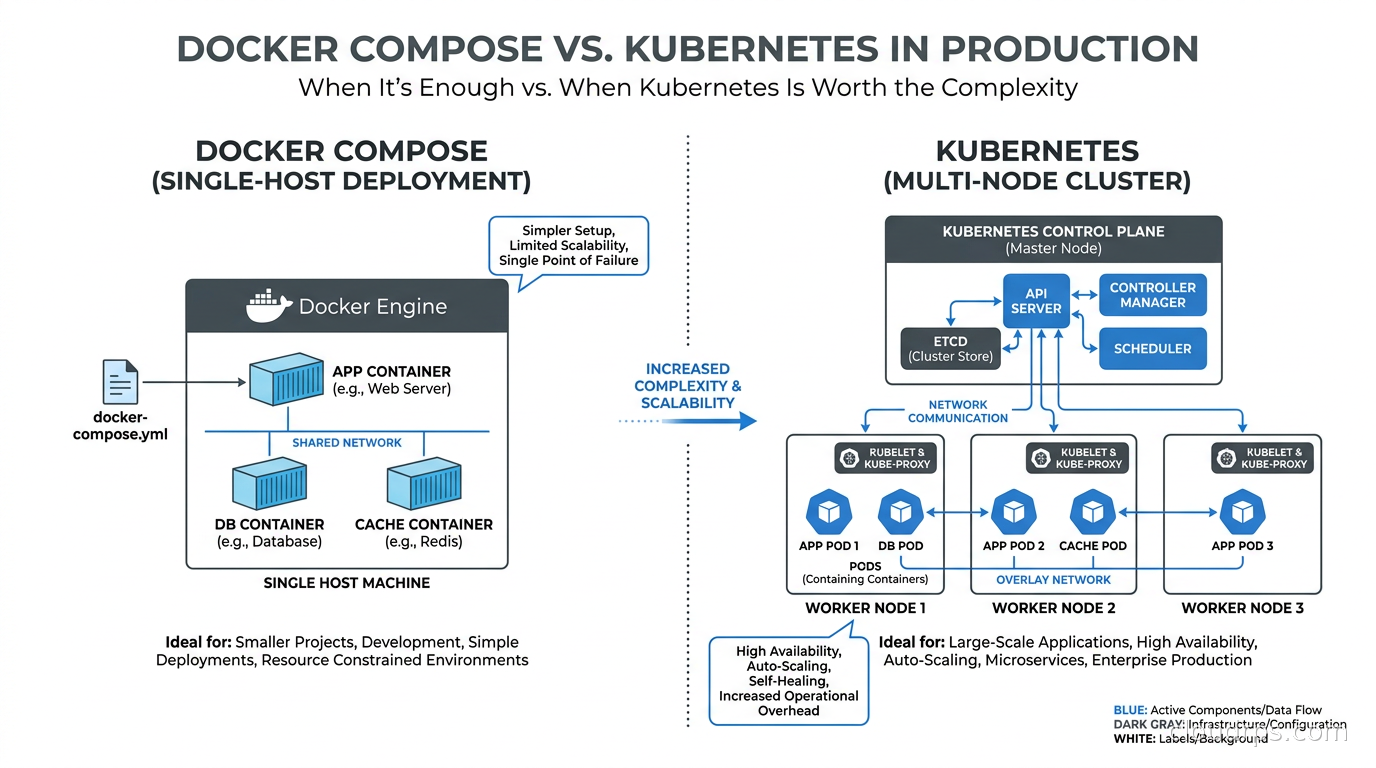
Every few months, a thread appears on Hacker News with a title like “Should I run Docker Compose in production?” and the comments split into two camps with equal conviction. One camp says Compose is fine and Kubernetes is massively over-engineered for most workloads. The other camp says anything running Compose in production is living dangerously and will regret it when the server dies at 2 AM.
I have spent twenty years building infrastructure for companies ranging from three-person startups to enterprises running thousands of nodes, and I can tell you both camps are partly right and partly wrong. The honest answer is: it depends on your situation, but there are clear signals that tell you which tool fits.
Let me walk you through how I think about this decision.
What Docker Compose Actually Does in Production
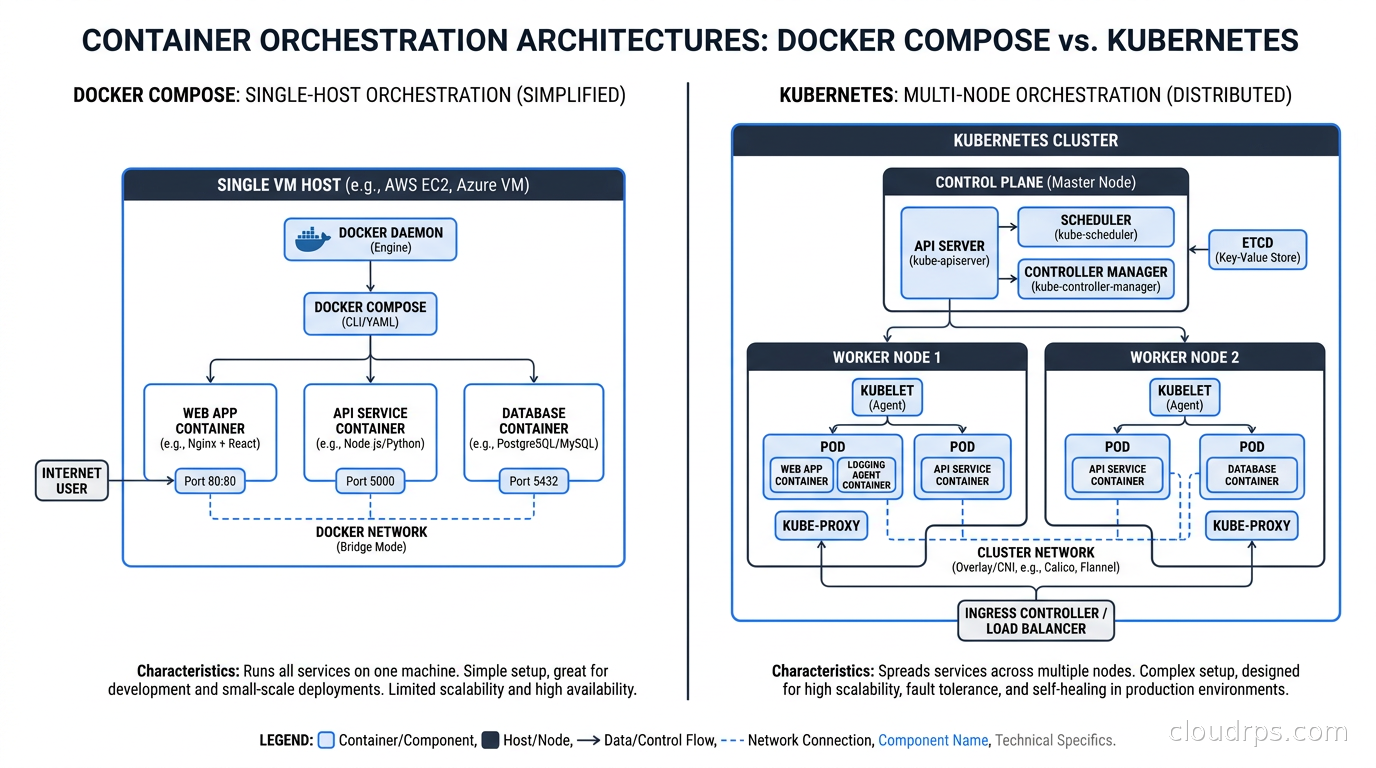
First, let’s be precise about what we are comparing. Docker Compose reads a YAML file that describes your services, networks, and volumes, then makes a series of Docker API calls to create and start containers on a single Docker daemon. That is its entire job. There is no control plane, no scheduler, no distributed state, no cluster membership protocol.
When you run docker compose up -d, you get containers running on one machine. If that machine goes away, everything on it goes away. If a container crashes and you have restart: always set, the Docker daemon restarts it. If you want to update an image, you run docker compose pull && docker compose up -d, and there will be a brief gap where the container is not running during the restart.
These are not bugs. They are the natural consequences of a tool that prioritizes simplicity over resilience. The question is whether those limitations matter for your specific situation.
When Compose Is Genuinely the Right Answer
I have seen teams waste three months building out a Kubernetes cluster, writing Helm charts, setting up cert-manager and ingress controllers, and configuring pod disruption budgets, only to end up with a system that is harder to reason about than what they replaced. They did this because they thought “production” requires Kubernetes.
Here is when Compose is genuinely the right tool.
Your traffic fits on one powerful server. If your application handles tens of thousands of requests per day, or even hundreds of thousands, a well-specced single server with 32 cores and 128 GB of RAM will handle it comfortably. Cloud providers sell you the illusion that distributed systems are for everyone, but the reality is that most applications never saturate a single host. I ran the backend for a SaaS product with 8,000 paying customers on a single EC2 instance with Compose for four years. It worked fine.
You have a team of fewer than ten engineers. Operating Kubernetes is a real job. You need someone who understands node pools, admission controllers, network policies, storage classes, and a dozen other moving parts. For small teams, that operational overhead is not free. Every hour spent debugging a Kubernetes scheduler decision or a certificate renewal failure is an hour not spent building product. Compose has almost zero operational overhead once you get past the initial setup.
Your deployment cadence is low. If you are deploying once a day or less, the brief downtime from a docker compose up -d restart (usually two to ten seconds for a stateless app) is not a problem. You can work around it with blue-green deployment patterns and a load balancer in front. Many teams do exactly this: run two Compose environments behind an nginx or HAProxy instance, deploy to the inactive one, then flip the load balancer. It is not elegant, but it works.
You are running internal tools or low-stakes workloads. Not everything needs five-nines availability. Internal dashboards, batch processing jobs, developer tooling, staging environments: all of these are appropriate Compose workloads even at large companies.
The war story I tell most often involves a fintech startup that was spending $18,000 per month on an EKS cluster to serve roughly 400 concurrent users at peak. When I showed up, they had two platform engineers whose primary job was keeping Kubernetes healthy. After we moved everything to two Compose-managed EC2 instances behind an Application Load Balancer, their infrastructure costs dropped to $1,100 per month and their platform team went back to doing feature work. The business grew 3x over the next year without touching the infrastructure.
Production-Hardening Compose: What You Actually Need
If you decide Compose is right for you, you cannot just run the default configuration and call it production. There are a handful of things you must do.
Set restart: always (or unless-stopped) on every service. This ensures the Docker daemon restarts containers after crashes and after server reboots. Without this, a container crash is a silent outage until someone notices.
Define memory and CPU limits for every service. Without limits, a misbehaving container can starve other services on the same host. In Compose v3, this looks like:
services:
  api:
    image: myapp:latest
    deploy:
      resources:
        limits:
          memory: 1G
          cpus: "2"
Note that resource limits under the deploy key are only honored when you use docker stack deploy (Swarm mode). For plain docker compose, use the mem_limit and cpus keys directly or migrate to the newer resources syntax with Docker Compose v2.20+.
Add health checks to every service and configure your application container to only start after its dependencies are healthy. The depends_on key with condition: service_healthy is your friend here. Without this, you will have race conditions where your app starts before the database is ready.
Use explicit image tags, never latest. Pinning to a specific digest (image: myapp@sha256:abc123...) gives you reproducible deployments and makes rollbacks straightforward.
Externalize your secrets. Do not put passwords in your Compose file or environment variables baked into images. Use Docker secrets if you are in Swarm mode, or pull from a secrets manager like AWS Secrets Manager or HashiCorp Vault at startup time.
Set up log forwarding. By default, Docker logs go to the local journal. In production, you want logs shipped to a centralized system before you lose the server. A logging driver configured in your Compose file or a sidecar container running Fluent Bit handles this cleanly.
What Compose Cannot Handle
Being honest about Compose’s limits is important. There are things it genuinely cannot do, and if you need them, you need something else.
True zero-downtime rolling deploys without external tooling. Compose does not have a built-in rolling update mechanism. When you update a service, containers are stopped and started. You can work around this with an external load balancer and a scripted swap, but it is not native.
Horizontal scaling across multiple hosts. Compose is single-host. If you need to spread containers across a fleet of machines for capacity or fault tolerance reasons, Compose does not help you. This is the fundamental ceiling.
Automatic bin packing and resource-aware scheduling. Kubernetes decides where to place pods based on available resources across the cluster. Compose does not schedule in the distributed sense at all. If you add more containers to a Compose setup, they all go to the same machine.
Self-healing across node failures. If your Compose host dies, your application is down until you restart the host or bring up a new one manually (or via your cloud provider’s auto-recovery features). There is no automatic failover to another node.
Fine-grained network policy and service mesh capabilities. If you need the kind of traffic control described in articles on service mesh architectures or Kubernetes network policies, Compose does not have a comparable abstraction.
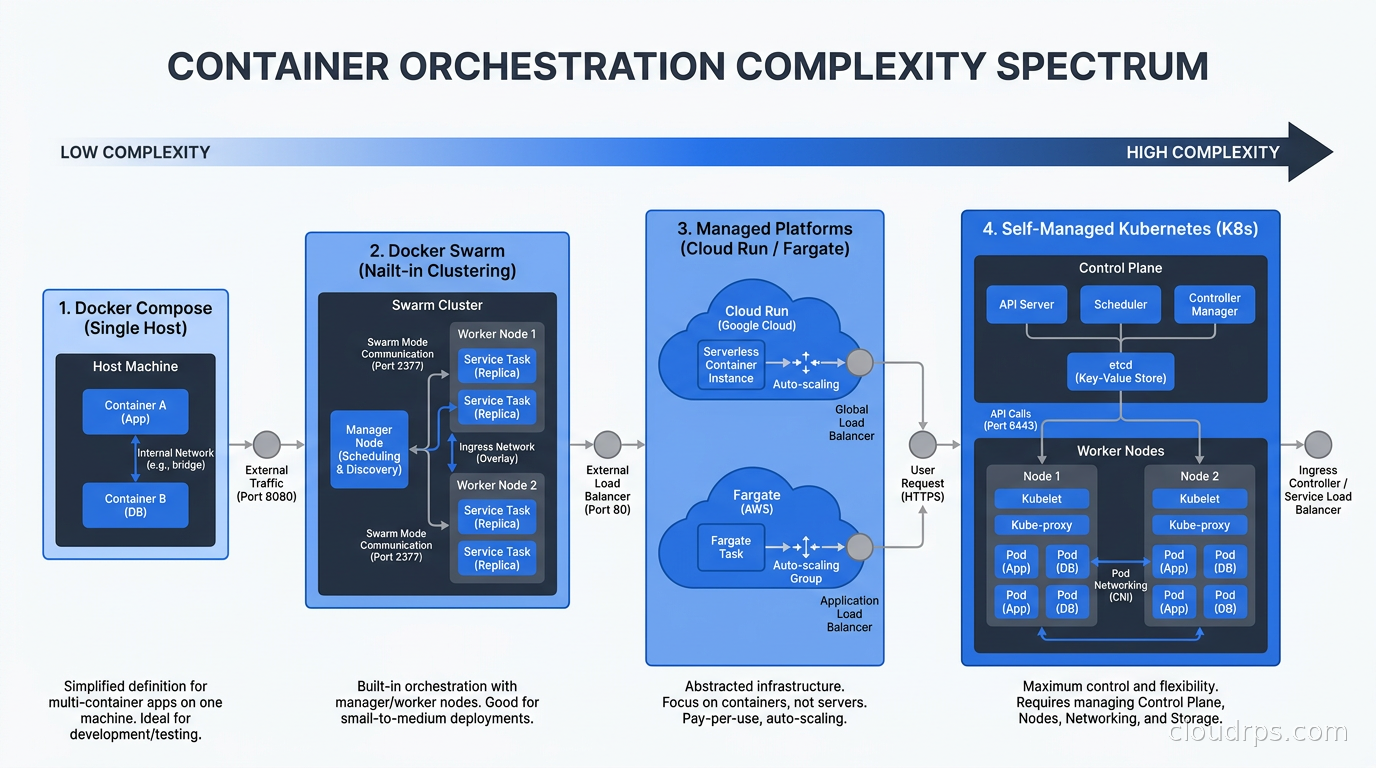
The Middle Ground: Docker Swarm and Managed Container Platforms
There is a spectrum between Compose and full Kubernetes, and it is worth knowing what lives there.
Docker Swarm is the forgotten middle child. It gives you multi-host orchestration using the same Compose YAML format you already know. Swarm understands replicas, rolling updates, secrets, and configs. It is dramatically simpler to operate than Kubernetes. The downside is that Docker Inc. has essentially deprioritized Swarm in favor of letting Kubernetes win the orchestration wars, so the ecosystem has stagnated. I would not start a new project on Swarm today, but if you are already running it and it works, there is nothing wrong with continuing.
Managed container platforms are often the right answer when you have outgrown Compose but do not want to operate Kubernetes yourself. AWS Fargate, Google Cloud Run, and Azure Container Apps all let you run containers without managing nodes. You get automatic scaling, health checks, rolling deploys, and integrations with managed services, without the operational burden of managing a Kubernetes control plane and worker nodes. If your team is small and you need horizontal scaling, this tier deserves serious consideration before you jump to self-managed Kubernetes.
When Kubernetes Is Actually Worth It
Kubernetes earns its complexity at a specific scale and set of requirements. Here are the signals that tell me a team has genuinely outgrown Compose.
You need to scale horizontally across multiple hosts for capacity. When a single server is not enough, you need a scheduler that can spread work across a fleet. Kubernetes does this well. If you are at the point where even the largest available instance type is insufficient, you need a distributed orchestration system.
You need sub-minute autoscaling to handle traffic spikes. Kubernetes autoscaling via HPA and KEDA can scale from 3 to 200 pods in under a minute in response to load. If your traffic profile has sharp spikes (payment processing, ticket sales, sports events), this matters. Compose on a fixed host cannot respond to spikes without pre-scaling.
You have more than 20-30 distinct services. At this point, dependency management and deployment ordering become genuinely complex. Kubernetes’ declarative model, combined with Helm or Kustomize, gives you a disciplined way to manage that complexity. Compose YAMLs at 50 services become unwieldy.
You have multiple teams deploying to the same infrastructure. Kubernetes namespaces, RBAC, and resource quotas let you give different teams isolated spaces on shared infrastructure. Compose provides no such multi-tenancy story.
You need multi-region active-active deployments. If you are building multi-region active-active architecture for global availability or compliance reasons, you are in Kubernetes territory. Compose has no concept of regions or global routing.
Your team has the platform engineering capacity to own it. This is the honest one that people skip over. If you have two engineers and no one who has operated Kubernetes before, adopting it is taking on a debt you may not be able to service. When a Kubernetes cluster goes wrong in novel ways, debugging it requires deep knowledge. Before committing, ask yourself: if your cluster started refusing to schedule pods at 3 AM, do you have someone who can diagnose it without spending four hours reading documentation?
A Decision Framework
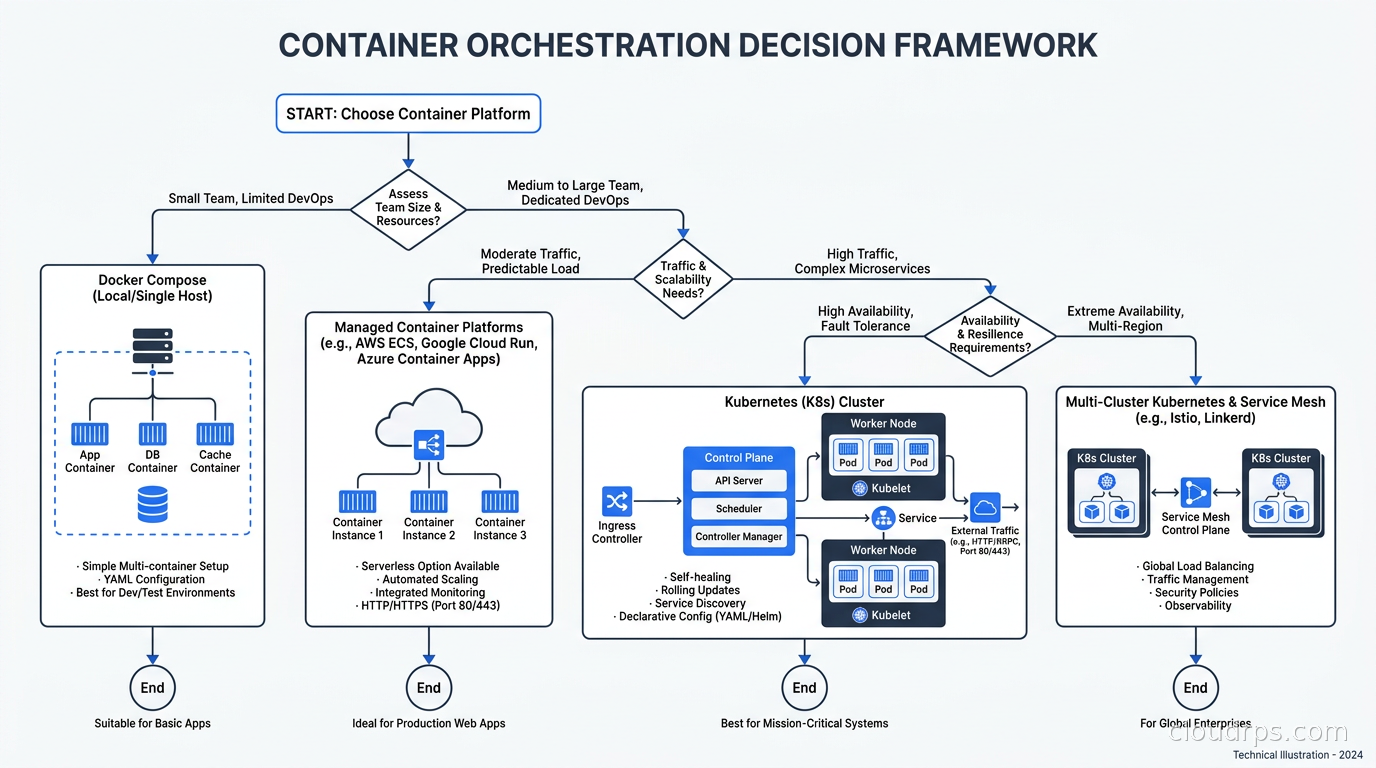
I have simplified this into a set of questions I ask any team debating this choice.
First: can your peak traffic fit on a single host, even a large one? If yes, Compose is viable from a capacity standpoint.
Second: do you need sub-second rolling deploys with true zero downtime and no external scripting? If yes, Compose requires extra work.
Third: do you need automatic failover if your host dies, without manual intervention? If yes, you need something with cluster-level scheduling.
Fourth: does your team have someone with real Kubernetes operational experience? If no, consider whether a managed platform (Cloud Run, Fargate) gives you what you need with less operational risk.
Fifth: are you deploying to more than two distinct environments (dev/staging/prod) with configuration that varies significantly? If yes, Kubernetes’ config management story scales better.
If you answered “no” to most of these, Compose is probably fine. If you answered “yes” to three or more, you are approaching Kubernetes territory.
What I want to push back on is the idea that “production” inherently means Kubernetes. Plenty of production systems run on Compose and are more reliable and cost-effective than the equivalent Kubernetes setups. From a total cost of ownership perspective, Kubernetes adds ongoing operational costs that many teams underestimate.
The Migration Path When the Time Comes
If you start with Compose and eventually need to migrate, the path is less painful than most people expect. Docker Compose files and Kubernetes manifests are both YAML-based container specifications. The concepts map reasonably well. A Compose service becomes a Kubernetes Deployment plus a Service. Environment variables become ConfigMaps or Secrets. Volumes become PersistentVolumeClaims.
Tools like Kompose (kompose convert) can take a Compose file and generate Kubernetes manifests as a starting point, though you will need to review and refine what they produce. The generated manifests are a scaffolding exercise, not a finished product.
The more important preparation you can do while running Compose is architectural: make your services stateless where possible, externalize all configuration, put secrets in a secrets manager from the start, and make sure you have proper CI/CD pipelines that build and push versioned container images. If you do these things under Compose, the migration to Kubernetes is mostly a manifest translation exercise. If you have built stateful shortcuts that depend on local files, the migration becomes a refactoring project first.
I have migrated three teams from Compose to Kubernetes over the years. The migrations that went smoothly took two to three weeks. The ones that took three months were because the application was doing things that Compose’s single-host model had papered over: writing files to local disk, using hard-coded container names for service discovery, relying on specific bind mounts. Clean those things up before you start, not during.
The Real Question
The reason this debate keeps coming up is that our industry has a bias toward complexity. Kubernetes is impressive technology. It solves genuinely hard problems elegantly. And there is social currency in running it: it signals technical sophistication. That makes people reach for it before they need it.
I have built infrastructure that processes millions of dollars per day on Compose-managed Docker hosts with an Application Load Balancer in front. I have also built Kubernetes platforms that serve global traffic from twelve regions. The right tool depends entirely on what you are building and who you have to operate it.
My general guidance: start with Compose if your needs fit it. Right-sizing your infrastructure to your actual requirements is not a sign of cutting corners. It is good engineering. When you genuinely outgrow it, the signals will be clear, and the migration path is well-understood. Until those signals appear, the simplest thing that works is the right choice.
The thing I have never seen go wrong is starting simple and adding complexity when needed. The thing I see go wrong constantly is starting with Kubernetes to avoid having to migrate later, then spending months maintaining infrastructure complexity that the application does not require. That is not future-proofing. That is paying a tax before you owe it.
If you are thinking about right-sizing your entire cloud strategy, not just your container orchestration, the same principles apply whether you are looking at spot instances for cost optimization or deciding between managed Kubernetes platforms. The question is always: what does your application actually need, and what is the minimum complexity that delivers it reliably?
Start there. Add complexity when the requirements demand it, not before.
Get Cloud Architecture Insights
Practical deep dives on infrastructure, security, and scaling. No spam, no fluff.
By subscribing, you agree to receive emails. Unsubscribe anytime.