
I was debugging a data pipeline for a client last year when an engineer on their team casually ran a GROUP BY aggregation across 400 million rows of Parquet files, directly from a Python script, with no database server, no cluster, no Spark context to spin up. The query finished in 11 seconds. On his laptop.
I asked him what he was using. He said DuckDB.
I went home and spent the next two evenings going through the DuckDB documentation and papers, and then the next several weeks incorporating it into projects where it clearly belonged. That 11-second query would have taken about 4 minutes in pandas on the same hardware, required spinning up a Redshift cluster to do properly, or needed a Spark cluster that takes 3 minutes just to initialize.
DuckDB is one of those tools that, once you actually understand what it does and how it works, you immediately see a dozen places in your work where you’ve been using the wrong tool.
What DuckDB Actually Is
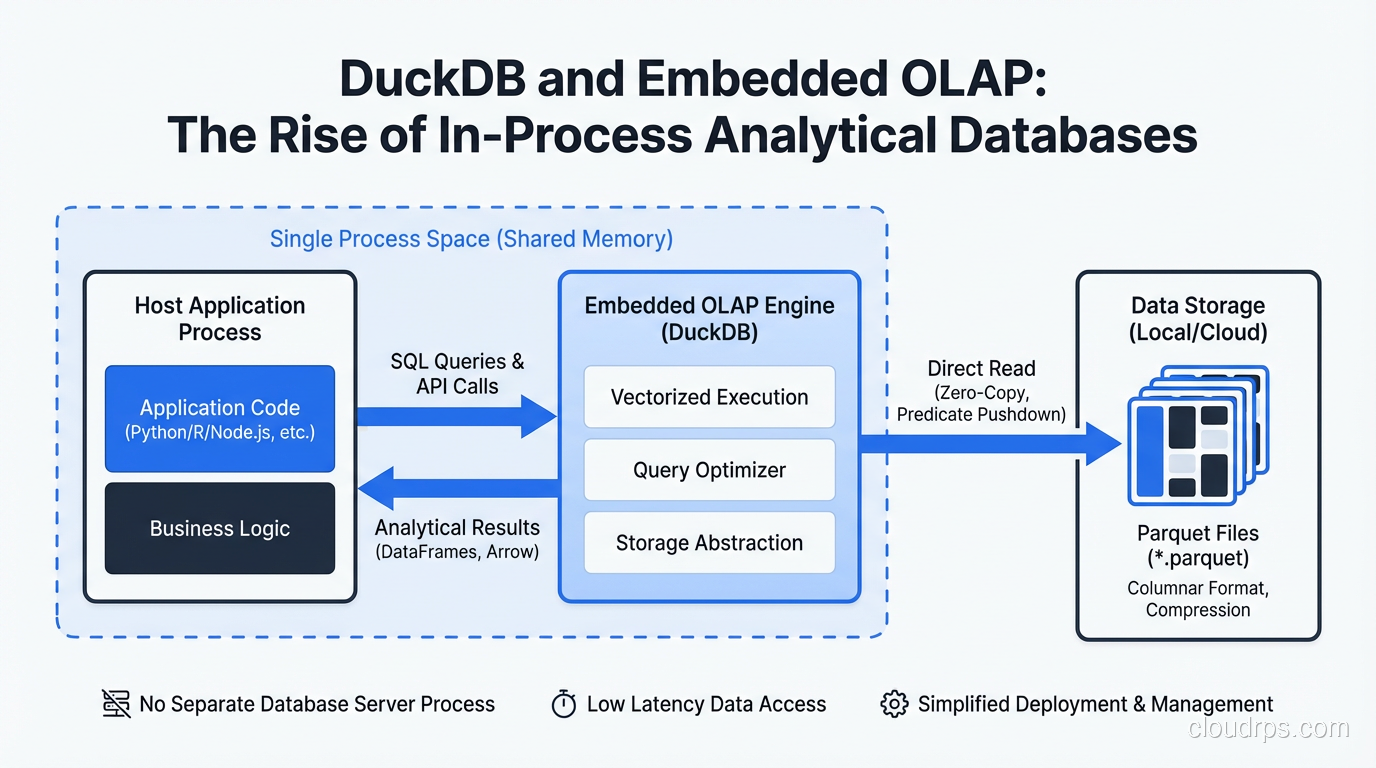
DuckDB is an in-process analytical database. Let me unpack each word:
In-process: DuckDB runs inside your application, not as a separate server. There’s no network socket, no client-server protocol, no separate process to manage. You import a library, call functions, get results. The same model as SQLite.
Analytical: DuckDB is designed specifically for analytical (OLAP) workloads. Complex aggregations, joins across large datasets, window functions, full-table scans. It is not designed for transactional (OLTP) workloads with high-concurrency point reads and writes.
Database: It has a full SQL engine, a query optimizer, a buffer manager, and a columnar storage format. It’s not a query layer on top of pandas. It’s a real database system that happens to be embedded.
The combination is what makes it unusual. SQLite is in-process but row-oriented and optimized for OLTP. PostgreSQL and MySQL are server-based. BigQuery, Redshift, and Snowflake are cloud data warehouses (server-based and remote). ClickHouse and Apache Druid are server-based columnar systems. DuckDB is the only major database that is simultaneously in-process and columnar/analytical.
This is not an accident. The DuckDB team at CWI Amsterdam spent years researching the performance characteristics of analytical query execution and built DuckDB specifically to push those workloads into the in-process model. The result is something that was academically interesting in 2019 and is production-essential in 2026.
How It Works Under the Hood
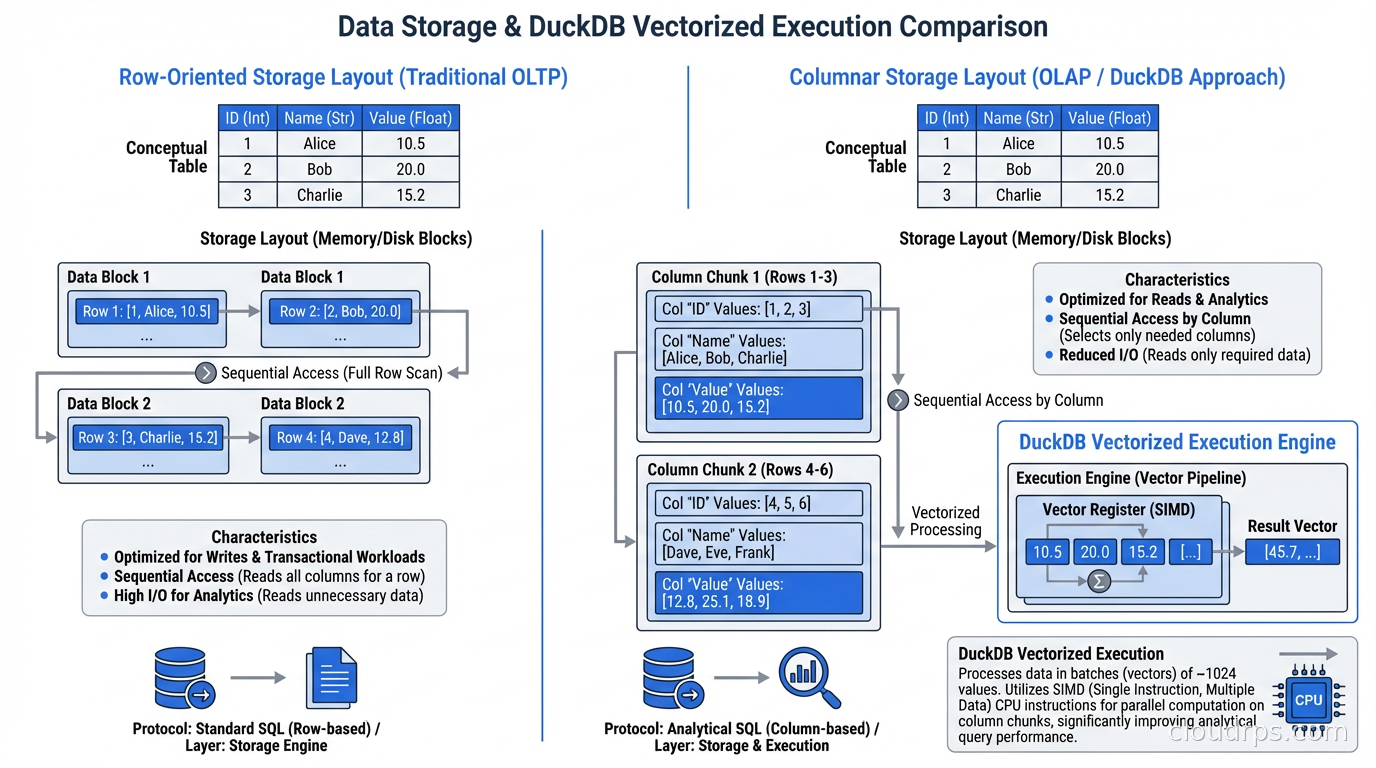
DuckDB uses vectorized query execution, which is the same architectural approach that made columnar data warehouses dramatically faster than row-oriented databases for analytical workloads. The key insight is that modern CPUs can execute the same operation on multiple values simultaneously using SIMD instructions, but only if those values are stored contiguously in memory.
Row-oriented storage (how traditional databases like PostgreSQL store data) keeps all columns of a row together. If you want to sum a single column across a million rows, you have to load all the row data into memory to get to the column you care about. Columnar storage keeps all values of a column together. Summing a column means loading just that column’s data, which fits well in CPU caches and enables SIMD vectorization.
DuckDB stores data in a columnar format and executes queries in vectors of 2048 values at a time. Each operation in the query plan processes a batch of 2048 values rather than one row at a time. This maps extremely well to CPU vector registers and results in analytical query performance that’s often within 2-3x of purpose-built distributed systems, on a single machine.
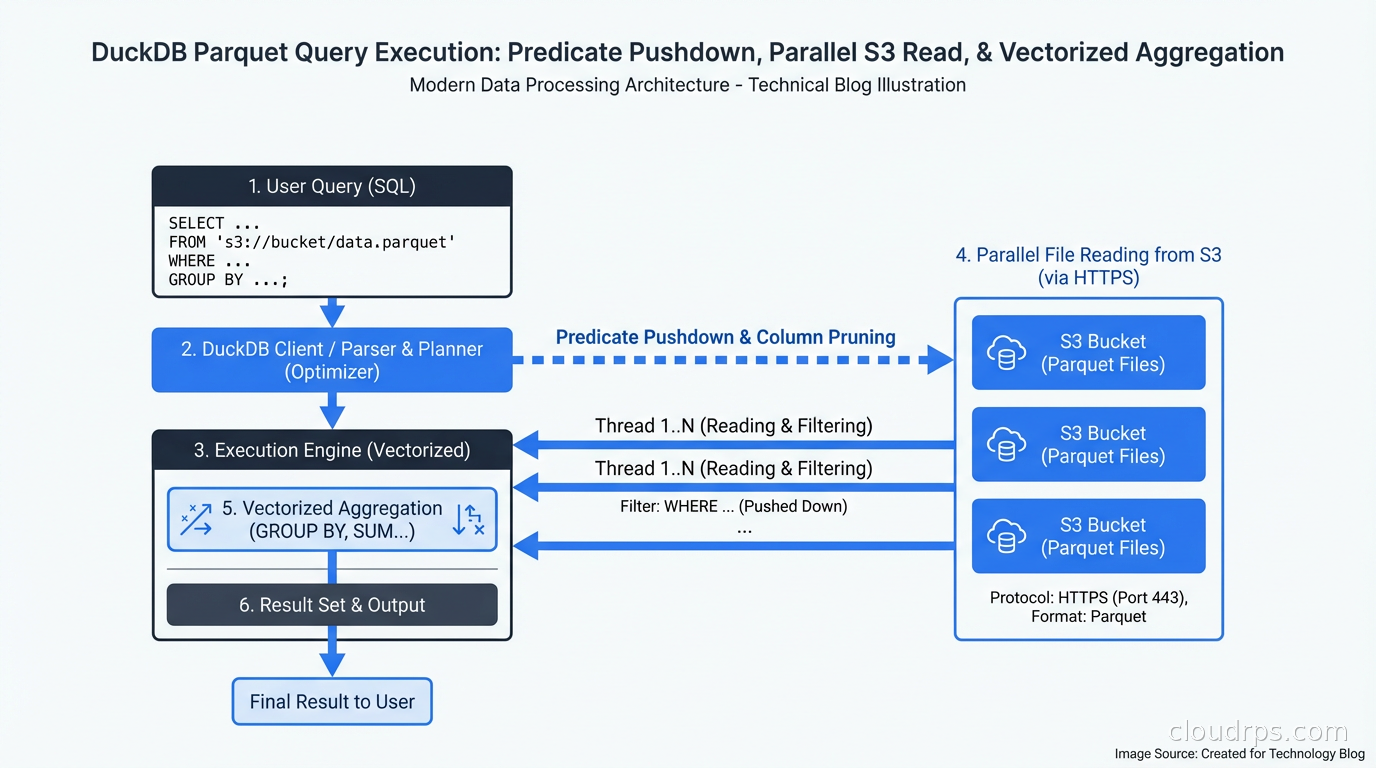
The other key piece of DuckDB’s architecture is its file format support. DuckDB can read Parquet, Arrow, CSV, JSON, and its own native format without copying data into the database first. When you point DuckDB at a directory of Parquet files on S3, it pushes down predicates to minimize data scanned, parallelize reads across files, and execute the query over the data in place. No ETL, no loading, no waiting.
This is the capability that most surprises people when they first encounter it. The query I mentioned at the top of this article ran against raw Parquet files on the local filesystem. DuckDB didn’t need those files loaded into any database. It queried them directly.
DuckDB vs the Columnar Database Alternatives
Understanding where DuckDB fits requires being precise about how it differs from the columnar databases that existed before it. I covered the general comparison in columnar vs row databases, but DuckDB’s embedded nature creates a different category entirely.
vs BigQuery, Redshift, Snowflake: These are cloud data warehouses. They’re server-based, remote, and priced on a per-query or per-capacity basis. They scale to petabytes and support hundreds of concurrent users. DuckDB is a single-process system; it can’t serve many concurrent users, can’t scale beyond the machine it runs on, and doesn’t have built-in access controls or multi-user session management. But it’s free, has zero infrastructure to manage, runs anywhere, and doesn’t have a billing console you need to watch. For datasets up to a few hundred gigabytes and use cases that don’t require concurrent access, DuckDB beats cloud warehouses on cost and simplicity.
vs ClickHouse: ClickHouse is also columnar and extremely fast, but it’s a server. You install it, run it as a service, connect clients to it. ClickHouse is the right answer when you need a high-throughput analytics server handling many concurrent queries. DuckDB is the right answer when you want to run analytics inside an application, a notebook, or a script without managing server infrastructure.
vs Apache Spark: Spark is the scale-out option. When your dataset genuinely doesn’t fit on one machine and you need distributed processing across a cluster, Spark is the right tool. But Spark has significant startup overhead (JVM initialization, cluster allocation), operational complexity, and is genuinely overkill for datasets under a few terabytes on modern hardware. DuckDB handles queries up to the memory limits of a single node, and a single node in 2026 can have 96 cores and 768GB of RAM. That covers a lot of use cases that people used to think required Spark.
vs pandas: pandas is the workhorse of Python data analysis, but it’s row-oriented (DataFrames are row-oriented), single-threaded for most operations, and requires loading entire datasets into memory. DuckDB is multi-threaded, columnar, and can work with data that exceeds memory through smart buffering and streaming. For aggregations and joins on large datasets, DuckDB is typically 10-100x faster than pandas. For simple transformations on small datasets, pandas is still fine.
What DuckDB Is Actually Good At
The use cases where DuckDB shines:
Data engineering in Python/R scripts: Replace pandas for large dataset transformations. Read Parquet, apply complex SQL transformations, write the results. No infrastructure, just a library import.
Jupyter notebooks for analysis: Analysts can query production-scale Parquet datasets directly from notebooks without pulling data into pandas first. The interactive analysis cycle is much faster when your queries take seconds rather than minutes.
Local development and testing: Build and test your data transformations locally against representative data before deploying to BigQuery or Snowflake. DuckDB’s SQL dialect is close enough to most cloud warehouses that your queries work in both environments with minimal changes.
Embedded analytics in applications: Applications that need to run ad-hoc queries against their own data. A reporting module, an admin dashboard, a data export feature. Instead of sending queries to a remote database, embed DuckDB and run them in-process.
Data lake querying: Point DuckDB at S3, GCS, or a local directory of Parquet files and query them with SQL. No data warehouse required. For data lake architectures, this removes the need for a query engine for exploratory and one-off analytical needs.
CI/CD data tests: Run data quality assertions in your pipeline without spinning up external infrastructure. Data observability checks that validate schema, distributions, and row counts can run directly in your pipeline using DuckDB, making them fast and dependency-free.
MotherDuck for collaborative analytics: MotherDuck is the managed cloud layer for DuckDB, allowing shared DuckDB instances with collaboration features. If you want the DuckDB experience but need to share queries and results with a team, MotherDuck is worth evaluating.
The Parquet Integration Is the Key
The Parquet integration deserves its own section because it’s what makes DuckDB genuinely transformative for data engineering, not just a faster pandas.
Data lakes built on Parquet are the standard now. Data lands in S3 in Parquet format, gets processed by Spark or Flink, and lands back in Parquet. The cloud data warehouse (Snowflake, BigQuery) is often just a query layer on top of Parquet stored in object storage (what Snowflake calls its “internal stage,” what BigQuery calls BigLake).
DuckDB can be that query layer, locally, for free, with SQL. The query:
SELECT
    region,
    SUM(revenue) as total_revenue,
    COUNT(DISTINCT customer_id) as unique_customers
FROM read_parquet('s3://my-data-lake/orders/year=2025/month=*/*.parquet')
WHERE order_status = 'completed'
GROUP BY region
ORDER BY total_revenue DESC;
This runs directly. DuckDB handles the S3 authentication, reads only the Parquet files that match the glob, pushes the order_status = 'completed' predicate into the Parquet reader to skip irrelevant row groups, and executes the aggregation in parallel across CPU cores. On a modern machine with a fast internet connection to S3, this kind of query on a few hundred GB of Parquet completes in under a minute.
The same query against a BigQuery external table or Athena would be cheaper for one-off usage, but you’d need AWS or GCP credentials set up, you’d deal with query latency from the service startup, and you’d get a bill for the bytes scanned. DuckDB against S3 needs AWS credentials but nothing else.
The Apache Arrow Integration
DuckDB and Apache Arrow have a particularly tight relationship worth understanding. Arrow is a columnar in-memory format (DuckDB is columnar on-disk). Converting between them is zero-copy: DuckDB can read from Arrow tables and return results as Arrow tables without any data serialization overhead.
This matters because Arrow is the lingua franca of the modern data ecosystem. Pandas 2.0 can use Arrow as its backend. Polars (a faster DataFrame library) uses Arrow natively. Spark can exchange data with Arrow. The DuckDB-Arrow pipeline means you can move data between these systems without copying bytes.
In practice this looks like: run a complex analytical query in DuckDB, get the result as an Arrow table, hand it to a ML framework for feature engineering, visualize it in a library that speaks Arrow. Each transition is zero-copy.
Where DuckDB Breaks Down
I don’t want to oversell this. DuckDB is not a replacement for everything:
Concurrent writes: DuckDB has a single-writer model. Multiple processes can read concurrently, but only one can write at a time, and the file is locked during writes. If you have multiple processes writing to the same DuckDB file, you’ll get locking errors. This is by design (it’s the same model as SQLite), but it means DuckDB is not appropriate as a shared, concurrent database for a multi-process application server.
Very large datasets: DuckDB’s sweet spot is up to a few hundred GB. You can push it further with efficient Parquet storage and predicate pushdown, but at multiple terabytes with complex queries, you’re better off with a distributed system. The DuckDB team is actively working on multi-node query execution, but it’s not production-ready as of mid-2025.
Long-running, multi-user query services: If you have a business intelligence tool (Metabase, Tableau, Looker) with 50 analysts running concurrent ad-hoc queries, DuckDB’s single-file concurrency model doesn’t fit. Use a server-based columnar database.
OLTP workloads: DuckDB is genuinely bad at high-concurrency point reads and writes. If you’re building a feature that does 10,000 individual row lookups per second, use PostgreSQL. The transactional strengths of traditional databases like ACID guarantees are present in DuckDB but tuned for analytical batch operations, not high-concurrency OLTP.
Operations that require a persistent server: DuckDB files are portable and can be shared, but there’s no server process managing connections, handling authentication, or enforcing row-level security. If your security model requires fine-grained access control at the database level, you need a server.
Getting Started in Practice
For Python:
pip install duckdb
import duckdb

# In-memory analytics
conn = duckdb.connect()
result = conn.execute("""
    SELECT year, SUM(sales) as total
    FROM read_parquet('sales_data/*.parquet')
    GROUP BY year
    ORDER BY year
""").fetchdf()
For persistent storage:
conn = duckdb.connect('analytics.duckdb')
conn.execute("CREATE TABLE orders AS SELECT * FROM read_parquet('orders.parquet')")
For the SQL vs NoSQL context: DuckDB is firmly in the SQL camp, with a SQL dialect that’s deliberately PostgreSQL-compatible. If your team knows PostgreSQL, they know DuckDB. The learning curve is essentially zero.
DuckDB also has native CLI, R, Java, Node.js, and Rust clients. The core is written in C++ with no external dependencies (the Python package is a self-contained wheel), which is part of why it’s so easy to embed.
The Broader Shift It Represents
DuckDB’s rise is part of a broader architectural shift: the move toward compute-storage separation and query execution at the data layer rather than a centralized warehouse.
For years, the answer to “how do I query large datasets” was “move the data to a centralized database and query it there.” The data warehouse was the place where data accumulated, was organized, and was queried. This model made sense when storage and compute were co-located and moving data was cheap relative to running it through a centralized query engine.
In 2026, storage is cheap and universal (S3, GCS, Azure Blob), data formats are standardized (Parquet, Arrow, Iceberg), and the bottleneck is spinning up query infrastructure. DuckDB flips this: keep the data in place, in open formats, and bring the query engine to the data. This is the same shift that tools like Trino (formerly Presto), Athena, and BigQuery OmniStore represent, but DuckDB takes it to its logical extreme: the query engine is a library, not a service.
The data mesh architecture world, where domain teams own and serve their own data products, benefits enormously from this. A domain team can own their data as Parquet in S3, serve it via a DuckDB-powered query API, and consumers can query it without the domain team running a database server.
This is still evolving. DuckDB at scale, with multi-node execution and proper access controls, would be genuinely transformative. The team is working on it. But even as it is today, for the enormous class of single-machine analytical workloads, DuckDB is the right tool and most teams are still not using it.
If you’re doing data engineering in Python, start with DuckDB. The first time you run a complex aggregation across hundreds of millions of rows in under a minute, on your laptop, with a library import and a SQL string, you’ll understand why the data engineering community has been excited about this for the past two years.
Get Cloud Architecture Insights
Practical deep dives on infrastructure, security, and scaling. No spam, no fluff.
By subscribing, you agree to receive emails. Unsubscribe anytime.