
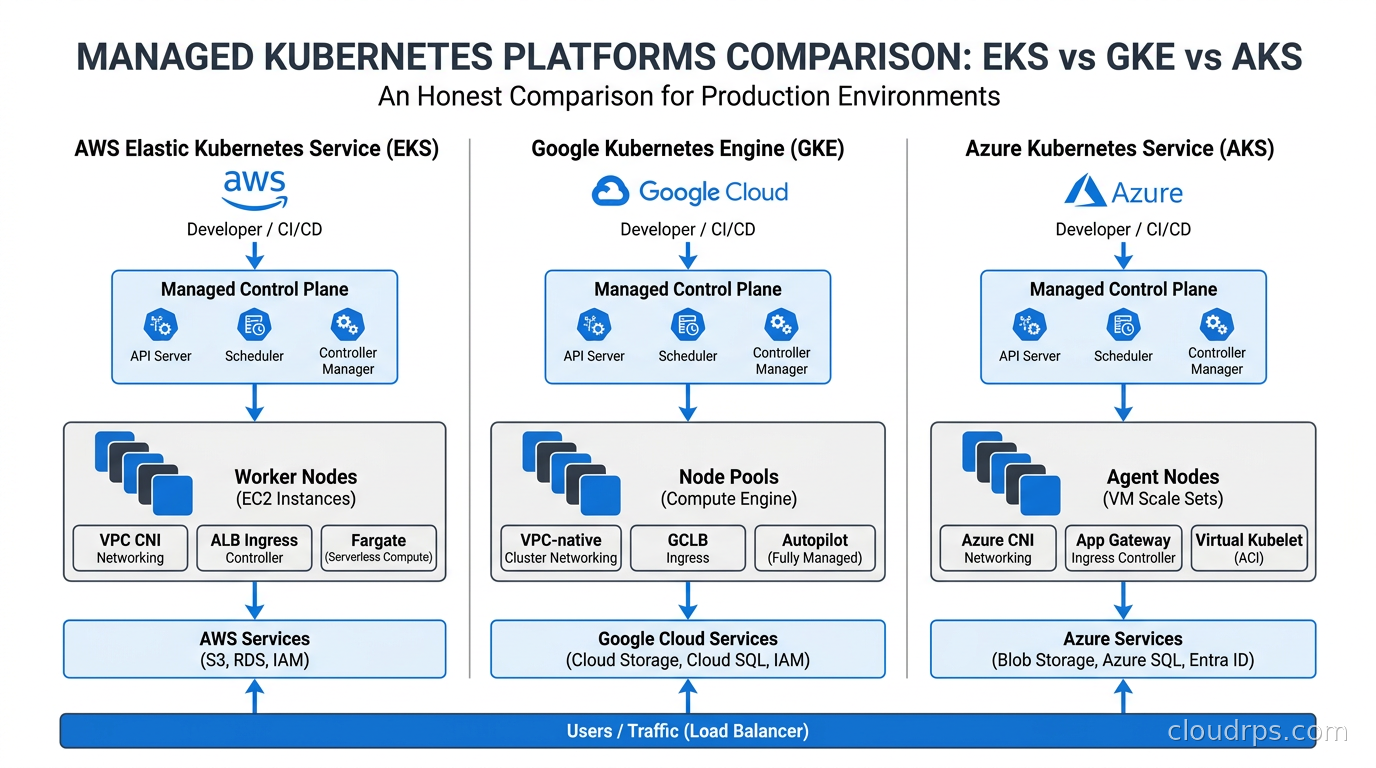
Over twenty years of architecting cloud infrastructure, the question I get asked most often by teams moving to containers is: which managed Kubernetes platform should we use? It sounds simple. It isn’t. EKS, GKE, and AKS all run Kubernetes, and on the surface they look nearly identical. You get a managed control plane, worker nodes you provision, and a kubectl endpoint. That’s where the similarities end.
I’ve run production workloads on all three, migrated teams between them, and watched engineers make expensive decisions by choosing based on marketing material rather than architectural fit. One fintech I worked with spent eight months building on AKS because they got a favorable Azure enterprise agreement, then spent another six months migrating to EKS when their security team realized their existing AWS IAM infrastructure wouldn’t bridge cleanly. Another team chose GKE because they read Google invented Kubernetes, deployed a stateful application without understanding Autopilot’s DaemonSet constraints, and hit a wall two weeks before launch. These choices compound. This article is what I wish I had handed to those teams before they committed.
What “Managed” Actually Means (and Doesn’t)
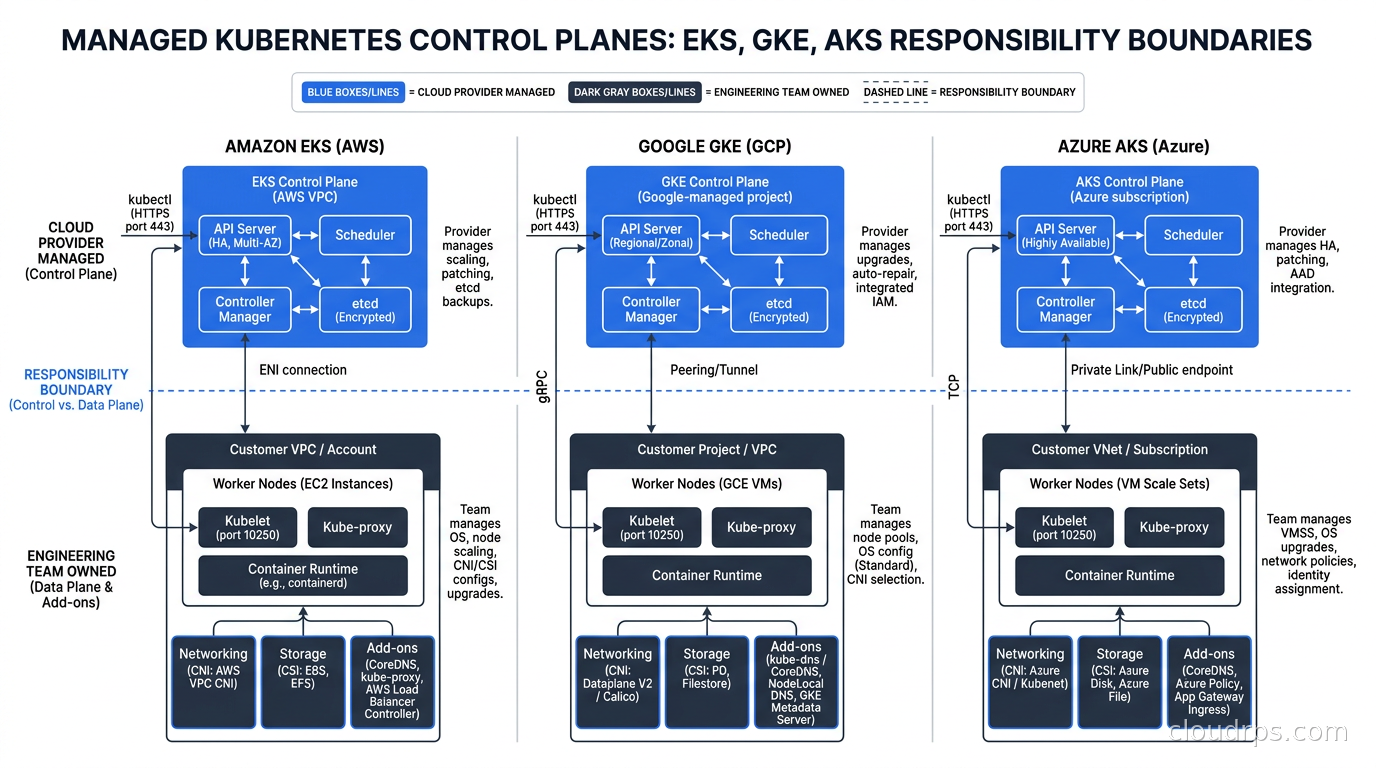
Before comparing platforms, let’s align on what managed Kubernetes actually delivers. In all three cases, the cloud provider runs the control plane: the API server, etcd, the scheduler, and the controller manager. You don’t provision those VMs. You don’t patch them. When the Kubernetes community releases a new version, the provider handles the upgrade path, at least in theory.
What you still own: the worker nodes in most modes, your networking configuration, your storage classes, your cluster add-ons, and every application running on the cluster. Managed does not mean hands-off. It means the hard distributed systems problem of running etcd reliably is someone else’s problem. That’s genuinely valuable, but don’t confuse it with managed in the PaaS sense.
Understanding the fundamentals of Kubernetes and containers before picking a provider matters more than people realize. Teams that skip the fundamentals end up blaming their cloud provider for problems that are actually Kubernetes concepts they haven’t internalized yet.
AWS EKS: The Pragmatic Choice for AWS-Native Teams
EKS is the dominant platform by adoption. If you look at job postings requiring Kubernetes expertise, EKS shows up meaningfully more often than either competitor. That market position tells you something real: EKS has the largest ecosystem of operational tools, community documentation, and battle-tested configurations. It also has the most ways to get yourself into trouble.
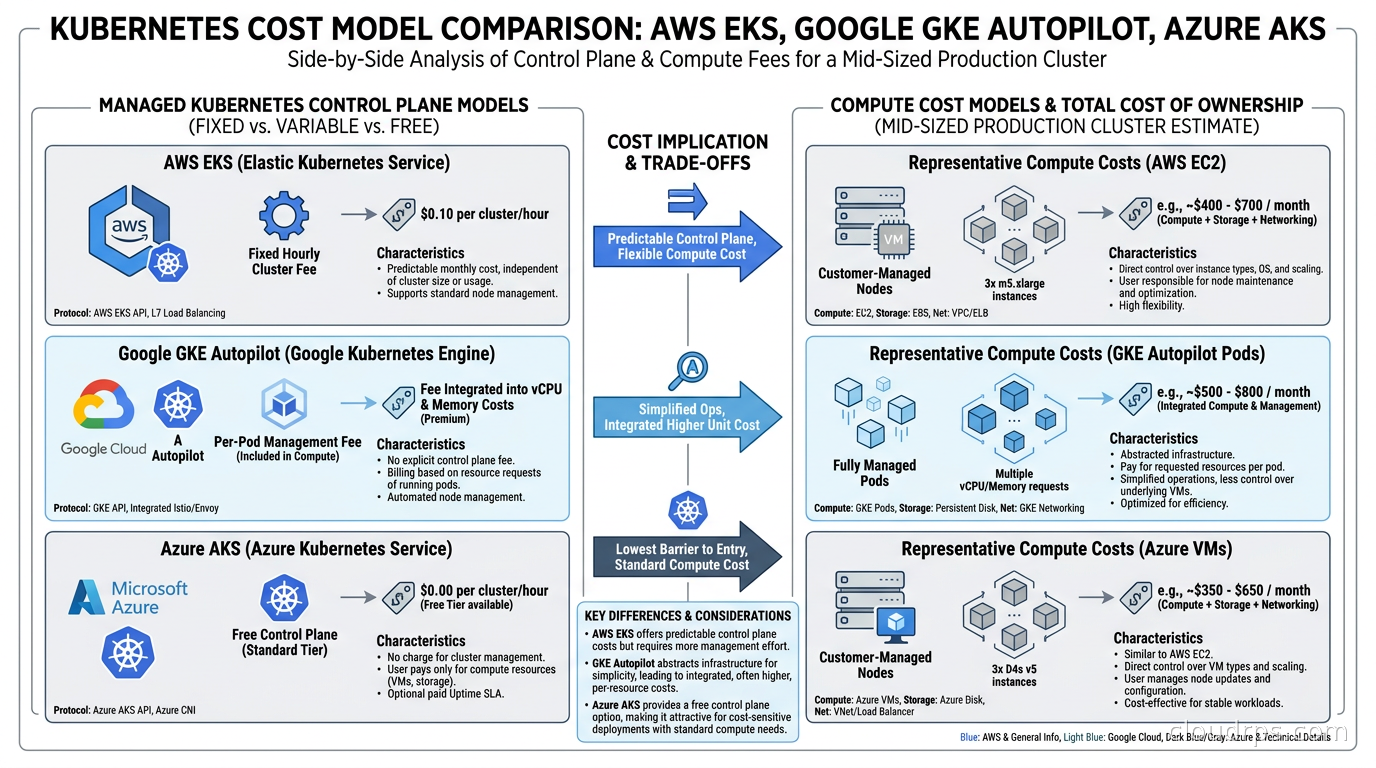
The control plane cost. EKS charges $0.10 per hour per cluster, which works out to about $73 per month. That’s not significant for a single production cluster, but it adds up when you’re running fifteen clusters for different environments, teams, and regions. GKE Standard charges similarly; AKS now runs a tiered model (more on that below) where the production-recommended tier matches EKS pricing. Keep this in mind when evaluating multi-cluster architectures.
The networking situation. By default, EKS uses the AWS VPC CNI plugin, which assigns actual VPC IP addresses to pods. This is architecturally elegant in some ways: your pods become first-class VPC citizens, can use security groups directly, and integrate naturally with AWS services. But it creates a painful capacity problem that surprises almost everyone who hits it. A given EC2 instance type has a fixed number of elastic network interfaces, and each ENI supports a limited number of secondary IPs. A c5.xlarge can run roughly 58 pods maximum under the default VPC CNI configuration. When you first hit this ceiling during a traffic spike, you spend an afternoon convinced your cluster is broken. It isn’t. You’ve simply run out of IP addresses.
There are solutions. The CNI plugin supports prefix delegation, which assigns /28 prefixes instead of individual IPs and dramatically increases pod density per node. But it’s an explicit configuration choice, not a default, and it catches teams off guard during scaling events.
Node management options. EKS gives you three paths: self-managed node groups where you own the AMI and lifecycle, managed node groups where AWS handles the AMI and rolling upgrades, and Fargate where there are no EC2 instances to manage at all. Most teams move through self-managed to managed node groups, and increasingly they layer Karpenter on top for dynamic node provisioning.
Karpenter is genuinely excellent on EKS and is one of the platform’s strongest competitive advantages. You can build Karpenter NodePools that aggressively target spot instances for stateless workloads while keeping critical services on on-demand capacity, driving substantial compute cost savings compared to running everything on-demand. GKE has comparable node provisioning capabilities, but the EKS-Karpenter combination has more community documentation, more mature binpacking algorithms, and tighter integration with EC2 fleet APIs.
The ecosystem argument. If your infrastructure is already AWS-centric, the EKS integration story is compelling. IAM Roles for Service Accounts lets pods assume IAM roles without storing credentials. The AWS Load Balancer Controller provisions ALBs and NLBs natively. EFS, EBS, and FSx CSI drivers are maintained by AWS itself. When you hit a problem at 2 AM, the probability that someone on Stack Overflow encountered the same EKS-specific issue six months ago is high.
Where EKS falls short. EKS historically lagged on Kubernetes version support. Google built Kubernetes and tends to support new API versions earlier. The EKS console experience is functional but unpolished compared to GKE’s. If you want a low-cognitive-overhead, just-runs experience, EKS is not your platform. It rewards teams that invest in operational sophistication and punishes teams that don’t.
Google GKE: The Kubernetes Purist’s Platform
Google built Kubernetes. That heritage shows. GKE supports new Kubernetes features earlier, has the cleanest cluster architecture, and in Autopilot mode offers something genuinely different: the ability to pay only for what your pods actually request rather than for the underlying nodes you provision.
GKE Standard versus GKE Autopilot. Standard gives you managed node pools, similar to EKS managed node groups. You choose instance types, configure autoscaling, and manage upgrades. Autopilot is the interesting mode: Google manages the node pools entirely, and you simply schedule pods. There are no nodes to configure, no node pool decisions to make. Billing happens per pod based on the CPU and memory you request, not per VM.
For teams that want to focus on application delivery rather than cluster operations, Autopilot is compelling. The operational burden drops significantly. The trade-off is less control: you cannot use DaemonSets for custom node agents in the same way standard mode allows, some privileged workloads require additional configuration, and the per-request pricing model exposes resource request hygiene problems quickly. Teams that wildly over-request resources on standard Kubernetes often discover Autopilot is more expensive precisely because the pricing is honest about their waste.
Networking. GKE’s networking is arguably the most sophisticated of the three. Dataplane V2, which uses eBPF built on Cilium, is the default for new Autopilot clusters; on Standard clusters it’s still an opt-in choice you make at creation time, though Google recommends enabling it for any new build. This delivers sub-millisecond network policy enforcement, built-in network visibility, and meaningfully better performance than iptables-based approaches. GKE’s Gateway API support is mature and ahead of EKS on implementation completeness. The overlay networking model avoids the EKS pod-density problem entirely, though pods don’t get native VPC IPs, which means some AWS-style direct pod-to-service integrations require different patterns.
AI and machine learning workloads. GKE has the strongest story for AI and ML workloads among the three platforms, for reasons that compound each other. First, Google’s TPU hardware is exclusive to Google Cloud, though not exclusive to GKE anymore: you can provision Cloud TPU VMs directly through Compute Engine’s queued resources API as well as through GKE. Either way, needing TPUs for training points you at Google Cloud, and GKE is where most teams end up running that training given the scheduling integration described next. Second, GKE’s Dynamic Resource Allocation implementation for GPU sharing is mature and production-tested at Google’s own scale. Third, GKE’s gen AI-aware scheduling and GKE Inference capabilities reduce serving costs and tail latency in ways that matter at volume. For teams running GPU infrastructure for AI workloads and not yet committed to a cloud provider, GKE deserves serious consideration.
Version currency. GKE supports new Kubernetes versions faster than EKS or AKS, often by several weeks. For teams running on the cutting edge of Kubernetes features such as Gateway API, DRA, or the new workload authorization models, this matters. For teams running stable enterprise workloads that never touch alpha APIs, it matters less.
Where GKE falls short. If your organization is AWS-native, the GKE ecosystem integrations require more custom glue. IAM integration uses Workload Identity, which works well but requires understanding Google’s resource hierarchy: projects, service accounts, and the binding model. The GCP ecosystem is smaller than AWS’s, which shows up when you’re searching for community solutions to obscure problems. Pricing outside of Autopilot can be surprisingly high for certain configurations, particularly around premium tier networking and managed add-ons.
Azure AKS: The Microsoft Ecosystem Play
AKS is the right choice for organizations deeply invested in the Microsoft and Azure ecosystem. Its tiered control plane pricing, the native Azure Active Directory integration, and Windows node support make AKS the obvious answer for a specific class of enterprise workloads.
Control plane pricing. AKS control plane pricing now has three tiers. Free ($0/hour, best-effort availability, no SLA) is meant for dev and test clusters, not production. Standard ($0.10/hour, a 99.95% SLA) is the same rate EKS charges and is Microsoft’s recommended default for production clusters. Premium ($0.60/hour) adds Long-Term Support, extending Kubernetes version support for up to two years, aimed at regulated or long-lived workloads. The old “AKS is free” pitch only holds if you’re willing to run production without an SLA, which most teams shouldn’t do. At EKS or AKS Standard pricing, fifty production clusters cost $3,650 per month before a single workload runs; parking those same fifty clusters on the AKS Free tier eliminates that overhead entirely, but you’re trading away the availability guarantee to get there. For organizations running dozens of genuinely short-lived clusters for CI/CD, testing, or per-tenant isolation where an SLA doesn’t matter, the Free tier savings are real.
Azure Active Directory and Entra ID integration. If your organization uses Azure AD for identity, AKS integration is first-class. RBAC on the cluster maps directly to Azure AD groups, and the OIDC integration means access policies align with your existing enterprise identity infrastructure. For enterprises with complex IAM requirements already expressed in Azure AD, this is significant operational simplification that AWS IRSA and GKE Workload Identity can’t match without additional tooling.
Windows nodes. All three platforms support Windows worker nodes, but the AKS experience is smoother. Microsoft’s deep Windows expertise shows in how Windows containers are handled, how mixed Windows/Linux clusters are managed, and how Windows-specific networking peculiarities are abstracted. If you’re containerizing .NET Framework workloads or IIS-based services not yet fully migrated to Linux, AKS handles mixed-OS clusters with less friction.
Where AKS falls short. Historically, AKS was the slowest of the three to support new Kubernetes versions and to resolve critical bugs. Microsoft has made meaningful progress here over the last two years, but the reputation lingers for good reason. The cluster networking options can be confusing: kubenet versus Azure CNI versus Azure CNI overlay each have different trade-offs, and the documentation doesn’t always make the right default obvious. I’ve watched teams deploy kubenet for development and Azure CNI for production, discover the pod IP ranges are incompatible with their network topology, and spend a week rebuilding clusters.
AKS autoscaling used to rely solely on the Cluster Autoscaler while Karpenter support sat in preview. That has changed: AKS Node Auto Provisioning, Microsoft’s Karpenter-based node provisioner, is now generally available and is Microsoft’s recommended approach for new clusters. It still trails the EKS-Karpenter ecosystem in community tooling and battle-tested configurations simply by being newer, but the maturity gap that existed a year ago has closed considerably. Teams that care deeply about advanced autoscaling and node provisioning speed should evaluate Node Auto Provisioning directly rather than assuming AKS is still stuck on Cluster Autoscaler.
Head-to-Head: The Dimensions That Actually Matter
Let me work through the dimensions that drive production decisions.
Autoscaling. GKE has the most mature autoscaling story in 2025, particularly for workloads needing both horizontal and vertical scaling simultaneously. GKE’s Multidimensional Pod Autoscaling scales on CPU and custom metrics in a single controller, ahead of what EKS and AKS offer natively. For event-driven autoscaling with KEDA, all three platforms work well. For node-level autoscaling, Karpenter on EKS is the best experience for teams willing to invest in configuration, offering the most sophisticated binpacking and spot diversification.
Egress costs. All three providers show their commercial interests clearly here. Cloud egress costs can dominate your bill on any platform if you’re moving large amounts of data between regions or to the internet. GCP traditionally had the highest egress rates but has become more competitive. The practical advice: architect to minimize cross-zone traffic, use VPC endpoints for internal service access, and account for egress in every TCO calculation. A cluster that looks cheaper on compute can be more expensive overall when data movement patterns generate significant egress.
GitOps integration. All three support ArgoCD, Flux, and other GitOps tooling without meaningful differentiation. The GitOps layer is largely cloud-provider-agnostic and should not factor heavily into platform selection.
Security posture. All three provide strong baseline security. The differentiator is how each integrates with its cloud provider’s identity and secrets management. EKS pairs naturally with IRSA and AWS Secrets Manager. GKE uses Workload Identity and Google Secret Manager. AKS integrates with Entra ID and Azure Key Vault. Follow the identity ecosystem your security team already operates. Switching identity stacks mid-migration is one of the most expensive things you can do in cloud architecture.
Cost visibility and FinOps. When you need to attribute Kubernetes costs to teams or applications, OpenCost and Kubecost work across all three platforms. GKE Autopilot has the most natural cost attribution because billing already happens at the pod request level. EKS integration with AWS Cost Explorer is the most sophisticated for organizations already operating AWS cost management tooling. All three are serviceable for teams that invest in FinOps practices early.
High-performance and AI workloads. For AI training clusters, HPC, and other workloads that need bare-metal performance and low-latency fabric, EKS and GKE have the edge. EKS integrates cleanly with EC2 bare metal instances and placement groups for tightly coupled distributed training. GKE’s TPU access and high-bandwidth networking give it the advantage for Google-native AI acceleration. AKS offers Azure HBv3 and NDv4 instances, but the ecosystem tooling for AI workloads on AKS is less mature than the other two.
The Decision Framework
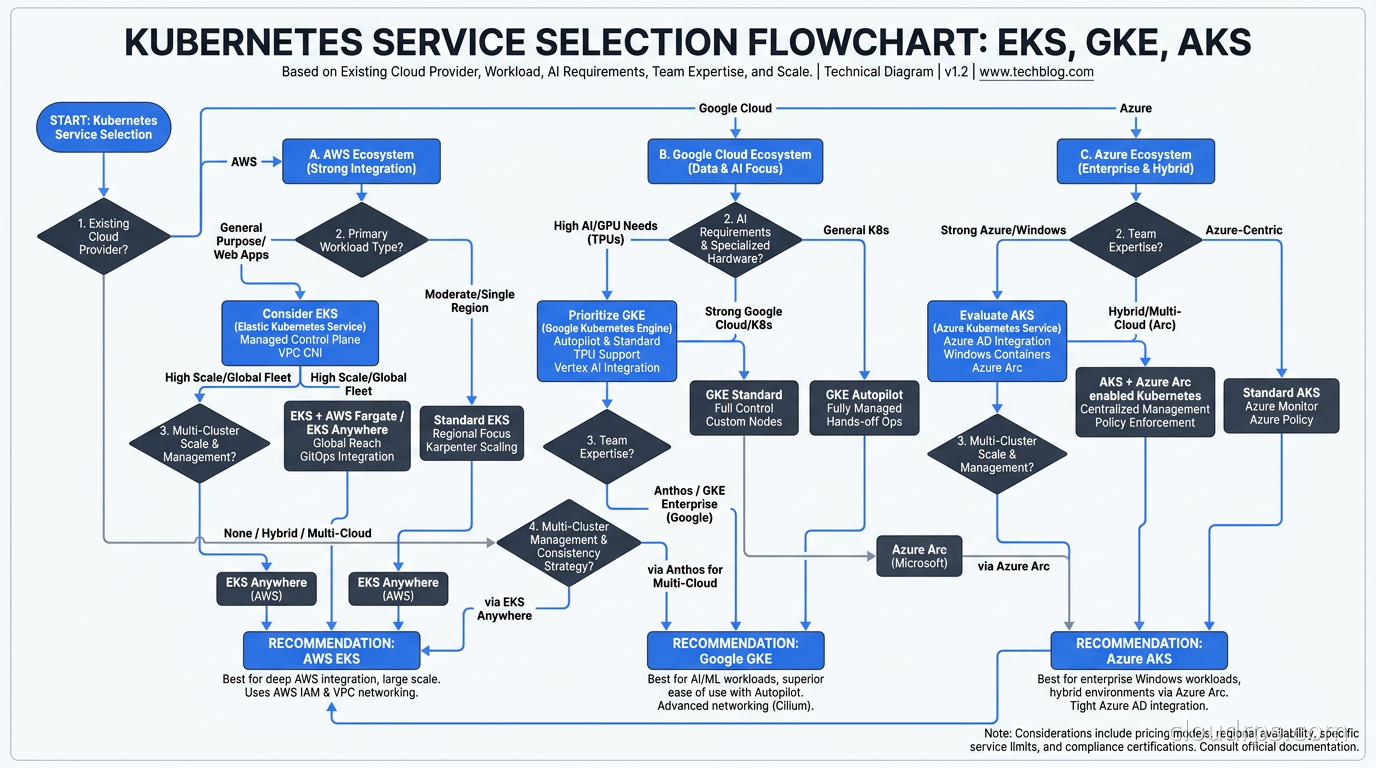
After everything above, here is the decision framework I use with clients.
Choose EKS if you are already in the AWS ecosystem, your team has AWS expertise, and you are willing to invest in operational sophistication for maximum control and integration depth. EKS’s strength is the breadth of the AWS integration surface. If your application uses RDS, ElastiCache, SQS, and AWS IAM heavily, keeping Kubernetes on EKS makes your infrastructure story coherent. Karpenter on EKS is the best node provisioning experience available today.
Choose GKE if you prioritize Kubernetes purity and want the platform that supports new features earliest. GKE Autopilot is the right answer for teams that want to minimize platform operations overhead and pay honestly for what they consume. For AI and ML workloads where TPU access or advanced GPU scheduling matter, GKE is the answer. For greenfield workloads without strong existing cloud commitments, GKE is my personal default recommendation.
Choose AKS if you are in the Microsoft ecosystem: Azure AD is your identity provider, you have Windows workloads in the container migration path, or you have Microsoft enterprise agreements with Azure credits to consume. The free control plane changes the economics meaningfully at scale, and the Entra ID integration saves real engineering time for Microsoft shops.
Do not choose based on control plane cost alone. The $73/month EKS management fee is noise compared to compute spend at any meaningful scale. The cost decisions that matter are instance selection, spot usage, autoscaling aggressiveness, egress architecture, and resource request discipline. Optimize those, not the cluster management fee.
Factor in your actual team, not the team you plan to build. A team with deep AWS expertise running EKS will outperform the same team operating GKE even if GKE is the better theoretical fit for their workload. Operational expertise is a real asset. Don’t discard it to chase a marginal platform advantage.
The Multi-Cluster Reality
One dimension that deserves its own treatment: most organizations running serious Kubernetes deployments end up running multiple clusters. Different environments, regions, teams, and compliance boundaries push you toward fleet management, and the platform choice compounds.
EKS with Karpenter and multi-cluster tooling like Karmada or Rancher Fleet works well at scale. GKE Fleet, once gated behind the paid Anthos Enterprise tier, is the most mature dedicated multi-cluster product, and the cost calculus changed in its favor: Google dissolved the Anthos Enterprise tier in September 2025, and fleet management capabilities (Config Sync, Policy Controller, Connect Gateway, fleet observability) are now bundled into base GKE at no extra charge. The genuinely expensive pieces, Cloud Service Mesh, multi-cloud cluster management, and extended support among them, split off into standalone a-la-carte SKUs instead. AKS with Azure Arc extends the model to hybrid and on-premises environments, which is compelling for enterprises with data residency requirements that force some workloads to stay on-premises.
Platform engineering practices matter enormously here. The teams I’ve seen succeed with multi-cluster Kubernetes are the ones that treated the cluster as an infrastructure primitive consumed by developers through self-service tooling, not as the product itself. The specific managed Kubernetes provider matters less than whether you’ve built the abstractions your developers actually need on top of it. A poorly designed platform on GKE is worse than a well-designed one on EKS. The platform architecture matters more than the provider.
Conclusion
There is no universally correct answer. EKS is dominant by adoption and best for AWS-native organizations willing to invest in operational sophistication. GKE is the purist’s choice, strongest for AI workloads, and best in Autopilot mode for teams that want low operational overhead. AKS is the right answer for Microsoft shops, Windows workload migrations, and scenarios where a free control plane changes the economics of a multi-cluster architecture.
The worst outcome is analysis paralysis. All three are production-grade, all three have large communities, and all three can be operated reliably. Pick the platform that aligns with your existing cloud ecosystem, audit your team’s expertise, and start with a non-critical workload. You will learn more from running production traffic for thirty days on the right platform for your organization than from another two weeks of comparison matrices.
Updated September 1, 2026: refreshed AKS control plane pricing tiers, TPU provisioning options, AKS Node Auto Provisioning status, GKE Dataplane V2 defaults, and Anthos/GKE Fleet pricing to reflect current platform state.
Get Cloud Architecture Insights
Practical deep dives on infrastructure, security, and scaling. No spam, no fluff.
By subscribing, you agree to receive emails. Unsubscribe anytime.