
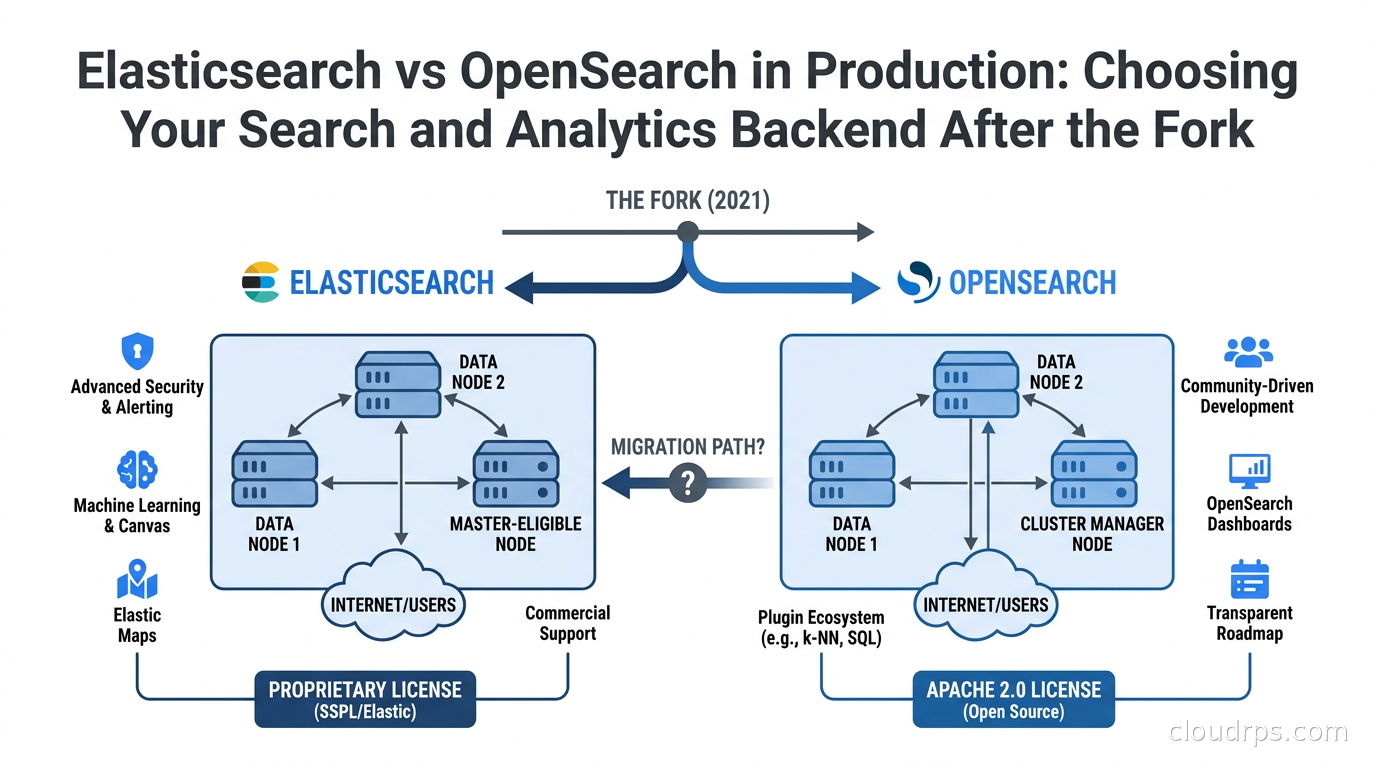
I have a complicated relationship with Elasticsearch. Twenty years in cloud infrastructure means I watched it go from a curious project that wrapped Lucene in a REST API to the de facto standard for log analytics and full-text search across every organization that could spell “ELK stack.” I’ve sized clusters that ingested terabytes per day, debugged split-brain scenarios at two in the morning, and watched the JVM heap pressure charts go vertical before a Black Friday traffic spike. I’ve also watched the fork happen in 2021 and spent the years since helping teams decide which side of that divide to land on.
The Elasticsearch vs OpenSearch question is not purely technical. It is also a licensing question, a vendor-relationship question, and increasingly an AI infrastructure question. This guide gives you the framework to make the call confidently, without the marketing spin from either side.
How We Got Here: The Fork That Changed Everything
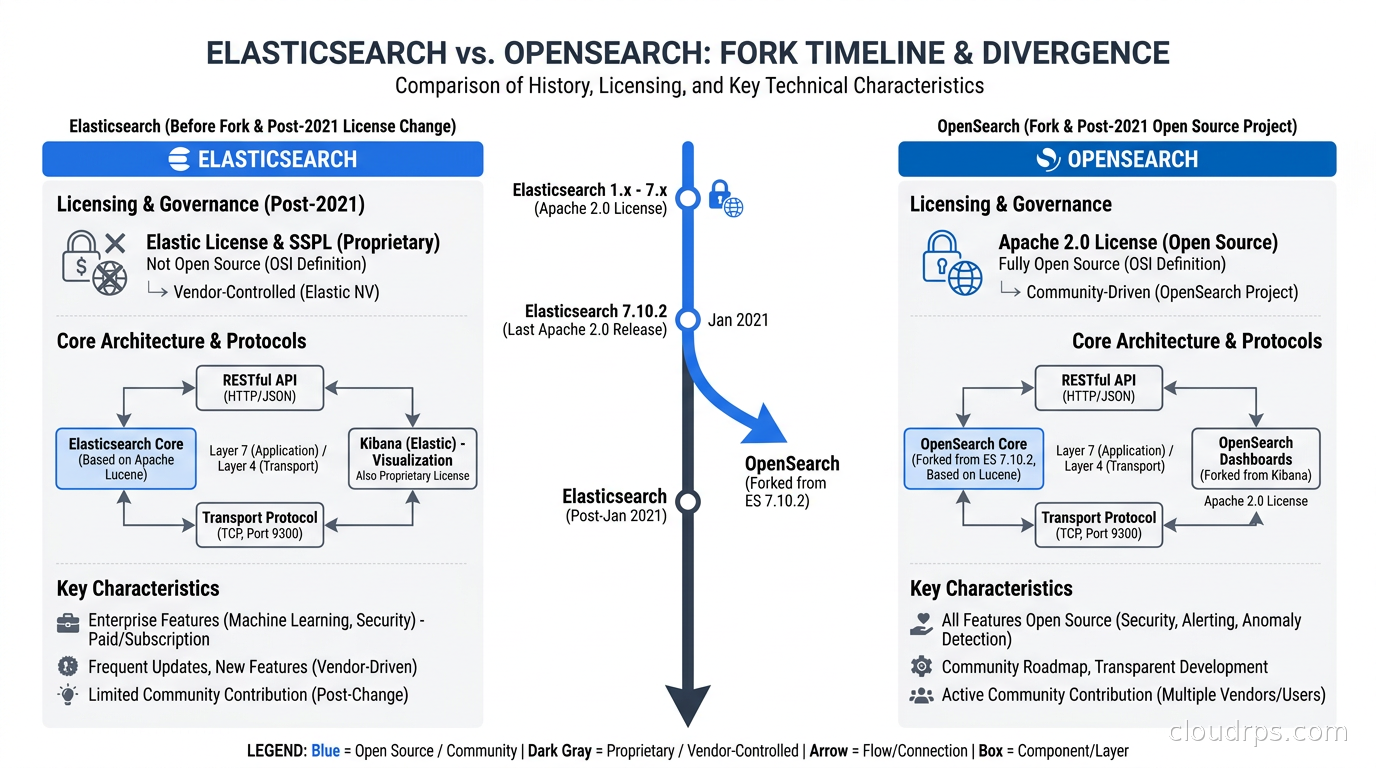
In January 2021, Elastic NV changed the license for Elasticsearch and Kibana from Apache 2.0 to the Server Side Public License (SSPL) and the Elastic License 2.0, depending on the component. The SSPL is not recognized as open source by the Open Source Initiative. The practical effect: if you offered Elasticsearch as a service to third parties without contributing back, you needed a commercial agreement with Elastic.
Amazon Web Services had been doing exactly that with Amazon Elasticsearch Service for years. AWS found the new license unacceptable for their managed service business and announced they would fork Elasticsearch at version 7.10.2, the last Apache 2.0 release. AWS announced the OpenSearch project in April 2021, and OpenSearch 1.0 reached general availability in July 2021, with OpenSearch Dashboards as the Kibana fork.
That was four years ago. The two projects have diverged substantially since then, and the choice today is meaningfully different from the choice in 2021 when they were nearly identical codebases.
The Architecture Is the Same. The Features Are Not.
Both products run on Apache Lucene. Both use the same distributed model: an index is split into shards, primary shards are distributed across data nodes, and each primary has one or more replica shards for redundancy. The query language started identical (Elasticsearch Query DSL), and both still support it. The REST API contracts are largely compatible up to the 7.10 baseline.
Where they diverge is everything built on top of that core since 2021.
Elasticsearch has added:
- ES|QL: A piped query language purpose-built for exploration and analytics, closer to how engineers think than the JSON DSL. If you have used Kusto (Azure Data Explorer’s language), you will feel at home. This is genuinely useful for ad hoc investigation and is not available in OpenSearch.
- BBQ (better binary quantization): A vector compression technique that Elastic claims reduces storage by 96% compared to uncompressed float32 vectors while maintaining high recall. For very large-scale vector workloads (100M+ documents), this matters considerably.
- Logsdb index mode: A specialized storage mode for log data that Elastic claims reduces storage footprint by 65-80% through synthetic source reconstruction. This is a significant operational advantage for high-volume log pipelines.
- ELSER (Elastic Learned Sparse Encoder): A sparse vector model for semantic search that runs inside the cluster itself, removing the need for an external embedding service on typical search workloads.
OpenSearch has added:
- Neural search plugin: Support for running sentence transformers inside the cluster via a model serving framework. You upload a model (from Hugging Face or custom), register it, and then use it in search requests. More flexible than ELSER but requires more operational work to set up well.
- Multiple k-NN backends: OpenSearch supports FAISS, NMSLIB, and the Lucene k-NN engine, giving you more options to tune memory vs speed vs accuracy trade-offs. Elasticsearch’s vector support is Lucene-only.
- Piped Processing Language (PPL): OpenSearch’s equivalent to ES|QL, though with SQL-like semantics that feel more familiar to analysts coming from a data warehouse background.
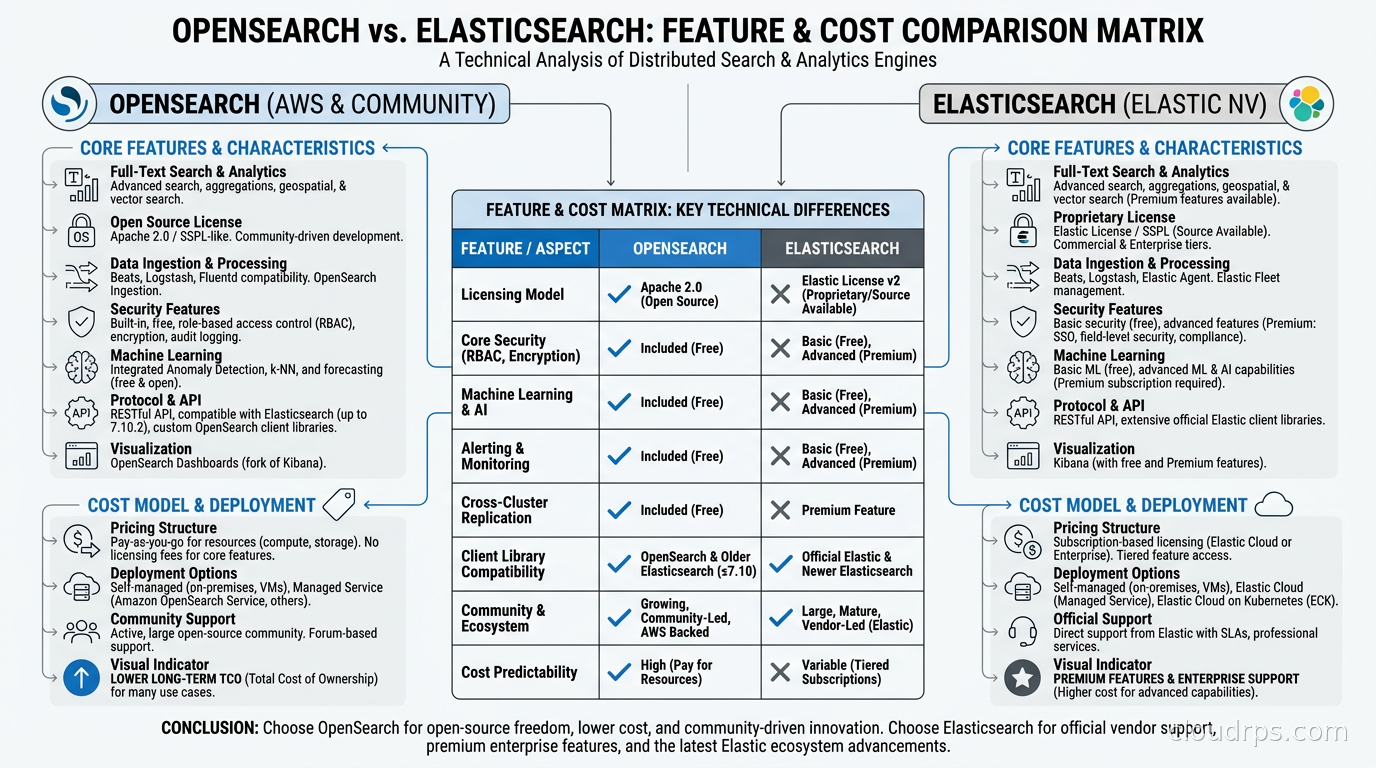
- Security plugin (free): This is the big one. OpenSearch ships with TLS encryption, role-based access control, document-level security, field-level security, and audit logging in the base package at no cost. Elasticsearch gates most of these features behind the paid Elastic Cloud Standard tier.
The Licensing Reality in Practice
In practice, “Apache 2.0 vs Elastic License” translates directly into budget conversations with finance and legal.
At one previous engagement, we were building a compliance-focused SaaS product in healthcare. Legal reviewed the Elastic License 2.0 and flagged that our use case was borderline: we were not technically offering “Elasticsearch as a service,” but we were using it to serve search results to our customers in a way that lawyers were not comfortable with. Three weeks of emails, then a commercial licensing call with Elastic. We ended up going with OpenSearch specifically to eliminate the ambiguity.
For most internal use cases, you will never hit Elastic License restrictions. But the moment you are building a product on top of the search layer, have legal review the license before you commit to the stack.
Apache 2.0 also matters for FOSS-only procurement policies in government, financial services, and some enterprise environments. OpenSearch clears that bar. Elasticsearch does not.
Performance: Who Is Actually Faster?
Both vendors publish benchmarks that show themselves winning. This is the least surprising thing in the industry.
The most credible independent testing I have seen recently ran the standard “Big 5” workload set (covering text indexing, text search, sorted keyword aggregations, date histogram aggregations, and geo queries) comparing recent OpenSearch and Elasticsearch releases. The finding: OpenSearch was faster overall on the composite workload, and the two products were roughly matched on default vector search at typical scales (under 10M documents).
Elasticsearch’s own marketing claims 40-140% faster log analytics and up to 8x faster filtered vector search at 20M documents. The logsdb index mode and BBQ quantization are genuinely useful features, not pure marketing. At very high scale, they create a measurable gap.
My rule of thumb: for workloads under 50M documents and fewer than 500GB of hot data, you are unlikely to feel the performance difference in production. Both will saturate your budget on hardware before you notice the software-level gap. For larger workloads or for latency-sensitive vector search at high QPS, Elasticsearch has a real technical edge right now. That gap is likely to narrow as OpenSearch invests in quantization and logsdb equivalents.
AWS Integration: OpenSearch Is a First-Class Citizen
If your infrastructure lives primarily in AWS, the integration story for OpenSearch Service (and OpenSearch Serverless) is hard to beat.
IAM-native authentication means you sign API requests with standard AWS credentials. No separate user stores, no Kibana login forms to manage, no separate secrets rotation. You attach an IAM policy to a Lambda function, an ECS task, or a Bedrock agent, and it can query OpenSearch with the same credential model as S3 or DynamoDB.
VPC support is clean. The cluster sits in your VPC, you control the subnet placement, and there is no public endpoint you need to remember to lock down. Fine-grained access control layered on top of IAM gives you per-index permissions at both the index and document level.
For log analytics pipelines, OpenSearch Ingestion (the managed version of the OpenTelemetry Collector’s OpenSearch exporter) receives structured telemetry from your services, applies transformations, and routes into the cluster. If you are running the OpenTelemetry Collector for observability pipelines, the OpenSearch exporter path is well-supported and actively maintained.
Cross-cluster search across AWS accounts works out of the box. In multi-account organizations, this lets security teams run centralized log analytics across dozens of application accounts without aggregating raw log data into a single account.
OpenSearch Serverless: The Operational Load Changes Significantly
OpenSearch Serverless is worth its own discussion because it represents a genuinely different operational model.
Traditional OpenSearch/Elasticsearch clusters require you to size instance types, choose shard counts, configure index lifecycle policies, plan for peak capacity, and think about rolling upgrades. The operational surface is real. I have spent days tuning JVM heap settings and shard allocation awareness rules on clusters that were otherwise delivering business value.
OpenSearch Serverless eliminates the cluster. You create a collection, assign an IAM policy, and start indexing. Capacity scales automatically. You pay by OpenSearch Compute Unit (OCU), currently around $0.24 per OCU-hour. There is no concept of “the cluster ran out of memory during a spike.”
The trade-off: you have limited control over performance tuning. You cannot pin shard counts, you cannot control replica placement, and you cannot tune JVM options. For teams with spiky, unpredictable workloads where operational simplicity matters more than maximizing throughput efficiency, Serverless is compelling. A typical 100GB/day ingestion workload tends to cost noticeably less per month on OpenSearch Serverless than on a comparable Elastic Cloud Standard tier plan where security features are included, though exact pricing depends heavily on usage patterns and current rate cards, so run the numbers against your own workload rather than trusting a rule of thumb.
For predictable, high-throughput workloads where you want full tuning control, provisioned OpenSearch Service or self-managed Elasticsearch on EC2/Kubernetes will outperform Serverless on cost.
Vector Search and the AI Dimension
Both platforms have made vector search a top priority, because that is where the budget is in 2026.
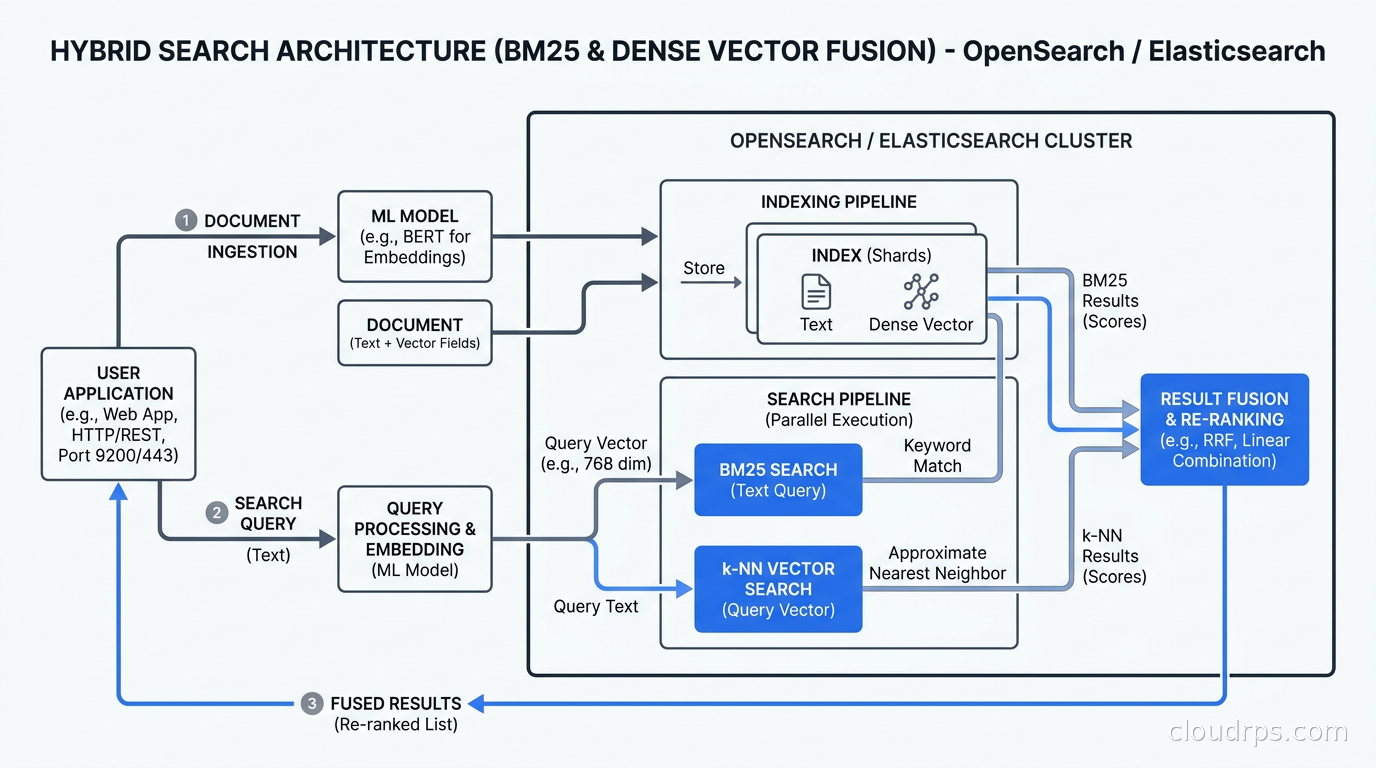
The typical use case is hybrid search: combining BM25 (traditional keyword relevance) with dense vector similarity search over embeddings, then fusing the scores. This pattern powers RAG architectures in production where you need to find semantically relevant documents even when the user query does not share keywords with the result.
For smaller corpora (under 10M documents), both platforms handle hybrid search well. The decision often comes down to which embedding pipeline you are running. If you are already running embeddings through a dedicated service, the OpenSearch neural search plugin and Elasticsearch’s ELSER integration both work. If you want an embedding model running inside the cluster with no external dependencies, Elasticsearch’s ELSER is simpler to operate out of the box.
At 100M+ documents, the storage math changes. Storing raw float32 embeddings for 100M documents at 1536 dimensions (OpenAI’s ada-002) costs roughly 600GB of RAM in a pure in-memory k-NN setup. Elasticsearch’s BBQ quantization compresses this to approximately 25GB with minimal recall loss, which means you can run viable vector search on EC2 instances that would otherwise require enormous memory. OpenSearch’s FAISS backend with product quantization gives you a similar result but requires more manual configuration of the index parameters.
For teams evaluating purpose-built vector databases as an alternative, the comparison with pgvector and dedicated vector stores is worth doing carefully. If you already have an Elasticsearch or OpenSearch cluster for full-text search, adding vector search there avoids maintaining a second store. If vector search is your primary workload rather than a secondary capability, a dedicated vector database often wins on operational simplicity.
Operational Realities: What the Benchmarks Do Not Show
After twenty years of running search clusters, I have learned that the operational differences between these platforms matter as much as raw performance numbers.
JVM tuning: Both platforms still run on the JVM and inherit all the GC tuning pain that comes with it. Heap sizing (the famous “no more than half your RAM” rule), garbage collector selection (G1 is the default; ZGC is available for lower pause times on very large heaps), and JVM flag management are identical concerns. This is the thing I wish both projects would abstract away more aggressively. OpenSearch’s recent work on incorporating off-heap segment caching helps, but the JVM tuning surface is still real.
Shard strategy: Both platforms suffer from over-sharding at scale. The general rule of 10-50GB per shard is as true for OpenSearch as it is for Elasticsearch. I have inherited clusters with 8,000 shards on an 8-node cluster and spent two weeks in remediation. The index lifecycle management tooling in both platforms helps with rolling indices (useful for time-series log data), but getting the initial shard count right requires careful capacity planning.
Upgrade paths: Elasticsearch minor version upgrades are generally smooth. Major version upgrades (7.x to 8.x) have historically broken API compatibility and required careful testing. OpenSearch follows a similar pattern. The gap between the two platforms creates an asymmetry: migrating from Elasticsearch 7.x to OpenSearch is relatively well-documented because OpenSearch started there. Migrating from Elasticsearch 8.x to OpenSearch is harder and requires index rebuilds in some cases because the index format diverged.
Cluster state instability: In large clusters (50+ nodes), cluster state updates from shard movements can cause cascading slowdowns. Both platforms improved significantly here in recent versions, but it remains something you monitor. The Elasticsearch cluster stability improvements in 8.13+ were notable; OpenSearch 2.14 shipped equivalent work.
For streaming data pipelines that feed into your search cluster, whether you are using Apache Flink for stateful stream processing or a simpler pipeline via Kafka, the indexing throughput ceiling matters. Bulk indexing via the _bulk API at 10,000-50,000 documents per batch is standard practice in both, but you will hit the refresh interval wall if you are not careful. Setting refresh_interval: 30s or higher during bulk load and then resetting it afterward is one of those non-obvious tips that saves you from hour-long indexing jobs.
The Observability Stack Dimension
For engineering teams running the Prometheus, Loki, Grafana observability stack, the question is often whether to add Elasticsearch or OpenSearch at all, or whether to route logs to Loki instead.
Loki is cheaper for pure log storage and retrieval. It does not index the full log content, only labels, which means storage costs are a fraction of Elasticsearch’s at equivalent data volumes. The trade-off is query power: Elasticsearch’s query DSL and aggregation framework are dramatically more powerful for ad hoc investigation and operational analytics. If your team frequently queries log content with complex boolean expressions or builds dashboards with intricate aggregation pipelines, Elasticsearch or OpenSearch earn their storage premium.
ClickHouse has also emerged as a competitor in this space. For teams that have moved log analytics to ClickHouse for its real-time analytics capabilities, the full-text search capability is adequate for most log patterns and the cost profile at high ingest volume is significantly better than either Elasticsearch or OpenSearch. The missing piece with ClickHouse is the query UX: Kibana and OpenSearch Dashboards are purpose-built for log investigation in ways that Grafana’s ClickHouse plugin is not.
When to Choose OpenSearch
OpenSearch is the right call when:
You are on AWS and want native integration. IAM-native auth, VPC-first networking, and the OpenSearch Ingestion pipeline all reduce operational overhead in AWS-native architectures. The total cost of ownership for security features (included free) tips the economics further.
You need Apache 2.0 for legal or procurement reasons. If your organization has an OSI-approved-only policy, or if you are building a product where the Elastic License creates legal ambiguity, OpenSearch eliminates the question entirely.
You are cost-sensitive and need security features. Elastic’s paid tiers start making sense above certain scale points, but many organizations pay for the premium tier primarily to get TLS and RBAC, both of which are free in OpenSearch. If you are below 50GB of hot data and running on AWS, OpenSearch Serverless often beats the cost of Elastic Cloud Standard.
Your workload is log analytics at moderate scale. OpenSearch is excellent for the ELK stack replacement use case: ingest logs from your change data capture pipelines and application event streams, build dashboards, run searches. At under 100M documents, you will not hit the performance ceiling where Elasticsearch’s optimizations create visible differences.
When to Choose Elasticsearch
Elasticsearch is the right call when:
You need best-in-class vector search at scale. BBQ quantization and the Lucene vector engine improvements in 8.x create a real advantage at 100M+ document scales. If AI search is a core product feature rather than a nice-to-have, Elasticsearch is currently ahead.
You want the ES|QL query language. For exploratory data analysis and ad hoc investigation by engineers who prefer a piped query syntax, ES|QL is genuinely better than the JSON DSL. OpenSearch’s PPL is functional but less mature.
You are building on Elastic Security or need SIEM. Elastic Security (their SIEM and endpoint detection product) is a first-class feature that integrates detection rules, ML anomaly detection, and SIEM workflows on top of the search layer. OpenSearch has no equivalent product.
You want a multi-cloud managed service with SLA guarantees. Elastic Cloud is available on AWS, GCP, and Azure from Elastic’s own infrastructure, with unified support. If you are multi-cloud and want a single vendor relationship for your search layer, that is an advantage.
You already run Elasticsearch 8.x and the upgrade cost of staying is low. There is no migration credit for switching. If your Elasticsearch deployment is running well and you are not hitting license friction or cost issues, staying is perfectly reasonable.
Migration Considerations
Going from Elasticsearch to OpenSearch is feasible at the 7.10 baseline. Take a snapshot, restore into an OpenSearch cluster, validate your queries, and move traffic. The query API is compatible. Most Elasticsearch clients work against OpenSearch with the opensearch-py or opensearch-java clients substituted in, since OpenSearch ships its own client libraries to avoid Elastic’s client license restrictions.
Going from Elasticsearch 8.x to OpenSearch is harder. Index formats have diverged. You cannot restore an 8.x snapshot directly into OpenSearch. The practical path is reindex-from-remote, which is slow for large indices and requires both clusters to be running simultaneously.
Going from OpenSearch back to Elasticsearch is an uncommon direction, but it follows the same reindex path since you cannot restore OpenSearch snapshots into Elasticsearch.
The thing I tell teams before any migration: the snapshot-and-restore path only handles data. Application code changes, Kibana/OpenSearch Dashboards configuration, index templates, ILM policies, and alerting rules all require separate migration work that, in my experience, tends to dominate the total migration effort well beyond the data migration itself. Budget accordingly.
The Honest Summary
Neither platform is obviously wrong for most use cases. The decision matrix is cleaner than it looks once you know your constraints.
If you are on AWS, price-sensitive, need Apache 2.0, and your workload is log analytics or full-text search at moderate scale: OpenSearch. It gives you everything you need, the AWS integration is excellent, and the security features you would pay for on Elastic are free.
If you are building AI-native search at high scale, need the most polished managed service, or want the Elastic Security product: Elasticsearch. The technical edge on vector workloads is real and the product maturity shows.
The one answer I give with confidence to almost every team: if you are starting fresh in 2026, default to OpenSearch on AWS unless you have a specific reason for Elasticsearch. The security feature inclusion alone justifies the default, and the performance parity at typical scales means you are not leaving anything on the table.
What I have never seen work: starting with OpenSearch because it is the default and then migrating to Elasticsearch for performance at 200M documents without budgeting for the reindex cost. Make the decision deliberately upfront, and make it based on your five-year data volume projection, not where you are today.
Updated September 1, 2026: corrected the OpenSearch 1.0 GA date, removed an unverifiable benchmark citation while keeping the finding, attributed the Logsdb storage claim to Elastic, and softened unsourced cost and migration-effort figures.
Get Cloud Architecture Insights
Practical deep dives on infrastructure, security, and scaling. No spam, no fluff.
By subscribing, you agree to receive emails. Unsubscribe anytime.