
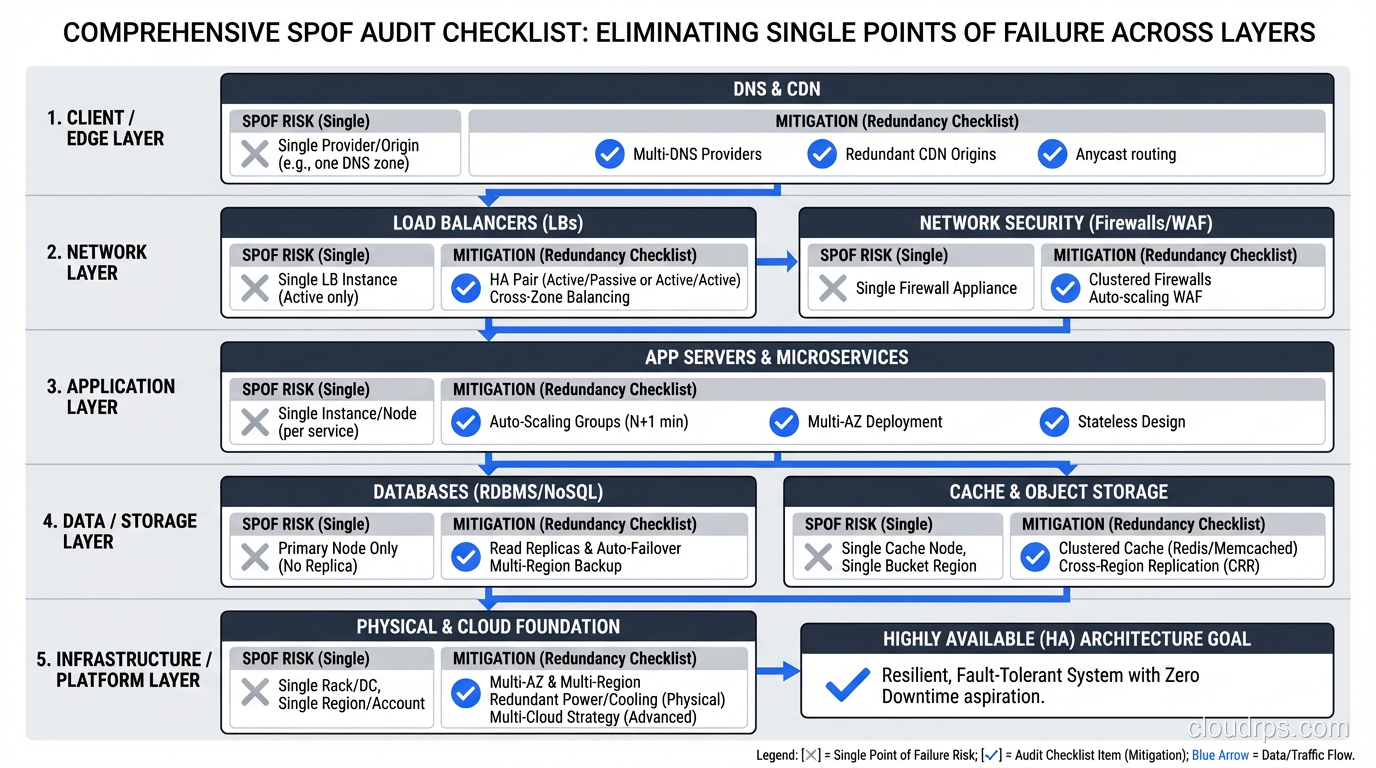
In 2009, I was brought in to review the architecture of an e-commerce platform that had experienced four major outages in six months. The CTO described the system as “highly available.” He pointed to a nice architecture diagram showing load balancers, multiple application servers, and a database cluster. It looked great on the whiteboard.
Then I started asking questions.
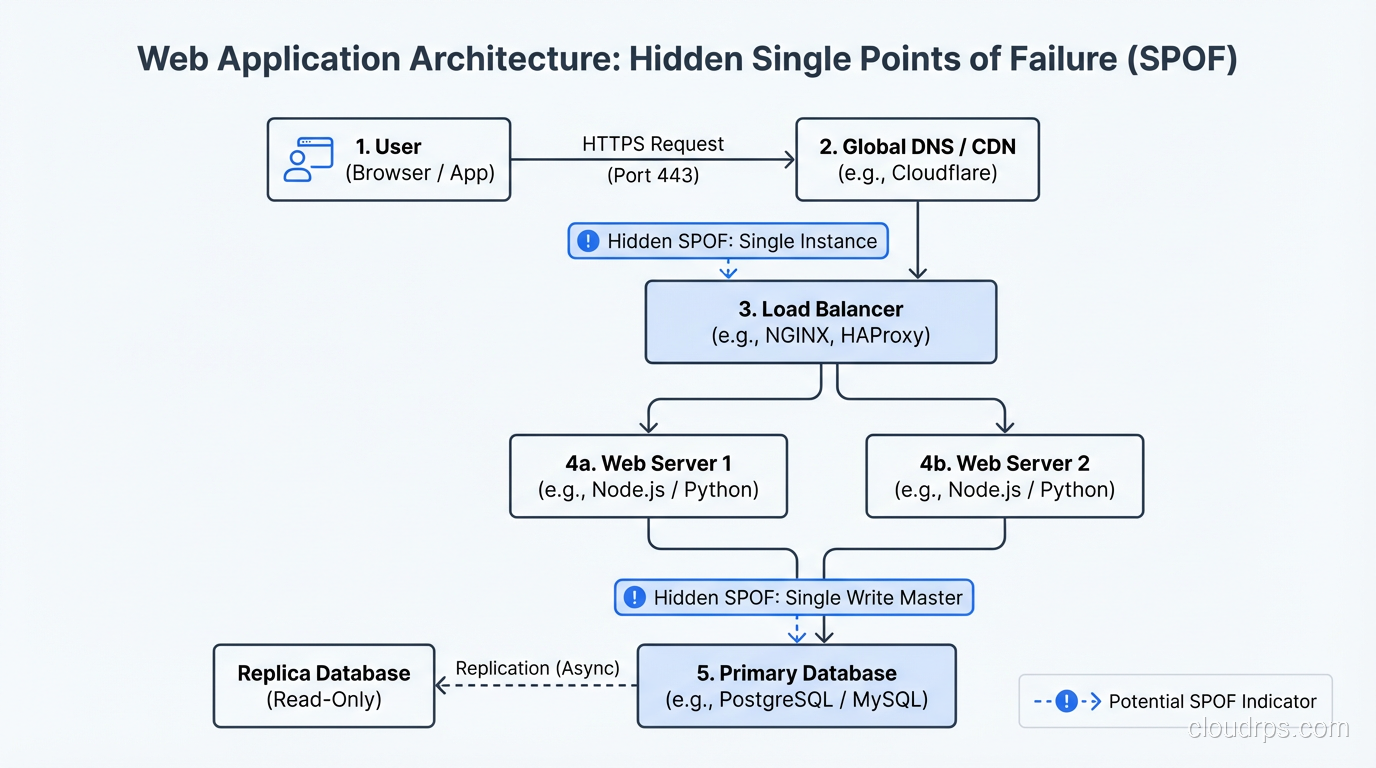
“Where does your SSL certificate termination happen?” One load balancer. “Where does your session data live?” One Redis instance. “How does your application connect to the database?” Through a single connection proxy. “Where do your DNS records point?” A single Elastic IP on the single load balancer.
The “highly available” system had four single points of failure that I found in the first thirty minutes. The outages weren’t bad luck. They were inevitable. Every component I identified had failed at least once in the preceding six months. The architecture guaranteed failure; the only question was which component would fail next.
That engagement changed how I approach every architecture review. I now start by mapping every component in the request path and asking one question about each: “What happens when this fails?”
What Is a Single Point of Failure?
A single point of failure (SPOF) is any component whose failure causes the entire system (or a critical function) to become unavailable. If removing one component takes down your service, that component is a SPOF.
The concept is simple. Identifying SPOFs in real systems is harder than you’d think, because they hide in places you don’t expect.
The Obvious SPOFs
Let me start with the ones everybody knows about, because even these still show up in production systems with alarming frequency.
Single Database Instance
One database server with no replication, no standby, no failover. If it dies, the application dies. This is the most common SPOF I encounter, usually in systems that grew organically from a small deployment without re-evaluating the architecture.
Fix: Primary-standby replication with automated failover. RDS Multi-AZ does this out of the box. For self-managed databases, set up streaming replication and use a failover manager like Patroni (PostgreSQL) or Orchestrator (MySQL).
Single Application Server
One server handling all requests. No redundancy, no failover.
Fix: Multiple instances behind a load balancer. At minimum, two instances across two availability zones. Configure health checks so the load balancer stops sending traffic to failed instances.
Single Load Balancer
I see this more than I should. Teams add multiple application servers behind a load balancer and congratulate themselves on eliminating the application tier SPOF. Then the load balancer itself fails.
Fix: Managed load balancers (AWS ALB/NLB, Azure Load Balancer, GCP Load Balancer) are redundant by design. The provider manages multiple load balancer nodes across AZs. If you’re running your own load balancers (HAProxy, NGINX), you need at least two in an active-passive or active-active configuration with a floating IP or DNS failover.
The Hidden SPOFs
These are the ones that trip up experienced architects. They don’t show up on typical architecture diagrams, and they lurk in the shadows until they bite.
DNS
Your application depends on DNS to resolve domain names. If your DNS provider goes down, your application is unreachable even though every server is healthy. This happened famously with the Dyn DDoS attack in 2016 that took down huge portions of the internet.
Fix: Use multiple DNS providers. Route 53 is highly available, but having a secondary DNS provider (Cloudflare, Google Cloud DNS) that serves the same zone provides protection against a single DNS provider outage. This requires keeping zone records synchronized, which tools like OctoDNS can automate.
Certificate Management
SSL/TLS certificates expire. When they do, your site shows scary browser warnings or stops working entirely. I’ve seen major outages caused by expired certificates, including one at a company that had spent millions on HA infrastructure.
Fix: Automate certificate renewal (Let’s Encrypt + cert-manager, ACM in AWS). Monitor certificate expiration dates. Alert well in advance (30 days, 14 days, 7 days).
External Dependencies
Your application probably depends on external services: payment processors, email providers, authentication services, CDNs, third-party APIs. Each one is a SPOF unless you’ve designed for its failure.
Fix: Circuit breakers for external calls. Fallback behavior when dependencies are unavailable. Retry with exponential backoff. Timeouts on every external call (I’ve seen systems lock up because they waited indefinitely for a response from a dead third-party API). Cache external responses where possible.
Shared State
This is the subtle one. Two application instances sharing a single Redis instance for session data, a single Elasticsearch cluster for search, a single message queue for async processing. The application tier is redundant, but it depends on non-redundant shared state.
Fix: Make every shared state component redundant. Redis Cluster or Redis Sentinel for cache/session. Multi-node Elasticsearch cluster. Replicated message queue (SQS is inherently redundant, self-managed RabbitMQ needs clustering).
Configuration and Secrets Management
Where do your application configurations and secrets live? If they’re in a single configuration server or a single secrets manager, that’s a SPOF.
Fix: Use managed services with built-in redundancy (AWS Secrets Manager, Parameter Store). Cache configuration locally so the application can operate temporarily if the configuration service is unavailable.
The Process: Finding SPOFs Systematically
I use a systematic approach to find SPOFs because gut instinct misses things. Here’s the process:
Step 1: Map the Request Path
Trace every request from the user’s browser to the database and back. Every component the request touches is a potential SPOF. Include DNS, CDN, load balancers, web servers, application servers, caches, databases, file storage, and external services.
Don’t skip the “boring” components. DNS, NTP, and service discovery are critical infrastructure that get overlooked.
Step 2: Map the Dependencies
For each component, list its dependencies. The application server depends on the database, the configuration service, and the secrets manager. The database depends on its storage subsystem and network connectivity. Map the full dependency tree.
Step 3: Ask “What If?”
For every component and dependency, ask: “What happens when this fails?” Document the answer honestly. Don’t write “failover to standby” unless you’ve tested the failover and verified it works.
Step 4: Classify by Impact
Not all SPOFs are equal. A SPOF that causes total system failure is more critical than one that degrades a non-essential feature. Prioritize elimination based on impact.
Step 5: Eliminate or Mitigate
For each SPOF:
- Eliminate by adding redundancy (preferred).
- Mitigate by designing graceful degradation, where the system continues operating with reduced functionality when the SPOF fails.
Some SPOFs can’t be economically eliminated. A single payment processor integration might be a SPOF, but integrating a second payment processor just for redundancy might cost more than the downtime it prevents. In those cases, design for graceful degradation: show users a helpful message and allow retries rather than crashing.
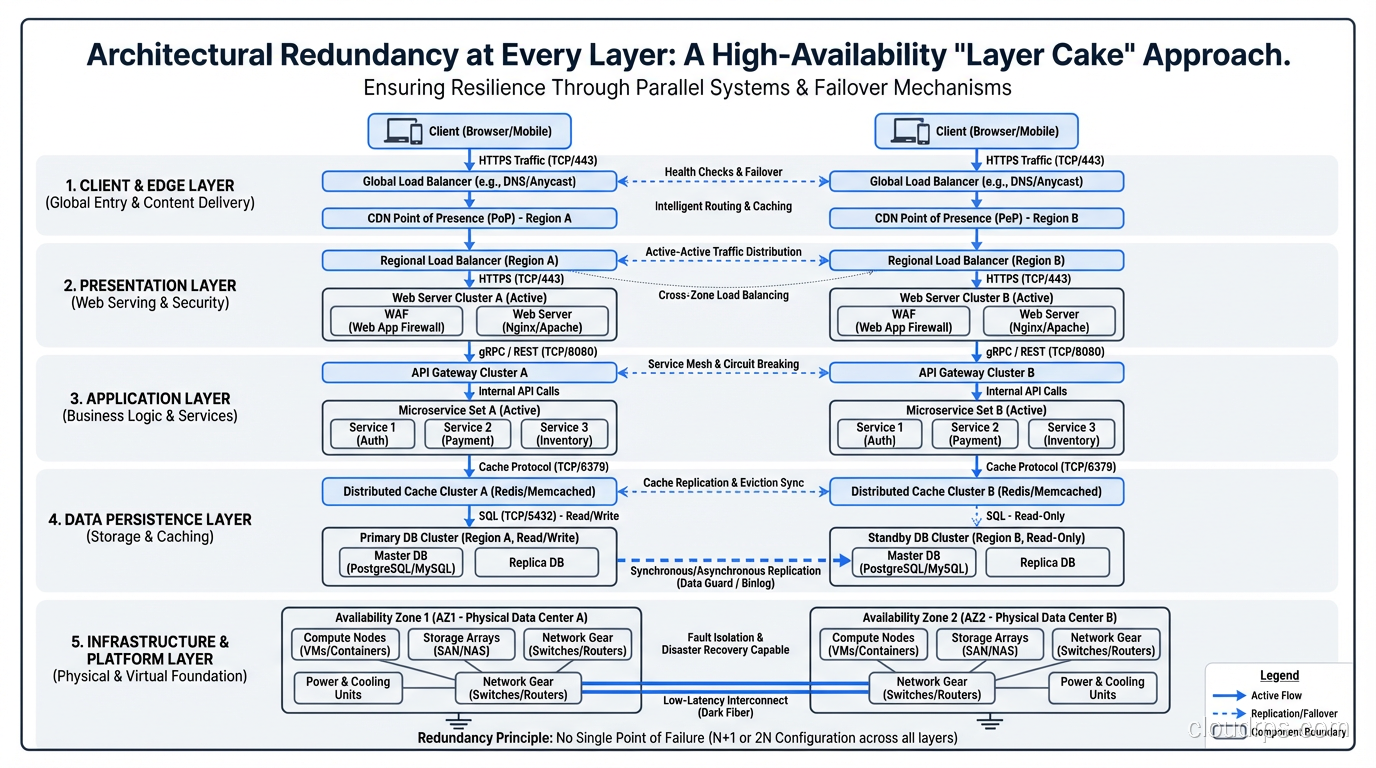
The Layer Cake of Redundancy
High availability requires eliminating SPOFs at every layer. Miss one layer and your “redundant” architecture has a single point of failure hiding inside it.
Physical Layer
- Redundant power supplies in servers
- Redundant network interfaces (bonded NICs)
- Multiple power feeds to racks
- Generator backup for data center power
Network Layer
- Multiple network paths between components
- Redundant switches and routers
- Multiple internet uplinks
- DNS redundancy
Compute Layer
- Multiple instances per service
- Cross-AZ distribution
- Auto-scaling to replace failed instances
- Health checks for detection
Data Layer
- Database replication
- Multi-AZ storage
- Backup and recovery procedures
- Connection pooling with failover
Application Layer
- Stateless design enabling instance replacement
- Circuit breakers for dependency failures
- Retry logic with exponential backoff
- Feature flags for graceful degradation
Operations Layer
- Automated monitoring and alerting
- Runbooks for manual intervention
- On-call rotation (don’t be a SPOF yourself)
- Cross-trained team members
That last bullet deserves emphasis. I’ve seen organizations where one person knew how to manage the database, and when that person was unavailable during an outage, recovery took hours instead of minutes. People are single points of failure too.
Real-World War Stories
The Hidden NAT Gateway SPOF
A client’s multi-AZ architecture looked perfect on paper. Application servers in two AZs, RDS Multi-AZ, redundant ALB. But all outbound traffic from both AZs routed through a single NAT Gateway in AZ-A. When AZ-A had a networking issue, the NAT Gateway became unreachable. Application servers in AZ-B were healthy but couldn’t reach external services (payment processor, email service, third-party APIs).
Lesson: NAT Gateways should be per-AZ, with route tables directing each AZ’s traffic to its local NAT Gateway.
The Deployment SPOF
A team had excellent runtime redundancy: multiple instances, multi-AZ, the works. But their deployment process updated all instances simultaneously. A bad deployment took down every instance at once. Their “highly available” system had a deployment process that was a SPOF.
Lesson: Rolling deployments, blue-green deployments, or canary deployments ensure that a bad deployment doesn’t take down all instances simultaneously. Your deployment process must respect the redundancy your runtime architecture provides.
The Monitoring SPOF
During an outage, the team discovered that their monitoring system was running on the same infrastructure that was failing. They lost visibility into the outage precisely when they needed visibility most.
Lesson: Monitoring infrastructure must be independent from the systems it monitors. External monitoring (Pingdom, StatusCake) that checks your system from outside provides visibility even when your infrastructure is down.
The Fault Tolerance Connection
Eliminating SPOFs gets you to high availability. The next step, fault tolerance, ensures that failover between redundant components is so fast that users never notice. The progression is:
- No redundancy: Single point of failure. Component fails, system fails.
- Redundancy with manual failover: SPOF eliminated, but recovery requires human intervention.
- Redundancy with automated failover: SPOF eliminated, recovery is automatic but may have brief interruption.
- Fault-tolerant redundancy: SPOF eliminated, failure is completely invisible to users.
Most systems should aim for level 3. Level 4 is reserved for systems where any interruption is unacceptable.
Audit Checklist
Here’s the checklist I use when reviewing architectures. For every item, I ask: “Is there more than one? What happens when one fails?”
- DNS provider(s)
- CDN/edge nodes
- Load balancer(s)
- Web/API server instances
- Application server instances
- Cache instances
- Database primary and standby
- Message queue/broker
- File/object storage
- Secrets/configuration management
- SSL/TLS certificate management
- NAT gateways (per AZ)
- External service integrations
- Monitoring and alerting systems
- Deployment pipeline
- Team knowledge (bus factor)
If any of those is a single instance with no redundancy or fallback, you have a SPOF. Whether you need to fix it depends on the impact analysis, but you should at least know it’s there.
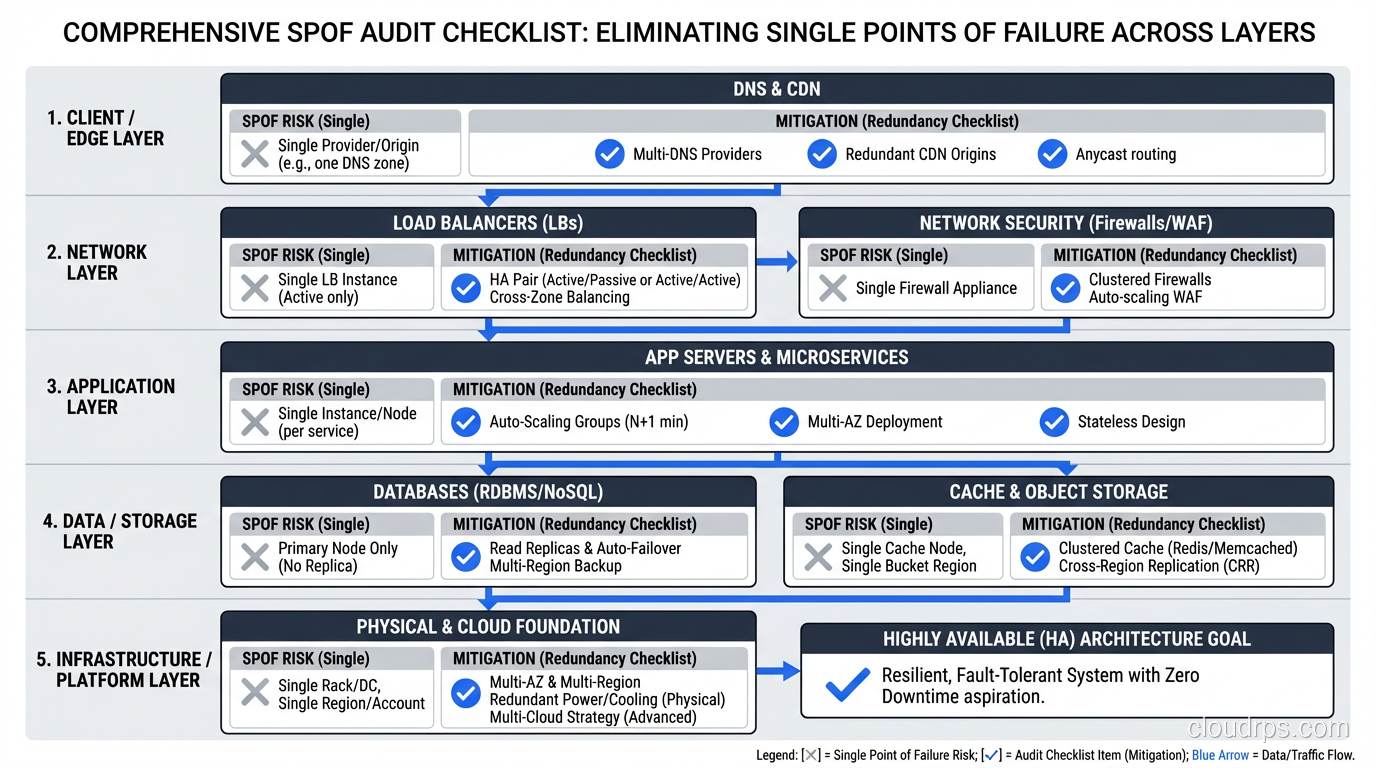
The uncomfortable truth about single points of failure is that every system has them. The difference between a reliable system and an unreliable one isn’t the absence of SPOFs; it’s the awareness of where they are and the deliberate decision about which ones to eliminate, which ones to mitigate, and which ones to accept.
After thirty years, I’ve never reviewed an architecture that didn’t have at least one SPOF I wasn’t expecting. The search never ends. But each one you find and fix makes the next 2 AM call a little less likely.
Get Cloud Architecture Insights
Practical deep dives on infrastructure, security, and scaling. No spam, no fluff.
By subscribing, you agree to receive emails. Unsubscribe anytime.