
In 2014, I was called in to assess the damage after a database server was stolen from a colocation facility. Physically stolen. Someone walked in, unplugged the server, and walked out. The database contained 3.2 million customer records including names, addresses, and partial payment information.
The data was not encrypted at rest.
The legal costs, the notification expenses, the regulatory fines, the reputational damage. I will not share the total number, but it was the kind of figure that makes executives reconsider their careers. And every dollar of it was preventable. If the data had been encrypted at rest, the stolen server would have been a paperweight. The data would have been unreadable without the encryption keys, which were not stored on the server.
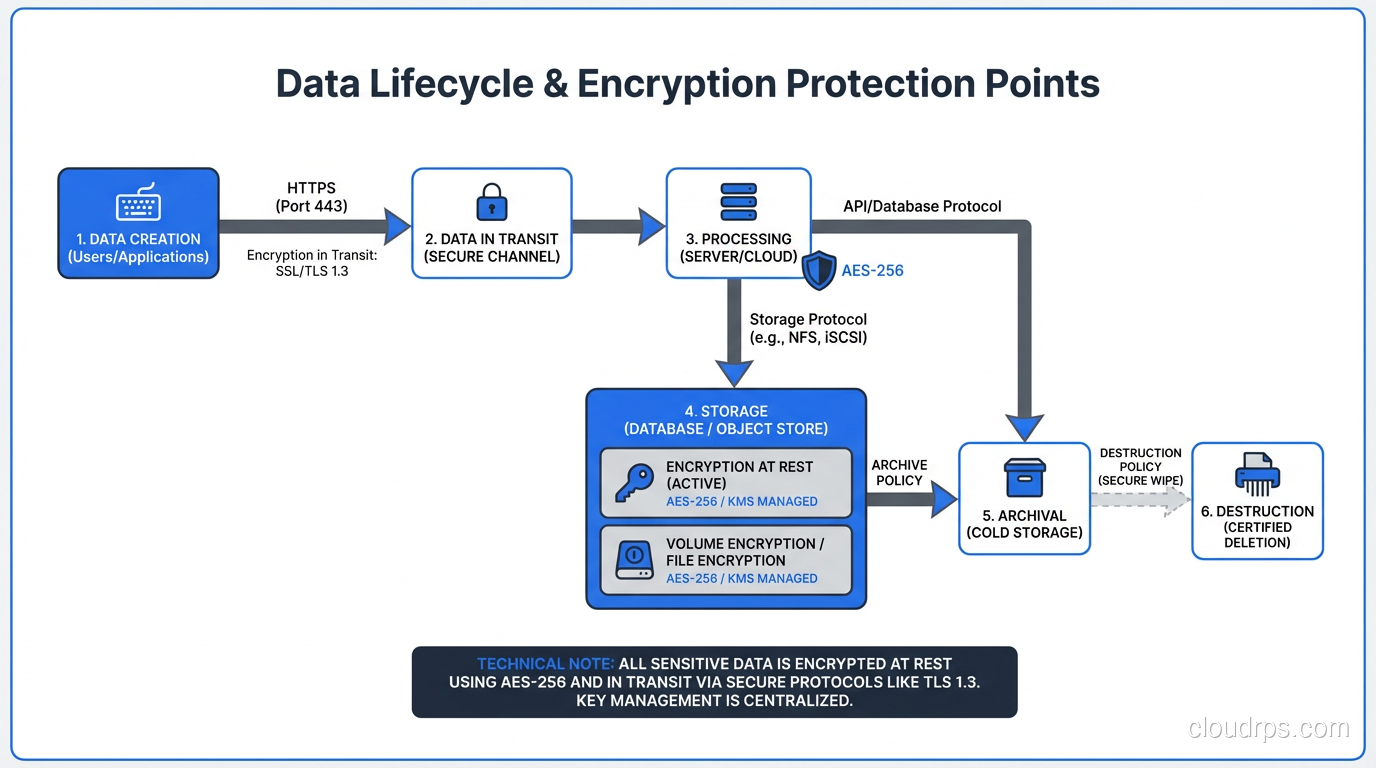
That incident fundamentally changed how I think about encryption. It is not a security feature you add if you have time. It is baseline infrastructure, as essential as backups and monitoring. And understanding the difference between encryption at rest and encryption in transit, and implementing both correctly, is non-negotiable for anyone managing production systems. There is actually a third state of data protection, data in use, which confidential computing and trusted execution environments address by encrypting data even while it is being processed in memory.
Two Different Problems, Two Different Solutions
Encryption at rest and encryption in transit protect data in two fundamentally different states, against two fundamentally different threat models.
Encryption at rest protects data that is stored on disk: database files, backups, log files, S3 objects, local filesystems. It defends against physical theft (someone stealing a drive or server), unauthorized access to storage media (a discarded drive that was not wiped), and certain types of unauthorized logical access (a compromised process reading raw disk blocks).
Encryption in transit protects data that is moving across a network: between your application and your database, between microservices, between your users’ browsers and your web servers. It defends against network interception (packet sniffing on a compromised network), man-in-the-middle attacks (an attacker inserting themselves between client and server), and eavesdropping on shared infrastructure.
You need both. Encryption at rest without encryption in transit means your data is protected on disk but exposed every time it crosses a network. Encryption in transit without encryption at rest means your data is protected on the wire but exposed if someone accesses the storage directly.
Encryption at Rest: How It Actually Works
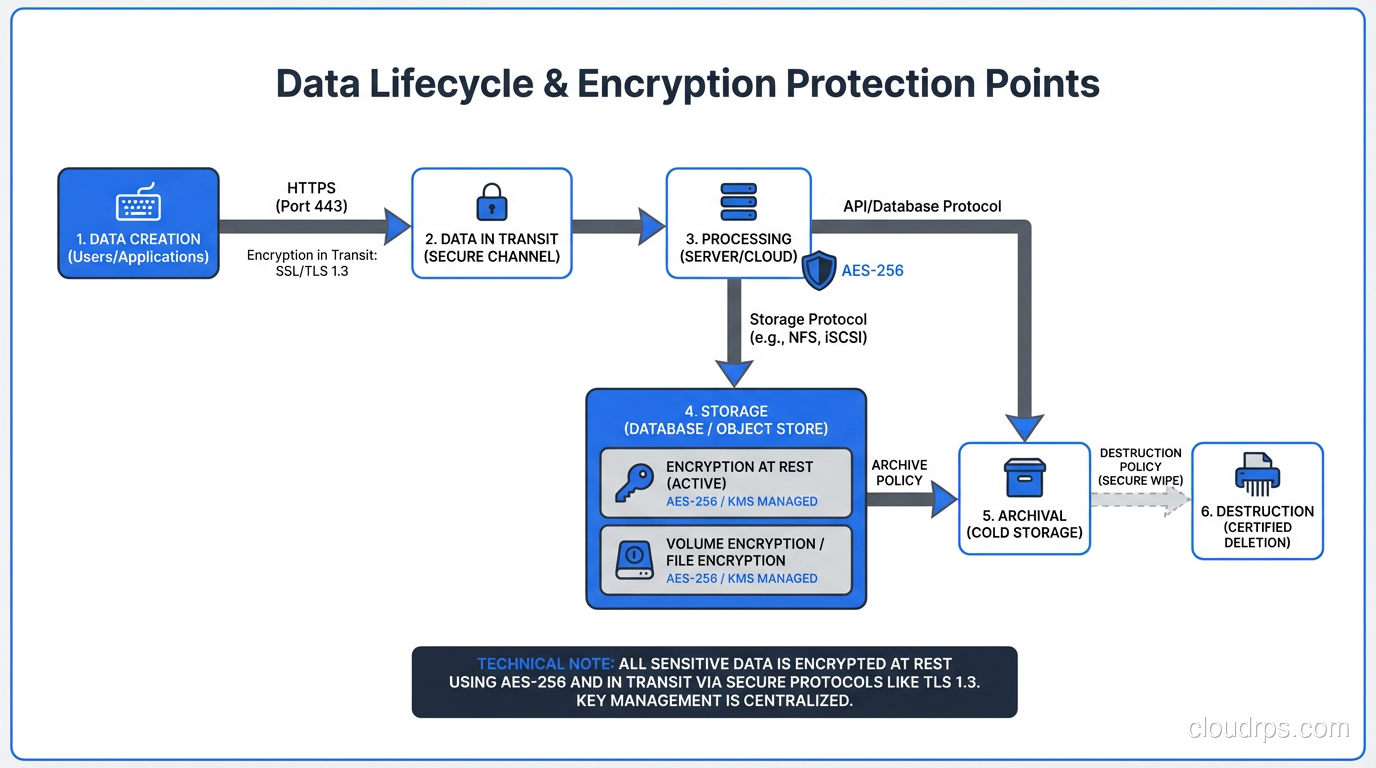
Encryption at rest takes your plaintext data and transforms it into ciphertext using an encryption algorithm and a key. Without the key, the ciphertext is computationally infeasible to reverse. The most widely used algorithm is AES-256 (Advanced Encryption Standard with a 256-bit key), which is approved by NIST and used by virtually every major cloud provider and database system.
There are multiple levels at which encryption at rest can be implemented, and each has different security and performance characteristics.
Full Disk Encryption (FDE)
The entire disk or volume is encrypted at the block level. Every block written to the disk is encrypted; every block read is decrypted. The encryption is transparent to the filesystem and the applications above it.
In cloud environments, this is the default. AWS EBS encryption, Azure Disk Encryption, and GCP Persistent Disk encryption all operate at this level. When you enable EBS encryption, every block written to the volume is encrypted with AES-256 before it reaches the storage hardware. The encryption and decryption happen in the Nitro hardware on the host, so the performance impact is negligible. I have measured less than 2% overhead in production workloads.
FDE protects against physical theft and unauthorized raw access to the storage media. It does not protect against a compromised operating system or application. If an attacker has OS-level access, they can read the mounted filesystem normally because the decryption happens transparently.
Database-Level Encryption (TDE)
Transparent Data Encryption operates at the database layer. The database engine encrypts data files, log files, and backups using a database encryption key, which is itself encrypted by a master key (often stored in a key management system).
SQL Server, Oracle, and PostgreSQL (via extensions) all support TDE. The database handles encryption and decryption transparently, so applications do not need to change.
TDE adds a layer of protection beyond FDE. Even if someone gains access to the raw database files (for example, by accessing a backup that was stored without volume-level encryption), the data is encrypted. The protection boundary is the database process itself; you need the running database with the correct key to decrypt the data.
Application-Level Encryption
The application encrypts specific fields before storing them in the database. Credit card numbers, social security numbers, health records: these sensitive fields are encrypted in the application layer, and the database stores only ciphertext.
This is the strongest form of encryption at rest because the data is protected even from database administrators and anyone with direct database access. The database engine never sees the plaintext. But it comes with significant tradeoffs: you cannot query, index, or sort on encrypted fields (unless you use specialized techniques like deterministic encryption or encrypted indexes, which have their own limitations).
I use application-level encryption for the most sensitive data categories (PII, PHI, payment card data) and rely on FDE or TDE for everything else.
Key Management: Where Teams Actually Fail
The encryption algorithm is the easy part. Key management is where I see teams fail.
The key that encrypts your data must be stored separately from the data it encrypts. If the encryption key is on the same disk as the encrypted data, encryption provides zero protection against theft of that disk. This sounds obvious, but I have seen it violated more times than I want to admit.
In cloud environments, the right approach is to use the provider’s key management service: AWS KMS, Azure Key Vault, or GCP Cloud KMS. These services store encryption keys in hardware security modules (HSMs), enforce access policies via IAM, and provide audit logging of every key usage.
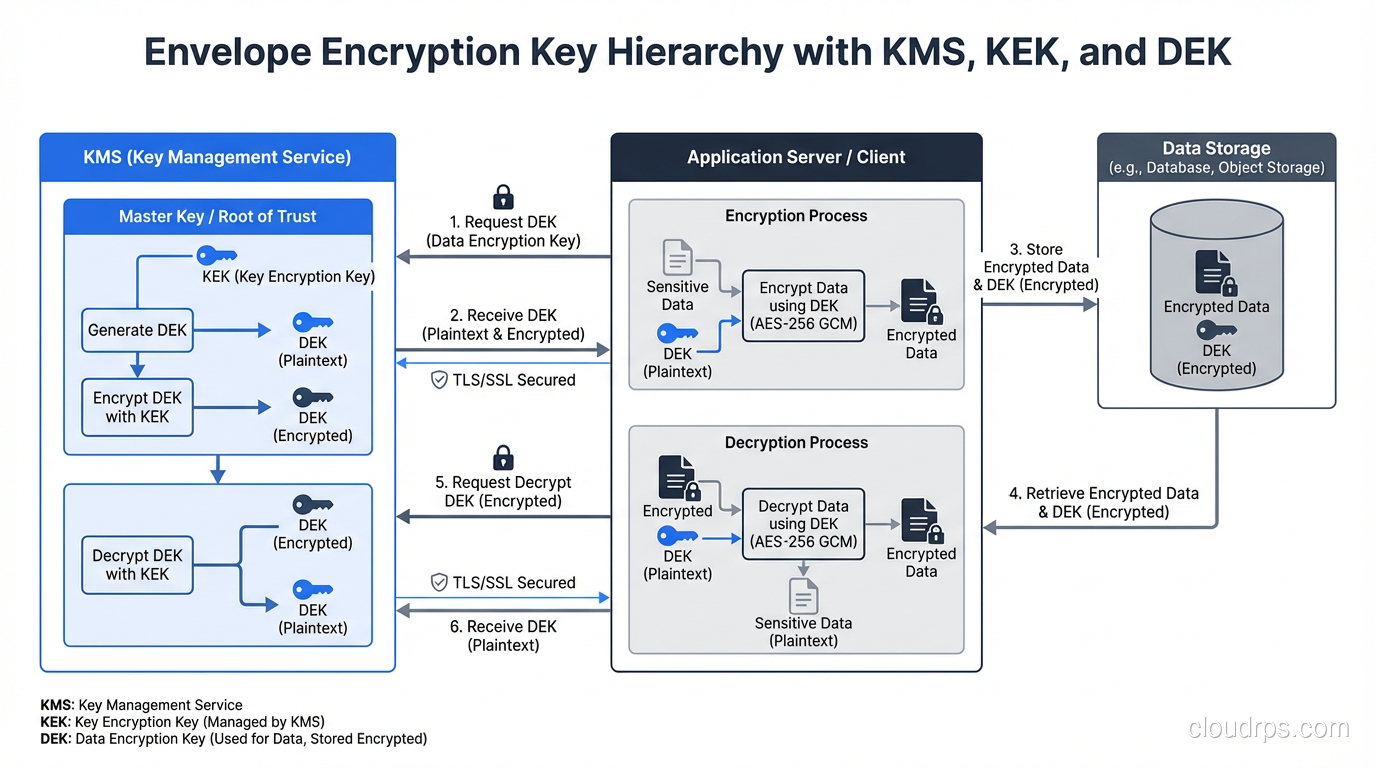
For symmetric encryption used in encryption at rest, the key hierarchy typically looks like this: a data encryption key (DEK) encrypts the actual data. A key encryption key (KEK), managed by the KMS, encrypts the DEK. The encrypted DEK is stored alongside the encrypted data. To decrypt the data, the application first calls the KMS to decrypt the DEK, then uses the decrypted DEK to decrypt the data.
This envelope encryption pattern means the KMS never sees your data, and the DEK never leaves the encryption boundary in plaintext. If someone steals your storage, they get encrypted data and an encrypted DEK, both useless without KMS access.
Encryption in Transit: TLS and Beyond
Encryption in transit primarily means TLS (Transport Layer Security). Every network connection that carries sensitive data should be encrypted with TLS. No exceptions.
For a detailed look at how TLS works at the protocol level, see my post on SSL/TLS mechanics. Here, I will focus on the practical implementation concerns.
TLS Between Users and Your Application
This is the most visible form of encryption in transit: HTTPS. Your web server presents a TLS certificate, the client verifies it, they negotiate an encryption cipher, and all subsequent communication is encrypted.
In 2025, there is no excuse for not using TLS on every public-facing endpoint. Let’s Encrypt provides free certificates. Modern web servers and load balancers handle TLS termination with negligible performance overhead. Google Search penalizes HTTP sites in rankings.
The configuration details matter. TLS 1.2 is the minimum acceptable version. TLS 1.3 is preferred because it is faster (one fewer round trip in the handshake) and more secure (it removes support for obsolete cipher suites). I disable TLS 1.0 and 1.1 on every system I manage.
Cipher suite selection also matters. Prefer ECDHE key exchange (forward secrecy), AES-GCM encryption (authenticated encryption), and SHA-256 or better for hashing. Disable anything using RC4, DES, 3DES, or MD5. These are not theoretical concerns. I have seen penetration testers exploit weak cipher configurations.
TLS Between Internal Services
This is where teams get lazy. “It is on a private network, so we do not need encryption.” I have heard this argument a hundred times, and it is wrong.
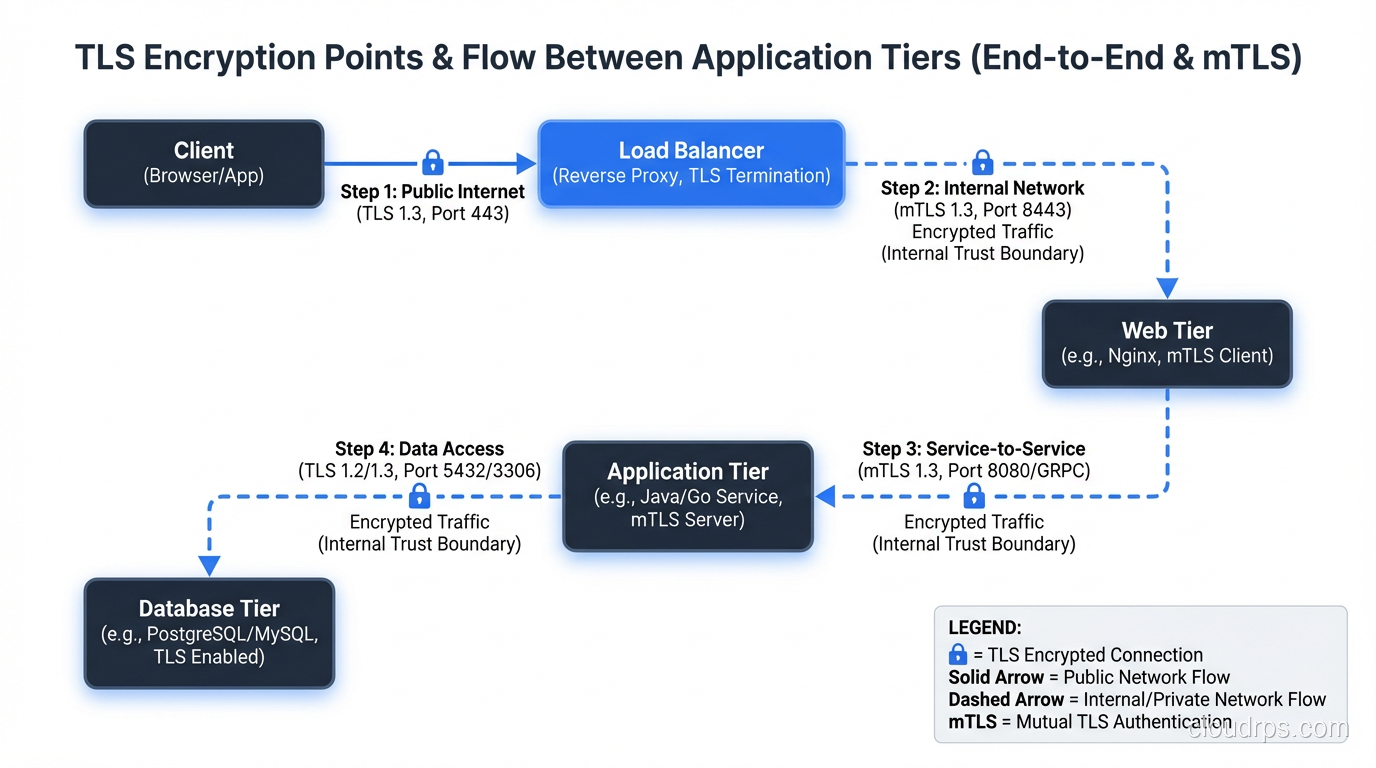
Private networks are not impenetrable. Lateral movement (where an attacker compromises one system and uses it to attack other systems on the same network) is a standard attack pattern. If your internal services communicate in plaintext, a compromised host can sniff every database query, every API call, every authentication token on the network.
This is a core principle of zero trust security: never trust the network. Encrypt everything, even internal traffic.
For service-to-service TLS, you have several options:
Mutual TLS (mTLS) requires both client and server to present certificates. This provides both encryption and authentication, so the server knows who the client is, and the client knows who the server is. Service meshes like Istio and Linkerd automate mTLS between services.
Service mesh sidecar proxies handle TLS termination and initiation automatically, so your application code does not need to manage certificates or TLS configuration.
Direct TLS configuration in your application or connection library. For database connections, PostgreSQL supports sslmode=verify-full, which requires TLS and validates the server certificate. MySQL and SQL Server have equivalent settings.
I configure every database connection with TLS, even within a VPC. The performance overhead is 1-3% for connection establishment and effectively zero for data transfer on modern hardware.
Database Wire Protocol Encryption
Database connections deserve special attention because they carry your most sensitive data.
PostgreSQL: Set ssl = on in postgresql.conf, configure server certificates, and require clients to connect with sslmode=verify-full. Reject unencrypted connections by setting hostssl entries in pg_hba.conf instead of host.
MySQL: Enable SSL with require_secure_transport = ON in the server configuration. Configure client certificates for mutual authentication.
Redis: Enable TLS with the tls-port configuration. Redis traffic is particularly important to encrypt because authentication tokens and session data often pass through Redis in plaintext.
Performance Impact: The Numbers
One of the most common objections I hear to encryption is “it will slow things down.” Let me give you actual numbers from production systems.
Encryption at rest (EBS encryption): Less than 2% throughput overhead. The encryption happens in dedicated hardware on the host, not in CPU. For all practical purposes, it is free.
Encryption at rest (TDE in PostgreSQL): 3-8% overhead for write-heavy workloads, negligible for read-heavy workloads. The overhead is primarily in encrypting WAL and data pages during writes.
Application-level encryption (AES-256-GCM): 5-15 microseconds per encrypt/decrypt operation on modern hardware with AES-NI instruction support. For a request that encrypts 5 fields, that is 75 microseconds, invisible in the context of a typical 50-millisecond API response.
TLS connection establishment: 1-3 milliseconds for a full TLS 1.3 handshake. With connection pooling (which you should be using for databases), this is a one-time cost amortized across thousands of queries.
TLS data transfer: Less than 1% CPU overhead on hardware with AES-NI support, which is every server CPU manufactured in the last decade.
The performance argument against encryption has not been valid since roughly 2012, when hardware-accelerated AES became universal. If someone on your team is arguing against encryption for performance reasons, they are working from outdated information.
Compliance Requirements You Cannot Ignore
Beyond the security argument, encryption is often a regulatory requirement.
PCI DSS requires encryption of cardholder data at rest and in transit. If you process, store, or transmit credit card data, encryption is mandatory.
HIPAA requires encryption of protected health information at rest and in transit. The regulation technically says encryption is “addressable” rather than “required,” but in practice, not encrypting PHI is almost impossible to justify.
GDPR does not mandate specific encryption requirements, but encryption is explicitly listed as an appropriate technical measure for protecting personal data. If you experience a breach and the data was encrypted, the notification requirements are significantly less onerous.
SOC 2 Type II audits will examine your encryption practices for both data at rest and in transit. Inadequate encryption controls will result in audit findings.
My advice: implement encryption at rest and in transit for all production systems regardless of current compliance requirements. Regulatory requirements expand over time, and retrofitting encryption into a system that was not designed for it is far more expensive than building it in from the start.
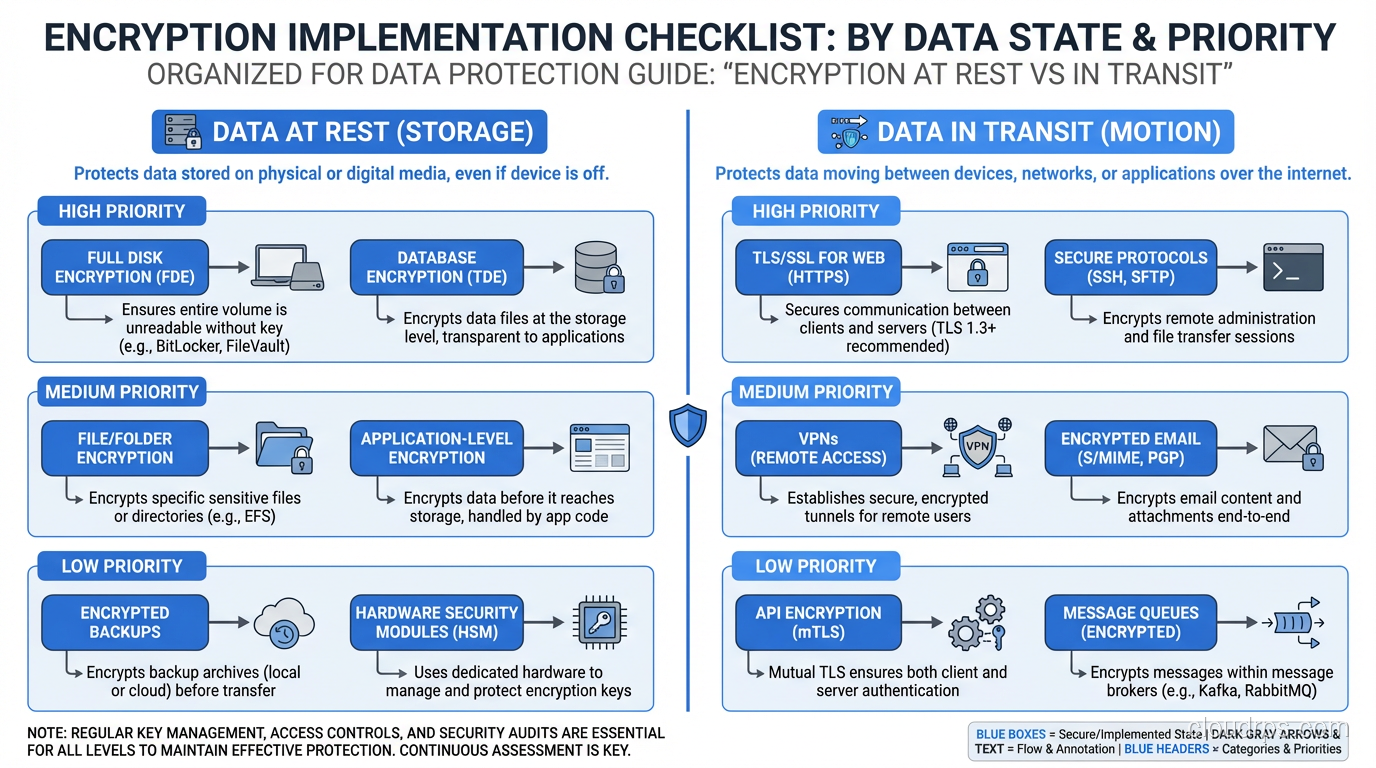
Implementation Checklist
Here is the checklist I use when setting up a new production system.
Encryption at rest:
- Enable volume/disk encryption (EBS encryption, Azure Disk Encryption, etc.)
- Enable database-level encryption (TDE) for the database engine
- Implement application-level encryption for the most sensitive fields (PII, PHI, payment data)
- Configure KMS with appropriate key rotation policies (annual rotation at minimum)
- Verify that backups inherit encryption from the source
- Verify that snapshots are encrypted
- Test that encrypted data is actually unreadable without keys (verify, do not assume)
Encryption in transit:
- Enable TLS on all public-facing endpoints with TLS 1.2+ and strong cipher suites
- Enable TLS on all database connections with certificate verification
- Enable TLS on all internal service-to-service communication
- Disable unencrypted connection options (reject plaintext connections)
- Implement certificate rotation automation (do not let certificates expire in production)
- Monitor for TLS configuration drift and certificate expiration
Key management:
- Store encryption keys in a KMS, never on the same storage as the encrypted data
- Implement key rotation policies
- Maintain break-glass procedures for emergency key access
- Audit key usage logs regularly
- Test key recovery procedures (what happens if the KMS is unavailable?)
The Mistakes I Have Seen
Let me close with the real-world failures that shaped my thinking on encryption.
The unencrypted backup. A team had encryption at rest enabled on their production database but stored database backups in an unencrypted S3 bucket. The backup contained the same sensitive data as the production database, completely unencrypted. Always verify that your backup and recovery pipeline preserves encryption end to end.
The expired certificate. A production service went down at 2 AM because the internal TLS certificate expired and the service rejected connections. Certificate monitoring and automated rotation are not optional. They are as critical as the encryption itself.
The key stored with the data. A team encrypted their database with a key stored in a configuration file on the same server. When the server was compromised, the attacker had both the encrypted data and the key. Envelope encryption with KMS would have prevented this.
The plaintext connection string. Database credentials passed in plaintext over HTTP between an application and a configuration service. An attacker on the network captured the credentials and accessed the database directly. Encrypt everything in transit, including metadata and configuration data.
The compliance surprise. A startup grew into a market segment that required SOC 2 compliance. Their infrastructure had no encryption at rest. The retrofit took three months and required downtime windows for database migration. Building with encryption from day one would have cost them an afternoon of configuration.
Encryption is not hard to implement correctly. It is hard to retrofit after the fact. It is impossibly expensive after a breach. Do it now, do it everywhere, and do it right. The data you are protecting deserves nothing less.
Get Cloud Architecture Insights
Practical deep dives on infrastructure, security, and scaling. No spam, no fluff.
By subscribing, you agree to receive emails. Unsubscribe anytime.