
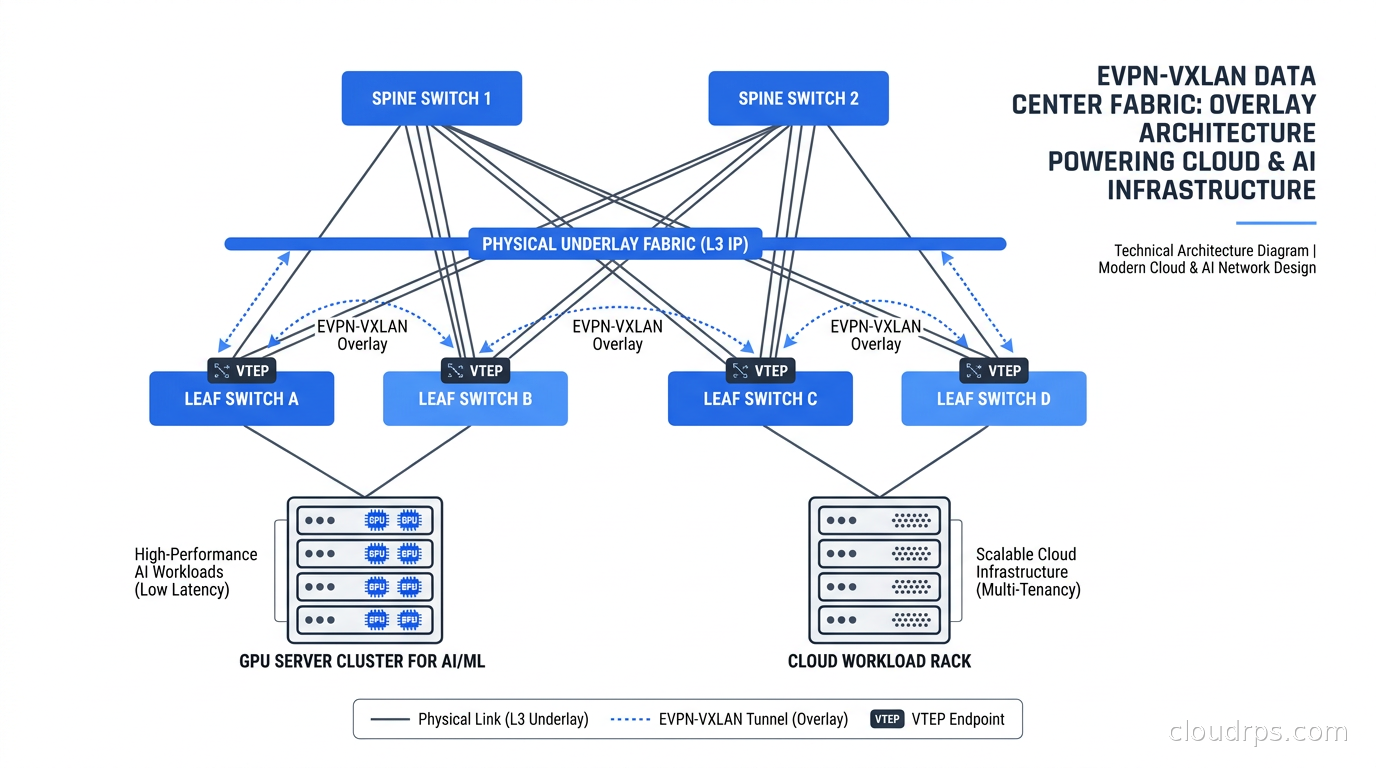
In twenty years of building cloud infrastructure, I have watched the data center networking stack get reinvented more than once. We went from STP-based Layer 2 fabrics that collapsed under their own flooding weight, to proprietary MPLS solutions that required vendor lock-in and a small army of CCIE consultants, to the current era of EVPN-VXLAN fabrics that finally give you scalable Layer 2 and Layer 3 services over a simple IP underlay. I have deployed this stack at financial services firms, at hyperscaler-adjacent infrastructure providers, and now I see it everywhere in the GPU cluster designs that power AI workloads.
If you are building a private cloud, a bare-metal AI training cluster, or a multi-tenant colocation environment and you have not gone deep on EVPN-VXLAN, this article is for you. I am going to explain the mechanics clearly, tell you where it actually breaks in production, and give you enough context to make intelligent decisions about your fabric design.
Why Overlay Networks Became Necessary
The fundamental tension in data center networking is that applications want Layer 2 adjacency (because many applications assume they can broadcast, because VMs live-migrate across hosts, because storage protocols expect flat addressing) but physical scale demands Layer 3 routing. You cannot run a flat Layer 2 network across thousands of servers without drowning in broadcast traffic and STP reconvergence events.
The original solution was proprietary: Cisco FabricPath, Juniper QFabric, Brocade VCS. These worked, but they created vendor dependencies that cost real money at renewal time and boxed you into a single vendor for your entire fabric. The industry needed a standards-based answer.
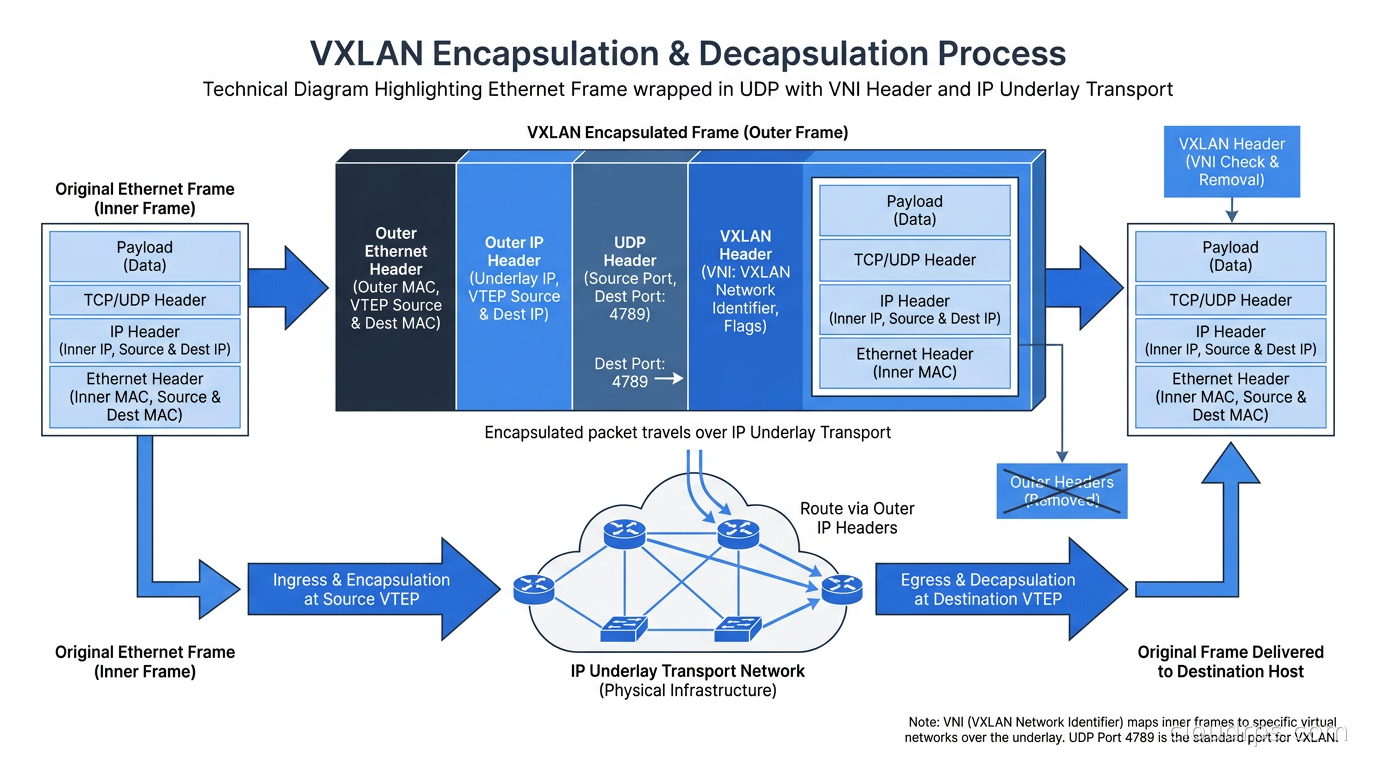
VXLAN (Virtual Extensible LAN), defined in RFC 7348, solves the data plane problem by encapsulating Ethernet frames inside UDP packets. Each encapsulated segment carries a 24-bit Virtual Network Identifier (VNI), giving you up to 16 million logical segments over a shared IP underlay. The encapsulation adds approximately 50 bytes of overhead per frame, which matters for jumbo frame planning but is otherwise manageable on modern links.
EVPN (Ethernet VPN), defined in RFC 7432, solves the control plane problem. Instead of flooding broadcasts to learn MAC addresses as traditional Ethernet does, EVPN distributes MAC/IP binding information using multiprotocol BGP (MP-BGP). RFC 8365 specifically governs using EVPN as the control plane for VXLAN data planes. Together, these two RFCs give you a standards-based overlay that any vendor supporting the specifications can implement.
The Underlay: Building the IP Fabric
Before you can run EVPN-VXLAN, you need a functioning IP underlay. This is a pure Layer 3 network where every switch has unique routable addresses on its links and every host has reachability to every VTEP (VXLAN Tunnel Endpoint). The VTEP is the switch port or software function that performs VXLAN encapsulation and decapsulation.
The standard underlay design is a leaf-spine (Clos) architecture. Leaf switches connect to servers. Spine switches connect only to leaf switches. Every leaf connects to every spine, giving you equal-cost multipath (ECMP) across all uplinks. This topology scales horizontally: add more spines to increase east-west bandwidth, add more leaves to add server capacity.
For the underlay routing protocol, you have two main choices. The traditional approach uses eBGP across each leaf-spine link, with each switch in its own autonomous system. Cisco’s design guides describe this model: with eBGP, the spines act as route servers exchanging routes between leaves, rather than as route reflectors in an iBGP design. The eBGP model has excellent failure isolation because each link failure affects only adjacent peers. The alternative is OSPF or IS-IS as the underlay IGP. Either works; eBGP has become more common in large-scale deployments because the operational model is consistent with the EVPN control plane above it.
For the link addressing, BGP unnumbered (using IPv6 link-local addresses on the links rather than explicit IPv4 point-to-point subnets) reduces IP address consumption and simplifies configuration. IP Infusion’s documentation describes VXLAN EVPN with BGP unnumbered and extended next-hop encoding as a recommended pattern for leaf-spine links.
The Overlay: EVPN Control Plane
Once your IP underlay is up, you overlay EVPN on top of it. Leaf switches become VTEPs and participate in an iBGP EVPN session, typically using the spines as route reflectors. In the eBGP underlay model, the spines handle both jobs: routing the underlay and reflecting EVPN routes.
EVPN defines several route types, each carrying different information. The two most commonly relevant in production are:
Type 2 routes carry MAC/IP advertisements. When a host connects to a leaf switch and sends a GARP or its MAC becomes known, the leaf advertises a Type 2 NLRI containing the MAC address, optionally the host IP, and the VTEP IP for the originating leaf. All other VTEPs receive this advertisement and program their forwarding tables directly. This eliminates most broadcast flooding: when a VM on leaf A wants to reach a VM on leaf B, leaf A knows from its EVPN-learned table exactly which VTEP to encapsulate the packet to.
Type 5 routes carry IP prefix information for inter-subnet routing. When a VTEP has a subnet (say, 10.10.20.0/24) and needs to advertise it for external routing, it originates a Type 5 route. This is what handles routed traffic between segments that do not share a Layer 2 domain.
Other route types handle multihoming (Type 1 Ethernet Auto-Discovery, Type 4 Ethernet Segment routes) and VTEP discovery (Type 3 Inclusive Multicast Ethernet Tag routes). You will encounter all of these in production but the core forwarding behavior depends primarily on Types 2 and 5.
Anycast Gateway: Distributed Default Routing
One of the most operationally significant features of EVPN is the anycast gateway (sometimes called a distributed IP gateway). In a traditional VLAN-based architecture, each VLAN has a single default gateway, typically a Layer 3 switch or firewall. If a VM moves from one physical host to another, it retains its IP address but now the traffic has to route back to the original gateway before forwarding, causing suboptimal paths.
With EVPN anycast gateway, every leaf switch in the fabric is configured with the same IP address and the same MAC address for a given subnet. When a VM on any leaf sends its default gateway traffic, its local leaf handles the routing. No traffic tromboning, no hairpin through a central gateway, no failure domain concentrated in a single device.
I have seen this pattern completely change the operational model for vMotion-heavy VMware environments. Before anycast gateway, live migrations caused temporary performance degradation because traffic still routed to the old gateway location. After EVPN anycast gateway, migrations are transparent from a networking perspective.
Active-Active Multihoming with ESI-LAG
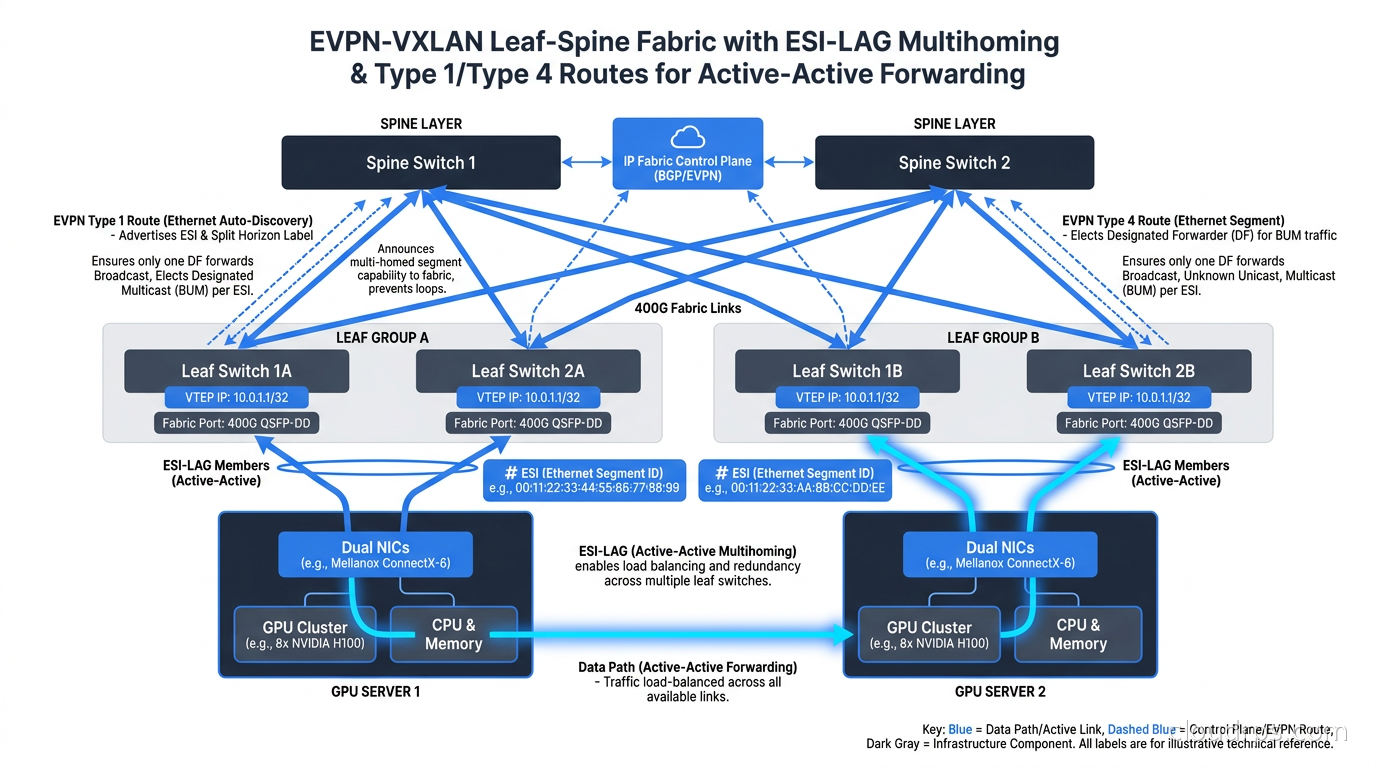
For servers that require redundant uplinks, EVPN provides the Ethernet Segment Identifier (ESI) mechanism defined in RFC 7432. An Ethernet Segment is a set of links connecting a multi-homed device (a server, a storage array, another switch) to multiple VTEPs. Both VTEPs advertise the same ESI and coordinate forwarding through Type 1 and Type 4 route exchanges.
The result is active-active multihoming without a dedicated peer link between the leaf switches (unlike traditional MLAG implementations that require a peer-link cable). Each leaf can forward traffic to and from the connected server simultaneously. When one leaf fails, the other continues handling traffic for that server without any reconvergence delay beyond the BGP session failure detection.
For GPU servers in AI clusters, this is valuable. High-throughput training workloads saturate NICs, and active-active ESI-LAG across two leaf switches doubles the available bandwidth for each server while maintaining redundancy. Cisco’s AI/ML fabric design guides for Nexus 9000 switches specifically call out ESI-LAG as a recommended pattern for dense GPU server connectivity.
Multi-Tenancy with L3 VRFs
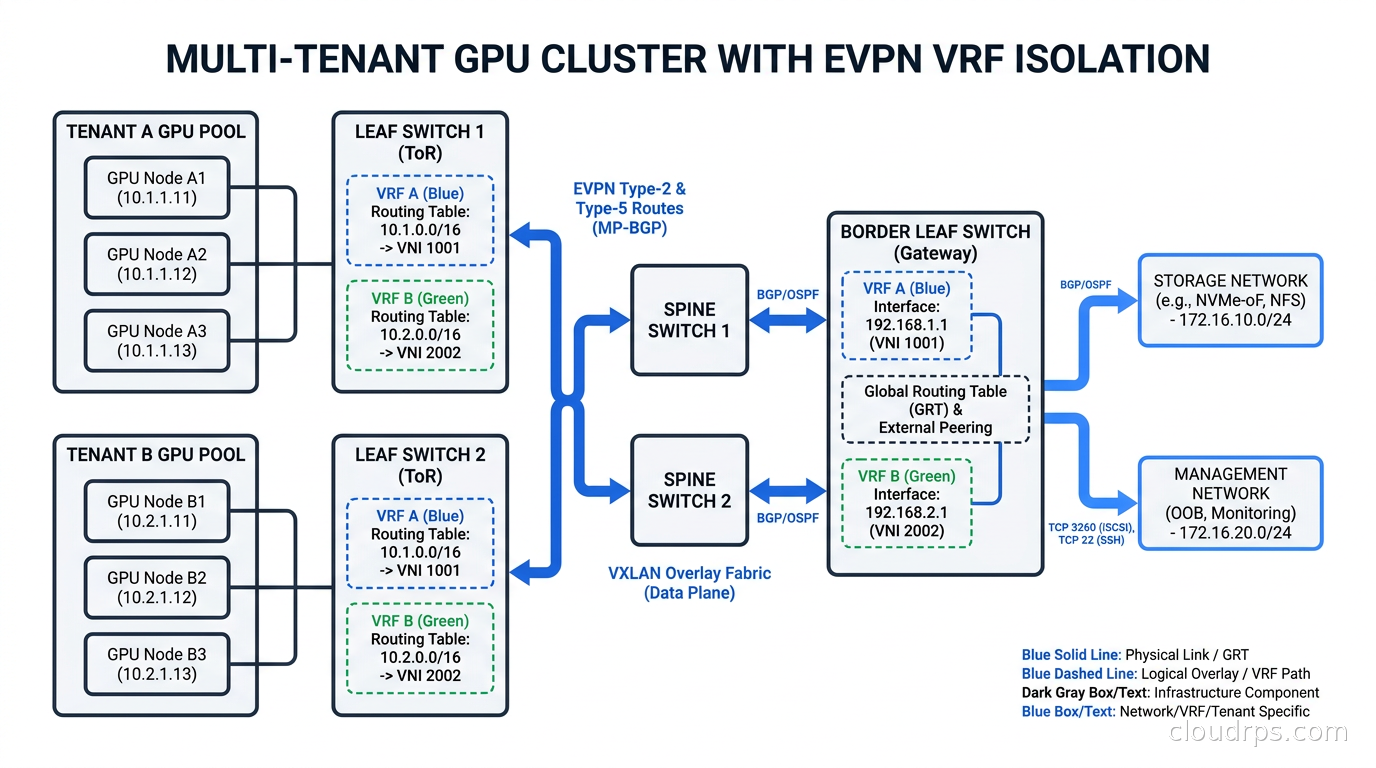
For organizations running multiple tenants or multiple isolated application environments in the same physical fabric, EVPN-VXLAN provides clean L3 segmentation through VRFs (Virtual Routing and Forwarding instances). Each tenant gets its own routing table on every leaf switch, with no route leakage between tenants unless explicitly configured.
Juniper’s EVPN documentation describes two common L3 segmentation approaches: MAC-VRF, which handles Layer 2 isolation on a per-VLAN basis, and IP-VRF with Type 5 routes, which handles Layer 3 isolation for routed prefixes. In multi-tenant data centers, you typically use both: MAC-VRF for the tenant’s internal VLANs and IP-VRF for the inter-segment routing within that tenant’s address space.
The Layer 3 VRF model maps naturally to how cloud VPCs work. If you are building private cloud infrastructure or colocation with network isolation guarantees, EVPN VRFs give you the same logical separation that hyperscalers provide in their public cloud VPC implementations. If you have looked at how AWS Transit Gateway handles VRF-like routing between VPCs, the underlying mechanism in many private cloud implementations is exactly this.
Multi-Site EVPN: Connecting Fabrics
A single data center EVPN fabric is operationally clean. Problems start when you need to connect two fabrics together, either for disaster recovery, for AI training workloads that span sites, or for multi-site active-active operations.
The recommended pattern for multi-site EVPN is not to stretch the same iBGP domain across sites, which creates a brittle blast radius and floods MAC/IP advertisements everywhere. Instead, you deploy border gateways at each site that terminate the local EVPN fabric and re-originate Type 2 and Type 5 routes toward the other site. Only the MAC/IP bindings for hosts that need to be reachable remotely are advertised across the inter-site link.
This model keeps each site’s failure domain isolated. A BGP session flap within Site A does not trigger reconvergence in Site B. Inter-site traffic goes over a well-defined border point where you can apply policy, rate-limiting, and monitoring.
For AI training workloads that span sites, the latency of the inter-site link dominates anyway. No amount of fabric elegance compensates for a 20-millisecond WAN link in a synchronous collective communication pattern. For those cases, you want all your GPUs in the same site on the same fabric. The multi-site EVPN model is better suited to control plane separation and disaster recovery failover than to synchronized distributed training.
Open Networking: SONiC and FRRouting
One of the most important shifts in data center networking over the past decade is the availability of production-grade open-source software for the entire EVPN-VXLAN stack.
SONiC (Software for Open Networking in the Cloud) is an open-source network operating system originally developed by Microsoft and now a Linux Foundation project. It runs in production at Microsoft Azure and Alibaba, as confirmed by multiple 2026 sources, and adoption has expanded well beyond hyperscalers into enterprise and carrier deployments. SONiC supports EVPN-VXLAN natively, with FRRouting (FRR) serving as the BGP/EVPN control plane.
FRR is an open-source routing suite that implements BGP, OSPF, IS-IS, and the EVPN extensions. Cisco has contributed EVPN multihoming with ESI-LAG to FRR, though Cisco describes this improvement as making the stack “comparable to proprietary solutions,” which you should treat as a vendor claim rather than an independent benchmark.
The combination of commodity merchant silicon (Broadcom Tomahawk, Trident, Intel Tofino), SONiC, and FRR gives you a complete fabric stack without mandatory vendor subscription contracts. This is why the GPU cluster space has seen significant interest: when you are building a cluster with thousands of ports, the per-port software cost on proprietary NOS licenses adds up to real money.
The caveats matter, though. SONiC has a steeper operational learning curve than Cisco NX-OS or Junos. Tooling for troubleshooting is less mature. Multi-vendor EVPN interoperability still has rough edges. An April 2026 test by ipSpace found that FRRouting rejected EVPN routes from Arista EOS over a PMSI tunnel attribute encoding mismatch, even with FRR 10.6 advertising IPv6 VTEP support. If you are building a multi-vendor EVPN fabric, plan explicit interoperability testing between every pair of vendors before you commit to the design.
Telemetry and Observability for EVPN Fabrics
Operating an EVPN-VXLAN fabric requires different observability tooling than a traditional network. The state you care about includes VTEP reachability, EVPN route counts per VNI, BGP session health, MAC table utilization per leaf, and VXLAN packet counters.
Streaming telemetry via gNMI (gRPC Network Management Interface) and gRPC has become the standard for high-frequency data collection from modern switches. Most enterprise-grade switches running SONiC or a proprietary NOS can stream counters at sub-minute intervals to a time-series database. I use Prometheus and Grafana for this, feeding data from a gNMI collector into the same observability stack we use for the compute layer.
For EVPN-specific debugging, the critical commands are the show bgp l2vpn evpn family: checking route counts, verifying VTEP discovery via Type 3 routes, and confirming MAC/IP bindings via Type 2 routes. When a VM cannot reach another VM across the fabric, the debugging workflow is: verify the BGP session is up, verify the Type 2 route exists for the target MAC on the originating leaf, verify the route has been received and programmed on the querying leaf, and then verify the VXLAN encapsulation is happening in the dataplane.
The eBPF-based observability tools that have become standard for Kubernetes networking complement fabric telemetry but do not replace it. eBPF gives you visibility inside the host network stack. Fabric telemetry gives you visibility into what happens between the server NIC and the destination VTEP. You need both to debug packet loss in a complex fabric.
EVPN-VXLAN for AI GPU Clusters
The AI infrastructure build-out has made EVPN-VXLAN relevant to a much wider audience than traditional data center architects. GPU cluster networking for synchronous training typically uses InfiniBand or RoCE (RDMA over Converged Ethernet) for the data plane, with separate Ethernet management and storage fabrics. The Ethernet fabric is where EVPN-VXLAN fits.
Cisco’s AI/ML data center fabric design guide for Nexus 9000 switches specifically addresses GPU cluster topologies. The guide covers rail-optimized topology mapping, network segmentation for multi-tenant GPUaaS, and telemetry integration. Juniper’s documentation covers EVPN-VXLAN for AI/ML with MAC-VRF and Type 5 IP-VRF designs for isolating tenant GPU pools.
The multi-tenancy model is particularly important for organizations offering GPU-as-a-Service. You want tenant A’s training job to have zero network-layer visibility into tenant B’s job. EVPN VRFs provide that isolation cleanly. You can have fifty tenants on the same physical fabric with cryptographically isolated forwarding tables.
SmartNICs and DPUs like NVIDIA BlueField and AWS Nitro increasingly offload VXLAN encapsulation from the CPU, which matters for line-rate GPU server connectivity. When you pair a 400G SmartNIC with EVPN-controlled VXLAN, you get hardware-offloaded overlay networking with a standards-based control plane. That is a significant improvement over software VTEP implementations that consume server CPU cycles for every encapsulated packet.
War Story: When ECMP Hash Killed Training Performance
I want to share a failure mode I have encountered twice in GPU cluster deployments with EVPN-VXLAN fabrics.
The training job was running but performance was significantly below what the hardware should deliver. Utilization telemetry showed some uplinks near saturation while others sat nearly idle, even though ECMP should distribute flows equally. The fabric was an eBGP leaf-spine with VXLAN EVPN.
The problem was ECMP hashing. VXLAN encapsulates Ethernet frames inside UDP. The outer UDP destination port is fixed at 4789 for VXLAN traffic. If the fabric’s ECMP hash algorithm does not look inside the VXLAN header at the inner flow’s source/destination ports and IP addresses, all VXLAN flows from a given VTEP pair hash to the same uplink. Training collectives between the same set of GPUs would all funnel onto one spine link, leaving the others empty.
The fix was to enable inner header hashing on the spine switches, which forces the ECMP algorithm to examine the inner Ethernet frame’s headers when computing the hash. Every switch vendor calls this something different: “load-balancing inner-header” on Cisco NX-OS, various gNMI config paths in SONiC. Verify that your hardware and software version actually support inner header hashing for VXLAN before you commit to a fabric design for GPU workloads.
This is the kind of operational detail that does not appear in vendor architecture diagrams but will absolutely hurt you in production. Document it, test it during commissioning, and verify it with flow distribution telemetry once the cluster is running.
Choosing Between EVPN-VXLAN and Pure L3 eBGP Clos
EVPN-VXLAN is not always the right answer. For workloads that are natively IP-routable and do not require Layer 2 adjacency, a pure Layer 3 eBGP Clos fabric with no overlay can be simpler to operate. Kubernetes deployments using Cilium with BGP or Calico often use pure L3 underlay designs where each node advertises its pod CIDR directly via BGP, with no VXLAN encapsulation at the fabric layer.
The overlay adds complexity: VTEP configuration, VNI management, Type 2/5 route troubleshooting, inner header hashing, MTU planning for the 50-byte overhead. If you do not need Layer 2 stretching, VM live migration, or multi-tenant VRF isolation, you can avoid that complexity entirely.
Where EVPN-VXLAN earns its keep:
- Multi-tenant environments where different customers need isolated L2 and L3 domains on shared hardware
- Virtualization-heavy environments with live migration requirements
- Private cloud infrastructure that needs to mimic the VPC model of public cloud
- GPUaaS providers needing strong tenant isolation at the network layer
Where pure L3 eBGP is often cleaner:
- Kubernetes-only workloads with a CNI that handles overlay at the pod level
- Environments where all workloads are containerized and IP-routable
- Organizations that want to minimize the operational surface area of their fabric
Understanding both models, and when to use which, is what separates a thoughtful fabric design from an architecture that was chosen because a vendor demo made it look simple.
Getting Started with EVPN-VXLAN
If you want hands-on experience before deploying this in production, the open-source tooling makes it accessible. Containerlab and FRRouting let you build a complete spine-leaf EVPN fabric on a laptop. The NANOG presentation from NANOG 94 on SONiC EVPN-VXLAN integration is worth reading for operational perspective from practitioners outside the vendor world.
For network policy enforcement in environments that combine Kubernetes with a physical EVPN-VXLAN fabric, the interaction between the CNI overlay and the physical overlay needs explicit design attention. Nested overlays (VXLAN inside VXLAN) work but add debugging complexity and MTU requirements that you need to plan for explicitly.
The standards are stable. The implementations are mature. The operational patterns are established. EVPN-VXLAN is no longer experimental networking; it is the default choice for new data center fabric deployments that need to support diverse workloads across multiple tenants. Understanding it at the protocol level, not just through a vendor wizard, is one of the most durable skills you can add to your infrastructure toolkit.
Updated October 9, 2026: Article published with verified technical claims from Cisco design guides (March 2026), Juniper documentation, ipSpace April 2026 FRR/Arista interop test, and Linux Foundation SONiC sources.
Get Cloud Architecture Insights
Practical deep dives on infrastructure, security, and scaling. No spam, no fluff.
By subscribing, you agree to receive emails. Unsubscribe anytime.