
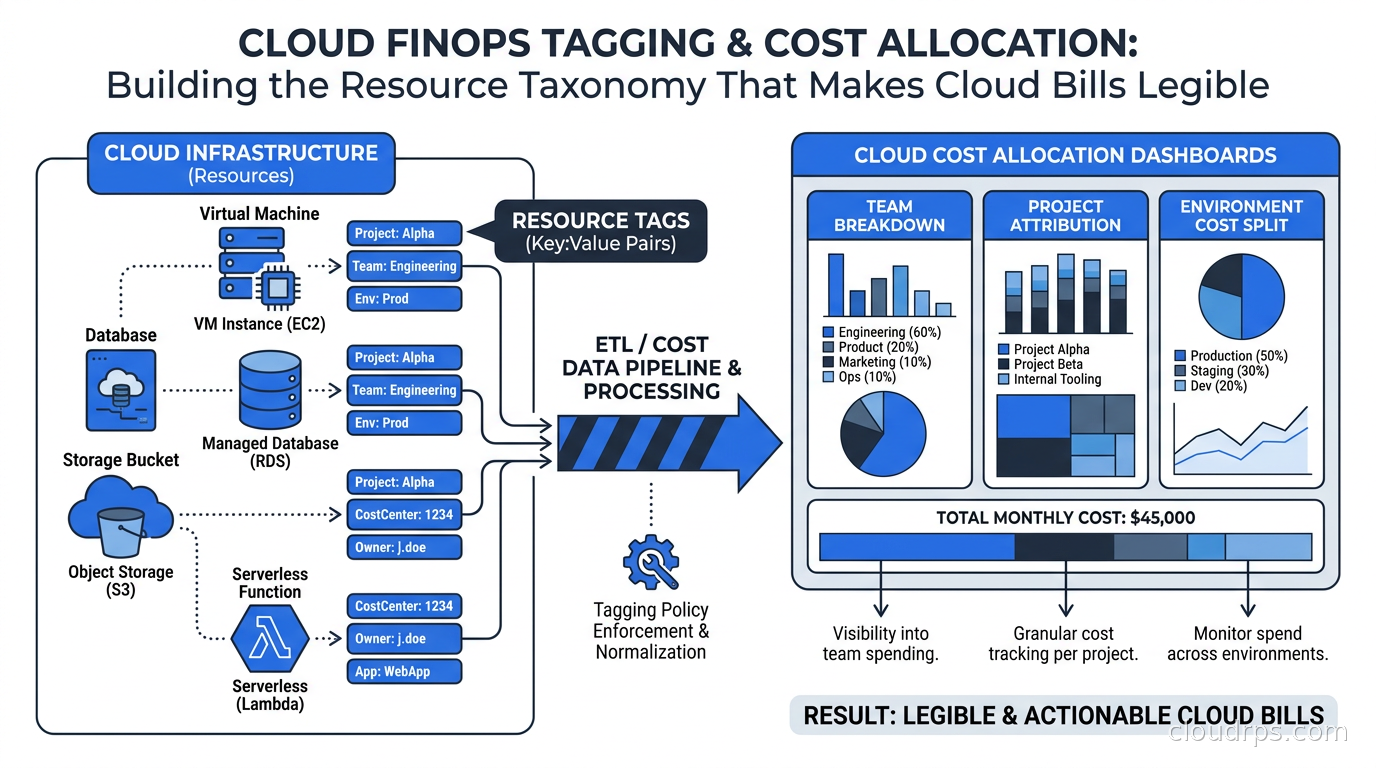
I’ve been doing this for twenty years, and I can tell you exactly when a cloud organization has turned a corner: it’s the day someone in engineering can look at their team’s cloud bill without calling the finance team and asking for a spreadsheet. Before that moment, you have spending. After it, you have accountability.
The gap between those two states is almost always a tagging problem. Not a tool problem, not a governance problem, not a culture problem at its root, though those tend to follow. A tagging problem. Your resources don’t know whose they are, what they’re for, or which environment they live in. So your billing data is a fog, and the engineers who generated the bill have no line of sight to what they spent.
A pattern I’ve seen repeatedly in my own work: a substantial share of cloud spend in a typical enterprise carries insufficient tags to be attributed to an owner. On a million-dollar-a-month bill, that can mean a meaningful chunk vanishing into shared pools nobody claims. That’s not a small inefficiency. That’s a full team’s salary sitting in unattributed infrastructure.
This piece is about fixing that, concretely. We’ll cover how to build a tagging taxonomy that actually sticks, how to enforce it without turning every developer into a governance compliance officer, how to handle the genuinely hard problems like shared resources and multi-cloud environments, and when to use showback versus chargeback. I’ll share what I’ve seen work and what I’ve watched blow up, because there are real ways to get this wrong.
Why Tagging Is the Load-Bearing Wall of FinOps
Before getting into mechanics, I want to be direct about what tagging actually is in a FinOps context. It is not a nice-to-have governance decoration. It is not something you bolt on after your infrastructure is running. Tagging is the foundational metadata layer that makes every other FinOps practice possible.
Want to do cost allocation by product team? You need tags. Want to build a showback report that product managers believe in? You need tags. Want to identify which environment is burning compute at 3am for no reason? You need tags. Want to use the FOCUS billing standard to normalize multi-cloud data into comparable cost rows? You need the same tags applied consistently across all three clouds so the normalization is meaningful.
The FinOps Foundation’s Cloud Cost Allocation Working Group puts it plainly: allocation depends on tags, and tags cannot be applied retroactively in any way that’s reliable. A compute instance that ran for six months untagged is six months of cost you cannot attribute with confidence. You can guess based on account structure or VPC placement, but you’re guessing.
If you want to understand the broader FinOps practice context, our FinOps explainer covers the frameworks and organizational models. But for this article, assume you’ve bought into FinOps and you need to make the tagging layer work.
Building Your Tagging Taxonomy
The first mistake organizations make is trying to tag everything immediately. They look at what AWS or GCP suggests, they read a few blog posts, they design a system with fifteen tag keys and complex conditional requirements, and then they launch it at 2,000 engineers who promptly ignore it because nobody explained why any of it matters.
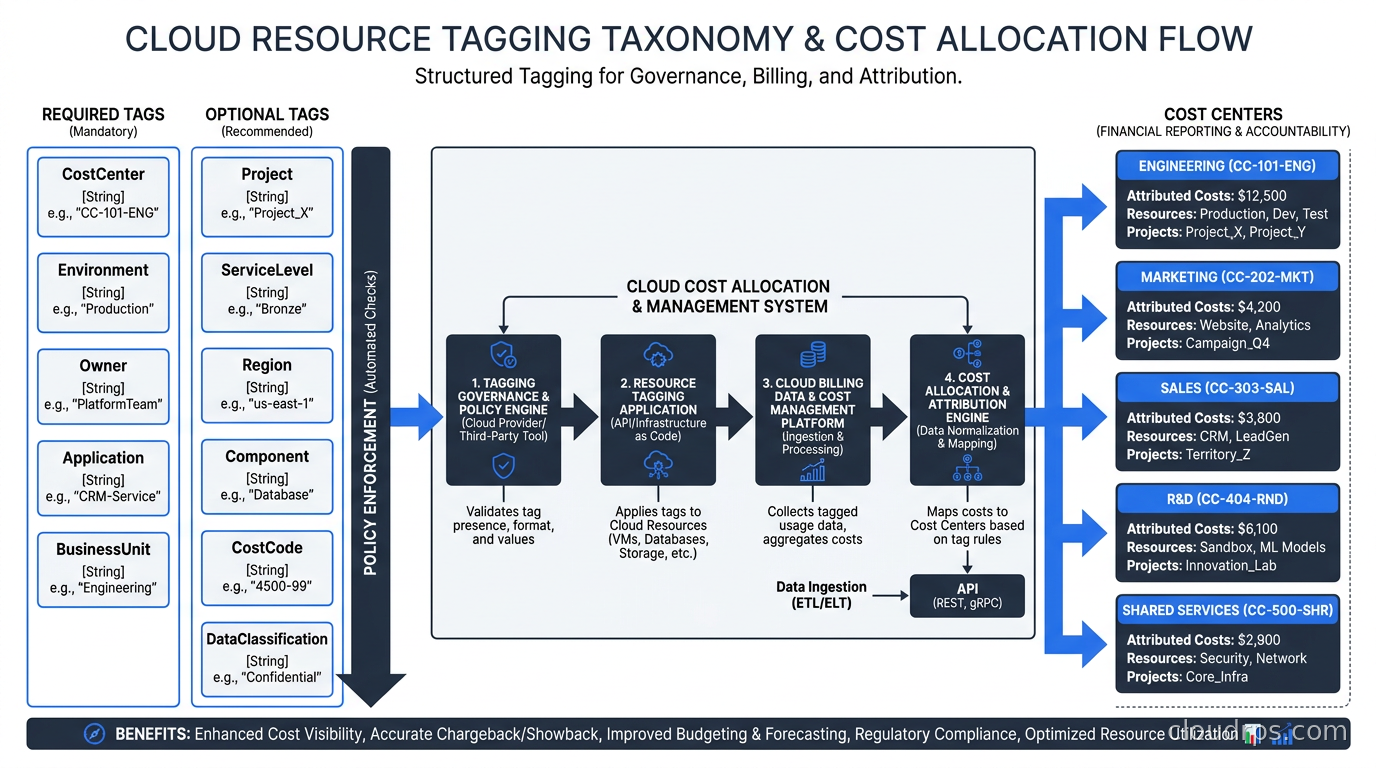
Start with five tag keys. Get those right first.
1. Cost Center (or Team or Owner)
This is the most important tag. It answers: who owns the spend? The value should map to a real financial entity that can be charged. For most organizations this is a team name, a product line, or a business unit code. Pick one convention and stick with it. The mistake I’ve seen repeatedly is having “team-payments” on AWS and “payments-team” on GCP and “Payments” on Azure. When you try to normalize that in your cost allocation tool, you’re writing string matching logic at 11pm instead of sleeping.
2. Environment
Production, staging, development, testing. This one seems obvious but it’s frequently missing or inconsistent. When it’s present, you can do immediately useful things: find all non-production resources that are running 24/7 and shut them down on weekends. At one financial services client, the first week after we got consistent environment tags, we identified tens of thousands of dollars a month of development infrastructure running around the clock because nobody had ever had a way to see it as a category.
3. Application or Service
One level more specific than team. The payment team might run five distinct services: payment-gateway, fraud-detection, reconciliation, settlements-api, and reporting. Without service-level tags, the team gets one number that tells them they spent $200k this month but doesn’t tell them which service is the anomaly.
4. Project or Initiative
This handles the temporal dimension. A team might run permanent services and also work on quarterly projects. Project tags let you attribute cost to specific initiatives, which is critical for capitalized software development costs under GAAP accounting, and increasingly important as organizations try to build unit economics around engineering investments.
5. Managed-By or Provisioned-By
This tag identifies whether a resource was created by Terraform, Pulumi, a CI/CD pipeline, or manually in the console. It sounds administrative but it has two practical uses: first, you can find all manually-created resources that are outside your infrastructure as code governance. Second, it feeds your drift detection tooling. Resources that weren’t provisioned by your IaC pipeline are resources that might not be in your state files, which means they won’t get cleaned up when they should be.
These five are your required tags. Make everything else optional to start. You can add optional tags for things like compliance scope, data classification, or project milestone, but optional means you’re not blocking deployments for missing them and not including them in your primary cost allocation model.
Enforcement: How to Make Tags Mandatory Without Making Everyone Hate You
Getting the taxonomy right is maybe 20% of the problem. Enforcement is where most tagging programs fail.
The naive approach is documentation. You write a tagging standard document, you send it to all the engineering teams, and you tell them to follow it. This works for about three weeks. New engineers join and don’t read the doc. Teams are under deadline pressure and shortcut the tagging. Someone copies a Terraform module from Stack Overflow that doesn’t include your required tags. Six months later you’re back where you started.
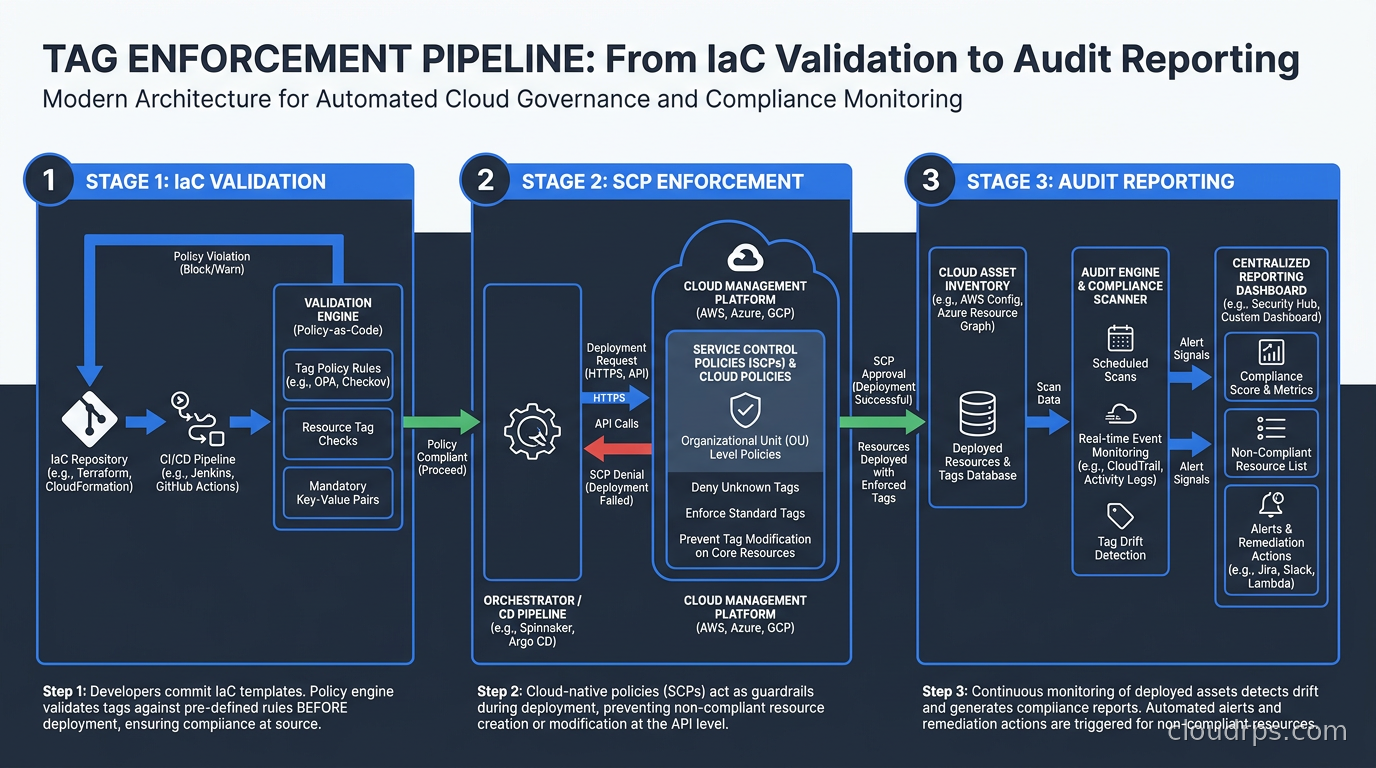
The effective approach is enforcement at the point of resource creation, built into the tooling engineers already use.
Service Control Policies (AWS)
On AWS, Service Control Policies attached to your AWS Organizations structure can deny resource creation requests that are missing required tags. Here’s the shape of a policy that blocks EC2 instance launches without a cost-center tag:
{
  "Version": "2012-10-17",
  "Statement": [
    {
      "Sid": "DenyWithoutCostCenter",
      "Effect": "Deny",
      "Action": ["ec2:RunInstances"],
      "Resource": ["arn:aws:ec2:*:*:instance/*"],
      "Condition": {
        "Null": {
          "aws:RequestTag/cost-center": "true"
        }
      }
    }
  ]
}
The problem with SCPs is that they’re blunt instruments. If you have a CI/CD pipeline or auto-scaling group that creates resources, those also need to pass tags through, which means your pipeline code needs to set tags, which means you need to audit every resource provisioning path in your organization. That’s a real project, not an afternoon’s work.
Practical approach: start with SCPs in non-production accounts where the blast radius is low. Let teams feel the enforcement, fix their pipelines, and then roll it to production accounts six to eight weeks later.
Azure Policy
Azure Policy works similarly but has better granularity through its effect system. You can use “deny” to block resource creation, “audit” to flag violations without blocking, or “modify” to automatically append tags. The “modify” effect is underused: you can have a policy that adds environment: production automatically to all resources created in your production subscription. That removes one required tag from the developer’s burden.
GCP Organization Policies and Labels
GCP uses labels rather than tags (the distinction matters: labels are key-value metadata, tags are a separate identity-and-access construct in GCP). Organization Policies can restrict label usage but GCP’s enforcement story for labels is weaker than AWS and Azure. Many GCP-heavy organizations rely on IaC guardrails rather than org-level enforcement.
IaC Guardrails: The Most Reliable Path
The most reliable enforcement mechanism I’ve found is building required tags directly into your Terraform modules and making engineers use those modules rather than raw resources. When your platform team owns the module and the module requires tag variables, you’ve moved the enforcement upstream into the developer workflow.
variable "required_tags" {
  type = object({
    cost_center = string
    environment = string
    service     = string
    team        = string
  })
  description = "Required resource tags for cost allocation"
}

resource "aws_instance" "app" {
  ami           = var.ami_id
  instance_type = var.instance_type

  tags = merge(var.required_tags, {
    Name         = var.instance_name
    managed-by   = "terraform"
    terraform-module = "ec2-standard-v2"
  })
}
Combined with a CI/CD validation step that runs something like tfsec, Checkov, or a custom OPA policy to verify tag variables are populated, you catch missing tags before they reach any environment. This is the approach I recommend as the primary enforcement mechanism, with SCPs/Azure Policy as a backstop for anything that bypasses IaC.
Showback vs Chargeback: When to Use Each
These two terms get conflated constantly, and the distinction matters because the wrong choice for your organization’s maturity level will blow up your FinOps program.
Showback means you compute cost attribution and show teams what they spent, but no money changes hands. Finance doesn’t actually move budget. It’s informational. Teams see their number, understand their impact, and (ideally) make better decisions.
Chargeback means the cost actually flows to the consuming team’s budget. Engineering spends cloud dollars, those dollars come out of their allocation, and they have real financial accountability.
In my experience, teams receiving weekly showback reports meaningfully reduce cloud spend within a few months, without any financial enforcement. That’s a significant finding: visibility alone drives behavior change. You don’t need to move money to change behavior.
Where I’ve seen chargeback fail is when it gets introduced before the tagging coverage is high enough to make the attribution trustworthy. If 30% of spend is unattributed and you’re doing chargeback, you have to allocate that 30% somewhere: either you eat it at a corporate level, you distribute it proportionally, or you write complex heuristic rules to estimate it. None of those options make engineering teams trust the numbers. And once they don’t trust the numbers, they spend more time arguing about the methodology than they spend optimizing their usage.
My rule of thumb: start showback as soon as you have 50% tagging coverage. Work to 80% coverage while running showback. Don’t go to chargeback until you’re above 90% coverage and teams have had at least two quarters to internalize their numbers and trust them.
There’s also a sequence within showback that I recommend. In week one, just send teams their raw spend. In week two, add environment breakdown. In week three, add service-level breakdown. Don’t dump all the information at once. Humans need time to build mental models, and a CFO-grade cost report dropped on a team that’s never seen cost data before will get ignored.
The Hard Problem: Shared Resources
Every organization eventually hits the same wall: how do you allocate the cost of shared infrastructure? Your network transit gateway, your central logging cluster, your monitoring stack, your security tooling, your CI/CD infrastructure. These serve all teams but belong to none of them.
There are three approaches, and each has trade-offs.
1. Corporate Overhead: Shared infrastructure is a corporate cost that doesn’t get allocated to individual teams. Clean and simple. The downside is that teams have no incentive to reduce their consumption of shared services because they don’t see the cost impact.
2. Proportional Distribution: Split shared costs proportionally based on some proxy metric, usually compute spend or number of resources. If Team A represents 30% of total compute spend, they get 30% of shared infrastructure costs. This is fair in a rough sense and preserves incentive alignment, but it requires teams to accept that their portion of shared costs will fluctuate based on what other teams do, which sometimes creates arguments.
3. Usage-Based Attribution: Instrument shared services to measure actual consumption per team and allocate based on real usage. Your Prometheus cluster gets tagged requests from each team’s pods; your transit gateway logs per-flow data. This is the most accurate approach but also the most engineering-intensive. It’s the right long-term destination but don’t start here.
Most organizations I’ve worked with start with corporate overhead for shared infrastructure, move to proportional distribution once their tagging is mature, and selectively implement usage-based attribution for their most expensive shared services where the investment is justified. Kubernetes cost visibility tools like OpenCost and Kubecost implement this usage-based approach for Kubernetes workloads specifically, and they’re worth adopting for your cluster costs even if you’re using proportional distribution elsewhere.
For AI and GPU infrastructure specifically, the attribution problem is more acute because GPU costs are so disproportionately high. A single H100 node costs as much as dozens of standard compute nodes. AI FinOps requires a separate consideration set, including per-job attribution for training workloads and per-request attribution for inference, and you want to get that right before shared GPU pools become a significant fraction of your bill.
Multi-Cloud Tagging: The Consistency Problem
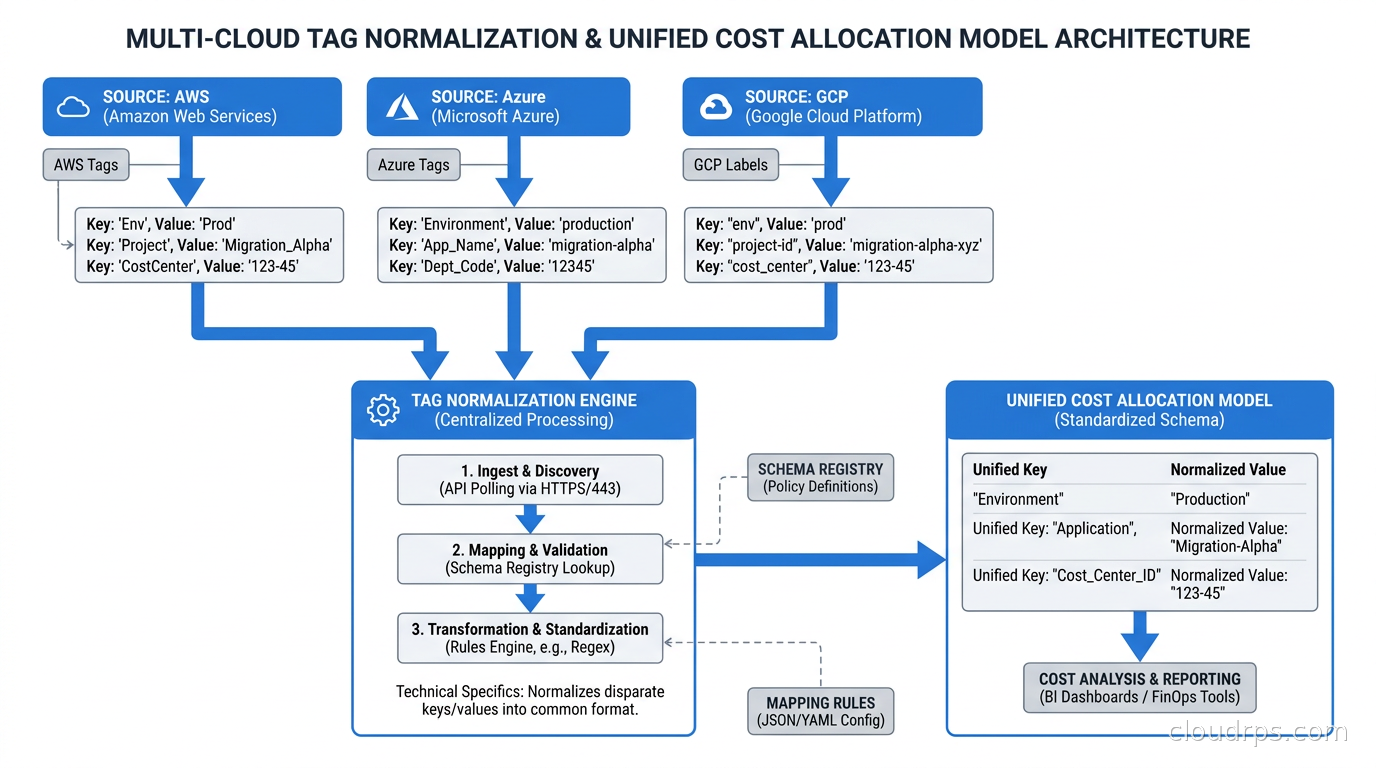
If you run a single cloud provider, tagging is hard. If you run two or three, it’s hard and also requires you to maintain consistency across systems with fundamentally different semantics.
AWS uses “tags” with a Key=Value format. Azure uses “tags” with the same Key=Value format but different limits (512 characters per value versus AWS’s 256). GCP uses “labels” with lowercase-only keys and values, limited to 64 characters. GCP also has separate “tags” that are different from labels and serve IAM purposes. These aren’t just cosmetic differences: your tag key Cost-Center on AWS becomes cost-center on GCP (because uppercase is not allowed in GCP labels), which means your normalization layer has to handle case-insensitive matching and alias mapping.
The FOCUS billing specification is attempting to standardize how tag data appears in billing exports, which will help, but the underlying providers still need to receive the tags in their native formats. You’ll need a tag normalization layer in whatever FinOps tooling you use, and you need to document your canonical tag schema in a way that maps to each cloud’s native format.
Vantage, CloudHealth, and Apptio all provide multi-cloud cost visibility with tag normalization. AWS Cost Explorer and native cloud billing tools do not, which means if you’re multi-cloud you almost certainly need a third-party tool for unified cost allocation.
Common Failure Modes I’ve Watched Play Out
After twenty years of this, I’ve seen the same failure modes repeatedly. Knowing them in advance might save you from repeating them.
Launching with too many required tags: You design a beautiful taxonomy with twelve required tags, you roll it out, and engineers start working around it because the friction is too high. They put placeholder values in required fields (“TBD”, “unknown”, “fixlater”) and your 90% coverage number is a lie because the values are garbage. Start with five tags you’ll actually enforce with real values, and expand from there.
Not training the IaC module maintainers: Your Terraform module owners are the key leverage point for tagging compliance. If they don’t understand why tagging matters and how the taxonomy works, they’ll implement the tag variables incorrectly, make them optional when they should be required, or set defaults that defeat the purpose. Invest an hour with every team that maintains shared modules explaining what cost allocation needs from them.
Ignoring tag drift: Resources change owners. Services get renamed. Teams merge or split. The tags applied at resource creation become stale. You need a periodic audit process, at minimum quarterly, that reviews whether existing tag values still match reality. AWS Config Rules, Azure Policy compliance dashboards, and GCP Asset Inventory all have built-in capabilities for this. Use them.
Not connecting tags to financial accountability: Showback only works if someone on each team actually looks at the reports and is empowered to act on them. If you send a weekly cost email to a distribution list of fifty people, nobody owns it. You need one accountable person per team, typically an engineering lead or a designated “FinOps champion,” whose job includes reviewing team cost data and following up on anomalies.
Treating egress costs and compliance tooling as shared overheads: These are categories where costs can be attributed to specific teams if you instrument correctly. Data egress in particular can be traced to specific services and endpoints. Treating them as corporate overhead removes the incentive for teams to architect egress-efficiently.
The FinOps Maturity Model for Tagging
The FinOps Foundation defines a crawl-walk-run maturity model. Tagging fits neatly into it:
Crawl: You have a documented tagging standard. At least the core required tags exist on more than half your resources. You have a manual monthly report showing spend by team. Enforcement is documentation-based.
Walk: You have IaC-enforced required tags on new resources. Coverage above 80%. You have automated weekly showback reports delivered to team leads. You’re running retroactive tagging campaigns to catch existing untagged resources. You have a first-pass allocation model for shared infrastructure.
Run: Coverage above 95% on all resources, including legacy. Real-time cost dashboards available to every team. Chargeback in place with a methodology teams trust. Usage-based attribution for major shared services. Automated anomaly detection that pages someone when a team’s spend spikes unexpectedly. Tags feeding into compliance reporting and security posture tooling, not just billing.
Most organizations I work with are somewhere in the early walk phase when I first engage with them. Getting to late walk typically takes six to twelve months of sustained effort. Getting to run takes two to three years. The good news is that significant cost reduction happens throughout the journey, not just at the end.
Practical Starting Point
If you’re reading this and you have a tagging problem today, here’s what to do in the next two weeks:
First, run a tag coverage audit. Every cloud provider has a way to do this: AWS Trusted Advisor and the Tag Editor, Azure Policy compliance reports, GCP Asset Inventory. Get a number. Knowing 47% of your resources are untagged is the starting data point for everything else.
Second, pick your five required tags and make sure everyone agrees on the allowed values. Not a range of valid values, but a specific list. “Team” should be “platform-eng” or “payments” or “data-infra”, not free-text anything someone types. Controlled vocabularies prevent the garbage data problem.
Third, start a retroactive tagging sprint for your top 20 most expensive untagged resources. Twenty resources probably isn’t a large share of your total resource count, but it’s likely a disproportionate share of your unattributed spend. Get those tagged and attributed in the first sprint.
Fourth, add tag validation to your next IaC module release, even if it’s just a warning rather than an error. Get engineers seeing the validation output in their pipeline.
Fifth, send the first showback report. It doesn’t have to be perfect. It just has to be real. A simple CSV with team, environment, and cost for the last 30 days is a starting point that creates conversations you couldn’t have before.
The conversations are where the real value begins. A team lead who sees their development environment spent $18,000 last month and asks “wait, why?” is now engaged in cost optimization in a way they weren’t yesterday. That engagement, multiplied across your organization, is worth more than any specific optimization technique.
Cloud costs are complex, and the complexity grows as organizations scale. Getting the metadata layer right early, before the bill becomes impossible to parse, is one of the highest-leverage infrastructure investments a platform team can make. It’s less exciting than deploying a new service mesh or adopting the latest AI tooling. But it’s the kind of foundational work that makes everything else legible, and in cloud infrastructure, legibility is its own form of reliability.
Updated September 1, 2026: removed unsourced statistics as part of an accuracy review.
Get Cloud Architecture Insights
Practical deep dives on infrastructure, security, and scaling. No spam, no fluff.
By subscribing, you agree to receive emails. Unsubscribe anytime.