
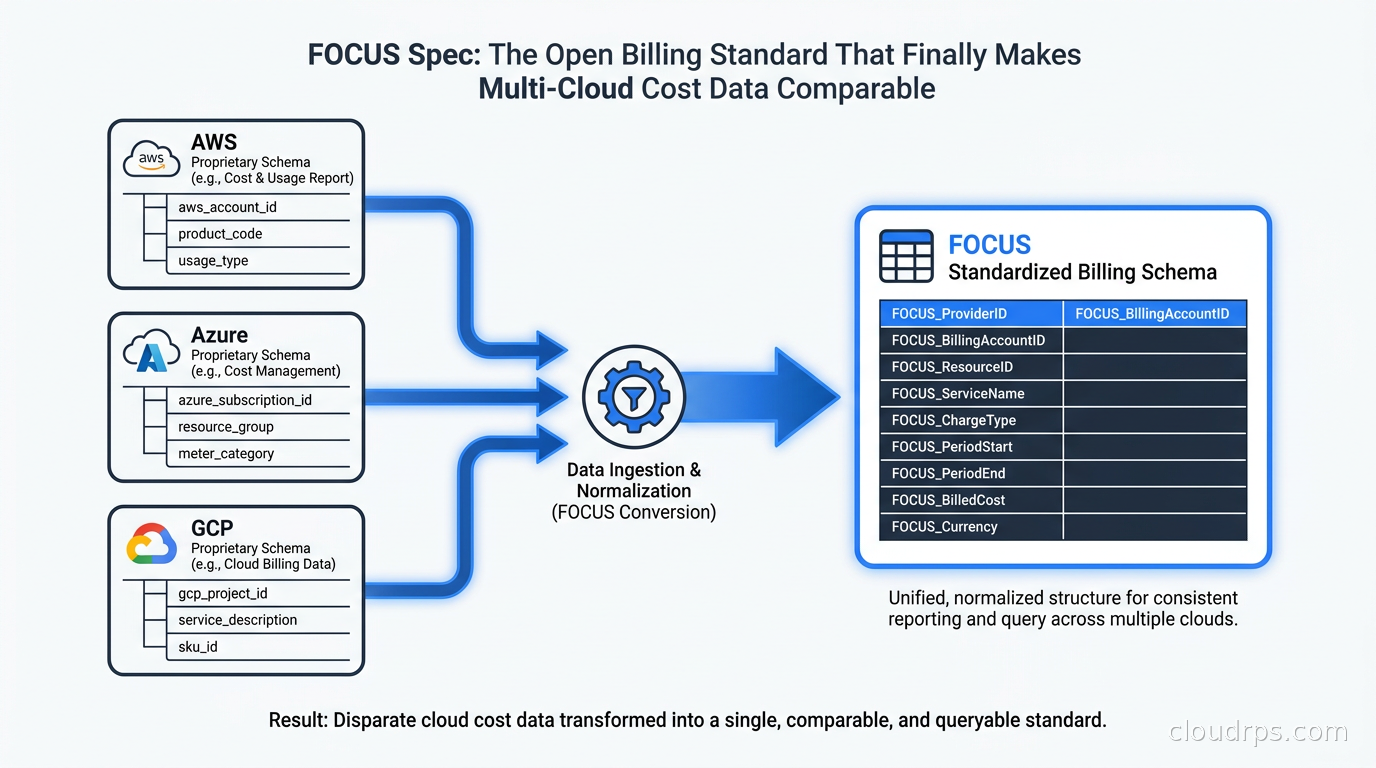
I spent the better part of three weeks last year debugging a discrepancy between what our finance team thought we were spending on compute and what our engineering team thought we were spending on compute. Both numbers were correct. The problem was that AWS calls the same concept “Amortized Cost” while Azure calls it “Effective Cost” and GCP buries it inside a nested JSON column inside a BigQuery table with a completely different amortization methodology for committed use discounts. We were running a multi-cloud environment and had wired up three separate ETL jobs to normalize each provider’s billing export into something we could query together. Those jobs had drifted. Nobody noticed until the discrepancy had grown into a significant sum over a quarter.
That incident is exactly the kind of thing the FOCUS specification was designed to prevent.
FOCUS (FinOps Open Cost and Usage Specification) is an open standard maintained by the FinOps Foundation that defines a vendor-neutral schema for cloud billing and usage data. After twenty years building cloud infrastructure, I have watched dozens of standards attempts fail because they were either too abstract to be useful or adopted by only one or two vendors. FOCUS is different: AWS, Azure, GCP, Oracle Cloud, and Tencent Cloud all export billing data in the FOCUS format today, and version 1.4 was ratified by the Steering Committee on June 4, 2026. This is now the closest thing the industry has to a universal language for technology cost data.
This article is a practitioner’s guide to what FOCUS actually contains, how to pull it from the major providers, how to build a cost pipeline on top of it, and where it still has gaps that will trip you up in production.
Why Cloud Billing Data Is Such a Mess
Before getting into the solution, it helps to understand how bad the problem actually is. Each major cloud provider generates billing data in a fundamentally different format, with different granularity, different update cadences, and different definitions for what seems like the same concept.
AWS gives you the Cost and Usage Report (CUR) as a CSV or Parquet file in S3, updated once per day, with around 300 columns. Some of those columns contain nested data. The “unblended cost” column sounds like it should tell you what you paid, but if you have Reserved Instances or Savings Plans, the amortized cost is in a different column and requires separate handling for RI benefit allocation. AWS introduced CUR 2.0 in 2023 with much cleaner column naming, but thousands of teams are still on CUR 1.0 and the migration is not trivial.
Azure gives you an actual cost export via the Cost Management API or portal, with a completely different column schema. If you have Enterprise Agreement pricing, your effective pricing tier gets expressed differently than if you have a Microsoft Customer Agreement. The “PayGCost” vs “CostInBillingCurrency” distinction trips up almost every team I have ever worked with on Azure cost analysis.
GCP gives you billing data through BigQuery export, which is actually the most developer-friendly approach, but their credits and sustained use discount model means computing your “real” cost requires expanding nested records and subtracting credits from list price in a way that is genuinely non-obvious the first time you do it.
Running all three means you need three separate transformation pipelines, three separate cost models, and three separate definitions for basic concepts like “service” and “region” and “account.” The moment any of those pipelines diverges (a schema change from the provider, a bug in a transformation job, a new discount type you did not handle), your cost reports become unreliable. Finance stops trusting them. You end up in a meeting explaining why your numbers are wrong, which is a very bad meeting to be in.
This is the problem FOCUS solves.
What the FOCUS Spec Actually Defines
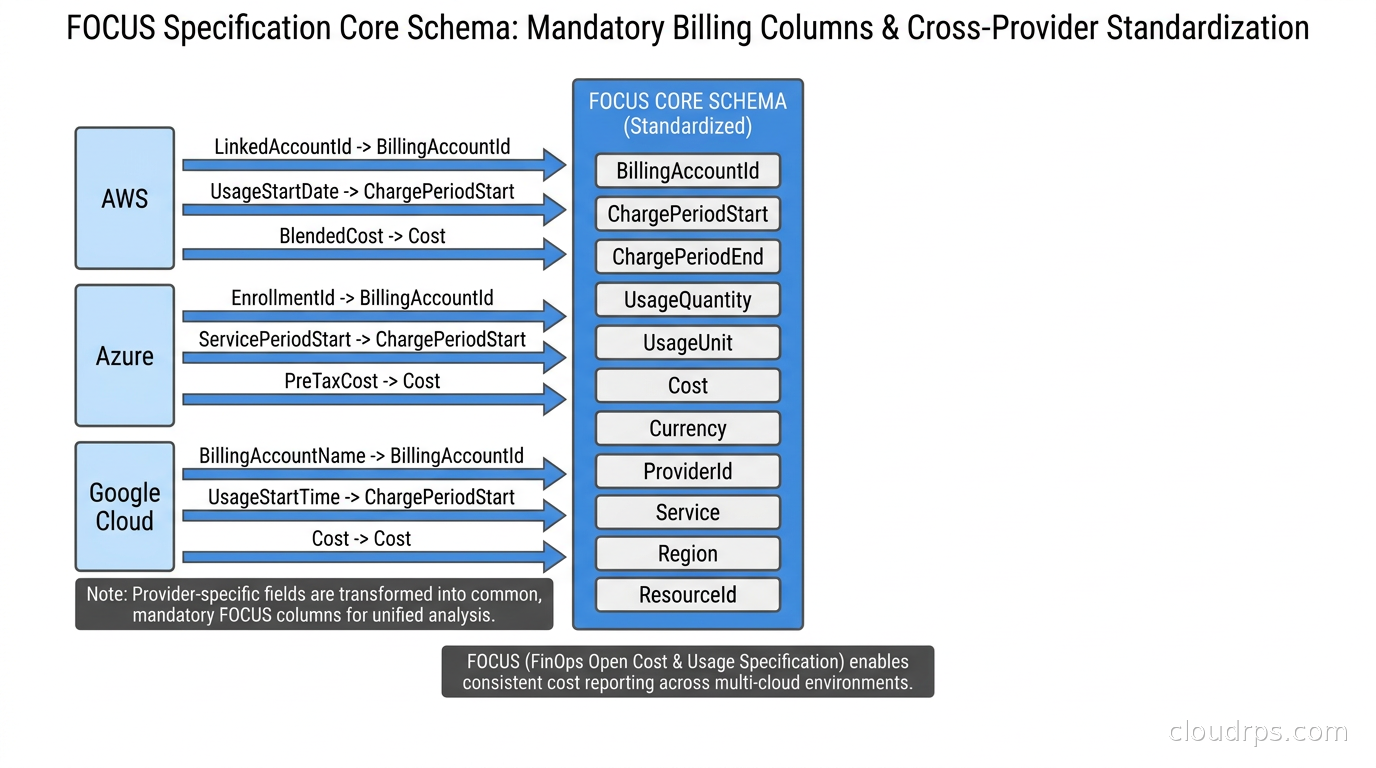
FOCUS defines a tabular schema, published as a set of column specifications, where each column has a precisely defined name, data type, nullability rules, and semantic meaning. The key insight is that the semantic meaning is pinned to business concepts, not to any individual provider’s implementation.
The mandatory columns in FOCUS 1.4 include:
BillingAccountId and BillingAccountName: The top-level account that receives the invoice. For AWS this is your AWS Organization management account, for Azure it is your billing account, for GCP it is your billing account ID. FOCUS normalizes these to the same column name even though the underlying concepts differ slightly between providers.
ChargePeriodStart and ChargePeriodEnd: ISO 8601 timestamps defining the time window this billing record covers. This sounds trivial but AWS CUR 1.0 used “UsageStartDate” and “UsageEndDate” with different timezone handling than Azure, which caused subtle bugs in hourly cost queries.
BilledCost: The exact amount that appears on your invoice before any amortization. This is what you actually owe the provider for this line item.
EffectiveCost: The cost after applying all discounts, Reserved Instance allocations, Savings Plan benefits, and Committed Use Discounts. For spot/preemptible instances this may differ significantly from BilledCost. This is the number your engineering teams should be optimizing against, because it reflects the actual business value of your commitments.
ListCost: What you would have paid at on-demand pricing with no discounts. The delta between ListCost and EffectiveCost is your total discount, and tracking this ratio tells you how well you are utilizing your committed capacity.
ServiceName and ServiceCategory: A normalized service name (like “Amazon Elastic Compute Cloud”) and a category from a controlled vocabulary (Compute, Storage, Network, Database, AI and Machine Learning, etc.). The ServiceCategory vocabulary is one of the most useful additions because it lets you query “all compute spend across all providers” with a single WHERE clause instead of maintaining a mapping table of every AWS service name to its category.
ChargeCategory: Distinguishes between Usage, Purchase (for Reserved Instances and Savings Plans upfront fees), Tax, Credit, and Adjustment. This is critical for correctly amortizing commitments.
RegionId and RegionName: Normalized region identifiers. In native billing data, AWS uses “us-east-1,” Azure uses “eastus,” and GCP uses “us-east1” for what is effectively the same geographic zone on the US East Coast. FOCUS normalizes these while preserving the original provider region name in a separate column.
ResourceId and ResourceName: The specific resource instance that generated the charge. For EC2 this is the instance ID, for Azure VMs it is the resource ID, for GCP Compute it is the instance name. Having these in a consistent schema means you can correlate cost data with your asset inventory from a single query.
The Tags column is particularly important: FOCUS defines it as a key-value map where all tags from the underlying resource are represented in a normalized format. This finally makes tag-based cost allocation consistent across providers, which is where a lot of FinOps implementations break down in practice. But normalization only works if the underlying tagging is disciplined: if you have inconsistent keys across clouds (“Cost-Center” on AWS, “cost-center” on GCP) you still need a mapping layer. The cloud FinOps tagging and cost allocation guide covers the taxonomy design and multi-cloud consistency problem in depth. If you want to learn more about why cost visibility at the resource level matters so much, the Kubernetes cost visibility guide covering OpenCost and Kubecost is a good companion read, since those tools are now FOCUS exporters.
How to Pull FOCUS Data from AWS, Azure, and GCP
All three major providers now support native FOCUS exports, though the mechanics differ.
AWS: In the AWS Billing console, go to Data Exports and create a new export with “FOCUS 1.0” as the format (AWS has not yet updated the console label to reflect 1.4, but the format is compatible). The export drops into an S3 bucket as Parquet files, partitioned by day. You can also use the Cost and Usage Report with CUR 2.0 format, which is structurally closer to FOCUS than CUR 1.0. If you have existing CUR 1.0 pipelines, the FinOps Foundation publishes open-source FOCUS converters for each provider, which is a reasonable migration path before your pipeline fully transitions.
Azure: In Azure Cost Management, navigate to Exports and create a recurring export with FOCUS as the dataset type. The export lands in Azure Blob Storage as CSV or Parquet. Enterprise Agreement customers need to make sure they are using the correct billing scope (Enrollment Account vs Billing Account) because the hierarchy affects how FOCUS represents your organizational structure.
GCP: GCP has a FOCUS export option in the Billing BigQuery export settings. You enable it alongside or instead of the Standard export. Unlike AWS and Azure, GCP keeps the data in BigQuery rather than object storage, which is actually convenient if your analysis pipeline already runs in BigQuery.
Once you have all three feeds landing in object storage or a data warehouse, the value of FOCUS becomes immediately obvious: you can UNION them. A query like “SELECT ServiceCategory, SUM(EffectiveCost) FROM billing WHERE ChargePeriodStart >= ‘2026-07-01’ GROUP BY ServiceCategory” works identically across your AWS, Azure, and GCP data without any transformation. This is genuinely new.
Building a FOCUS-Powered Cost Pipeline
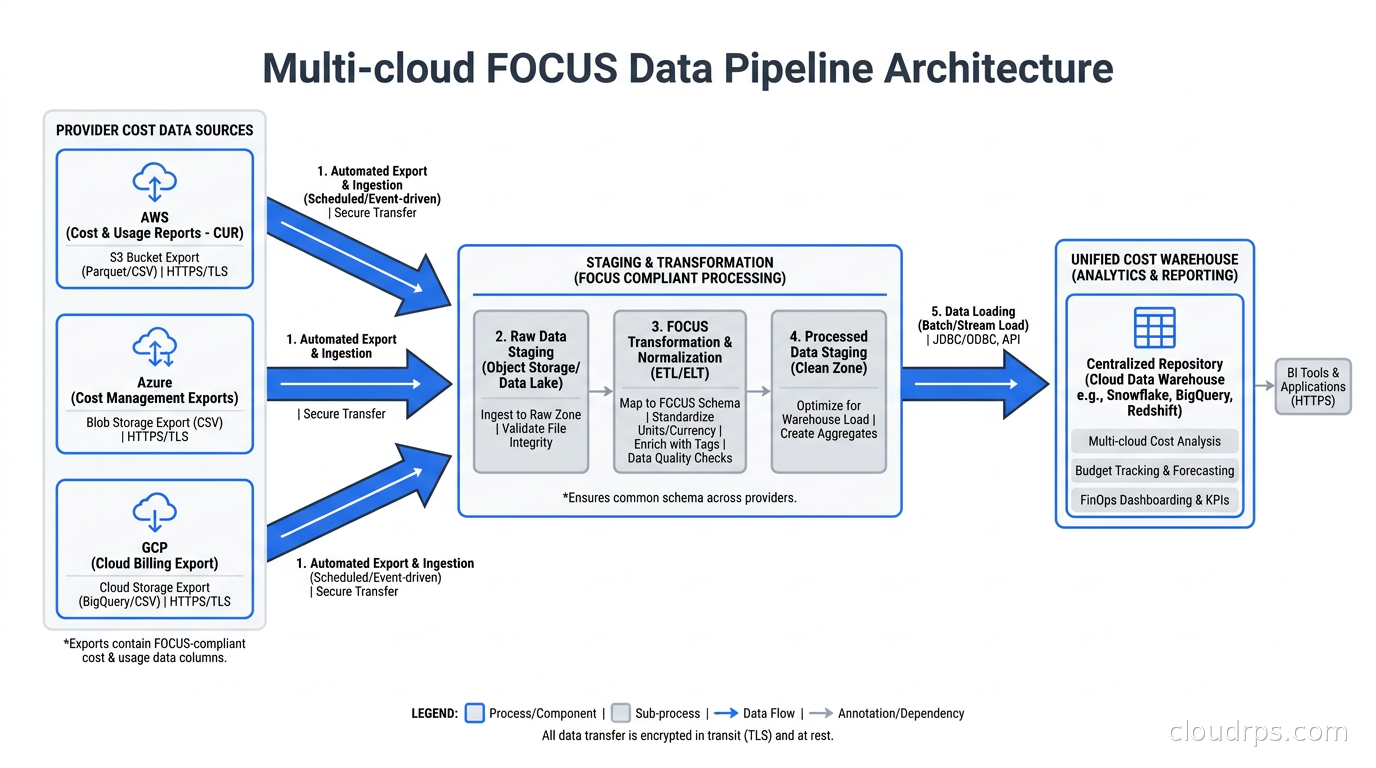
I have helped build several cost analytics platforms and the pattern that works best for FOCUS data is fairly straightforward once you stop trying to normalize provider data yourself.
Layer 1: Raw ingestion. Pull FOCUS exports from each provider into your data lake on their natural cadence (daily for AWS and Azure, near-real-time for GCP BigQuery). Store them in raw form, partitioned by provider and billing period. Do not transform at this layer.
Layer 2: Unified table. Create a single table that covers all providers with the FOCUS schema. This is where you UNION the provider exports. You will need to add a “Provider” column since FOCUS does not include one (it is implied by which account the data came from, but explicit is better). For historical data, you either run the FinOps FOCUS converters on your old CUR/Azure exports or accept that pre-FOCUS history requires a different query path.
Layer 3: Allocation. FOCUS does not solve allocation for you, but it gives you consistent building blocks. Apply your tag-based allocation rules, your shared cost splitting logic, and your commitment amortization at this layer. The key columns for commitment amortization are ChargeCategory (filter to “Usage” for running cost analysis) and the commitment-specific columns that FOCUS 1.4 added to the Contract Commitment dataset.
Layer 4: Metrics. Build your standard cost metrics on top of the allocation layer: spend by team, by service category, by region, commitment utilization, savings plan coverage, discount rate. These are now provider-agnostic queries because the schema is normalized.
For teams using dbt for their data transformation work, FOCUS data is a natural fit. You define the unified table as a source, write models for your allocation logic, and build marts for each stakeholder. The dbt data transformation guide covers the pattern well. The difference now is that your source models are consistent across providers instead of needing separate source definitions with completely different schemas for each cloud.
What FOCUS 1.4 Adds
FOCUS 1.4, ratified June 2026, brought several meaningful improvements over earlier versions.
The Invoice Detail and Billing Period datasets are new additions that make it possible to reconcile FOCUS cost data against actual invoices. This was a gap in earlier versions: you could query your cost at a granular level but reconciling those numbers back to a line on a PDF invoice required manual work. The Invoice Detail dataset bridges that gap.
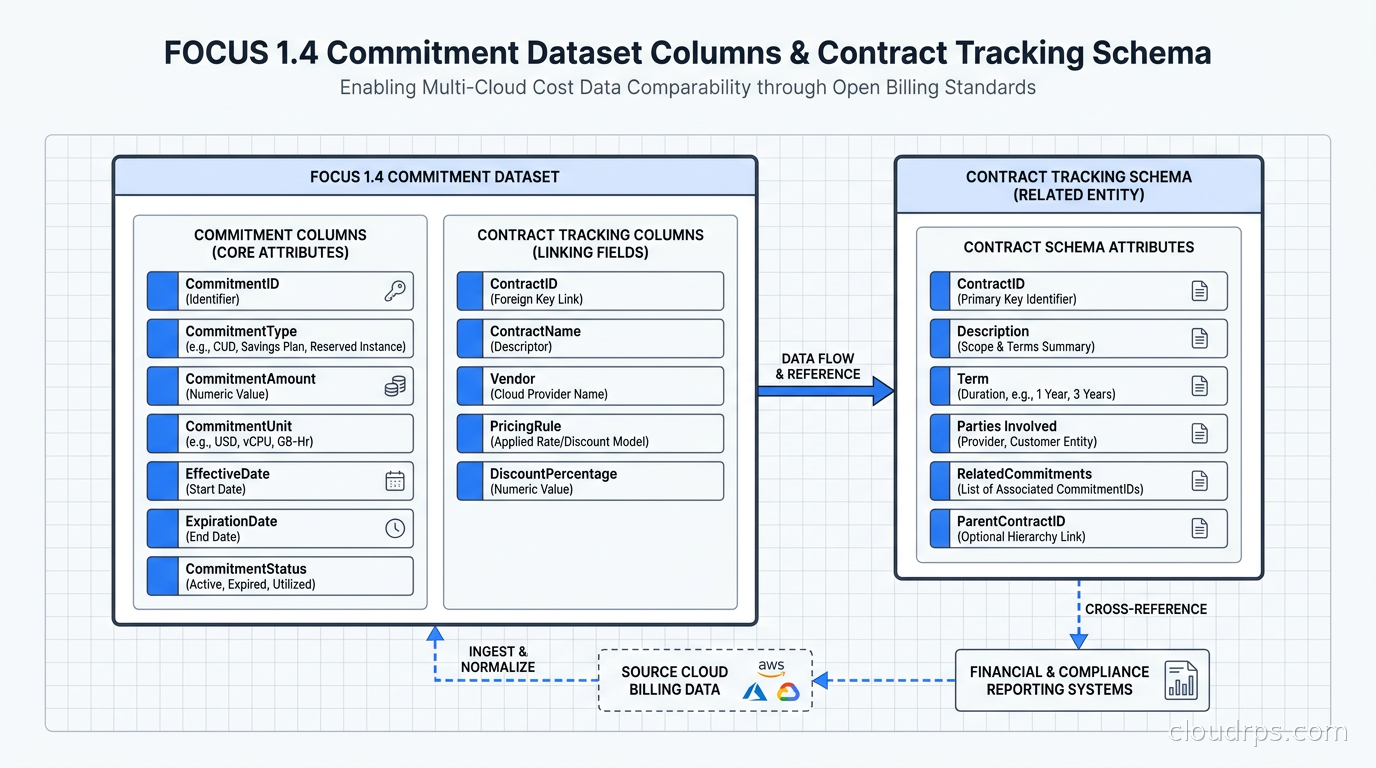
The Contract Commitment dataset added a substantial set of new columns. This is significant if your organization uses Reserved Instances, Savings Plans, or Committed Use Discounts at scale. The new columns include commitment eligibility metadata (which resources can benefit from a given commitment) and allocation-methodology columns that tell you exactly how a commitment’s value was distributed across resources. This finally makes it possible to automate commitment utilization reporting without building your own attribution logic from scratch. If you are still working out the right commitment strategy before you get to this point, our cloud commitment pricing guide covers how to layer Reserved Instances, Savings Plans, and GCP CUDs for maximum savings without over-committing.
The data recency and completeness metadata requirement is a quality-of-life addition that tells consumers whether the export they received is complete and current. This matters more than it sounds: FOCUS exports can lag, providers can reprocess historical billing data, and your pipeline needs to handle late-arriving data correctly. The completeness metadata gives you a standard way to detect and handle these situations without provider-specific logic.
FOCUS 1.4 also extends scope beyond pure cloud billing to include SaaS spend, data center costs, and AI inference costs. The AI token usage addition is timely: as AI FinOps practices mature, teams need to track LLM API spend alongside their cloud infrastructure spend. FOCUS giving these the same schema means you can have a unified view of total technology cost, not just cloud compute and storage.
Tooling That Speaks FOCUS
The ecosystem around FOCUS has grown considerably. Several tools now export or consume FOCUS-format data directly.
OpenCost and Kubecost, which I covered in the Kubernetes cost visibility guide, both support FOCUS export. This is genuinely useful: you can take your in-cluster cost allocation from OpenCost and union it with your cloud provider FOCUS data to get a single view of compute cost that includes both managed infrastructure and Kubernetes workload costs in the same schema.
Apptio, CloudHealth, Spot.io, and the cloud-native cost management tools from each provider have all announced or shipped FOCUS support. The FinOps Foundation maintains a conformance program that certifies tooling against the specification, which gives you a useful filter when evaluating vendors.
The FinOps Foundation also publishes open-source FOCUS converters for each major provider’s legacy billing format on GitHub. If you are sitting on three years of AWS CUR 1.0 data, the converter lets you backfill that into a FOCUS-compatible schema without reingesting from AWS. I have run the AWS converter on historical data and it handles the vast majority of charge types correctly. The edge cases are things like specific Reserved Instance billing quirks from 2019 and earlier, which are obscure enough that most teams will not hit them.
War Story: The Egress Surprise
I was brought in to help a fintech company that was convinced their GCP bill was wrong. They were spending significantly more than their forecast, and their internal FinOps team had been unable to pinpoint the cause because they were running separate queries against AWS CUR and GCP Standard billing export with completely different schemas.
Once we wired up FOCUS exports from both providers and unified them in BigQuery, the answer appeared in about ten minutes: they had a service running in AWS that was pulling data from GCP Cloud Storage for a nightly reconciliation job. The egress from GCP to their AWS account was appearing in GCP billing as “Network Internet Egress from GCP to Other Google Cloud Services” but the destination was actually an AWS S3 endpoint they had confused GCP into treating as a Google endpoint. The FOCUS ServiceCategory field made the networking charges immediately comparable between providers, and the resource tags (which FOCUS normalized across both) pointed directly to the service responsible.
Fixing the architecture to run the reconciliation job in AWS instead of pulling data across providers saved them a meaningful amount every month. If you want to understand the architecture patterns behind why cross-provider data transfer is expensive, the cloud egress costs guide covers the trade-offs in depth.
Where FOCUS Still Falls Short
I want to be honest about the gaps because FOCUS gets oversold in vendor marketing materials.
SaaS coverage is still thin. The specification extends to SaaS in 1.4, but provider adoption is sparse. Snowflake, Datadog, and Confluent are not exporting FOCUS-format billing data yet. You can hand-map their invoices to FOCUS columns, but that is maintenance work and it depends on their billing APIs not changing their schema.
Granularity varies by provider. AWS provides hourly granularity in CUR 2.0 and FOCUS export. Azure provides daily granularity in most cases. GCP BigQuery export can be near-real-time for some charge types. The FOCUS specification does not mandate a specific granularity, which means “let me query cost by hour across all providers” still requires knowing that your Azure data will have gaps.
Allocation is still your problem. FOCUS gives you the raw ingredients for cost allocation, but it does not tell you how to split a shared Kubernetes cluster’s cost across ten product teams. You still need your own allocation logic, applied on top of FOCUS data. What FOCUS eliminates is the need to implement that logic three times, once per provider.
Kubernetes workload costs are not in scope. The FOCUS specification covers cloud provider billing data. It does not cover the within-cluster attribution problem where you need to map pod CPU and memory consumption back to individual teams or services. Tools like OpenCost solve this and can export to FOCUS format, but there is still a seam between provider-level billing and cluster-level attribution.
Historical data migration is real work. If you have years of cost history in native provider formats, migrating to FOCUS-formatted historical data is not trivial. The converters help, but they require running on your existing exports and some charge types do not have clean mappings. Plan for this before you commit to a FOCUS-first analytics stack.
Should You Adopt FOCUS Now?
If you are running workloads on more than one cloud provider and doing any kind of serious cost management, yes. The unified schema eliminates a class of bugs and maintenance burden that I have seen slow down every multi-cloud FinOps implementation I have worked with. Even if you are single-cloud today, adopting FOCUS positions you to add a second provider without rebuilding your cost analytics from scratch.
The practical path is:
- Enable FOCUS exports on your primary provider first. This costs nothing and lets your team get familiar with the schema.
- Build your core cost reporting against FOCUS columns rather than native provider columns. This is the step that pays dividends when you add a second provider.
- Add secondary provider FOCUS exports and UNION them into your existing pipeline. If you built against FOCUS columns in step 2, this should be a day of work, not a sprint.
- Migrate historical data using the FinOps Foundation converters if you need historical comparisons across providers.
The FinOps general guide is a good starting point if you are new to the discipline. The multi-cloud strategy guide is worth reading alongside FOCUS adoption because the technology strategy and the cost management strategy need to be aligned.
FOCUS does not replace FinOps practices or fix bad tagging hygiene or make your reserved instance portfolio coherent. But it removes a layer of accidental complexity that has been silently absorbing engineering time and creating cost reporting credibility problems for years. After twenty years of watching organizations struggle with cloud billing data, I consider that a meaningful improvement. The industry needed a shared language for cost data, and FOCUS is the closest we have come to getting one right.
Updated September 1, 2026: removed unsourced statistics as part of an accuracy review.
Get Cloud Architecture Insights
Practical deep dives on infrastructure, security, and scaling. No spam, no fluff.
By subscribing, you agree to receive emails. Unsubscribe anytime.