
The word “proxy” gets thrown around constantly in networking and infrastructure conversations, and half the time the person saying it means something different than the person hearing it. I’ve sat through too many architecture reviews where “we’ll put a proxy in front of it” meant completely different things to the developer, the network engineer, and the security architect in the same room.
Let me end the ambiguity. There are two fundamentally different proxy architectures, they solve different problems, and the direction matters.
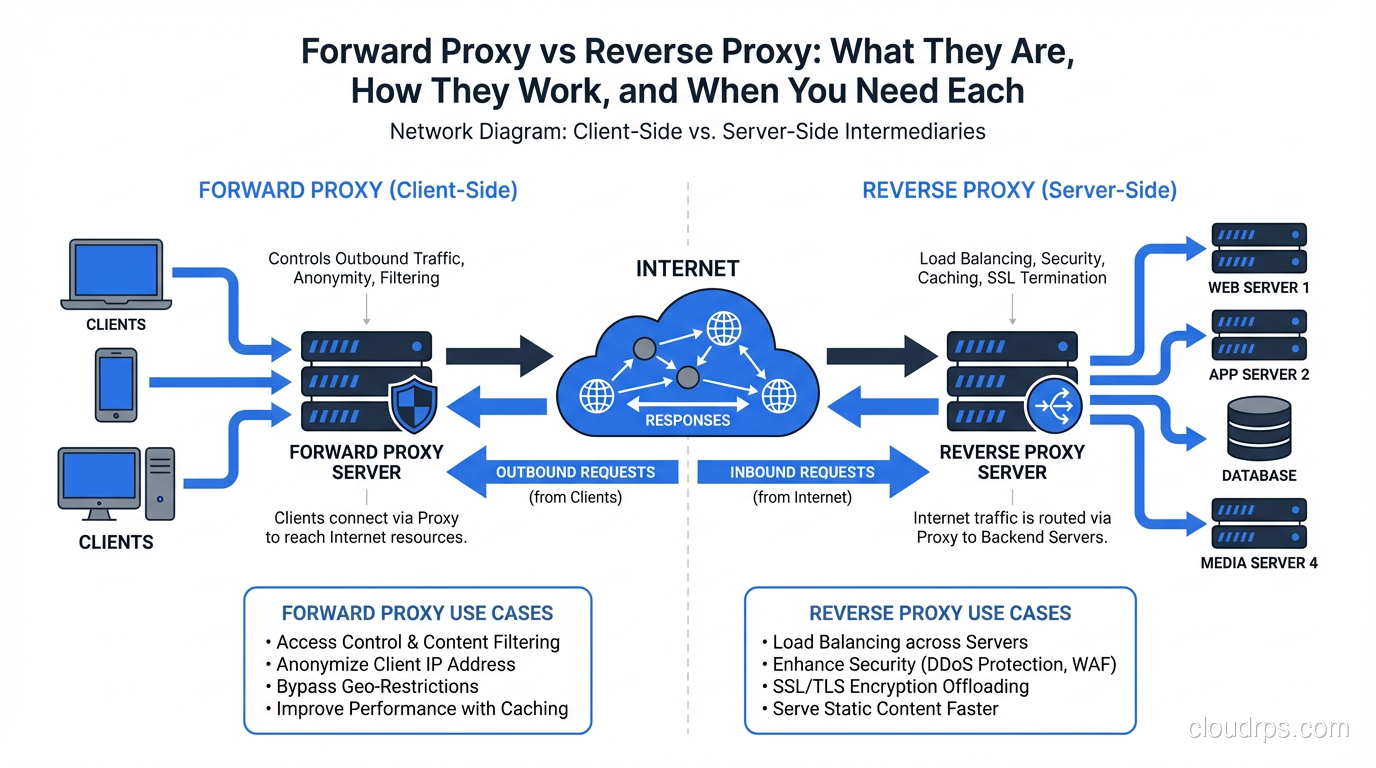
The short version: a forward proxy acts on behalf of clients, mediating their access to servers. A reverse proxy acts on behalf of servers, mediating clients’ access to them. In a forward proxy, the server doesn’t know who the real client is. In a reverse proxy, the client doesn’t know which server it’s actually talking to.
If that didn’t immediately click, stay with me. The practical implications are significant.
Forward Proxies: Client-Side Intermediaries
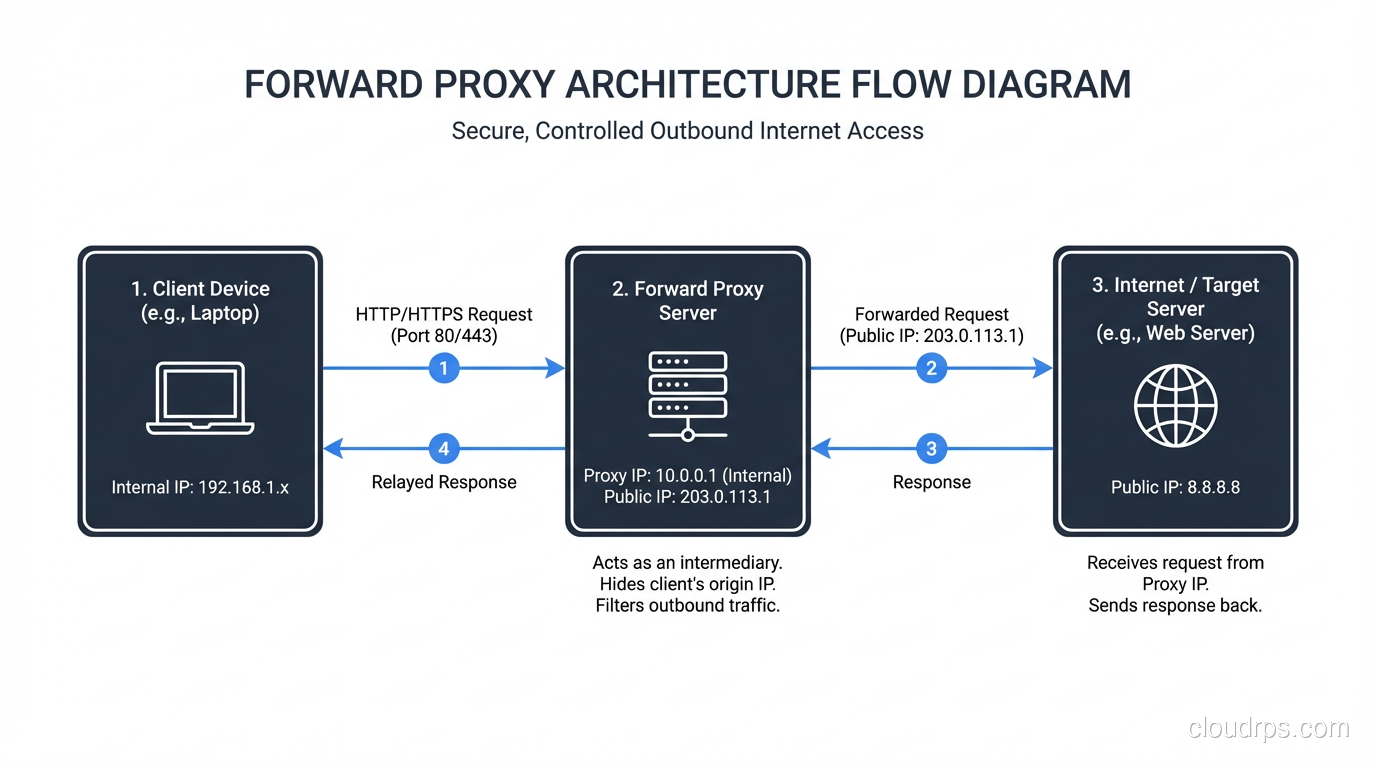
A forward proxy sits between a group of clients and the rest of the internet (or some network). When a client wants to access a resource, it sends the request to the forward proxy instead of directly to the destination. The proxy forwards the request on behalf of the client, receives the response, and passes it back.
The destination server sees a request coming from the proxy’s IP address, not the client’s. The server has no visibility into which client initiated the request.
Classic forward proxy use cases:
Corporate internet access control: Every company with a real security policy routes outbound employee traffic through a forward proxy. The proxy enforces content filtering policies (block social media, block malware sites, block specific categories), logs all HTTP/HTTPS traffic for compliance, and provides a single point to enforce security scanning. Squid is the dominant open-source choice here. Blue Coat (now Symantec Proxy SG) and Zscaler dominate the enterprise market.
Caching for bandwidth reduction: Before CDNs became ubiquitous, forward proxy caching was how you managed bandwidth costs. Deploy Squid in your office network, and every frequently-accessed resource (Windows updates, npm packages, Docker images) is cached locally after the first pull. The second engineer downloading the same 500MB base image gets it from the local proxy, not from the internet. I set this up for a client with satellite internet connections at remote sites. The bandwidth cost reduction was 60%.
Anonymization and location masking: This is the consumer VPN use case. When traffic exits through a proxy (or VPN gateway, which is a forward proxy at a higher protocol layer), the destination sees the proxy’s IP. Tools like Squid, Privoxy, and commercial services all work on this principle. Worth noting: your ISP still sees the traffic going to the proxy. The proxy operator sees everything. True anonymity requires more than a forward proxy.
Transparent proxies: A variant where the proxy intercepts traffic without requiring client configuration. HTTP traffic on port 80 is redirected to the proxy by your network infrastructure (firewall or router using WCCP or similar). The client doesn’t know a proxy is involved. This is how many corporate MITM inspection setups work. HTTPS transparent proxying requires certificate injection, which is why corporate laptops are loaded with company-issued CA certificates.
Forward proxy configuration from the client side looks like this (environment variables):
export http_proxy="http://proxy.corp.example.com:8080"
export https_proxy="http://proxy.corp.example.com:8080"
export no_proxy="localhost,127.0.0.1,.corp.example.com"
Or in applications directly:
import requests
proxies = {
    "http": "http://proxy.corp.example.com:8080",
    "https": "http://proxy.corp.example.com:8080",
}
response = requests.get("https://api.example.com/data", proxies=proxies)
Reverse Proxies: Server-Side Intermediaries
A reverse proxy sits in front of one or more backend servers. Clients connect to the reverse proxy thinking they’re connecting to the application. The reverse proxy forwards requests to the appropriate backend, receives the response, and returns it to the client.
The client sees the reverse proxy’s IP and hostname. The client has no visibility into what server (or servers) actually processed the request.
This is the architecture underlying virtually every web application deployed at any scale. When you connect to a large website, you almost certainly hit a reverse proxy before your request reaches any application code.
The canonical reverse proxy technologies: Nginx (by far the most common), HAProxy (performance-focused, excellent at TCP load balancing), Envoy (cloud-native, used heavily in service meshes), Caddy (automatic TLS, simpler configuration), Apache httpd (legacy, still widely deployed), Traefik (Kubernetes-native, automatic service discovery).
Reverse proxy use cases:
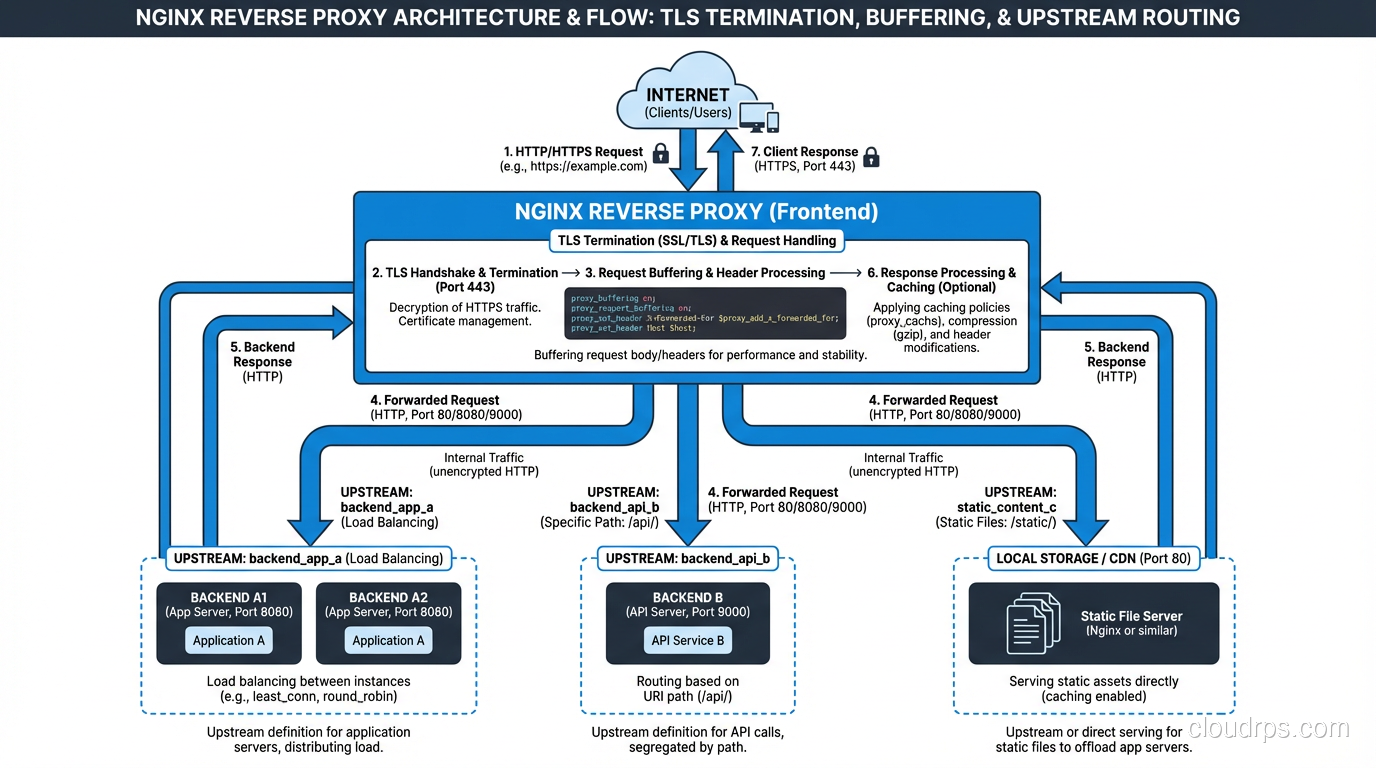
Load balancing: Distribute requests across multiple backend instances. This is why reverse proxies and load balancers are often conflated. A reverse proxy that distributes traffic across backends is performing load balancing. The layer 4 vs layer 7 distinction applies here: a reverse proxy load balancer operates at layer 7 and can make routing decisions based on HTTP headers, URLs, and cookies.
TLS termination: Your backend application servers don’t need to handle TLS. The reverse proxy accepts encrypted connections from clients, decrypts them, and forwards plain HTTP to backends over your internal network (which should itself be secured). This centralizes certificate management and offloads the CPU cost of TLS from application servers. Nearly every production setup I’ve worked with terminates TLS at the reverse proxy. The SSL/TLS implementation details matter here, particularly cipher suite selection and certificate rotation.
Caching: The reverse proxy caches responses from backends and serves cached content for repeated requests. Nginx’s proxy_cache module is excellent for this. An API that returns the same data for 60 seconds can serve thousands of requests from cache with zero load on the backend.
Compression: The reverse proxy compresses responses before sending them to clients (gzip, Brotli), reducing bandwidth and improving perceived performance. Your application code doesn’t need to implement compression.
Request buffering and slow client protection: A reverse proxy buffers the entire response from a fast backend before sending it to a slow client. Without this, a slow client (mobile phone on a bad connection) holds backend connections open for the entire transfer duration. With buffering, the backend sends the response to the proxy quickly, the connection is released, and the proxy slowly dribbles data to the mobile client.
Authentication and authorization: Validate JWTs, check API keys, or redirect to an OAuth provider before the request ever reaches your backend. I’ve implemented this pattern to add authentication to legacy services that had no auth layer without modifying the application code.
A basic Nginx reverse proxy configuration:
upstream backend_servers {
    server app-1.internal:8080 weight=3;
    server app-2.internal:8080 weight=3;
    server app-3.internal:8080 weight=2;

    keepalive 32;
}

server {
    listen 443 ssl http2;
    server_name api.example.com;

    ssl_certificate /etc/letsencrypt/live/api.example.com/fullchain.pem;
    ssl_certificate_key /etc/letsencrypt/live/api.example.com/privkey.pem;

    location / {
        proxy_pass http://backend_servers;
        proxy_http_version 1.1;
        proxy_set_header Host $host;
        proxy_set_header X-Real-IP $remote_addr;
        proxy_set_header X-Forwarded-For $proxy_add_x_forwarded_for;
        proxy_set_header X-Forwarded-Proto $scheme;

        # Buffering
        proxy_buffering on;
        proxy_buffer_size 16k;
        proxy_buffers 8 16k;

        # Timeouts
        proxy_connect_timeout 5s;
        proxy_send_timeout 60s;
        proxy_read_timeout 60s;
    }
}
Note the X-Forwarded-For header. Because the client connects to the proxy, your backend sees the proxy’s IP as the source address. XFF passes the real client IP through. Your application needs to use this header to get the actual client address. Don’t forget to validate that this header is only trusted when it comes from your proxy, not from arbitrary clients who can forge it.
Where They’re Easy to Confuse
The confusion between forward and reverse proxies usually happens because both involve an intermediary in the network path and both can perform caching. The key question is: who is being hidden from whom?
Forward proxy: The client is hidden from the destination server. The server doesn’t know who the real requester is.
Reverse proxy: The backend servers are hidden from the client. The client doesn’t know which server is actually serving the response.
Another confusion point: some tools can function as both. Nginx can be configured as a forward proxy (though it’s not great at it; Squid is better) and also as a reverse proxy. Envoy can function as both forward and reverse. The capability is separate from the deployment pattern.
API Gateways as Sophisticated Reverse Proxies
An API gateway is essentially a reverse proxy with additional features: request transformation, rate limiting, authentication, routing by API version, developer portal integration, analytics. Kong, AWS API Gateway, and Google Apigee are all reverse proxies at their core, extended with API management features.
When teams ask me “should we use Nginx or Kong?” my answer is usually: use Nginx until you need what Kong provides. Nginx is simpler, faster, and has lower operational overhead. If you need per-consumer rate limiting, JWT validation with JWKS endpoint, developer portal, or plugin extensibility, that’s when you reach for an API gateway.
Service Meshes as Distributed Reverse Proxies
A service mesh like Istio or Linkerd deploys a sidecar reverse proxy (Envoy, usually) next to every service in your cluster. Each service’s traffic flows through its sidecar proxy. The mesh control plane configures all the proxies centrally.
From a conceptual standpoint, a service mesh is reverse proxies all the way down. The difference from a single reverse proxy is that the mesh distributes the proxying function to every service, enabling per-service observability, mTLS between all services, and fine-grained traffic control (circuit breaking, retries, timeouts) without application code changes.
The tradeoff is operational complexity. A single Nginx instance is easy to reason about. A mesh with 200 Envoy sidecars, a Pilot control plane, a Citadel certificate authority, and Mixer telemetry is a significant operational undertaking.
CDNs as Globally Distributed Reverse Proxies
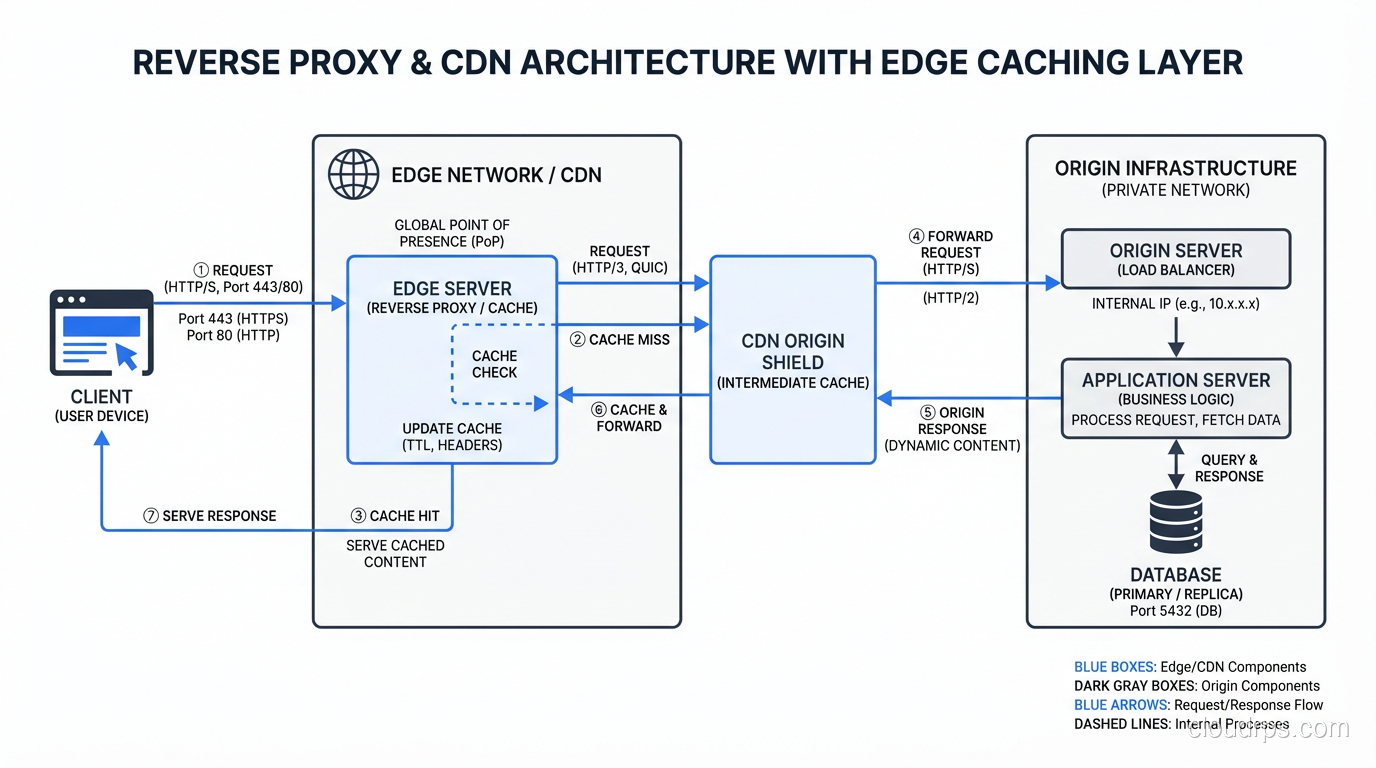
A CDN is a globally distributed reverse proxy network. Cloudflare, CloudFront, Fastly, and Akamai are all reverse proxy services deployed across hundreds of points of presence globally. When you configure your DNS to point to a CDN, client requests go to the nearest edge location (reverse proxy) rather than your origin servers.
The CDN layer adds: global caching, DDoS absorption (the edge can absorb traffic that would overwhelm your origin), TLS termination at the edge (reducing connection latency), and sometimes WAF and bot mitigation.
The origin pull flow: client connects to edge, edge checks cache, cache miss triggers a request to origin, origin responds to edge, edge caches the response and sends it to client. Subsequent requests for the same resource are served from edge cache without hitting your origin.
Practical Deployment Patterns
For most applications, the reverse proxy architecture looks like this:
Internet -> CDN Edge (Cloudflare/CloudFront)
              -> Origin Shield (optional CDN layer)
                -> Load Balancer (AWS ALB or Nginx)
                  -> Application Servers
The forward proxy pattern is relevant when:
- You have outbound traffic from a corporate network that needs filtering or logging
- You’re deploying in an environment where egress traffic must exit through a single controlled point
- You’re building a developer environment where you want to intercept and inspect API calls
One pattern I’ve found particularly valuable in cloud environments: a forward proxy for egress traffic from microservices. Instead of each microservice having direct internet access, route all outbound HTTP through a central forward proxy (Squid or a commercial equivalent). You get centralized logging of all external API calls, a single point to enforce egress allow-listing, and an easy way to debug “why is my service calling this unexpected endpoint.”
The security benefits connect directly to zero trust architecture: egress through a forward proxy enforces the principle that services should only be able to reach explicitly permitted destinations, not the entire internet.
Understanding proxies is foundational to understanding modern web architecture. The reverse proxy in front of your application isn’t just plumbing; it’s a capability platform where you can implement caching, auth, compression, and routing without touching application code. And the forward proxy controlling your outbound traffic is a security control that far too many organizations skip.
Get Cloud Architecture Insights
Practical deep dives on infrastructure, security, and scaling. No spam, no fluff.
By subscribing, you agree to receive emails. Unsubscribe anytime.