
I have been running CI/CD pipelines for twenty years, across self-hosted Jenkins clusters, Buildkite agents on bare metal, Concourse on VMs, and more recently GitHub Actions. GitHub Actions is genuinely excellent: the workflow syntax is approachable, the ecosystem of third-party actions is enormous, and the GitHub-hosted runners get you from zero to functional pipeline in under an hour. I recommend it to almost every team getting started.
Then the bill arrives.
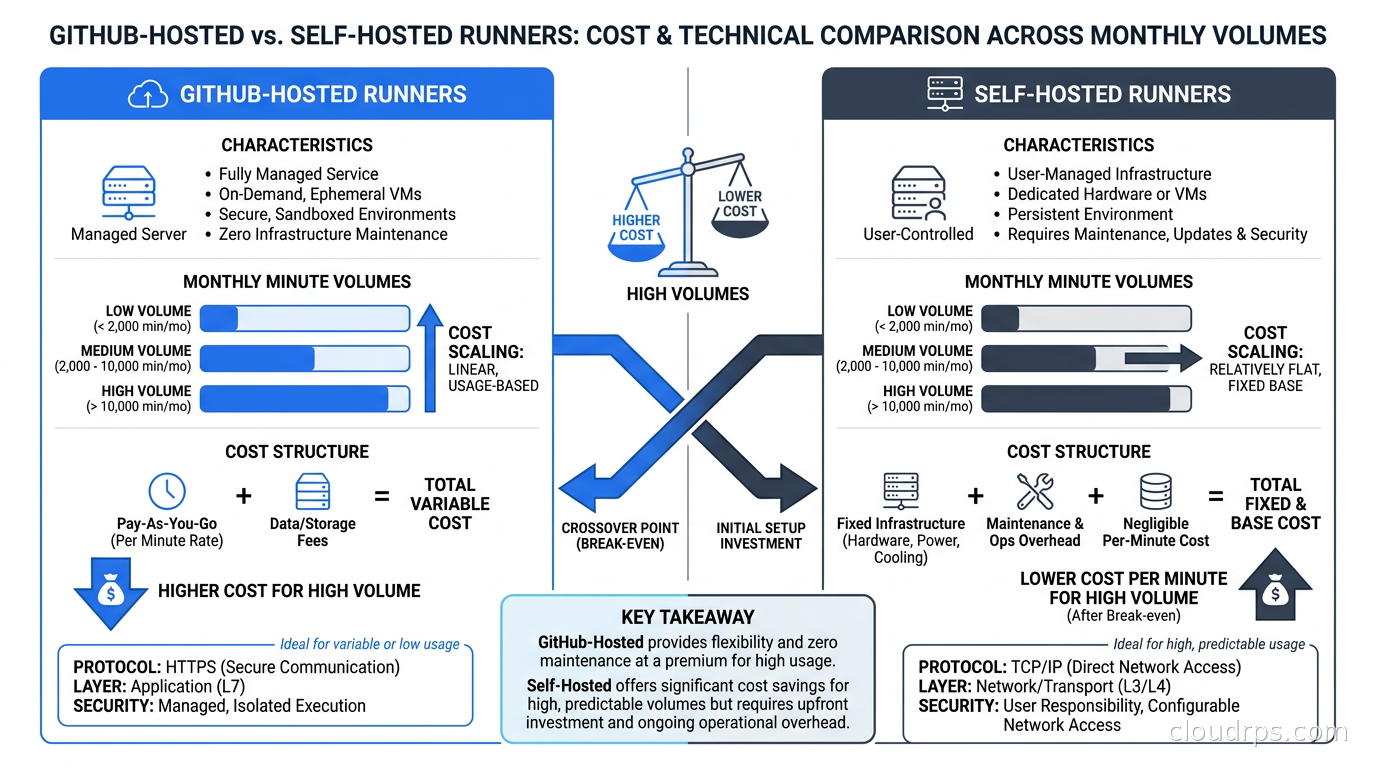
At somewhere between two thousand and five thousand minutes per month of compute, GitHub-hosted runners feel reasonable. Past that threshold, the economics invert fast. A team running moderate CI load, say fifty developers with active pipelines, can burn fifty thousand to two hundred thousand minutes per month without blinking. At GitHub’s standard pricing, that turns into a four-to-five-figure monthly charge just for the compute substrate under your pipelines. Meanwhile, that same workload would cost a fraction of that on Kubernetes nodes you control, especially if you use spot or preemptible instances.
The answer is self-hosted runners managed by Actions Runner Controller (ARC). This is not a weekend project anymore. ARC is now a first-party GitHub project, the runner scale set model is GA and production-ready, and teams of all sizes are running it successfully. But there are sharp edges, particularly around security and lifecycle management, that will burn you if you go in without preparation.
What Self-Hosted Runners Actually Are
A self-hosted runner is a process you run on infrastructure you control. It registers with GitHub using a token or GitHub App credentials, polls the GitHub Actions API for workflow jobs assigned to it, executes those jobs, and reports results back. From GitHub’s perspective, the runner is just another execution environment. From your perspective, it is a process running on your compute with your network access.
This distinction matters more than people realize. A GitHub-hosted runner has no network access to your internal systems. If your pipeline needs to talk to an internal registry, an internal API, a database you cannot expose to the internet, or a VPN-protected environment, you need a self-hosted runner or an elaborate network tunneling solution. Self-hosted runners are the right answer in those cases, not a workaround.
The security model also flips. GitHub-hosted runners are ephemeral and sandboxed by GitHub. Self-hosted runners run on your infrastructure, which means you own the isolation, the credential handling, and the network exposure. This is not harder, but it is different. You need to think carefully about what a compromised runner job could do to your environment.
Why ARC and Scale Sets Are the Right Model
Before ARC existed, teams ran persistent self-hosted runners on VMs or bare metal. A pool of N always-on machines waited for work. This worked, but it had problems: idle cost during off-peak hours, queuing during peak demand, stale runner state causing flaky builds, and operational overhead managing a fleet of long-lived processes.
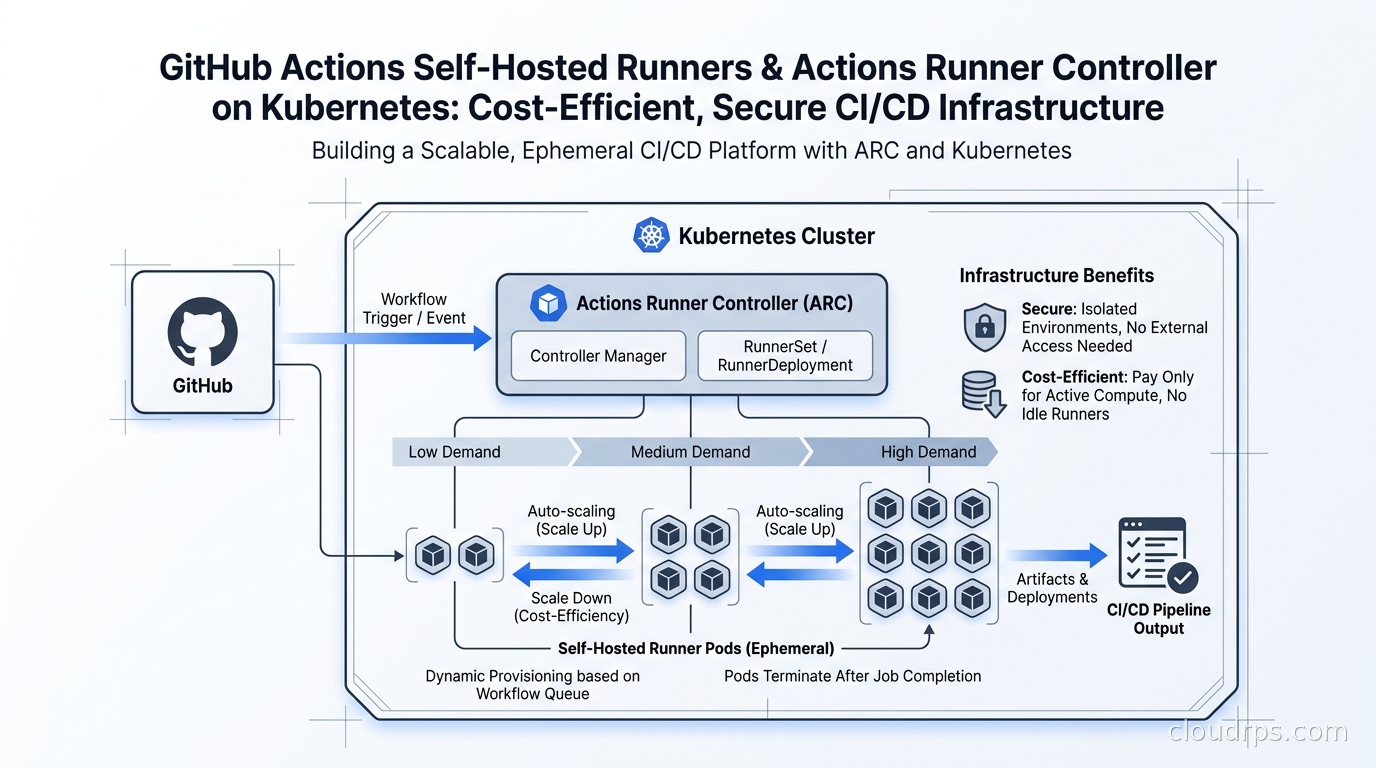
ARC solves the lifecycle problem by running runners as ephemeral Kubernetes pods. Each job gets a fresh pod. The pod spins up, executes exactly one job, and is deleted. No state leaks between jobs. No “it worked last time but not now” mystery failures caused by residue from a previous run. And because Kubernetes can scale pods up and down, you pay for compute only when jobs are actually running.
The original ARC (the community-built summerwind/actions-runner-controller) used a webhook-based autoscaling model that worked but had scaling delays and required maintaining the legacy runner registration flow. GitHub’s current first-party ARC, now living at actions/actions-runner-controller, introduced a cleaner model called runner scale sets. This is what you should be using for new deployments.
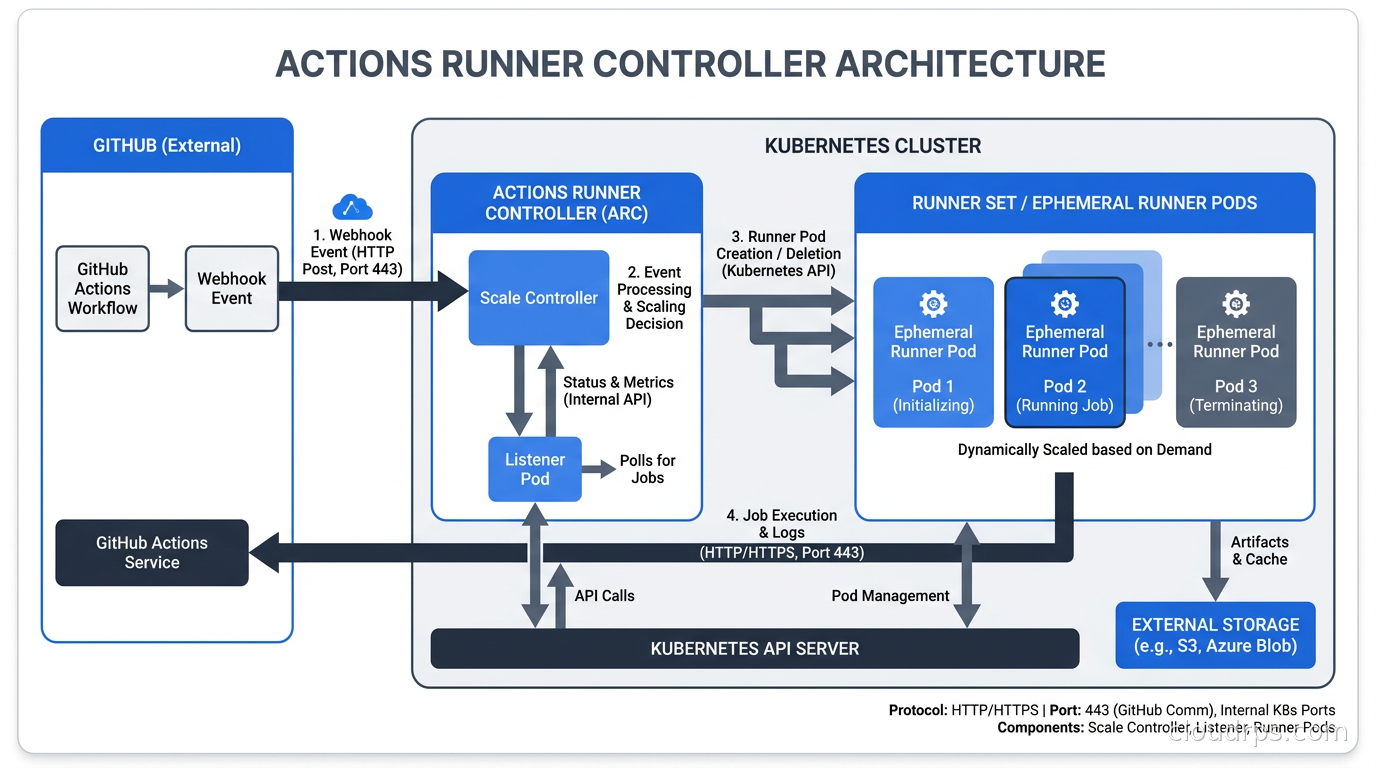
A scale set is a logical group of runners with a shared configuration. When you create a scale set, ARC deploys a controller manager and a listener pod for that scale set. The listener maintains a long-lived connection to the GitHub Actions service using the new message-passing protocol (not legacy polling). When a workflow job with a matching runs-on label is queued, GitHub sends an acquisition message to the listener, which creates a runner pod to handle that specific job. When the job completes, the pod is deleted.
The architectural result is a clean mapping: one job, one pod, one lifecycle. The listener pod handles the coordination overhead, and the actual runner pods are perfectly ephemeral. The scale set controller watches the queue depth and can trigger Kubernetes-level node scaling (via Karpenter or Cluster Autoscaler) when the pod demand exceeds available node capacity. You can read more about those node-level scaling approaches in my piece on Karpenter for Kubernetes node provisioning.
GitHub App Authentication: Do Not Use Personal Access Tokens
The most critical setup decision is how ARC authenticates to GitHub. The three options are Personal Access Tokens (PATs), Fine-grained PATs, and GitHub Apps. Use GitHub Apps. Every time.
PATs are tied to individual user accounts. When that person leaves your company or their account is compromised, your entire CI infrastructure loses authentication. Fine-grained PATs are slightly better but still user-scoped.
A GitHub App is an organizational entity with its own identity. You create it, install it on the repositories or organization you want, grant it the specific permissions needed (repository access, workflow permissions), and generate a private key. ARC uses that private key to authenticate as the app installation. No user account in the critical path, no blast radius from employee offboarding, and you can rotate the private key independently.
The ARC Helm chart handles this cleanly. You create a Kubernetes Secret containing the app ID, installation ID, and private key:
apiVersion: v1
kind: Secret
metadata:
  name: github-app-credentials
  namespace: arc-systems
type: Opaque
stringData:
  github_app_id: "123456"
  github_app_installation_id: "78901234"
  github_app_private_key: |
    -----BEGIN RSA PRIVATE KEY-----
    ...
    -----END RSA PRIVATE KEY-----
Then reference it in your scale set configuration. This is where secret management practices matter; I have seen teams hard-code these values in Helm values files checked into source control, which is the kind of mistake that generates a very bad GitHub security advisory. Use a secrets manager, inject at deploy time, or at minimum use Kubernetes secret encryption at rest.
Deploying ARC with Helm
ARC ships as two Helm charts: gha-runner-scale-set-controller for the central controller, and gha-runner-scale-set for each scale set you create. This separation lets you run a single controller managing multiple scale sets across different repositories or with different runner configurations.
Install the controller first:
helm install arc \
  --namespace arc-systems \
  --create-namespace \
  oci://ghcr.io/actions/actions-runner-controller/charts/gha-runner-scale-set-controller
Then create your first scale set. Here is a minimal values file for a scale set targeting an organization:
githubConfigUrl: "https://github.com/your-org"
githubConfigSecret: github-app-credentials

minRunners: 0
maxRunners: 20

containerMode:
  type: "kubernetes"
  kubernetesModeWorkVolumeClaim:
    accessModes: ["ReadWriteOnce"]
    storageClassName: "gp3"
    resources:
      requests:
        storage: 10Gi

template:
  spec:
    containers:
      - name: runner
        image: ghcr.io/actions/actions-runner:latest
        resources:
          requests:
            cpu: "1"
            memory: "2Gi"
          limits:
            cpu: "4"
            memory: "8Gi"
    nodeSelector:
      workload-type: ci-runners
    tolerations:
      - key: ci-runner
        operator: Equal
        value: "true"
        effect: NoSchedule
A few things worth unpacking in that configuration. Setting minRunners: 0 means no pods run when there are no queued jobs. This is what makes self-hosted runners economical: you are not paying for idle pods during nights, weekends, or slow periods. The nodeSelector and tolerations route runner pods to nodes specifically provisioned for CI work, keeping them isolated from your application workloads. This matters both for resource predictability and for Kubernetes pod scheduling hygiene.
The containerMode: kubernetes setting enables the Kubernetes mode where each step in your workflow can optionally run in its own container. This is distinct from the Docker-in-Docker mode, which I will cover in the security section.
Runner Container Images: Build Your Own
GitHub’s default runner image (actions/actions-runner) is lean. It includes the runner binary and basic tooling, but not the build dependencies most pipelines need: specific Node.js versions, Go toolchains, Docker, kubectl, Helm, specific Python versions, your internal CA certificates, your internal package registry credentials, etc.
You have two approaches. The first is to install dependencies at job startup via uses steps (like actions/setup-node). This is fine and works with the stock image, but it adds latency to every job. Installing Node.js, Go toolchain, or a Python virtual environment on every run costs thirty to ninety seconds per job, which adds up to real money and developer wait time at scale.
The second approach, which I prefer for busy teams, is maintaining a custom runner image that bakes in your commonly-used tooling. You end up with a Dockerfile that extends the base runner image, installs your specific versions of Node, Go, Python, your internal certificates, and any CLI tools your pipelines use. Build this image in your own registry, reference it in your scale set configuration.
The tradeoff is image freshness management. You own the update cycle now. Pin your tool versions explicitly and automate the rebuilds. The Dagger CI/CD approach pairs well here: define your runner image build as a Dagger pipeline so the same toolchain that builds your application can build your runner image, and both are tested and versioned consistently.
Security Hardening: Isolation Is Not Optional
This is where I spend the most time in reviews, and where I have seen the most serious mistakes. A compromised CI job on a self-hosted runner has network access to everything that runner pod can reach. If your runners run in the same namespace and network as your production services, you have a supply chain attack waiting to happen.
Isolate your runner pods in a dedicated namespace with restrictive network policies. The network policy should allow egress to GitHub’s IP ranges (for job acquisition), to your internal registry (for pulling images), to your package repositories (npm, PyPI, Maven), and nothing else. No access to your production cluster’s API server, no access to your internal services, no access to your databases.
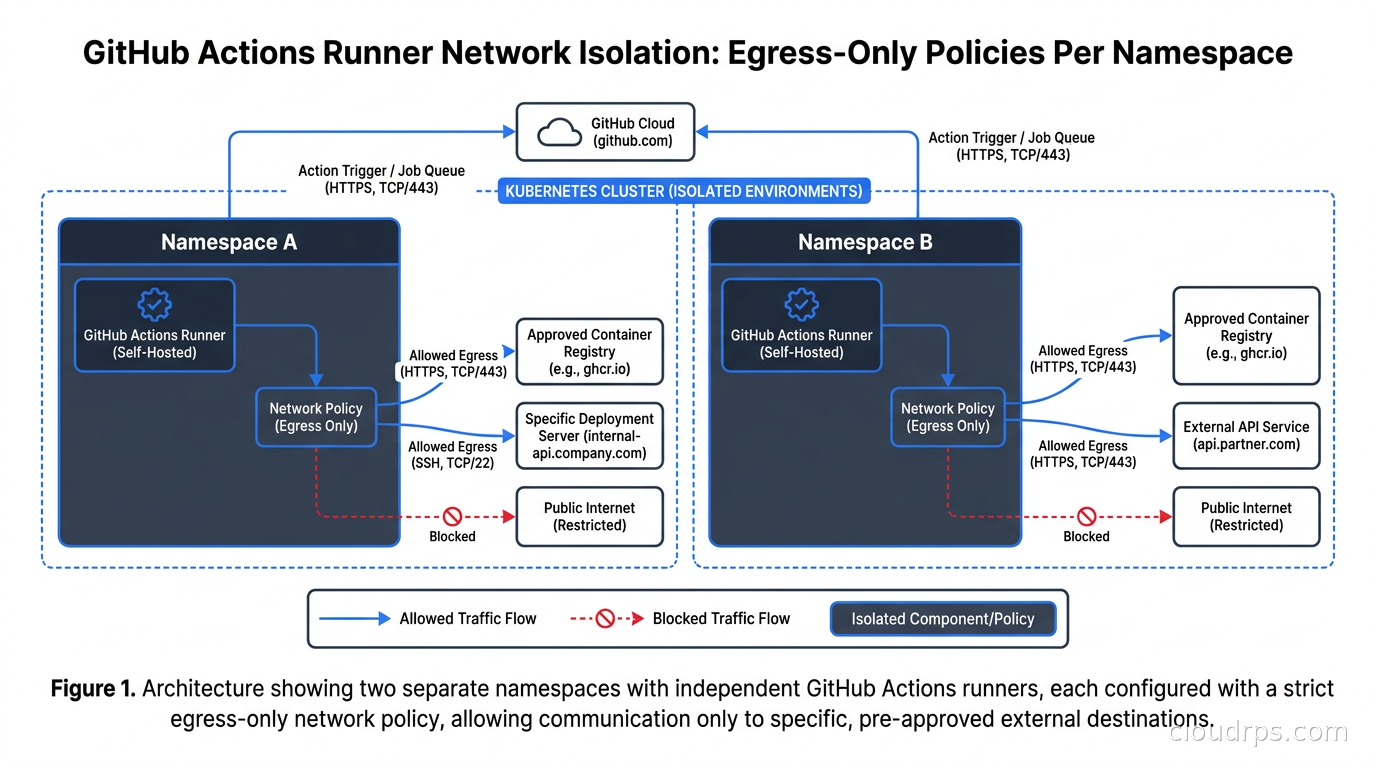
Equally important: do not mount service account tokens with elevated permissions into runner pods. The default Kubernetes service account in most clusters has more permissions than you want a compromised CI job to have. Create a dedicated service account for runner pods with no ClusterRole bindings. If specific jobs need Kubernetes API access (to deploy to a cluster, for example), use a separate runner scale set configured for that purpose, with tighter controls around which repositories can target it.
The Docker-in-Docker problem deserves its own paragraph. Many pipelines need to build Docker images. The naive solution is mounting the host Docker socket (/var/run/docker.sock) into the runner pod, which gives the runner full Docker access to the host. Do not do this. A malicious or compromised job can trivially escape the pod and access the host. Use Kaniko, BuildKit in rootless mode, or Buildah for image builds inside runner pods. These tools build OCI images without requiring Docker daemon access.
For runner pods themselves, apply restrictive security contexts: run as non-root, drop all Linux capabilities, use a read-only root filesystem where feasible. Pair this with a NetworkPolicy and you have a runner environment that can execute your pipelines without being a lateral movement vector into your cluster.
Handling Secrets in Pipelines
GitHub Actions has a built-in secrets management system. You store secrets in GitHub (at repository or organization level) and reference them as ${{ secrets.MY_SECRET }}. These are injected into the job environment as masked environment variables. This works and is fine for many cases.
The limitation is that GitHub secrets are managed in GitHub. For organizations using a centralized secrets manager like HashiCorp Vault, AWS Secrets Manager, or GCP Secret Manager, you want secrets fetched at job runtime from the canonical store, not duplicated into GitHub. This matters for rotation: if you rotate a database password in Vault, you want running pipelines to pick up the new value automatically, not fail because a stale copy is stored in GitHub secrets.
The pattern I recommend is minimal GitHub secrets: store only the credentials needed to authenticate to your secrets manager (a Vault token, an AWS IAM role ARN, a GCP service account), and use that to fetch everything else at runtime. GitHub Actions’ OIDC federation makes this elegant for cloud providers: your job can assume an AWS IAM role or a GCP service account without storing any static credentials at all, using OIDC tokens that GitHub mints for each run. This is essentially the same workload identity pattern I covered in the workload identity federation article, applied to CI rather than to Kubernetes pods.
Observability for Your Runner Fleet
When your CI infrastructure is a fleet of ephemeral Kubernetes pods, standard monitoring requires some thought. Pods come and go in seconds. You need visibility into queue depth, job latency, scale-up events, and failure rates, without trying to tail logs from pods that no longer exist.
ARC exposes Prometheus metrics from the controller manager: queue depth per scale set, number of running runners, listener connection status, and controller reconciliation errors. Connect these to your existing Prometheus and Grafana stack and build a dashboard that shows pipeline throughput alongside infrastructure utilization.
For job-level observability, GitHub’s audit log API captures every workflow run event. Pull these into your SIEM or data warehouse and you can answer questions like “which repository generates the most CI minutes,” “which jobs have the highest p99 duration,” and “which jobs fail most frequently at the runner setup step versus the actual test step.” These metrics feed directly into cost attribution conversations with engineering teams.
The Cost Math: When Self-Hosting Makes Sense
I get asked this constantly, so let me be direct about the numbers. GitHub-hosted Ubuntu runners cost $0.006 per minute, after a price cut effective January 1, 2026 (it was $0.008 before that). A team consuming one hundred thousand minutes per month pays six hundred dollars. At two hundred thousand minutes, twelve hundred dollars. At five hundred thousand minutes, three thousand dollars per month, just for CI compute.
A reasonably sized Kubernetes node pool for that same workload, using spot instances on AWS (c5.2xlarge or similar runs around $0.34 per on-demand hour; spot pricing for the same instance type typically lands fifty to seventy percent lower, roughly $0.10 to $0.15), with proper autoscaling and minimal idle time, runs the same workload for a few hundred dollars a month. The crossover point varies by team, but I typically see meaningful savings starting around one hundred thousand minutes per month, with the savings becoming substantial well above three hundred thousand minutes.
The hidden cost is operational overhead. Maintaining ARC, the runner images, the node configuration, and the security posture is real work. For a small platform team or a team without Kubernetes expertise, the operational burden can easily exceed the cost savings until the system is mature. The Kubernetes cost visibility tooling helps attribute this accurately, so you can make the build-vs-buy decision with real numbers.
Using spot instances for your runner node pools amplifies the savings further. CI workloads are well-suited to spot: they are interruptible (a terminated runner returns its job to the queue and it gets picked up by another runner), they are short-lived, and they start fresh on every run. Pair spot nodes with Karpenter’s diverse instance type selection, and Karpenter will automatically find the cheapest available instance that fits your runner pod’s resource requirements.
War Stories and Common Pitfalls
I have seen ARC deployments go wrong in predictable ways. Here are the ones worth warning you about.
The “it scaled to zero and won’t come back” problem. ARC with minRunners: 0 creates a cold-start scenario. When no runners are active and a job is queued, ARC needs to create a pod, the pod needs to pull its image, and the image pull can take thirty to sixty seconds if the node’s image cache is cold. For workflows that developers run interactively and expect to start immediately, this latency is frustrating. Set minRunners: 1 for your most-used scale sets to keep one warm runner available.
Log retention for ephemeral pods. When a runner pod completes and is deleted, its logs are gone unless you have a log forwarding solution configured. If you discover a mysterious build failure two hours later, you want to be able to retrieve the full runner logs, not just the GitHub Actions log viewer output. Deploy a log aggregator (Fluentbit, Vector) that forwards pod logs to your centralized logging system before the pod is deleted.
Runner version pinning. GitHub periodically deprecates old runner versions and blocks their registration. The originally announced March 2026 block on runners below version 2.329.0 never actually took effect: GitHub paused that enforcement on March 13, 2026, three days before it was due to start, after pushback from self-hosted runner operators. It came back on a new timeline announced in June 2026, with brownout periods intermittently blocking older runners rolling out through the second half of the year. If you pin your runner image to a specific tag and do not have automated image updates, you will eventually arrive at work to find your entire CI fleet unable to register with GitHub once enforcement lands for your account type. Pin to a minor version at most, not a patch version, and use Renovate or Dependabot to automate image updates. The secrets detection tooling you probably already have in your pipeline can catch any sensitive values accidentally introduced during image updates.
Namespace collision. ARC strongly recommends keeping the controller in a separate namespace from the runner pods. I have seen teams put everything in the same namespace “for simplicity” and then have the controller get disrupted by a runner pod resource contention event. Put arc-systems for the controller and a separate arc-runners namespace for each scale set.
Deploying ARC via GitOps
One of the things I appreciate about the current ARC architecture is that it is entirely Kubernetes-native: Helm charts, Kubernetes secrets, Kubernetes resources for the scale set configuration. This means you can manage the entire ARC deployment via your existing GitOps toolchain.
Check your Helm values and Kubernetes manifests into your Git repository. Use ArgoCD or Flux to apply them declaratively. When you need to update the runner image version or adjust the maxRunners limit, make a pull request, get it reviewed, merge it, and the GitOps controller applies the change. No manual helm upgrade commands, no configuration drift. I covered the GitOps model in detail in the ArgoCD and Flux explainer.
This also means ARC’s configuration lives alongside your infrastructure as code for the rest of your Kubernetes cluster. The Terraform or Pulumi code that provisions your EKS or GKE cluster can include the node pool with the ci-runner taint, and the ArgoCD application pointing at the ARC Helm chart. The entire CI infrastructure becomes reproducible and auditable.
When NOT to Self-Host
Self-hosted runners are not always the right answer, and I want to be honest about the cases where I tell teams to stay on GitHub-hosted runners.
If your team is small (under ten developers), runs light CI workloads, and has no internal networking requirements, the operational overhead of ARC is not worth the cost savings. You will spend more engineering time maintaining the runner infrastructure than you save in compute bills. GitHub-hosted runners, possibly supplemented with larger runner configurations for your longest jobs, will serve you better.
If you do not already run Kubernetes, standing up a cluster solely for CI runners is a significant operational commitment. Kubernetes is an excellent platform for many things, but “I want cheaper CI” is not a strong enough reason to adopt it if you are not already there.
If your security posture requires complete air-gap from GitHub’s cloud (rare but real in certain government and financial contexts), self-hosted runners create a dependency on GitHub’s API that GitHub-hosted runners also have. The self-hosted model does not help with that requirement; you need a fully self-hosted Git and CI platform instead.
Getting Started: Practical Steps
If you have decided self-hosted runners make sense for your team, here is the order of operations I recommend:
First, create a dedicated GitHub App for ARC. Do this before anything else. Install it on your organization, grant it the minimum necessary permissions (repository access, workflow jobs), and generate the private key. Store the private key in your secrets manager.
Second, provision a dedicated node group or node pool in your Kubernetes cluster with a specific taint for CI runners. Use spot instances. Size the nodes based on your typical job resource requirements, not peak.
Third, deploy the ARC controller into a dedicated namespace. Start with a single scale set pointing at a low-traffic repository so you can observe the behavior before rolling out to your whole organization.
Fourth, build your custom runner image. Start with the GitHub base image and add your most-used tools. Push it to your internal registry.
Fifth, apply network policies to your runner namespace before any sensitive workflows run on it. Define the egress rules you need and deny everything else.
Sixth, set up monitoring: Prometheus scraping the ARC metrics, Grafana dashboard, alerts for listener disconnection and queue depth.
Once that is stable, migrate repositories from GitHub-hosted runners one group at a time. Update the runs-on label in your workflows from ubuntu-latest to the name of your scale set. Watch the Grafana dashboard during the first few runs to confirm scaling behaves as expected.
The platform investment pays back quickly once you get past that initial setup. When the runner fleet is mature, your CI infrastructure becomes a zero-maintenance background service: it scales up when developers push code, scales down during weekends, and costs a fraction of what SaaS minutes cost at the same volume.
The twenty minutes you spend debugging a stuck listener pod are annoying. The three thousand dollars per month you save starting from month two are not.
Updated September 1, 2026: corrected the GitHub-hosted runner rate to $0.006/minute and recomputed the downstream cost math, fixed the EC2 c5.2xlarge on-demand versus spot pricing, corrected the runner version enforcement timeline, and softened the unverified self-hosting savings percentage.
Get Cloud Architecture Insights
Practical deep dives on infrastructure, security, and scaling. No spam, no fluff.
By subscribing, you agree to receive emails. Unsubscribe anytime.