
It was 2 AM on a Thursday and I was staring at a Kubernetes cluster that had quietly drifted into a state nobody could explain. Three different engineers had run kubectl apply commands over the previous week. One had patched a deployment to bump memory limits. Another had scaled a replica set manually to handle a traffic spike and never scaled it back. A third had applied a ConfigMap change directly because “it was just one small fix.” None of these changes existed in version control. When the cluster started throwing OOMKilled errors and dropping requests, we had no idea what the “correct” state was supposed to look like. We spent four hours reverse-engineering the cluster state by comparing live resources against stale YAML files scattered across three different repos.
That incident was my conversion moment. I walked into the next architecture review and said: “We are never doing imperative deployments again.”
That is the origin story for most teams that adopt GitOps. Not because someone read a blog post about it, but because they got burned.
What GitOps Actually Is
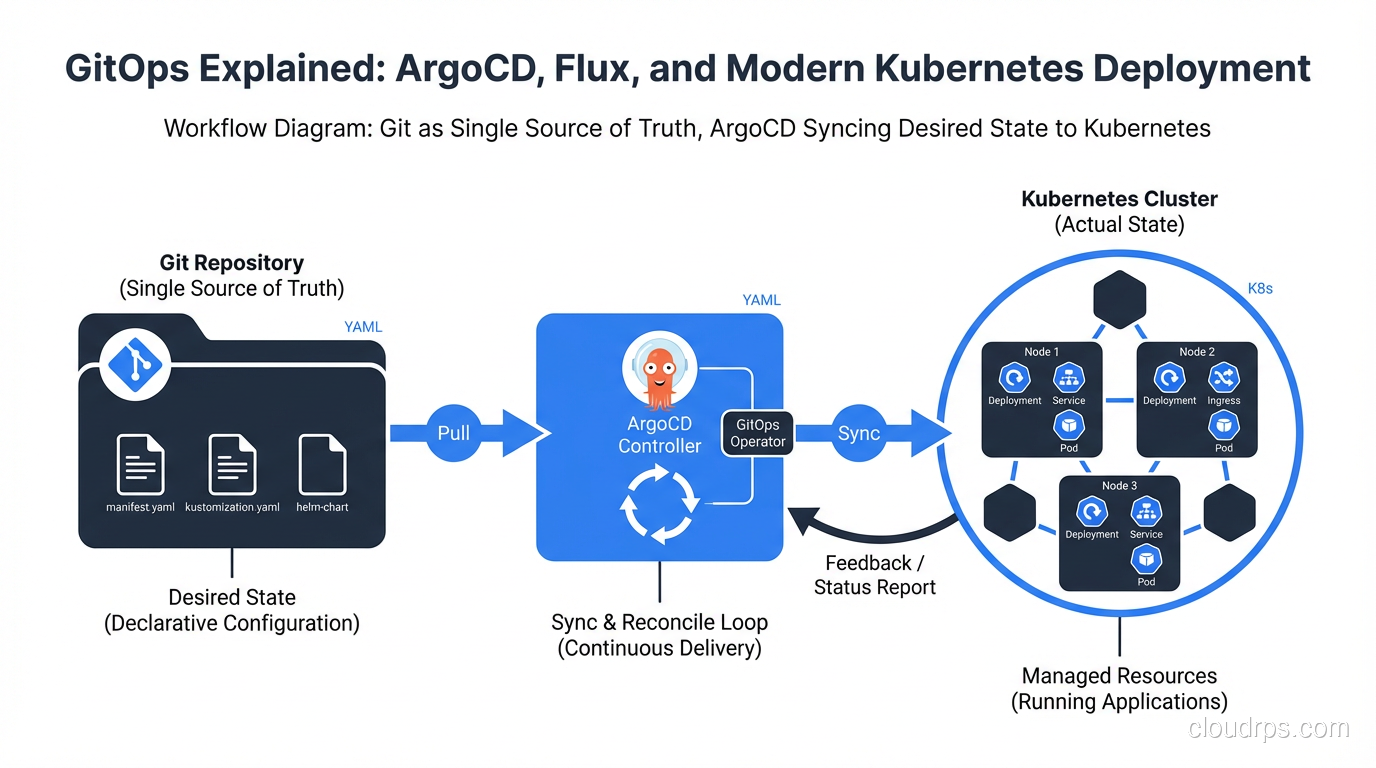
GitOps is one of those terms that gets thrown around loosely, so let me be precise about what it means in practice. The concept was coined by Weaveworks (the company behind Flux) and it boils down to four principles:
Declarative configuration. Your entire system, including applications, infrastructure, policies, and networking, is described declaratively. You define the desired state, not the steps to get there. This is the same principle behind Infrastructure as Code tools like Terraform and Pulumi. If you have worked with Kubernetes and containers, you already think this way with manifests and Helm charts.
Versioned and immutable. Git is the single source of truth. Every change goes through a pull request, gets reviewed, and creates an auditable history. You can answer “who changed what, when, and why” for every single resource in your cluster. Try doing that with a history of ad-hoc kubectl commands.
Automated delivery. Once a change is merged, the system automatically applies it. No human needs to run a deploy script. No CI pipeline needs cluster credentials. The deployment is pulled by an agent running inside the cluster, not pushed from outside.
Self-healing through reconciliation. If someone manually changes something in the cluster (intentionally or not), the GitOps agent detects the drift and corrects it. The live state always converges back to the declared state in Git. This is the part that would have saved my team that Thursday night.
If you are already doing CI/CD, GitOps is not a replacement for it. Your CI pipeline still builds, tests, and packages your application. GitOps takes over at the deployment stage, replacing the “CD” part with something more robust and auditable.
Push vs. Pull: Why the Deployment Model Matters
Most traditional CI/CD pipelines use a push model. Jenkins, GitHub Actions, or GitLab CI builds your container image, then runs kubectl apply or helm upgrade to push changes into the cluster. This works, but it has real problems at scale.
First, your CI system needs cluster credentials. That means your CI runners, which are often shared across many projects, have broad access to your production Kubernetes API. That is a security surface area you do not want.
Second, push-based systems have no concept of drift detection. If someone manually changes something in the cluster after the pipeline runs, nobody knows until something breaks. The pipeline only fires on code changes; it does not continuously monitor the live state.
Pull-based GitOps flips this model. An agent running inside the cluster (ArgoCD or Flux) watches a Git repository. When it detects a difference between the desired state in Git and the actual state in the cluster, it pulls the changes and applies them. The cluster credentials never leave the cluster. The Git repo does not need to know anything about the cluster’s API endpoint.
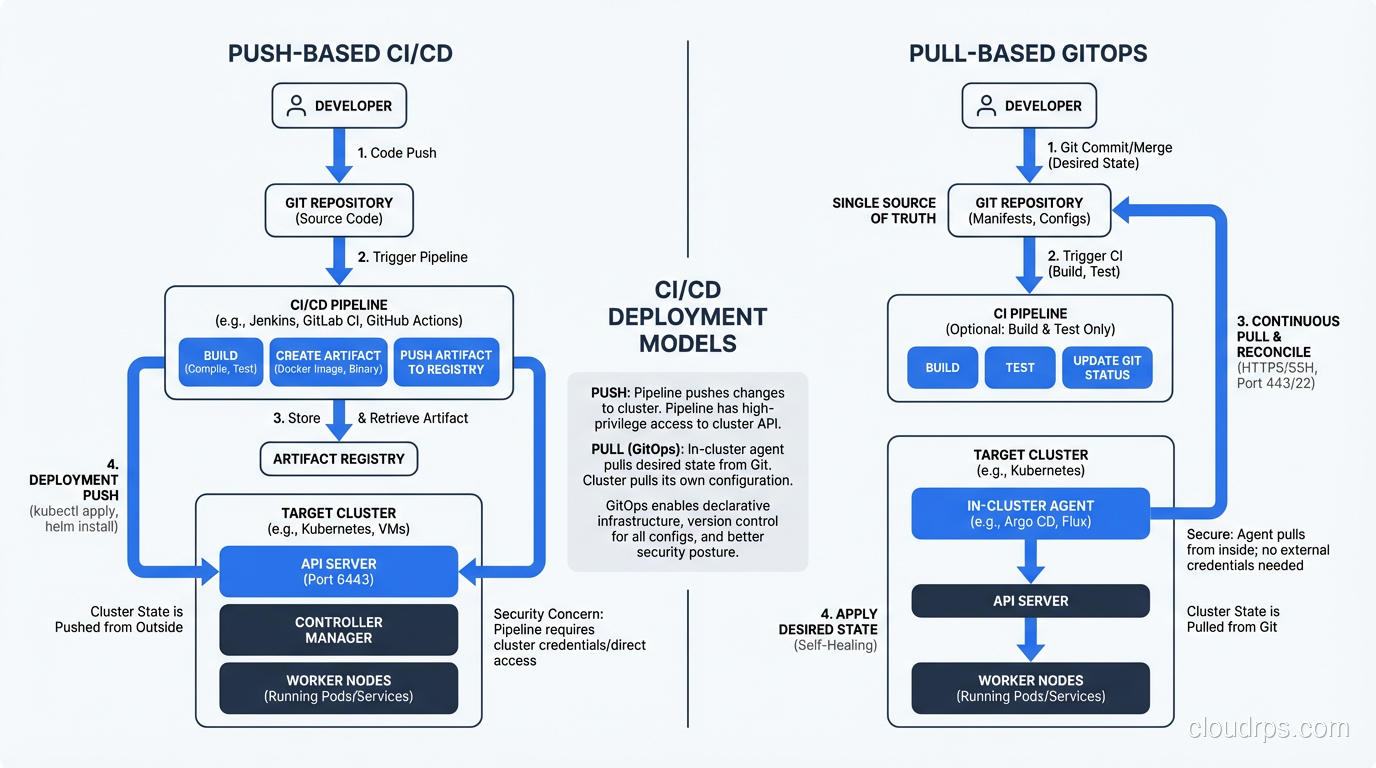
This is not just a theoretical improvement. In practice, pull-based deployment eliminates an entire class of “works on my machine” problems and makes disaster recovery dramatically simpler. If your cluster dies, you spin up a new one, point your GitOps agent at the same Git repo, and everything reconverges. I have done this in production and it is genuinely that straightforward.
ArgoCD: The Kubernetes-Native GitOps Engine
ArgoCD is the most widely adopted GitOps tool in the Kubernetes ecosystem, and for good reason. It was built specifically for Kubernetes and it shows.
Architecture
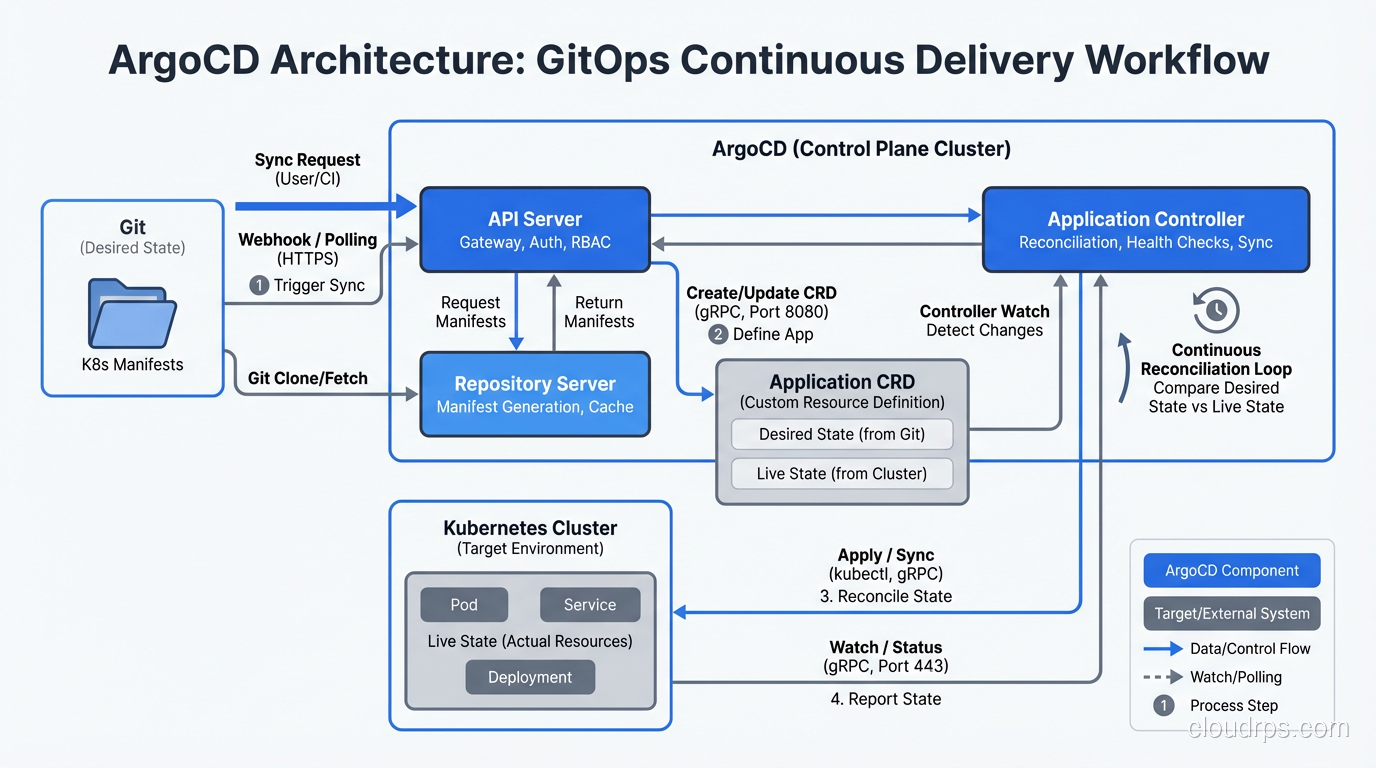
ArgoCD runs as a set of controllers inside your cluster. The main components are:
- API Server that exposes a gRPC and REST API, plus a web UI for visualization
- Repository Server that clones Git repos and generates Kubernetes manifests from Helm charts, Kustomize overlays, or plain YAML
- Application Controller that continuously compares the desired state (from Git) against the live state (from the Kubernetes API) and takes action when they diverge
The web UI is genuinely useful, not just a nice-to-have. Being able to see a visual tree of every resource in your application, color-coded by sync status, has saved me hours of debugging. When a deployment is stuck, you can see exactly which resource is out of sync and why.
Application CRDs
In ArgoCD, you define an Application custom resource that tells the controller where to find manifests and where to deploy them:
apiVersion: argoproj.io/v1alpha1
kind: Application
metadata:
  name: my-service
  namespace: argocd
spec:
  project: default
  source:
    repoURL: https://github.com/myorg/k8s-manifests
    targetRevision: main
    path: apps/my-service/production
  destination:
    server: https://kubernetes.default.svc
    namespace: my-service
  syncPolicy:
    automated:
      prune: true
      selfHeal: true
    syncOptions:
      - CreateNamespace=true
The syncPolicy.automated section is where the magic happens. With selfHeal: true, ArgoCD will revert any manual changes made to the cluster. With prune: true, it will delete resources that exist in the cluster but not in Git. This is what gives you the “Git is the single source of truth” guarantee.
Sync Strategies and Rollback
ArgoCD gives you fine-grained control over how syncs happen. You can use sync waves to order resource creation (create the namespace before the deployment, create the ConfigMap before the pod that reads it). You can add pre-sync and post-sync hooks for tasks like database migrations or smoke tests.
Rollback is trivially simple: revert the Git commit. ArgoCD detects the change and syncs to the previous state. Compare this to traditional deployments where rollback means remembering which Helm release version to roll back to, or hoping your blue-green deployment still has the old version running. Git history becomes your deployment history, and that is a powerful simplification.
Multi-Cluster Management
This is where ArgoCD really shines for larger organizations. You can register multiple clusters with a single ArgoCD instance and manage deployments across all of them from one place. I have run setups where a single ArgoCD instance managed staging, production, and disaster recovery clusters. The Application CRDs just point to different destination.server values. For teams building highly available systems, this multi-cluster capability is essential.
Flux: The Composable GitOps Toolkit
Flux (specifically Flux v2, which is the current version) takes a different philosophical approach than ArgoCD. Where ArgoCD is a single integrated platform, Flux is a set of composable controllers that you can mix and match.
Architecture
Flux is built around several specialized controllers, each handling one concern:
- Source Controller manages Git repositories, Helm repositories, OCI repositories, and S3 buckets as sources of Kubernetes manifests
- Kustomize Controller reconciles Kustomization resources, applying overlays and patches to your base manifests
- Helm Controller manages Helm releases declaratively through HelmRelease custom resources
- Notification Controller handles inbound webhooks (to trigger reconciliation) and outbound notifications (to Slack, Teams, or other alerting systems)
- Image Automation Controllers can watch container registries and automatically update image tags in your Git repository
This modular design means you only install what you need. If you do not use Helm, you do not install the Helm Controller. If you do not need image automation, skip those controllers.
Kustomize Controller
The Kustomize Controller is the heart of most Flux deployments. You define a Kustomization resource that tells Flux which path in a Git repo to reconcile:
apiVersion: kustomize.toolkit.fluxcd.io/v1
kind: Kustomization
metadata:
  name: my-service
  namespace: flux-system
spec:
  interval: 5m
  path: ./apps/my-service/production
  prune: true
  sourceRef:
    kind: GitRepository
    name: my-infrastructure
  healthChecks:
    - apiVersion: apps/v1
      kind: Deployment
      name: my-service
      namespace: my-service
  timeout: 3m
The interval field controls how often Flux checks for drift between the Git state and the cluster state. The healthChecks section tells Flux to verify that deployments are actually healthy after applying changes, not just that the YAML was accepted by the API server.
Helm Controller
If your team uses Helm charts, the Helm Controller lets you manage releases declaratively:
apiVersion: helm.toolkit.fluxcd.io/v2beta2
kind: HelmRelease
metadata:
  name: redis
  namespace: redis
spec:
  interval: 10m
  chart:
    spec:
      chart: redis
      version: "18.x"
      sourceRef:
        kind: HelmRepository
        name: bitnami
  values:
    architecture: replication
    auth:
      enabled: true
This is a significant improvement over running helm install or helm upgrade from a CI pipeline. The HelmRelease resource is versioned in Git, reconciled continuously, and can be rolled back by reverting a commit.
Image Automation
One of Flux’s unique capabilities is image automation. The Image Reflector Controller watches container registries for new tags, and the Image Automation Controller can update the image tags in your Git repository automatically. This creates a fully automated pipeline: push code, CI builds an image, Flux detects the new image, Flux updates the Git repo, Flux deploys the update.
I have mixed feelings about this feature. It is powerful for development and staging environments where you want continuous deployment of every commit. But for production, I prefer explicit human approval via a pull request. Automating everything sounds great until a broken image gets deployed at 3 AM with no human in the loop.
ArgoCD vs. Flux: When to Use Each
After running both in production across different organizations, here is my honest assessment.
Choose ArgoCD when:
- You want a polished web UI for visualization and debugging. ArgoCD’s UI is excellent, and operations teams love it.
- You need multi-cluster management from a single control plane.
- Your team includes people who are not deeply comfortable with Kubernetes primitives and benefit from a graphical interface.
- You want a batteries-included experience with less assembly required.
- You are doing multi-tenancy with ArgoCD’s project-level RBAC.
Choose Flux when:
- You prefer a lightweight, CLI-first approach with no centralized UI component.
- You want to compose exactly the controllers you need without extra overhead.
- Image automation is a core requirement for your workflow.
- You are already deeply invested in the Kustomize workflow.
- You prefer that the GitOps tooling itself is managed declaratively via Git (Flux can bootstrap itself from a Git repo).
In my experience, ArgoCD tends to win in larger enterprises where visibility and multi-team collaboration matter. Flux tends to win with platform engineering teams that want maximum control and minimal overhead. Neither is objectively better; they optimize for different things.
One thing worth noting: both are CNCF graduated projects, so you are not betting on a tool that might disappear. Both have strong communities and active development.
GitOps Repository Structure Patterns
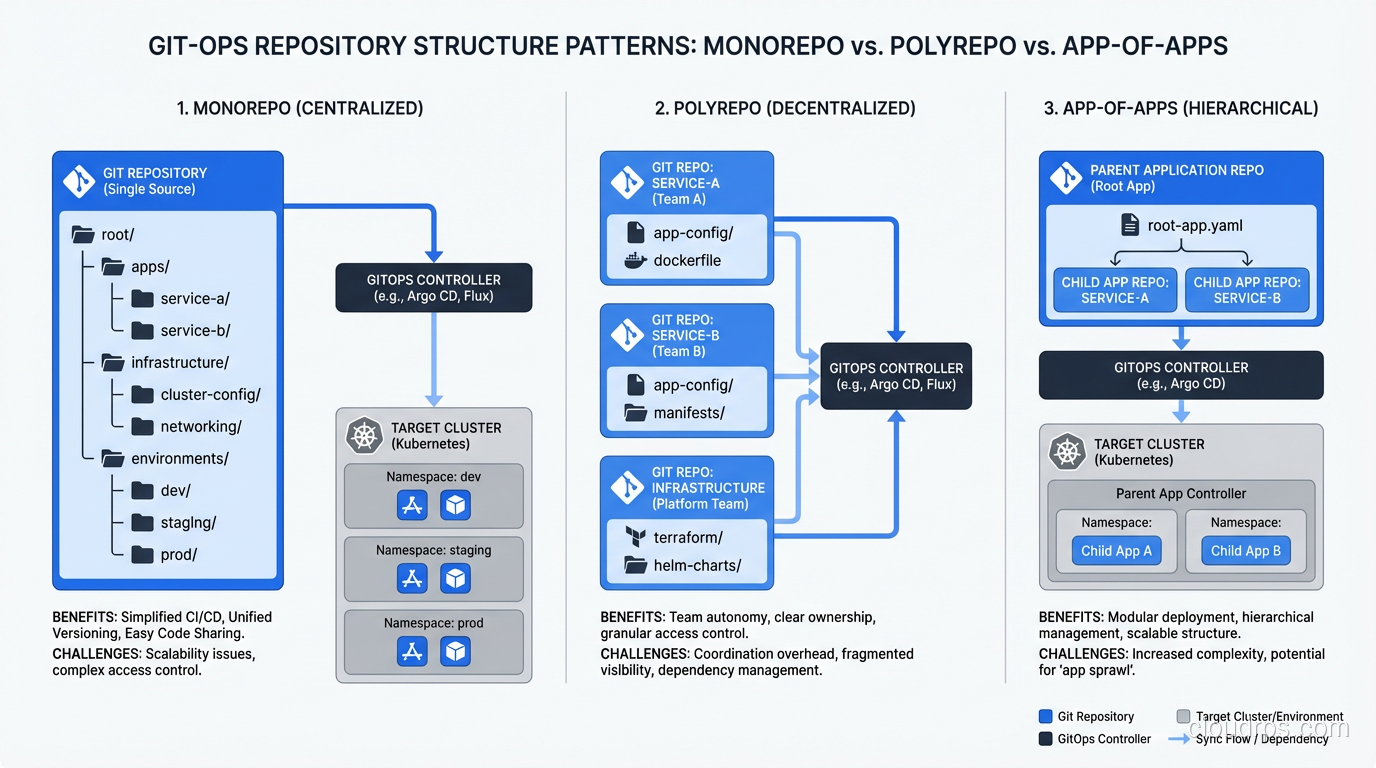
How you organize your Git repositories matters more than most teams realize when starting with GitOps. I have seen three patterns work well.
Monorepo
Everything lives in one repository: application manifests, infrastructure configs, environment-specific overlays. The directory structure typically looks like:
├── apps/
│   ├── service-a/
│   │   ├── base/
│   │   ├── staging/
│   │   └── production/
│   └── service-b/
│       ├── base/
│       ├── staging/
│       └── production/
├── infrastructure/
│   ├── cert-manager/
│   ├── ingress-nginx/
│   └── monitoring/
└── clusters/
    ├── staging/
    └── production/
The monorepo approach is simpler for small teams. Everything is in one place, and cross-cutting changes (like updating a shared ConfigMap) are atomic. The downside is that access control gets complicated when different teams should only be able to modify their own services.
Polyrepo
Each application or team gets its own repository for Kubernetes manifests. A separate “infrastructure” repo manages cluster-wide resources. This is better for large organizations with clear team boundaries, but it introduces coordination challenges when changes span multiple repos.
App-of-Apps (ArgoCD) / Kustomization Dependencies (Flux)
This is the pattern I recommend for most teams. You have a top-level “root” Application (ArgoCD) or Kustomization (Flux) that points to a directory containing other Application or Kustomization definitions. This creates a hierarchy: the root app manages the child apps, and each child app manages its own set of resources.
In ArgoCD, this is called the “app-of-apps” pattern. In Flux, you achieve the same thing with Kustomization dependencies. Either way, the key benefit is that adding a new service to the cluster means adding a single file to the root directory, not configuring the GitOps tool itself.
Common Pitfalls and How to Avoid Them
After years of running GitOps in production, these are the problems that catch teams off guard.
Secret Management
This is the number one issue every team hits. You cannot store plain-text secrets in Git (obviously), but your applications need secrets. You have several options:
- Sealed Secrets encrypts secrets with a cluster-specific key so the encrypted version can live in Git safely. Simple to use, but rotating the encryption key is painful.
- External Secrets Operator syncs secrets from external stores like AWS Secrets Manager, HashiCorp Vault, or Azure Key Vault. This is my preferred approach because the secret lifecycle is managed by a purpose-built tool, not Git.
- SOPS (Secrets OPerationS) encrypts secret values in-place within YAML files using age, PGP, or cloud KMS keys. Flux has native SOPS integration, which makes this approach very clean.
Whatever you choose, decide on your secret management strategy before you go all-in on GitOps. Retrofitting it later is miserable.
Stateful Applications
GitOps works beautifully for stateless applications. For stateful workloads like databases, message queues, and persistent storage, things get tricky. The problem is that GitOps wants to reconcile everything to a declared state, but stateful applications have runtime state that should not be overwritten.
My advice: manage the Kubernetes operators for stateful systems (like the PostgreSQL operator or the Redis operator) via GitOps, but let the operators manage the stateful resources themselves. Do not try to GitOps-manage individual PersistentVolumeClaims or database schemas.
Multi-Cluster and Multi-Environment Drift
Running GitOps across staging and production is great in theory. In practice, teams struggle with keeping environment-specific differences manageable. Your staging overlay has different resource limits, different replica counts, different feature flags. Over time, these overlays grow until they diverge significantly from the base manifests.
Use a layered Kustomize approach with a shared base and thin environment-specific overlays. If your staging overlay is larger than your base, something has gone wrong. Be disciplined about what gets customized per environment (resource limits, replicas, domain names) versus what stays consistent (container images, command arguments, health check paths).
Observability
GitOps gives you great audit trails through Git history, but you still need monitoring and logging for the operational side. Both ArgoCD and Flux expose Prometheus metrics for sync status, reconciliation duration, and error counts. Set up alerts for sync failures and drift detection. A GitOps agent that is silently failing to reconcile is worse than no GitOps at all because you have a false sense of security.
Repository Sprawl
I have seen teams go from zero to thirty Git repositories in the first month of adopting GitOps. Every microservice gets its own config repo, plus infrastructure repos, plus cluster repos, plus a repo for the GitOps tool configuration itself. Before long, nobody knows where anything lives.
Start with one or two repos and split only when you have a concrete reason (team ownership boundaries, access control requirements). Premature repository splitting creates more problems than it solves.
Practical Recommendations
If you are just starting with GitOps, here is what I would do based on everything I have learned from production deployments across multiple organizations.
Start with ArgoCD if you want to move fast and get value quickly. Install it, create a single Git repo for your manifests, and migrate one non-critical service first. Get comfortable with the sync workflow, the UI, and the Application CRDs before expanding. Resist the temptation to GitOps-manage everything on day one.
Separate your application code repositories from your GitOps configuration repositories. Your CI pipeline builds and tests code, then updates an image tag in the config repo. The GitOps agent picks up the config change and deploys it. This separation of concerns keeps the system clean and auditable.
Invest in your secret management strategy early. External Secrets Operator with a cloud-native secret store (AWS Secrets Manager, GCP Secret Manager, Azure Key Vault) is the most production-ready approach I have used.
Build drift detection alerts from day one. Both ArgoCD and Flux emit metrics that tell you when the cluster state has diverged from Git. If you are not alerting on that, you are missing half the value of GitOps.
And finally, remember that GitOps is a practice, not just a tool. The tools are important, but the real value comes from the discipline of declaring everything in Git, reviewing changes through pull requests, and trusting the automated reconciliation loop. Once your team internalizes that workflow, the specific tool matters less than the habit. The days of SSH-ing into a server and making changes by hand should be behind us. GitOps is how cloud-native teams deploy with confidence, and it has fundamentally changed how I think about infrastructure management.
Get Cloud Architecture Insights
Practical deep dives on infrastructure, security, and scaling. No spam, no fluff.
By subscribing, you agree to receive emails. Unsubscribe anytime.