
I will never forget the first time I opened a cloud bill and saw a $47,000 line item for GPU compute. It was a Tuesday morning. I had just gotten coffee. The number hit me like a freight train. We had spun up a cluster of eight A100 instances for a training job that was supposed to take a weekend. Someone forgot to set up auto-shutdown, the job had errored out on Saturday night, and those GPUs sat idle at $32 per hour for three days straight.
That was the moment I became deeply, personally invested in understanding GPU cloud infrastructure. Not as an academic exercise, but as a matter of professional survival. When you are spending more on GPUs per month than most companies spend on their entire cloud footprint, you cannot afford to guess. You need to understand the hardware, the pricing models, the tradeoffs, and the dozen small decisions that separate a well-architected GPU deployment from a money furnace.
If you are building AI workloads in the cloud, this guide is everything I wish someone had handed me before that Tuesday morning.
Why GPUs for AI (And Why CPUs Fall Short)
Let me start with the basics, because I still run into teams trying to do inference on CPU-only instances and wondering why their model takes 30 seconds to generate a paragraph.
A modern CPU has 8 to 128 cores. Each core is powerful, capable of complex branching logic, deep instruction pipelines, and sophisticated caching. CPUs are brilliant at sequential, logic-heavy work. That is exactly the wrong profile for AI workloads.
Neural network computation is dominated by matrix multiplication. Millions of multiply-and-accumulate operations that are independent of each other. A GPU like the NVIDIA H100 has 16,896 CUDA cores plus 528 Tensor Cores designed specifically for this kind of massively parallel math. Where a CPU processes matrix operations sequentially across a handful of cores, a GPU blasts through them in parallel across thousands.
The performance gap is not 2x or 5x. For transformer-based models, we are talking 50-200x faster on GPUs versus CPUs. That gap is why a 70B parameter model that takes 40 seconds per response on a high-end CPU cluster delivers sub-second responses on a single H100. If you are new to the fundamentals, my breakdown of cloud computing basics covers why specialized hardware like GPUs represents the next evolution of cloud infrastructure.
The memory architecture matters just as much as the compute. AI models need to fit entirely in GPU memory (VRAM) for efficient inference. When a model does not fit, you have to split it across multiple GPUs or use quantization to shrink it, both of which add complexity. This is why GPU memory capacity is often the first constraint you hit, not compute speed.
The NVIDIA GPU Lineup: A100 Through Blackwell
NVIDIA dominates AI compute. AMD and Intel are making progress, but the NVIDIA ecosystem (CUDA, cuDNN, TensorRT, NVLink) is so entrenched that choosing a different vendor introduces real compatibility risk. I have seen teams burn months trying to get PyTorch models running efficiently on non-NVIDIA hardware. Until the ecosystem matures, NVIDIA is the pragmatic choice.
Here is how I think about the current lineup, from oldest to newest.
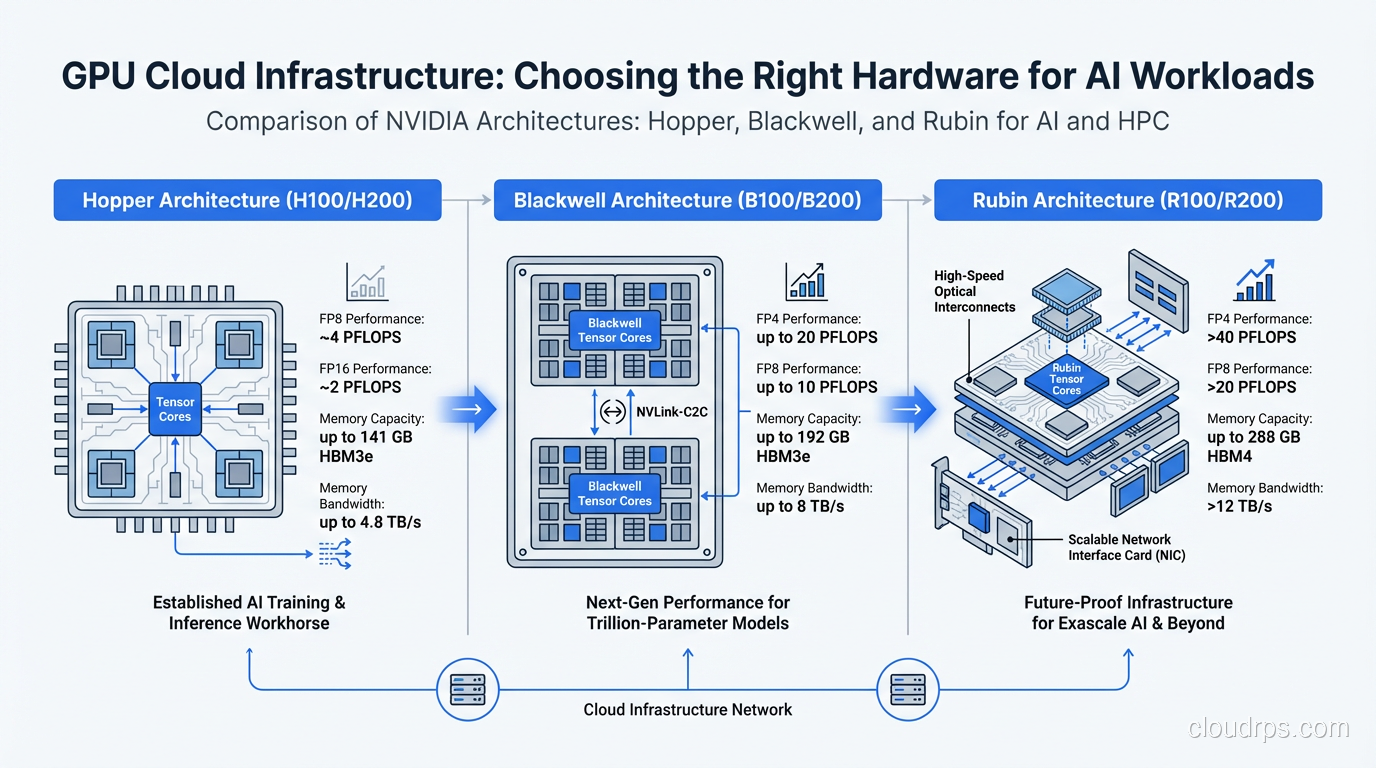
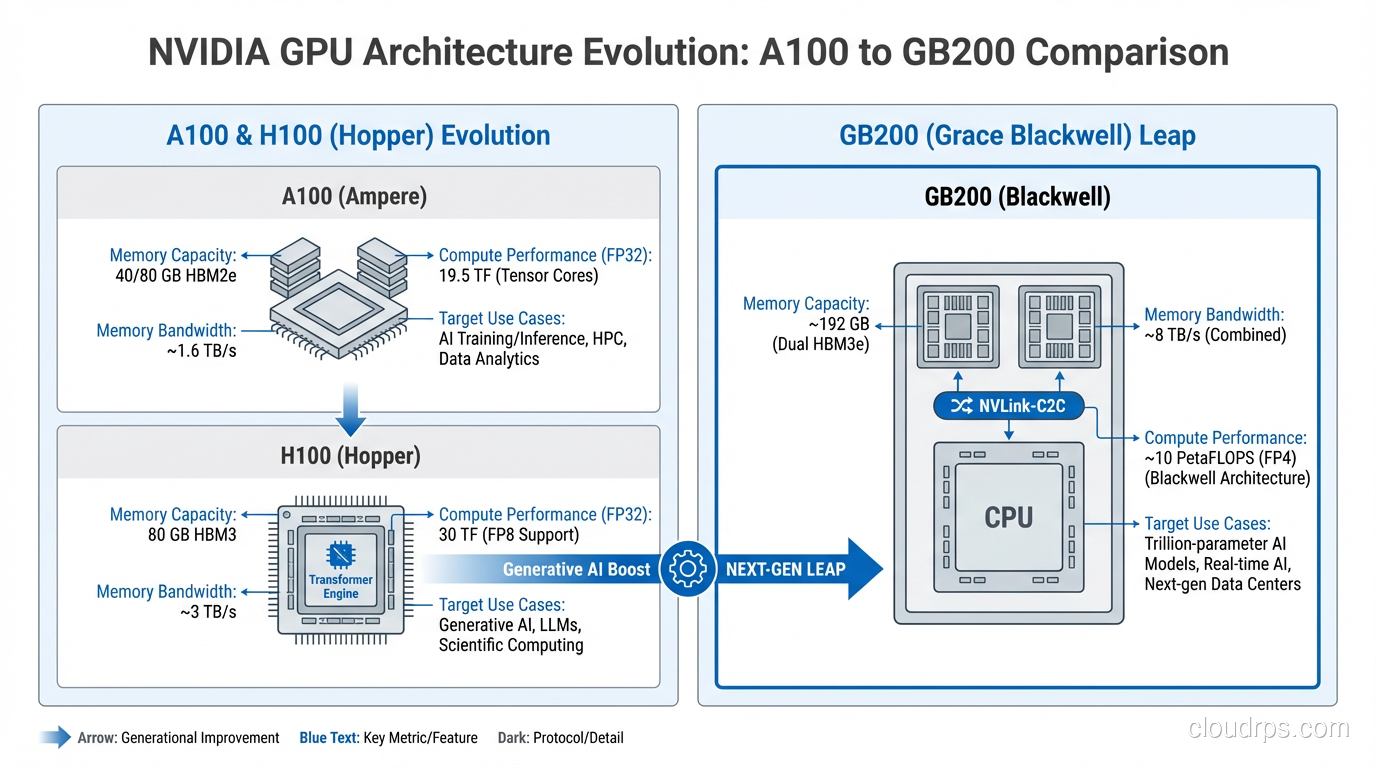
NVIDIA A100 (Ampere, 2020)
The A100 remains the most widely available data center GPU. It comes in 40GB and 80GB HBM2e variants. The 80GB model can fit a 70B parameter model with INT8 quantization, which covers the majority of production LLM use cases.
I still deploy A100s regularly. They are well-supported by every framework, availability is excellent, and pricing has come down significantly as newer hardware enters the market. Think of the A100 as the reliable workhorse. Not cutting-edge, but proven and cost-effective.
NVIDIA H100 (Hopper, 2023)
The H100 was the GPU that defined the current AI infrastructure era. 80GB of HBM3 memory with roughly 3x the memory bandwidth of an A100. The Transformer Engine introduced hardware-level FP8 support, which nearly doubles throughput for compatible workloads compared to FP16.
Real-world inference benchmarks consistently show 2-3x improvement over A100s for large language models. Training jobs see similar or larger gains, especially at scale. The H100 is the current sweet spot for production AI if you can get allocation. Availability has improved dramatically since the supply crunch of 2023-2024, but popular regions still see waitlists.
NVIDIA H200 (Hopper Refresh, 2024)
Same Hopper architecture as the H100, but with 141GB of HBM3e memory and significantly higher memory bandwidth. The H200 is a surgical upgrade. If your bottleneck is memory capacity or bandwidth (which it often is for large model inference), the H200 delivers meaningful improvement without requiring you to rearchitect anything.
I recommend H200s for teams running 70B+ models that are memory-constrained on H100s. The extra VRAM means you can serve larger batch sizes or avoid model parallelism entirely, which simplifies your deployment considerably.
NVIDIA B100 and B200 (Blackwell, 2025)
Blackwell is NVIDIA’s latest architecture, and the performance jump is substantial. The B200 packs 192GB of HBM3e memory and introduces a second-generation Transformer Engine with FP4 support. NVIDIA’s published benchmarks claim 4x inference performance over H100 for large language models.
In my early testing with B200 instances, the real-world gains are closer to 2.5-3.5x for typical LLM inference workloads. Still remarkable. The FP4 support is particularly interesting because it lets you run quantized models with minimal accuracy loss while nearly doubling throughput versus FP8.
The B100 is the cost-optimized variant with lower TDP and slightly reduced performance. Good for inference-heavy deployments where you do not need peak training performance.
NVIDIA GB200 (Blackwell Ultra, 2025)
The GB200 is the flagship configuration: two B200 GPUs connected to a Grace ARM CPU via NVLink-C2C, forming an integrated compute unit with 384GB of combined GPU memory. This is designed for the largest models, think trillion-parameter scale, where you need massive memory pools and CPU-GPU bandwidth that traditional PCIe cannot deliver.
Unless you are training or serving models above 200B parameters, the GB200 is more hardware than you need. But for the organizations pushing the frontier of model scale, it eliminates a whole category of infrastructure headaches around model parallelism and CPU-GPU data transfer.
Cloud Provider GPU Instances
Knowing the GPU hardware is only half the equation. You also need to understand how cloud providers package these GPUs into instance types, because the instance configuration (CPU, memory, networking, storage) matters almost as much as the GPU itself.
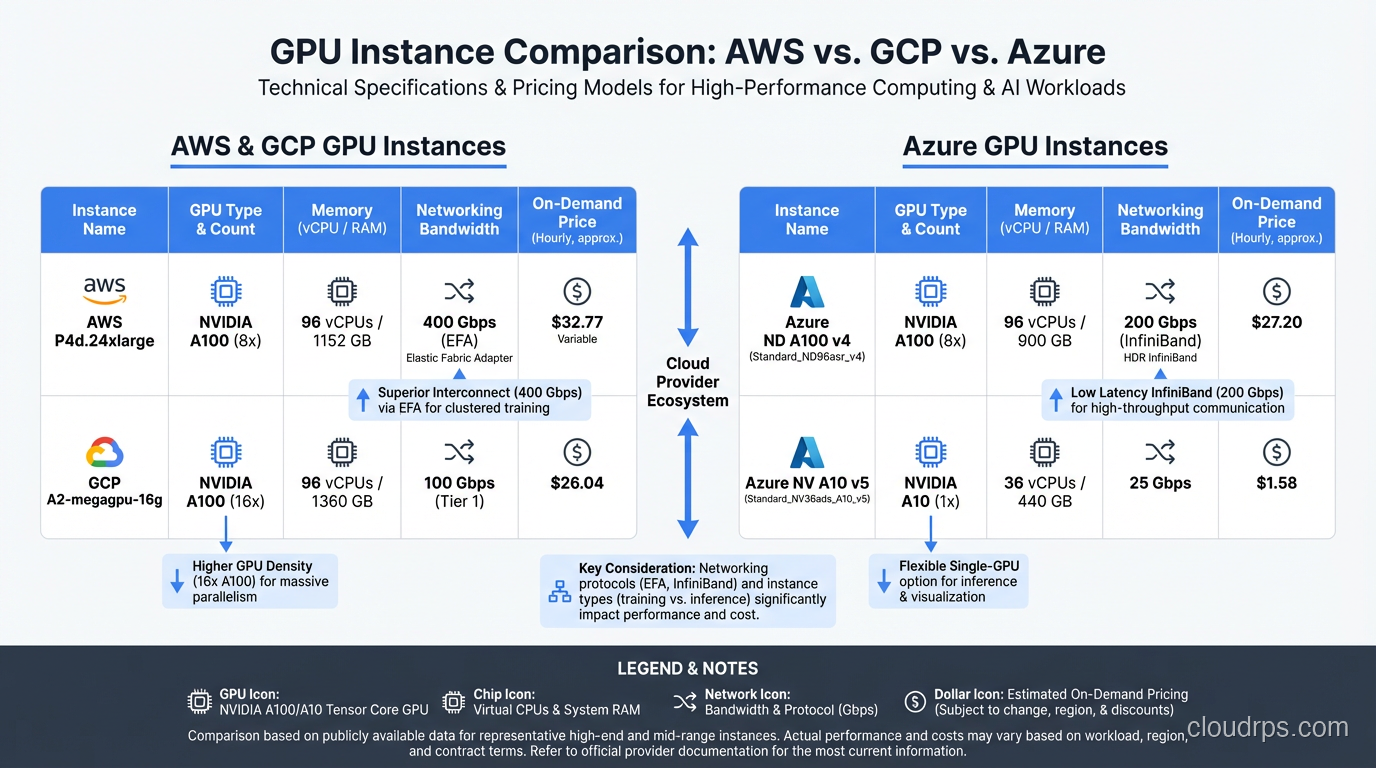
AWS GPU Instances
AWS offers the broadest GPU instance selection. The key families:
p5.48xlarge runs eight H100 GPUs with 640GB total GPU memory, 192 vCPUs, and 2TB of system RAM. Connected with 3.2 Tbps of EFA (Elastic Fabric Adapter) networking for multi-node training. This is the current production workhorse for serious AI workloads on AWS.
p5e.48xlarge swaps in H200 GPUs for the memory upgrade. Same instance shape, more VRAM. Ideal when you are memory-bound.
p6.48xlarge (recently launched) brings Blackwell B200 GPUs to AWS. Early availability is limited to specific regions, but it is worth the wait for new deployments.
p4d.24xlarge gives you eight A100 80GB GPUs. Still widely available and significantly cheaper than p5 instances. For workloads that do not need Hopper-level performance, p4d remains an excellent choice.
For inference specifically, AWS also offers inf2 instances powered by custom Inferentia2 chips and g5 instances with A10G GPUs. These are worth considering for smaller models where you do not need the firepower of data center GPUs. I covered the broader AWS compute landscape in my guide to EC2, EBS, EFS, Lambda, and the physical hardware underneath.
GCP GPU Instances
Google Cloud’s GPU instance naming is less intuitive, but the offerings are competitive.
a3-highgpu-8g delivers eight H100 GPUs with 640GB GPU memory and 3.2 Tbps networking. Google’s implementation of multi-node networking (using GPUDirect-TCPX) is arguably best-in-class for distributed training.
a3-ultragpu-8g is the H200 variant. Same story as AWS p5e.
a3-megagpu-8g uses Blackwell GPUs and is rolling out in 2025-2026.
Google also offers g2 instances with L4 GPUs that are excellent for inference of smaller models. The L4 draws only 72 watts and costs a fraction of an H100, making it ideal for cost-sensitive inference deployments.
Azure GPU Instances
Azure’s naming convention uses the ND-series for GPU compute.
ND H100 v5 provides eight H100 GPUs with InfiniBand networking. Azure has strong InfiniBand support, which can be an advantage for large-scale distributed training.
ND H200 v5 is the memory-upgraded variant.
ND GB200 v6 is Azure’s Blackwell offering, targeted at the largest enterprise AI workloads.
Azure’s differentiator is the integration with the broader Microsoft ecosystem. If you are already running on Azure and your team lives in the Microsoft toolchain, the operational benefits of staying put often outweigh small differences in GPU performance or pricing.
Choosing Your Provider
I get asked this constantly, and my honest answer is: it depends on what you are already using. Migrating your entire infrastructure to a different cloud provider just for GPU instances is almost never worth the operational cost. If you are on AWS, use AWS GPU instances. If you are on GCP, use GCP. The GPU hardware inside is identical; the differences are in networking, storage integration, and instance management tooling.
The one exception is price-sensitive batch workloads where you can shop across providers for the best spot pricing. But even then, the complexity of multi-cloud GPU orchestration is real. The scalability and elasticity patterns that work for standard compute do not always translate cleanly to GPU workloads.
Training vs. Inference: Different Workloads, Different GPUs
This is where I see teams waste the most money. They provision GPU infrastructure without clearly separating their training and inference requirements, and they end up with hardware that is wrong for both.
Training is throughput-oriented and batch-scheduled. You want maximum FLOPS, and you are willing to trade latency for throughput. Training jobs are predictable in duration (hours to weeks), can tolerate interruption (via checkpointing), and benefit enormously from multi-GPU and multi-node scaling. You want the biggest, fastest GPUs you can afford, and you want them connected with the highest-bandwidth interconnects available.
For training, I recommend H100 or B200 GPUs in multi-GPU configurations with NVLink and InfiniBand. Use reserved capacity or committed use discounts to lock in pricing for jobs you know will run for weeks or months.
Inference is latency-sensitive and variable. Real users are waiting for responses. Traffic is bursty. You need to handle highly variable request patterns without over-provisioning. The key metric is not raw FLOPS but throughput-per-dollar at your target latency SLA.
For inference, the right GPU depends entirely on your model size and traffic volume. A 7B model serving moderate traffic? An L4 or A10G is probably fine. A 70B model serving thousands of concurrent users? H100 or H200. A mixture-of-experts model with 100B+ parameters? You might need B200s or multi-GPU setups.
I covered the inference side in depth in my LLM inference infrastructure guide, including framework selection and batching strategies. The short version: do not use training GPUs for inference unless your traffic volume justifies the cost.
Cost Optimization: Keeping GPU Bills Under Control
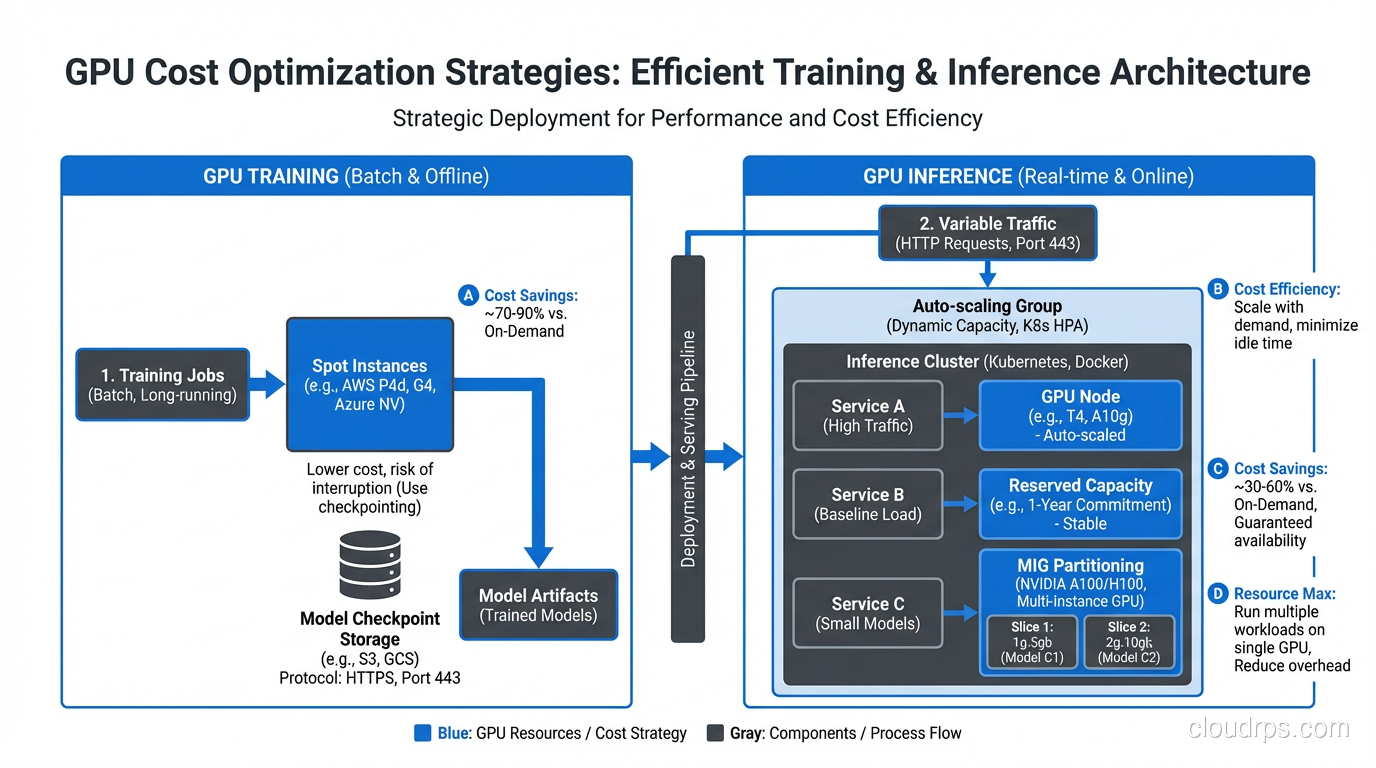
GPU compute is expensive enough that cost optimization is not optional. It is a core architectural concern. Here are the strategies I use in every GPU deployment.
Spot and Preemptible Instances
Spot instances for GPU workloads can save 60-90% compared to on-demand pricing. The catch is that your instance can be reclaimed with little notice. For training, this is manageable if you checkpoint regularly (every 15-30 minutes). For inference, spot instances are risky because losing capacity mid-request creates a terrible user experience.
My approach: use spot instances aggressively for training, sparingly for inference. When I do use spot for inference, I pair it with a small on-demand baseline that can absorb traffic during spot interruptions. This tiered approach aligns with FinOps principles of matching cost models to workload characteristics.
Reserved Capacity and Committed Use
If you know you will need GPU capacity for 1-3 years, reserved instances or committed use discounts save 30-60% over on-demand. The commitment is real, though. GPU generations turn over fast, and locking into A100 reservations when Blackwell is available at similar per-FLOP pricing is a mistake I have seen teams make.
My rule of thumb: reserve capacity for your baseline inference load (the minimum you always need), and use on-demand or spot for everything above that baseline.
Fractional GPUs and GPU Sharing
Not every workload needs a full GPU. If you are serving a 7B model that uses 14GB of VRAM on a GPU with 80GB, you are wasting 82% of that GPU’s memory. Technologies like NVIDIA MIG (Multi-Instance GPU) on A100 and H100 let you partition a single GPU into multiple isolated instances.
MIG is particularly useful for inference. You can run multiple small models on a single A100, each getting a guaranteed slice of memory and compute. I have seen this cut inference costs by 60-70% for teams serving several smaller models.
NVIDIA’s time-slicing is another option that does not require MIG-capable GPUs. It is less isolated but works on a wider range of hardware.
Right-Sizing Through Monitoring
You cannot optimize what you do not measure. GPU utilization, memory utilization, and queue depth are the three metrics I watch obsessively. If your GPU utilization is consistently below 40%, you are over-provisioned. If your inference queue depth is growing, you need more capacity or better batching.
Set up proper monitoring and logging for GPU metrics from day one. CloudWatch, Prometheus with the NVIDIA DCGM exporter, or your provider’s native GPU monitoring all work. The important thing is that you are watching utilization trends, not just checking a dashboard occasionally.
Multi-GPU and Cluster Networking
Once you scale beyond a single GPU, networking becomes the bottleneck that determines whether your expensive hardware actually delivers proportional performance gains.
NVLink
NVLink is NVIDIA’s high-bandwidth GPU-to-GPU interconnect. On Hopper, NVLink 4.0 delivers 900 GB/s bidirectional bandwidth between GPUs within the same node. On Blackwell, NVLink 5.0 pushes this to 1.8 TB/s.
This matters because multi-GPU workloads (tensor parallelism, pipeline parallelism) require constant communication between GPUs. If that communication goes over PCIe (64 GB/s) instead of NVLink, you create a massive bottleneck that tanks performance. I have seen teams deploy multi-GPU instances without NVLink connectivity and wonder why their 4-GPU setup was barely faster than a single GPU.
Always verify that your cloud instance type provides NVLink connectivity between GPUs. Not all multi-GPU instances do.
InfiniBand and RoCE
For multi-node training (distributing a job across multiple servers), the network between nodes becomes the constraint. InfiniBand is the gold standard, offering 400 Gbps with ultra-low latency and RDMA (Remote Direct Memory Access) that bypasses the CPU entirely.
AWS uses EFA (Elastic Fabric Adapter) which provides RDMA-like semantics. GCP uses GPUDirect-TCPX. Azure offers actual InfiniBand on ND-series instances. The implementations differ, but the goal is the same: minimize the latency and maximize the bandwidth of GPU-to-GPU communication across nodes.
For distributed training jobs, network topology matters enormously. You want your GPU nodes to be in the same availability zone, ideally in the same placement group, to minimize network hops. The high availability patterns that spread workloads across zones for resilience actually work against you for distributed training, where co-location is king.
When You Need Multi-Node
Here is my practical rule: if your model fits on a single node’s worth of GPUs (typically 8), do not go multi-node unless you need to. Single-node training and inference are dramatically simpler to manage. Multi-node introduces network partitioning risks, synchronization overhead, and a whole category of distributed systems bugs.
Go multi-node when your model physically does not fit on one node, when you need to parallelize training across more GPUs for speed, or when your inference traffic requires more throughput than a single node can deliver.
A Practical Right-Sizing Guide
After years of trial and error (and a lot of wasted cloud spend), here is the decision framework I use when architecting GPU infrastructure.
Step 1: Profile your model. Before you provision anything, know your model’s memory footprint at different precision levels (FP32, FP16, FP8, INT8, INT4). A 7B parameter model is roughly 14GB at FP16, 7GB at INT8, and 3.5GB at INT4. This tells you which GPUs can even fit your model.
Step 2: Define your SLA. What latency is acceptable? For interactive chat applications, you probably need time-to-first-token under 500ms and token generation at 30+ tokens per second. For batch processing, you might tolerate seconds of latency if the throughput is high. Your SLA determines whether you can use smaller, cheaper GPUs or need top-tier hardware.
Step 3: Estimate your traffic. How many concurrent requests do you need to support? At what peak? Inference throughput scales with batch size up to a point (limited by GPU memory), so understanding your concurrency requirements tells you how many GPUs you need.
Step 4: Start small and measure. I always start with a single GPU of the smallest viable type, benchmark actual performance with realistic traffic patterns, and then scale from there. Theoretical specs are useful for narrowing options, but nothing replaces real benchmarks with your actual model and actual request distribution.
Step 5: Build in elasticity. GPU workloads are inherently bursty. A Kubernetes-based deployment with KEDA or custom autoscaling that provisions GPU nodes based on queue depth or latency metrics prevents both over-provisioning and under-provisioning. This is where the distinction between scalability and elasticity becomes directly relevant to your cloud bill.
Step 6: Review monthly. GPU pricing changes. New instance types launch. Your traffic patterns evolve. I set a calendar reminder to review GPU utilization and spending monthly. Half the cost savings I have delivered came from these reviews, not from the initial architecture.
Wrapping Up
GPU cloud infrastructure is one of those domains where the stakes are high enough that getting it wrong is genuinely painful. Over-provision and you burn through budget that could fund additional engineering headcount. Under-provision and your users suffer, your training jobs crawl, and your team spends more time fighting infrastructure than building products.
The good news is that the ecosystem is maturing rapidly. Cloud providers are making GPU instances more accessible, NVIDIA’s software stack is getting more optimized with each generation, and the tooling for monitoring and autoscaling GPU workloads improves every quarter.
My advice to teams just starting their GPU infrastructure journey: resist the urge to buy the biggest, newest hardware. Start with A100s or H100s, learn the operational patterns, build your monitoring and cost management muscles, and upgrade to Blackwell when your workloads justify it. The teams that succeed at GPU infrastructure are not the ones with the most powerful hardware. They are the ones who understand their workloads deeply enough to match the right hardware to the right job.
And for the love of your cloud budget, set up auto-shutdown on your training clusters. Trust me on this one.
Get Cloud Architecture Insights
Practical deep dives on infrastructure, security, and scaling. No spam, no fluff.
By subscribing, you agree to receive emails. Unsubscribe anytime.