
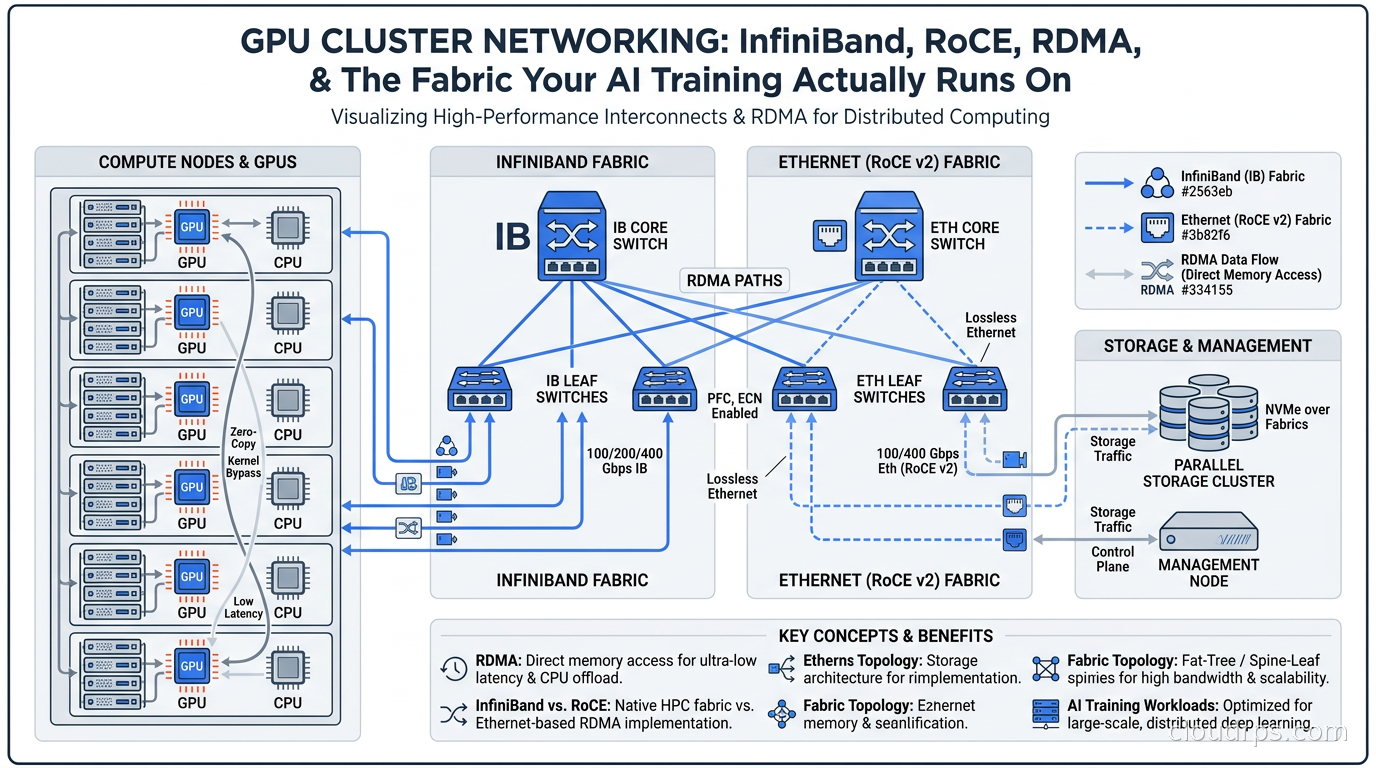
When companies budget for a GPU cluster, they obsess over the accelerators themselves. The H100s, the B200s, the GB200 NVL72 racks. Everyone has an opinion on which GPU to buy. But after twenty years in cloud infrastructure, I can tell you the GPU is only half the equation. The network connecting those GPUs is equally critical, and it is where most teams make expensive mistakes that show up as terrible GPU utilization rates weeks into a training run.
I have watched teams buy tens of millions of dollars worth of H100s and then watch them sit at a fraction of the utilization they expected because the network could not keep up with all-reduce operations during distributed training. I have also seen teams build a 512-GPU cluster on a budget by getting the network right first. The fabric matters at least as much as the silicon.
This article covers what you actually need to know about GPU cluster networking: RDMA, InfiniBand, RoCE, EFA, NVLink, the topology choices, and how to configure lossless networking so your training jobs do not fall apart.
Why GPU Networking Is Different From Everything Else
Standard Ethernet with TCP/IP was designed for general-purpose communication tolerant of latency and retransmits. Your web server does not care if a packet takes an extra 50 milliseconds to arrive. Your distributed training job absolutely does care.
During a training step with model parallelism or data parallelism, every GPU in the cluster needs to synchronize gradients with every other GPU. This happens thousands of times per second. The synchronization pattern is called all-reduce, and it requires collective communication across every node simultaneously.
The math is brutal. A 1024-GPU cluster running all-reduce over 400Gbps InfiniBand sees, on the order of magnitude, hundreds of terabits per second of aggregate network traffic during a synchronization event. If any single link drops a packet and triggers a TCP retransmit, the entire collective operation stalls while waiting for the slow node. One straggler holds back 1023 GPUs.
For TCP-based networking, packet loss rates that look acceptable (0.01%) translate to catastrophic GPU idle time at scale. This is why GPU clusters demand a fundamentally different networking stack: RDMA.
RDMA: Bypassing the Kernel to Save Your Training Run
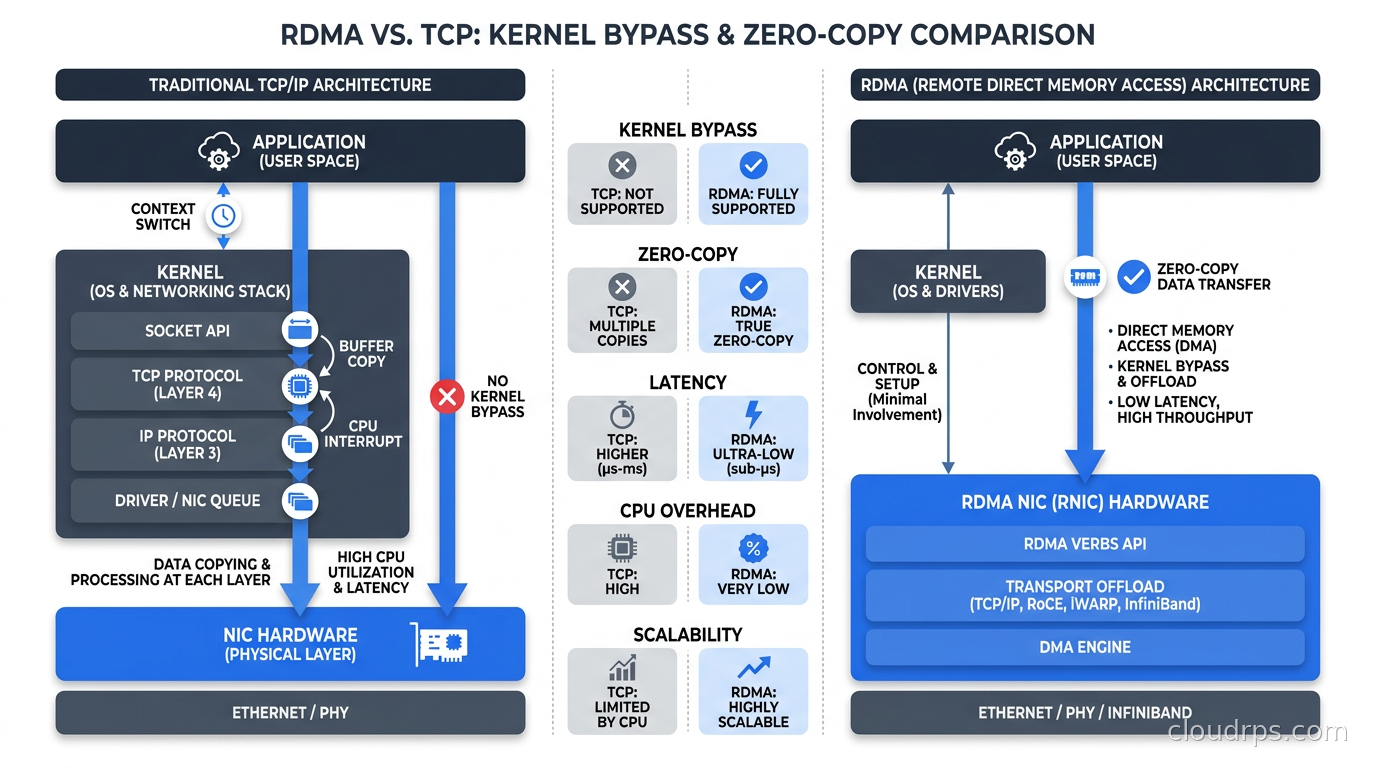
Remote Direct Memory Access (RDMA) is a mechanism that allows one machine to directly read from or write into the memory of another machine without involving either machine’s CPU or operating system kernel. The data moves between network adapters and memory with zero copies, zero CPU cycles on the data path.
In a traditional TCP/IP flow, data travels: application buffer, kernel socket buffer, NIC DMA, wire, NIC DMA, kernel socket buffer, application buffer. Every transition costs CPU cycles and adds latency. On a high-core-count GPU server, those CPU cycles add up, but more importantly, the latency floor is measured in microseconds to milliseconds.
RDMA eliminates that path. The source application registers a memory region, hands the NIC the source and destination addresses, and the NIC handles the transfer autonomously. End-to-end latency drops to 1-3 microseconds. CPU utilization for network I/O effectively disappears.
For AI training, RDMA is not a performance optimization. It is a hard requirement. NCCL (NVIDIA Collective Communications Library) and PyTorch’s distributed module both assume RDMA-capable transport to hit the bandwidth numbers needed for efficient all-reduce.
The challenge is delivering RDMA at Ethernet scale. There are two dominant approaches: InfiniBand and RoCE.
InfiniBand: The Incumbent, Still the Gold Standard
InfiniBand is a purpose-built interconnect technology that has been the dominant fabric in high-performance computing for over two decades. NVIDIA acquired Mellanox (InfiniBand’s primary maker) in 2020, which has made InfiniBand the obvious choice for NVIDIA GPU clusters.
HDR InfiniBand runs at 200Gbps per port. NDR (Next Data Rate) runs at 400Gbps per port. The latest XDR InfiniBand runs at 800Gbps. These are the cables connecting your DGX nodes to your spine switches.
InfiniBand’s key advantages over Ethernet for GPU workloads:
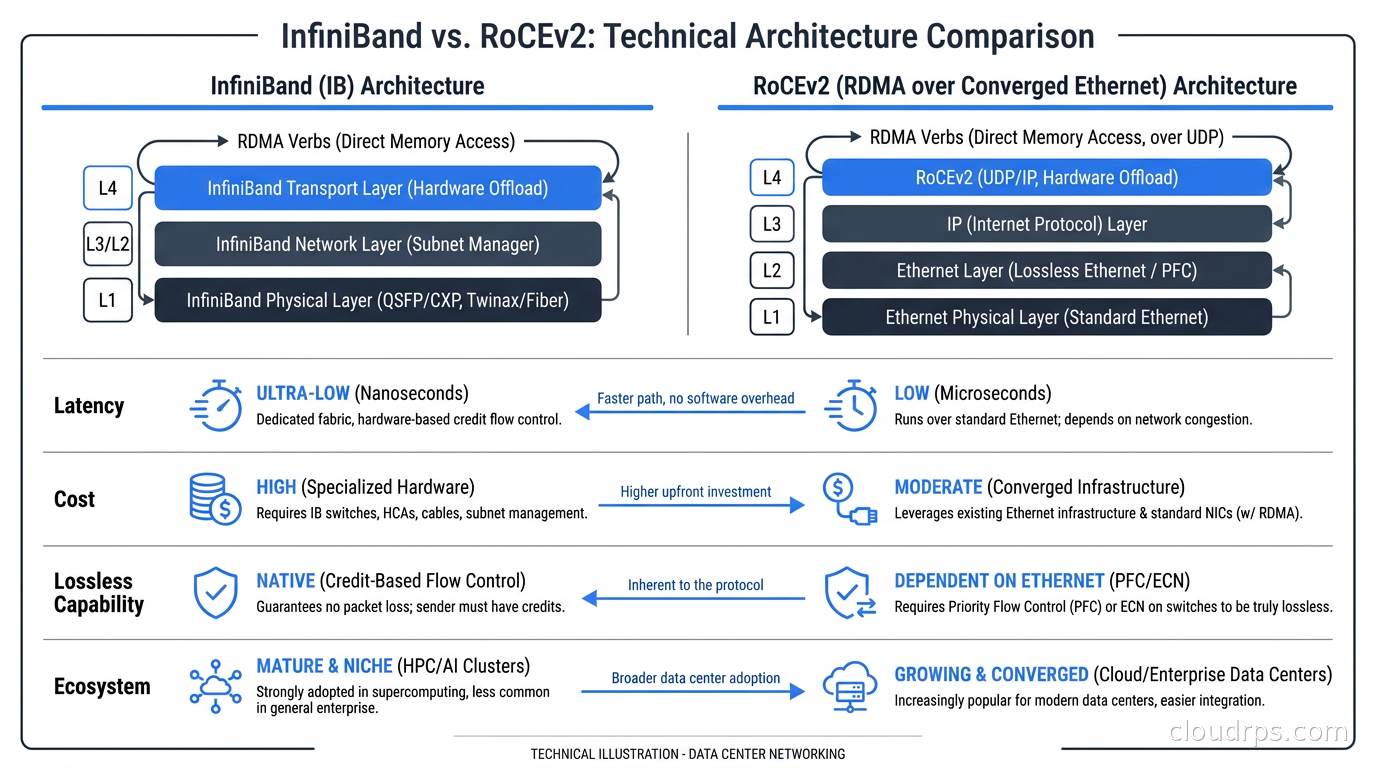
Credit-based flow control. InfiniBand uses a credit system where a sender cannot transmit unless it has received credits from the receiver guaranteeing buffer space. This means InfiniBand is inherently lossless at the link level. There is no packet drop, ever. This is the fundamental reason InfiniBand dominated HPC for twenty years.
Low latency. InfiniBand MPI latency runs at 1-2 microseconds end-to-end. For comparison, well-configured RoCEv2 runs 2-5 microseconds. That gap matters when you are doing millions of collective operations per training step.
Mature ecosystem. NVIDIA’s DGX SuperPOD reference architecture is built on InfiniBand. The tooling (UFM, SHARP in-network computing), the debugging tools, and the operational playbooks have been refined over years of production deployments.
The downsides are real though. InfiniBand is expensive. The NICs, the cables, and especially the switches cost meaningfully more than equivalent Ethernet hardware. It is also a proprietary ecosystem. You buy from NVIDIA (via the Mellanox acquisition), and the pricing reflects that market position.
For the largest clusters at hyperscalers, InfiniBand remains the preferred fabric. But the Ethernet world has caught up dramatically.
RoCE: InfiniBand Semantics on Ethernet Infrastructure
RDMA over Converged Ethernet (RoCE, specifically RoCEv2) takes InfiniBand’s RDMA transport semantics and runs them over standard UDP/IP networking. You get RDMA performance characteristics on commodity Ethernet switches.
The value proposition is compelling. Ethernet switch silicon from Broadcom, Intel, and others is produced at massive volume, driving prices down. A 400Gbps RoCEv2 network can be built for significantly less than equivalent InfiniBand, and you can reuse existing Ethernet expertise rather than hiring InfiniBand specialists.
Meta’s AI Research Supercluster uses RoCEv2. Microsoft Azure’s NDv4 and NDv5 GPU instances use RoCEv2. These are serious deployments at serious scale. The technology works.
But RoCEv2 has a critical weakness: Ethernet is lossy by default. Unlike InfiniBand’s credit-based flow control, Ethernet switches drop packets when buffers fill. For RDMA, packet loss is catastrophic. A single dropped packet triggers a timeout and retransmit at the application layer, not the link layer. With 400Gbps links, a buffer can fill in microseconds.
To make RoCEv2 work for AI training, you must configure two complementary mechanisms at every switch in the fabric: Priority Flow Control (PFC) and Explicit Congestion Notification (ECN).
PFC is a pause mechanism. When a switch buffer starts filling, it sends a pause frame upstream on that priority class, telling the upstream sender to stop transmitting. This prevents drops by propagating backpressure.
ECN marks packets as they approach congestion rather than dropping them. The DCQCN (Data Center Quantized Congestion Notification) algorithm running in the NIC detects ECN marks and reduces its transmission rate before drops occur.
The operational challenge: PFC misconfiguration produces pause storms. A single overloaded port sends pause frames, the upstream switch pauses, which fills its buffers, which triggers more pause frames, and the congestion cascades fabric-wide in milliseconds. I have seen this take down a 512-node cluster during a critical training run. The cure is tight PFC watchdog timers and careful traffic class isolation. Only the RDMA traffic class should use PFC. Put everything else on a separate class without PFC.
AWS EFA: Cloud-Native RDMA
If you are running GPU training in the cloud, AWS provides Elastic Fabric Adapter (EFA), which is a custom network interface designed specifically for HPC and AI workloads. EFA implements a scalable reliable datagram (SRD) protocol that provides RDMA-like semantics over AWS’s network fabric.
EFA gives you RDMA without requiring you to manage InfiniBand or configure RoCEv2. The EFA driver plugs into NCCL and MPI, your application sees standard collective communication primitives, and AWS handles the underlying lossless fabric.
What is less visible is that EFA termination happens on the Nitro card, not on the host CPU. The RDMA transfer goes directly from GPU memory to the Nitro DPU and onto the network fabric without the host CPU handling the transport. This is the same SmartNIC architecture that hyperscalers use to offload all infrastructure plumbing. For a full explanation of how DPUs and SmartNICs work, including the AWS Nitro, Azure Boost, and NVIDIA BlueField implementations, see the DPU and SmartNIC architecture guide.
P4d instances (A100) and P5 instances (H100) include EFA with 400Gbps to 3200Gbps of aggregate network bandwidth depending on instance size. For practical AI training in AWS, EFA is the answer. You do not need to choose between InfiniBand and RoCEv2 because AWS made that choice for you at the infrastructure layer.
GCP has similar functionality with their high-bandwidth intra-cluster networking on A3 (H100) instances. Azure uses InfiniBand on their ND series instances. Each cloud has made deliberate choices about the GPU cluster networking stack, and they have generally made good ones.
For more on how to choose GPU hardware and cloud instances for your AI workloads, the GPU cloud infrastructure guide covers the hardware decision in detail.
NVLink and NVSwitch: The Within-Node Fabric
The conversation so far has been about between-node networking: how GPUs on different servers communicate. But the within-node interconnect matters just as much for large model training.
Modern NVIDIA DGX systems (and the broader HGX server design) use NVLink to connect GPUs within a single node. NVLink 4.0 on H100 provides 900 GB/s of bidirectional bandwidth between GPUs on the same node. For comparison, PCIe 5.0 (the CPU-to-GPU path) tops out around 128 GB/s in each direction. NVLink is roughly 7x faster than PCIe for GPU-to-GPU communication on the same node.
NVSwitch is the NVLink fabric switch that enables all-to-all connectivity within a node. In a DGX H100 with 8 GPUs, NVSwitch provides full bisection bandwidth among all eight GPUs simultaneously. Every GPU can talk to every other GPU at full 900 GB/s without contention.
The GB200 NVL72 system takes this further. 72 GPUs connected via NVSwitch 4.0 provide 1.8 TB/s of all-to-all bandwidth within the rack. For models that fit within those 72 GPUs, you may not need InfiniBand or RoCEv2 at all: the within-rack NVLink fabric handles everything.
This is shaping how AI training architectures are designed. Teams now think in terms of NVLink domains (the set of GPUs that can communicate via NVLink) versus InfiniBand or RoCEv2 domains (the broader cluster). Model and tensor parallelism happens within the NVLink domain where bandwidth is massive. Data parallelism across NVLink domains uses the external network fabric where bandwidth is more constrained.
Network Topology: Fat-Tree and Dragonfly
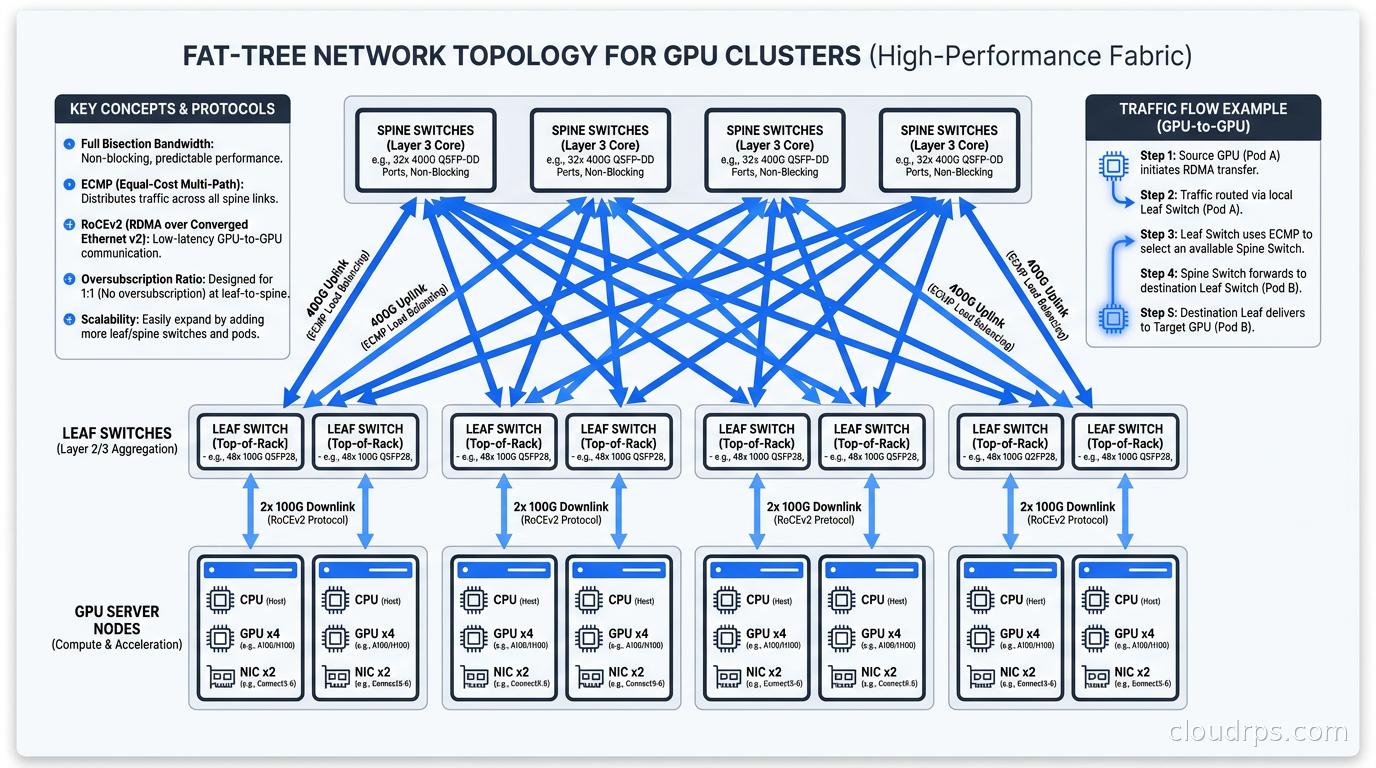
The switch topology connecting your GPU servers to each other is not arbitrary. Two topologies dominate at scale.
Fat-tree is the standard for most GPU clusters up to a few thousand nodes. In a fat-tree, leaf switches connect to GPU servers, spine switches connect to leaf switches, and optionally a super-spine layer connects spine switches. The key property is that every server can communicate with every other server at the same bandwidth: there is no oversubscription at the spine.
A 2:1 oversubscription ratio means the spine has half the bandwidth of the leaves. This is often acceptable for AI training because most communication is within a rack or pod, but it will bottleneck cross-pod all-reduce at scale.
Dragonfly is used for the largest clusters where fat-tree becomes prohibitively expensive to build at full bisection. Rather than a strict hierarchical topology, dragonfly groups are connected with a flexible all-to-all topology at the group level. The trade-off is that routing becomes more complex and adaptive routing is required to avoid congestion hotspots.
For most teams, fat-tree with 1:1 bisection bandwidth is the right choice. The cost scales as O(n log n) in the number of nodes, which gets expensive, but the operational simplicity is worth it. NVIDIA’s DGX SuperPOD reference architecture uses fat-tree InfiniBand topology for exactly this reason.
One operational note from experience: whatever topology you choose, invest in network monitoring. In a 512-node cluster, a single failed or flapping link creates asymmetric bandwidth that NCCL will not automatically route around. Your training job slows down mysteriously, and the only way to find it is link-by-link bandwidth monitoring. NVIDIA’s UFM for InfiniBand and SONiC-based monitoring for Ethernet RoCEv2 clusters are the tools I rely on for the fabric layer; pair that with DCGM-based GPU observability to correlate NVLink bandwidth drops and XID events on specific nodes with the network anomalies you find, since a straggler can originate at either layer.
Lossless Networking in Practice: What Actually Goes Wrong
Let me share what misconfigured GPU cluster networking looks like in practice, because the failure modes are not obvious.
The most common failure is PFC misconfiguration on RoCEv2. Teams configure PFC on the RDMA priority class but forget to set the PFC watchdog timer. When a pause storm starts, the watchdog should detect the stuck port and disable PFC to allow traffic to drain. Without it, the entire fabric freezes. The training job hangs, not crashes: NCCL keeps waiting for packets that are not coming because every port is paused. You restart the job, the pause storm clears on its own, training starts again, and thirty minutes later it freezes again.
The second most common issue is mixed traffic on the RDMA priority class. Storage traffic, management traffic, or even Kubernetes health check traffic sharing the same traffic class as RDMA generates bursty PFC that confuses DCQCN rate control. RDMA traffic should live in complete isolation on its own DSCP marking and queue.
The third issue is misconfigured ECN thresholds. The default ECN marking thresholds on Broadcom Tomahawk and Tofino switches are tuned for storage workloads, not AI training. AI training has much more bursty synchronization patterns. You need to tune the minimum and maximum ECN thresholds for your specific workload, which requires profiling actual NCCL traffic patterns.
NVIDIA has published detailed RoCEv2 configuration guides for Mellanox ConnectX NICs and Spectrum switches. Following them exactly is table stakes. But the real operational knowledge is what happens when something deviates from the configuration: which logs to check, how to interpret UFM or SONiC telemetry, how to distinguish a network problem from a GPU memory bug in NCCL.
InfiniBand vs RoCEv2: How to Choose
The choice between InfiniBand and RoCEv2 for a new GPU cluster comes down to a few factors.
Budget. InfiniBand typically costs meaningfully more, often by a wide margin, for equivalent bandwidth at small to medium scale. At very large scale the gap narrows because of InfiniBand SHARP (in-network computing that offloads all-reduce operations to the switches), which can dramatically improve effective bandwidth without adding more links.
Team expertise. If your infrastructure team knows Ethernet deeply and has no InfiniBand experience, RoCEv2 is faster to get right. InfiniBand has its own management plane, its own fabric manager, its own troubleshooting tools. It is not difficult, but it is a different skill set.
Scale. Below 512 GPUs, well-configured RoCEv2 delivers comparable performance to InfiniBand for most workloads. Above 1024 GPUs, InfiniBand’s inherent lossless fabric and SHARP in-network computing start to make a meaningful difference in all-reduce efficiency.
Vendor lock-in tolerance. InfiniBand means NVIDIA. If that concentration of vendor dependency concerns you, RoCEv2 on commodity Broadcom or Intel silicon gives you more negotiating leverage and more hardware choices.
The Ultra Ethernet Consortium (UEC), backed by AMD, Intel, Meta, Microsoft, HPE, Cisco, and Broadcom, is actively developing an open RDMA standard for Ethernet that targets InfiniBand-equivalent latency. When UEC hardware ships in volume, the calculus may change. For now, both InfiniBand and RoCEv2 are legitimate production choices.
Putting It Together: A Reference Architecture
For a 256-GPU cluster intended for LLM training:
Each server has 8 H100 GPUs connected via NVSwitch (NVLink domain). The 32 servers each have two 400Gbps InfiniBand or RoCEv2 ports to the network (for redundancy and bandwidth aggregation). Leaf switches (one per 16 servers) provide 800Gbps uplinks to a pair of spine switches. Total cross-rack bandwidth: 3.2 Tbps bisection.
If using RoCEv2: Mellanox ConnectX-7 NICs, Spectrum-3 switches, DSCP 26 for RDMA traffic class, PFC enabled only on that class, ECN thresholds tuned from NVIDIA’s reference guide, SONiC-based telemetry exporting to Prometheus. If using InfiniBand: HDR NICs, QM8790 spine switches, UFM for fabric management, SHARP enabled for all-reduce offload.
In both cases: out-of-band management network using commodity 1Gbps Ethernet for BMC and OS access, completely isolated from the RDMA fabric. Storage access (reading training data from object storage) goes through a third network or through the Ethernet management network with appropriate QoS, never sharing RDMA priority classes. For teams using parallel file systems instead of object storage for training data (Lustre, WEKA, BeeGFS), the parallel file systems guide covers how to isolate and size the storage network so it does not contend with RDMA all-reduce traffic.
For teams running distributed training on Kubernetes, the Kubernetes DRA article covers how dynamic resource allocation handles GPU and network topology-aware scheduling. The Ray distributed computing guide covers how to structure training jobs across a cluster once the network is configured. For the fine-tuning side, LLM fine-tuning infrastructure goes deep on LoRA, QLoRA, and the training setup that works in production.
If you are running AI inference rather than training, the network requirements are quite different. The LLM inference engines comparison covers vLLM, SGLang, and TensorRT-LLM. Inference is typically single-node or small multi-node, so NVLink dominates and InfiniBand is rarely necessary. The exception is Mixture-of-Experts inference at scale: the all-to-all communication pattern that expert parallelism requires is far more bandwidth-intensive than anything dense model inference generates, and DeepSeek V3 or Llama 4 Maverick deployments spanning multiple nodes genuinely need InfiniBand-class fabric. The MoE infrastructure guide walks through the specific bandwidth math and node topology decisions that make or break large MoE serving clusters.
For teams evaluating bare metal versus cloud GPU instances, the bare metal cloud guide covers when the hypervisor is genuinely the bottleneck. GPU training is one of the clearest cases for bare metal, both for network performance and for NVLink access.
The Network Is Not Optional
Here is what I have learned after deploying GPU clusters ranging from 8 H100s for a startup to multi-thousand-GPU training clusters at enterprise scale: every team underestimates the networking complexity the first time.
The GPU vendors have done an extraordinary job marketing the accelerators themselves. You know exactly what an H100 can do: roughly 1 petaFLOP of dense BF16 tensor compute, about 2 petaFLOPS with structured sparsity, per NVIDIA’s own spec sheet. You have benchmarks. You have models. The network is invisible until it breaks.
Getting the network right is not glamorous work. Tuning PFC thresholds, validating ECN configuration, mapping traffic classes to DSCP values, monitoring link utilization at microsecond resolution: none of this shows up in GPU benchmark papers. But the GPU utilization numbers that matter in production, the ones that determine whether your $10 million training cluster pays for itself, depend entirely on whether the network keeps up.
Understanding latency versus bandwidth fundamentals provides the mental model for why these trade-offs matter. For GPU training specifically, you need both: ultra-low latency for synchronization operations and maximum bandwidth for gradient transfer. InfiniBand and well-configured RoCEv2 both deliver. Standard Ethernet with TCP does not.
The right choice between InfiniBand and RoCEv2 is less important than making a deliberate choice and configuring it correctly. Either fabric, properly deployed, will let your GPUs run at 90% utilization. Either fabric, poorly configured, will have you rebooting training jobs every thirty minutes and wondering why you spent so much on the accelerators.
Get the network right first. Everything else follows from there.
Updated September 1, 2026: corrected H100 BF16 compute figures and softened several unsourced utilization, traffic, and cost statistics.
Get Cloud Architecture Insights
Practical deep dives on infrastructure, security, and scaling. No spam, no fluff.
By subscribing, you agree to receive emails. Unsubscribe anytime.