
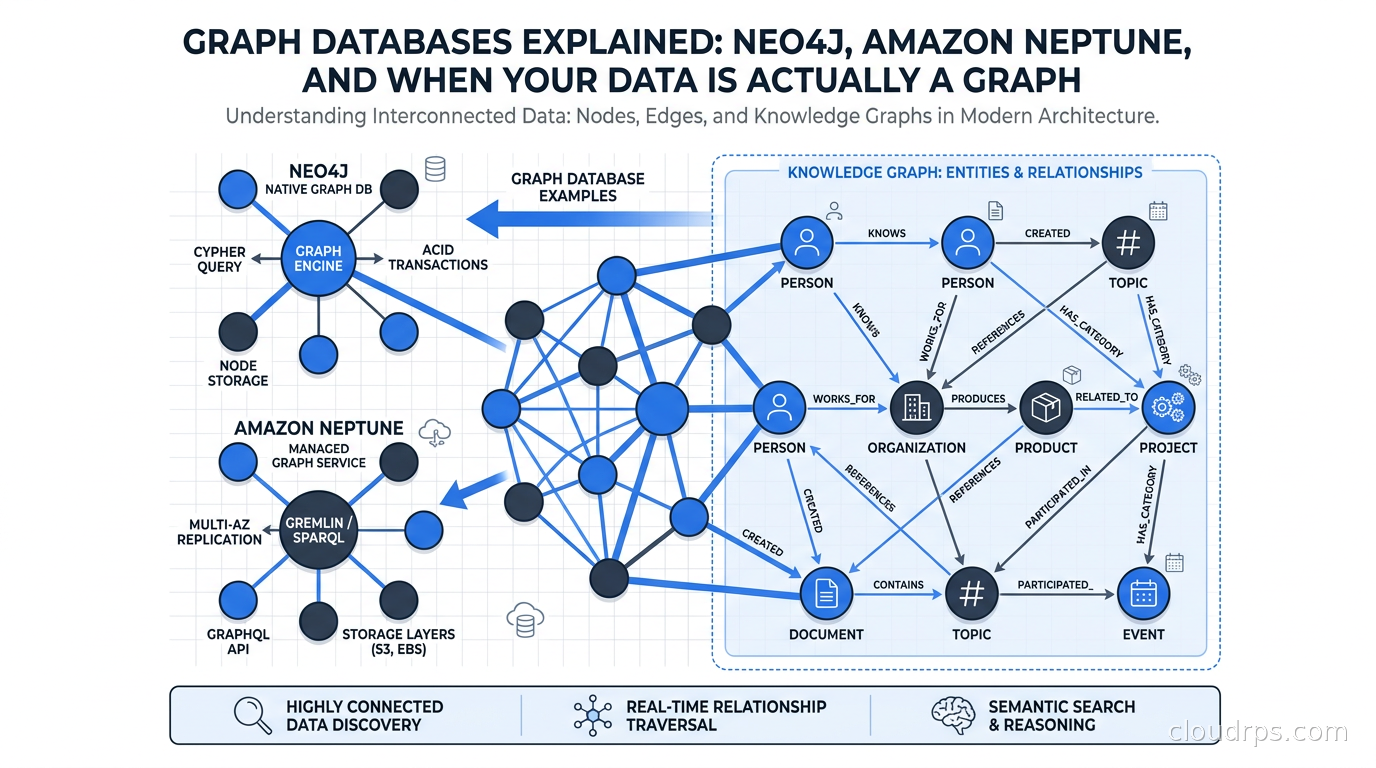
I spent three years at a fintech company watching our fraud detection team fight a war they were losing. We had a perfectly normalized PostgreSQL schema with users, accounts, transactions, and devices. The analysts were brilliant. The SQL was elegant. But catching fraud rings, where one bad actor spreads across hundreds of accounts through shared devices, phone numbers, and addresses, required seventeen-table JOINs that took forty minutes to run and still missed the lateral connections that mattered.
The fix was not a faster database. It was a different kind of database entirely.
Graph databases model data the way it actually exists: as entities connected by relationships. When you need to answer questions like “who is two hops away from this known fraudster?” or “find all users who share a device with someone who shares an address with someone in our blacklist,” graph databases answer those queries in milliseconds. Relational databases answer them in tears.
After twenty years in cloud architecture, I have learned that the choice between relational, document, and graph databases is not about which one is “best.” It is about which data model matches the shape of your problem. And a surprising number of problems have a graph shape.
What Makes a Graph Database Different
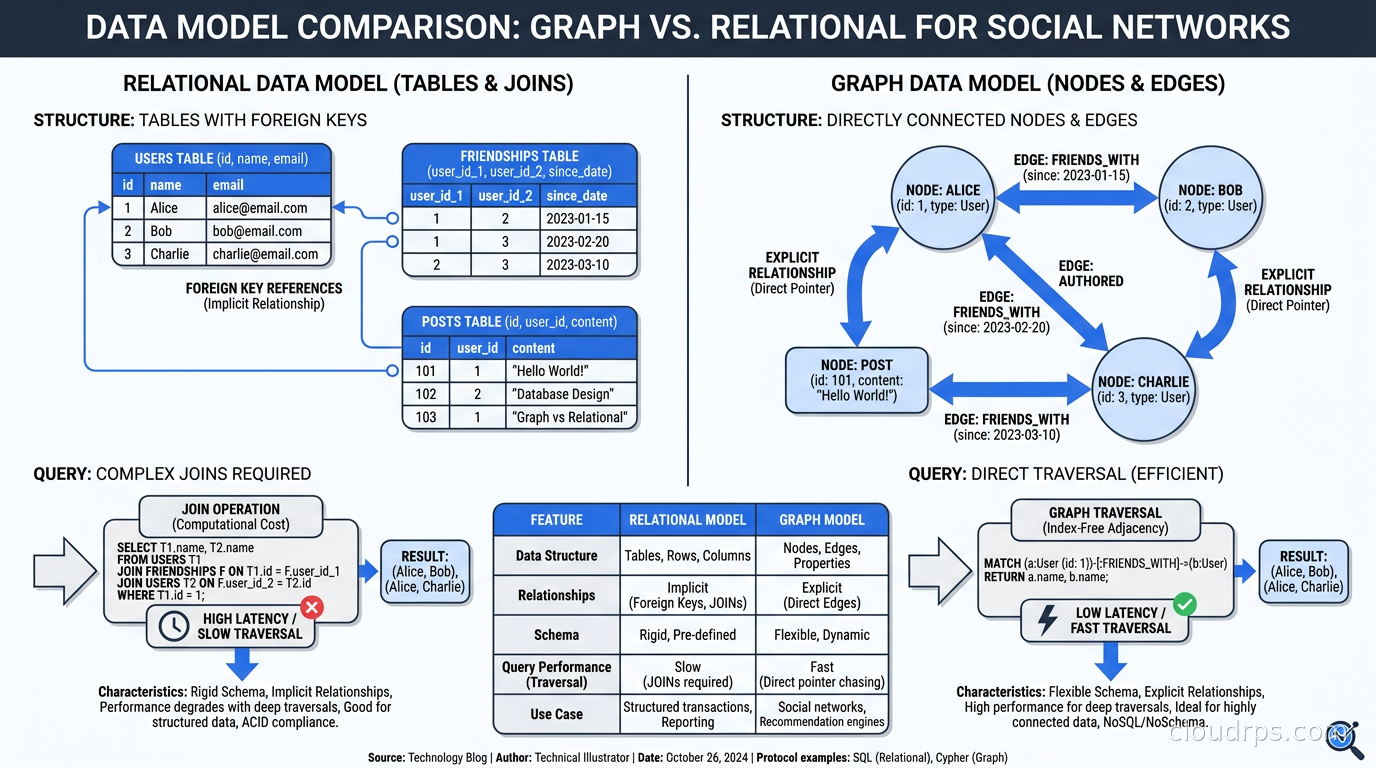
A relational database stores data in tables with rows and columns. Relationships between tables are expressed as foreign keys and resolved at query time with JOINs. This works beautifully when your queries are mostly about aggregating and filtering records.
A graph database stores data as nodes (entities) and edges (relationships), each of which can have properties. The relationships are first-class citizens, stored with their own properties, and physically connected in the storage layer so traversing from node to node is a direct pointer follow rather than a JOIN.
This distinction sounds subtle until you try to answer a question like: “Find all products bought by customers who also bought a product in the same category as a product returned by another customer in the same city.”
In SQL, that is five or six JOINs, a subquery, and a headache. In Cypher (Neo4j’s query language), it reads almost like plain English:
MATCH (c1:Customer)-[:BOUGHT]->(p1:Product)-[:IN_CATEGORY]->(cat:Category)
      <-[:IN_CATEGORY]-(p2:Product)<-[:RETURNED_BY]-(c2:Customer)
WHERE c1.city = c2.city
RETURN DISTINCT p1
The performance difference is not about hardware or indexing. It is structural. Graph databases use index-free adjacency, where each node directly stores pointers to its neighboring nodes. Traversing a relationship is a constant-time operation regardless of graph size. In a relational database, JOIN cost grows with table size. In a graph database, traversal cost grows only with the depth of the path you are following.
Property Graphs vs RDF: Two Competing Models
Before we get into specific databases, it is worth understanding that the graph database world is split into two fundamentally different data models.
The property graph model stores nodes and edges, each with a label (type) and a map of key-value properties. A User node might have properties like name, email, and created_at. A PURCHASED relationship might have a timestamp and amount property. Neo4j, TigerGraph, and JanusGraph use this model.
The RDF (Resource Description Framework) model represents everything as triples: subject-predicate-object. “User123 PURCHASED Product456” is a triple. There are no property bags on edges; everything is a node or a relationship. This model comes from the semantic web world and is queried with SPARQL. Amazon Neptune supports both property graphs (via Gremlin and openCypher) and RDF (via SPARQL).
For most application developers, property graphs are the right choice. The model maps naturally to how we think about objects and their relationships. RDF shines in knowledge graphs, ontology-driven systems, and when you need to federate data from multiple sources using shared vocabularies like OWL.
Query Languages: The Tower of Babel Problem
One of the most frustrating things about graph databases historically was the lack of a standard query language. We have had:
- Cypher: Created by Neo4j, now the basis for the ISO GQL standard (ISO/IEC 39075, finalized 2024). Declarative and readable.
MATCH (n:Person)-[:KNOWS]->(m) RETURN m - Gremlin: Apache TinkerPop’s query language. Imperative and functional. Used by JanusGraph, Amazon Neptune (property graph mode), and others.
- SPARQL: For RDF graphs. Complex but powerful for semantic queries.
- GSQL: TigerGraph’s proprietary language. SQL-like but graph-native and compiled, which gives it a performance edge on complex multi-hop traversals.
The good news is that both Neo4j and Amazon Neptune have committed to supporting GQL. We are finally getting convergence. The bad news is that most production code is still written in Cypher or Gremlin, so lock-in at the query layer is real.
When I evaluate graph databases for a project, I start with the query language. Cypher is dramatically easier for developers who know SQL. Gremlin gives more programmatic control for complex traversals. If your team is writing a lot of graph algorithms rather than ad-hoc queries, Gremlin’s imperative style often produces more legible code for things like PageRank or community detection.
Neo4j: The Market Leader
Neo4j has been around since 2007 and has the largest installed base of any graph database. It pioneered the property graph model and Cypher, and it runs everything from developer laptops to production systems with billions of nodes.
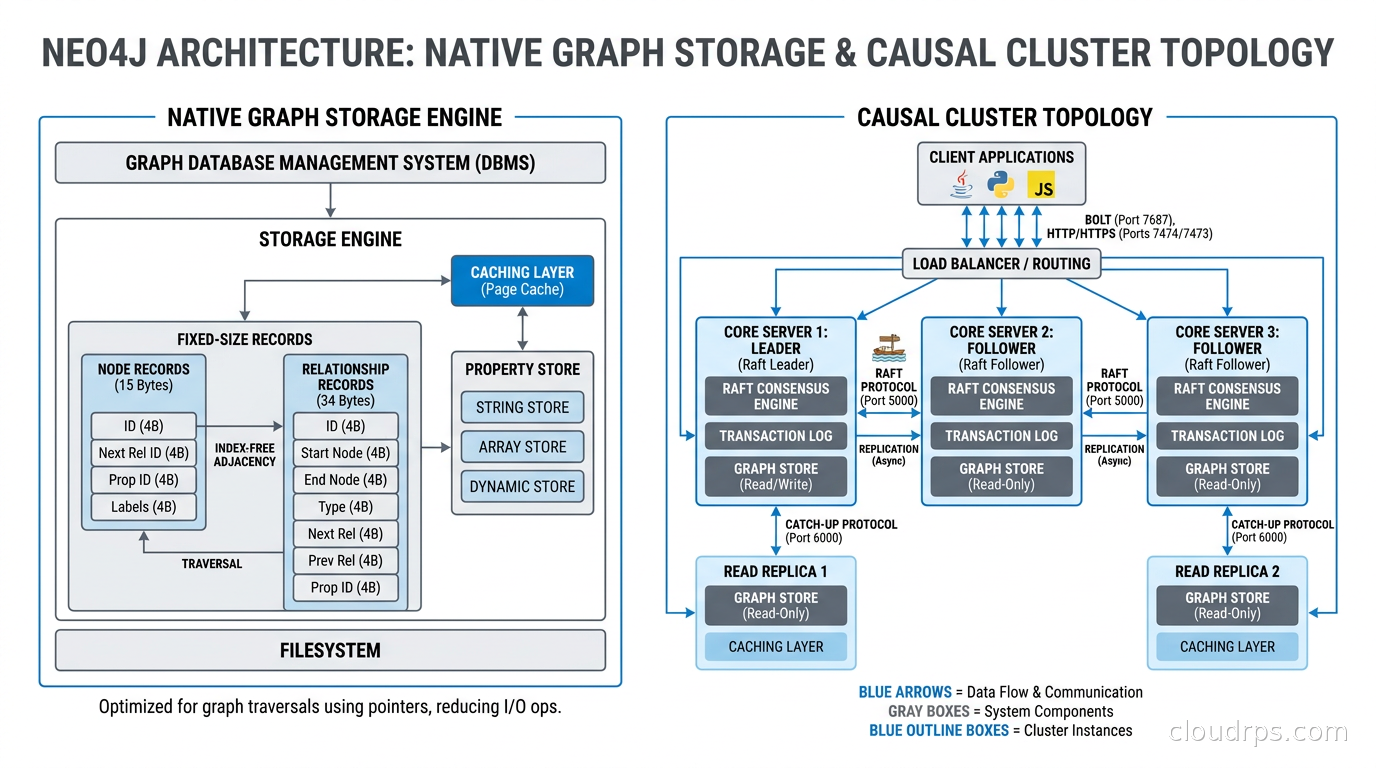
The storage architecture is purpose-built for graphs. Neo4j stores nodes, relationships, and properties in separate store files with fixed-size records for nodes and relationships. This means the database can compute the address of any node in constant time given its ID, and relationships are stored as doubly-linked lists so you can traverse them in either direction without an index lookup. This is the index-free adjacency that makes deep traversals fast.
Neo4j Aura is the managed cloud service. AuraDB is the transactional (OLTP) product; AuraDS is the graph data science platform. On-premises deployments use enterprise editions with clustering and causal consistency, or the community edition for single-node setups.
Where Neo4j shines:
- Rich native graph storage and algorithms (40-plus built-in algorithms: PageRank, Betweenness Centrality, Louvain community detection, node similarity)
- Excellent developer tooling: Neo4j Browser, Bloom for visual exploration, the APOC plugin library
- Best Cypher support, since they invented it and drive the GQL standard
- Full ACID transactions with causal clustering
Where Neo4j struggles:
- Horizontal write scaling is complex. The enterprise clustering model is leader-follower with causal routing. True horizontal write scaling requires careful sharding that the database does not do automatically.
- Cost. Neo4j enterprise licensing is not cheap, and AuraDB pricing at scale gets uncomfortable quickly.
- The database is not designed for analytical workloads over billions of edges in the transactional product. For that, you need the Graph Data Science library or a separate analytics layer.
Amazon Neptune: The AWS-Native Option
Amazon Neptune launched in 2018 as AWS’s managed graph database service. It supports both the property graph model (via Gremlin and openCypher) and RDF (via SPARQL), making it more flexible than Neo4j at the data model level.
Neptune’s architecture follows the Aurora pattern: compute and storage are separate. Storage is a purpose-built distributed SSD layer replicated six ways across three availability zones. Compute nodes are stateless and can be added or removed without rebalancing data. This gives Neptune better operational characteristics than self-managed Neo4j clusters, especially for teams that do not want to operate graph database infrastructure.
Neptune Serverless automatically scales graph compute capacity up and down based on workload. For development environments and workloads with unpredictable traffic, this is compelling. You pay for what you use rather than provisioning for peak.
Neptune Analytics is a newer product: a separate in-memory graph analytics engine that can load graphs from Neptune Database or S3 and run graph algorithms over billions of edges in seconds. It uses a snapshot-based model: bulk-load a graph, run analytics, extract results. This covers the gap where Neptune’s OLTP-optimized storage is not ideal for heavy graph algorithm workloads. Neptune Analytics also supports vector similarity search, which matters for the knowledge graph use cases I will cover shortly.
Where Neptune shines:
- Fully managed with no operational burden: automatic failover, point-in-time restore, automated backups
- Dual model: use property graph and RDF in the same database via different query interfaces
- Deep AWS integration: IAM authentication, VPC, CloudWatch, Lambda triggers, AWS Glue for ETL, S3 bulk loader
- Excellent for read-heavy workloads with easy read replica scaling
Where Neptune struggles:
- Gremlin as the primary property graph language is more verbose than Cypher, though openCypher support is improving
- Deep traversal performance can lag behind Neo4j for certain complex queries because the storage is not natively graph-oriented
- Graph algorithm support is in Neptune Analytics, not the transactional database, so you need two systems for transactional plus analytical workloads
- Less mature ecosystem: fewer community plugins, libraries, and visualization tools compared to Neo4j
For teams already deep in AWS, Neptune is usually the right operational choice. For teams that need sophisticated graph algorithms, rich query tooling, or Cypher-first development, Neo4j is often worth the operational overhead.
Other Players Worth Knowing
TigerGraph targets enterprise-scale analytical graph workloads. Its GSQL language is compiled and designed for complex multi-hop traversals at scale, and TigerGraph has consistently outperformed Neo4j and Neptune in benchmarks for deep link analysis and graph analytics. The downside: GSQL has a steeper learning curve, and TigerGraph is essentially an enterprise sale without a self-service free tier. You are dealing with a sales process, not a sign-up.
JanusGraph is the open-source option backed by the Linux Foundation. It is storage-backend-agnostic, supporting Cassandra, HBase, and Google Bigtable for storage and Elasticsearch for indexes. This makes JanusGraph horizontally scalable in ways Neo4j and Neptune are not. The trade-off is significant operational complexity: you are managing multiple systems and the integration between them. JanusGraph is popular in organizations that need massive scale and have the infrastructure team to run it.
Dgraph is a newer contender, written in Go, with a native GraphQL API and built-in horizontal sharding. Worth evaluating if your team is GraphQL-first and wants a graph database that speaks your language from day one.
When to Use a Graph Database (and When Not To)
After seeing graph databases succeed and fail in production, I have developed a simple heuristic: use a graph database when the relationships are the data.
Use cases where graph databases genuinely win:
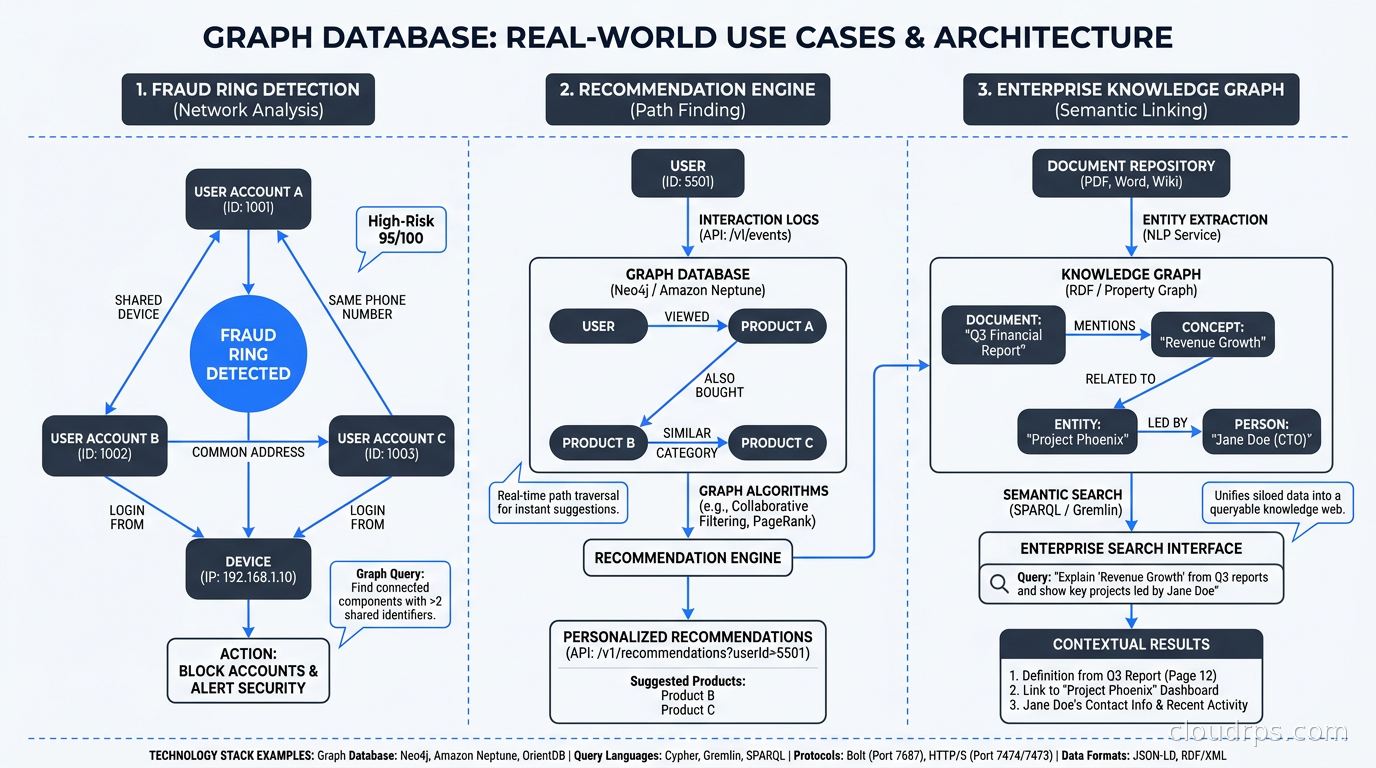
Fraud detection and identity resolution. Fraud rings use shared infrastructure: devices, IP addresses, phone numbers, email domains. A relational model forces you to find these connections via JOINs across huge tables. A graph database lets you traverse “all accounts that share a device with this account” in milliseconds. The same pattern applies to know-your-customer checks, sanctions screening, and synthetic identity fraud detection.
Recommendation engines. “Customers who bought X also bought Y” can be done in SQL, but it gets complicated when you want to go three or four hops: “users who like movies liked by users who share your viewing history.” Collaborative filtering on graphs finds these patterns naturally, and the query scales with depth of interest rather than table size.
Knowledge graphs for AI. This is the hottest use case right now. Building a knowledge graph that connects your enterprise data (products, people, documents, regulatory rules, concepts) and using it as a structured retrieval layer for LLMs is a serious architectural pattern. Where vector databases give you semantic similarity (“find content about this topic”), a knowledge graph gives you structured facts (“what regulatory requirements apply to this product in this jurisdiction”). The two complement each other in modern RAG architectures.
Network and IT operations topology. If you are modeling a network (physical or logical), a graph database is natural. “Which services are affected if this switch fails?” is a traversal problem. “What is the blast radius of this configuration change?” is too. This pairs well with observability tooling for service dependency mapping, where you need to know the impact of any single failure on the rest of your stack.
Access control and permission systems. Systems like Google Zanzibar (which powers Google Drive sharing) use a graph to model nested group memberships and permission inheritance. “Does user A have read access to document B?” requires traversing the group hierarchy, which relational databases model poorly. Graph is the natural fit for hierarchical, nested permission structures.
Do not use a graph database when:
- Your queries are mostly about aggregating and filtering records: use a relational or columnar database
- Your data has few relationships or the relationships are simple foreign keys: the complexity is not worth it
- You need heavy analytical workloads over billions of records with complex aggregations: use ClickHouse or a data warehouse
- Your team has limited graph expertise and no clear traversal query pattern driving the decision
The ACID properties you get from Neo4j and Neptune are real, but they are not magic. Graph databases have their own failure modes: Cartesian product queries (missing a relationship condition in Cypher) will scan the entire graph, unbounded traversals can time out, and graphs with supernodes (nodes with millions of relationships) require careful query design to avoid full-neighborhood scans.
Graph Data Modeling: The Hard Part
The technology is the easy part. Data modeling is where most graph database projects succeed or fail.
Common mistakes I see in the field:
Overusing relationships for what should be properties. If a user has a status attribute (active, inactive, suspended), make it a node property, not a relationship to a Status node. Use relationships for real connections between entities, not for attribute values.
Using generic relationship types. “CONNECTED_TO” is useless. “PURCHASED,” “VIEWED,” “RETURNED,” “REVIEWED” are meaningful. Specific relationship types make queries readable and allow the database to use relationship-type indexes efficiently.
Ignoring cardinality. A node with millions of outgoing relationships is a supernode, and traversals through it can be catastrophically slow. Design around supernodes by subdividing them (bucket by time period or category) or filtering before traversing (add a date range filter before expanding a high-cardinality relationship).
Not indexing node properties you filter on. Cypher MATCH patterns with WHERE clauses on node properties hit full node scans if you have not created an index on those properties. This is the same mistake as forgetting to index a SQL table column, but people forget it more often with graph databases because the query language hides the cost.
Production Considerations
A few things I have learned from running graph databases in production:
Backup and restore. Neo4j online backup works well with the neo4j-admin database dump tooling. Neptune has point-in-time restore with retention up to 35 days. Test your restore procedures before you need them with your actual data size, because a 100GB graph restore can take hours and the window matters during an incident.
Import pipelines. Getting data into a graph database efficiently requires batch import rather than row-by-row inserts. Neo4j’s neo4j-admin import tool loads billions of nodes and relationships from CSV in minutes, but it requires the database to be offline. Neptune has a bulk loader that reads from S3 in Turtle, CSV, or Gremlin formats. Plan your initial load and ongoing sync pipelines early in the project, not as an afterthought.
Keeping the graph in sync. If your source of truth is a relational database and you are using the graph as a derived query layer, change data capture from your PostgreSQL WAL is a proven approach. Debezium can stream row changes into a Kafka topic, and a consumer transforms and writes them into the graph. Neptune also has direct integration with AWS Database Migration Service for this pattern.
Query profiling. Both Neo4j (PROFILE and EXPLAIN in Cypher) and Neptune (slow query logs and Neptune workload management) have profiling tools. Use them from day one. A graph query that looks clean can hide a full graph scan in an unlabeled MATCH clause that you will not notice until production load hits.
The AI Inflection Point
The reason graph databases are getting renewed attention right now is knowledge graphs for AI. Large language models have training cutoffs and hallucinate facts. One mitigation is retrieval-augmented generation with vector similarity search. A more powerful mitigation combines vector retrieval for semantic matching with graph traversal for structured reasoning.
When an AI agent needs to answer “what are all the regulatory requirements that apply to a financial product sold in Germany to a corporate customer,” a knowledge graph traverses the regulatory hierarchy and returns structured facts that a vector similarity search would struggle to assemble correctly. The graph knows that German corporate customers fall under BaFin jurisdiction, which inherits requirements from EU MiFID II, which interacts with ESMA guidelines. Vector search finds documents about these topics; graph traversal navigates the actual relationships.
This is not theoretical. I am seeing financial services companies, healthcare organizations, and large enterprises building knowledge graphs specifically to ground their agentic AI systems in structured domain knowledge. The architectures combine a graph database for structured relationship queries with a vector database for semantic similarity, with an orchestration layer that routes queries to the appropriate retrieval strategy.
Neo4j has added native vector index support so you can run both similarity search and graph traversal in the same database. Neptune Analytics supports vector similarity alongside graph algorithms. The convergence is real and accelerating.
Making the Decision
My recommendation when evaluating graph databases:
If you are on AWS, already using managed services, and want operational simplicity, start with Neptune. The dual model support and serverless mode give you flexibility, and the AWS integration eliminates a lot of operational work. If you later need heavy algorithm work, Neptune Analytics covers that.
If you are starting from scratch, need rich developer tooling, or your team already knows Cypher, start with Neo4j AuraDB. The community, documentation, and ecosystem are better. The free AuraDB tier is genuinely usable for development, and you can graduate to paid tiers as your needs grow.
If you have tens of billions of nodes and need real horizontal write scaling with analytical query performance, look at TigerGraph or JanusGraph and plan for the operational complexity that comes with them. Neither is a casual choice.
If you are still unsure whether you need a graph database at all, examine your query patterns first. If your relational queries are slow because of deep JOIN chains specifically because you are traversing relationships between records rather than aggregating large result sets, that is the signal. Check your database connection patterns while you are at it: graph traversal often generates more shorter queries rather than fewer monster queries, and that changes your connection pool sizing. The CAP theorem tradeoffs apply here too: Neo4j’s causal cluster gives you eventual consistency for reads from followers, and Neptune has its own consistency model for replicas. Know what you are signing up for before you commit.
Graph databases are not a silver bullet. I have seen projects add one because it sounded cool, then spend six months trying to justify it while engineers struggled with unfamiliar query languages and modeling patterns. The technology is mature. The question is always whether your problem is actually a graph problem.
When it is, nothing else comes close.
Get Cloud Architecture Insights
Practical deep dives on infrastructure, security, and scaling. No spam, no fluff.
By subscribing, you agree to receive emails. Unsubscribe anytime.