
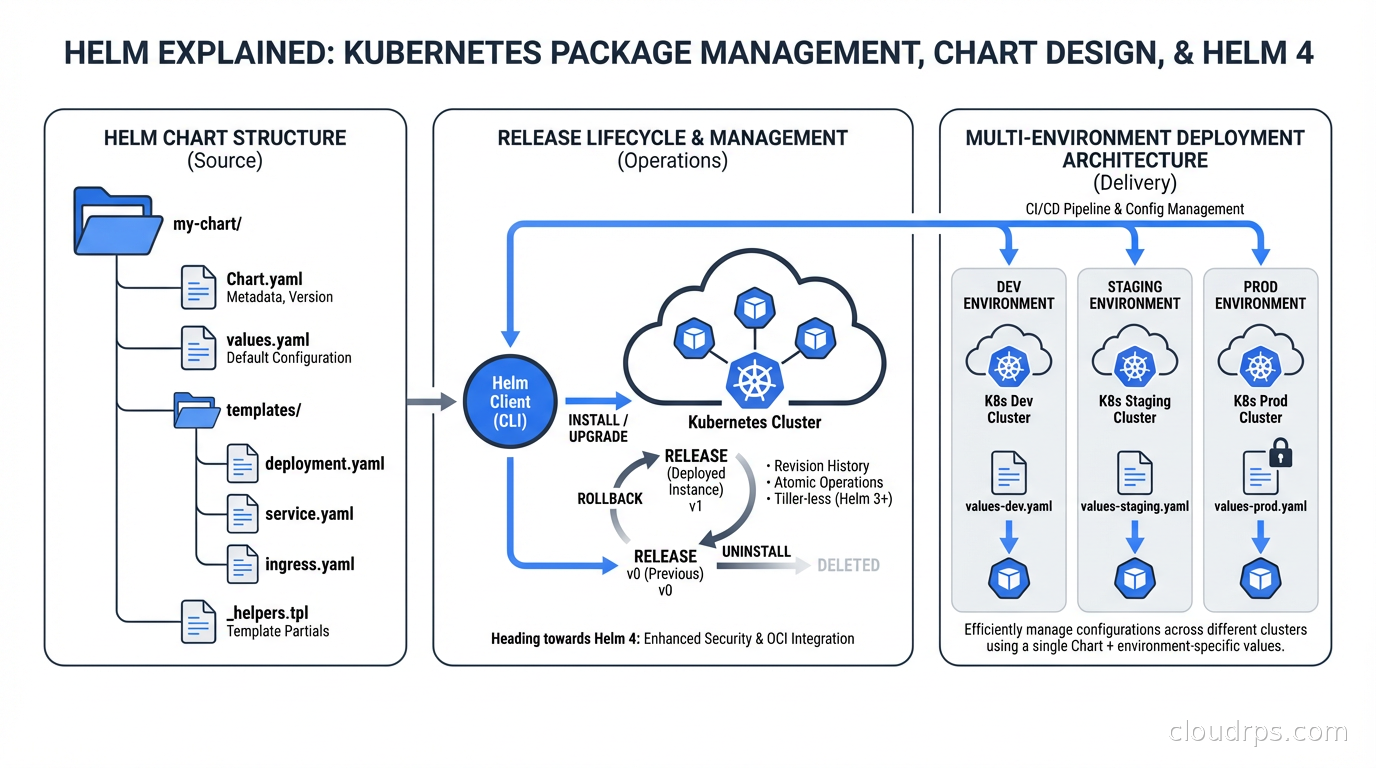
The day I realized we needed something better than raw YAML was a Tuesday afternoon, three hours before a production deployment window. We had eight microservices, each with its own Deployment, Service, Ingress, HorizontalPodAutoscaler, and a handful of ConfigMaps. Forty-seven YAML files total. Staging had diverged from production in eleven different places because someone had manually patched a config “just temporarily” six months prior and never went back. We had no idea which patches were intentional and which were accidents.
That’s the problem Helm solves. Not elegantly, not perfectly, but consistently enough that it’s become the de facto standard package manager for most Kubernetes deployments. If you’re running Kubernetes workloads in production and not using Helm (or something like it), you’re accumulating technical debt that compounds fast.
This is everything I’ve learned from years of maintaining Helm charts across dozens of clusters, including what changed with Helm 4 in late 2025 and why those changes matter for how you structure your deployments.
Why Kubernetes Needs a Package Manager
Kubernetes is intentionally low-level. It gives you primitives: Deployments, Services, ConfigMaps, Secrets, Ingresses. Composing those into a deployable application is your problem. For simple apps, raw YAML is fine. For anything beyond a toy, it becomes painful.
The specific problems that accumulate without a packaging layer:
Duplication across environments. Your dev, staging, and prod configs are 95% identical but different in ways that matter: replica counts, resource limits, image tags, endpoint URLs. Copy-pasting YAML files and editing them by hand is how you end up with subtle mismatches that only surface during incidents.
No release history. With raw kubectl apply, you can see the current state but not how you got there. When a deployment breaks, “what changed?” becomes an archaeological dig through git blame and kubectl describe logs.
No atomic upgrades. If you have a Service and a Deployment that need to update together, kubectl apply each one separately means there’s a window where they’re inconsistent. Helm treats a “release” as an atomic unit.
Template repetition. The app.kubernetes.io/name label needs to be on every resource. The resource limits follow the same pattern everywhere. Without templating, you’re copy-pasting and inevitably diverging.
Helm addresses all of this. It’s not magic, and it introduces its own complexity. But the tradeoff is almost always worth it once you’re managing more than two or three workloads.
Core Concepts: Charts, Releases, and Repositories
Understanding Helm requires getting three terms straight.
A chart is a package: a collection of YAML templates plus metadata that describes a deployable Kubernetes application. Think of it like a Docker image but for Kubernetes manifests. Charts live in directories (or archived as .tgz files) and follow a specific structure.
A release is a specific instance of a chart deployed to a cluster. You can install the same chart multiple times in the same cluster, each time creating a new release with its own name and configuration. The nginx-ingress chart installed as ingress-prod and ingress-staging produces two completely independent releases.
A repository is a collection of charts served over HTTP (or increasingly, as an OCI registry). The Bitnami repository hosts hundreds of pre-built charts for common software. Your organization probably maintains a private chart repository for internal services.
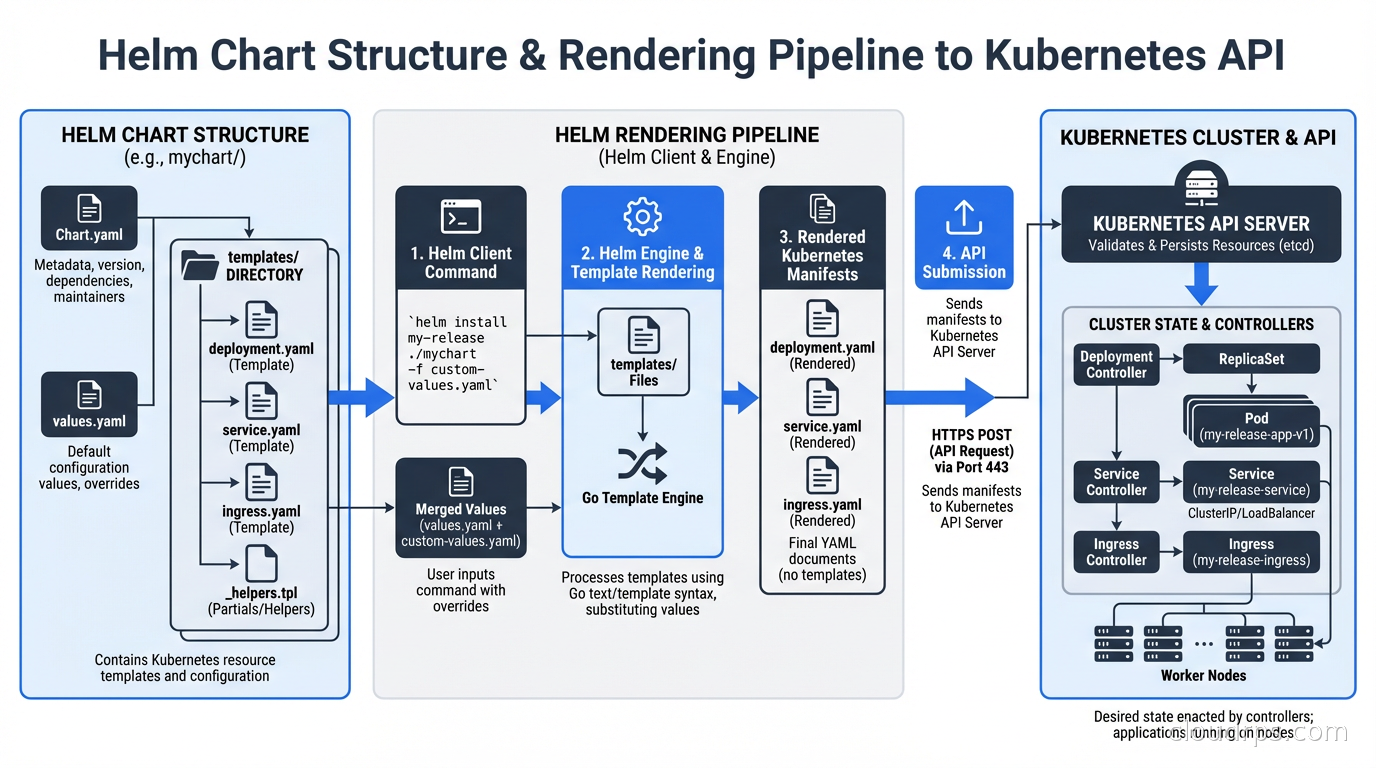
When you run helm install myapp ./my-chart --values prod-values.yaml, Helm renders all the templates in my-chart using the values you provided, sends them to the Kubernetes API, and records the resulting release in a Kubernetes Secret in your cluster. That Secret is how Helm tracks what it deployed and enables rollbacks.
Chart Anatomy: What’s Actually in a Chart
A minimal production chart looks like this:
my-service/
  Chart.yaml          # Metadata: name, version, appVersion, dependencies
  values.yaml         # Default values (overridden per environment)
  templates/
    deployment.yaml
    service.yaml
    ingress.yaml
    hpa.yaml
    _helpers.tpl      # Reusable template fragments
  charts/             # Dependency charts (subcharts)
The Chart.yaml is where you declare the chart version (semantic versioning), the appVersion (usually the Docker image tag), and dependencies on other charts. The version in Chart.yaml should be bumped every time the chart changes, separately from the application version.
values.yaml is the contract between the chart and its users. It defines every configuration knob with sane defaults. The structure matters: values should be organized hierarchically to avoid collisions when the chart is used as a subchart.
The _helpers.tpl file is where you define template fragments that get reused across all your resource definitions. A common pattern:
{{- define "my-service.labels" -}}
app.kubernetes.io/name: {{ include "my-service.name" . }}
app.kubernetes.io/version: {{ .Chart.AppVersion }}
app.kubernetes.io/managed-by: {{ .Release.Service }}
helm.sh/chart: {{ .Chart.Name }}-{{ .Chart.Version }}
{{- end }}
Every resource then calls {{ include "my-service.labels" . | nindent 4 }} instead of repeating the label set. When you need to add a new standard label, you change it in one place.
What Helm 4 Actually Changes
Helm 4 shipped at KubeCon North America in November 2025, the first major version bump in six years. Some changes are quality-of-life improvements. Two of them are genuinely important for production operations.
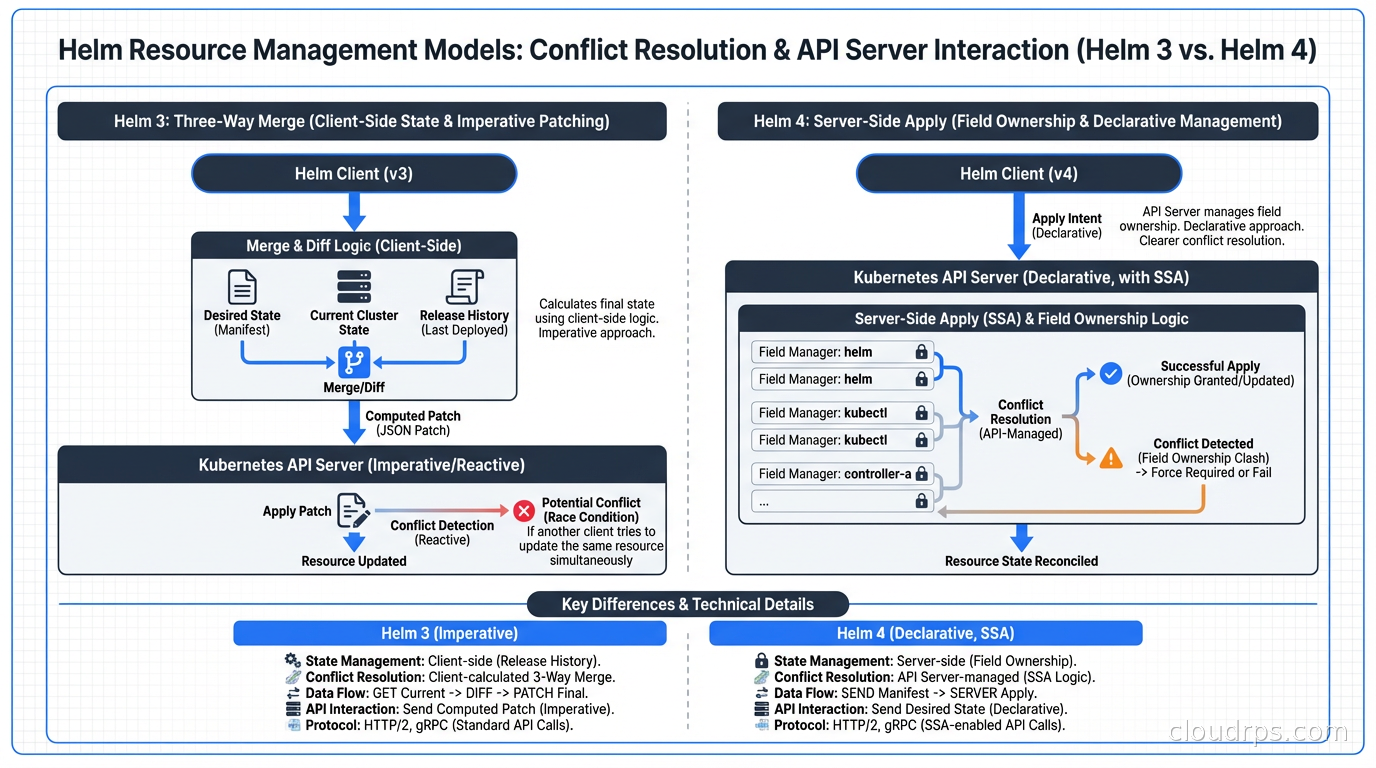
Server-Side Apply (SSA) is now the default. This is the big one. In Helm 3, updates were applied using a three-way merge patch: Helm compared the last-known state (stored in the release Secret), the current cluster state, and the desired state. This mechanism broke in specific ways when another tool also managed resources in the cluster.
The classic failure mode: you’re using ArgoCD or Flux for GitOps alongside Helm. ArgoCD manages some resources, Helm manages others, and occasionally they both try to manage the same field on the same resource. With three-way merge, whoever applied last wins, and you get inconsistent behavior and drift warnings from your GitOps tool.
With SSA, the Kubernetes API server itself handles conflicts using field ownership tracking. Helm declares ownership of the fields it manages. ArgoCD declares ownership of the fields it manages. When there’s a real conflict, you get an explicit error rather than silent overwrite. This makes the two tools composable in ways Helm 3 never quite achieved.
OCI registries are fully supported. Helm has had experimental OCI support for a while. Helm 4 makes it stable and the default recommendation. This means you can store Helm charts in the same container registry you’re already using (ECR, GCR, GitHub Container Registry) rather than running a separate chart museum. You can now also install charts by digest: helm install myapp oci://registry/chart@sha256:abc123, which gives you the same content-addressability guarantees as pinning a Docker image by digest.
The other Helm 4 changes are smaller but useful: a WebAssembly-based plugin system that sandboxes plugins more safely than the old arbitrary binary execution model, kstatus integration for more reliable readiness detection, and structured logging via slog.
What Helm 4 does NOT change: the chart format is backward compatible. Your existing charts work. Your existing pipelines work. The breaking changes are in the Go SDK (if you’re embedding Helm programmatically) and some edge cases in hook behavior. For most teams, the migration from Helm 3 to 4 is low-risk, and Helm 3 security support has been extended to February 10, 2027, giving you a wider migration window than originally planned.
The Multi-Environment Problem and Helmfile
Here’s where raw Helm starts to feel inadequate for real organizations.
You have three environments. Each environment has fifteen Helm releases (ingress controller, cert-manager, monitoring stack, ten application services). Each release has environment-specific values. You need to apply them in the right order (cert-manager before anything that depends on certificates), and you need to track which versions are deployed where.
Managing this with raw helm install and helm upgrade commands means writing shell scripts, and shell scripts managing Kubernetes state have a way of becoming fragile, undocumented, and terrifying to run.
Helmfile solves this. It’s a declarative specification for a set of Helm releases:
repositories:
  - name: bitnami
    url: https://charts.bitnami.com/bitnami

environments:
  dev:
    values:
      - environments/dev.yaml
  prod:
    values:
      - environments/prod.yaml

releases:
  - name: cert-manager
    namespace: cert-manager
    chart: jetstack/cert-manager
    version: 1.16.0
    needs:
      - kube-system/ingress-nginx

  - name: my-service
    namespace: default
    chart: ./charts/my-service
    values:
      - values/my-service.yaml
      - values/my-service.{{ .Environment.Name }}.yaml
helmfile sync applies everything. helmfile diff shows what would change without applying. helmfile apply applies only changed releases. The needs: directive handles ordering without custom scripting.
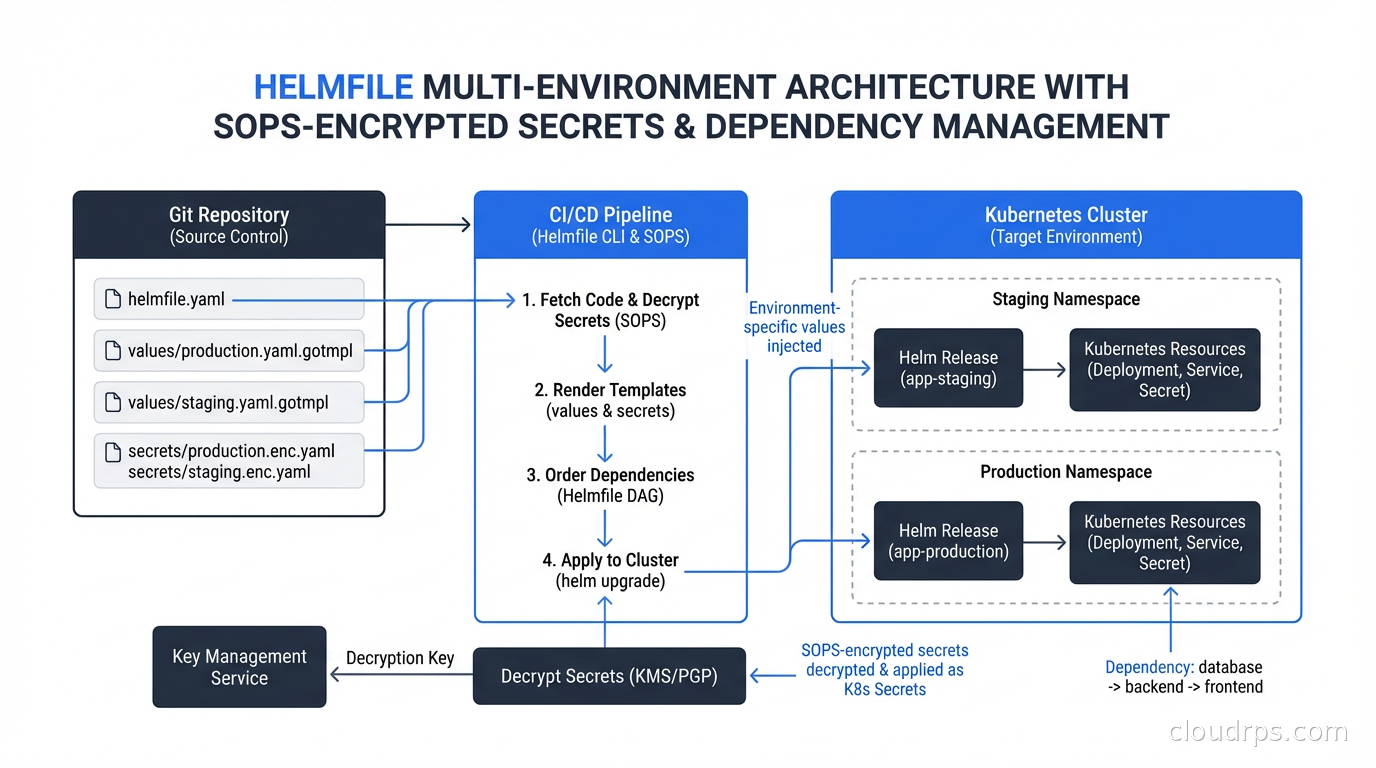
For secrets management, Helmfile integrates with SOPS (Mozilla’s secret encryption tool). Your values files live in git encrypted, Helmfile decrypts them in memory at deploy time using your KMS key, and no plaintext secrets ever touch disk or version control. The workflow feels like:
# In helmfile.yaml
releases:
  - name: my-service
    values:
      - values/my-service.yaml
      - secrets://values/my-service-secrets.yaml  # SOPS-encrypted
This approach is strictly better than the common anti-pattern of storing Kubernetes Secrets in git base64-encoded, which is not encryption, it’s encoding.
Library Charts: The DRY Principle Applied to Kubernetes
If you run a platform with multiple teams each writing their own service charts, you’ll notice they all have the same structure: Deployment, Service, Ingress, HPA. They all need the same label conventions, the same resource limit patterns, the same liveness probe structure.
Library charts let you codify those patterns once and reference them. A library chart (marked type: library in Chart.yaml) contains only template definitions, no rendered templates. Other charts include it as a dependency and call its templates:
# In a service chart's templates/deployment.yaml
{{ include "company-base-chart.deployment" . }}
The library chart defines the full Deployment template, the service chart provides the values to fill it in. When you need to add a new standard annotation to all deployments (say, for a new monitoring system), you update the library chart and all consuming charts pick up the change on their next release.
This is how platform engineering teams encode organizational standards into Kubernetes deployments without forcing every team to relearn the same patterns from scratch.
Common Anti-Patterns That Will Burn You
I’ve reviewed a lot of Helm charts over the years. The same mistakes come up repeatedly.
Putting everything in one giant values block. Values files become unmanageable when they’re flat. Structure your values hierarchically: app.image.tag, app.resources.limits.memory, ingress.enabled, monitoring.enabled. This makes it obvious which values affect which components, and it prevents naming collisions when the chart is embedded as a subchart.
Baking in environment-specific defaults. Your values.yaml should have production-safe defaults. Replica counts should default to 2+, not 1. Resources should have limits set. If you need to override for dev (single replica, lower limits), do that in a dev values overlay. The default values are what get deployed if someone forgets to specify an environment.
Using helm upgrade --install for everything without --atomic. Without --atomic, a failed upgrade leaves the release in a degraded state. Helm marks it as failed and subsequent helm upgrade commands fail with “cannot upgrade a failed release” until you manually roll back or delete the release. The --atomic flag automatically rolls back on failure and is almost always the right default for production pipelines.
Not versioning charts separately from applications. The chart version and the application version are different things. The chart might need to change (add a new resource, fix a template bug) without the application changing. If you tie them together, you end up with weird coupling where you need to bump the app version to fix a Helm template.
Ignoring helm diff. The Helm diff plugin shows you exactly what will change before you apply it. Running helm diff upgrade in your CI/CD pipeline and requiring someone to review the diff before applying to production is a simple control that catches a lot of mistakes.
Helm vs Kustomize: The Honest Comparison
This comes up constantly. The short version: Helm and Kustomize solve different problems and are often used together.
Kustomize works by applying overlays to base YAML. You have a base/ directory with canonical YAML, and environment-specific overlays/ that patch it. Kustomize ships with kubectl and requires no additional tooling. It’s excellent for simple cases where you have a handful of resources and want to maintain separate environment configs.
Helm works by rendering templates. You write templates with placeholders, provide values to fill them in, and Helm outputs YAML. Helm is better when you need to conditionally include or exclude entire resource blocks, do complex value transformations, package and distribute reusable components across teams, or maintain release history with rollback.
Where they genuinely conflict: Kustomize-based GitOps workflows (using ArgoCD or Flux to apply Kustomize overlays) and Helm releases can coexist in the same cluster, but the same resources should not be managed by both. Pick one approach per workload. The SSA improvements in Helm 4 make this boundary cleaner, but “both tools touching the same resource” remains a foot-gun.
Helm and RBAC: Who Can Deploy What
A Helm release runs with whatever Kubernetes permissions the user or service account executing helm install has. In a shared cluster with multiple teams, this matters.
The typical pattern in a platform engineering setup is to give each team a service account with namespace-scoped permissions. The service account can manage resources in its namespaces, can read cluster-scoped resources it needs, but cannot create ClusterRoles or modify other teams’ namespaces. The Kubernetes RBAC system handles this naturally; Helm just inherits those permissions.
Where this gets complicated: some charts want to create ClusterRoles and ClusterRoleBindings. If your service account doesn’t have cluster-wide RBAC permissions, the chart install fails. The right answer is usually to extract cluster-scoped resources into a separate chart managed by the platform team, not to give application teams cluster-admin. This is another argument for library charts and a central platform chart that installs cluster-scoped infrastructure.
Structuring a Production Helm Workflow
After years of iterating on this, the pattern I recommend:
Charts live in a dedicated charts/ repository (or a charts/ directory in a monorepo). Each chart has its own semantic version. Chart changes go through CI/CD pipelines that run helm lint, helm template (to verify rendering), and helm test against an ephemeral cluster.
Values files live in an environments/ repository (separate from the chart repo). This keeps the “what to deploy” separate from “how to deploy it,” which simplifies access control: developers can propose changes to values, only the platform team merges chart changes.
Helmfile in the environments repo ties everything together. Pull requests to the environments repo show helmfile diff output so reviewers can see exactly what will change in the cluster.
Promotions happen by copying the values from one environment directory to the next and opening a PR. This is auditable, reviewable, and reversible.
Wrapping Up
Helm is not perfect. The templating language can be arcane, debugging rendering errors takes practice, and the interaction between Helm and GitOps tools has historically been messy. Helm 4’s server-side apply addresses the most persistent of those issues.
But for managing Kubernetes deployments at scale, Helm remains the most pragmatic choice. The chart ecosystem means you’re not writing from scratch for common infrastructure. The release model gives you history and rollback. Library charts let platform teams encode standards once. Helmfile makes multi-environment management tractable without custom scripting.
If you’re still on Helm 3, plan your migration now. Security support has been extended to February 10, 2027, but that window will not stay open forever. The migration is lower-risk than a major version bump usually implies since chart formats are backward compatible. Start with a non-production cluster, verify your charts render correctly, and verify your pipelines work with the new client binary.
If you’re building a platform engineering capability or setting up a GitOps workflow with ArgoCD or Flux, invest the time to set up library charts and Helmfile early. Retrofitting them onto a proliferated set of inconsistent charts is significantly harder than starting with the right patterns. The consistency payoff compounds every time you have to debug a production issue at 2am.
Updated September 1, 2026: removed unsourced statistics and corrected the Helm 3 security support end date as part of an accuracy review.
Get Cloud Architecture Insights
Practical deep dives on infrastructure, security, and scaling. No spam, no fluff.
By subscribing, you agree to receive emails. Unsubscribe anytime.