
At 2:47 AM on a Tuesday in 2011, I got paged because a $40 fan failed in a power supply unit. That fan failure caused the PSU to overheat and shut down. The server had a redundant PSU, but the second one had been dead for three weeks. Nobody noticed because monitoring only checked if the server was up, not if it was running on redundant power. The server went down, and because it was a single-instance database server for a payment processing system, the entire platform went down with it.
We lost $180,000 in transactions over the next four hours.
That night taught me what high availability actually means. Not the textbook definition, but the visceral, 2 AM, career-on-the-line reality of it. High availability isn’t a feature you add. It’s a discipline you practice. And it starts with understanding that everything fails, and your job is to make sure those failures don’t reach your users.
What High Availability Actually Means
High availability (HA) means designing systems so that they continue operating when individual components fail. The goal isn’t to prevent failure; failure is inevitable. The goal is to ensure that no single failure causes a service outage.
HA is typically expressed as a percentage of uptime, and those percentages map to specific amounts of allowed downtime:
| Availability | Downtime/Year | Downtime/Month | Downtime/Week |
|---|---|---|---|
| 99% (“two nines”) | 3.65 days | 7.3 hours | 1.68 hours |
| 99.9% (“three nines”) | 8.76 hours | 43.8 minutes | 10.1 minutes |
| 99.99% (“four nines”) | 52.6 minutes | 4.38 minutes | 1.01 minutes |
| 99.999% (“five nines”) | 5.26 minutes | 26.3 seconds | 6.05 seconds |
Most people throw around “five nines” without understanding what it actually takes to achieve it. Five nines means you can be down for a total of five minutes per year. That includes deployments, database failovers, DNS propagation, and anything else that causes even partial unavailability. I’ve achieved four nines for several systems. I’ve never achieved five nines for a complete system, and I’m skeptical of anyone who claims they have.
The relationship between HA and fault tolerance is important. HA means the system stays available despite failures, possibly with brief degradation. Fault tolerance means the system continues operating with zero impact from failures. Fault tolerance is a higher bar, and a much more expensive one.
The Math of Availability
Understanding availability math is crucial because it drives architectural decisions.
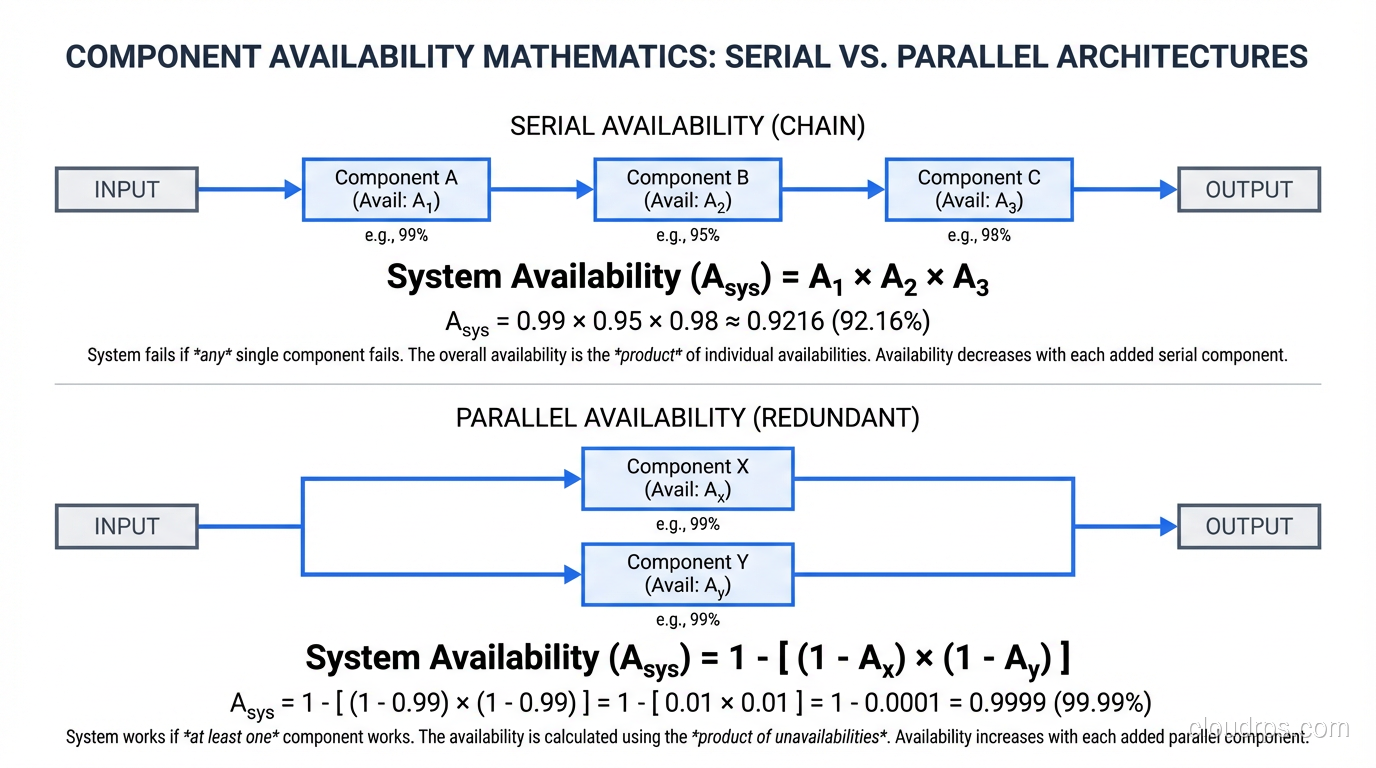
Serial Components
When components are in series (each one must work for the system to work), you multiply their individual availabilities:
System Availability = Component A × Component B × Component C
If your web server is 99.9% available, your application server is 99.9% available, and your database is 99.9% available, and all three must work for your system to work:
0.999 × 0.999 × 0.999 = 0.997 (99.7%)
You went from three nines per component to less than three nines for the system. Every component in the chain drags the total down.
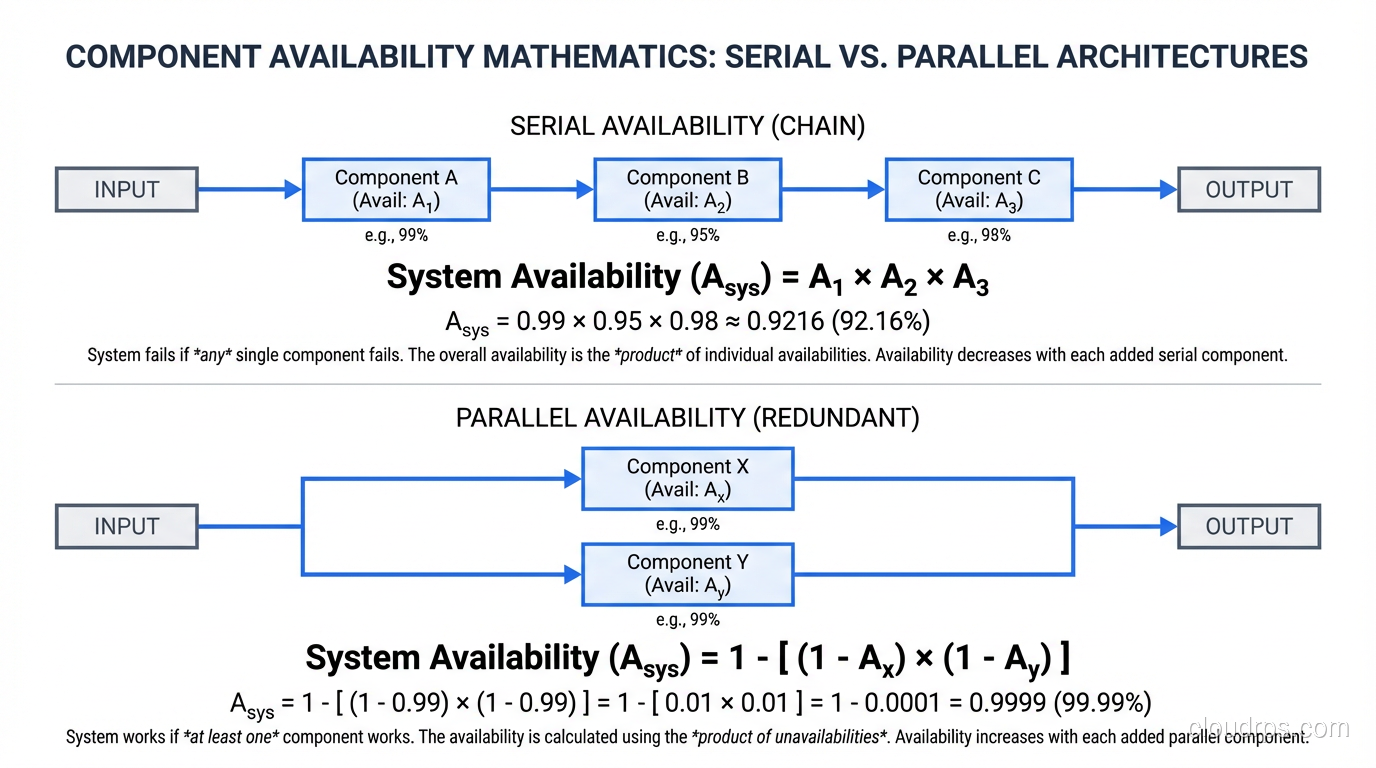
Parallel Components (Redundancy)
When components are in parallel (the system works if any one works), the availability calculation changes:
System Availability = 1 - (1 - Component A) × (1 - Component B)
Two components at 99.9% availability in parallel:
1 - (0.001 × 0.001) = 0.999999 (99.9999%)
That’s the magic of redundancy. Two three-nines components give you six nines when either one can serve traffic. This is why redundancy is the fundamental pattern of high availability.
The Core Patterns
Every HA architecture I’ve built uses some combination of these patterns:
Redundancy
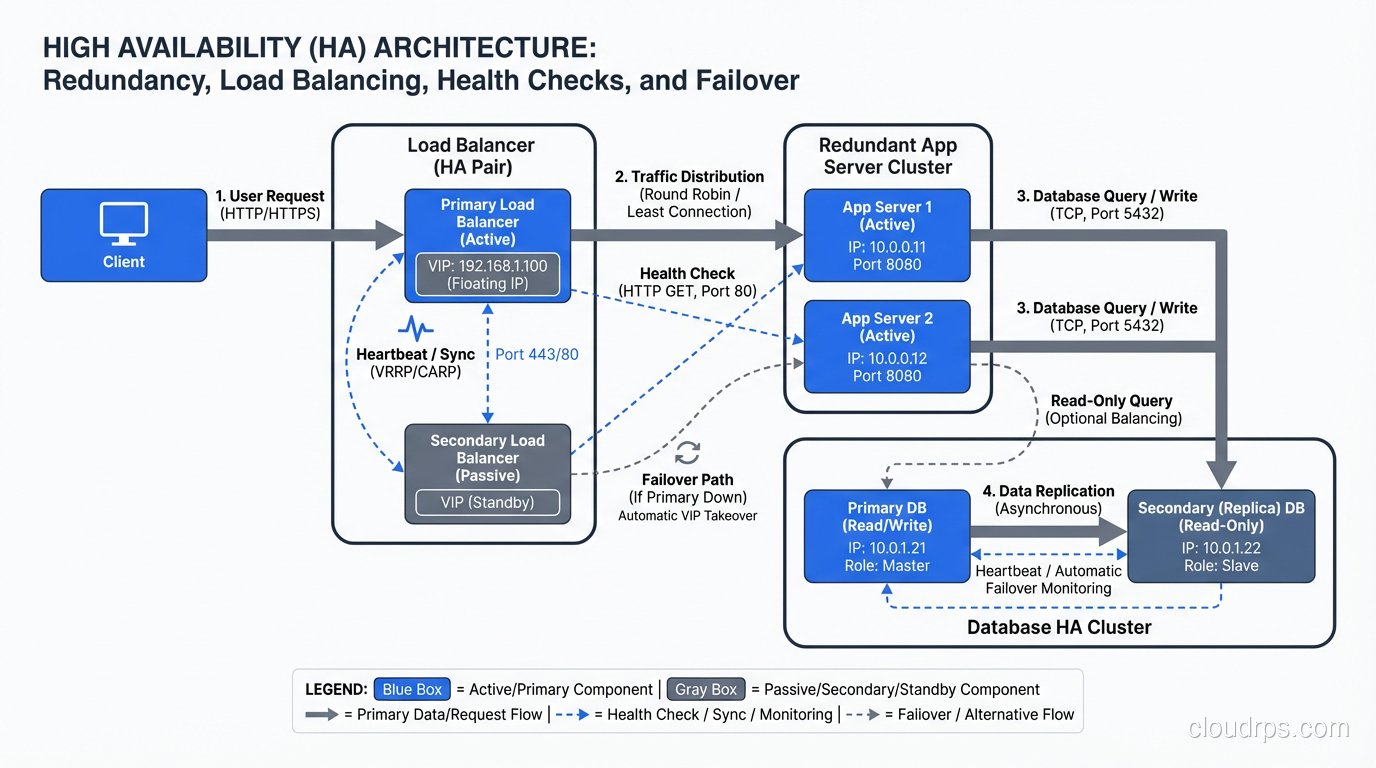
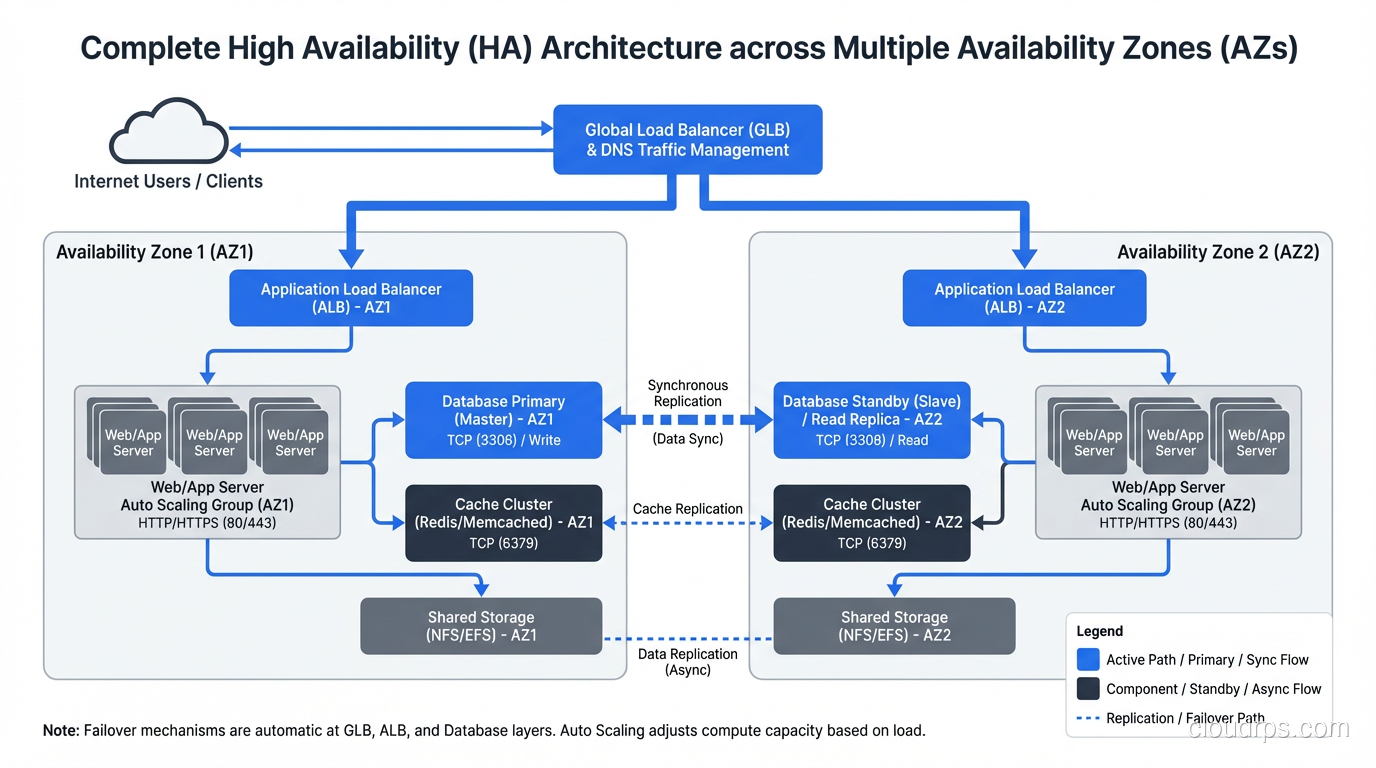
Every critical component exists in at least two instances. Two load balancers, two (or more) application servers, two database nodes, two network paths, two power feeds. For critical systems, I follow the N+1 rule: if you need N instances to handle your load, deploy N+1 so that one can fail without affecting capacity.
For truly critical systems, I use N+2, which covers the scenario where one instance is down for maintenance and another fails simultaneously.
Load Balancing
Distribute traffic across redundant instances so that if one fails, the others absorb its traffic. Load balancers are the front door to high availability. But the load balancer itself must be redundant. A single load balancer is a single point of failure.
This is why I strongly prefer managed load balancers (AWS ALB/NLB, Azure Load Balancer, Google Cloud Load Balancing) for cloud deployments. The provider handles the load balancer’s own availability, which is one less thing for me to design redundancy around.
Health Checks
Redundancy is useless without detection. You need automated health checks that detect when a component has failed and trigger remediation. Load balancer health checks route traffic away from unhealthy instances. Database health checks trigger failover to a standby. Monitoring health checks page engineers when automated remediation isn’t sufficient.
The health check itself needs to be meaningful. A TCP port check confirms the process is running. An HTTP 200 check confirms the web server is responding. A deep health check that queries the database and verifies the response confirms the entire request path is functional. I use deep health checks for production systems because a process can be running while completely broken.
Failover
When a primary component fails, a standby takes over. Failover can be automatic (the system detects failure and switches) or manual (a human makes the decision and executes the switch).
I always design for automatic failover with manual override. Automated failover handles the 2 AM scenario when nobody is awake. Manual override handles the edge case where automated failover might make things worse (like a split-brain scenario in a database cluster).
Geographic Distribution
Spread your infrastructure across multiple data centers, availability zones, or regions. This protects against facility-level failures: power outages, network cuts, cooling failures, natural disasters.
In AWS, this means multi-AZ deployment at minimum, multi-region for disaster recovery. Each availability zone is a separate physical data center with independent power, cooling, and networking. AZ failures are rare but not unheard of. I’ve been through two in my career.
Designing HA for Each Architectural Tier
Stateless Tiers (Web, Application)
These are straightforward. Run multiple instances behind a load balancer across multiple AZs. Configure auto-scaling to maintain minimum instance count even if instances fail. Set up health checks to detect unhealthy instances and replace them.
The key is ensuring true statelessness. If any state lives on the instance (session data, cached computations, file uploads), that state is lost when the instance fails. Externalize everything: sessions to Redis, files to S3, cache to ElastiCache.
Stateful Tiers (Databases)
This is where HA gets hard. Databases hold your data, and data loss or inconsistency is unacceptable for most systems.
Primary-Standby (Active-Passive): One primary handles all reads and writes. A standby receives replicated data in real-time. If the primary fails, the standby is promoted to primary. This is the most common HA pattern for relational databases (RDS Multi-AZ uses this).
The critical question is synchronous vs. asynchronous replication. Synchronous replication guarantees the standby has every committed transaction, but adds latency to writes. Asynchronous replication is faster but risks losing recent transactions during failover. For financial data, I always use synchronous. For less critical data, asynchronous is acceptable.
Active-Active (Multi-Primary): Multiple nodes handle reads and writes simultaneously. This provides both HA and horizontal write scalability, but introduces write conflict resolution complexity. Databases like CockroachDB, Spanner, and Cassandra support this model.
Networking
Network redundancy is the most overlooked aspect of HA. A single network path is a single point of failure. In AWS, multi-AZ deployment provides network diversity. On-premises, this means redundant switches, redundant routers, redundant ISP connections, and redundant paths between racks.
I once diagnosed a multi-hour outage caused by a single fiber optic cable being severed by a construction crew. The data center had redundant internet connections, but both came through the same physical conduit. Redundancy that shares failure domains isn’t real redundancy.
Testing High Availability
Here’s the part that separates mature HA implementations from theater: you have to test it.
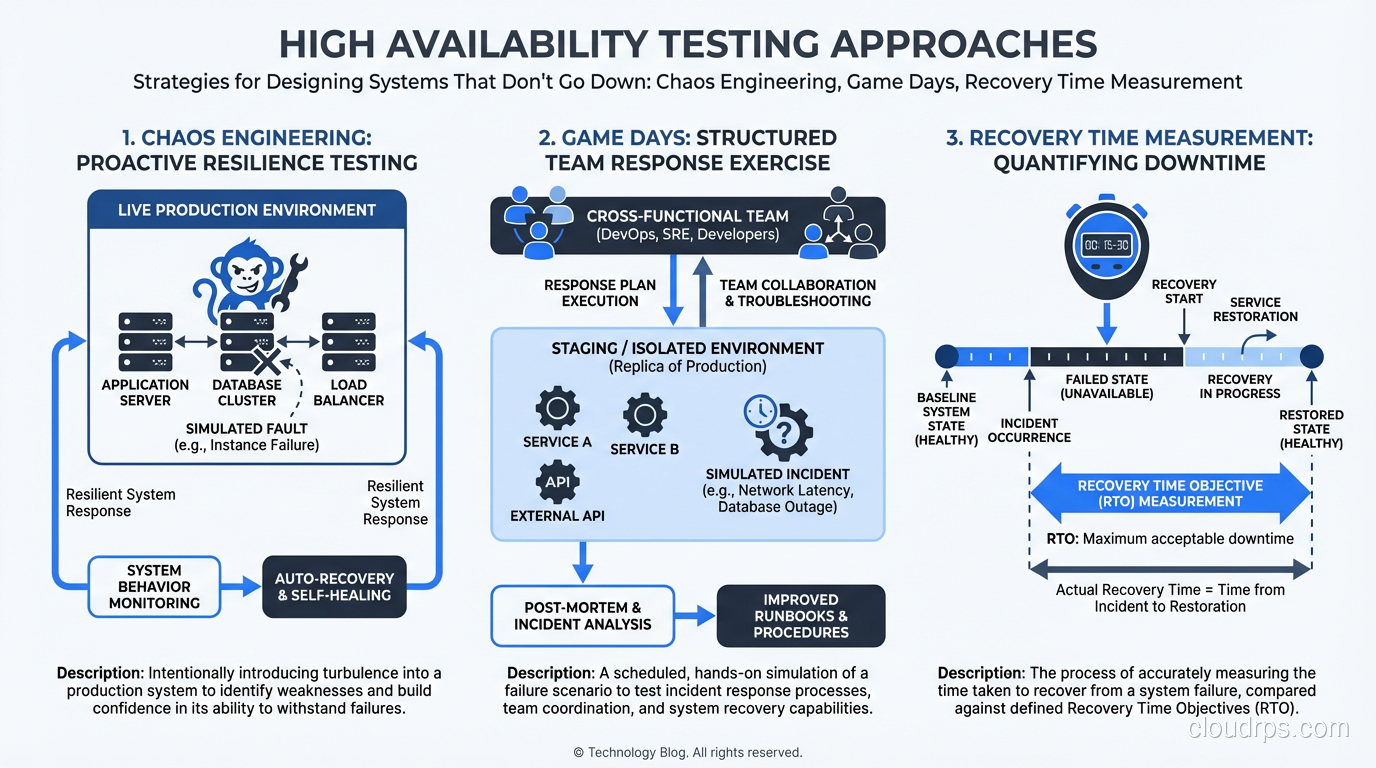
Chaos Engineering
Deliberately inject failures into your production system and verify it handles them correctly. Netflix’s Chaos Monkey is the famous example, but the principle applies to every HA system.
At minimum, I test:
- Instance failure: Kill an application instance and verify the load balancer routes around it.
- AZ failure: Simulate an AZ failure by blocking traffic to instances in one AZ.
- Database failover: Trigger a database failover and measure the impact on application requests.
- Dependency failure: Block connectivity to a downstream service and verify graceful degradation.
Game Days
Scheduled exercises where the team practices responding to failures. Like fire drills, but for infrastructure. I run these quarterly for critical systems. The goal isn’t just to verify the technology works; it’s to verify the people and processes work.
In one game day, we discovered that our runbook for database failover referenced a console page that AWS had redesigned. The engineer following the runbook couldn’t find the failover button. We updated the runbook that afternoon.
Recovery Time Testing
Measure your actual recovery time, not your theoretical recovery time. There’s always a gap. Your automated failover might complete in 30 seconds, but if it takes 5 minutes to detect the failure, your actual recovery time is 5 minutes and 30 seconds.
The Human Factor
After thirty years, the lesson I keep relearning is that humans are the biggest threat to availability. Not hardware, not software, not natural disasters. Humans.
Configuration errors cause more outages than hardware failures. A mistyped security group rule, a botched database migration, a deployment with a missing environment variable. Change management (peer review, staged rollouts, automated validation) prevents more outages than redundant hardware.
Alert fatigue kills availability. If your team gets 200 alerts a day, they stop paying attention. When the alert that matters fires, it gets lost in the noise. Tune your alerting aggressively. Every alert should be actionable. If an alert doesn’t require human action, it shouldn’t be an alert; it should be a dashboard metric.
Knowledge silos are a single point of failure. If only one person knows how to failover the database, that person being on vacation during an outage is catastrophic. Document procedures. Cross-train team members. Rotate on-call responsibilities.
What HA Costs (And When It’s Worth It)
HA isn’t free. Running two of everything roughly doubles your infrastructure cost. Multi-region deployment can triple or quadruple it. The engineering effort to design, implement, and test HA is significant.
The question isn’t “should we be highly available?” The question is “what’s the cost of downtime vs. the cost of availability?”
For a payment processing system doing $1M/hour in transactions, even five nines might not be enough. The cost of HA is trivial compared to the cost of an hour of downtime.
For an internal reporting tool used during business hours, 99% availability (about 7 hours of downtime per month) might be perfectly acceptable. Spending six months engineering four nines for a reporting tool is a waste.
Calculate the cost of downtime. Calculate the cost of HA. Make a rational decision. That’s it. No religious arguments about uptime percentages. Just math.
Where to Go Next
High availability is one piece of the resilience puzzle. Understanding fault tolerance and how to eliminate single points of failure gives you the complete picture.
The goal is always the same: build systems where your users never know that something failed. Everything fails. The question is whether your architecture makes those failures invisible.
That $40 fan in 2011 taught me more about availability than any textbook. The best HA designs come from people who’ve been woken up at 2 AM by preventable failures. After enough of those nights, you get very good at making sure they don’t happen again.
Get Cloud Architecture Insights
Practical deep dives on infrastructure, security, and scaling. No spam, no fluff.
By subscribing, you agree to receive emails. Unsubscribe anytime.