
The first time I really understood how a CDN works was in 2008, during a product launch that went viral. Our single-origin architecture (a few web servers behind a load balancer in us-east-1) buckled under the load. Page load times for users in Tokyo were 4+ seconds. Users in Sydney were timing out entirely. We threw the site behind Akamai, and within an hour, global response times dropped to under 200ms.
That experience permanently rewired how I think about content delivery. A CDN isn’t just “a cache in front of your website.” It’s a globally distributed system that fundamentally changes how the internet delivers content, and understanding its internals makes you a better architect whether you’re serving static files or building real-time APIs.
What a CDN Actually Does
At its core, a CDN does one thing: it serves content from a location physically close to the user instead of from the origin server, which might be thousands of miles away.
The physics are simple. Light in a fiber optic cable travels at roughly 200,000 km/s (about two-thirds the speed of light in a vacuum). A round trip from New York to Sydney is about 32,000 km of fiber, giving you a minimum round-trip time of ~160ms just from the speed of light, before any processing, routing, or congestion delays. In practice, you’ll see 200-300ms.
Every HTTP request requires at least one round trip (TCP handshake), usually two (TLS handshake), plus the actual data transfer. A page that makes 50 requests could be spending seconds just on network round trips.
A CDN eliminates most of those long-distance round trips by caching content at edge servers (also called Points of Presence or PoPs) distributed globally. Major CDN providers have hundreds of PoPs:
| CDN Provider | Approximate PoPs | Notable Coverage |
|---|---|---|
| Cloudflare | 300+ | Strong in developing markets |
| Akamai | 4,000+ | Largest network, enterprise-focused |
| AWS CloudFront | 400+ | Tightly integrated with AWS |
| Fastly | 80+ | Developer-friendly, real-time purge |
| Google Cloud CDN | 150+ | Leverages Google’s backbone |
How Requests Get Routed to the Nearest Edge
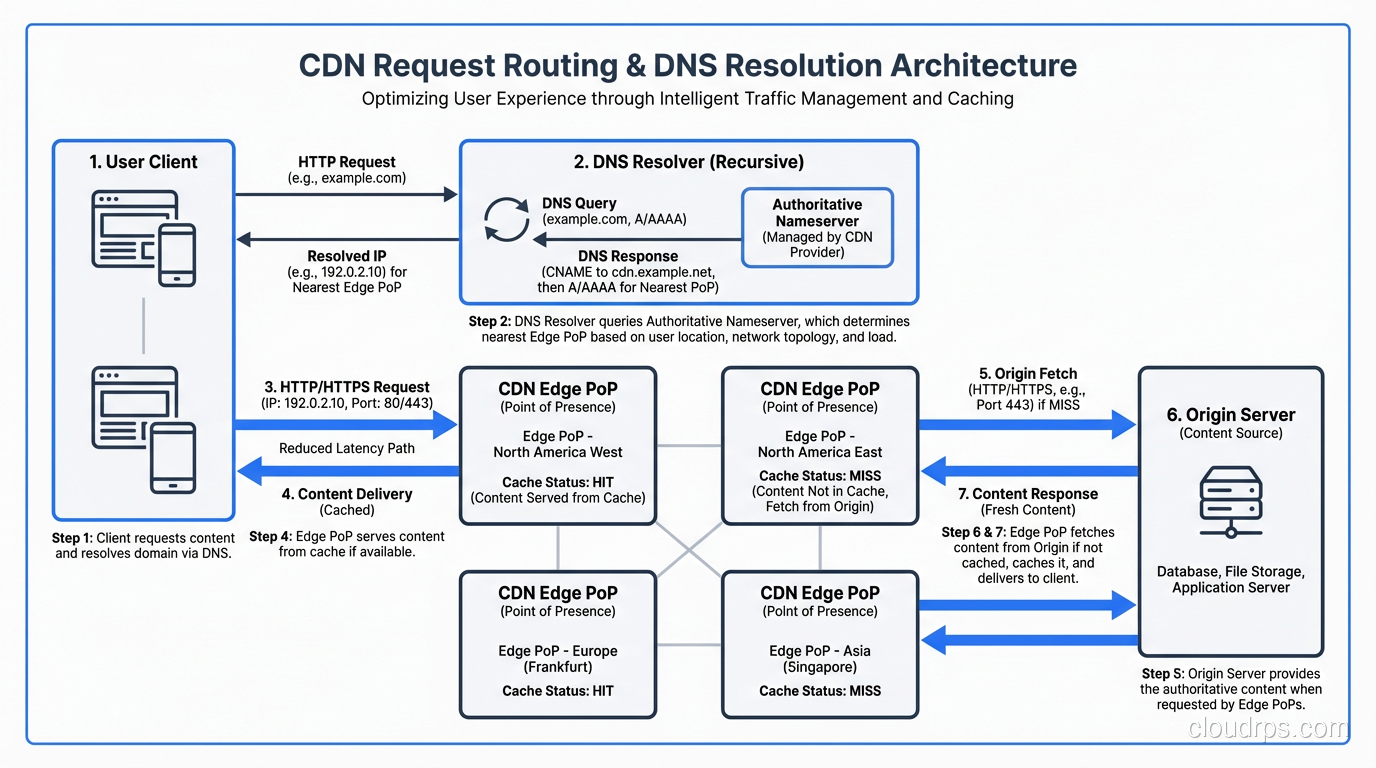
When a user types www.example.com into their browser, they need to end up at the nearest CDN edge server, not the origin. This routing happens through DNS resolution.
DNS-Based Routing
Most CDNs use DNS-based routing. When you configure your domain to use a CDN, you typically CNAME your domain to the CDN’s domain:
www.example.com → CNAME → d1234.cloudfront.net
When a user’s DNS resolver queries d1234.cloudfront.net, the CDN’s authoritative DNS server responds with the IP address of the nearest edge PoP. “Nearest” is determined by a combination of:
- GeoDNS: The CDN looks at the source IP of the DNS resolver and maps it to a geographic region
- Latency measurements: Some CDNs actively measure latency from their PoPs to major DNS resolvers
- Health checks: Unhealthy PoPs are removed from DNS responses
- Capacity: Overloaded PoPs may be de-prioritized
Anycast Routing
Some CDNs (notably Cloudflare) use BGP Anycast instead of or in addition to DNS routing. With Anycast, the same IP address is announced from every PoP worldwide. The internet’s BGP routing automatically directs each user to the “nearest” PoP in terms of BGP path length.
Anycast has a key advantage: it works at Layer 3, so it’s faster than DNS (no extra DNS lookup needed) and handles failover automatically. If a PoP goes down, BGP withdraws the route and traffic shifts to the next-nearest PoP.
The downside is that “nearest by BGP” isn’t always “lowest latency.” BGP routing is based on AS path length and policy, not actual measured latency. A PoP three AS hops away might be faster than one that’s two hops away if the intermediate links are congested.
Cache Architecture: Edge, Mid-Tier, and Origin
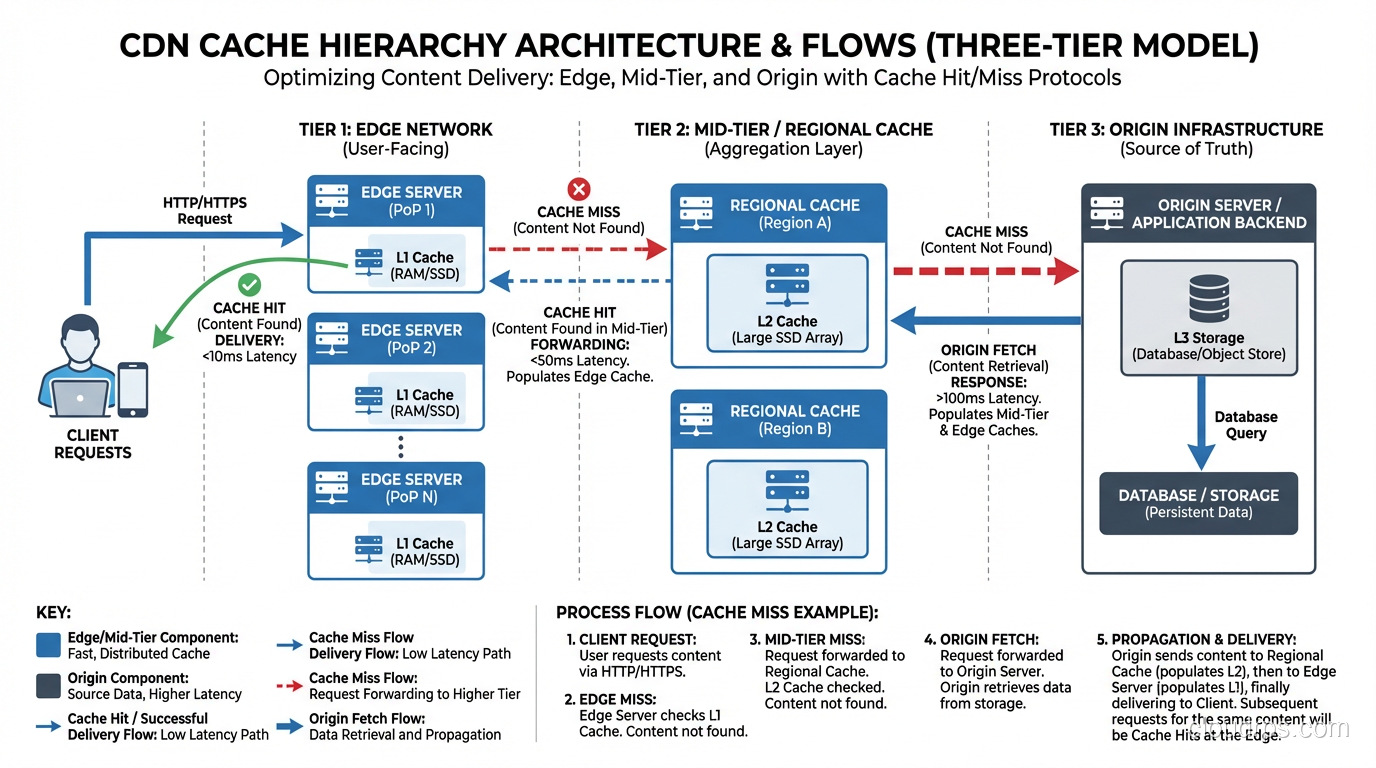
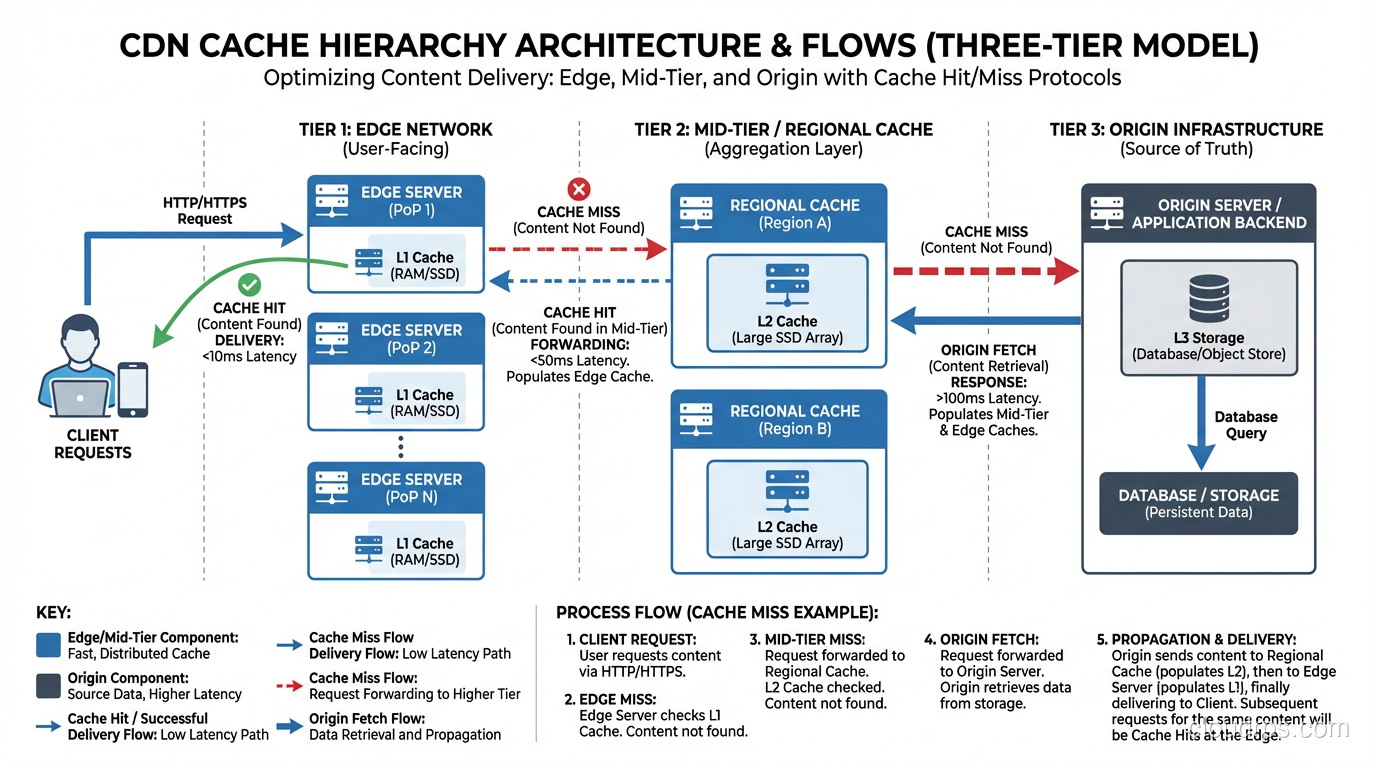
A CDN’s cache architecture typically has multiple tiers:
Tier 1: Edge Cache (PoP)
The edge cache is the first line of defense. It’s the server closest to the user. When a request arrives at the edge:
Cache HIT: The content is in the edge cache and hasn’t expired. Serve it immediately. This is the fast path, with latency typically 5-50ms.
Cache MISS: The content isn’t cached at this edge. The edge needs to fetch it from somewhere.
Tier 2: Mid-Tier Cache (Shield/Regional)
Instead of every edge PoP going directly to the origin on a cache miss, most CDNs route misses through a mid-tier cache (Cloudflare calls this “Tiered Caching,” CloudFront calls it “Origin Shield,” Akamai has “SureRoute”). The CDN edge is architecturally a reverse proxy deployed at global scale: it intercepts requests on behalf of your origin servers, serves cached content, and only forwards uncached requests upstream.
The mid-tier cache serves as a shared cache for multiple edge PoPs in a region. If the content is cached at the mid-tier, the edge gets it from there instead of hitting the origin.
This dramatically reduces origin load. Without mid-tier caching, a viral piece of content that’s accessed from 300 PoPs simultaneously would cause 300 concurrent requests to the origin. With mid-tier caching (say, 10 regional mid-tier caches), at most 10 requests hit the origin.
Tier 3: Origin Server
The origin is your actual web server, the source of truth for all content. In a well-configured CDN setup, the origin should only be hit for:
- First requests for new/uncached content
- Cache revalidation requests (conditional GET with
If-Modified-SinceorIf-None-Match) - Truly dynamic content that can’t be cached
User → [Edge PoP (NYC)] → Cache HIT → Response (5ms)

User → [Edge PoP (NYC)] → Cache MISS
     → [Mid-Tier (US-East)] → Cache HIT → Response (20ms)

User → [Edge PoP (NYC)] → Cache MISS
     → [Mid-Tier (US-East)] → Cache MISS
     → [Origin (us-east-1)] → Response (100ms)
Cache Control: How the CDN Knows What to Cache
The CDN respects HTTP cache headers from your origin. The main ones:
Cache-Control Header
Cache-Control: public, max-age=86400, s-maxage=604800
public: Any cache (including CDN) can store thismax-age=86400: Browsers should cache for 24 hourss-maxage=604800: Shared caches (CDN) should cache for 7 days
The s-maxage directive is your best friend. It lets you set different TTLs for the CDN and the browser. You might want the CDN to cache aggressively (long s-maxage) while keeping browser cache short (short max-age) so users get updated content when you purge the CDN.
Common Cache-Control Patterns
| Content Type | Recommended Cache-Control | Why |
|---|---|---|
| Static assets (JS/CSS with hash) | public, max-age=31536000, immutable | Content-addressable, never changes |
| Images | public, max-age=86400, s-maxage=2592000 | CDN caches 30 days, browser 1 day |
| HTML pages | public, s-maxage=60, max-age=0 | CDN caches 1 min, browser always revalidates |
| API responses | private, no-store or public, s-maxage=5 | Usually not cached, or very short TTL |
| User-specific content | private, no-store | Never cache on shared caches |
The ETag/Last-Modified Dance
Even after a cached object expires, the CDN doesn’t necessarily re-download it. It sends a conditional request:
GET /image.png HTTP/1.1
If-None-Match: "abc123"
If-Modified-Since: Mon, 15 Jan 2024 10:00:00 GMT
If the origin responds with 304 Not Modified, the CDN knows its cached copy is still valid and extends its cache lifetime. This saves bandwidth and origin CPU.
Vary Header: The Cache Key Modifier
The Vary header tells the CDN that the response depends on certain request headers. The most common use:
Vary: Accept-Encoding
This tells the CDN to maintain separate cached copies for different encodings (gzip vs Brotli vs uncompressed). Without this, a CDN might serve a gzip-compressed response to a client that only supports Brotli.
Gotcha: Vary: * means “this response is unique to every request,” effectively disabling caching. I’ve seen applications accidentally set Vary: * and wonder why their CDN hit rate was 0%. Similarly, Vary: Cookie means a separate cached copy for every unique cookie combination, which usually means no caching at all.
Cache Invalidation: The Hard Problem
Phil Karlton famously said there are only two hard things in computer science: cache invalidation and naming things. CDN cache invalidation is a perfect illustration of why.
Purge/Invalidation
Every CDN provides an API to purge cached content:
# CloudFront invalidation
aws cloudfront create-invalidation \
  --distribution-id E1234567890 \
  --paths "/index.html" "/css/*"

# Cloudflare purge
curl -X POST "https://api.cloudflare.com/client/v4/zones/ZONE_ID/purge_cache" \
  -H "Authorization: Bearer TOKEN" \
  -d '{"files":["https://www.example.com/index.html"]}'
But purging has costs:
- Propagation delay: A purge at the API doesn’t instantly clear every edge PoP. Akamai quotes 5-10 seconds for Instant Purge; CloudFront invalidations can take minutes.
- Thundering herd: Purging popular content from all caches simultaneously causes a stampede of requests to the origin. The smarter CDNs handle this with request coalescing, where only one cache miss request goes to the origin, and all other waiting requests share the response.
- CloudFront charges for invalidations: The first 1,000 paths/month are free; after that, it’s $0.005 per path.
The Better Approach: Cache Busting
Instead of purging, use content-addressed URLs (cache busting):
<!-- Instead of purging /app.css, change the URL -->
<link rel="stylesheet" href="/app.a1b2c3d4.css">

<!-- Or use a query parameter (less reliable but simpler) -->
<link rel="stylesheet" href="/app.css?v=1705312800">
When you deploy new content, the URL changes, so the old cached version is irrelevant. The browser requests the new URL, which isn’t in any cache yet. This is why build tools like Webpack, Vite, and esbuild add content hashes to filenames.
For HTML pages (which can’t be cache-busted because the URL is fixed), use short s-maxage values and accept that there will be a brief staleness window.
CDN for Dynamic Content: Beyond Static Files
A common misconception is that CDNs are only for static files. Modern CDNs can accelerate dynamic content too:
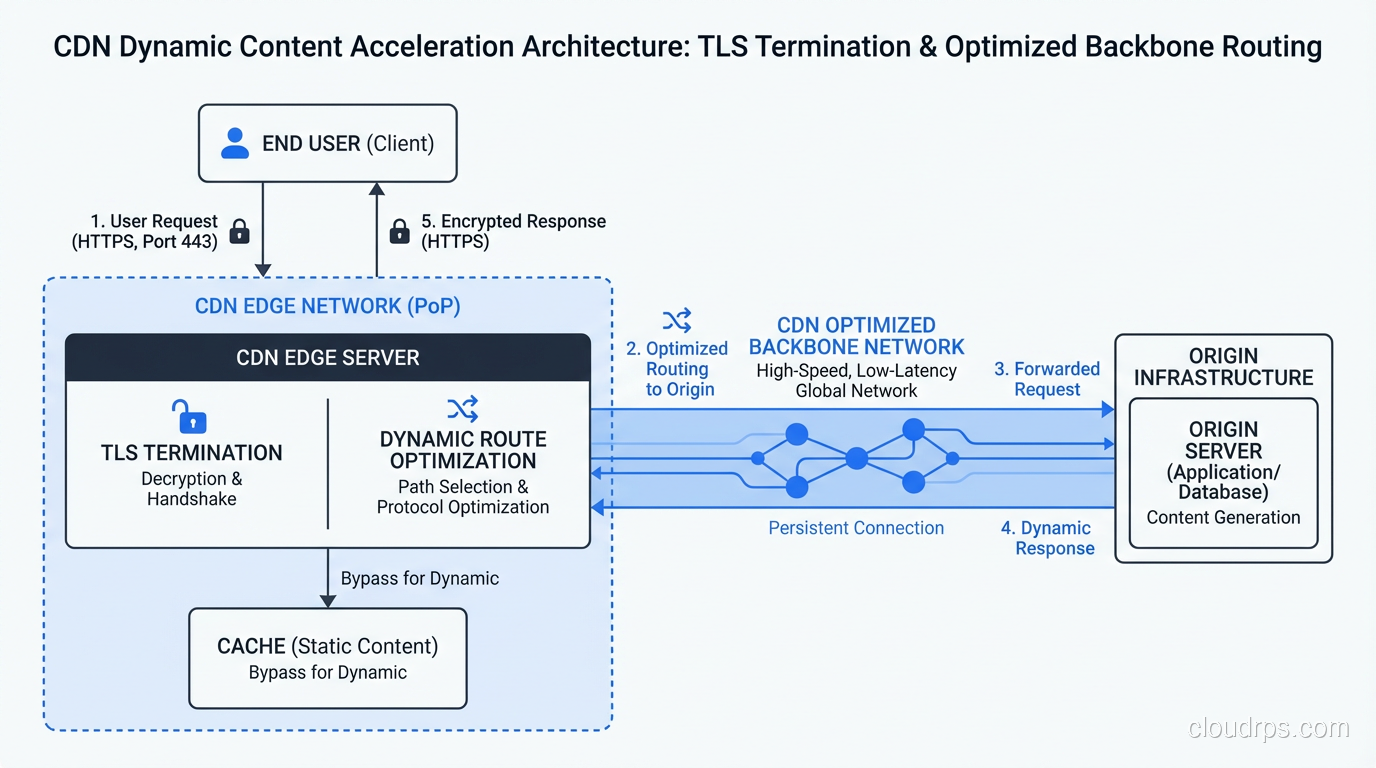
Connection Optimization
Even for uncacheable requests, a CDN provides value through connection optimization:
- TLS termination at the edge: The user completes the TLS handshake with the nearby edge PoP (fast), not the distant origin (slow)
- Persistent connections to origin: The CDN maintains a pool of warm TCP/TLS connections to your origin, eliminating connection setup time for each request
- HTTP/2 multiplexing: The CDN speaks HTTP/2 to the user even if your origin only supports HTTP/1.1
- Optimized backbone routing: CDNs route traffic between edge and origin over their private backbones, which are faster and more reliable than the public internet
I’ve measured this: a dynamic API request that takes 300ms from the user directly to the origin drops to 180ms through a CDN, even with 0% cache hit rate. The connection optimization alone is worth 30-40% latency reduction.
Edge Computing
The latest evolution is running actual application logic at the edge:
- Cloudflare Workers: V8 isolates at every PoP, JavaScript/Wasm
- CloudFront Functions / Lambda@Edge: AWS’s edge compute
- Fastly Compute@Edge: Wasm-based edge compute
- Deno Deploy: Edge-first serverless platform
This lets you do things like A/B testing, authentication, geolocation-based routing, and even database queries at the edge, all without ever hitting the origin for certain requests.
CDN and TLS: The SNI Connection
CDNs are one of the biggest users of SNI (Server Name Indication). A single CDN edge server might serve HTTPS for tens of thousands of different domains. Without SNI, each domain would need a dedicated IP address at every PoP, which would require millions of IPv4 addresses.
When your browser connects to a CDN edge, the TLS ClientHello contains the SNI hostname. The CDN uses this to:
- Select the correct TLS certificate for your domain
- Look up the CDN configuration for your domain (cache settings, origin address, etc.)
- Apply any domain-specific rules (WAF, redirects, headers)
This is also why CDNs are at the forefront of Encrypted Client Hello (ECH) deployment. They have both the technical capability and the business incentive to protect user privacy.
Measuring CDN Performance
Key Metrics
| Metric | What It Means | Good Value |
|---|---|---|
| Cache Hit Ratio | % of requests served from cache | > 90% for static sites, 50-80% for mixed |
| TTFB (Time to First Byte) | Time from request to first byte of response | < 100ms for cached, < 500ms for origin |
| Bandwidth Offload | % of bandwidth served from edge | > 95% for media-heavy sites |
| Origin Requests/sec | How often the CDN hits your origin | Should be a fraction of total traffic |
| P95/P99 Latency | Tail latency at high percentiles | 2-5x the median is acceptable |
Debugging Cache Behavior
Most CDNs add response headers that tell you what happened:
$ curl -I https://www.example.com/image.png

X-Cache: Hit from cloudfront           # CloudFront: cache hit
CF-Cache-Status: HIT                    # Cloudflare: cache hit
Age: 3600                               # Object has been cached for 1 hour
X-Served-By: cache-iad-kcgs7200089     # Fastly: which PoP served this
If you see MISS consistently, check your cache headers. If you see BYPASS, the CDN is intentionally not caching (usually due to Set-Cookie or Cache-Control: private in the response).
When NOT to Use a CDN
CDNs aren’t always the answer:
- Single-region users: If all your users are in one city and your server is in that city, a CDN adds complexity without much latency benefit
- Highly personalized content: If every response is unique to the user (after authentication), cache hit rates will be near zero. You still get connection optimization, but evaluate if the cost is justified.
- WebSocket-heavy applications: CDNs can proxy WebSockets, but they’re not optimized for long-lived connections. You might be better with direct connections.
- Very small traffic: CDN benefits scale with traffic. If you’re getting 100 requests/day, the CDN overhead (configuration, debugging, additional DNS hop) may not be worth it.
- Development environments: Don’t CDN your dev/staging unless you’re specifically testing CDN behavior. Caching makes debugging painful.
Wrapping Up
A CDN is one of the most impactful infrastructure decisions you can make. Adding a CDN in front of a poorly-optimized website can cut load times by 50-80% for global users. But a CDN is not magic. It requires proper cache headers, thoughtful content strategy, and monitoring to work well.
The key concepts to remember:
- CDNs work by serving content from edge servers near the user, reducing latency from physics-imposed round-trip times
- DNS-based routing and Anycast direct users to the nearest PoP
- Multi-tier cache hierarchies (edge → mid-tier → origin) protect your origin from traffic storms
- Cache-Control headers are how you communicate caching policy to the CDN
- Content-addressed URLs (cache busting) are better than purging
- CDNs help dynamic content too, through connection optimization and edge computing
- Always monitor your cache hit ratio, which is the single most important CDN metric
If you’re serving users globally and you’re not using a CDN, you’re making your users wait for photons to travel around the world for no good reason. Fix that.
Get Cloud Architecture Insights
Practical deep dives on infrastructure, security, and scaling. No spam, no fluff.
By subscribing, you agree to receive emails. Unsubscribe anytime.