
I still remember the exact moment I understood why SSO mattered. It was 2003, and I was watching a help desk technician at a financial services firm reset the same user’s password for the fourth time in a single week. Four different applications, four different password policies, four different expiration schedules. The user wasn’t dumb. The system was.
That week, I started pushing for a centralized identity solution. Twenty-plus years later, I’ve deployed SSO across hospitals, banks, government agencies, and SaaS platforms. And I can tell you that while the concept is simple – log in once, access everything – the engineering underneath is anything but.
Let me walk you through how SSO actually works, from the protocol handshakes to the session cookies to the failure modes nobody warns you about.
What Single Sign-On Actually Means
At its core, SSO means a user authenticates once with a trusted identity source, and that authentication is honored by multiple independent applications. That’s it. One login, many doors.
But the devil is in the details. How does Application B know that Application A already verified who you are? How do you revoke access without logging out of everything? How do you handle applications that live in different domains, different data centers, or different clouds?
These are the questions that separate a whiteboard diagram from a production deployment.
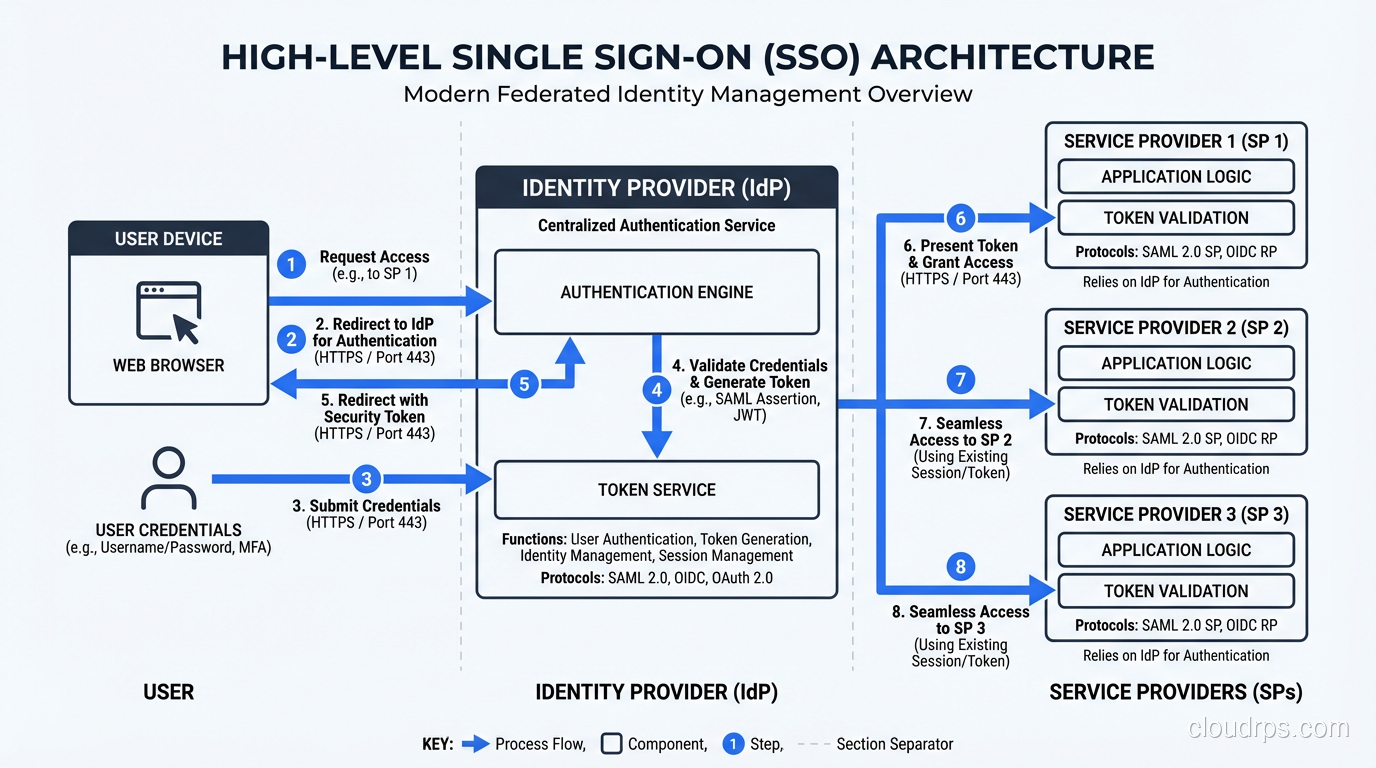
The fundamental building blocks of any SSO system are:
- Identity Provider (IdP): The single authority that authenticates users and issues assertions. Think Okta, Azure AD, Ping Identity, or your own ADFS server.
- Service Providers (SP): The applications that rely on the IdP to confirm a user’s identity. Your CRM, your email, your internal dashboards.
- Tokens or assertions: The cryptographic proof that travels between the IdP and SP, confirming “yes, this person is who they claim to be.”
- Trust relationships: Pre-configured agreements between IdP and SP, usually established through metadata exchange and certificate sharing.
If you want to understand how SSO fits into the broader picture of proving identity versus granting permissions, I wrote about that distinction in Authentication vs Authorization. It’s foundational to everything that follows here.
The SSO Authentication Flow Step by Step
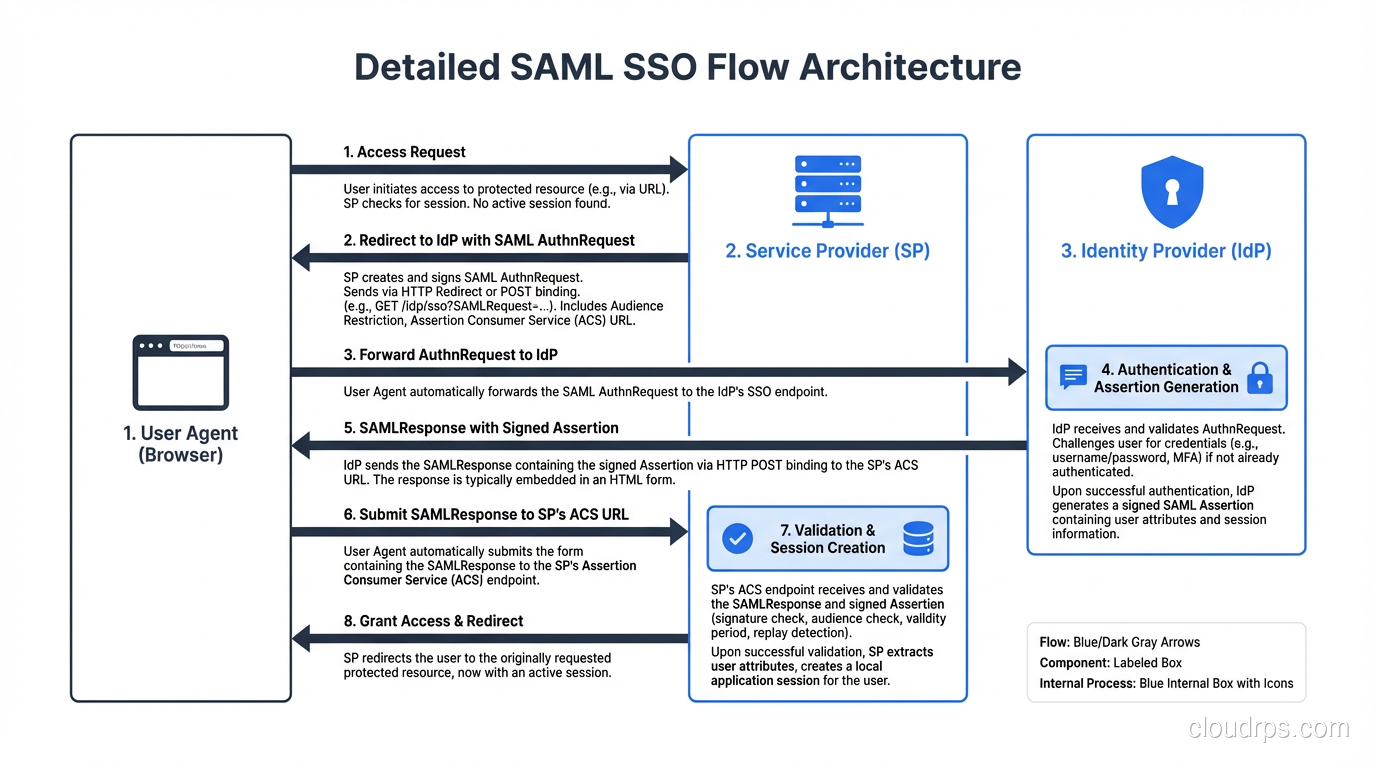
Let me trace through what actually happens when a user clicks “Login with SSO” on a typical enterprise application. I’ll use the most common pattern – SP-initiated SAML SSO – because it’s what you’ll encounter in about 80% of enterprise deployments.
Step 1: User Requests a Protected Resource
The user navigates to app.yourcompany.com/dashboard. The application checks for a valid session cookie. There isn’t one, so the user needs to authenticate.
Step 2: Service Provider Redirects to the Identity Provider
The SP generates a SAML AuthnRequest – an XML document that says “I need this user authenticated, here’s who I am, and here’s where to send them back.” The SP redirects the user’s browser to the IdP’s SSO endpoint, with that AuthnRequest encoded in the URL or POST body.
Step 3: Identity Provider Authenticates the User
The IdP checks if the user already has an active session. If they do (because they already logged into another application), the IdP skips the login prompt entirely. This is the magic moment – the “single” in single sign-on.
If there’s no existing session, the IdP presents a login page. The user enters credentials, maybe completes MFA, and the IdP validates everything against its user store.
Step 4: Identity Provider Issues an Assertion
Once authenticated, the IdP constructs a SAML Response containing a signed assertion. This assertion includes the user’s identity (usually an email or username), attributes (groups, roles, department), and conditions (validity window, audience restriction).
The IdP digitally signs this assertion with its private key. This signature is everything. It’s how the SP knows the assertion wasn’t tampered with and actually came from the IdP it trusts.
Step 5: Assertion Delivered to the Service Provider
The IdP redirects the user’s browser back to the SP’s Assertion Consumer Service (ACS) URL, carrying the signed assertion. The SP validates the signature against the IdP’s public certificate, checks the timestamp and audience restriction, and extracts the user’s identity and attributes.
Step 6: Service Provider Creates a Local Session
The SP creates its own session for the user – typically a session cookie scoped to that application’s domain. From this point forward, the user interacts with the SP normally until the session expires.
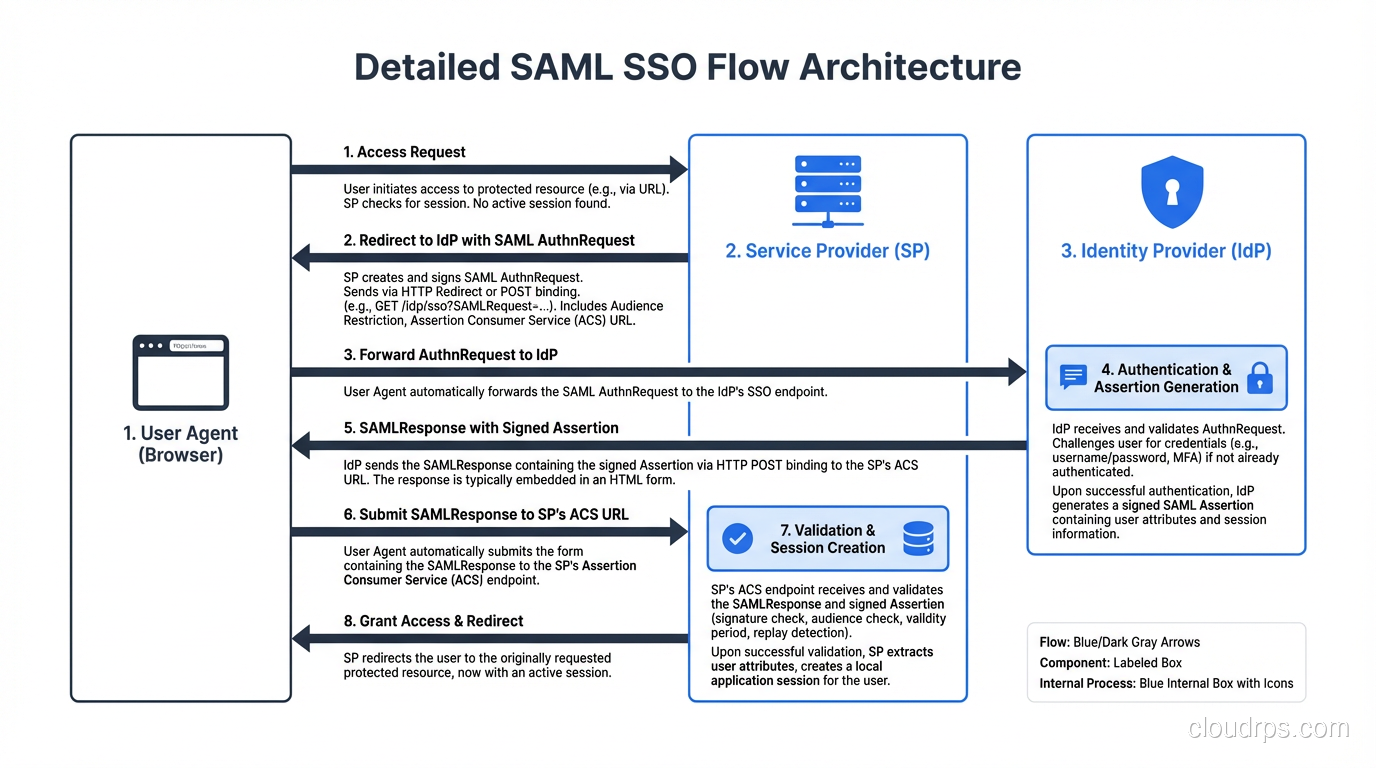
The entire exchange happens in seconds, mostly through browser redirects. The user sees a brief flash, maybe a loading spinner, and then they’re in.
The Protocols That Power SSO
SSO isn’t a single protocol. It’s a pattern implemented through several different protocols, each with its own strengths and historical baggage.
SAML 2.0: The Enterprise Workhorse
SAML (Security Assertion Markup Language) has been the dominant enterprise SSO protocol since the mid-2000s. It’s XML-based, verbose, and frankly painful to debug – but it works, it’s battle-tested, and every serious enterprise IdP supports it.
SAML uses browser redirects and POST bindings to shuttle assertions between parties. The assertions are signed XML documents that can carry identity information, authentication context, and authorization decisions.
I’ve implemented SAML integrations where the metadata exchange alone took two weeks of back-and-forth with the partner’s security team. The protocol is solid. The human coordination around it is where projects go sideways.
OAuth 2.0 and OpenID Connect: The Modern Approach
OAuth 2.0 wasn’t designed for authentication – it’s an authorization framework. But OpenID Connect (OIDC) was built on top of OAuth 2.0 specifically to handle authentication, and together they’ve become the preferred stack for modern SSO deployments.
Instead of XML assertions, OIDC uses JSON Web Tokens (JWTs). Instead of browser POST bindings, it uses redirect-based authorization code flows. The result is lighter, more developer-friendly, and far easier to debug than SAML.
For a deep dive into how these protocols relate to each other and when to use which, check out my breakdown of Federated Identity. It covers the decision matrix I use when architecting identity systems.
Kerberos: The On-Premises Silent Partner
In Windows-heavy environments, Kerberos handles SSO silently through ticket-granting tickets (TGTs). When you log into your Windows workstation in the morning and then open SharePoint without a password prompt, that’s Kerberos at work.
Kerberos is elegant but domain-bound. It works beautifully within an Active Directory forest and becomes a headache the moment you step outside it. Most hybrid environments use Kerberos for internal SSO and SAML or OIDC for cloud application SSO.
Session Management: Where SSO Gets Complicated
The initial authentication is the easy part. Session management is where I’ve seen the most production incidents and the most confused architects.
The Session Triangle
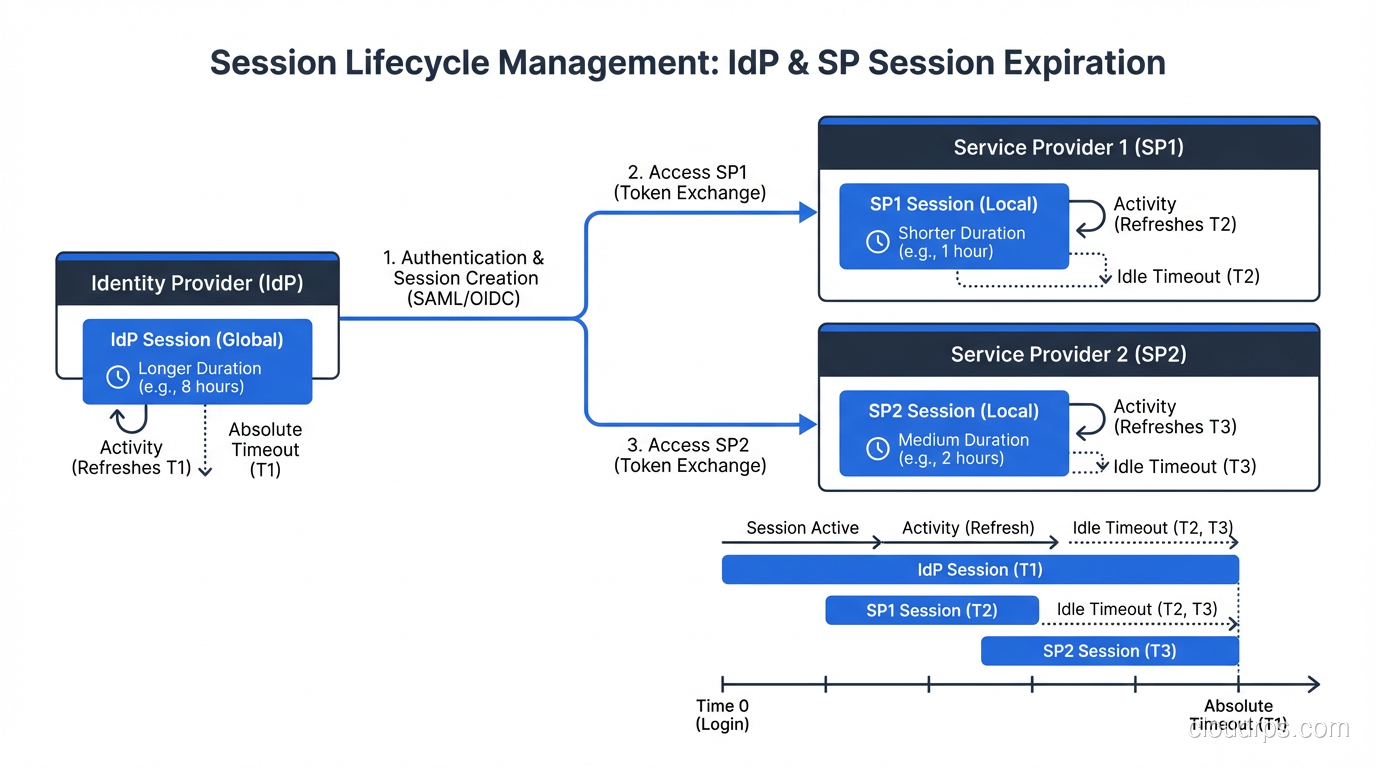
In an SSO environment, you’re dealing with three different sessions simultaneously:
- IdP session: The master session at the identity provider. This is the “I’m logged in” flag that enables the single sign-on experience.
- SP sessions: Independent sessions at each service provider. Each application manages its own session lifecycle.
- Browser sessions: Cookies, local storage, and other browser-side state that ties it all together.
These sessions have different lifetimes, and that asymmetry causes real problems.
Session Lifetime Mismatches
Here’s a scenario I’ve seen at least a dozen times: The IdP session is configured for 8 hours. Application A sets a 30-minute session. Application B sets a 4-hour session.
A user logs in at 9 AM. At 9:35 AM, Application A’s session expires. The user clicks a link in Application A, gets redirected to the IdP, and the IdP says “you’re still logged in” and sends back a fresh assertion. The user gets a new Application A session without seeing a login prompt. Seamless.
But what happens at 5:05 PM? The IdP session has expired. The user tries to access Application B (which still has an active session) and everything’s fine. Then they click over to Application A, get redirected to the IdP, and now they have to log in again. Meanwhile, they’re still active in Application B.
This is correct behavior, but it confuses users and generates support tickets. You need to think through these interactions during architecture, not after deployment.
Single Logout: The Hardest Problem
Single Sign-On has an evil twin called Single Logout (SLO), and it’s dramatically harder to implement correctly.
The idea is simple: when a user logs out of one application, they should be logged out everywhere. In practice, this requires the IdP to notify every SP that has an active session for that user. Some SPs might be down. Some might not support the logout protocol. Some might have already expired their session.
I’ve worked on deployments where we spent more time getting SLO working than we did on the initial SSO implementation. My honest advice: implement SLO if compliance requires it, but set realistic expectations with stakeholders about its reliability. In many environments, session timeout is a more dependable mechanism than active logout propagation.
Security Considerations That Keep Me Up at Night
SSO concentrates authentication into a single point, which is both its greatest strength and its most significant risk. If the IdP is compromised, every connected application is compromised. This is not theoretical – it happened in the SolarWinds attack when threat actors forged SAML tokens after compromising ADFS servers.
Protecting the Identity Provider
Your IdP is now the crown jewel of your infrastructure. Treat it accordingly:
- Require MFA for IdP access. Not optional. Not “we’ll add it later.” From day one.
- Monitor assertion issuance. If your IdP is generating tokens at 3 AM for a user who’s never worked nights, that’s a signal.
- Rotate signing certificates on a schedule. And test the rotation process before you need it. I’ve seen certificate expirations take down SSO for entire organizations because nobody practiced the renewal.
- Restrict who can modify trust relationships. Adding a new SP to your IdP is a security decision, not an IT convenience task.
The entire point of SSO is trust delegation, and that trust chain is only as strong as the TLS connections protecting every redirect and the certificate management practices keeping assertions authentic.
Token Security
SAML assertions and JWTs are bearer tokens. If someone intercepts one, they can replay it. Mitigations include:
- Short validity windows. I typically set assertion validity to 5 minutes or less. That’s enough time for clock skew but not enough for most replay attacks.
- Audience restrictions. An assertion meant for Application A should be rejected by Application B.
- One-time use enforcement. The SP should track assertion IDs and reject duplicates within the validity window.
- Channel binding. When possible, tie the assertion to the TLS session that delivered it.
Privilege Escalation Through Attribute Manipulation
Here’s one that catches people off guard. If your SP uses attributes from the SAML assertion to assign roles (and many do), then an attacker who can modify those attributes can escalate privileges.
I worked an incident where a developer figured out that the application blindly trusted the “groups” attribute in the SAML assertion. He set up a rogue IdP, pointed his local application instance at it, and gave himself admin rights. The fix was straightforward – validate that assertions come only from the trusted IdP and always verify the signature – but the vulnerability existed in production for months.
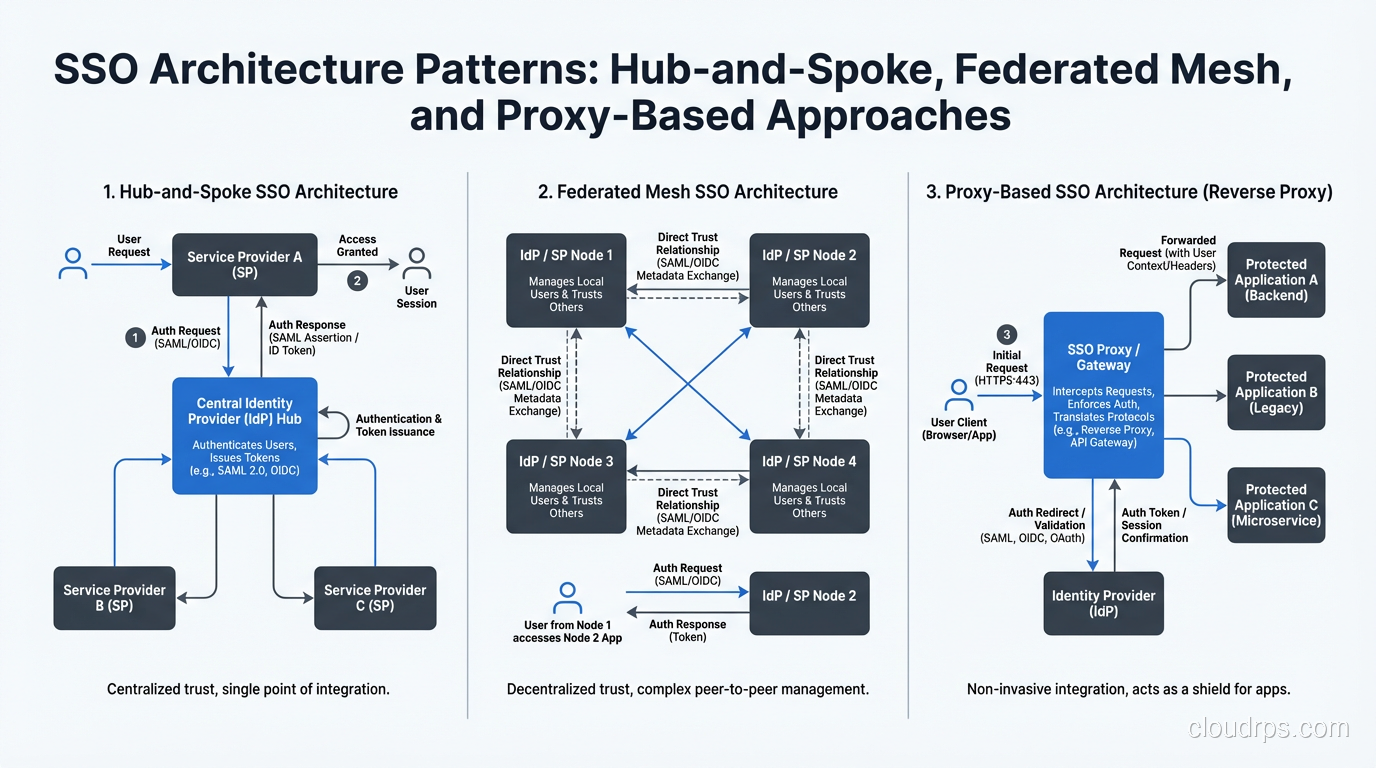
Common SSO Architectures in the Wild
Hub and Spoke
The most common pattern. One central IdP, many SPs radiating outward. Clean, manageable, and the right choice for 90% of organizations. The risk is the single point of failure at the hub.
Federated Mesh
Multiple IdPs trust each other, allowing users from one organization to access resources in another. Common in higher education (InCommon federation), healthcare, and B2B partnerships. More complex to manage but necessary when no single organization owns the identity authority.
Proxy-Based SSO
An SSO proxy sits between users and applications, injecting credentials or headers on behalf of the user. This is how you add SSO to legacy applications that don’t support SAML or OIDC natively. It’s a hack, but a necessary one when you have mainframe applications from the 1990s that need to participate in your SSO ecosystem.
Implementation Lessons From the Trenches
After deploying SSO across dozens of organizations, here are the lessons I wish someone had told me on day one:
Start with an application inventory. You cannot implement SSO without knowing what you’re connecting to. I’ve walked into organizations that thought they had 50 applications and discovered 300. Shadow IT is real, and SSO is often the project that exposes it.
Negotiate session lifetimes early. Getting security, compliance, and user experience teams to agree on session durations is a political exercise disguised as a technical decision. Handle it before you write a single line of configuration.
Test with real users, not just service accounts. I’ve seen SSO deployments that worked perfectly in testing and failed in production because real users had special characters in their email addresses, belonged to hundreds of groups (exceeding attribute size limits), or used browsers with aggressive cookie policies.
Plan for IdP unavailability. Your IdP will go down eventually. What happens to your users? Most SPs will continue honoring existing sessions, but new logins will fail. Have a break-glass procedure documented and tested.
Monitor the SSO flow end-to-end. Synthetic transactions that walk through the full SSO flow every few minutes will catch problems before your users do. I set up these monitors on every SSO deployment and they’ve saved me more than once.
Where SSO Is Heading
The direction is clear: passwords are on their way out. FIDO2 and WebAuthn are making passwordless authentication practical, and SSO providers are racing to integrate these capabilities. The combination of SSO with passwordless MFA and continuous authentication (where the system periodically re-verifies your identity based on behavior and context) is where enterprise identity is heading.
But the fundamentals I’ve described here – trust relationships, signed assertions, session management, and the security implications of centralized authentication – those aren’t going anywhere. The protocols may evolve, but the architecture patterns will serve you for years.
SSO done right is invisible to users and robust under attack. SSO done wrong is a single point of failure that takes down your entire organization. The difference is in the details, and now you know where those details live.
Get Cloud Architecture Insights
Practical deep dives on infrastructure, security, and scaling. No spam, no fluff.
By subscribing, you agree to receive emails. Unsubscribe anytime.