
I’ve been debugging HTTP requests since the days when we used telnet to hand-type them. Open a socket to port 80, type GET /index.html HTTP/1.0, hit enter twice, and watch the response come back character by character. It was tedious but illuminating. You could see exactly what HTTP was doing, stripped of all the framework abstractions that hide it today.
HTTP methods are one of those fundamentals that every developer thinks they understand but many get subtly wrong. I’ve reviewed hundreds of API designs, and the most common issues aren’t exotic; they’re basic method misuse. POST requests that should be GETs, PUT requests that should be PATCHes, and DELETE requests that return 200 instead of 204. These mistakes create APIs that are confusing to consumers, hard to cache, and impossible to debug.
Let me walk through each method properly, with the nuances that the quick tutorials skip.
The Core Concepts: Safety, Idempotency, and Request Bodies
Before diving into individual methods, you need to understand three properties that define how HTTP methods behave.
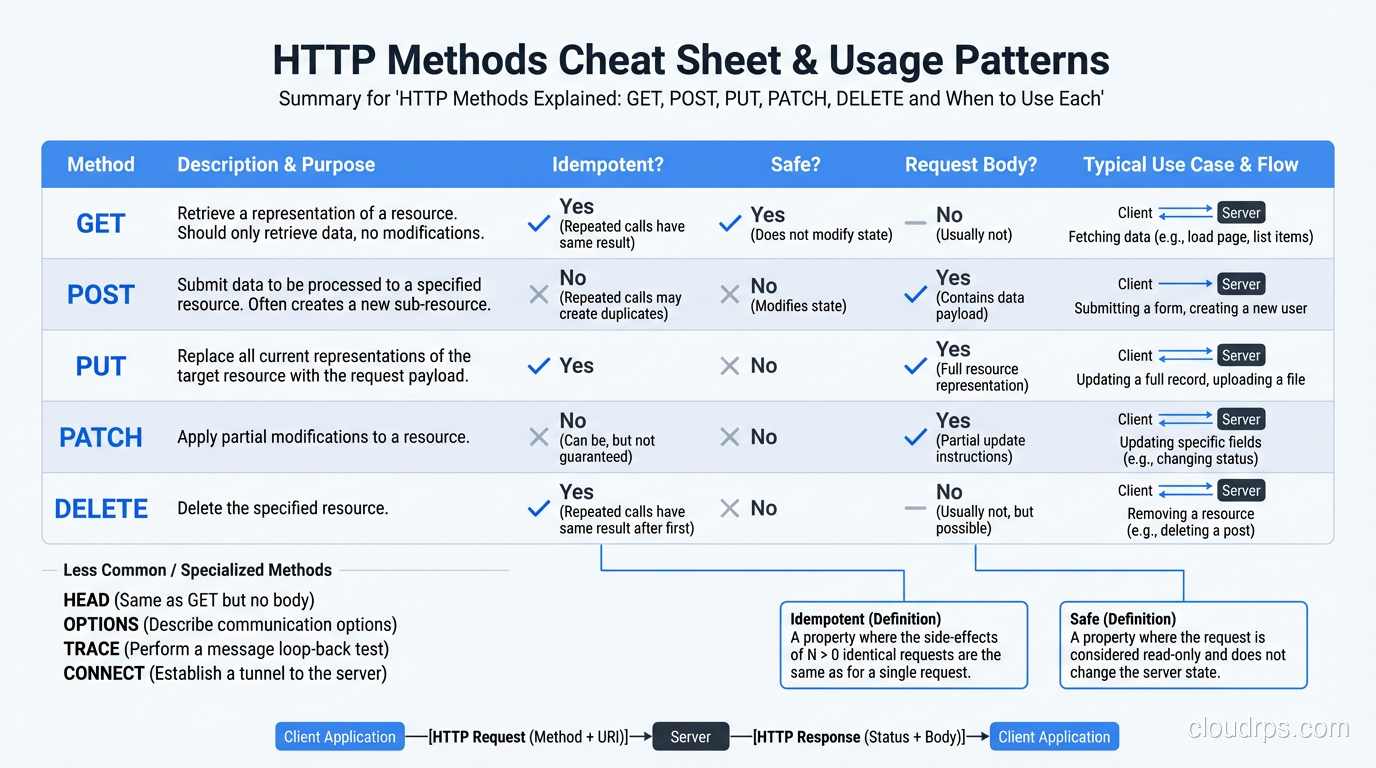
Safety: A safe method doesn’t modify server state. GET and HEAD are safe, meaning calling them should never create, update, or delete anything. This isn’t just a convention; it has practical implications. Web crawlers, prefetch mechanisms, and link checkers all assume GET requests are safe. If your GET endpoint has side effects, these tools will trigger them.
Idempotency: An idempotent method produces the same result whether called once or a hundred times. GET, PUT, DELETE, and HEAD are idempotent. POST and PATCH are not (in general). This matters for retry logic. If a network failure occurs mid-request, a client can safely retry an idempotent request without worrying about duplicate effects.
Request body: Some methods include a body (the data payload), some don’t, and some technically can but shouldn’t. GET should not have a body. POST and PUT require a body. PATCH usually has a body. DELETE can have a body but rarely does.
| Method | Safe | Idempotent | Body |
|---|---|---|---|
| GET | Yes | Yes | No |
| HEAD | Yes | Yes | No |
| POST | No | No | Yes |
| PUT | No | Yes | Yes |
| PATCH | No | No* | Yes |
| DELETE | No | Yes | Optional |
| OPTIONS | Yes | Yes | No |
*PATCH can be implemented as idempotent, but the spec doesn’t require it.
GET: Retrieve a Resource
GET requests a representation of a resource. It’s the most common HTTP method; every time your browser loads a page, image, or script, it sends a GET request.
GET /api/users/123 HTTP/1.1
Host: api.example.com
Accept: application/json
Response:
HTTP/1.1 200 OK
Content-Type: application/json
Cache-Control: max-age=3600

{"id": 123, "name": "Alice", "email": "alice@example.com"}
Key rules for GET:
- Never use GET to modify data. I’ve seen APIs where
GET /api/users/123/activateactivates a user account. This is wrong. Web crawlers will follow that link. Browser prefetch will trigger it. Use POST for state changes. - GET responses are cacheable by default. CDNs, browsers, and proxies will cache GET responses unless you explicitly prevent it with cache-control headers. This is enormously powerful for performance.
- Don’t put sensitive data in the URL. Query parameters appear in server logs, browser history, and referrer headers.
GET /api/users?password=secretis a security vulnerability. - Use query parameters for filtering, sorting, and pagination:
GET /api/users?role=admin&sort=name&page=2
Common mistake: Using POST instead of GET for reads
I see this frequently: a “search” endpoint that accepts POST with a JSON body containing search criteria. While sometimes necessary (when search parameters are too complex for a URL), this forfeits GET’s caching benefits. If possible, encode search parameters as query parameters and use GET.
POST: Create a Resource or Trigger an Action
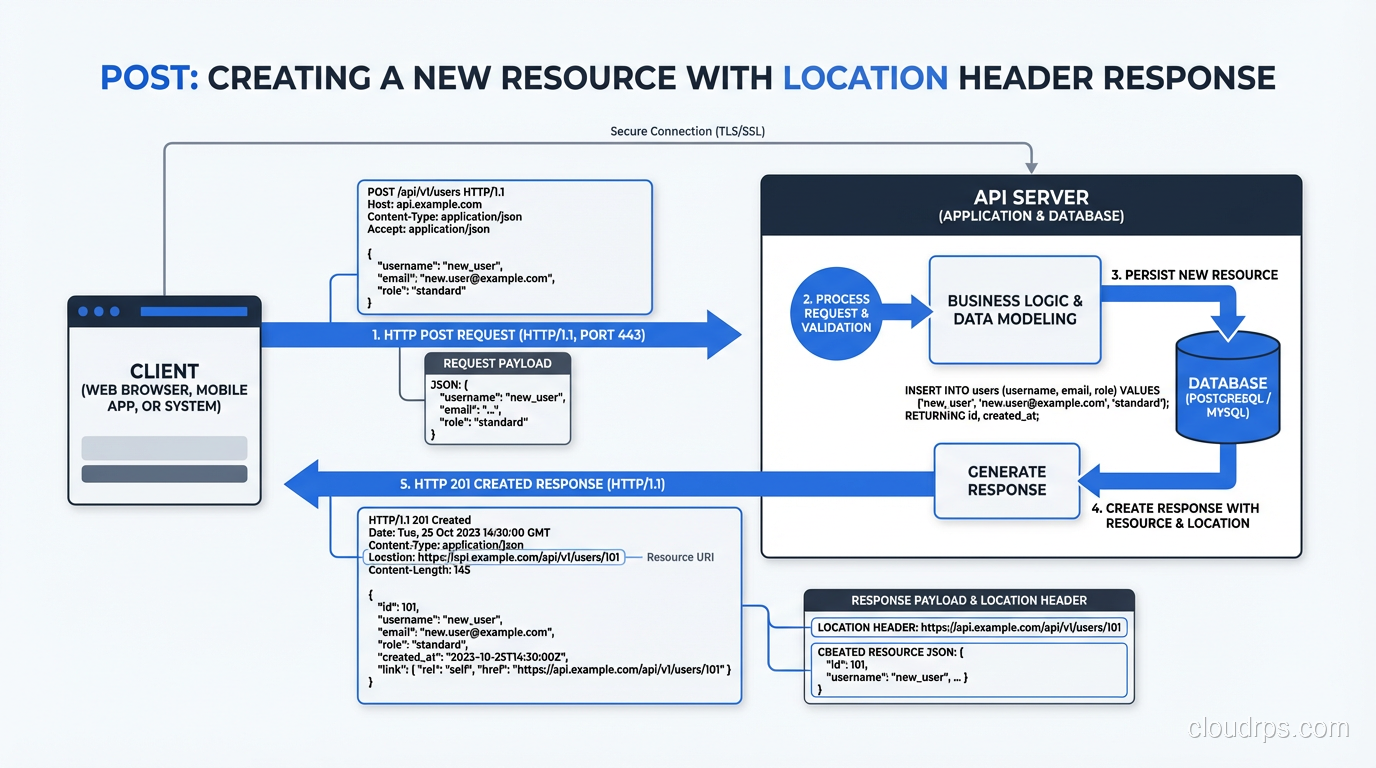
POST submits data to the server, typically creating a new resource or triggering a server-side action.
POST /api/users HTTP/1.1
Host: api.example.com
Content-Type: application/json

{"name": "Bob", "email": "bob@example.com"}
Response:
HTTP/1.1 201 Created
Location: /api/users/456
Content-Type: application/json

{"id": 456, "name": "Bob", "email": "bob@example.com"}
Key rules for POST:
- POST is NOT idempotent. Sending the same POST twice creates two resources. This has real implications for retry logic. If the client doesn’t know whether the first request succeeded, retrying might create a duplicate. Solutions include idempotency keys (a unique identifier in the request header that the server uses to detect duplicates).
- Return 201 Created for resource creation, with a
Locationheader pointing to the new resource. - Use POST for actions that don’t map to CRUD: sending an email, triggering a build, running a report.
POST /api/reports/generateis perfectly fine. - POST responses are NOT cacheable by default (unlike GET).
POST for RPC-style operations
Not everything in an API maps to resources. Sometimes you need to trigger an action: charge a payment, send a notification, restart a service. POST is the correct method for these operations. Don’t try to force them into PUT or GET just because you want to be “RESTful.”
PUT: Replace a Resource Entirely
PUT replaces the entire resource with the provided representation. If the resource exists, it’s replaced. If it doesn’t exist, some APIs create it (though this behavior varies).
PUT /api/users/456 HTTP/1.1
Host: api.example.com
Content-Type: application/json

{"name": "Bob Smith", "email": "bob.smith@example.com", "role": "admin"}
Key rules for PUT:
- PUT is idempotent. Sending the same PUT request multiple times produces the same result. The resource ends up in the same state regardless of how many times you call it.
- PUT replaces the entire resource. If the existing user has fields
name,email,role, andaddress, and your PUT only includesnameandemail, theroleandaddressfields should be removed (or reset to defaults). This is the most commonly misunderstood aspect of PUT. - The URL identifies the resource being replaced:
PUT /api/users/456replaces user 456. Don’t usePUT /api/usersto create a resource with a server-assigned ID. That’s POST’s job. - Return 200 OK with the updated resource, or 204 No Content if you don’t return a body.
PUT vs POST for creation
The distinction: PUT creates a resource at a URL the client specifies (PUT /api/users/456, where the client knows the ID). POST creates a resource at a URL the server determines (POST /api/users, where the server assigns the ID and returns it in the Location header).
In practice, most APIs use POST for creation because the server assigns IDs. PUT for creation is rare but valid, for example, creating a configuration resource at a known path: PUT /api/config/email-settings.
PATCH: Partial Update
PATCH applies a partial modification to a resource. Unlike PUT, you only send the fields you want to change, and everything else stays as-is.
PATCH /api/users/456 HTTP/1.1
Host: api.example.com
Content-Type: application/json

{"role": "admin"}
This changes only the user’s role, leaving name, email, and everything else untouched.
Key rules for PATCH:
- PATCH is not necessarily idempotent (though it can be if implemented carefully). The spec allows PATCH operations like “increment counter by 1,” which are not idempotent.
- In practice, most JSON PATCH implementations are idempotent because they set fields to specific values.
{"role": "admin"}produces the same result whether applied once or many times. - There are two PATCH formats: JSON Merge Patch (RFC 7396), the simple one where you send the fields to update, and JSON Patch (RFC 6902), a more powerful format that supports operations like add, remove, replace, move, copy, and test. Most APIs use JSON Merge Patch for simplicity.
PUT vs PATCH: The Practical Difference
PUT: “Here’s the complete new state of this resource.” PATCH: “Here are the changes to apply to this resource.”
If your user has 20 fields and you want to change one, PUT requires sending all 20 fields (replacing the entire resource), while PATCH requires sending just the one field you’re changing.
I use PATCH for almost all update operations in APIs I design. It’s more bandwidth-efficient, less error-prone (no risk of accidentally blanking fields you forgot to include), and more intuitive for client developers.
DELETE: Remove a Resource
DELETE removes the resource at the specified URL.
DELETE /api/users/456 HTTP/1.1
Host: api.example.com
Response:
HTTP/1.1 204 No Content
Key rules for DELETE:
- DELETE is idempotent. Deleting a resource that’s already been deleted should return 204 (or 404, depending on your API’s convention), not an error. The end state is the same: the resource doesn’t exist.
- Return 204 No Content (no body) or 200 OK (with a confirmation body). I prefer 204.
- Soft delete vs hard delete: Most production systems implement soft delete (marking a record as deleted rather than physically removing it). This is an implementation detail that shouldn’t leak into the API. The client calls DELETE, the server marks it as deleted internally.
- Cascade behavior should be documented: If deleting a user also deletes their orders, say so in the API documentation. Surprise cascading deletes are a terrific way to lose customer trust.
HEAD and OPTIONS: The Supporting Cast
HEAD
HEAD is identical to GET but returns only the response headers, not the body. It’s useful for:
- Checking if a resource exists without downloading it
- Checking the Content-Length before deciding to download a large file
- Checking the Last-Modified date to see if your cached copy is stale
I use HEAD in monitoring systems to check if an API is responding without wasting bandwidth on the full response body.
OPTIONS
OPTIONS returns the communication options available for a URL. In practice, it’s mostly used for CORS (Cross-Origin Resource Sharing) preflight requests. When a browser makes a cross-origin request, it first sends an OPTIONS request to check whether the server allows the actual request.
If you’re building a web API consumed by frontend applications on different domains, you’ll deal with OPTIONS requests whether you want to or not. Make sure your server handles them correctly, or your frontend developers will spend hours debugging CORS errors.
For a deeper dive on networking fundamentals that underpin HTTP, see networking protocols overview.
Common Mistakes I See in API Design
Using GET for Side Effects
GET /api/users/123/send-welcome-email. This should be POST. GET is safe, meaning it shouldn’t trigger side effects.
Using POST for Everything
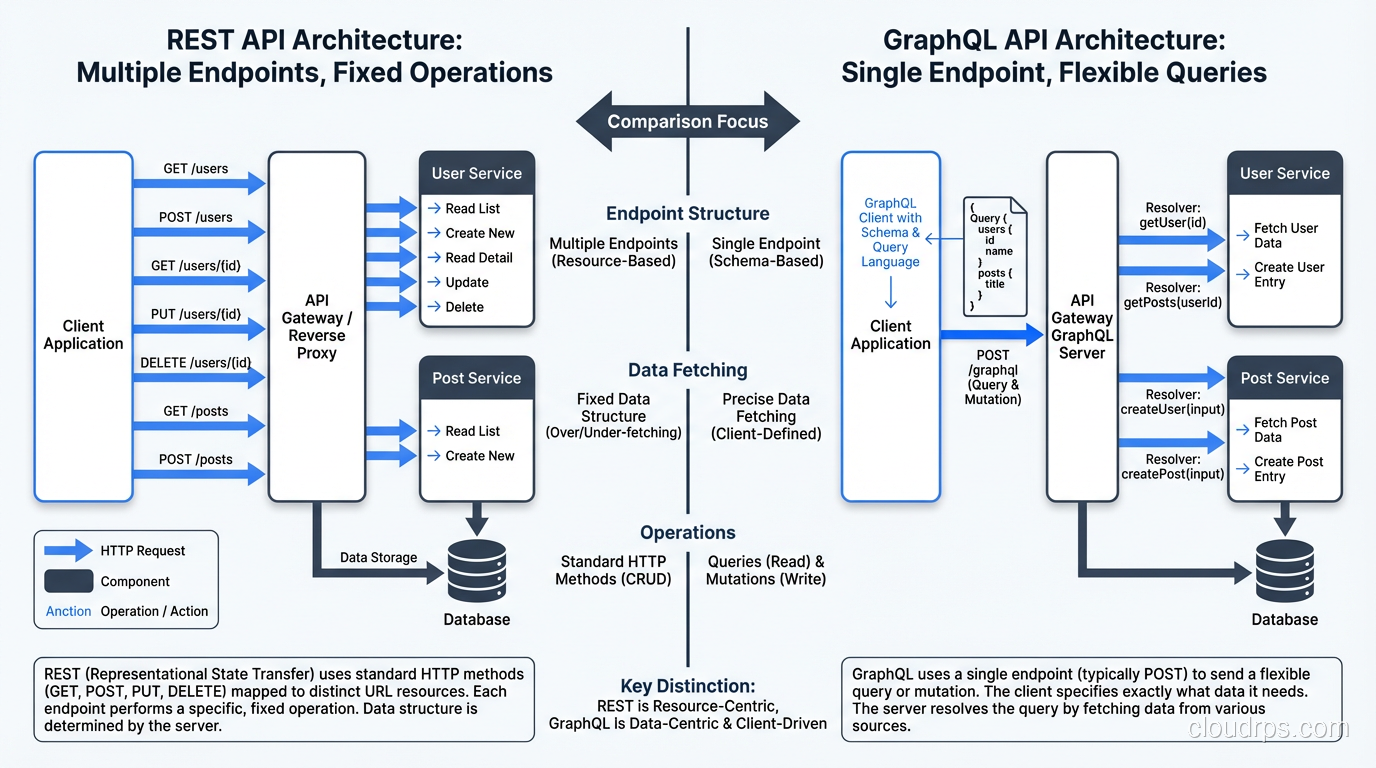
Some APIs use POST for every operation: create, read, update, delete. This throws away HTTP semantics, caching, idempotency guarantees, and makes the API harder to understand. If you’re only using POST, you’re not building a REST API; you’re building RPC over HTTP.
Inconsistent Status Codes
Returning 200 for everything: success, creation, deletion, not found, validation error. Use the right codes: 200 for success, 201 for creation, 204 for no content, 400 for bad request, 404 for not found, 409 for conflict, 422 for validation errors, 500 for server errors.
Verbs in URLs
POST /api/createUser or PUT /api/updateUser/123. The HTTP method already conveys the action. Use nouns in URLs and let the method define the operation: POST /api/users (create) and PUT /api/users/123 (update).
For more on building APIs that developers actually want to use, see what makes an API developer-friendly.
Beyond Theory: How This Maps to Frameworks
Every web framework maps HTTP methods to handler functions. Express.js has app.get(), app.post(), etc. Django REST Framework uses ViewSets that map methods to actions. Go’s standard library routes requests by method. If you’re building internal service-to-service APIs where REST semantics are more ceremony than value, it’s worth reading my piece on gRPC and Protocol Buffers before committing to JSON over HTTP.
Understanding HTTP methods at the protocol level, not just at the framework level, makes you a better API designer. Frameworks abstract the details, but the abstractions leak. When you’re debugging a CORS issue, a caching problem, or an idempotency bug, you need to understand what’s happening at the HTTP level.
These methods have been stable since HTTP/1.1 was standardized in 1997. They’ll outlast every framework you use. Learn them properly once, and you’ll use that knowledge for the rest of your career.
Get Cloud Architecture Insights
Practical deep dives on infrastructure, security, and scaling. No spam, no fluff.
By subscribing, you agree to receive emails. Unsubscribe anytime.