
I’ve watched the cloud service model conversation go sideways hundreds of times. Someone pulls up the pizza analogy (dining in vs. delivery vs. frozen pizza) and everyone nods along, and then they still pick the wrong model for their workload. Analogies are great for cocktail parties. They’re terrible for architecture decisions.
Let me give you what I wish someone had given me when I started making these decisions for enterprises: a practical, opinionated guide based on actually running workloads across all three models for the better part of two decades.
The Three Models, Without the Fluff
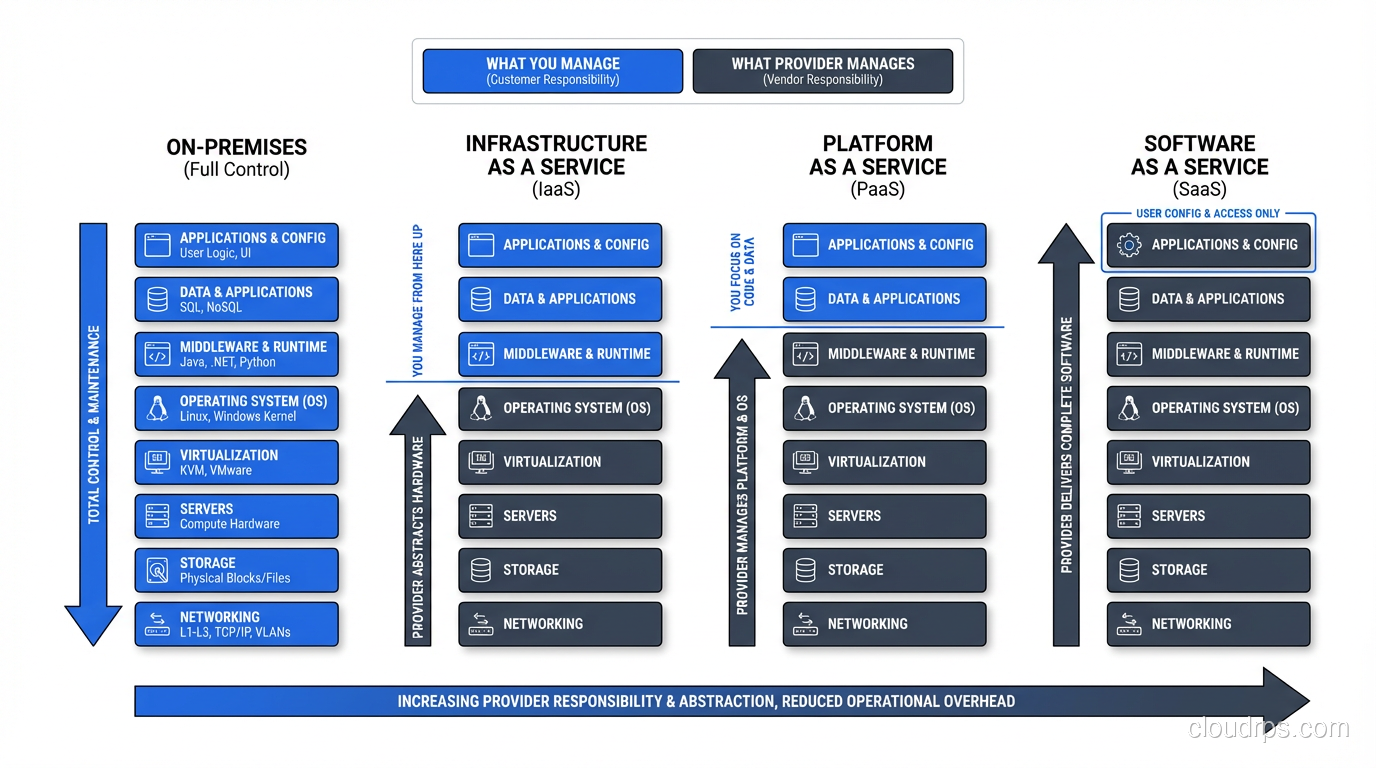
Let me lay these out in terms of what you’re actually responsible for versus what the provider handles. This is where the real decision-making happens.
Infrastructure as a Service (IaaS)
The provider gives you: physical data center, networking hardware, physical servers, hypervisors, and the virtualization layer.
You manage: virtual machines, operating systems, middleware, runtimes, applications, and data.
Real examples: AWS EC2, Azure Virtual Machines, Google Compute Engine, DigitalOcean Droplets.
IaaS is the closest thing to running your own data center without actually running a data center. You get raw compute, storage, and networking as programmable resources. You’re responsible for everything from the OS up.
I spent 2012-2015 migrating a financial services firm from on-premises infrastructure to AWS IaaS. We moved about 400 servers to EC2 instances. The architecture barely changed: same OS configurations, same middleware, same application deployments. We just didn’t own the hardware anymore.
That’s the IaaS value proposition: you eliminate hardware management and gain elasticity, but your operational model stays mostly the same. You still patch operating systems, configure firewalls, manage load balancers, and handle all the operational concerns you always did.
For a deeper understanding of what’s happening under the hood, see What is Cloud Computing?.
Platform as a Service (PaaS)
The provider gives you: everything in IaaS plus the operating system, runtime, middleware, and platform capabilities.
You manage: your application code and your data.
Real examples: Heroku, AWS Elastic Beanstalk, Google App Engine, Azure App Service, Railway, Render.
PaaS is where the provider takes over operational responsibilities. You don’t choose an OS or configure a web server. You push your code, the platform builds it, deploys it, and scales it. The platform makes opinionated choices about the runtime environment, and you work within those constraints.
I used Heroku extensively from 2010-2016 for several startups I was advising. The developer experience was outstanding. git push heroku main and your code was live in 90 seconds. No Ansible playbooks, no AMI builds, no auto-scaling group configurations. Just code to deployment.
The trade-off was control. When I needed a specific Linux kernel parameter tuned for a high-connection database proxy, I couldn’t do it. When I wanted to run a custom binary alongside my web process, it was possible but awkward. When I needed to debug a networking issue, I didn’t have OS-level access to diagnose it.
Software as a Service (SaaS)
The provider gives you: everything. The complete application, ready to use.
You manage: your data and your configuration (within the application’s options).
Real examples: Salesforce, Google Workspace, Slack, Zoom, Datadog, PagerDuty.
SaaS is the final abstraction. You don’t deploy code or manage infrastructure. You use a finished product. The provider handles everything: infrastructure, platform, application code, updates, scaling, availability.
I don’t build SaaS applications from a consumer perspective. I use them. My team uses Datadog for monitoring, PagerDuty for incident management, Slack for communication. We don’t manage any infrastructure for these tools. We configure them, integrate them, and pay a monthly bill.
The Shared Responsibility Model: Where People Get Burned
Every cloud service model comes with a shared responsibility model, and misunderstanding it is the number one source of cloud incidents I see in my consulting work.
The principle is simple: the cloud provider is responsible for security and reliability of the cloud. You are responsible for security and reliability in the cloud.
In IaaS, that means the provider ensures the hypervisor is secure and the physical hardware is maintained. But if you leave port 22 open to the internet with password authentication on your EC2 instance, that’s on you.
In PaaS, the provider also handles OS patching and runtime updates. But if your application has a SQL injection vulnerability, that’s on you.
In SaaS, the provider handles almost everything. But if you configure your Salesforce org with overly permissive sharing rules, that’s on you.
I’ve seen breaches at every level caused by misunderstanding this boundary. The most common: an IaaS customer who assumed their cloud provider was patching their OS (they weren’t, because that’s the customer’s job in IaaS). The server was compromised through a six-month-old vulnerability.
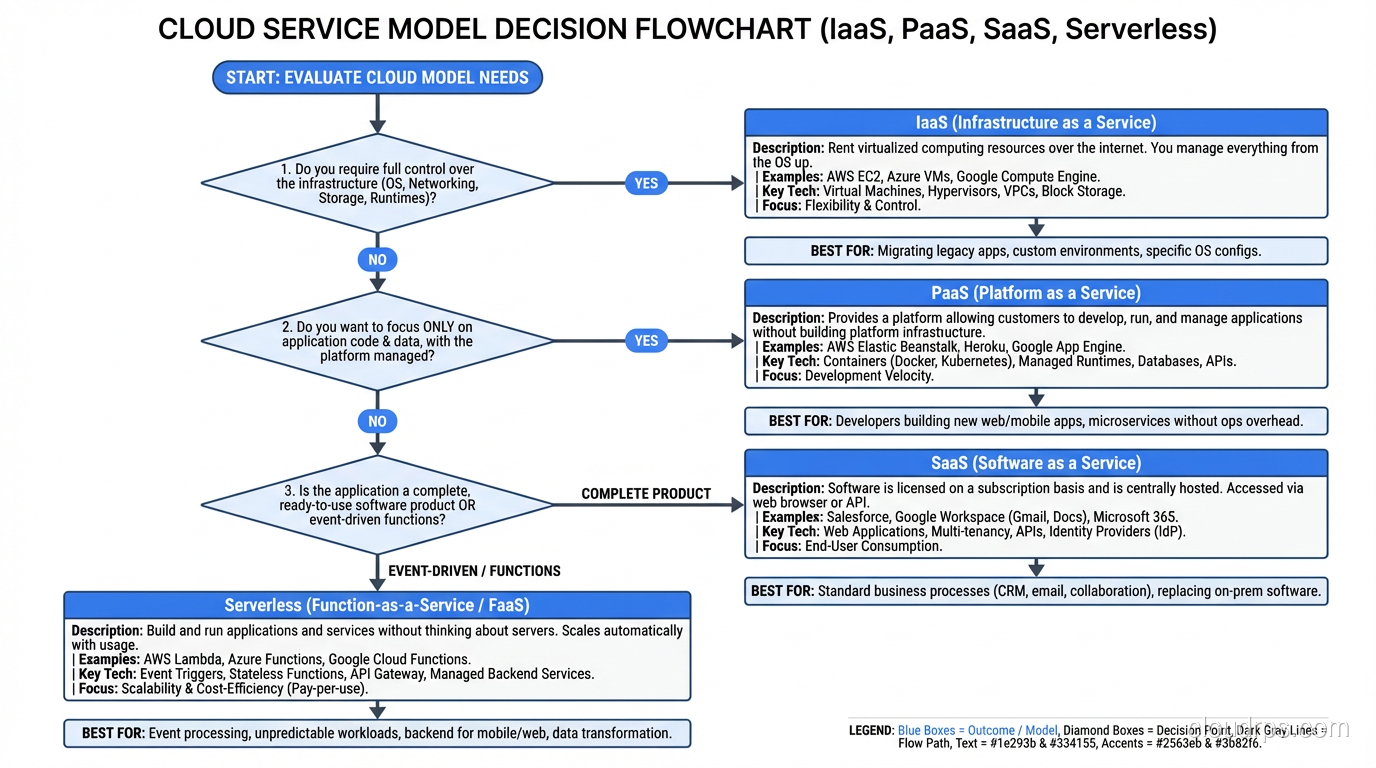
When to Use Each Model: The Decision Framework
After two decades of making these decisions, here’s the framework I use:
Choose IaaS When:
You need full control over the operating environment. Custom kernel modules, specific OS versions, non-standard software stacks. If your application has hard requirements about the underlying OS, IaaS is your only cloud option.
You’re doing a lift-and-shift migration. Moving existing applications from on-premises to cloud with minimal changes. IaaS provides the closest equivalent to your current environment.
Your workload doesn’t fit PaaS constraints. Long-running background processes, custom networking requirements, specialized hardware (GPUs, FPGAs), or software that requires root access.
You have the operations team to support it. IaaS requires significant operational expertise. If you don’t have people who can manage OS patching, security hardening, monitoring, and incident response at the OS level, IaaS will eat you alive.
Choose PaaS When:
Developer velocity matters more than infrastructure control. Startups, product teams iterating quickly, proof-of-concept deployments. PaaS eliminates the infrastructure tax so developers can focus on features.
Your application fits the platform’s model. Web applications, API services, and standard runtime environments (Node.js, Python, Ruby, Java, Go) are PaaS sweet spots. If your stack is mainstream, PaaS works.
You want to minimize operations overhead. Small teams without dedicated infrastructure engineers benefit enormously from PaaS. The platform handles patching, scaling, and operational concerns that would otherwise require dedicated staff.
Your team doesn’t have deep infrastructure expertise. There’s no shame in this. Not every team needs to be infrastructure experts. PaaS lets application developers ship code without learning the intricacies of VPC networking and IAM policies.
Choose SaaS When:
The problem is already solved. If you need CRM, use Salesforce. If you need monitoring, use Datadog. If you need communication, use Slack. Building these from scratch is almost never the right call.
The solution doesn’t need to be differentiating. Your monitoring tool isn’t your competitive advantage. Your email system isn’t your competitive advantage. Use SaaS for everything that isn’t core to your business differentiation.
You want predictable costs and zero operational burden. SaaS pricing is typically per-user or per-feature-tier. No surprises, no operational overhead.
The Serverless Dimension
There’s a fourth option that sits between PaaS and SaaS in the responsibility model: serverless. AWS Lambda, Azure Functions, Google Cloud Functions. You write individual functions, and the platform handles everything else. It’s more granular than PaaS (function-level deployment rather than application-level) and pushes even more responsibility to the provider.
I consider serverless a subset of PaaS, but the operational model is different enough that it deserves its own consideration. The pay-per-execution pricing and auto-scale-to-zero capabilities make it the best choice for event-driven, variable-traffic workloads.
The Hybrid Reality
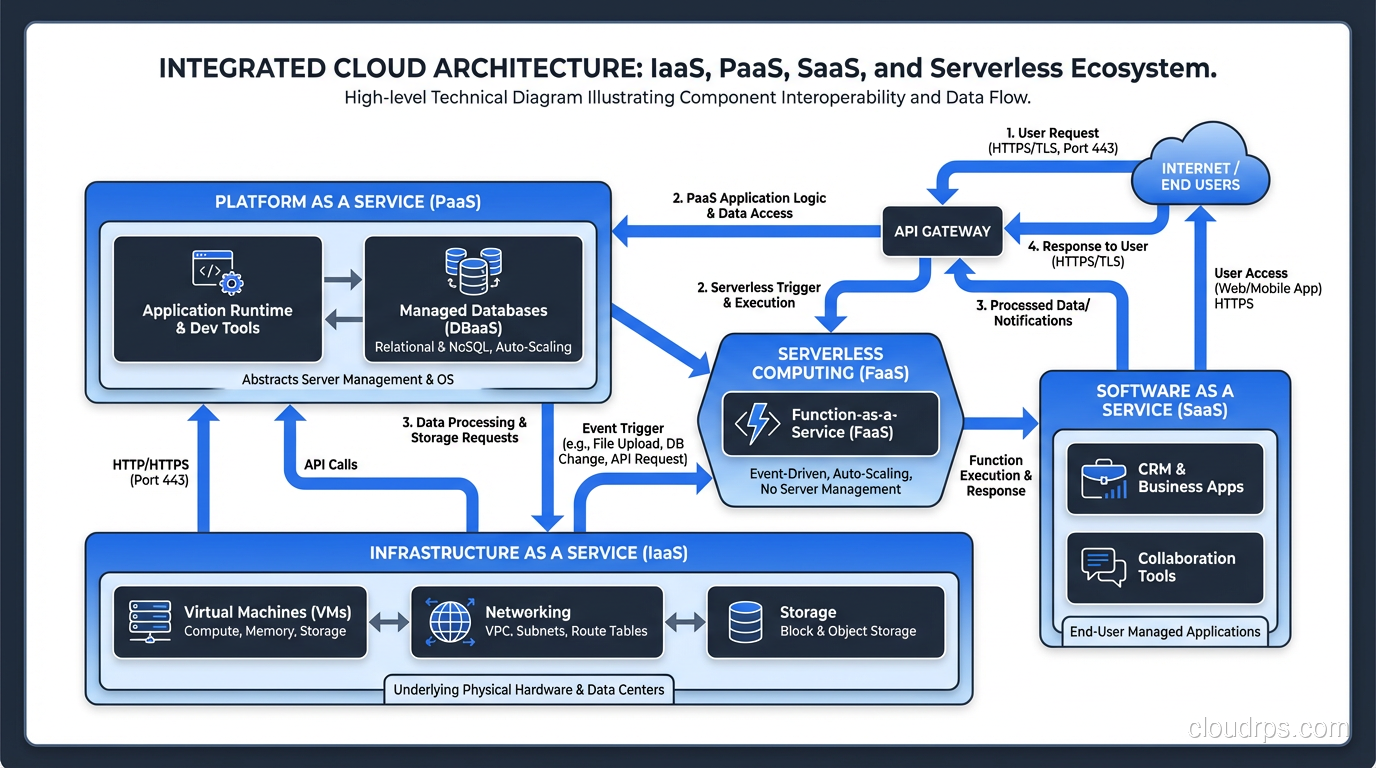
Here’s what most guides won’t tell you: almost no real-world architecture uses a single service model.
My typical enterprise architecture uses all three:
- IaaS for databases with specific performance requirements, legacy applications that can’t be refactored, and workloads with specialized hardware needs
- PaaS for modern web applications and API services where developer velocity matters
- SaaS for everything that isn’t core: monitoring, alerting, CI/CD, communication, project management
And increasingly, serverless for event-driven integrations and scheduled tasks.
The question isn’t “which model should we use?” It’s “which model fits each workload?” The answer is almost always a mix.
The Cost Trap
Let me address the cost question because it’s where I see the most confusion.
IaaS appears cheapest per unit of compute. And it is, if you measure cost per CPU-hour. But you have to add the cost of the people managing that infrastructure. System administrators, security engineers, operations staff. When I calculate the fully-loaded cost of running an EC2 instance, including the percentage of staff time dedicated to managing it, the “cheap” IaaS option often costs more than PaaS.
PaaS appears expensive per unit of compute. Heroku’s pricing makes AWS engineers gasp. But when a single developer can deploy, scale, and maintain an application on Heroku that would require three people on AWS IaaS, the math changes dramatically.
SaaS appears most expensive. Per-user pricing scales linearly with your organization. But the alternative, building and operating the equivalent software yourself, almost always costs more when you factor in development, maintenance, and operations.
The total cost analysis needs to include people costs, opportunity costs, and operational risk. I’ve watched companies “save money” by moving from Heroku to self-managed Kubernetes on AWS and then hire three additional engineers to manage the infrastructure. That’s not savings. That’s a reallocation that increased total spending.
The Multi-Tenancy Angle
One thing worth understanding: all three models are built on multi-tenancy. In IaaS, your VMs share physical hardware with other customers. In PaaS, your applications share platform infrastructure. In SaaS, you share the application itself.
This multi-tenancy is what makes cloud economics work. If every customer got dedicated hardware, the costs would be comparable to on-premises. The sharing is what drives the efficiency.
Understanding the isolation mechanisms at each level helps you make better security decisions. IaaS isolation (hypervisor-level) is different from PaaS isolation (container/process-level) is different from SaaS isolation (application-level). Each has different risk profiles.
My Advice After Thirty Years
Stop trying to pick one model for everything. Stop having religious arguments about IaaS vs PaaS. Stop assuming that more control is always better or that less control is always easier.
Instead, evaluate each workload on its own merits. What does it need? What constraints does it have? What does your team have the skills to operate? What’s the total cost of ownership, including people, not just infrastructure?
The best architects I work with are pragmatists. They use IaaS when they need it, PaaS when it fits, SaaS when it makes sense, and they don’t waste energy defending a philosophical position. They just build systems that work.
That pragmatism, born from years of shipping production systems and cleaning up the aftermath when philosophy won over practicality, is what separates good architecture from good-sounding architecture.
Get Cloud Architecture Insights
Practical deep dives on infrastructure, security, and scaling. No spam, no fluff.
By subscribing, you agree to receive emails. Unsubscribe anytime.