
I still remember the day a junior engineer fat-fingered a security group rule in the AWS console and opened port 22 to the entire internet. We caught it in twelve minutes, but those twelve minutes were enough for three SSH brute-force attempts to hit our bastion host. The fix took thirty seconds. The post-mortem took two days. And the takeaway was simple: stop clicking buttons in a web console to manage production infrastructure.
That incident, about seven years ago now, was the final push I needed to go all-in on Infrastructure as Code. Since then, I have shipped production IaC at four different companies, across AWS, GCP, and Azure, using Terraform, CloudFormation, Pulumi, and most recently OpenTofu. I have opinions. Strong ones. And I have the scars to back them up.
This article is the guide I wish I had when I started. Not a tutorial on how to write your first Terraform file (there are a thousand of those), but a practical comparison of the major IaC tools, their real trade-offs, and how to choose the right one for your team.
What Infrastructure as Code Actually Means
At its core, IaC is simple: you describe your infrastructure in files, check those files into version control, and let a tool reconcile the real world with what you declared. Instead of clicking through the AWS console, you write code. Instead of tribal knowledge about “that one security group Dave set up in 2019,” you have a Git history.
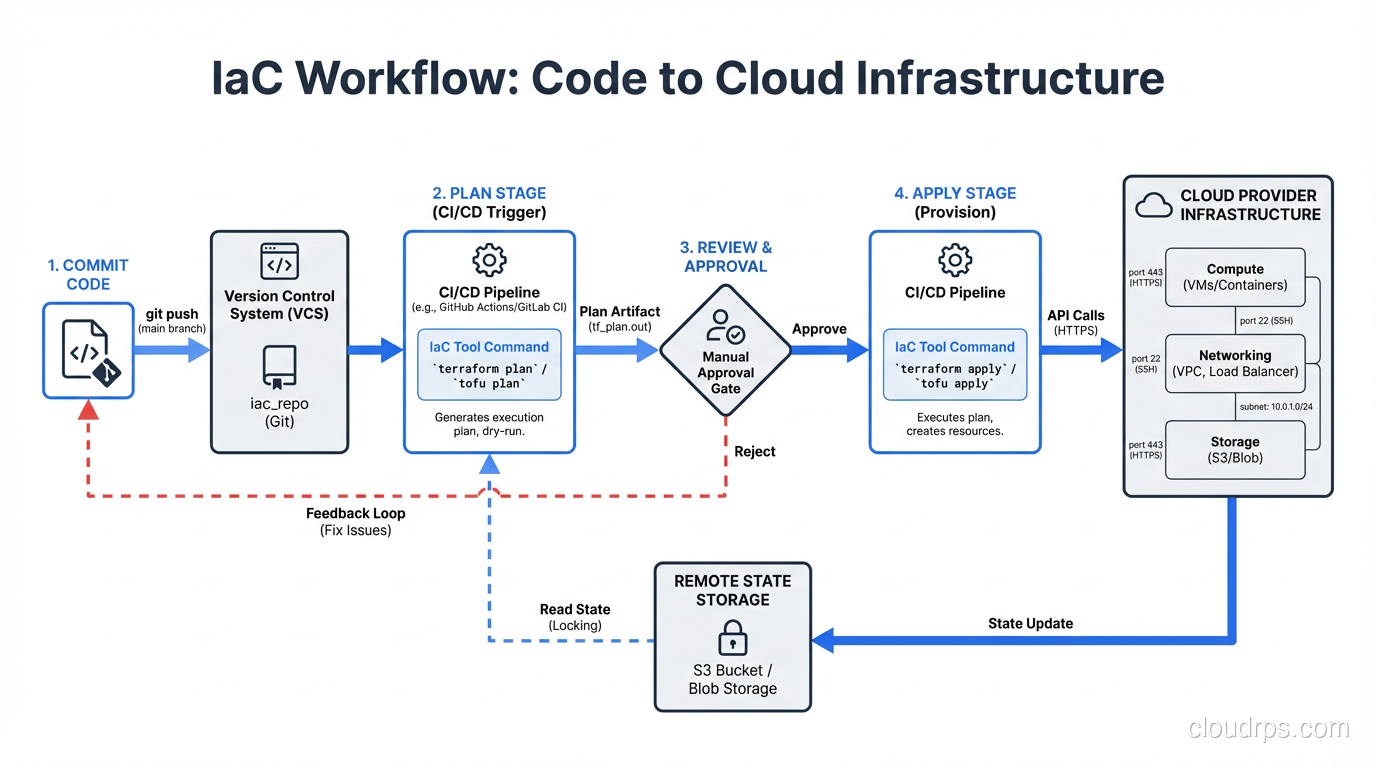
The real value of IaC is not automation. Automation is a side effect. The real value is that your infrastructure becomes reviewable, testable, and reproducible. When a new engineer joins and asks “how is our networking set up?”, you point them at a directory in the repo instead of a Confluence page that has been wrong since Q3 of last year.
There are two fundamental approaches:
Declarative IaC means you describe the desired end state. “I want three EC2 instances behind a load balancer.” The tool figures out how to get there. Terraform, CloudFormation, and OpenTofu all work this way.
Imperative IaC means you describe the steps. “Create a VPC. Then create a subnet. Then launch an instance in that subnet.” Pulumi sits in an interesting middle ground here. You write imperative code in a real programming language, but the engine underneath still operates declaratively, building a dependency graph and reconciling state.
Most teams today use declarative tools, and for good reason. Declarative code is easier to reason about, easier to review in pull requests, and harder to accidentally turn into spaghetti. But as you will see, the line between declarative and imperative is blurrier than it looks.
Terraform: The Industry Standard
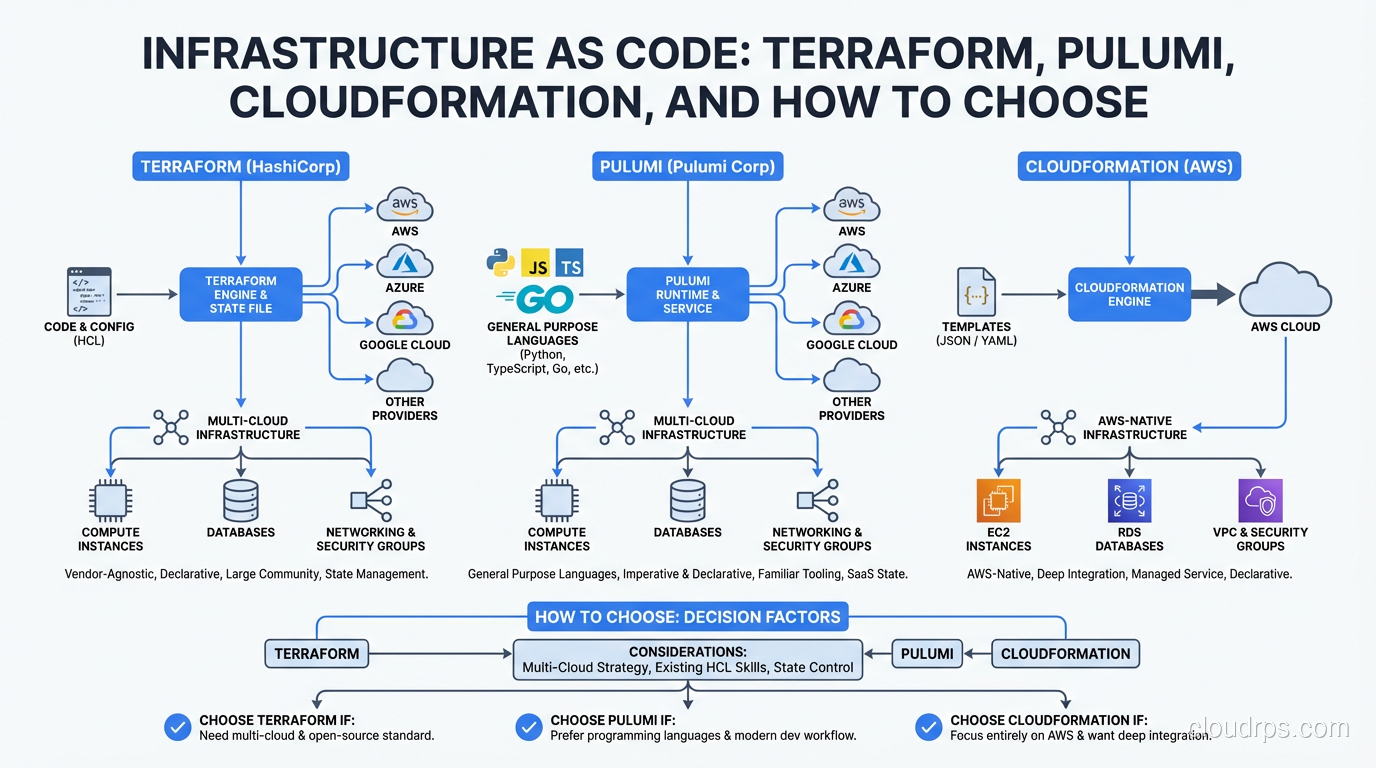
Let’s start with the 800-pound gorilla. Terraform, built by HashiCorp, is the most widely adopted IaC tool by a significant margin. If you are applying for cloud engineering roles, Terraform is the one you need to know. Period.
Terraform uses HCL (HashiCorp Configuration Language), a domain-specific language designed specifically for infrastructure definitions. Here is what a basic AWS setup looks like:
resource "aws_vpc" "main" {
  cidr_block = "10.0.0.0/16"

  tags = {
    Name        = "production-vpc"
    Environment = "prod"
  }
}

resource "aws_subnet" "private" {
  count             = 3
  vpc_id            = aws_vpc.main.id
  cidr_block        = cidrsubnet(aws_vpc.main.cidr_block, 8, count.index)
  availability_zone = data.aws_availability_zones.available.names[count.index]
}
HCL is deliberately limited. You cannot write arbitrary logic, you cannot make HTTP calls, and you cannot import libraries. This is a feature, not a bug. It means that any engineer can read a Terraform file and understand what infrastructure it creates without worrying about hidden side effects.
Strengths:
- Provider ecosystem is unmatched. Over 3,000 providers covering every major cloud, SaaS platform, and even things like DNS registrars and monitoring tools.
- Modules let you package and reuse infrastructure patterns. The Terraform Registry has thousands of community modules.
terraform planshows you exactly what will change before you apply. This is the single most important feature of any IaC tool, and Terraform does it well.- Massive community means every problem you encounter has been solved by someone before you.
Weaknesses:
- HCL is expressive enough to get you into trouble but not expressive enough to get you out. Once you start using
for_each,dynamicblocks, and complex variable transformations, the readability advantage disappears fast. - State management is genuinely hard. More on this later.
- The BSL license change in 2023 rattled the community and spawned OpenTofu. If you are building a product that competes with HashiCorp, this matters.
Terraform pairs incredibly well with GitOps workflows. Tools like Atlantis sit in front of your Terraform repos, running plan on every pull request and apply on merge. It is one of the cleanest infrastructure deployment patterns I have ever used.
AWS CloudFormation: The Native Option
CloudFormation is AWS’s built-in IaC service, and it has a reputation problem. Engineers complain about verbose YAML, cryptic error messages, and slow rollbacks. Those complaints are fair. But CloudFormation has gotten meaningfully better in the last few years, and it has advantages that people overlook.
Resources:
  ProductionVPC:
    Type: AWS::EC2::VPC
    Properties:
      CidrBlock: 10.0.0.0/16
      Tags:
        - Key: Name
          Value: production-vpc
        - Key: Environment
          Value: prod
Why you might actually want CloudFormation:
First, there is no state file to manage. CloudFormation stores state on the AWS side, in stacks. You never have to worry about a corrupted state file, a locked DynamoDB table, or someone running apply from their laptop. The state management story is just simpler.
Second, CloudFormation supports drift detection natively. It can tell you when someone has manually changed a resource outside of IaC. Terraform can do this too, but it requires running plan against every resource, which can be slow in large environments.
Third, CloudFormation integrates deeply with AWS services. Custom resources let you run Lambda functions as part of your stack deployments, and newer features like CloudFormation modules and the Cloud Development Kit (CDK) have closed the developer experience gap significantly.
Why people avoid it:
It is AWS-only. If you have any multi-cloud ambitions, CloudFormation cannot follow you there. The template syntax is genuinely verbose, even with YAML shortcuts. Error messages are often useless. And rollback on failure can take twenty, thirty minutes while CloudFormation slowly undoes changes.
I have seen CloudFormation work beautifully in organizations that are 100% AWS and have no plans to change. If that describes you, do not let internet opinion push you toward Terraform just because it is more popular. CloudFormation is a perfectly valid choice.
Pulumi: Real Languages, Real Power
Pulumi takes a fundamentally different approach. Instead of learning a DSL, you write infrastructure code in TypeScript, Python, Go, Java, or C#. The same languages your application developers already know.
import * as aws from "@pulumi/aws";

const vpc = new aws.ec2.Vpc("production-vpc", {
    cidrBlock: "10.0.0.0/16",
    tags: {
        Name: "production-vpc",
        Environment: "prod",
    },
});

const subnets = [0, 1, 2].map((i) =>
    new aws.ec2.Subnet(`private-${i}`, {
        vpcId: vpc.id,
        cidrBlock: `10.0.${i}.0/24`,
        availabilityZone: aws.getAvailabilityZones().then(azs => azs.names[i]),
    })
);
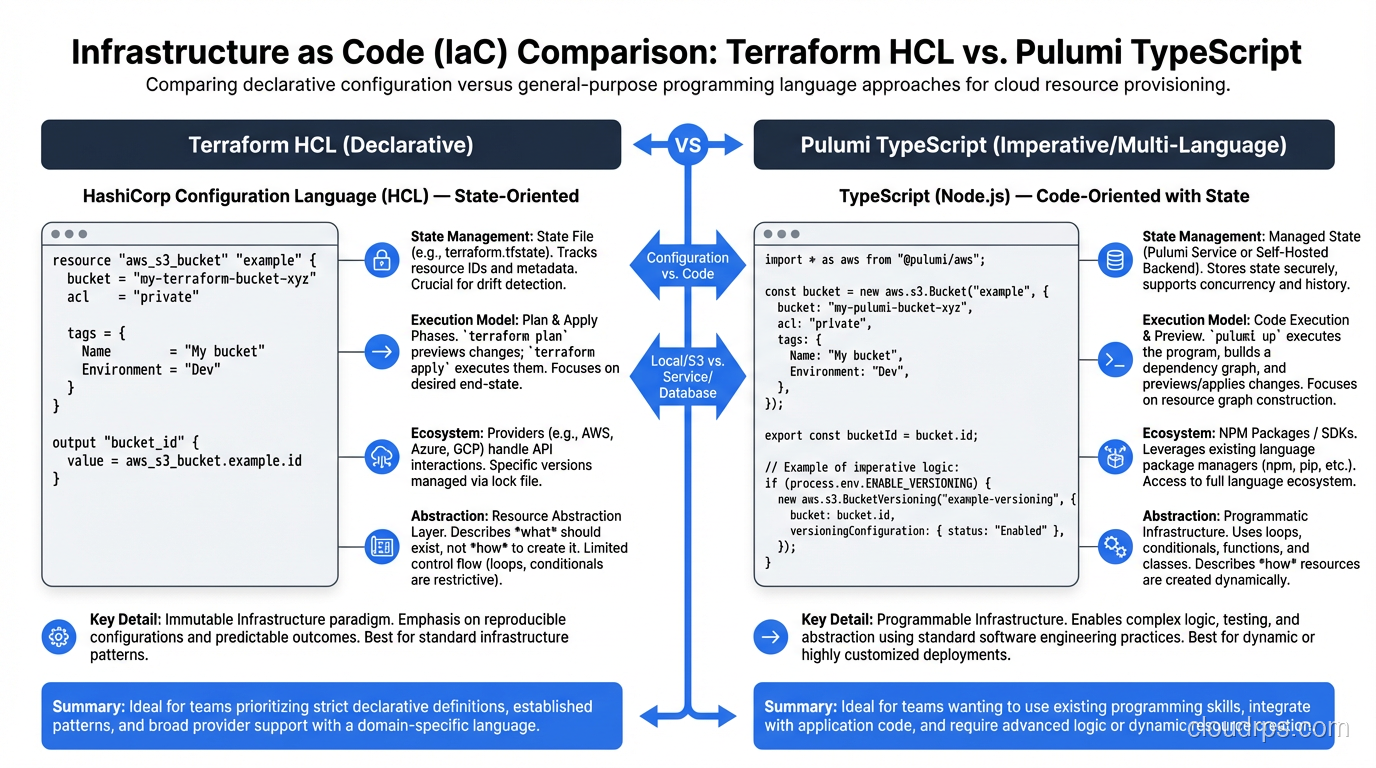
This is where things get interesting. Because you are writing real code, you can use real abstractions. You can write functions that generate infrastructure. You can use your language’s package manager to share modules. You can write unit tests using your existing test framework.
I migrated a mid-size startup from Terraform to Pulumi about two years ago. The team was mostly TypeScript developers who dreaded touching infrastructure. Within a week of the switch, two frontend engineers were confidently creating and modifying Lambda functions, API Gateway routes, and DynamoDB tables. That would never have happened with HCL.
The honest trade-offs:
Pulumi’s power is also its risk. When you give developers a real programming language for infrastructure, some of them will build real programming language messes. I have seen Pulumi codebases with class hierarchies three levels deep, abstract factory patterns for creating S3 buckets, and infrastructure code that requires a thirty-minute onboarding session to understand. You need strong code review practices to prevent this.
The ecosystem is smaller than Terraform’s. Pulumi can use Terraform providers under the hood (through a bridge), but the native Pulumi provider experience is not as polished for many services.
Pulumi’s state management options include their managed service (Pulumi Cloud) or self-hosted backends like S3. The managed service is good, but it means trusting a third party with your infrastructure state.
For teams building internal developer platforms, Pulumi’s Automation API is a killer feature. It lets you embed Pulumi inside your own applications, building custom deployment workflows that would require significant glue code with other tools.
OpenTofu: The Fork
In August 2023, HashiCorp changed Terraform’s license from the open-source MPL to the Business Source License (BSL). The open-source community responded by forking Terraform into OpenTofu under the Linux Foundation.
Let me be direct about OpenTofu: it is Terraform. The syntax is the same. The state format is the same. Most providers work identically. The migration path is literally “rename your binary and update your backend configuration.”
When to consider OpenTofu:
- You are building a product or service that competes with HashiCorp offerings. The BSL explicitly restricts this.
- Your organization has a strict open-source-only policy.
- You want the community governance model that the Linux Foundation provides.
When to stick with Terraform:
- You need Terraform Cloud or Terraform Enterprise features (Sentinel policies, private registry, cost estimation).
- Your team already has established Terraform workflows and tooling.
- You value the stability of a commercially backed product.
The OpenTofu community is adding features that diverge from Terraform, like client-side state encryption and early variable evaluation. Over time, the two projects will diverge more, but today they are functionally identical for most use cases.
State Management: The Hard Part Nobody Warns You About
Every IaC tool that uses a declarative model needs to track state, a mapping between the resources defined in your code and the actual resources that exist in your cloud account. And state management is, without exaggeration, the source of 80% of IaC pain.
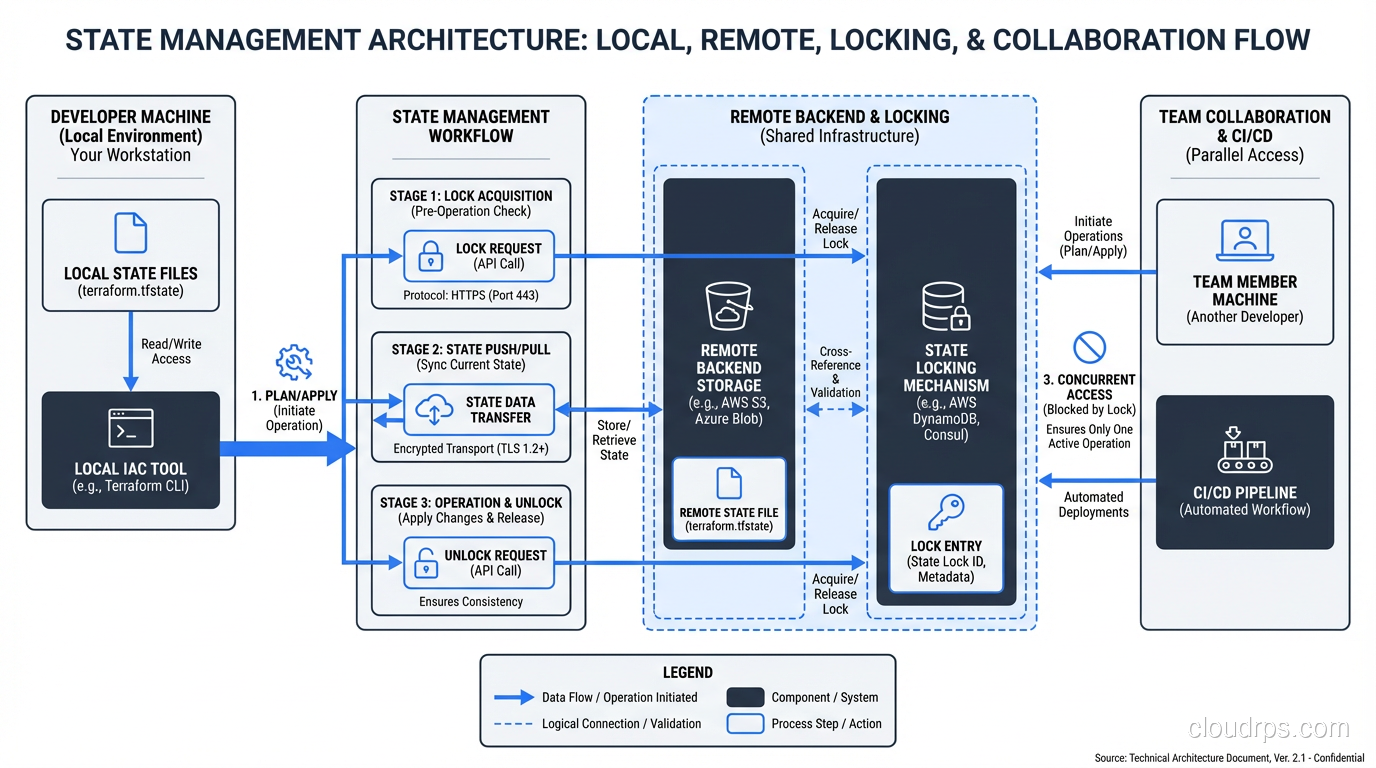
With Terraform and OpenTofu, state lives in a file. By default, it is local (terraform.tfstate), but any serious deployment stores it remotely in S3, GCS, or Azure Blob Storage, with a DynamoDB table or equivalent for locking.
Here is what goes wrong:
State drift. Someone modifies a resource manually in the console. Now your state says one thing and reality says another. The next terraform apply might try to revert the manual change, or it might error out. Either way, you are in for a bad time.
State corruption. A terraform apply gets interrupted halfway through, maybe the engineer’s laptop loses network, maybe CI times out. Now some resources were created and state was partially updated. Recovery usually involves manual state surgery with terraform state rm and terraform import.
Secrets in state. This one catches people off guard. Terraform stores resource attributes in state, including database passwords, API keys, and other secrets. If your state file is in S3, you need to encrypt that bucket and lock down access tightly. This is something to consider alongside your broader security group and access control strategy.
State file size. Large environments can have state files measured in hundreds of megabytes. Every plan and apply downloads the entire state file. The solution is to split your infrastructure into smaller, independent state files (what Terraform calls “workspaces” or more commonly, separate root modules), but deciding where to draw those boundaries is more art than science.
CloudFormation sidesteps most of these issues by managing state server-side. Pulumi’s managed backend handles it well too. But if you are using Terraform or OpenTofu with a remote backend, invest time in your state management strategy on day one. You will thank yourself later.
How to Choose: A Practical Decision Framework
After deploying all four tools in production, here is my honest recommendation framework:
Choose Terraform if: you want the safest career bet, the largest ecosystem, and the most battle-tested tool. Terraform is the default choice, and there is nothing wrong with defaults. Most organizations should start here.
Choose CloudFormation if: you are 100% AWS, you value not managing state files, and you are comfortable with the AWS ecosystem. CDK makes CloudFormation genuinely pleasant to work with if you do not want to write raw YAML.
Choose Pulumi if: your team is developer-heavy, you want to use real programming languages, and you are building a platform engineering layer where the Automation API adds real value.
Choose OpenTofu if: the BSL license is a blocker for your use case, or you want to bet on the open-source community fork. Be aware that the ecosystem is younger and some enterprise integrations lag behind.
| Feature | Terraform | CloudFormation | Pulumi | OpenTofu |
|---|---|---|---|---|
| Language | HCL | YAML/JSON | TS/Python/Go/C#/Java | HCL |
| Multi-cloud | Yes | No (AWS only) | Yes | Yes |
| State management | Remote backend (S3, etc.) | AWS-managed | Pulumi Cloud or self-hosted | Remote backend (S3, etc.) |
| Learning curve | Moderate | Low (if you know AWS) | Low (if you know the language) | Same as Terraform |
| Provider ecosystem | 3,000+ | AWS services only | 100+ native, bridges to TF | Same as Terraform |
| License | BSL 1.1 | Proprietary (AWS service) | Apache 2.0 | MPL 2.0 |
| Drift detection | Via plan | Native | Via preview | Via plan |
| Testing | Terratest, built-in tests | TaskCat, cfn-lint | Native unit tests | Terratest, built-in tests |
Migration Stories and Practical Advice
I want to share a few real patterns I have seen work (and fail) in production.
Pattern 1: Start with CloudFormation, migrate to Terraform. This is the most common migration path I see. A team starts on AWS with CloudFormation, grows to need multi-cloud or gets frustrated with the developer experience, and migrates to Terraform. The migration itself is tedious but not hard: you write the equivalent Terraform config and use terraform import to bring existing resources under management. Budget two to four weeks for a medium-sized environment.
Pattern 2: Monolithic Terraform, then split. Nearly every team starts with one big Terraform root module. Everything is in one state file. It works great until your environment has 200+ resources and every plan takes four minutes. The fix is to split into smaller, isolated modules: networking, compute, databases, monitoring stack. Use terraform_remote_state data sources or (better) pass values via SSM Parameter Store or Consul.
Pattern 3: IaC for infrastructure, GitOps for workloads. This is the pattern I recommend most strongly for Kubernetes-heavy environments. Use Terraform or Pulumi for the cluster itself, the VPCs, the node pools, the IAM roles. Then use ArgoCD or Flux for everything that runs inside the cluster. Trying to manage Kubernetes manifests with Terraform’s Kubernetes provider is possible but painful.
Pattern 4: Layered IaC with CI/CD. Integrate IaC into your CI/CD pipeline so that every infrastructure change goes through the same review process as application code. Pull request opens, Atlantis (or similar) runs plan, a teammate reviews the output, merge triggers apply. This is table stakes for production infrastructure.
Common Pitfalls and How to Avoid Them
Pitfall 1: Not using modules early enough. Copy-pasting resource blocks across environments (dev, staging, prod) seems faster at first. By month three, the environments have drifted apart and nobody knows which differences are intentional. Use modules from day one.
Pitfall 2: Ignoring the blast radius. If one state file contains your VPC, your RDS instance, your ECS cluster, and your S3 buckets, then a bad apply can theoretically destroy all of them. Separate your state files by blast radius. Network and data layers should be isolated from compute layers.
Pitfall 3: Running apply from laptops. The first time someone runs terraform apply from their laptop, gets interrupted, and leaves state in a broken condition, you will understand why CI-only applies matter. Lock down your backend so that only your CI system can run apply. Engineers should be able to run plan locally, but apply should go through the pipeline.
Pitfall 4: Not planning for disaster recovery. Your IaC repo is your disaster recovery plan. If your entire AWS account gets compromised, can you stand up the infrastructure in a new account from your Terraform code alone? If the answer is no, you have gaps to fill. Test this. Actually run apply in a clean account and see what breaks.
Pitfall 5: Over-abstracting. This is especially common with Pulumi but happens with Terraform modules too. You do not need a generic “create any AWS resource” abstraction layer. Write infrastructure code that is specific enough to be readable and general enough to be reusable. When in doubt, err on the side of being specific.
Where IaC Is Heading
The IaC space is evolving fast. Terraform’s built-in testing framework, released in late 2023, makes it possible to write integration tests without third-party tools. Pulumi’s AI capabilities can generate infrastructure code from natural language (though I would not trust it for production without careful review). OpenTofu is carving out its own identity with features like state encryption.
The bigger trend is convergence with cloud-native development patterns. Tools like Crossplane bring IaC concepts inside Kubernetes, letting you manage cloud resources with the same kubectl and YAML workflows you use for pods and services. AWS’s CDK and Pulumi both blur the line between application code and infrastructure code, particularly for serverless architectures where the infrastructure and the application are nearly the same thing.
Whatever tool you choose, the principles stay the same: version control everything, review every change, automate the apply process, and treat your infrastructure code with the same rigor you treat your application code. The tool is just the tool. The discipline is what keeps your production environment alive at 3 AM.
Pick one, learn it deeply, and ship something. You can always migrate later. I have. More than once.
Get Cloud Architecture Insights
Practical deep dives on infrastructure, security, and scaling. No spam, no fluff.
By subscribing, you agree to receive emails. Unsubscribe anytime.