
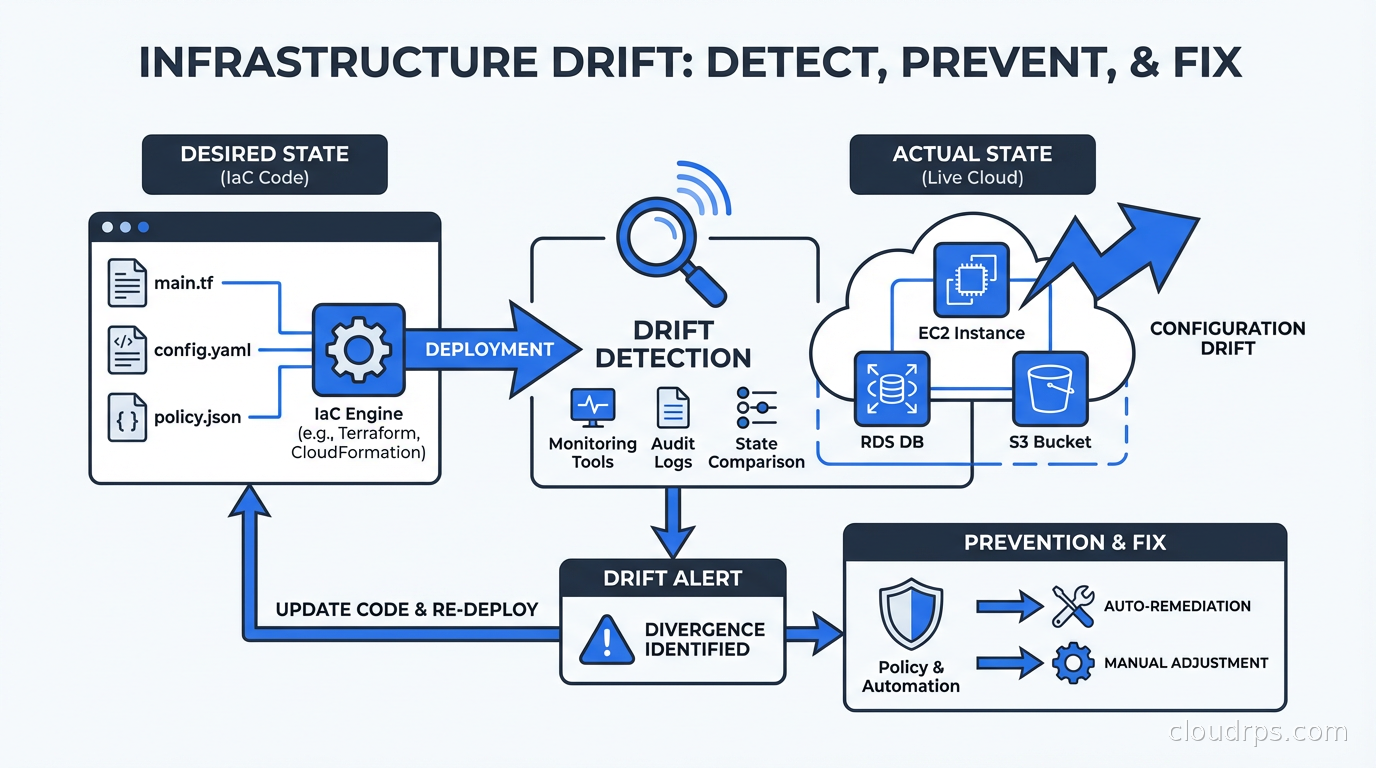
I got a call from a panicked SRE at 11pm on a Friday. Their production database was allowing inbound connections from an IP range that their security team had explicitly forbidden. The Terraform code said the security group was correct. The actual AWS security group had an extra rule. Nobody knew where it came from. They’d been running vulnerable for three weeks.
That’s infrastructure drift. The code says one thing. Reality says something else. And the gap between them is where security incidents, compliance failures, and operational surprises live.
What Is Infrastructure Drift?
Infrastructure drift occurs when the actual state of your deployed cloud resources diverges from what your Infrastructure as Code definitions specify. If you’re using Terraform, Pulumi, or CloudFormation, your code represents the intended state. Drift is the delta between intended and actual.
Drift happens in a few predictable ways:
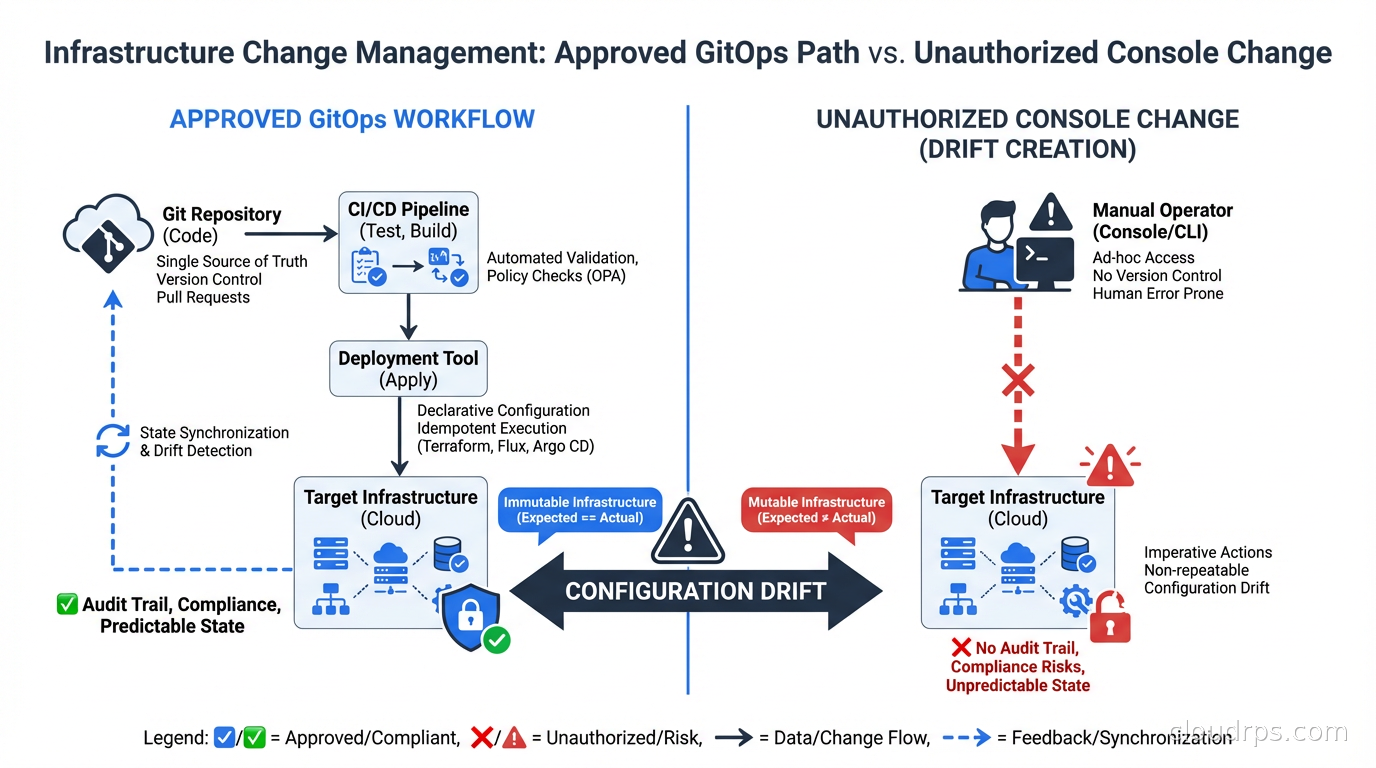
Manual console changes. Someone logs into the AWS console and tweaks a security group, resizes an instance, or adds a storage bucket. They mean to update the Terraform later. They don’t. This is by far the most common cause of drift in organizations that haven’t adopted strict GitOps discipline.
Automated remediations. AWS Config rules, Security Hub findings, and automated compliance tools sometimes modify resources directly. Your Terraform doesn’t know this happened.
Cloud provider changes. AWS occasionally modifies default values, adds new attributes to existing resources, or changes behavior of managed services in ways that cause terraform plan to show differences even when you haven’t changed anything.
Failed applies. A Terraform apply that partially succeeds leaves some resources updated and others not. The state file might not accurately reflect what actually deployed, creating a gap between stored state and live resources.
State file corruption or drift. If Terraform state gets out of sync with reality (state file was modified manually, resources were imported incorrectly, or state was restored from backup), the next plan will show drift that doesn’t represent real changes.
The insidious thing about drift is that it’s often silent. Nothing breaks immediately. The drift accumulates. Then one day your security audit fails, your disaster recovery test produces different results than expected, or an incident response reveals your runbook assumes infrastructure that no longer exists.
Why Drift Is Getting More Dangerous
The drift problem is getting harder, not easier, for a few reasons.
First, infrastructure is more complex. A modern cloud application might span hundreds of AWS resources across networking, compute, storage, security, and managed services. Any of them can drift independently.
Second, teams are larger. More engineers with console access means more opportunities for ad-hoc changes that never make it back to code. The “I’ll update the Terraform later” intention gap is proportional to team size.
Third, compliance requirements are stricter. SOC 2, PCI DSS, HIPAA, and ISO 27001 controls increasingly specify that infrastructure must be managed via approved change processes. Drift violates that control. Auditors are getting better at detecting it.
Fourth, security posture is harder to maintain. A zero-trust security model assumes that network boundaries and access controls work as designed. Drift in security groups, IAM policies, or network ACLs can punch holes in controls that took months to design.
Detecting Drift: The Terraform Approach
If you’re using Terraform, drift detection starts with terraform plan. The plan output shows you the difference between what Terraform thinks should exist (based on your code and state file) and what actually exists in the cloud provider.
The challenge is that terraform plan runs on-demand. Most teams run it as part of their CI/CD pipeline when code changes. But drift can occur at any time, independent of code changes. Running plan only on deploys means drift can accumulate for weeks between releases.
The solution is scheduled plan runs. Set up a pipeline that runs terraform plan against every Terraform workspace on a regular schedule (daily is a reasonable starting point, hourly for sensitive environments) and alerts when the plan shows changes you didn’t make.
# GitHub Actions example for scheduled drift detection
name: Drift Detection
on:
  schedule:
    - cron: '0 8 * * *'  # Daily at 8am UTC

jobs:
  detect-drift:
    runs-on: ubuntu-latest
    steps:
      - uses: actions/checkout@v4
      - name: Terraform Init
        run: terraform init
      - name: Detect Drift
        run: |
          terraform plan -detailed-exitcode 2>&1
          if [ $? -eq 2 ]; then
            echo "DRIFT DETECTED - sending alert"
            # trigger notification
          fi
Exit code 2 from terraform plan -detailed-exitcode means changes are present. That’s your drift signal.
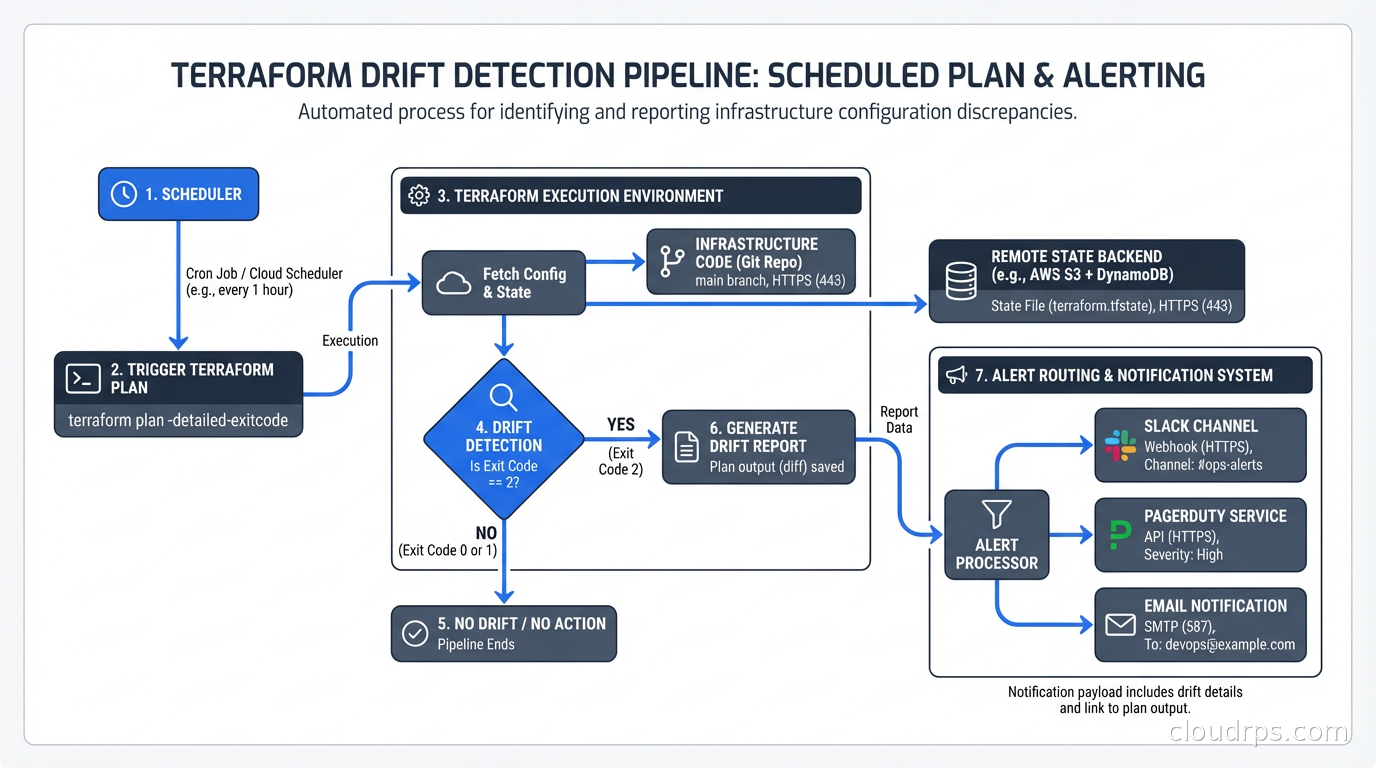
Tools like Spacelift, env0, and Atlantis build drift detection into the platform. Spacelift’s drift detection runs terraform plan on a schedule, notifies you of detected drift, and can optionally auto-remediate by applying the plan automatically. For teams with large numbers of Terraform workspaces, a platform-level solution beats managing dozens of custom CI jobs. If you are evaluating which TACOS platform to use, see the Terraform PR automation guide covering Atlantis, Spacelift, Scalr, and the full TACOS landscape.
The OpenTofu fork of Terraform (the open-source successor after HashiCorp’s license change) supports the same drift detection patterns. If you’ve migrated to OpenTofu, nothing changes operationally. If you’re still evaluating whether to make that switch, our OpenTofu vs Terraform fork guide covers what’s actually different and who should migrate.
Detecting Drift in GitOps Environments
If you’re using ArgoCD or Flux for Kubernetes deployments, you already have drift detection built in. Both tools continuously compare the desired state in Git with the actual state in the cluster. When they diverge, the application status shows as “OutOfSync.”
The GitOps model has a structural advantage over traditional Terraform workflows: the reconciliation loop runs continuously. ArgoCD polls Git (or receives webhooks) and compares against the live cluster state every few minutes. Drift is detected and optionally auto-remediated almost immediately.
ArgoCD’s auto-sync feature is the automated remediation option: when OutOfSync is detected, ArgoCD automatically applies the changes needed to bring the cluster back to the desired state. This is the strongest form of drift prevention, but it requires trust that your Git repository is the source of truth and that automatic applies are safe.
The risk of auto-sync: if your Git repo has a bug, it gets auto-applied. If someone pushes a breaking change, ArgoCD will helpfully apply it to production immediately. The standard practice is to enable auto-sync for non-production environments and require manual sync approval for production, or use progressive delivery tools for gradual rollout.
For Crossplane users, the same GitOps reconciliation model applies to cloud infrastructure. Crossplane continuously reconciles cloud resources against the definitions in your Kubernetes cluster. If someone manually modifies an RDS instance in the console, Crossplane will detect the drift and attempt to revert it to the desired state. This is powerful but requires careful consideration: Crossplane fighting against a human making an emergency change during an incident is not a fun situation.
The Three Remediation Strategies
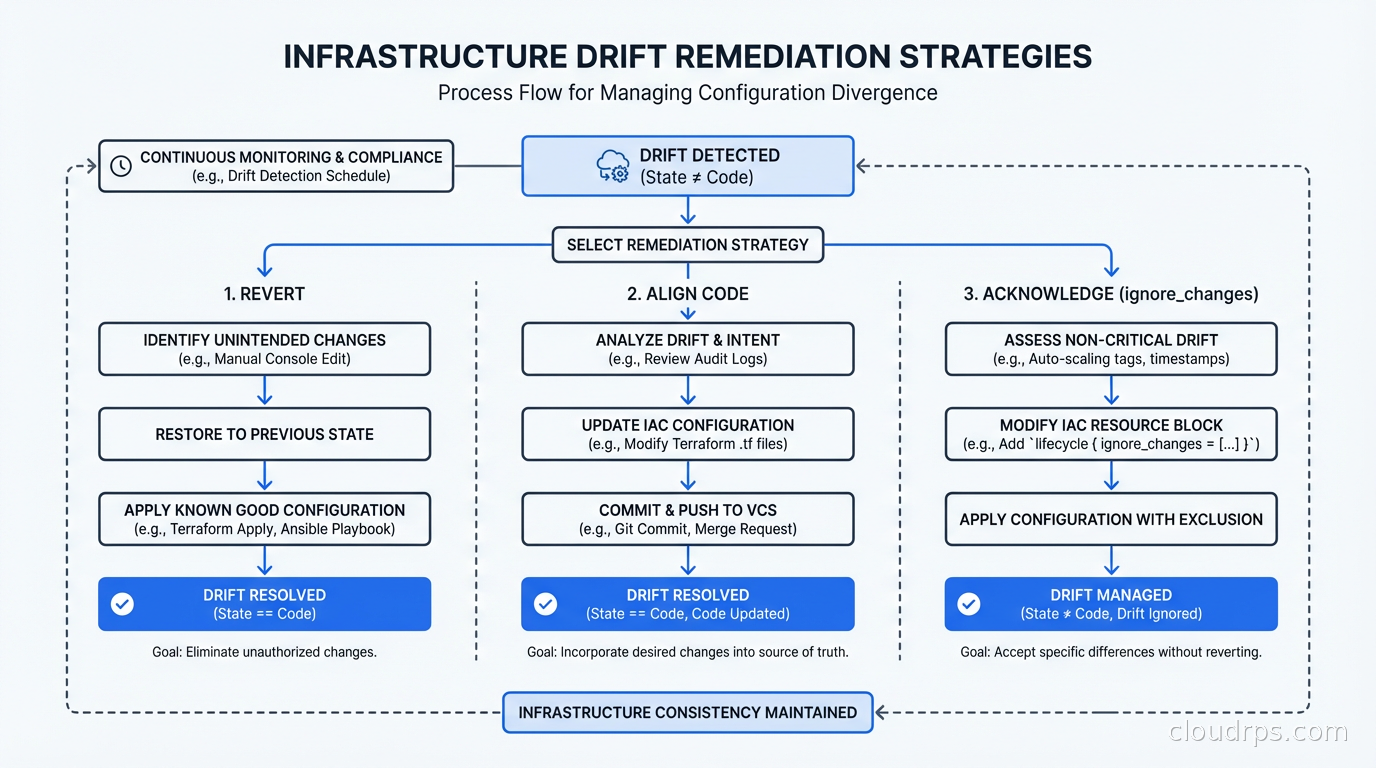
When you detect drift, you have three options. The choice depends on context, not on a blanket policy.
Strategy 1: Revert the infrastructure to match the code. This is the default for most drift: the code is correct, someone made an unauthorized change, revert it. For Terraform, this means running terraform apply with the current code. For ArgoCD, this is the “Sync” operation. This is the right choice when the code represents the intended state and the drift was an unauthorized deviation.
Strategy 2: Update the code to match the infrastructure. Sometimes the drift represents a legitimate change that someone made correctly but forgot to codify. Maybe an ops engineer resized a database during an incident and the new size is correct. The right move is to import the current state into Terraform (terraform import or terraform state replace-provider) and update the code to match. Reverting would break something that was intentionally changed.
Strategy 3: Acknowledge the drift and take no action. Sometimes drift is expected and acceptable. Cloud providers add new attributes to resources; Terraform might show differences for attributes you don’t manage. Using lifecycle { ignore_changes = [...] } in Terraform lets you explicitly ignore specific attribute drift that isn’t operationally meaningful.
The decision tree: Is the current infrastructure state correct? If yes, update the code. Is the code state correct? If yes, revert the infrastructure. Is neither authoritative? Resolve the ambiguity before touching anything.
Prevention: The Harder but More Important Work
Detection and remediation are reactive. Prevention is where you eliminate the root cause.
The most effective prevention mechanism is removing the ability to make changes outside the approved process. This means:
Lock down console access. IAM policies that allow read-only access to the console but require all changes to go through the CI/CD pipeline. This is culturally difficult in organizations where engineers are used to console access for exploration, but it’s the only way to eliminate the manual change category of drift.
Require Terraform for all changes. Use policy as code with OPA or Kyverno to enforce that cloud resources have required tags indicating they’re managed by Terraform. Resources without those tags trigger alerts. Regular audits catch unmanaged resources before they become a maintenance burden.
Break-glass access. For genuine emergencies where someone needs to make a manual change immediately, have a defined process: emergency access granted with automatic expiration, all actions logged, and a mandatory follow-up task to codify the change in Terraform within 24 hours. This acknowledges that operational reality sometimes requires speed, but creates accountability to bring code and reality back into alignment.
For teams managing VMs directly (not through Kubernetes), a complementary approach worth considering is Nix and NixOS, where the OS and all software on a server is described in a declarative Nix expression. Manual changes to a NixOS server do not persist across the next nixos-rebuild switch, which means the system always converges back to its declared state. That is a different model than drift detection and remediation: it makes many classes of drift structurally impossible at the OS layer.
Enforce state locking. Concurrent Terraform applies against the same state file cause corruption and drift. Remote state with locking (S3 + DynamoDB, Terraform Cloud, etc.) prevents this category of problem. This is covered in depth in Terraform state management.
Real-World Drift Patterns I’ve Seen
Let me share the patterns that show up repeatedly.
Security group sprawl. Someone adds an inbound rule during an incident response, forgets to remove it, and never updates Terraform. Six months later, a penetration test finds the open port. I’ve seen this in every organization that doesn’t enforce IaC-only changes.
Auto Scaling Group configuration drift. The launch template gets updated in Terraform, but the ASG still has old instances running from the previous template. The running instances look like drift even though they’re the result of a normal rolling update. Understanding what’s expected drift (in-progress deployments) versus unexpected drift (unauthorized changes) requires context.
RDS parameter group changes. Database administrators often need to tune parameters for performance. If those changes are made via the console or CLI rather than Terraform, they show up as drift. The fix is a clear process: all parameter changes go through a reviewed Terraform PR, not via the RDS console.
Kubernetes node group instance type changes. Auto scaling changes the number of nodes; Karpenter provisions different instance types based on workload requirements. None of this should be codified as drift but distinguishing managed scaling from actual configuration drift requires clear boundary definitions.
Building a Drift Management Program
Ad-hoc drift detection doesn’t scale. For a mature organization, drift management needs to be a defined operational practice.
Start by inventorying your Terraform workspaces and understanding their current drift status. Most organizations doing this for the first time find substantial drift that’s been accumulating for years. Don’t try to fix everything at once. Prioritize by risk: security-related resources first (security groups, IAM policies, network ACLs), then production infrastructure, then everything else.
Establish a drift SLA. For security-critical resources, drift should be investigated and remediated within 24 hours of detection. For non-critical resources, weekly resolution is reasonable. The SLA forces prioritization and prevents drift from becoming a queue that nobody processes.
Integrate drift metrics into your engineering scorecard alongside deployment frequency and DORA metrics. A team with zero detected drift might be running a very tight ship or might not have detection configured. A team with consistently high drift that gets remediated quickly is healthier than one that ignores it.
Testing Drift Detection
You should test your drift detection the same way you’d test anything else: intentionally introduce it and verify it gets caught. This is a form of chaos engineering applied to your operational tooling.
The test: make a manual change to a non-production resource in the console, then verify your drift detection job catches it within the expected detection window and generates the expected alert. Document the response procedure. Run this test quarterly.
If your drift detection doesn’t catch an intentional manual change within 24 hours, you have a coverage gap that a real attacker or a well-meaning engineer making an emergency change could exploit without your knowledge.
The Long Game
Infrastructure drift is fundamentally a discipline problem, not a tooling problem. The tools (Terraform, ArgoCD, Crossplane, Spacelift) are mature and capable. The harder work is building the organizational practices that make IaC the mandatory path for all infrastructure changes.
The teams I’ve seen succeed treat infrastructure code with the same rigor as application code: code review, testing, CI/CD, and no manual changes outside that process. That means a real infrastructure testing practice with tools like Terratest and Testcontainers, not just drift detection after the fact. The teams that struggle treat infrastructure code as a nice-to-have that gets updated “when we have time.” They accumulate drift, then accumulate more, and eventually face a painful cleanup or a security incident that forces the cleanup for them.
Start with detection. You can’t fix what you can’t see. Then build prevention incrementally as organizational trust in the IaC process grows. Don’t try to lock down console access on day one; earn that through demonstrated reliability of the automated path first.
Related: Terraform State Management for the foundation of drift prevention, GitOps with ArgoCD and Flux for continuous reconciliation, Infrastructure as Code: Terraform, Pulumi, CloudFormation for IaC fundamentals, Policy as Code with OPA and Kyverno for automated compliance enforcement, and DORA Metrics for measuring engineering performance.
Get Cloud Architecture Insights
Practical deep dives on infrastructure, security, and scaling. No spam, no fluff.
By subscribing, you agree to receive emails. Unsubscribe anytime.