Twenty years in this industry, and I still see teams reach for a managed Kubernetes service as the answer to everything, even when they’re running a three-node on-prem cluster in a factory floor, a Raspberry Pi cluster at the edge of a telco network, or a hardened environment inside a government datacenter where internet egress is a compliance violation. Managed Kubernetes is excellent when it fits. It does not fit everywhere.
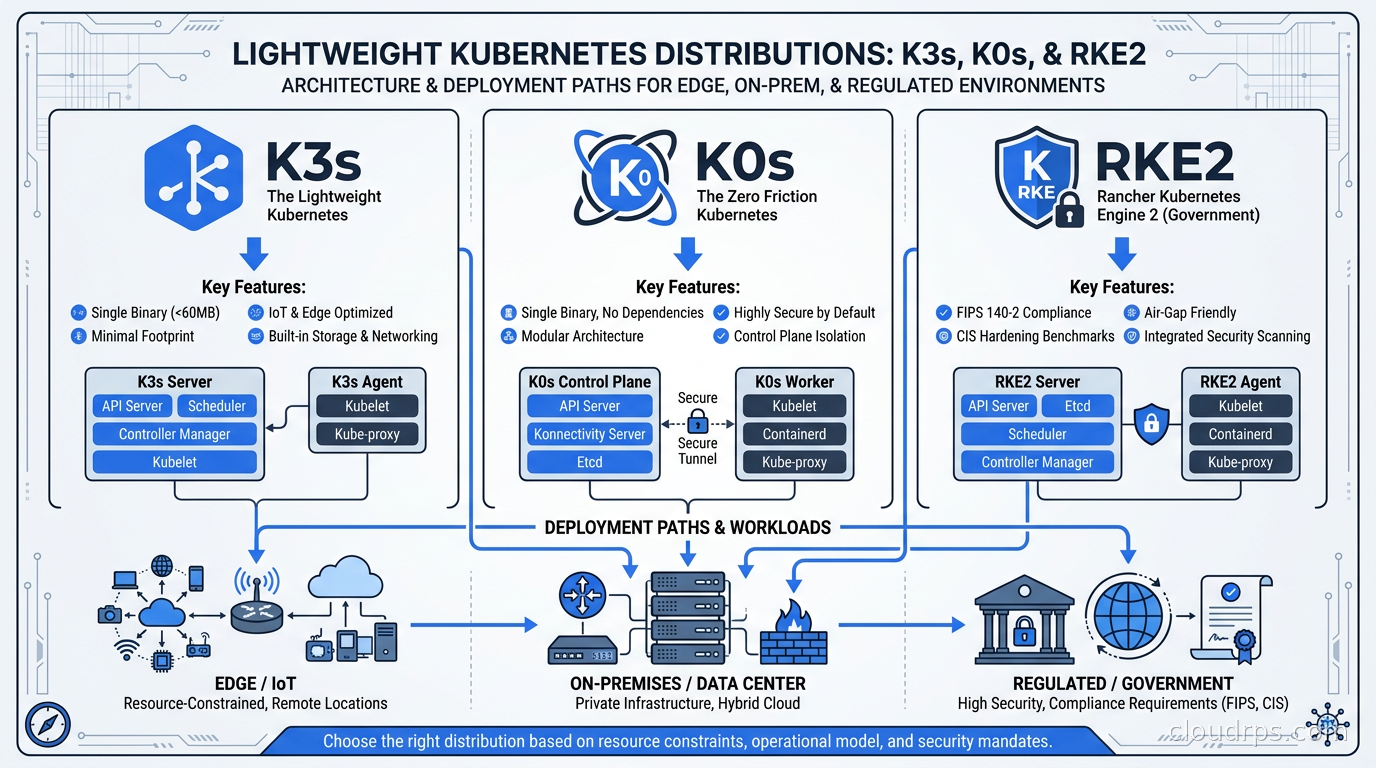
When it does not fit, you are choosing between the full upstream Kubernetes install and one of three battle-tested lightweight distributions: K3s, K0s, or RKE2. All three ship as a single binary. All three pass CNCF conformance. And all three make meaningfully different tradeoffs that determine whether they are an elegant fit or a source of ongoing pain.
This guide is the one I wish I had the first time I was standing in front of a whiteboard trying to explain these differences to a team that had never run Kubernetes outside of EKS.
Why Lightweight Distributions Exist
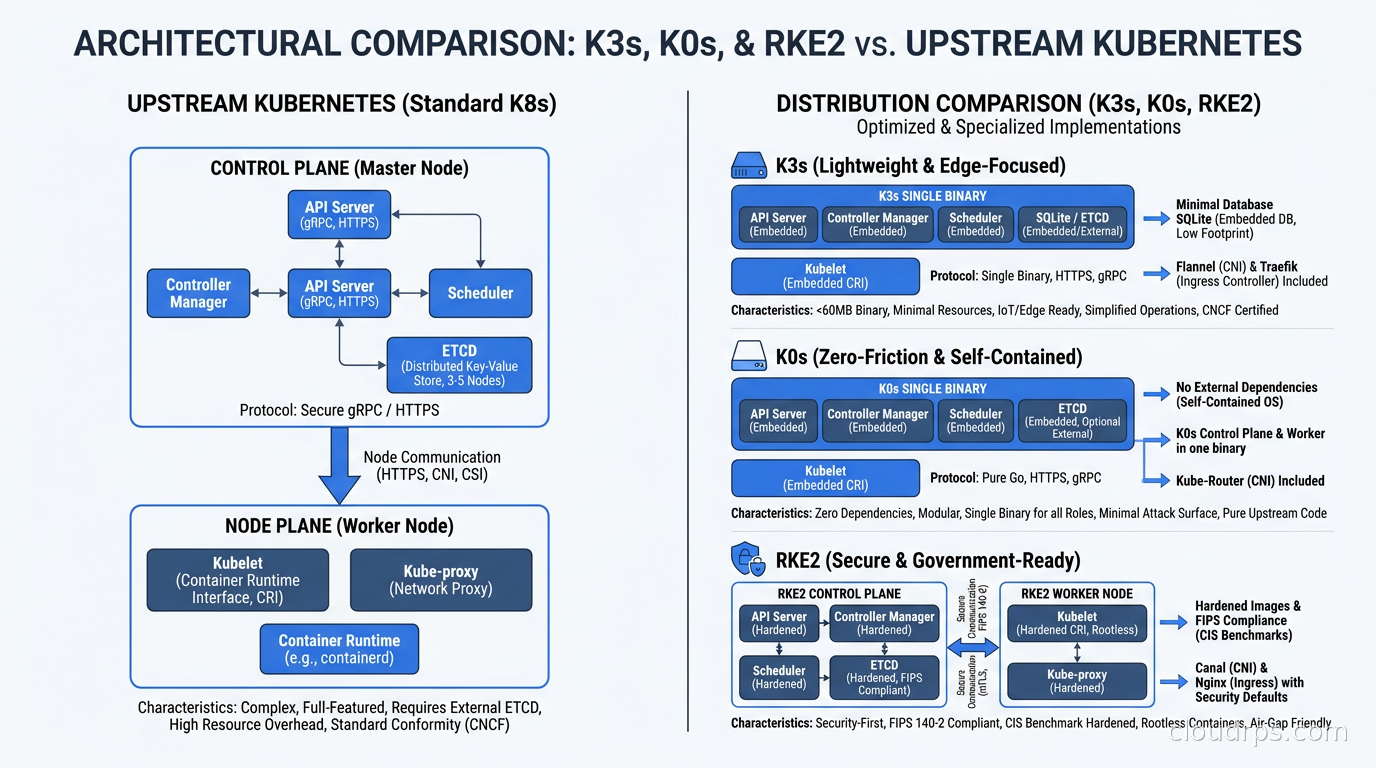
Upstream Kubernetes is not hard to install anymore. Tools like kubeadm, kops, and Cluster API have made it tractable. The problem is that upstream Kubernetes assumes you have separate control plane nodes, a dedicated etcd cluster, a CNI plugin, an ingress controller, and storage provisioners. For a production managed cluster on EKS or GKE, all of that is handled for you. For a three-node bare metal cluster, you are stitching it together yourself.
Lightweight distributions pre-package those components into a coherent, opinionated stack. The tradeoff is that you accept their opinions. You accept their default CNI, their default ingress controller, and their default storage behavior. In exchange, you get a cluster that installs in minutes rather than hours, with a far smaller operational surface.
There is also a resource story. Upstream Kubernetes is not especially lean. If you are running Kubernetes on ARM hardware with limited RAM, or on virtual machines in a resource-constrained private cloud, the overhead of separate etcd nodes and multiple control plane components adds up. All three lightweight distributions address this with architectural decisions that reduce memory and compute footprint.
K3s: The Edge and Developer Favorite
K3s is the distribution that started the conversation. Originally built by Rancher (now part of SUSE), it ships as a single binary under 100MB and runs most Kubernetes control plane components inside a single process. That architectural choice is the key to its low memory footprint: instead of separate processes for the API server, controller manager, and scheduler, K3s runs them together, eliminating the duplicated overhead of each component having its own runtime.
The default datastore for a single-server K3s install is SQLite. That is the most important thing to know about K3s production deployments: SQLite is not appropriate for a highly available control plane. If you deploy a single server K3s cluster and then try to add more servers later without planning for it upfront, you cannot simply switch datastores on a live cluster. HA in K3s requires either an external datastore (PostgreSQL or MySQL are both supported) or embedded etcd, which you must enable at initial cluster creation with the --cluster-init flag. Miss that step and you have committed yourself to a single server control plane.
When embedded etcd is enabled, K3s runs a full Raft consensus cluster between server nodes. This works well and performs well. The constraint is that you need an odd number of server nodes (typically three) to maintain quorum, which is no different from upstream Kubernetes.
The default CNI in K3s is Flannel, using VXLAN mode. Flannel is not the most capable CNI in the ecosystem. It does not implement Kubernetes NetworkPolicy natively; for that you need to bring Kyverno or a different CNI. If you need advanced network policy, Cilium is a popular drop-in replacement that many K3s users run instead of Flannel. I have run K3s clusters with Cilium in production and the combination works well, with the caveat that you are now managing CNI separately instead of letting K3s handle it.
K3s also ships its own ingress controller, Traefik 2, and its own local path provisioner for persistent storage. These defaults make it immediately useful for development and edge deployments. For production, you will often replace Traefik with ingress-nginx or Kubernetes Gateway API implementations, and you will replace local path provisioner with a proper storage class backed by your environment’s storage.
The ARM story on K3s is excellent. If you are deploying Kubernetes on Raspberry Pi hardware, ARM servers, or any non-x86 architecture, K3s has first-class ARM support. This is one of the reasons it dominates edge and IoT deployments.
Where I have seen K3s work best: developer laptop clusters (it installs in under a minute), CI/CD runner clusters where you want lightweight ephemeral clusters, telco and industrial edge deployments on resource-constrained hardware, and homelab or small team clusters where full EKS would be overkill. Understanding GitOps with ArgoCD and Flux becomes particularly valuable in K3s environments where you want the same deployment ergonomics as a managed cluster without the managed cluster overhead.
The main K3s caution for production: the SQLite default has burned teams. I have seen a “quick K3s install” on a single node become the de facto production cluster, with no etcd quorum and no path to HA without rebuilding. If you are deploying K3s for anything that needs to be resilient, run k3s server --cluster-init from day one, even if you start with a single server. It costs nothing.
RKE2: The Security-Hardened Choice
RKE2 (Rancher Kubernetes Engine 2) occupies the opposite end of the spectrum from K3s in terms of opinions and defaults. Where K3s is optimized for minimal footprint and fast setup, RKE2 is optimized for security and regulatory compliance. The two distributions share a parent organization (SUSE/Rancher) but serve different audiences.
RKE2 ships with CIS Kubernetes Benchmark hardening enabled by default. This means its default configuration has restrictive pod security admission, read-only API server configurations, audit logging, secrets encryption at rest, and a set of disallowed capabilities that would trip up applications that assume privileged defaults. When I work with teams in regulated industries, financial services, healthcare, or government, this default posture is enormously valuable. The alternative is to start with a permissive cluster and harden it, which requires tracking every deviation and regularly reconciling against the benchmark. Starting hardened and relaxing where necessary is a much safer operational model.
SUSE documents RKE2 as supporting FIPS 140 compliance. The specific version (140-2 vs 140-3) depends on the release and the host OS configuration, so check the current SUSE documentation for your specific version rather than relying on any secondary source. The practical implication is that RKE2 is one of the only Kubernetes distributions where you can document a credible path to FIPS compliance without writing your own cryptographic policy. This matters for FedRAMP, ITAR, and similar regulated environments.
RKE2 uses etcd as its default datastore. There is no SQLite fallback. Even a single-node RKE2 install runs etcd. This is by design: the goal is production-grade from the first install, even if it means slightly higher resource consumption.
The default CNI in RKE2 is Canal, which is a combination of Calico for network policy and Flannel for the overlay network. Canal gives you NetworkPolicy enforcement out of the box, which K3s with default Flannel does not. The default ingress controller is ingress-nginx (the community version, not the NGINX Inc. commercial one). For anyone coming from a managed Kubernetes background, this feels familiar.
RKE2 has a higher resource floor than K3s. Server nodes need meaningfully more RAM to run comfortably, and the hardened configuration adds some overhead on top of that. If you are running on very constrained hardware, RKE2 is not the right choice. For anything in a proper server environment, the overhead is not relevant.
One operational advantage of RKE2 is its alignment with the Rancher management platform. If you are using Rancher to manage multiple clusters, RKE2 clusters integrate more deeply with Rancher’s lifecycle management, policy enforcement, and multi-cluster visibility than K3s does. For organizations running dozens of clusters across on-prem sites, this integration reduces operational burden significantly.
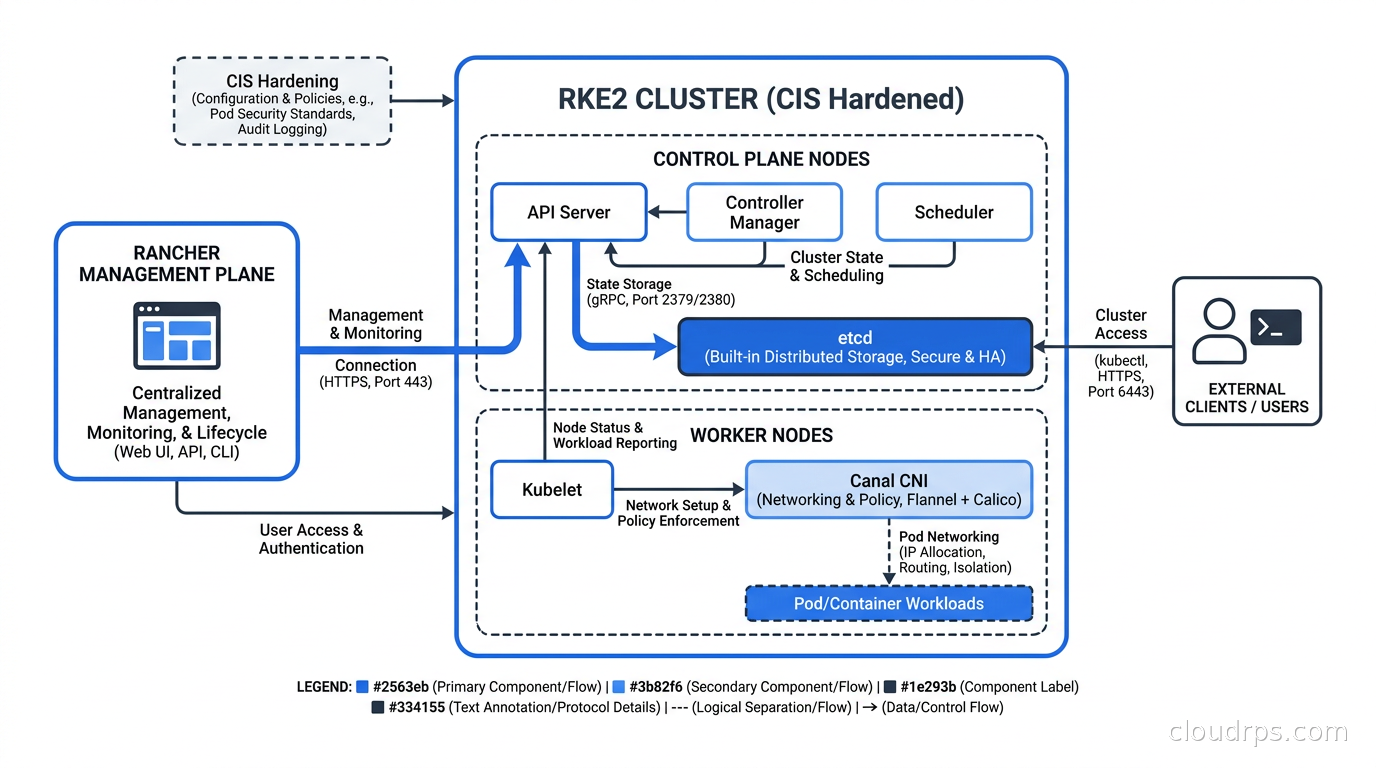
The Kubernetes security hardening practices that teams build manually on upstream Kubernetes are baked into RKE2 from the start, which is a legitimate operational advantage for teams that cannot dedicate a security engineer to ongoing cluster hardening.
K0s: The Upstream-Faithful Option
K0s (pronounced “kay-zeros”) comes from Mirantis, one of the oldest names in OpenStack and Kubernetes infrastructure. The design philosophy of K0s is different from both K3s and RKE2: instead of opinionated defaults and bundled components, K0s tries to stay as close to upstream Kubernetes as possible while still providing the single-binary packaging and simplified installation story.
The practical difference is that K0s swaps out fewer core components than K3s. K3s replaces etcd with SQLite by default, replaces the container runtime with containerd (a reasonable choice that upstream also uses), and bundles Flannel, Traefik, and the local path provisioner. K0s runs containerd (same as upstream), uses kine over SQLite for single-node installs, uses embedded etcd for multi-node HA, and does not impose a CNI choice. You bring your own CNI. K0s supports Calico, Cilium, Flannel, Canal, and kube-router out of the box, but none is the default. The first thing you pick is your CNI.
This design means K0s deployments behave more like upstream Kubernetes. If your team has existing expertise with vanilla Kubernetes, the muscle memory transfers better to K0s than to K3s. The control plane components behave like their upstream equivalents. The audit logs look familiar. The upgrade paths follow upstream semantics more closely.
The installation tooling is a standout feature. K0s ships with k0sctl, a single binary that installs and manages clusters over SSH without requiring a pre-existing Kubernetes cluster. You write a YAML manifest describing your nodes, and k0sctl handles the rest: installing binaries, configuring components, joining workers. This is a dramatically simpler workflow than kubeadm for on-premises bare metal clusters.
K0s also has a clean separation between the control plane and worker components. A k0s server runs control plane components; a k0s worker runs kubelet and container runtime. You can run a control plane node with no workload capacity, or a combined node that runs both. For resource-constrained environments where you want to maximize workload capacity, this separation is useful.
The main caveat on K0s is that staying close to upstream Kubernetes also means fewer bundled opinions. You get less out of the box. There is no default ingress controller, no default storage provisioner. For teams that want to bring their own stack and minimize the opinionation of the distribution itself, this is a feature. For teams that want to stand up a functional cluster quickly, this is friction.
On version currency, k0s has historically tracked upstream Kubernetes releases closely, typically shipping a new minor version within days of the upstream release. Check the k0sproject.io docs for the current release cadence, as it can vary.
The Comparison You Actually Need
The abstract comparison matters less than the specific question: what does your environment look like and what constraints do you operate under?
For edge and IoT deployments with constrained hardware, K3s is the clear choice. The single-binary, sub-100MB footprint, first-class ARM support, and fast installation make it the best tool for this context. Start K3s with --cluster-init if you want HA, use an external datastore (PostgreSQL) if you want to decouple the control plane from the hardware, and replace Flannel with Cilium if you need NetworkPolicy.
For regulated environments with hard compliance requirements, RKE2 is the default choice. CIS hardening out of the box, FIPS-compliant cryptographic builds, audit logging enabled by default, and alignment with Rancher’s enterprise support. If you are running FedRAMP, HIPAA-regulated workloads, or anything where an auditor will ask you to demonstrate your Kubernetes benchmark posture, RKE2 gives you a much shorter path to a defensible answer.
For on-premises clusters where your team has existing upstream Kubernetes expertise and wants to bring their own CNI, storage, and ingress, K0s is a strong choice. The upstream-faithful behavior reduces cognitive load for teams that have internalized vanilla Kubernetes behavior. The k0sctl install tooling is excellent. And the freedom from opinionated defaults means you are not working around bundled components.
For development clusters, small teams, and homelabs: K3s. The fast iteration loop and low overhead make it the right choice when the goal is a working cluster quickly rather than an enterprise-grade platform.
For organizations already deep in the Rancher ecosystem: RKE2. The Rancher integration reduces operational overhead across the entire cluster lifecycle.
| K3s | K0s | RKE2 | |
|---|---|---|---|
| Default datastore | SQLite (single), embedded etcd (HA) | kine/SQLite (single), embedded etcd (HA) | etcd |
| Default CNI | Flannel | None (bring your own) | Canal (Calico + Flannel) |
| Default ingress | Traefik | None | ingress-nginx |
| CIS hardened by default | No | No | Yes |
| FIPS support | No | No | Yes (with host OS config) |
| ARM support | Excellent | Good | Good |
| Resource footprint | Lowest | Medium | Highest |
| Upstream fidelity | Moderate | High | Moderate |
| Vendor | SUSE/Rancher | Mirantis | SUSE/Rancher |
The Talos Question
Every time I give a talk on lightweight Kubernetes distributions, someone asks about Talos. Talos Linux takes a fundamentally different approach: rather than packaging Kubernetes into a single binary, Talos builds an immutable, API-driven operating system designed exclusively for running Kubernetes. There is no SSH. There is no package manager. The OS is read-only except for designated configuration surfaces.
Talos is not in direct competition with K3s, K0s, and RKE2 because it is not just a Kubernetes distribution; it is a complete node operating system. The comparison is more like K3s vs kubeadm on Talos. Teams that go the Talos route typically combine it with Cluster API for lifecycle management and GitOps for workload deployment.
The operational overhead of Talos is higher upfront but lower over time. Once you are in the Talos model, the attack surface is dramatically smaller and upgrade paths are cleaner. For greenfield on-premises infrastructure where you have the freedom to choose your OS, Talos is worth serious consideration. For environments where you are installing Kubernetes on existing Linux VMs or bare metal with existing OS configurations, K3s, K0s, or RKE2 are more practical.
HA Design: The Decision You Cannot Undo
Whatever distribution you choose, the HA question is the one you must answer before you install anything. All three distributions support HA control planes with multiple server nodes. All three require an odd number of server nodes to maintain etcd quorum. All three will not automatically convert a single-server install to a multi-server HA cluster without deliberate planning.
The operational pattern I recommend regardless of distribution: always deploy a minimum of three control plane nodes for any cluster that serves production workloads. Even if you start with one node, provision the additional nodes and join them before the cluster receives production traffic. The cost is negligible compared to the pain of rebuilding a cluster under load because you skipped HA at install time.
For K3s specifically: pass --cluster-init on your first server. For K0s: the k0sctl manifest accepts a list of controller nodes, so put three in from the start. For RKE2: the first server is the cluster init node; add additional server nodes before promoting the cluster to production.
The Kubernetes cluster lifecycle management with Cluster API becomes particularly powerful when you are managing multiple lightweight clusters across many sites. K3s and RKE2 both have Cluster API providers (CAPRKE2 for RKE2 and a community K3s provider), which means you can manage fleets of edge clusters with the same GitOps-driven tooling you use for your cloud Kubernetes clusters.
Networking Decisions That Follow the Distribution Choice
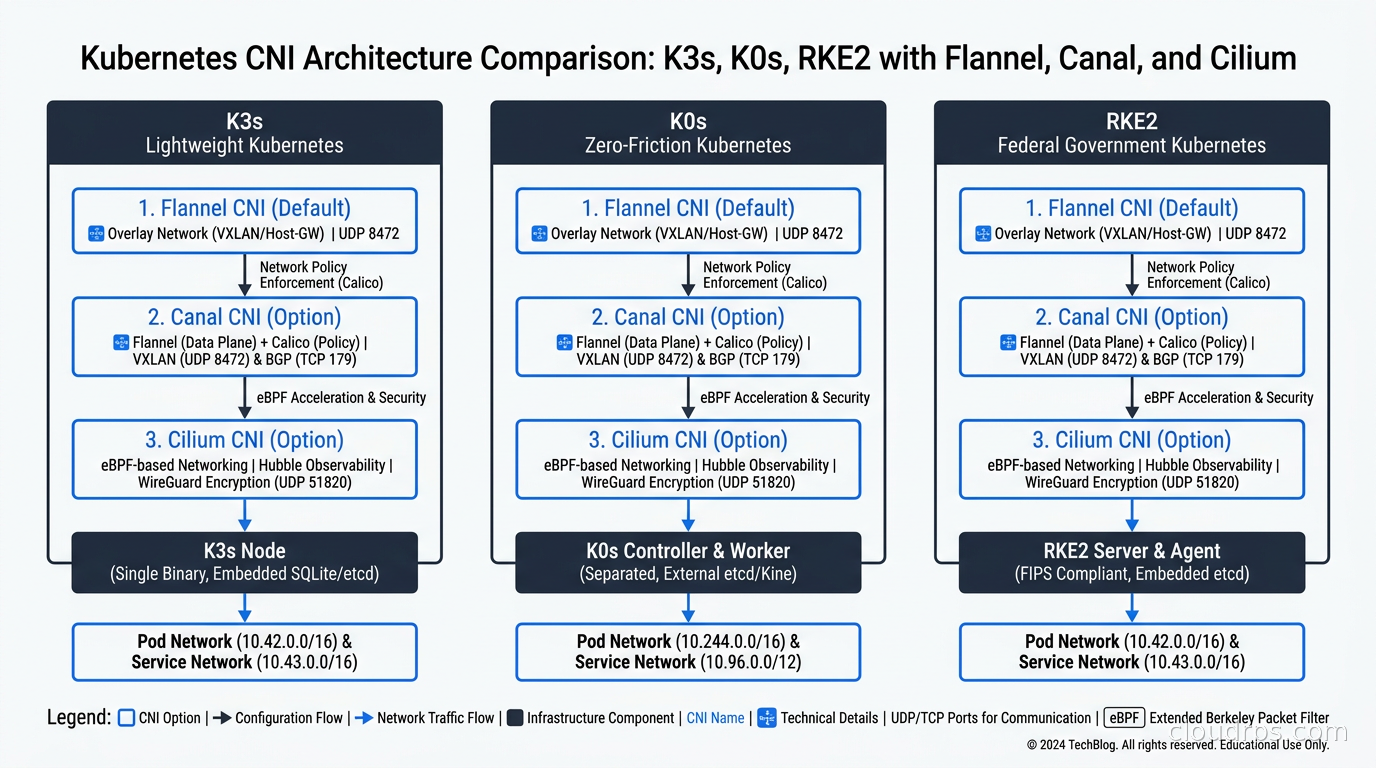
Your CNI choice is partially determined by your distribution choice. K3s gives you Flannel, which you may want to replace. K0s gives you nothing, which you must fill. RKE2 gives you Canal. In each case, there are good reasons to use Cilium as your CNI regardless of the distribution’s default.
Cilium’s eBPF-based networking eliminates the overhead of kube-proxy, adds native NetworkPolicy enforcement, and provides Hubble for network observability. For K3s deployments on reasonably capable hardware, replacing Flannel with Cilium is a worthwhile investment. For K0s deployments, Cilium is probably the default CNI I would recommend unless you have a specific reason to choose differently. For RKE2, Canal works fine, but teams that want the Hubble observability layer and eBPF performance often switch to Cilium there too.
Storage: The Blind Spot
One area where all three lightweight distributions leave teams on their own is persistent storage. K3s’s local path provisioner is fine for development but unacceptable for production workloads that need resilience. K0s and RKE2 ship with no default storage provisioner.
Your options are: use an existing storage system (NFS, iSCSI, Ceph) with the appropriate CSI driver; deploy Longhorn (open source, CNCF sandbox, works well with all three distributions and is the Rancher-recommended choice for K3s and RKE2); or use Rook/Ceph if you want the full Ceph storage platform managed by Kubernetes operators.
Longhorn is simpler operationally but has higher overhead and lower throughput than Ceph. For edge deployments and small on-prem clusters, Longhorn is usually the right call. For larger clusters where you need predictable performance and you have the operational capacity to run Ceph, Rook/Ceph is a more capable platform.
The VMware Exodus Context
A significant driver of K3s, K0s, and RKE2 deployments in 2025 and 2026 has been the VMware exodus as teams migrate away from Broadcom’s licensing model. Teams that previously ran Kubernetes inside VMware with vSphere-integrated components have been forced to rethink their infrastructure stack. For many of them, the path forward is not managed Kubernetes but rather Kubernetes on bare metal or on Proxmox and XCP-ng hosts.
In that context, RKE2 on top of Proxmox has become a common architecture. You get the familiar hypervisor-level isolation from Proxmox, CIS-hardened Kubernetes from RKE2, and Rancher as the management plane. The operational model feels familiar to VMware administrators while delivering modern Kubernetes capabilities.
K3s on bare metal is also popular in this migration context, particularly for teams that want to simplify dramatically rather than replicate a complex VMware architecture in a different tool.
Upgrade and Lifecycle Considerations
All three distributions handle upgrades differently, and this matters more than teams typically realize when evaluating distributions upfront.
K3s ships a system upgrade controller that can automate rolling upgrades of K3s versions. The upgrade path for etcd-backed clusters is straightforward. For SQLite-backed clusters, the single server constraint makes rolling upgrades more careful.
RKE2 integrates with Rancher for upgrade management, which is elegant if you are already in the Rancher ecosystem. Outside of Rancher, RKE2 supports rolling upgrades through its own upgrade mechanism. The CIS hardening configuration is versioned and must be manually updated when new CIS benchmark versions are released.
K0s uses k0sctl for upgrades. The tooling is straightforward: update the k0sctl manifest with the new version and apply. The upgrade is rolling, with control plane components updated before workers.
For teams managing more than about five clusters, the Kubernetes multi-cluster management patterns become critical regardless of which distribution you choose. K3s has strong Rancher Fleet integration for this purpose. K0s has less opinionated tooling here and relies more on GitOps patterns.
Making the Call
My honest recommendation, distilled after deploying all three across dozens of environments:
If you are at a small company or building edge infrastructure and you want something that installs in five minutes and works: K3s with embedded etcd from day one. You will be happy with it.
If you are in a regulated industry or running government workloads and someone will audit your Kubernetes configuration: RKE2. The CIS hardening default will save you weeks of work and the audit conversation will be much shorter.
If you have a team with deep upstream Kubernetes expertise, a strong preference to bring your own components, and an on-prem environment where you want minimal distribution opinions: K0s. The k0sctl tooling is excellent and the upstream fidelity reduces surprises.
If none of these criteria resonate and you are on a hyperscaler: use their managed Kubernetes service. The managed Kubernetes platform comparison between EKS, GKE, and AKS applies here, and any of them will save you operational overhead compared to self-managed clusters.
The wrong answer is to pick based on which one has more GitHub stars or a more compelling blog post. The right answer is to match the distribution’s defaults and operational model to your specific environment. All three of these tools are battle-tested, all three are actively maintained, and all three will run Kubernetes reliably. The choice is about fit, not quality.
The official documentation for each distribution is at docs.k3s.io, docs.k0sproject.io, and docs.rke2.io. Version-specific details, hardware requirements, and FIPS compliance documentation should be verified against those primary sources rather than any secondary comparison guide, including this one.
Get Cloud Architecture Insights
Practical deep dives on infrastructure, security, and scaling. No spam, no fluff.
By subscribing, you agree to receive emails. Unsubscribe anytime.