
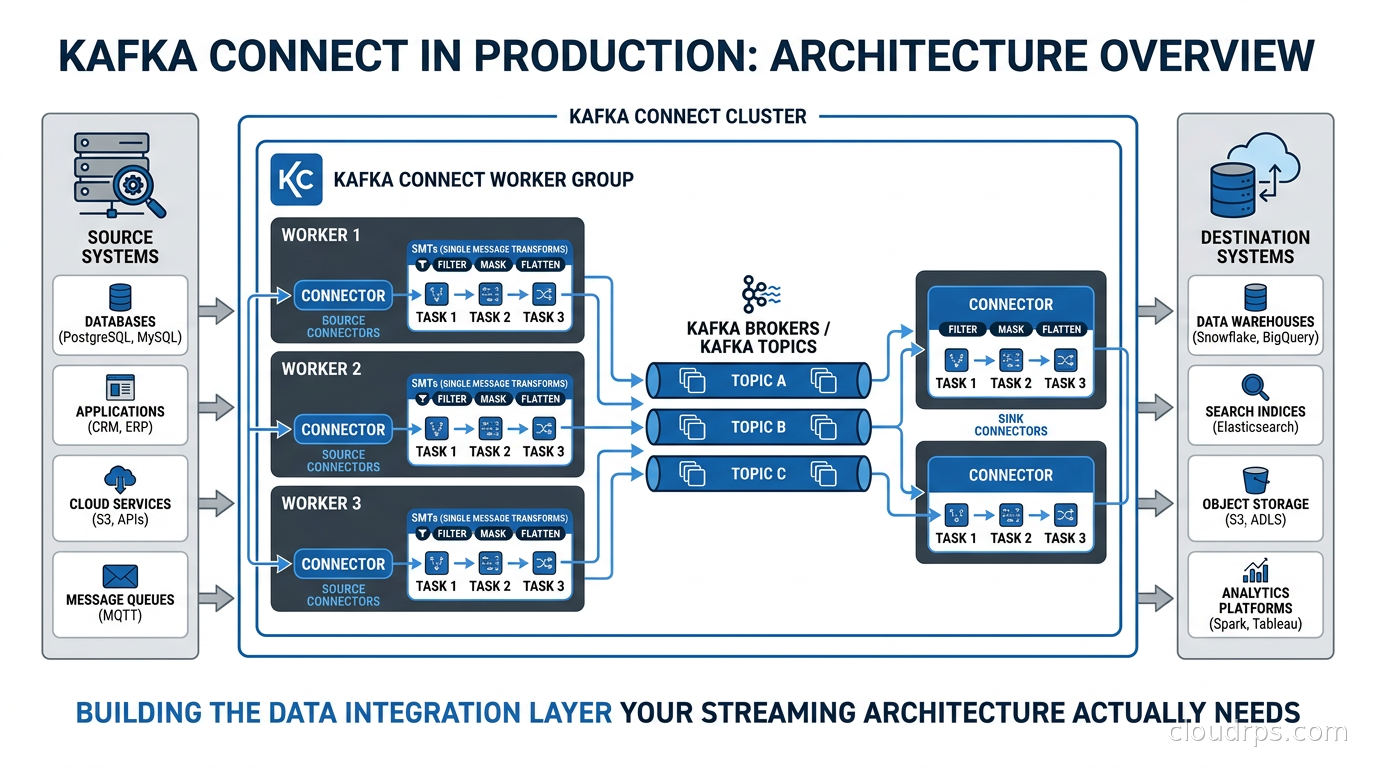
Every team that gets serious about Apache Kafka eventually lands on the same question: how do you actually get data into and out of Kafka without writing the same boilerplate producer and consumer code for the fifteenth time? The answer, in most production environments, is Kafka Connect. It is the part of the Kafka ecosystem that gets the least blog coverage relative to how much operational pain it causes.
I have been running Kafka in production for the better part of my twenty years as a principal cloud architect. Kafka Connect is one of those tools where the first deployment feels trivially easy and then two years later you are debugging offset commit failures at 2am and wondering where your life went. This article is the guide I wish I had had before that 2am call.
What Kafka Connect Is (and Is Not)
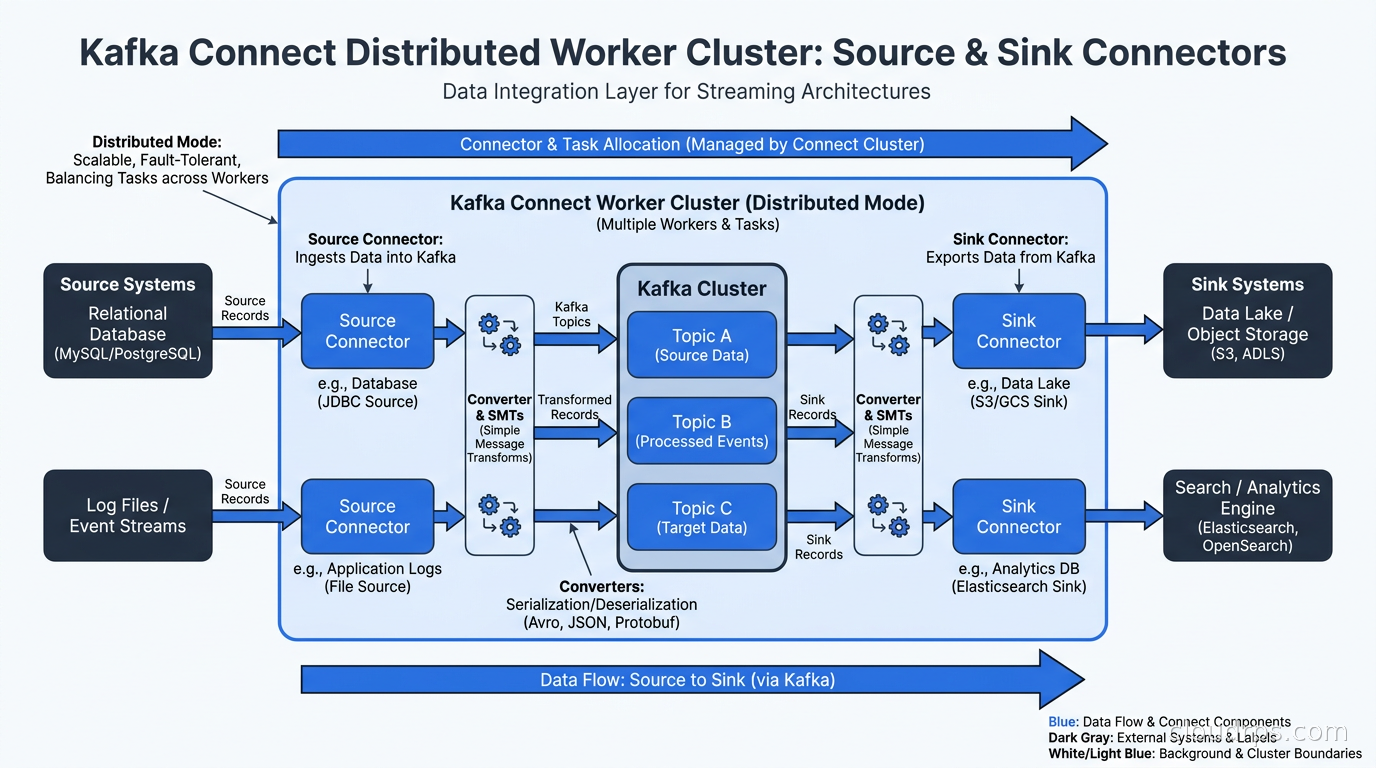
Kafka Connect is a framework for moving data between Kafka and external systems at scale. It is not a message bus, it is not a stream processor, and it is not a replacement for Kafka Streams or Flink. Connect is specifically about data integration: reliably reading from a source system and writing records into Kafka topics, or reliably reading from Kafka topics and writing records into a sink system.
The abstraction is clean. You configure connectors using JSON or properties files, you deploy them to a Connect cluster, and the framework handles parallelism, offset tracking, error handling, retries, and restart behavior. In theory, you swap out connectors the way you swap out dependencies. In practice, connector quality varies enormously, and the framework gives you enough rope to hang yourself in interesting ways.
Connect is built into the Apache Kafka distribution. You do not install a separate binary. You run connect-distributed.sh or connect-standalone.sh pointing at a properties file, and workers start. The workers load connector plugins from a configurable plugin path, register themselves via internal Kafka topics, and coordinate through a group protocol similar to consumer groups.
The Core Architecture
A Kafka Connect deployment has three main concepts worth understanding deeply: workers, connectors, and tasks.
Workers are the JVM processes that execute connector code. In distributed mode, multiple workers form a cluster. They elect a leader, distribute connector assignments across the group, and handle rebalancing when a worker joins or leaves. Workers communicate via internal Kafka topics, specifically the config topic, offset topic, and status topic. This is elegant because Kafka itself becomes the coordination and state storage layer, but it also means your Connect cluster’s health is coupled to your Kafka cluster’s health.
Connectors are the logical configuration units. A connector defines where to read from or write to, what credentials to use, which topics are involved, and how many tasks to run in parallel. A connector is just configuration: it does not do any actual work. Connectors come in two flavors: source connectors that pull data into Kafka, and sink connectors that push data from Kafka into external systems.
Tasks are where work actually happens. A connector with tasks.max=4 will generate up to four tasks, each processing a subset of the work. For a JDBC source connector reading from a database with ten tables, you might get ten tasks each responsible for a single table. For an S3 sink connector writing to object storage, tasks handle partition assignments from the source topic. Tasks run inside workers, and the framework distributes tasks across available workers.
The REST API is how you manage everything. POST /connectors to deploy a new connector configuration, GET /connectors/my-connector/status to check health, PUT /connectors/my-connector/config to update configuration without deleting state, DELETE /connectors/my-connector to remove it. Most teams wrap this API with Terraform or a custom control plane, because managing twenty connectors via raw curl calls in production becomes untenable fast.
Source Connectors in Practice
Source connectors read from an external system and produce records into Kafka topics. The two patterns I see most often are database CDC via JDBC polling, and change data capture via log-based replication.
JDBC Source Connector is the blunt instrument. It runs SQL queries against your database on a configurable interval, finds rows where a timestamp or incrementing ID is greater than the last seen value, and publishes them to Kafka. Simple to configure, no database-side setup required, available for any JDBC-compatible database. The problem is it is not real CDC. You will miss deletes. You will have polling lag. Under high write load, you will put significant read pressure on your source database at exactly the wrong moments. I deployed JDBC Source at a fintech company in 2016 and we spent three months chasing the bug where our downstream systems showed balances that were always thirty seconds stale. The answer was polling interval. We moved to log-based CDC and the problem evaporated.
Debezium connectors are the right answer for real CDC. Debezium integrates with database binary logs (PostgreSQL WAL, MySQL binlog, MongoDB oplog, Oracle LogMiner) and captures every insert, update, and delete as a structured event. When you combine Debezium with Kafka Connect, you get a production-grade CDC pipeline that can reliably replicate a database with millions of rows per day with subsecond latency and exactly-once semantics at the source side. I have written about this in detail in the change data capture with Debezium guide, but the short version is: if you are using JDBC polling for anything where deletes matter, stop and switch to Debezium.
Other source connectors worth knowing: Confluent’s S3 Source (for reprocessing data from object storage), the HTTP Source Connector (polling REST APIs into Kafka, useful for webhook aggregation), and MQ connectors for IBM MQ, RabbitMQ, and ActiveMQ migrations.
Sink Connectors and the Delivery Guarantee Problem
Sink connectors read from Kafka topics and write to external systems. This is where exactly-once semantics get philosophically interesting.
Kafka supports exactly-once end-to-end when all participants cooperate, but many sink targets do not support idempotent writes. Writing a record twice to Elasticsearch results in a document update (usually harmless). Writing a record twice to a relational database with no unique constraint results in a duplicate row (almost always harmful). Writing a record twice to an S3 file results in… it depends on whether you are using atomic rename or multipart upload, which depends on your S3 sink configuration.
The Kafka Connect exactly-once feature, introduced in Connect 3.3, uses Kafka’s transactional producer API to make source-to-Kafka delivery exactly-once. For sink connectors, it requires the sink to support transactional writes, and most external systems do not. The practical implication: design your downstream systems to be idempotent. Use upsert semantics in your database sinks. Generate deterministic IDs based on the Kafka record key. Accept that some systems will process at-least-once and build deduplication logic into your consumers.
For sinks I deploy in production: the S3 Sink Connector (the single most common data lakehouse ingestion path), the JDBC Sink Connector (for database synchronization), the Elasticsearch Sink Connector, and the BigQuery Sink Connector. The OpenSearch/Elasticsearch sink connector configuration has a gotcha that I have hit multiple times: the behavior.on.malformed.documents setting defaults to FAIL, which means a single schema-mismatched document will pause your entire connector. Set it to WARN with a dead letter queue configured, or your pipeline will pause silently at 3am.
Single Message Transforms: Power and Limits
Single Message Transforms (SMTs) are the most misunderstood feature in Kafka Connect. They let you modify records as they flow through a connector, applying transformations inline without deploying a separate stream processing job. You chain SMTs in the connector configuration using transforms and transforms.*.type properties.
The built-in transforms cover the operations you hit every day. ReplaceField drops or renames fields. MaskField replaces sensitive values with zeros or null. InsertField adds a partition offset, timestamp, or static value. ExtractField pulls a nested field to the top level. TimestampConverter converts between epoch milliseconds and ISO 8601 strings. Filter drops records based on a predicate. RegexRouter and TimestampRouter change the destination topic name dynamically.
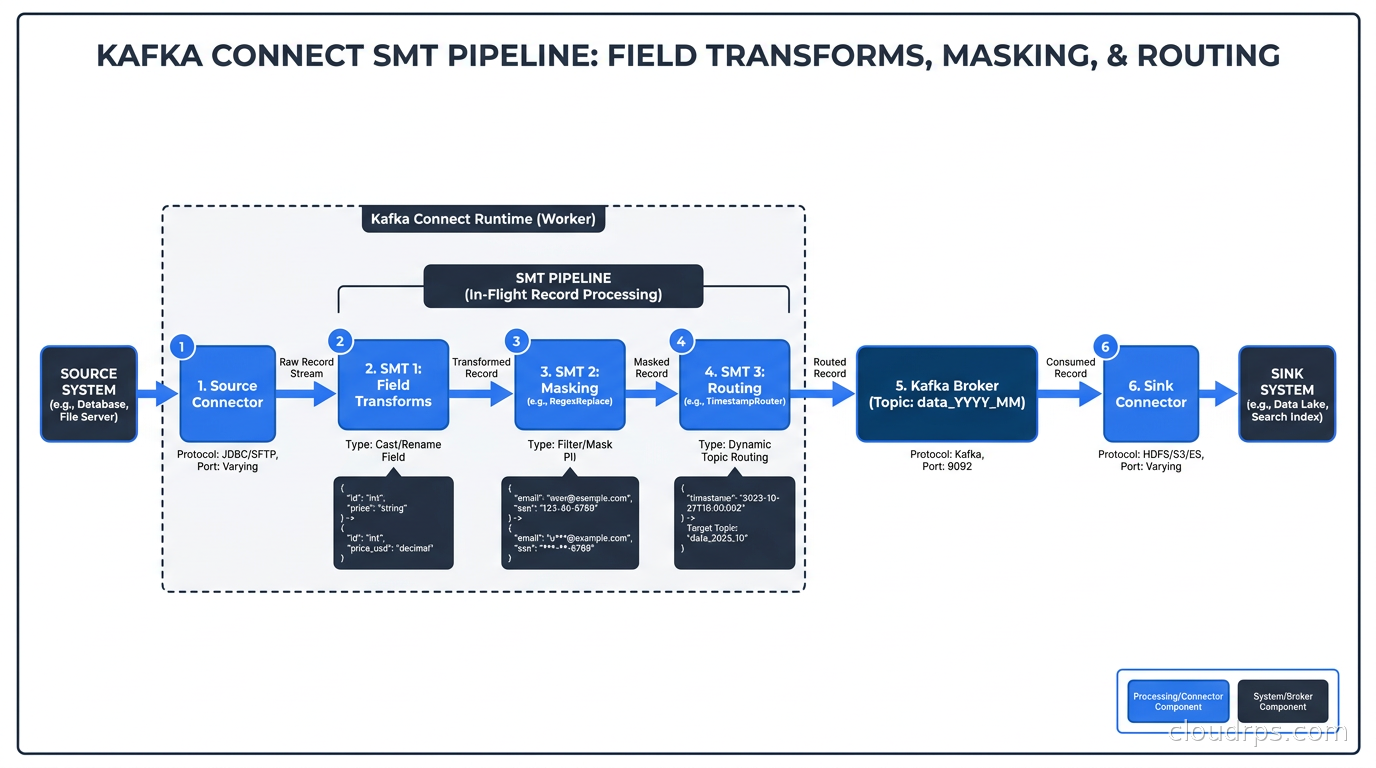
Here is the pattern I use for deploying a Debezium source connector with schema-aware routing into a data lake. The connector captures PostgreSQL WAL. One SMT extracts only the after envelope (the post-update record state) and discards the before image and metadata. A second SMT converts the Debezium change type header to a string field in the payload. A third SMT routes records to different topics based on the table name using a regex. All of this happens at zero added latency inside the Connect worker, with no additional Flink or Kafka Streams job required.
The limit of SMTs is that they operate on one record at a time. You cannot join streams, aggregate over time windows, or do stateful computation. The moment your transformation requires looking at more than one record, you need a proper stream processor. I cover the right tools for that in the Apache Flink in Production guide. SMTs are for stateless field manipulation, routing, and masking. Use them for that and nothing more.
Custom SMTs are straightforward to write. Implement the Transformation interface, add your JAR to the plugin path, and reference it by class name in the connector config. I have written custom SMTs to handle proprietary timestamp formats, to add company-specific audit fields, and to perform lightweight schema validation before records reach the Schema Registry. Keep custom SMTs simple and stateless, test them with unit tests against ConnectRecord objects, and treat them like production code because they are.
Distributed Mode vs Standalone: A Clear Recommendation
Standalone mode runs one worker process with all state stored on the local filesystem. It is useful for local development and edge deployments. It is not suitable for production. If the worker dies, your connectors stop and you lose in-flight offset information.
Distributed mode stores all state in Kafka topics. Workers are stateless. You can kill a worker and another picks up its tasks within a few seconds. You can rolling restart the entire cluster to upgrade connector versions. You can scale horizontally by adding workers when connector load exceeds capacity. Run distributed mode in production. Always. Even if you only have one machine, run distributed mode, because it gives you a clear upgrade path and keeps your offsets safe.
The configuration topics created by distributed Connect are internal Kafka topics you should not mess with unless you know exactly what you are doing. The config topic (connect-configs by default) stores connector configurations as compacted topics. The offsets topic (connect-offsets) tracks source connector progress. The status topic (connect-statuses) records connector and task lifecycle events. Increase replication factor on these topics to three in any production deployment. Losing the offsets topic means restarting all your source connectors from the beginning, and if you are ingesting a year of CDC history that is a very bad day.
Schema Management and the Registry Integration
Kafka Connect has built-in Converters that handle serialization. The JSON Converter works out of the box with no external dependencies, but it embeds the schema in every message payload, which is wasteful at scale. The Avro Converter (or Protobuf Converter) serializes records against schemas stored in a Schema Registry, dramatically reducing message size and enabling schema evolution with compatibility enforcement.
Using schema-aware converters with Kafka Connect is the right default for any production data platform. Source connectors automatically register schemas for the topics they write to. Sink connectors use the registry to deserialize incoming records. Schema evolution, backward compatibility enforcement, and schema governance all come for free. I wrote a detailed breakdown of production Schema Registry configuration in the Kafka Schema Registry guide.
The one operational gotcha with Avro converters: the auto.register.schemas setting. In development it defaults to true, meaning connectors register whatever schema they see without asking. In production, set it to false for sink connectors and manage schema registration as a controlled operation. An uncontrolled schema change pushed by a source connector can break downstream consumers immediately.
Operational Patterns for Production Deployments
Running Kafka Connect well in production requires instrumentation and runbooks. Here is what I monitor and what I do when the numbers go wrong.
Lag on the source side. Source connectors maintain offsets in the offsets topic. For JDBC source connectors, the relevant metric is offset.current versus the actual row count in your source table. For Debezium connectors, track the replication slot lag on your PostgreSQL source, available via pg_replication_slots. Lag above a configurable threshold means your connector is not keeping up. Common causes: insufficient tasks.max, source database throttling the replication connection, or Connect worker resources saturated.
Consumer group lag on the sink side. Sink connectors are Kafka consumers. Monitor the consumer group lag for each sink connector’s group ID using standard Kafka consumer group tools or your observability platform. If lag is growing, your sink is slower than your source, which is the most common production problem. Solutions: increase tasks.max if the sink supports parallel writes, increase consumer.max.poll.records to let the connector batch more records per poll, or add write batching if your sink connector supports it.
Task failures and the FAILED state. A task in FAILED state stops processing entirely. Connect does not automatically restart failed tasks by default. Set errors.retry.timeout to give transient failures time to self-heal. Set errors.tolerance=all with a dead letter queue topic to route unparseable records out of the main path instead of halting everything. Check task failures via GET /connectors/{name}/tasks/{id}/status and automate remediation: a simple monitoring loop that restarts FAILED tasks via POST /connectors/{name}/tasks/{id}/restart saves you a lot of 3am pages.
Connector rebalancing storms. If workers are frequently joining and leaving the cluster, every rebalance redistributes all tasks across the remaining workers. This is expensive and causes brief processing gaps. In Kubernetes deployments, use a PodDisruptionBudget that limits voluntary disruptions to one worker at a time. Set scheduled.rebalance.max.delay.ms (Connect’s equivalent of group.rebalance.timeout) high enough that a transient worker restart does not trigger a full rebalance.
Running Connect on Kubernetes
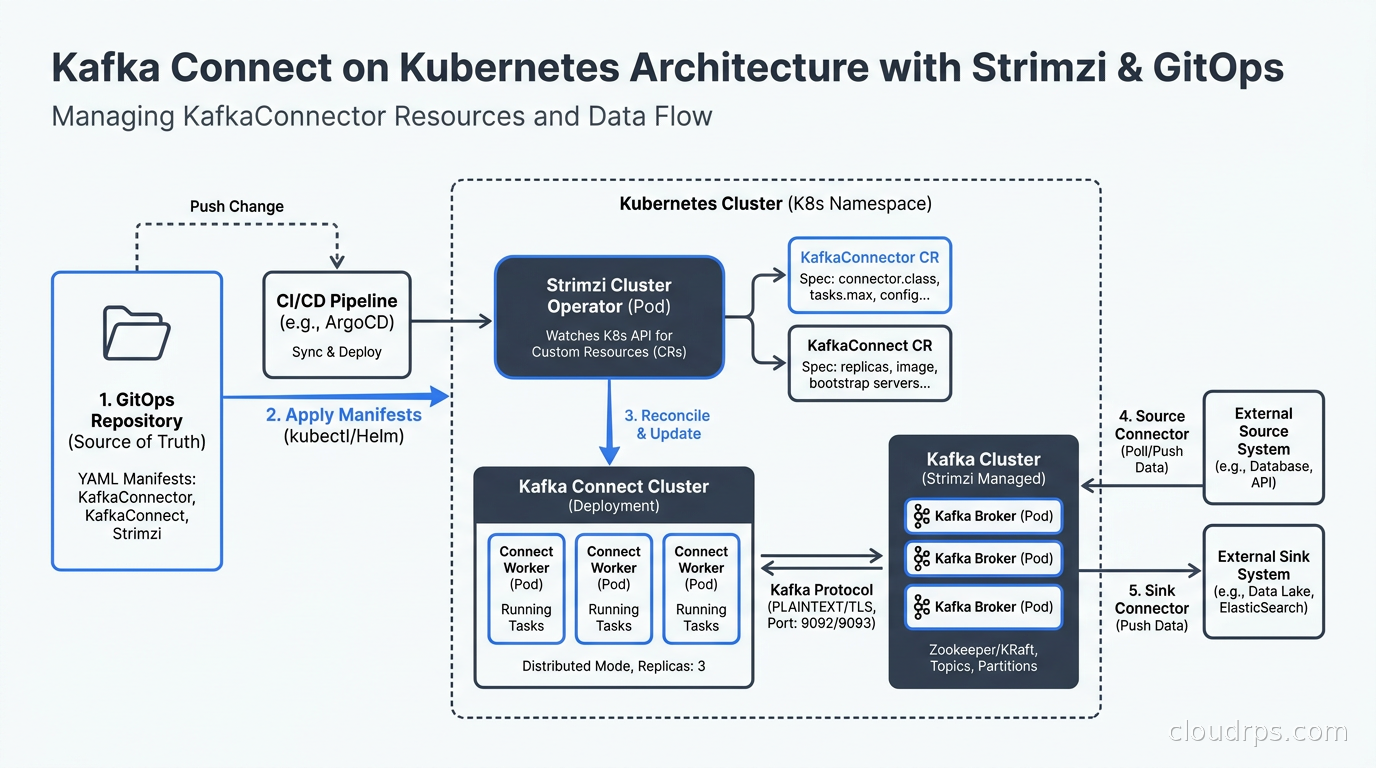
Most teams run Kafka Connect on Kubernetes today, either with the Confluent Platform Operator, the Strimzi Kafka Operator, or plain Deployments with the upstream Kafka distribution. I prefer Strimzi’s KafkaConnector and KafkaConnect custom resources because they treat connector configuration as Kubernetes-native objects, which means GitOps workflows apply cleanly.
The Strimzi approach lets you store connector configurations in Git, apply them with kubectl or ArgoCD, and get automatic reconciliation. A KafkaConnector CRD looks like a standard Kubernetes object with connector properties in the spec. This is a significant operational improvement over managing connector configs via REST API calls in CI/CD scripts, which breaks down once you have more than a handful of connectors. The Kubernetes and GitOps deployment patterns for Kafka article covers the Strimzi operator lifecycle in more detail.
One deployment pattern I have settled on: run Connect workers as a separate Deployment from Kafka brokers, with a dedicated node pool in Kubernetes. This is because connector workloads can be CPU and memory intensive (especially Debezium connectors holding large transaction state), and you do not want connector activity to compete with broker resources. Size workers generously: 4 CPU and 8GB memory per worker as a starting point for moderate connector loads. Connect workers are largely IO-bound, not CPU-bound, so horizontal scaling matters more than vertical.
When to Replace Connect With Something Else
Kafka Connect is the right tool for connecting Kafka to external systems with standard connectors and simple inline transformations. It is not always the right tool.
If your transformations are stateful, use a stream processor. Flink, Kafka Streams, or RisingWave handle aggregations, joins, and windowing that Connect explicitly cannot do. A common pattern I see: teams try to use chained SMTs to do what is really a Flink job, end up with five custom SMT classes that nobody else can understand, and then have to rewrite it anyway.
If your source system does not have a production-quality Kafka Connect plugin, evaluate whether building a custom connector makes sense versus using a native producer client. Custom connectors have to handle offset management, task lifecycle, schema registration, and error handling correctly, which is more work than it looks. A well-written Kafka producer client can be easier to operate and audit than a connector built on top of the framework.
If you are running Kafka alternatives like Redpanda or AutoMQ, check connector compatibility carefully. Both support the Kafka Connect API, but connector compatibility at the plugin level varies. Some connectors use Kafka-specific internal APIs that are not exposed in Redpanda’s compatibility layer. Test before you commit. The Kafka alternatives comparison article covers what each alternative does and does not support at the ecosystem level.
The Connector Ecosystem
The connector ecosystem is the part of Kafka Connect that ages the fastest. Here is how I evaluate connectors before deploying them.
Check the GitHub repository for recent commits and open issues. A connector with no commits in eighteen months and fifty open bugs is a project that the maintainer has moved on from. Confluent Hub lists connectors with user ratings and download counts, which is a rough proxy for community adoption. Prefer connectors with active commercial backing (Confluent, Debezium/Red Hat, Lenses) for mission-critical pipelines. For less critical paths, community connectors from well-maintained projects are usually fine.
Read the connector’s documentation for exactly-once support, schema inference behavior, and error handling configuration. These three characteristics determine whether a connector is production-ready or a proof of concept with a connector wrapper around it.
Test connectors against your specific Kafka version and Schema Registry version before deploying to production. Connector plugins use internal Kafka APIs that occasionally change between minor versions. A connector that worked on Kafka 3.6 may fail in subtle ways on Kafka 3.8 due to a removed internal class. Add connector plugin testing to your CI/CD pipeline using Testcontainers to spin up ephemeral Kafka clusters.
Connecting to the Broader Data Platform
Kafka Connect is rarely the whole story. It is a layer in a larger data platform, and understanding how it connects to adjacent layers is what separates teams that use Connect effectively from teams that build brittle pipelines.
Source connectors feed data into topics that downstream Flink jobs, Kafka Streams applications, or consumer groups process. Those processed results may land in a data lakehouse like Apache Iceberg, documented in the Apache Iceberg and the data lakehouse guide, where analytics teams run SQL queries against them. The transformation work between raw CDC events and analytics-ready tables often belongs in dbt, covered in the dbt and modern analytics engineering guide.
The data pipeline orchestration layer, Airflow, Dagster, or Prefect, typically does not manage Kafka Connect directly. Connect runs continuously, not as a scheduled job. Where orchestration tools interact with Connect is in bootstrap workflows: running a backfill connector job for initial load, then switching to an incremental connector for ongoing replication. The data pipeline orchestration comparison covers how to wire these tools together.
Production Checklist
Before going live with Kafka Connect in production, validate these.
The three internal topics (config, offsets, status) have replication factor of at least three and are compacted. Workers are running in distributed mode with at least two workers for availability. Connector configurations are stored in version control and applied via an automated process, not manual REST API calls. Dead letter queues are configured for all connectors, with alerts on DLQ consumer group lag. Task failure monitoring with automatic restart is in place. Schema Registry is configured with compatibility enforcement and auto.register.schemas=false for sink connectors. A tested runbook exists for restarting an entire Connect cluster after a Kafka broker failure.
Kafka Connect is not glamorous. It does not come up in architecture reviews the way Kafka Streams or Flink does. But it is the layer that moves data between every system in your organization and Kafka, and if it breaks, everything downstream breaks with it. Treat it like the critical infrastructure it is: instrument it carefully, give it appropriate resources, and build the operational knowledge in your team before you need it at 2am.
Have you hit offset management bugs or connector rebalancing issues in production? The Debezium and CDC deep-dive covers the database-side of what Kafka Connect handles on the Kafka side.
Get Cloud Architecture Insights
Practical deep dives on infrastructure, security, and scaling. No spam, no fluff.
By subscribing, you agree to receive emails. Unsubscribe anytime.