
I have a story I tell whenever a team asks me to help debug why their Kafka pipeline is falling apart on deploy day. It always starts the same way: they are doing a rolling restart of ten consumer instances, expecting it to be smooth, and instead they watch consumer lag explode to several hundred thousand messages while their ops channel lights up. By the time the restart finishes, they have caught up, but they burned twenty minutes and made the on-call engineer hate them.
The culprit is almost always the classic consumer group rebalancing protocol doing exactly what it was designed to do: stopping the entire group, redistributing every partition, and starting over. After twenty years working with distributed messaging systems, I can say this is one of those failure modes that looks like a bug but is actually intended behavior that nobody warned you about.
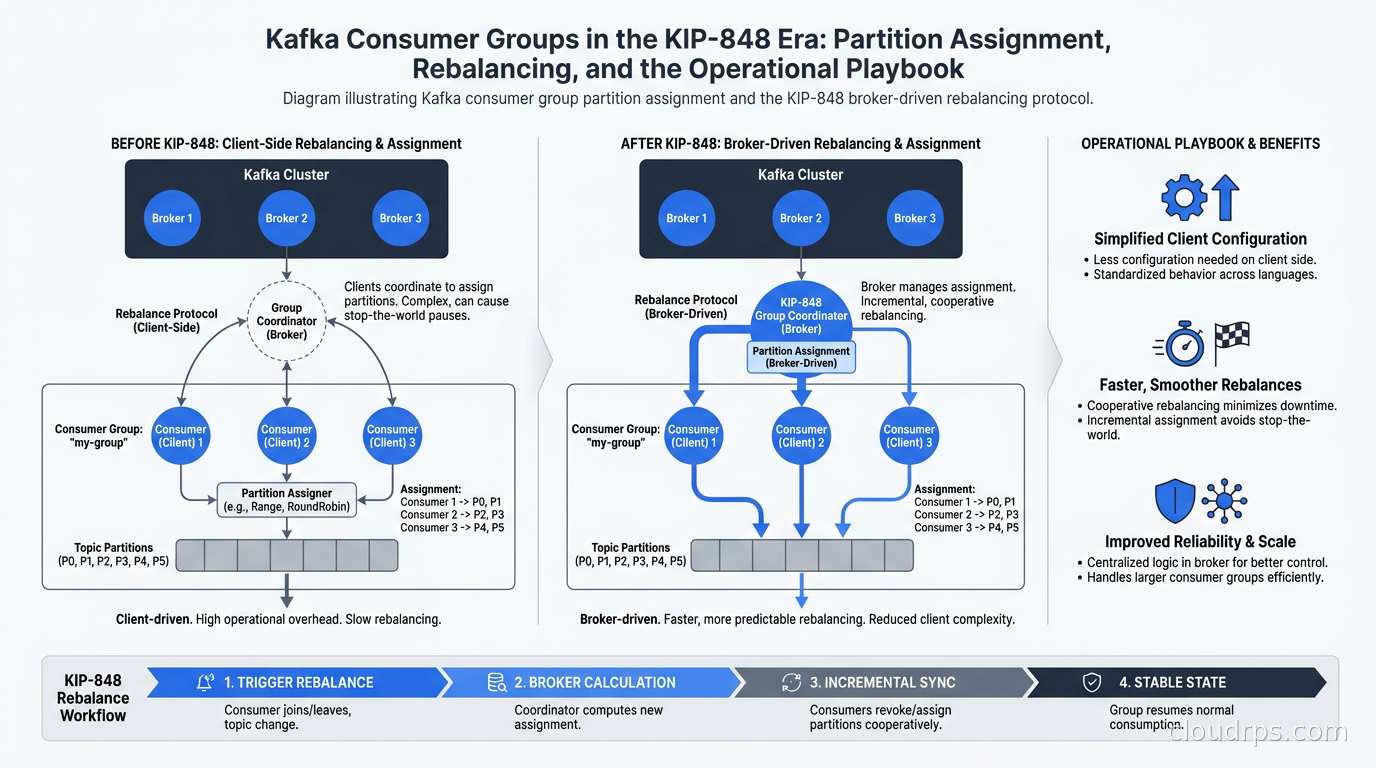
Kafka 4.0, released in March 2025, made a major change here: KIP-848 reached general availability, shipping a fundamentally different rebalancing approach where the broker drives coordination and only the partitions actually moving are affected. This article is the deep dive I wish had existed when KIP-848 was landing: what the classic protocol does, why it hurts, what KIP-848 actually changes, how to migrate safely, and what your consumer group monitoring should look like in 2026.
Before I start, a note on scope: Kafka 4.0 also removed ZooKeeper entirely, and you should read that piece separately if you are still on a pre-4.0 cluster. The consumer group protocol and the metadata coordination layer are related but separate concerns. Here we focus on consumer groups.
What the Classic Consumer Group Protocol Actually Does
To understand why KIP-848 matters, you need a clear picture of how the classic protocol works. Most explanations hand-wave over the mechanics, which is why teams keep getting surprised.
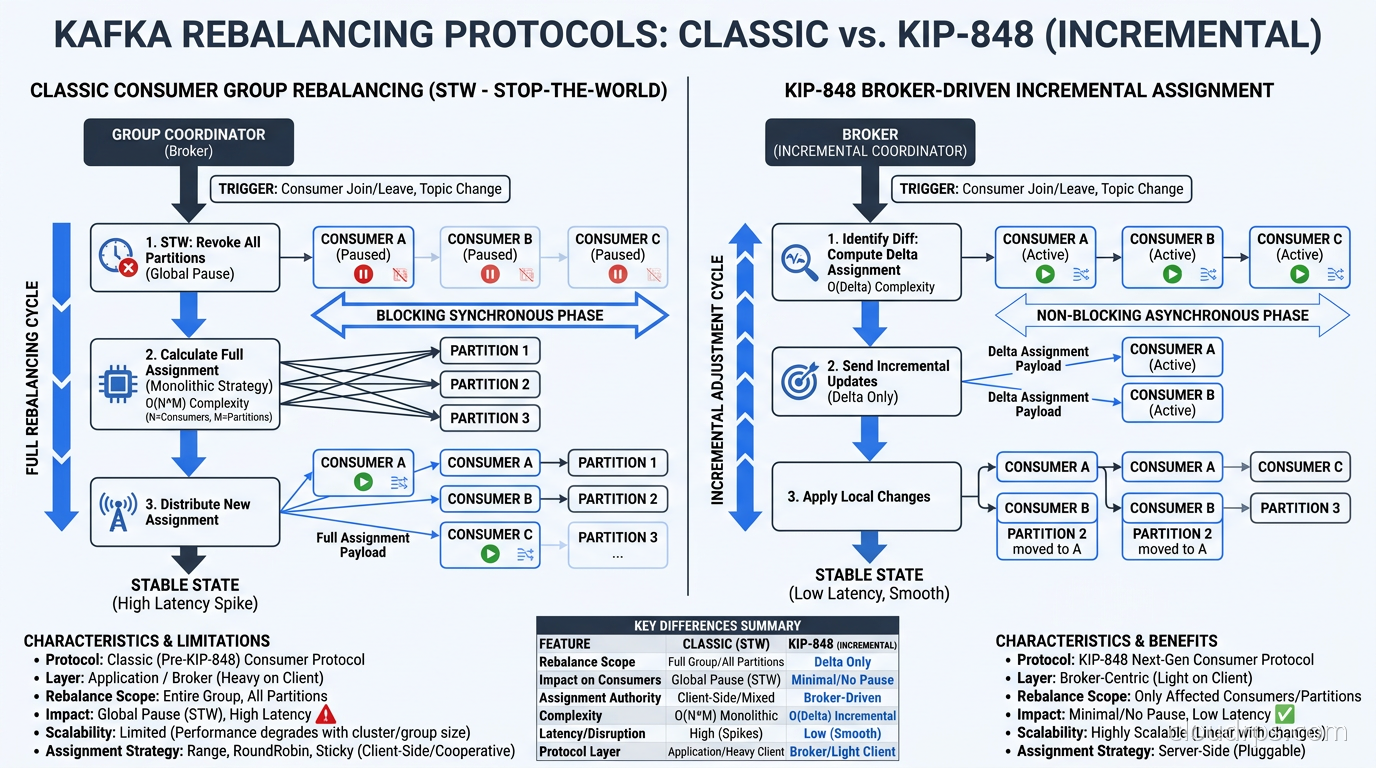
When a consumer group member joins, leaves, or loses its heartbeat, the group coordinator (a broker elected to own that group) triggers a rebalance. The protocol is client-driven: the coordinator instructs all current members to stop and rejoin. Every member calls the JoinGroup API. The leader (the first member to respond) receives the full member list and runs the partition assignment algorithm locally, then sends the assignment back through the coordinator via a SyncGroup call. Only after every member completes SyncGroup can any of them start consuming again.
This is a global barrier. If you have 50 consumers in a group and one of them is slow to rejoin (perhaps it was in the middle of a heavy processing batch), the other 49 sit idle waiting. During this window, consumer lag accumulates on every partition.
The practical consequences:
Rolling restarts amplify the problem. Each instance restart triggers a rebalance, so a ten-instance rolling restart can cause ten sequential global stops. If your processing is stateful (you maintain an in-memory aggregation or a local RocksDB state store), the redistribution is even more painful because state has to be rebuilt.
Uneven poll intervals cause spurious rebalances. The max.poll.interval.ms configuration sets the maximum time between poll() calls before the consumer is considered dead. If your message processing occasionally takes longer than this threshold (database write, external API call), the group coordinator evicts that member and triggers a rebalance, even though the consumer is alive and will come back.
Large groups get expensive. The JoinGroup/SyncGroup round-trip touches every member on every rebalance. At hundreds of consumers (common in large data platform teams sharing a Kafka cluster), this serialization becomes a bottleneck.
Partition Assignment Strategies: The Foundation You Need to Understand First
Before KIP-848, the assignment strategy was configured on the client via partition.assignment.strategy. Understanding these strategies is still relevant because they inform how you think about partition ownership, even under the new protocol.
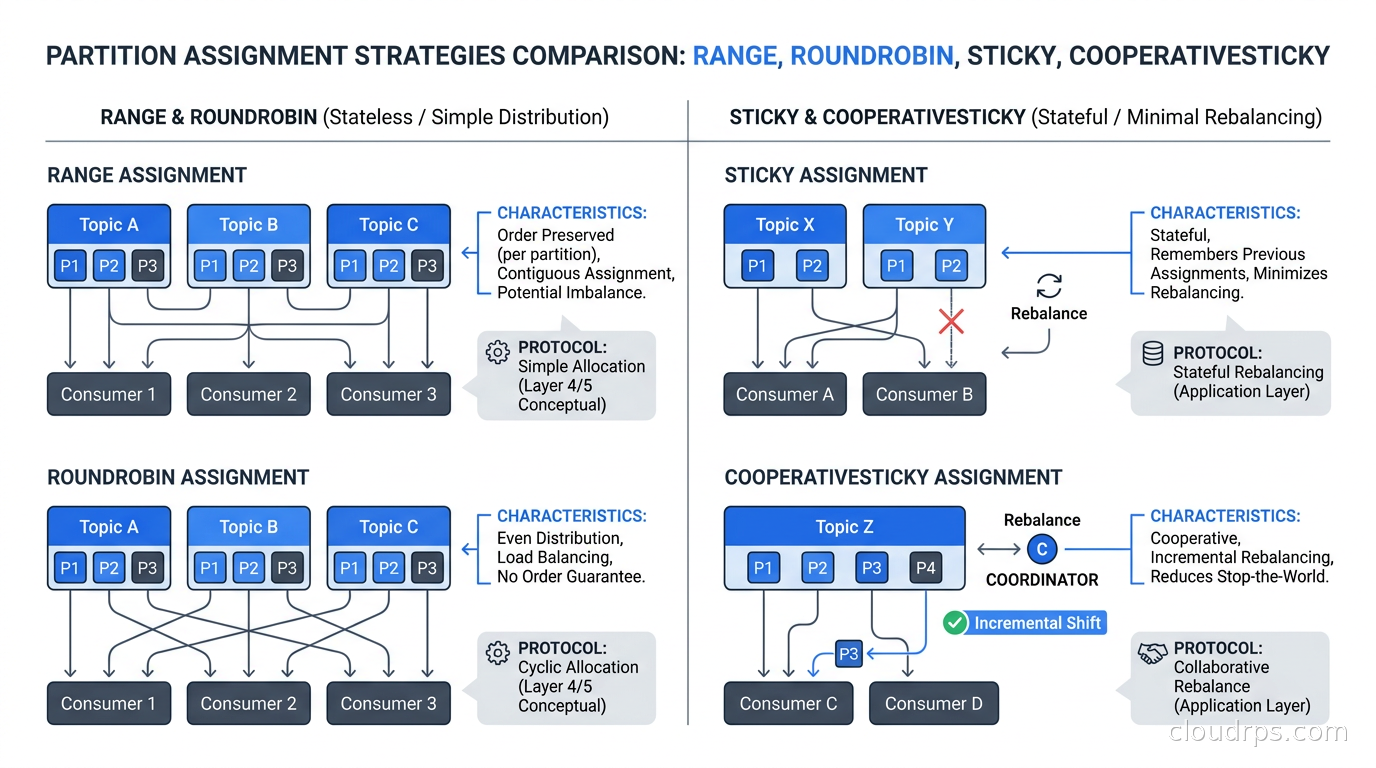
Range assignor is the default in most older clients. It sorts topics alphabetically and assigns contiguous ranges of partitions to each consumer. This is simple but creates uneven distribution when the number of partitions is not divisible by the number of consumers, and it assigns the same relative partitions across all topics, which can create hot consumers.
RoundRobin assignor distributes partitions evenly across all consumers regardless of topic. Better balance, but partition ownership changes on every membership change because the algorithm re-sorts and re-assigns from scratch.
StickyAssignor was the cooperative-era predecessor: it tries to preserve existing assignments as much as possible during rebalances. A consumer coming back to the group after a restart will likely get back the same partitions it had before, which matters for stateful processing. However, it still participates in the global barrier: all consumers stop, assignments are computed, then all consumers restart.
CooperativeStickyAssignor was the first real improvement, landing in Kafka 2.4 and becoming the recommended strategy before KIP-848. It runs rebalancing in two phases. In the first phase, only the partitions that actually need to move are revoked. Other partitions stay assigned and keep getting processed. In the second phase, the revoked partitions get reassigned. This avoids the full stop-the-world, but it is still client-driven and still requires all members to participate in both phases.
If you are on Kafka 3.x today, using CooperativeStickyAssignor is the right call. It is genuinely better than the others. On Kafka 4.0+, you can go further with KIP-848.
KIP-848: What Actually Changed
The KIP-848 consumer group protocol (referred to internally as the “consumer” protocol, versus the legacy “classic” protocol) makes a fundamental architectural shift: it moves assignment logic from clients to the broker.
In the classic model, one elected consumer (the group leader) runs the assignment algorithm and sends results back through the coordinator. The coordinator is just a pass-through for assignment data. In the KIP-848 model, the broker’s group coordinator owns the assignment entirely. Consumers simply tell the coordinator what topics they want to subscribe to, and the coordinator decides who gets what.
This changes the rebalancing dynamic completely. Because the coordinator has full visibility into the group at all times, it can make incremental changes without calling a global meeting. When a new consumer joins, the coordinator identifies the partitions to transfer and sends targeted revoke and assign instructions only to the affected members. Consumers that are not involved in the change keep consuming without interruption.
The session heartbeat model also changes. In the classic protocol, consumers send heartbeats to keep their session alive. In KIP-848, the heartbeat mechanism is restructured so that consumers send heartbeat requests and receive responses that can carry new assignment information. The session timeout configuration moves from the client to the broker: instead of setting session.timeout.ms in your consumer config, the broker controls it via group.consumer.session.timeout.ms and group.consumer.heartbeat.interval.ms.
This is one of the migration gotchas: some configurations that lived in your consumer properties file no longer apply under the new protocol, and they need to be set at the broker level instead.
Kafka 4.2, released in February 2026, is the current stable release and has had several quarters for the KIP-848 implementation to mature in production environments. If you are on Kafka 4.x, KIP-848 is GA and production-ready. If you are on Amazon MSK, verify that your MSK version has been updated to Kafka 4.x before attempting to enable it.
Migrating from Classic to Consumer Protocol
Enabling KIP-848 per consumer requires one config change:
group.protocol=consumer
That is it on the client side. The broker needs to be running Kafka 4.0+ for this to work. If you set this config against an older broker, the consumer will fall back to the classic protocol automatically.
However, there are some migration details that will bite you if you skip the planning:
Groups must be empty to switch protocols. A consumer group cannot have members using both the classic and consumer protocol simultaneously. The migration path for a live group is a rolling switch: drain all consumers out of the group, restart with the new config, and let the group repopulate. In practice this means you either accept a brief processing pause or you route to a new consumer group name and run parallel groups during the transition.
Remove unsupported client-side configs. The following configurations are not used in the new protocol: partition.assignment.strategy, session.timeout.ms, and heartbeat.interval.ms. They are not errors to leave in place (Kafka will ignore them), but leaving them creates confusion because the values you set there are meaningless under KIP-848. Clean them out to avoid future confusion.
Broker-side session timeout defaults. The defaults for group.consumer.session.timeout.ms and group.consumer.heartbeat.interval.ms at the broker are reasonable for most workloads, but if you had non-default session timeouts under the classic protocol because your processing can be slow (batch jobs, external API calls), you need to adjust the broker config to compensate.
max.poll.interval.ms still lives on the client. This one does NOT move to the broker. If your processing can exceed the default of 300 seconds (five minutes), you still configure this on the consumer directly. This is the parameter that controls how long the consumer can be between poll() calls before the coordinator evicts it.
The client libraries also need to support KIP-848. As of mid-2026, the Java client (included in the Kafka 4.x distribution), Python librdkafka-based clients (confluent-kafka-python at recent versions), and the .NET client all support it. Check your specific client and version before assuming it is available.
Consumer Lag: The Metric That Actually Matters
Getting rebalancing right eliminates one source of consumer lag spikes. The other sources are throughput mismatches, slow consumers, and partition imbalance. Lag monitoring is how you catch these before they become incidents.
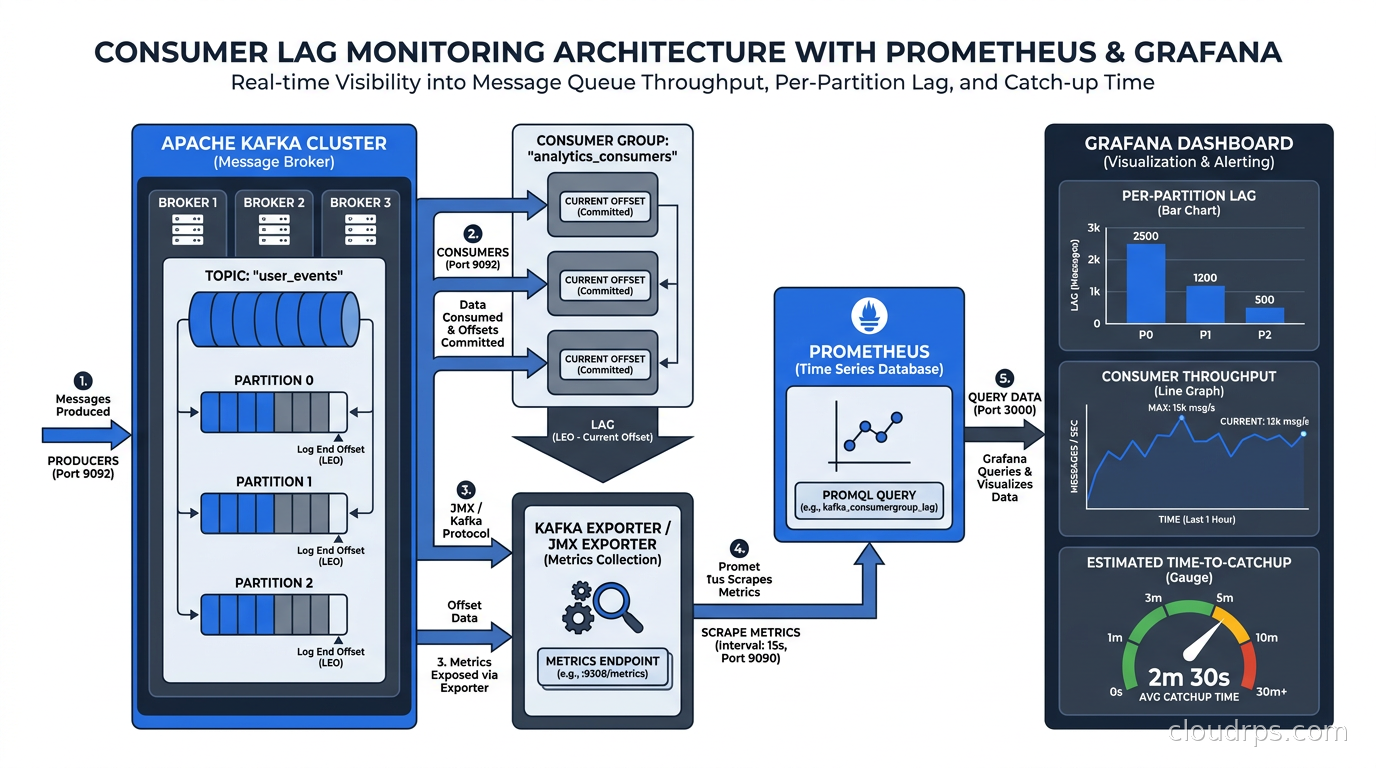
Consumer lag is the difference between the latest offset on a partition and the committed offset for your consumer group. A lag of zero means the consumer is keeping up. Growing lag means the consumer is falling behind the producers.
The challenge with lag is that the raw metric is noisy and context-dependent. A lag of 100,000 messages on a topic receiving 500 messages per second is a twenty-minute delay: serious. The same lag on a topic receiving 10 messages per second is over two hours behind: an incident. What matters is lag combined with partition throughput, which gives you estimated time to catch up.
For Kafka monitoring in 2026, the standard stack is:
kafka-consumer-groups.sh (the CLI tool bundled with Kafka) for ad-hoc inspection. It shows you lag per partition for any group: kafka-consumer-groups.sh --bootstrap-server <broker> --describe --group <group-id>. This is your first tool for debugging.
Kafka JMX metrics via Prometheus. The kafka.consumer.consumer-fetch-manager-metrics MBean exposes records-lag-max and records-lag per partition. Scrape these with the JMX Exporter and ship to Prometheus. Connect to the Prometheus/Grafana observability stack you are already running for other services.
kafka_consumergroup_lag metric from the Kafka exporter (danielqsj/kafka-exporter or bitnami’s version). This exporter queries the Kafka admin API and exposes per-group, per-topic, per-partition lag directly as Prometheus metrics. For groups with hundreds of partitions, this is easier than scraping JMX.
Alerting thresholds. Set a warning alert at a lag-to-throughput ratio that represents more than, say, five minutes of delay. Page on lag that represents more than fifteen minutes. The exact numbers depend on your SLOs, but the pattern of alerting on time-to-catch-up rather than raw message count is what matters.
What you do NOT want to do is alert on raw lag numbers with a fixed threshold across all topics. A topic receiving millions of messages per minute and a topic receiving dozens per hour are incomparable by raw offset number. Teams that set “alert if lag > 10000” across all consumer groups without throughput context will either page constantly on fast topics or miss slow-building problems on slow topics.
Common Anti-Patterns I Have Seen in Production
Too many partitions relative to consumers. If your topic has 100 partitions and you run 5 consumers, each consumer processes 20 partitions. This is fine until one consumer becomes slow (perhaps it is hitting a hot database shard). That consumer’s 20 partitions all fall behind, and the others cannot help because they do not own those partitions. If your processing is uniformly fast, over-partitioning is benign. If it is not, consider whether you actually need that many partitions or whether finer-grained consumer groups would help.
Fewer partitions than consumers. Kafka assigns at most one consumer per partition. If you have 10 partitions and 20 consumers, 10 of those consumers are idle. You cannot scale horizontally beyond your partition count. A common pattern is to set partition count to 2x or 3x the expected peak consumer count so you have room to scale.
max.poll.interval.ms mismatches for batch processing. If you are using Kafka consumers inside a batch job that processes large chunks of data before committing, you need max.poll.interval.ms set to a value larger than your worst-case batch processing time. Teams forget this when they move from a fast message-by-message processing pattern to a batch aggregation pattern. The consumer gets evicted mid-batch, rebalancing triggers, another consumer picks up the partition from the last committed offset, and you reprocess everything the evicted consumer already handled. With exactly-once guarantees, this is safe but wasteful. Without them, it is a correctness issue.
Sharing consumer groups across different processing speeds. I have seen teams put a real-time dashboard consumer and a slow analytics writer in the same consumer group because they subscribe to the same topic. The analytics writer processes at 10% the speed of the dashboard consumer. The group ends up rebalancing constantly because the slow consumer is always near its poll interval limit, and the fast consumer’s throughput suffers. Consumer groups should be owned by a single application with a uniform processing requirement.
Not using static membership for deployments. Static membership (group.instance.id) allows a consumer to rejoin with its previous identity after a restart. Without it, a restarting consumer looks like a new member to the coordinator, triggering a rebalance. With it, the coordinator holds the assignment briefly (controlled by the session timeout) and reassigns it to the returning member when it reconnects. For Kubernetes deployments with StatefulSets, setting group.instance.id to the pod’s ordinal index is a reliable pattern. Rolling restarts stop causing group-wide disruption.
KIP-932: Queues for Kafka, and Why It Is Relevant to Consumer Groups
Kafka 4.1 (September 2025) shipped Queues for Kafka (KIP-932) in preview, and it is worth understanding because it changes what consumer groups are needed for.
Traditional Kafka consumer groups provide competing consumers but with partition affinity: each partition is owned by exactly one consumer at a time. This means you cannot have two consumers processing messages from the same partition simultaneously, which is fine for ordered processing but means your parallelism is bounded by partition count.
KIP-932 introduces share groups: a new consumer group type where multiple consumers can read from the same partition concurrently, with the broker managing which records each consumer gets. This is closer to traditional queue semantics (like SQS or RabbitMQ) and removes the partition-count parallelism ceiling.
For teams using Kafka as a task queue rather than an ordered event log, share groups (when they reach production readiness, which as of mid-2026 they have not yet for most workloads) will be significant. For teams using Kafka for event sourcing, CDC pipelines, or ordered processing, the classic consumer group model remains correct.
If you are evaluating Kafka alternatives like Redpanda or AutoMQ, note that their consumer group implementations are Kafka-compatible but may lag in supporting KIP-848 and KIP-932. Verify compatibility with your target platform before committing to protocol migration.
Operational Configuration Checklist for Kafka 4.x Consumer Groups
Here is what I put in every production consumer group configuration review:
# Enable the new KIP-848 protocol (Kafka 4.0+ brokers only)
group.protocol=consumer

# Time between polls - critical for batch processing use cases
# Default is 300000 (5 minutes). Increase if your processing can exceed this.
max.poll.interval.ms=300000

# How many records to fetch per poll call. Tune this based on record size
# and your processing time budget.
max.poll.records=500

# Static membership: prevents rebalances during restarts
# Use a stable identifier (pod ordinal, hostname)
group.instance.id=${HOSTNAME}

# Auto offset reset: what to do when there is no committed offset
# earliest: start from beginning; latest: start from now
auto.offset.reset=earliest

# Enable auto-commit? Only for simple at-least-once consumers.
# For exactly-once or manual control, disable this.
enable.auto.commit=false
For the broker side (in server.properties or your managed Kafka config):
# Consumer group session timeout range (defaults are reasonable)
group.consumer.min.session.timeout.ms=45000
group.consumer.max.session.timeout.ms=60000

# Heartbeat interval (broker-side for KIP-848 groups)
group.consumer.heartbeat.interval.ms=5000
These are starting points, not universal truths. Tune max.poll.records and max.poll.interval.ms based on your actual processing time, measured under load.
Integration with Stream Processing and CDC
Consumer groups are not just for application consumers. Stream processing frameworks and CDC tools build on top of them.
Apache Flink’s Kafka connector manages its own consumer groups internally. As of Flink 2.x on Kubernetes, it uses the Java Kafka client and will support KIP-848 when you configure the underlying client properties. Check the Flink Kafka connector documentation for your version before enabling the new protocol.
Debezium’s CDC connectors run through Kafka Connect, which has its own consumer group management. Kafka Connect worker groups are separate from your application consumer groups. If you are running Kafka Connect as the CDC layer and want to enable KIP-848 for your application consumers, the two do not interfere. However, migrating Kafka Connect’s internal consumer groups to KIP-848 is a separate exercise with separate compatibility requirements.
If you are using schema registry with Avro or Protobuf for your Kafka topics, the consumer group protocol change is transparent. Schema compatibility is enforced at the message level and is orthogonal to how consumers are coordinated.
What KIP-848 Does Not Fix
KIP-848 solves the rebalancing problem. It does not solve:
Partition hotspots. If your partitioning key causes one partition to receive 10x the traffic of others, the consumer assigned to that partition will always lag. The fix is a better partitioning strategy (custom partitioner, key hashing changes, or topic redesign), not consumer group tuning.
Slow consumer processing. KIP-848 means rebalances do not stop the group, but a slow consumer still accumulates lag on its partitions. Fix the processing code.
Kafka Connect worker rebalancing. Kafka Connect has its own group protocol for distributing connectors and tasks across workers. This is separate from KIP-848 and follows its own rebalancing rules.
Offset management complexity. Exactly-once semantics, transactional producers, and manual offset management are application-level concerns that KIP-848 does not simplify. If you are building exactly-once pipelines, you still need to think carefully about your commit semantics.
The Upgrade Path
If you are running a Kafka cluster on 3.x and planning an upgrade to 4.x, the consumer group migration can happen independently of the broker upgrade. After the brokers are on 4.0+, you can migrate consumer groups one at a time by draining a group, restarting with group.protocol=consumer, and validating that lag behaves as expected. There is no need to migrate everything at once.
For teams on managed Kafka services (Amazon MSK, Confluent Cloud, Aiven, Redpanda Cloud), verify KIP-848 support with your vendor. Amazon MSK added support for Kafka 4.0 with MSK Provisioned in 2025. Confluent Cloud’s Serverless clusters use their own internal infrastructure and may expose KIP-848 differently.
The Kafka schema registry migration I mentioned earlier is one consideration. Another is your monitoring tooling: if you are using older versions of kafka-exporter or Kafka Manager to monitor consumer groups, verify they can inspect KIP-848-based groups. The admin API calls used to inspect consumer groups did change in Kafka 4.0.
Conclusion
The classic Kafka consumer group protocol has been good enough for years, but it has always had an achilles heel: rebalances stop the world. For clusters with large groups, frequent deployments, or latency-sensitive consumers, this has been a real operational pain.
KIP-848 in Kafka 4.0 fixes the underlying architecture. Rebalancing is now incremental, broker-driven, and does not require global synchronization. The migration is straightforward if you plan for the empty-group requirement and clean up the client-side configs that no longer apply.
Get your monitoring right: time-to-catchup lag alerting, not raw offset counts, and tune max.poll.interval.ms to match your actual processing workload. Use static membership for anything running on Kubernetes with a stable identity. And if you are building anything that looks like a task queue rather than an ordered event log, keep an eye on KIP-932 share groups for when they reach general availability.
Consumer groups are still the heart of Kafka’s consumption model. KIP-848 just made that heart a lot less likely to give your on-call engineer a panic attack on deploy day.
Additional resources: Apache Kafka 4.0 release announcement, KIP-848 specification on the Apache Kafka wiki, Confluent’s KIP-848 explainer.
Get Cloud Architecture Insights
Practical deep dives on infrastructure, security, and scaling. No spam, no fluff.
By subscribing, you agree to receive emails. Unsubscribe anytime.