
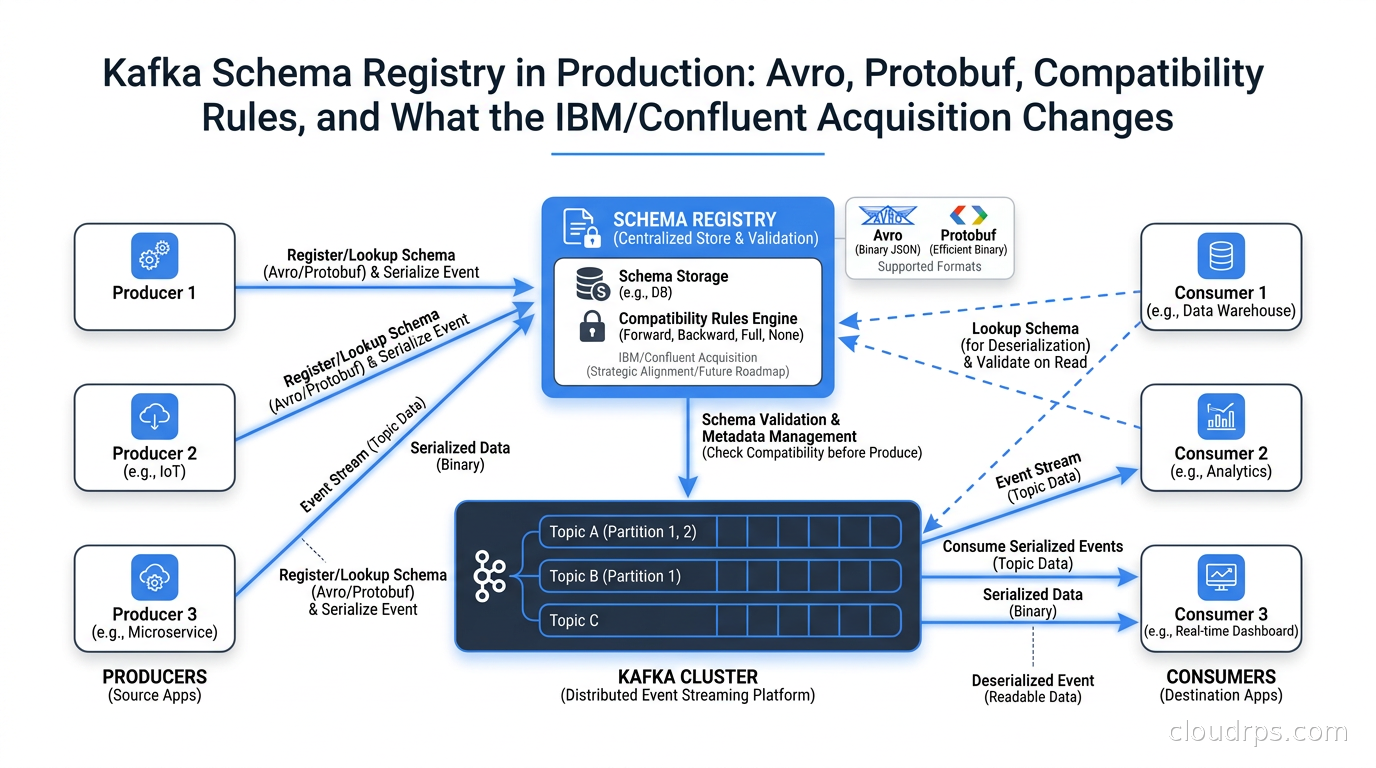
I have watched the same failure mode play out more times than I want to count over twenty years of building data infrastructure. A team adds a field to their event schema. They redeploy the producer. Everything looks fine for about four hours, until the consumer crashes because it does not know what to do with the new field, or worse, a field got renamed and the consumer starts silently dropping data. By the time anyone notices, the analytics pipeline has two days of corrupted records and the on-call engineer is having a very bad night.
Schema Registry exists to prevent exactly this class of problem. It is the traffic cop that sits between your Kafka producers and consumers and enforces a contract: no schema change ships until it has been validated against the compatibility rules your team agreed on. In principle, it is simple. In practice, getting it right in production requires understanding a pile of decisions that nobody explains in the getting-started tutorials.
And in 2026, there is a new variable in the equation. IBM completed its $11 billion acquisition of Confluent in March, which means the company that built and maintained the de facto standard Kafka Schema Registry is now under Big Blue’s roof. That changes the calculus for anyone evaluating their streaming infrastructure stack.
Let me walk through what you actually need to know.
What Schema Registry Actually Does
At its core, Schema Registry is a centralized metadata service that stores schema definitions and assigns each schema version a unique integer ID. When a producer serializes an event, it registers the schema (or fetches the ID if it already exists), then prepends the schema ID to the binary message payload. When a consumer receives the message, it reads the ID from the first few bytes, fetches the schema definition from the registry, and uses it to deserialize the payload.
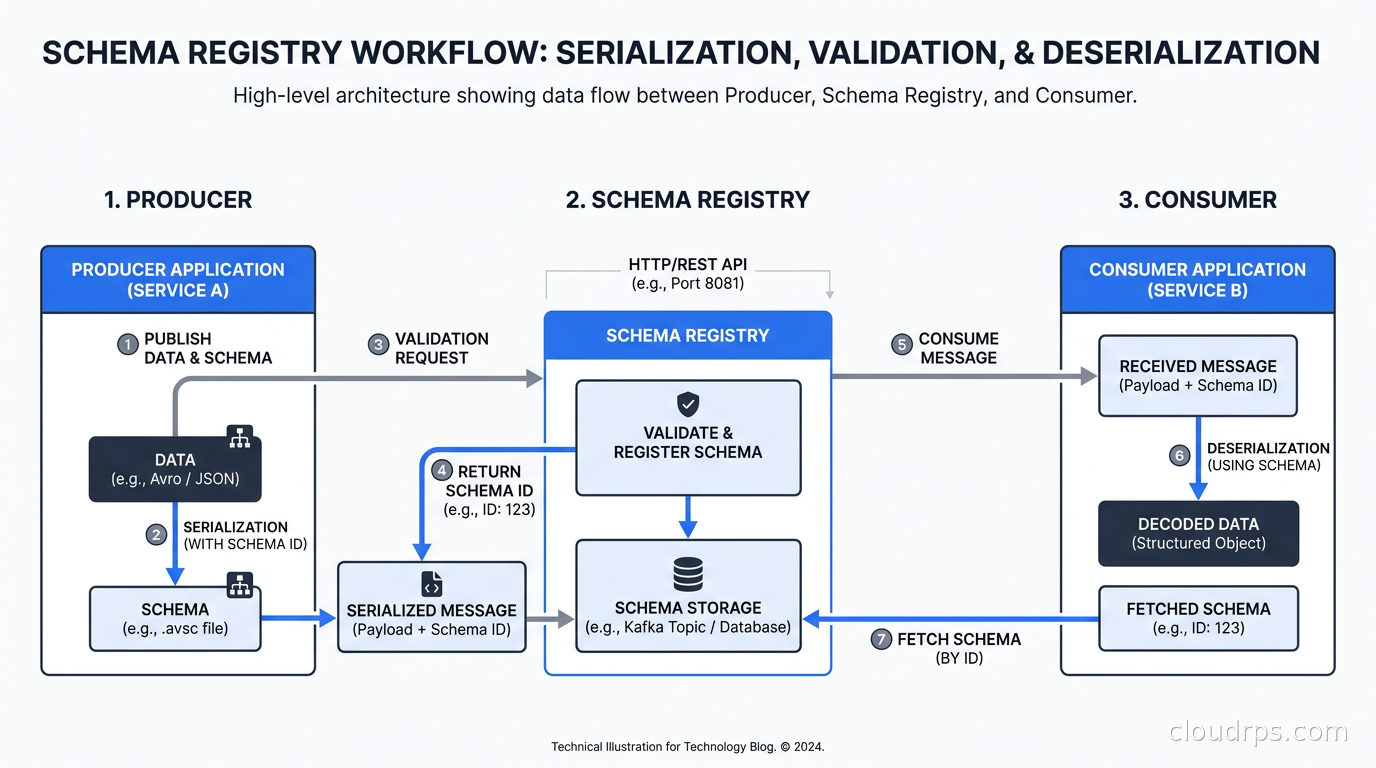
This matters because without a registry, every consumer has to hardcode schema definitions or coordinate out-of-band. With a registry, you get several concrete benefits.
Schema evolution with compatibility enforcement. The registry refuses to register a new schema version if it violates the compatibility rules configured for that subject. A backward-incompatible change gets rejected before it ever reaches production.
Smaller payloads. Instead of embedding the full schema definition in every message, you send four bytes for the schema ID. For high-throughput topics, this is meaningful. I have seen 30-40% payload size reductions moving from self-describing JSON to Avro with a registry.
A single source of truth for data contracts. When a downstream team asks what shape a topic’s events take, you point them at the registry. No more hunting through codebases or Confluence pages. For teams that also need a discovery layer documenting which topics exist, who produces them, and what protocol bindings apply, AsyncAPI is the specification that sits above the schema registry and provides that broader contract.
The Confluent Schema Registry uses a subject naming strategy to link schemas to topics. By default, the subject name is {topic-name}-value for the value schema and {topic-name}-key for the key schema. You can also use TopicRecordNameStrategy if you need multiple event types on a single topic, which is a pattern worth understanding when you are modeling complex domains where a single stream carries heterogeneous events.
The registry stores schemas in a dedicated Kafka topic called _schemas. This is an elegant architectural choice: the registry’s durability is backed by Kafka’s own replication guarantees, and you can replay the schema history from the topic if you need to reconstruct the registry’s state. It does mean the registry has a chicken-and-egg dependency on Kafka being available, which matters for bootstrapping and disaster recovery scenarios.
Serialization Formats: Avro vs Protobuf vs JSON Schema
The registry supports three serialization formats, and the choice has real consequences on performance, tooling, and evolution ergonomics.
Apache Avro
Avro has been the default choice for Kafka workloads for years, and for good reason. It has compact binary encoding, schema evolution support built into the spec, and serializers available in every major language. Avro schemas are defined in JSON, which is readable without special tooling.
The tradeoff is that Avro does not have native support for optional fields the way Protobuf does. Schema evolution works through default values: if you add a field, it must have a default so consumers on the old schema can handle records that include it. I have seen teams get burned by forgetting to add defaults to new fields, then discovering that the compatibility check passed because they misconfigured the subject compatibility mode, while consumers on the old version started throwing deserialization exceptions.
Avro’s schema resolution rules are powerful but require discipline. The writer schema (what the producer used) and the reader schema (what the consumer expects) can differ, as long as Avro can resolve the differences using defaults and type promotions. A consumer can run an older schema version against data produced with a newer schema, as long as the new fields have defaults. This is different from Protobuf, where binary-level compatibility is baked into the encoding itself.
Protocol Buffers
Protobuf is the right choice when you have multiple language ecosystems, need strong backward compatibility guarantees from the wire format itself, or have teams that prefer generated code over dynamic schema resolution.
Protobuf’s field numbering system makes wire-level compatibility robust. As long as you do not reuse field numbers and you only add optional fields or remove fields, old consumers can read new messages and ignore unknown fields. This is more forgiving than Avro’s resolution rules in practice, because the binary format itself encodes field identity rather than relying on position.
The cost is verbosity. Protobuf schemas require their own build toolchain, generated code has to be committed or generated at build time, and the debugging experience without a schema is painful. Binary Protobuf messages are not human-readable. I have spent enough time writing custom protoc plugins and build rules to have firm opinions here: Protobuf’s ecosystem is excellent if your organization is all-in on it, but it adds real friction in polyglot environments where teams are accustomed to just looking at a JSON log entry to understand what happened.
JSON Schema
JSON Schema support in Schema Registry exists for teams that want validation without giving up human-readable payloads. The tradeoff is obvious: JSON is verbose, larger on the wire, and slower to serialize and deserialize than either Avro or Protobuf.
I use JSON Schema in Schema Registry in exactly two situations: low-volume operational topics where readability matters more than throughput, and legacy systems where adding an Avro or Protobuf serializer is impractical. For any high-throughput topic, use Avro or Protobuf. The operational clarity of human-readable JSON does not outweigh the performance and payload size penalties at scale.
Compatibility Modes: The Part Everyone Gets Wrong
This is where teams consistently misconfigure Schema Registry and create production incidents six months later when they try to evolve a schema they have never touched before.
Schema Registry supports four base compatibility modes plus transitive variants of each.
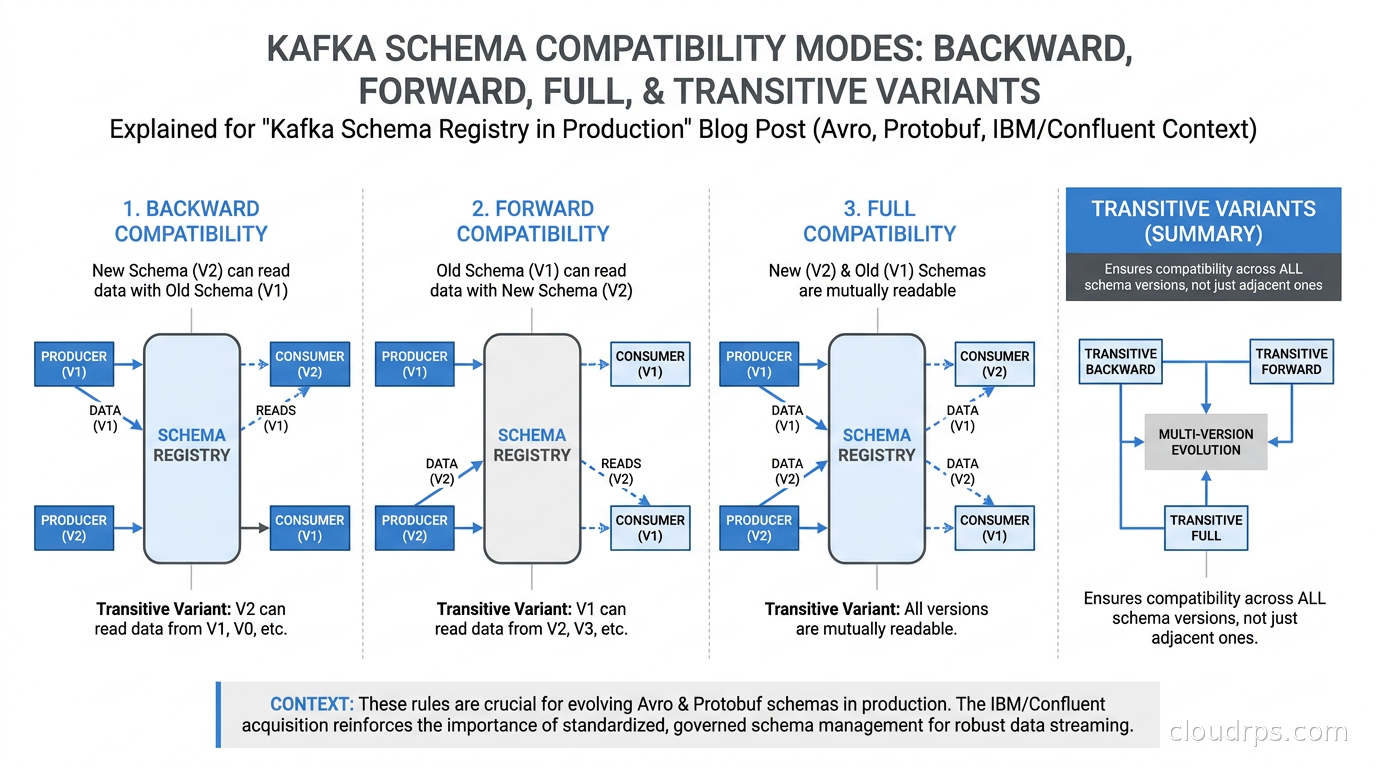
BACKWARD (the default): New schema versions must be readable by consumers using the previous schema version. You can add optional fields with defaults or delete fields. You cannot add required fields without defaults or change field types. This mode is optimized for consumers: upgrade consumers first, then producers. The producer can start writing new schema versions before all consumers have upgraded, because old consumers can read the new format.
FORWARD: New schema versions must be readable by consumers using the older schema. You can add fields (old consumers ignore them) or delete optional fields. The upgrade order flips: deploy producers first, then consumers. This is less common in practice because it means producers have to be more conservative about what they write.
FULL: New schema versions must be both backward and forward compatible. You can only add or remove optional fields with defaults. This is the strictest mode and the one I recommend for most production topics. It removes the burden of coordinating consumer and producer upgrade order because both directions are compatible.
NONE: No compatibility checking. I have never encountered a legitimate reason to use this in production. If you find yourself reaching for NONE, the real problem is that the schema design needs to be rethought, not that the compatibility check should be skipped.
The transitive variants (BACKWARD_TRANSITIVE, FORWARD_TRANSITIVE, FULL_TRANSITIVE) check compatibility not just against the immediately previous schema version, but against all previous versions. This prevents subtle issues where version N is compatible with version N-1, but a consumer running two versions behind on version N-2 breaks when it encounters messages produced with version N. For long-lived topics that span organizational boundaries, transitive checking is worth the additional constraint.
My default recommendation: set FULL_TRANSITIVE at the registry level so it applies to all subjects by default, then grant per-subject overrides only when a topic owner can articulate exactly why they need something less strict and document that decision. This policy has saved me from several near-misses where a team was about to ship a breaking change and the registry caught it before it reached production.
Running Schema Registry in Production
Because Schema Registry stores schemas in the _schemas Kafka topic, it inherits Kafka’s availability properties. For production deployments, run at least two Schema Registry instances behind a load balancer. Consumers and producers hit the registry when they first encounter a schema ID they have not cached locally, and a single-instance registry is a single point of failure for the entire event streaming plane.
For read-heavy workloads, tune caching aggressively. Schema Registry caches schema lookups in memory, and schemas almost never change. A well-configured registry instance serves millions of schema ID lookups per second from cache. The network call you want to avoid is the initial cache miss on a previously unseen schema ID, not the steady-state read from a warm cache.
Separate the Schema Registry’s operational Kafka cluster from your application topics in large-scale deployments. I have seen Schema Registry lag cause cascading failures when a misconfigured producer flooded the _schemas topic. Dedicated operational infrastructure for operational metadata is a pattern worth following consistently across your stack.
On authentication and authorization: Schema Registry supports basic auth, Kafka ACLs for the underlying _schemas topic, and mutual TLS. Do not leave Schema Registry without authentication on any network that application services can reach. I walked into an engagement once where the Schema Registry was exposed on the internal network with no auth, and a migration script accidentally deleted three hundred schema versions. They recovered from backup, but it was a painful afternoon that nobody needed. The secret management patterns that apply to your broader infrastructure apply here: credentials for Schema Registry clients belong in a secrets manager, not hardcoded in application config.
The higher-level principle is that data contracts at the organizational level need enforcement at the technical level. Without Schema Registry’s compatibility checking, “do not break the schema” is a request you make to other teams. With it enforced in CI and production, it becomes a constraint that prevents accidents regardless of intention. The place where this matters most practically is Kafka Connect: when you deploy Avro converters in Connect, the auto.register.schemas setting controls whether new schemas are registered automatically or require explicit approval. The Kafka Connect production guide covers exactly how to configure converters and schema registration in a production Connect cluster.
Open Alternatives: Your Options After the IBM Acquisition
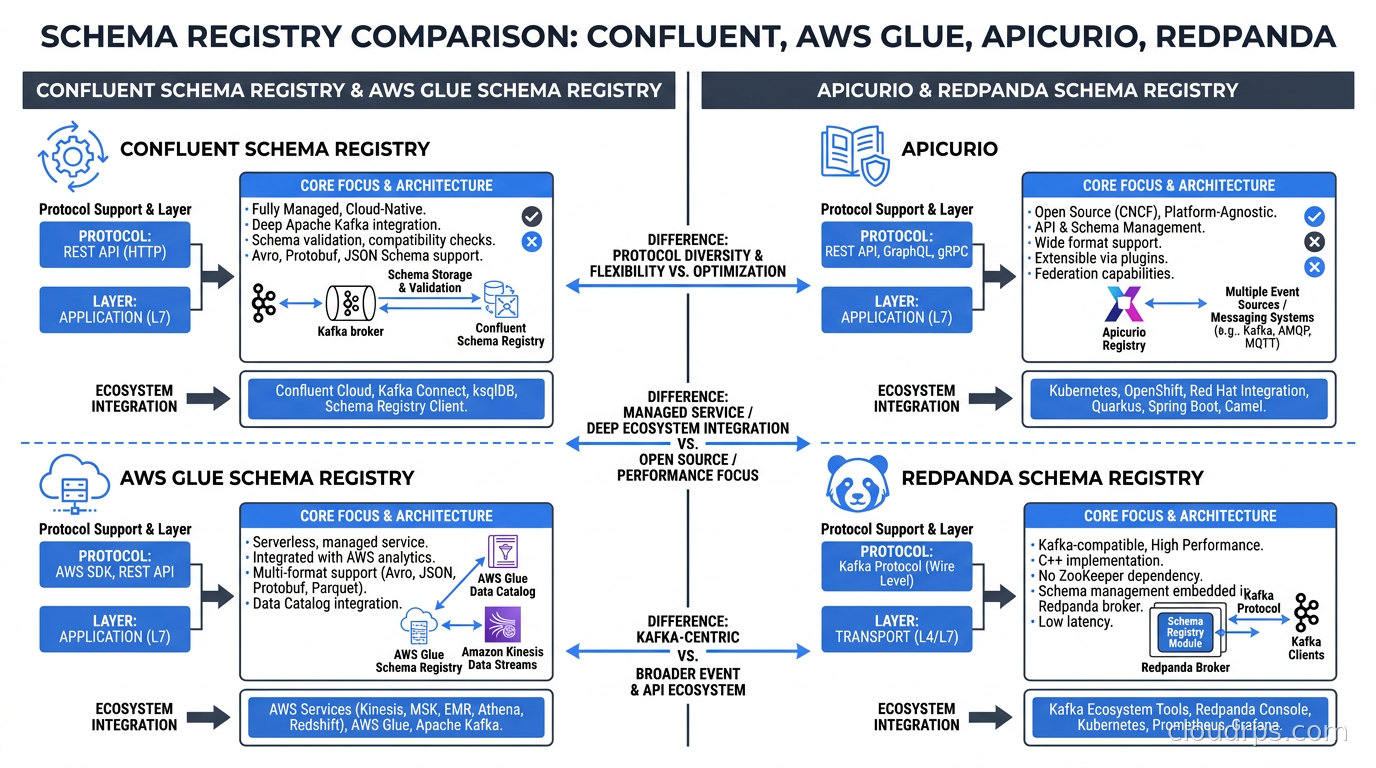
The acquisition has understandably made organizations nervous about Confluent’s product roadmap and pricing trajectory. IBM has committed to maintaining Confluent’s open-source contributions, but a significant portion of Schema Registry’s value is in the managed cloud offering and the additional governance features in Confluent’s commercial tier. Let me walk through the realistic alternatives.
Confluent Schema Registry (Open Source)
The core registry is Apache-licensed and available on GitHub. Running it yourself is not difficult, and for self-hosted Kafka deployments it is the most natural path. You get the full feature set of the registry itself, just without Confluent Cloud’s managed infrastructure and enterprise governance UI.
The concern post-acquisition is around the commercial tier features: role-based access control, audit logging, data lineage, and the Stream Catalog. These are genuinely useful at scale, and they live in Confluent Platform rather than the open-source component. If you depend on those, build a transition plan before your next renewal negotiation.
AWS Glue Schema Registry
If your Kafka deployment runs on Amazon MSK, Glue Schema Registry integrates cleanly with the broader AWS data stack. It uses IAM for authentication, which removes the credential management burden, and it integrates with both Kinesis and MSK. The limitations are real: fewer client library integrations than Confluent, no meaningful UI, and limited compatibility mode support. As of mid-2026, it handles backward and forward compatibility but lacks FULL and transitive variants.
For teams that are heavily AWS-native and want the lowest operational overhead, Glue Schema Registry is viable. For teams with complex schema evolution requirements or teams that rely on specific client libraries, the maturity gap is too significant.
Apicurio Registry
Apicurio is the Red Hat-backed open-source schema registry that supports Avro, Protobuf, JSON Schema, GraphQL, and OpenAPI. Its most important practical feature is that it exposes a Confluent-compatible API, which means you can swap it in without changing your Kafka serializers. Migration friction is minimal.
Apicurio uses PostgreSQL or another SQL backend for storage rather than Kafka’s _schemas topic. This is either a feature or a limitation depending on your operational preferences. You do not need a running Kafka cluster to stand up the schema registry, which simplifies bootstrapping and makes the registry’s operational lifecycle independent of Kafka’s. The cost is adding a database dependency.
The governance features in Apicurio are solid and actively developed. I have deployed it in several post-acquisition engagements as a Confluent replacement for organizations that needed to hedge on pricing. The Red Hat Streams product (Strimzi-based) includes Apicurio as the supported option, which gives it a reasonable enterprise support story.
Redpanda Schema Registry
If you have already evaluated Kafka alternatives and landed on Redpanda, their built-in Schema Registry is worth considering. It is embedded in the Redpanda broker, implements the Confluent Schema Registry API, and requires no separate deployment. For teams that want fewer moving parts in their streaming infrastructure, this is genuinely attractive.
The limitation is obvious: it only applies to your Redpanda cluster. If you need a unified schema registry across multiple clusters or multiple Kafka implementations, a standalone registry is the better architectural choice.
The IBM Acquisition: What It Actually Changes
I want to be practical here rather than alarmist. IBM completed the acquisition in March 2026. IBM has indicated it plans to give Confluent the “Red Hat treatment,” which in the best case means serious enterprise backing and continued open-source investment, and in the worst case means the gradual commercial lock-in that has characterized Red Hat’s trajectory with OpenShift and RHEL.
The immediate technical story is unchanged. Confluent Schema Registry, Confluent Platform, and Confluent Cloud still exist and still work. Apache Kafka itself is governed by the Apache Software Foundation under the Apache 2.0 license and is completely independent of Confluent. That is not changing.
What has changed is the strategic risk profile for organizations embedded in Confluent’s commercial tooling. Three patterns from similar acquisitions are already visible.
Talent attrition. Unofficial reports suggest 600-800 Confluent engineers left after the acquisition closed. Feature velocity on commercial products has slowed. Bugs that would have been patched in two weeks are sitting open for two months. If you depend on specific Confluent Cloud features, track the issue resolution time as a leading indicator.
Pricing pressure. IBM’s enterprise software pricing model is not a startup’s pricing model. Year-three renewals on Confluent Cloud contracts will be the first real signal of where IBM intends to take pricing. Start evaluating alternatives before the next renewal cycle, not after you have seen the renewal price.
Support model changes. Confluent’s support was a differentiated offering. IBM’s support model is different. Validate that the support tier you depend on still exists under IBM’s structure and has the response SLAs your organization needs.
For schema registry specifically: the open-source component is fine and will remain fine. The risk is in the commercial governance features. Apicurio with PostgreSQL storage and the Confluent-compatible API is my current default recommendation for new deployments that want to hedge.
Schema Evolution Patterns That Survive Production
I have been building streaming infrastructure long enough to have rules that I apply consistently regardless of which registry implementation I am using.
Additive changes should be the default. If you design schemas so that 90% of changes are adding new optional fields with defaults, you will almost never encounter a breaking change scenario. This requires thinking carefully upfront about what fields you might need, and making them optional from day one rather than promoting optional fields to required later when the data is proven necessary.
Rename fields by adding, deprecating, and removing. The temptation to just rename a field is strong, especially for small teams moving fast. Resist it. Add the new field with the correct name, document the old field as deprecated, keep both until all consumers have migrated, then remove the old field. This three-step process is tedious. A rename shortcut has caused me production incidents. The three-step process never has.
Test compatibility in CI. Register schemas in a test Schema Registry instance in your CI pipeline and run compatibility checks before merging schema changes. This is the same discipline that makes change data capture pipelines robust: validate schema changes against the existing contract before deploying. A failed compatibility check in CI costs ten minutes. The same failure in production at 2am costs much more.
Think carefully about Flink state. For Apache Flink pipelines, schema evolution is more complex than it looks. Flink’s stateful operators hold intermediate state that may have been serialized using older schema versions. When you upgrade a Flink job after a schema change, you need confidence that the new job can read state serialized by the old job. Schema Registry governs the Kafka boundary; Flink’s state serialization is a separate concern that requires its own migration plan.
Treat the registry as operational infrastructure. Monitor it like you monitor Kafka itself. Alert on registry lag, on failed schema registrations, on client error rates. A schema registry that is silently unhealthy will manifest as serialization failures in producers and deserialization failures in consumers. By the time those surface in application logs, you are already behind.
Choosing Your Schema Strategy
Here is what I would actually do starting from scratch today.
For serialization format, I default to Avro for most topics and Protobuf when teams explicitly need generated client code or have polyglot environments where Protobuf’s build toolchain is already established. JSON Schema only for low-volume operational topics.
For compatibility mode, I set FULL_TRANSITIVE at the registry level and treat any deviation as requiring documented justification. The additional constraint is worth the guarantee.
For the registry implementation, my current recommendations by deployment context:
If you are AWS-native with MSK and want the lowest operational overhead, AWS Glue Schema Registry is acceptable with the understanding that you are accepting its limitations.
If you want a mature open-source option with Confluent API compatibility and a SQL backend, Apicurio Registry is my current default for new deployments.
If you are already using Redpanda and your schema governance requirements are straightforward, the built-in registry is fine.
If you are already on Confluent Cloud with complex governance requirements, stay for now but build a migration plan and revisit it before your next renewal conversation.
One infrastructure question that comes up alongside Schema Registry planning is the Kafka 4.0 ZooKeeper sunset. Schema Registry itself is completely transparent to the KRaft migration: it communicates with Kafka via the standard client protocol, not ZooKeeper, so your schema registry continues working unchanged as brokers migrate. But if your underlying Kafka cluster is still on ZooKeeper mode, the migration deadline is real.
One underappreciated consequence of Kafka tiered storage is that it makes schema compatibility even more critical. When you can retain data for months or years at object-storage cost, consumers replaying old segments will need to deserialize messages written under schemas that may have evolved substantially. BACKWARD_TRANSITIVE and FULL_TRANSITIVE modes are essential in long-retention clusters; the default BACKWARD mode is not enough.
The data lakehouse world has reinforced something I have believed for a long time: the format and schema of your data matters more than the storage engine. Apache Iceberg’s table format is essentially a schema registry for batch and analytical workloads. Kafka Schema Registry occupies the same role in streaming workloads. Both exist to answer the same fundamental question: how do you evolve data structures over time without breaking the consumers that depend on them?
The answer has not changed in twenty years. You do it carefully, incrementally, with enforcement mechanisms that catch mistakes before they reach production, and with a clear upgrade path for downstream consumers. Schema Registry is one of those enforcement mechanisms. The IBM acquisition changes the commercial risk profile of one implementation. The underlying problem it solves is permanent.
Plan your schema strategy around the problem, not around a vendor’s product roadmap. Vendors get acquired. Data endures.
Get Cloud Architecture Insights
Practical deep dives on infrastructure, security, and scaling. No spam, no fluff.
By subscribing, you agree to receive emails. Unsubscribe anytime.