
The first time I had to recover a Kubernetes cluster from a catastrophic failure with no backup, I aged five years in an afternoon. It was 2017, early days of running anything meaningful on Kubernetes, and a developer had accidentally run kubectl delete namespace production in the wrong terminal window. The namespace had StatefulSets, PersistentVolumeClaims, ConfigMaps, Secrets, and custom resources from several operators. We spent nine hours reconstructing everything from memory, Helm charts that were not fully up to date, and screenshots in Slack messages.
After that, I made Kubernetes backup a non-negotiable part of every cluster I have been responsible for. Not optional, not “we’ll get to it,” not “we’re using GitOps so we’re fine.” A real backup that covers everything relevant and that gets tested regularly.
In twenty years of building infrastructure, I have never seen GitOps alone save a team from the failure modes that actually destroy Kubernetes clusters. GitOps gets you back to your desired state, but it does not back up your PersistentVolumes, your etcd state, or the things that live outside your Git repository. The two are complementary, not redundant.
This guide covers what you actually need to back up in a Kubernetes cluster, how Velero works in production, the etcd backup story that many teams skip, and the testing discipline that separates real DR plans from fiction.
What Kubernetes Backup Actually Covers
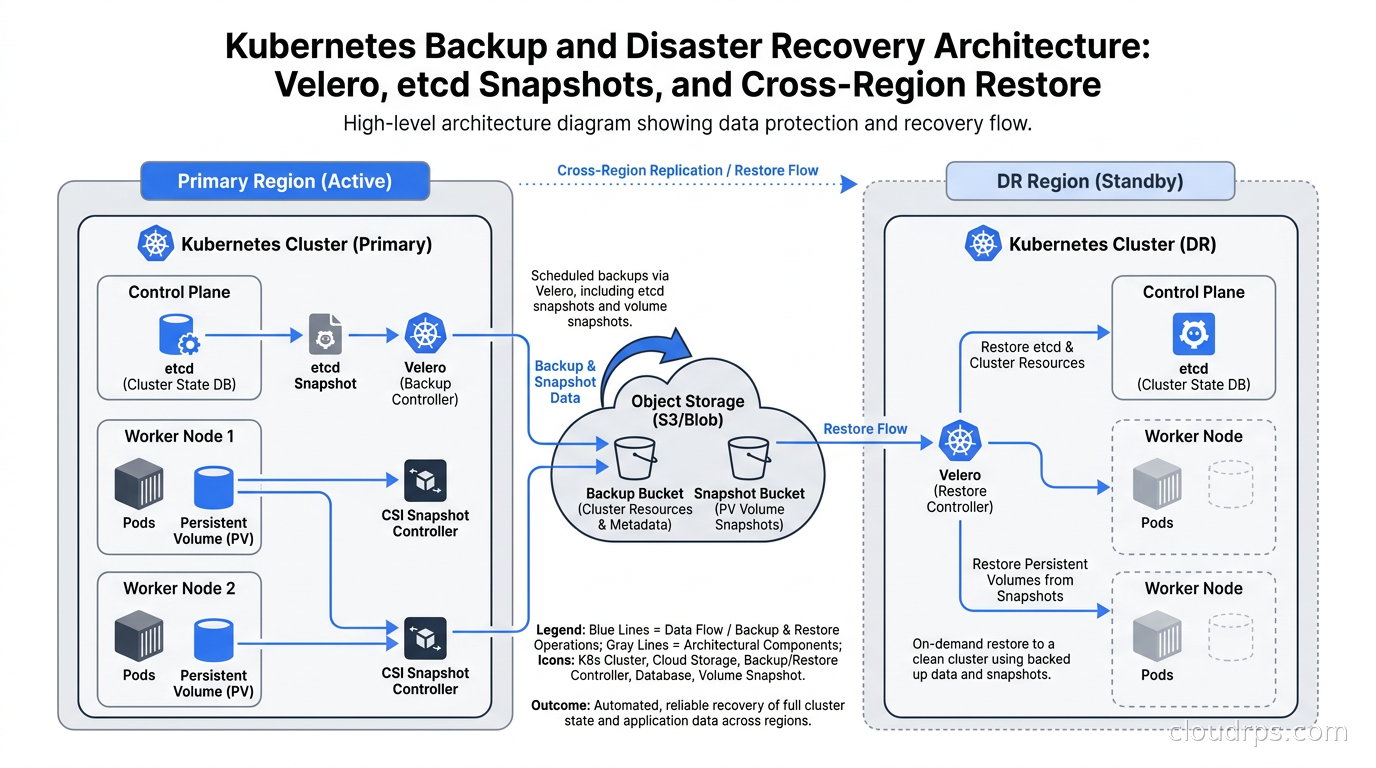
Kubernetes state is distributed across more components than most teams realize. When you think about “backing up Kubernetes,” you need four distinct categories in your mental model.
etcd is the control plane database. Every object in your cluster, every Deployment, ConfigMap, Secret, NetworkPolicy, CustomResourceDefinition, ServiceAccount, and Role lives in etcd. If etcd is corrupted or lost, you cannot reconstruct the cluster state from anything else, because etcd is the source of truth. It is not derived from somewhere else. On managed Kubernetes (EKS, GKE, AKS), the cloud provider manages etcd for you and backs it up continuously. On self-managed clusters (kubeadm, k3s, Talos), etcd backup is entirely your responsibility.
Persistent volumes are where your stateful applications store data. Databases, message queues, file uploads, anything that survives a Pod restart lives in a PersistentVolume. These are block or file storage resources managed through CSI drivers. Recovering from etcd alone without your PersistentVolumes leaves you with a cluster that knows about your databases but has no data in them.
Container images are usually not in scope for backup because they should already be stored in an image registry that is separately managed. What you need to ensure is that your image references are pinned to specific digests or tags that still exist. Mutable tags are a backup failure mode: if myapp:latest has been overwritten, your restore points at a different image than the one you were running.
External dependencies live outside your cluster: RDS databases, S3 buckets, third-party SaaS integrations. Velero does not help here. Your DR plan needs to account for these separately.
The etcd Backup Story
On self-managed clusters, etcd backup is the unglamorous foundation of everything else. Velero backs up Kubernetes objects by reading from the API server, which reads from etcd. But if your cluster is entirely gone, you need etcd to bootstrap the API server before Velero can help you.
The canonical etcd backup mechanism is etcdctl snapshot save. Run this from a control plane node:
ETCDCTL_API=3 etcdctl snapshot save /backup/etcd-snapshot-$(date +%Y%m%d-%H%M%S).db \
  --endpoints=https://127.0.0.1:2379 \
  --cacert=/etc/kubernetes/pki/etcd/ca.crt \
  --cert=/etc/kubernetes/pki/etcd/peer.crt \
  --key=/etc/kubernetes/pki/etcd/peer.key
This produces a consistent point-in-time snapshot of all etcd data. The snapshot should be tested with etcdctl snapshot status to confirm it is valid, then uploaded to object storage outside the cluster. An etcd snapshot that lives on the control plane node is destroyed when the node is destroyed.
Automate this with a CronJob or a DaemonSet on control plane nodes. The snapshot size for a medium-sized cluster is typically under 100 MB, so storage is not a concern. Frequency depends on your RPO: hourly is reasonable for most production clusters, every five minutes for clusters with high change rates.
The restore process for etcd is well-documented but requires cluster downtime. You stop the etcd process, restore the snapshot with etcdctl snapshot restore, reconfigure etcd to start from the restored data directory, and bring etcd back up. For HA clusters with three or five members, the restore needs to happen on all members with the same snapshot before any member reaches quorum. This is the procedure you want to rehearse before you need it.
On managed Kubernetes, the cloud provider handles all of this for you. EKS, GKE, and AKS continuously back up etcd and support cluster-level restores, though the process varies by provider and is subject to their SLAs. Read your provider’s documentation on this carefully, because the restore procedures and retention windows are not consistent across platforms.
How Velero Works
Velero is the de facto community-standard open source tool for Kubernetes backup and restore, originally released as Heptio Ark and now maintained under VMware/Broadcom stewardship. It backs up Kubernetes objects (namespaces, deployments, services, PVCs, etc.) to object storage, and backs up persistent volume data through one of two mechanisms: CSI volume snapshots or file-level backup using Kopia.
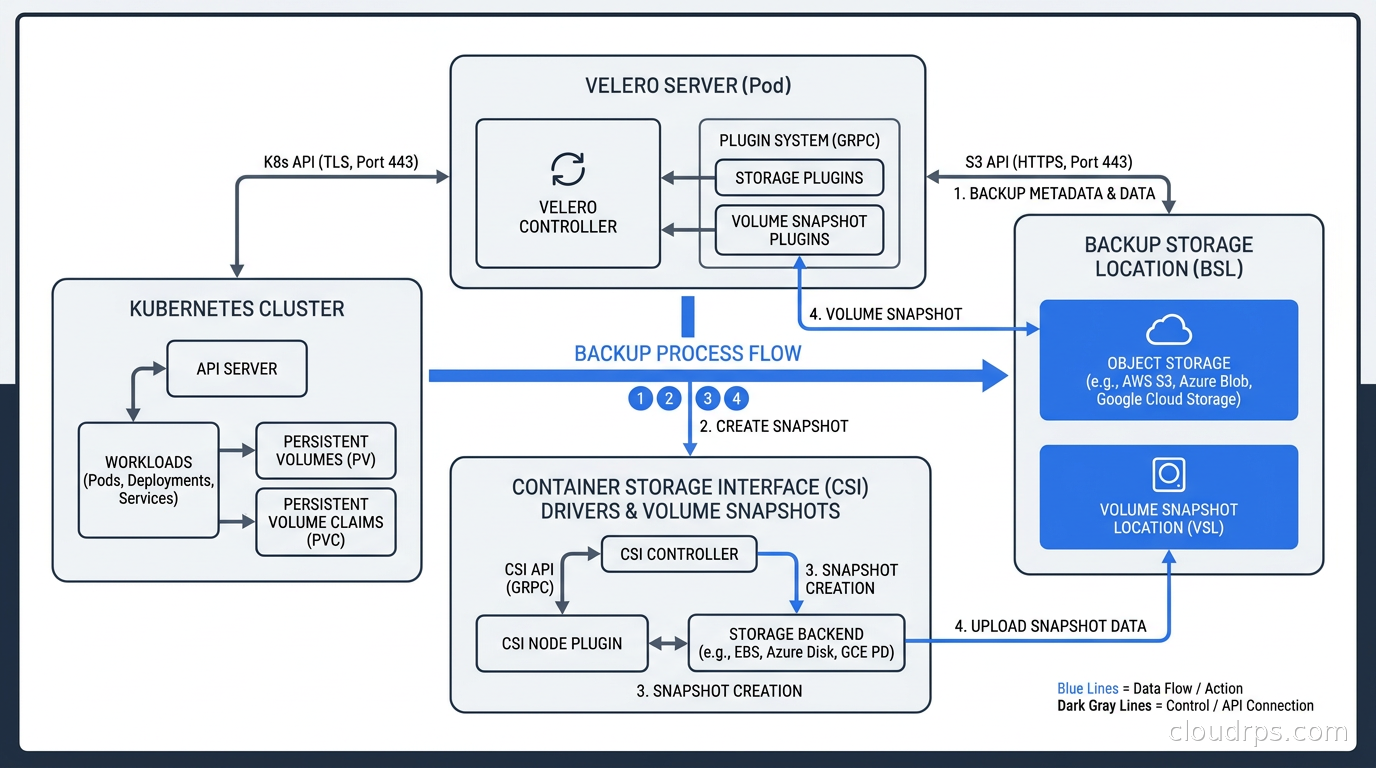
Velero runs as a Deployment in a dedicated namespace (usually velero). The main components are:
The Velero server runs the main control loop, processes backup and restore requests, and manages communication with object storage and volume snapshot providers.
BackupStorageLocation (BSL) defines where backup artifacts go: an S3-compatible bucket, Google Cloud Storage, or Azure Blob Storage. You configure the bucket name, region, prefix, and credentials. Velero writes compressed tarballs of Kubernetes object JSON and metadata to this location.
VolumeSnapshotLocation (VSL) is where volume snapshots are stored, for the legacy plugin-based snapshot approach. With modern CSI snapshot support, this is less relevant because snapshots go to wherever the CSI driver stores them.
Plugins extend Velero to support different storage providers. The object storage plugins handle BSL operations; the volume snapshot plugins handle VSL operations. If you are on AWS and want to snapshot EBS volumes using the legacy approach, you install the velero-plugin-for-aws plugin. For CSI-based snapshots, you use the built-in CSI plugin instead.
The backup process looks like this: you create a Backup object in the cluster (either via CLI or as a CronJob-managed Schedule). Velero lists all resources in the specified namespaces, filters them according to label selectors and exclude rules, serializes them to JSON, and uploads them to the BSL bucket. Simultaneously, it triggers volume snapshots for any PVCs that match the backup scope.
Restoring is the reverse: you point at a specific backup, Velero downloads the object JSON from object storage, applies it to the cluster (optionally mapping namespaces to different target namespaces), and triggers restores of volume snapshots.
CSI Snapshots vs Kopia: Choosing Your Volume Backup Mechanism
Velero supports two approaches to backing up persistent volume data. Understanding the difference matters for choosing the right one and troubleshooting when things go wrong.
CSI Volume Snapshots are the modern approach and my recommendation for most clusters. They work by creating a VolumeSnapshot object in the cluster, which triggers the CSI driver to take a storage-level snapshot. On AWS, this is an EBS snapshot. On GCP, it is a Persistent Disk snapshot. On clusters using Rook/Ceph, it uses Ceph’s snapshot capability. The snapshot is storage-efficient (no full copy of data) and typically very fast. The limitation is that restoring to a different cluster or a different cloud region requires the CSI driver on the target side to be able to access the snapshot, which is not always possible across regions or clouds.
For CSI snapshots to work, your cluster needs the snapshot.storage.k8s.io API group installed (the external-snapshotter), a VolumeSnapshotClass configured for your CSI driver, and Velero configured with --features=EnableCSI and the CSI plugin. When these are properly wired up, backing up and restoring volumes through Velero is almost seamless.
Kopia file backup (previously Restic in older Velero versions) is the alternative for when CSI snapshots are not available or cross-cluster portability is needed. Velero runs a Kopia node agent as a DaemonSet, and it accesses the volume data by mounting the volume from the host filesystem. It then uploads the files directly to the Velero backup bucket using Kopia’s content-addressed deduplication. This is slower and more resource-intensive than snapshots, but it produces backups that can be restored to any cluster, including clusters on different clouds or self-hosted environments.
Kopia backups require the Pod using the volume to be running, because Velero needs to find the volume mount on a live node. For truly consistent database backups with Kopia, you need to quiesce the application first using Velero’s pre/post hooks.
Application-Consistent Backups With Hooks
Raw volume snapshots capture the disk state at a point in time. For a database, this might capture data mid-write, with partial transactions that leave the recovered state in an inconsistent form. For most modern databases using write-ahead logging, a snapshot of the data directory is recoverable because the WAL is on the same volume and crash recovery handles it. But for maximum safety, you want an application-consistent snapshot where the database has flushed everything to disk before the snapshot is taken.
Velero handles this with backup hooks, which are annotations on the Pod that execute commands before and after the volume snapshot. For PostgreSQL:
backup.velero.io/backup-volumes: pgdata
pre.hook.backup.velero.io/command: '["/bin/bash", "-c", "psql -U postgres -c CHECKPOINT;"]'
pre.hook.backup.velero.io/container: postgres
pre.hook.backup.velero.io/on-error: Fail
post.hook.backup.velero.io/command: '["/bin/bash", "-c", "echo done"]'
post.hook.backup.velero.io/container: postgres
The pre-hook runs the command inside the specified container before the snapshot, and the post-hook runs after. For PostgreSQL, issuing CHECKPOINT forces all dirty pages to disk. For MySQL, you would use FLUSH TABLES WITH READ LOCK and then unlock after the snapshot. For MongoDB, db.fsyncLock() followed by db.fsyncUnlock().
The cleaner alternative for databases is to use a dedicated sidecar or init container that handles backup operations and runs logical backups (pg_dump, mysqldump) into the object storage bucket directly, then point Velero only at non-database volumes. This is what I prefer for production databases because you get a consistent logical backup that can be restored to a different database version and inspected without needing to mount volumes.
See our guide on running databases on Kubernetes for a full discussion of the tradeoffs involved in running stateful workloads in the cluster.
Scheduling Backups and Setting Retention
One-off manual backups are for testing. Production backup is a Schedule object:
apiVersion: velero.io/v1
kind: Schedule
metadata:
  name: daily-cluster-backup
  namespace: velero
spec:
  schedule: "0 2 * * *"
  template:
    includedNamespaces:
    - production
    - staging
    - monitoring
    excludedResources:
    - events
    - events.events.k8s.io
    storageLocation: default
    volumeSnapshotLocations:
    - default
    ttl: 720h
The ttl field controls retention. 720h is 30 days. Velero will automatically delete backups older than the TTL when it runs its garbage collection. Set your TTL based on your RPO requirements and storage cost tolerance.
The excludedResources list matters. Events are high-volume, low-value, and can bloat your backups. Ephemeral objects like leases, endpointslices, and certain operator-managed resources may cause spurious errors on restore if they conflict with freshly created equivalents. Test your restore to discover which resources cause problems, then exclude them.
A common pattern is multiple schedules at different granularities: hourly backups of just the critical namespaces with a two-day TTL, daily backups of everything with a 30-day TTL, and weekly backups with a 90-day TTL. This follows the grandfather-father-son rotation principle that has served backup strategies well for decades.
Store your backups in a separate AWS account or at minimum a separate S3 bucket with its own IAM policy. Velero needs write access to create backups and read access to list and restore them, but the IAM role for your cluster nodes should not have permission to delete backup objects. If your cluster is compromised by ransomware and the attacker has the Velero IAM role credentials, you do not want them deleting your backups.
Velero works well with workload identity federation on EKS (IRSA) and GKE (Workload Identity) so that Velero’s ServiceAccount gets S3 access without storing long-lived credentials in a Secret.
Cross-Cluster and Cross-Region Restore
The most powerful feature of Velero over raw etcd backups is the ability to restore into a different cluster. You can use this to:
- Migrate workloads between clusters during upgrades
- Restore production into a staging cluster for debugging
- Recover from a total region failure into a new cluster in a different region
- Clone an environment for performance testing
For cross-region restores using CSI snapshots, the workflow gets complicated because EBS snapshots in us-east-1 are not directly accessible to a cluster in us-west-2. You either need to copy the snapshot to the destination region before restoring, or use Velero’s Kopia-based backup (which stores data in the BSL bucket and is therefore accessible from anywhere you have bucket access).
For critical multi-region DR, my recommendation is to configure Velero with Kopia for volume backup and use an S3 bucket with cross-region replication enabled. The backup data lands in your primary region bucket, gets replicated to the secondary region bucket automatically, and you can restore in the secondary region without any manual snapshot copying.
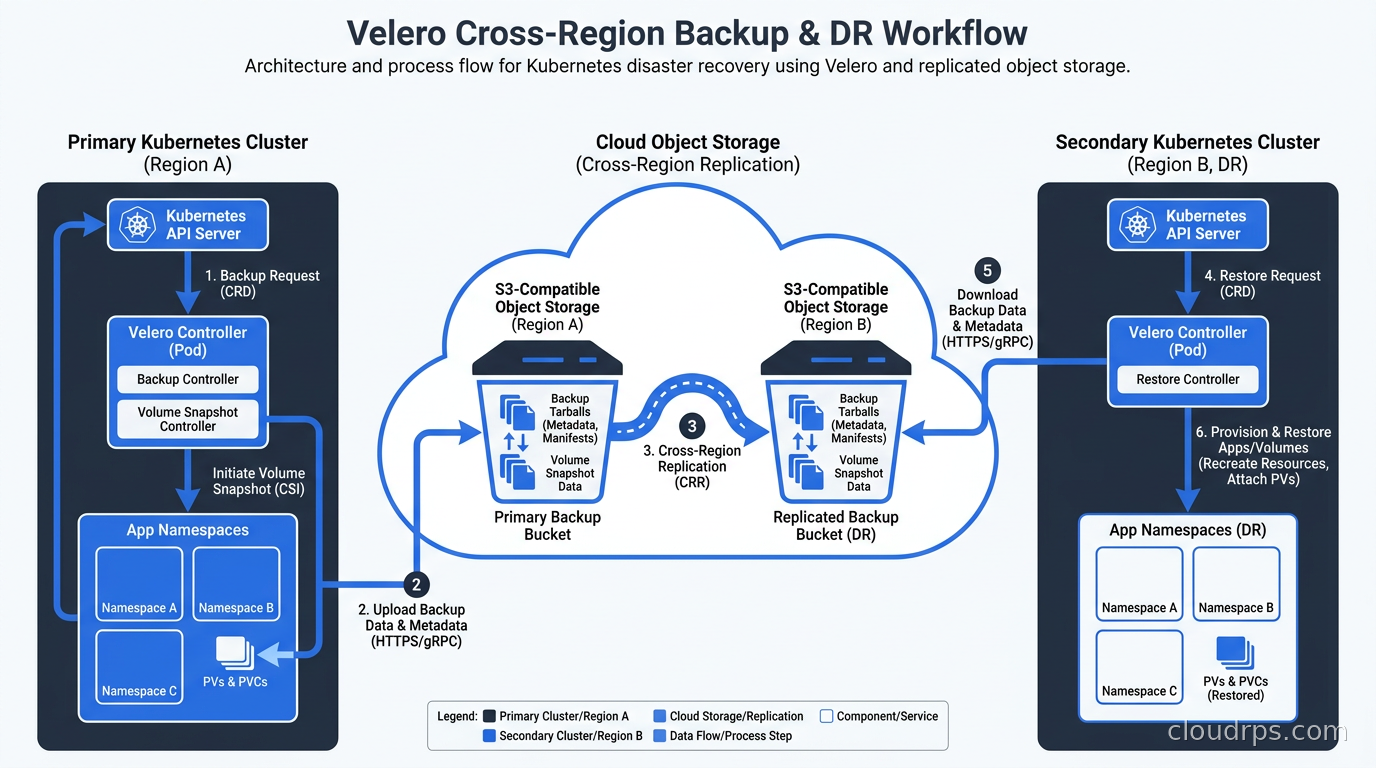
Namespace mapping is useful for restore into different environments. When restoring from a production backup into staging, you do not want to overwrite the staging namespace. Use --namespace-mappings production:staging-restored to restore all resources from the production namespace into a new staging-restored namespace instead.
What GitOps Gets You (and What It Does Not)
I mentioned GitOps at the top because the “we use GitOps so we don’t need backup” argument comes up regularly. Let me be precise about what GitOps actually covers.
GitOps tools like ArgoCD and Flux continuously reconcile cluster state with manifests in a Git repository. If someone deletes a Deployment manually, ArgoCD notices the drift and recreates it. This is tremendously valuable and I use it on every cluster. But it covers only resources that are managed by Git. It does not cover:
- PersistentVolume data (your database contents are not in Git)
- Resources created by operators that are not tracked in your GitOps config
- Secrets that are excluded from Git for security reasons
- Runtime state like ConfigMap changes made without going through Git
If you lose a namespace containing a StatefulSet with a PVC backed by a PersistentVolume, GitOps restores the StatefulSet and a new PVC. But the old PV is gone and the new PV is empty. You have recreated the skeleton without the data. For a user-content database, that is a catastrophe.
If your GitOps setup with ArgoCD or Flux is solid, it dramatically speeds up recovery by handling all the declarative manifest restoration automatically. Combine it with Velero for volume backup and etcd snapshots for the control plane, and you have a genuinely comprehensive recovery capability.
Testing Your Backups
Untested backups are not backups. They are backup-shaped objects that may or may not contain valid data. I have tested “successful” Velero backups that restored with zero volumes because the CSI plugin was misconfigured and silently skipped volumes rather than failing. I have tested etcd snapshots that were corrupted due to disk I/O errors during the write. I have found PostgreSQL CHECKPOINT pre-hooks that failed silently because the backup account did not have superuser permission.
Every failure I just listed was discovered in a scheduled drill, not during an actual disaster. That is exactly how you want to find them.
Run restore drills on a quarterly schedule at minimum. The drill should:
- Select a backup from at least 48 hours ago (this tests that recent backups are not required)
- Restore into a separate test namespace or a separate cluster
- Verify that the application actually works, not just that the Pods started
- Check volume data is present and correct (row counts, spot checks, checksums)
- Measure the time taken and compare against your RTO
Document the results. Treat a failed drill like an incident: root-cause it, fix it, and verify the fix.
For stateful applications with Kubernetes persistent storage, pay particular attention to verifying the CSI driver on the restore target is compatible with the snapshots from the source. Snapshot format compatibility is not guaranteed across driver versions, and this is a common silent failure mode.
The DR Runbook
When a real failure happens, nobody wants to figure out the restore procedure from scratch. Write a runbook and store it somewhere accessible when your cluster is down (not in the cluster itself, and not in a tool that requires the cluster to authenticate). A shared Google Doc, Confluence page, or printed copy in the server room all work.
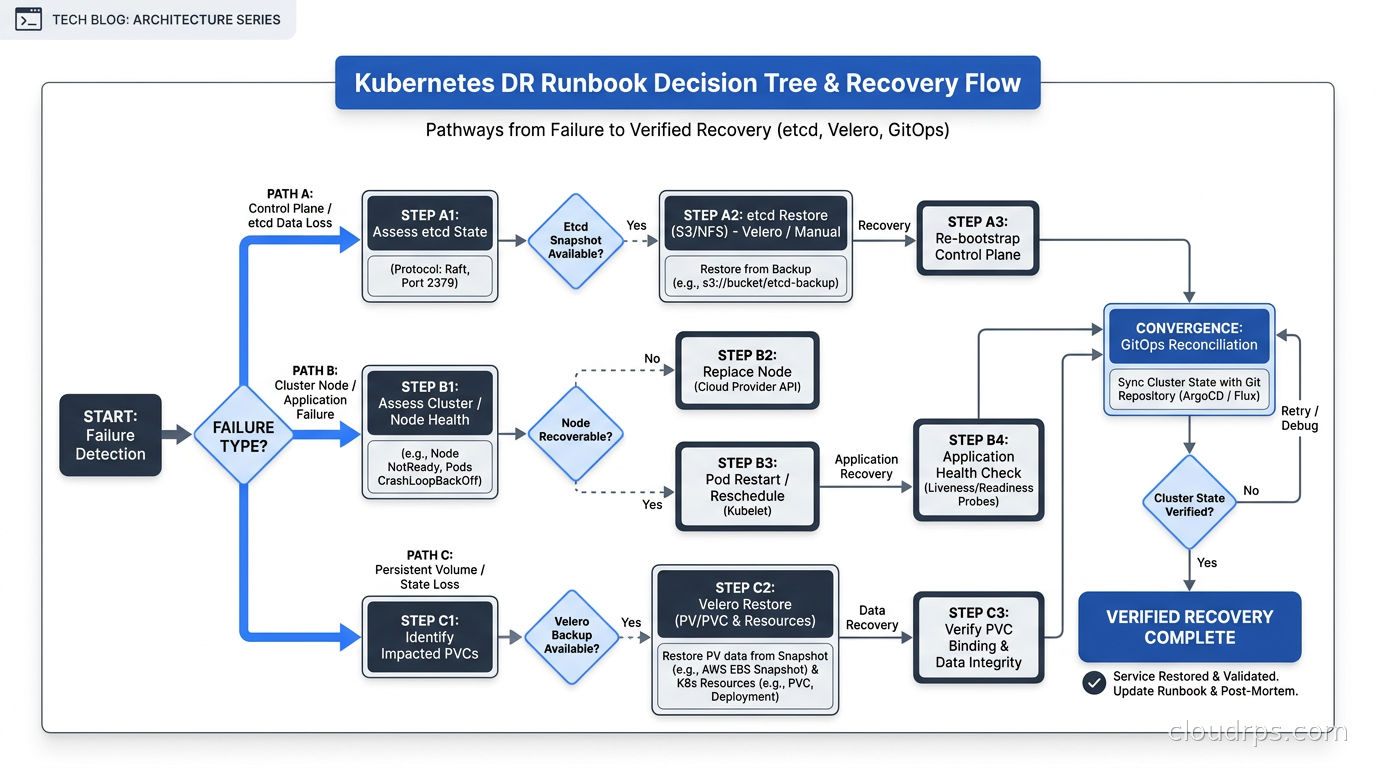
The runbook should cover three scenarios:
Namespace or workload deletion: This is the most common. Velero restore from the most recent backup, scoped to the affected namespace. Expected recovery time: 15-30 minutes. Command: velero restore create --from-backup daily-cluster-backup-20250318 --include-namespaces production.
Control plane failure (managed Kubernetes): Contact the cloud provider’s support. Most managed Kubernetes providers can restore an etcd backup to a point in time. While the control plane is recovering, workloads continue running on nodes (the data plane is independent of the control plane). Expected time: 1-4 hours depending on provider SLA.
Total cluster loss (self-managed): Provision new nodes, reinstall etcd, restore from etcd snapshot, reinstall control plane components, verify cluster health, then run Velero restore for persistent volume data. Expected time: 2-6 hours. This is the scenario to rehearse at least once.
For every scenario, define the person responsible, the communication plan, and the verification criteria. A recovery is not complete until you have confirmed that the application is serving real traffic correctly, not just that Pods are Running.
RBAC and Access Control for Velero
Velero runs with broad cluster permissions because it needs to list and restore all resource types. Apply the principle of least privilege to who can create, list, and delete backups. The Velero ServiceAccount needs cluster-admin-level access to the Kubernetes API, but that does not mean every engineer should have the ability to delete backups or modify backup schedules.
For the object storage side, use a dedicated IAM role with the minimum S3 permissions needed: s3:GetObject, s3:PutObject, s3:ListBucket, s3:DeleteObject for the backup bucket. The DeleteObject permission is needed for TTL-based expiration. Consider whether you want this permission on the role that Velero uses at runtime, or whether you want deletion to require explicit human approval.
Use Kubernetes RBAC to restrict who can create Restore objects in the velero namespace. A restore into production should require at least two people to agree, or go through an approval workflow, because an accidental restore can overwrite live data.
What Velero Does Not Solve
Velero is excellent within its scope, but it has real limitations.
Velero does not back up resources across all namespaces atomically. If you are running a distributed application across five namespaces and you take a backup, the five namespace backups are not guaranteed to be at exactly the same etcd revision. For most applications this does not matter. For tightly coupled distributed systems, it might.
Velero does not solve database point-in-time recovery. If you restore a PostgreSQL volume from a Velero backup, you get the state at the snapshot time, not arbitrary points between snapshots. For databases that need sub-minute RPO, you need the database’s own replication and PITR mechanisms in addition to Velero.
Velero does not back up cluster-scoped resources by default in all configurations. CustomResourceDefinitions, ClusterRoles, PersistentVolumes (the cluster-scoped resource, distinct from PVCs), and StorageClasses need explicit inclusion. Test this in your restore drill. I have seen clusters restored with all namespace-scoped resources intact but missing the CRDs that the operators depend on, causing cascading failures.
Velero does not replace a proper disaster recovery planning process. Backup is a component of DR. DR is a component of business continuity. You need all three layers, not just the technical backup tool.
Putting It Together: A Minimal Production Backup Architecture
If I were setting up Kubernetes backup from scratch today on a production EKS cluster, this is the architecture I would use:
etcd backup is handled by EKS (managed control plane). I verify that the cluster has active backups and document the restore procedure in the runbook.
Velero is installed with the velero-plugin-for-aws, configured with IRSA for credential-free access to S3, and CSI plugin enabled for volume snapshots. The BSL points to a dedicated S3 bucket in a separate AWS account with versioning enabled and MFA delete protection.
Three backup schedules run: hourly for critical production namespaces (24h TTL), daily for all namespaces (30d TTL), and weekly full backup with namespace filtering to exclude development namespaces (90d TTL).
For self-hosted object storage users who want to test Velero against a local bucket before going to production, MinIO works well as a Velero BSL target during development. Just do not use local MinIO as your production backup target or you lose your backups when you lose your cluster.
Quarterly restore drills are on the team calendar, not optional. The drill script lives in the team runbook alongside the DR scenarios.
This setup has a realistic RTO of 30-60 minutes for workload-level failures and 2-4 hours for full cluster recovery. If your business requires better, you need active-active architecture or managed DR products that go beyond what Velero provides.
Final Thought
The engineers I have seen struggle most with Kubernetes backup are the ones who believe the problem is solved by something else: “our GitOps means we can always recreate everything,” or “AWS manages etcd for us so we’re fine,” or “we do database backups separately.” Each of these statements is partially true and completely insufficient. The gap between partially true and actually safe is where production disasters live.
Velero is not complicated to install or operate. An afternoon of setup and a few hours of testing gives you a recovery capability that the kubectl delete namespace production scenario no longer destroys. In twenty years of building cloud infrastructure, I have never regretted spending time on backup. I have deeply regretted neglecting it.
Get Velero running, schedule your backups, and test a restore this quarter. Everything else about your Kubernetes DR strategy builds from there.
Updated September 1, 2026: corrected Velero’s project affiliation (it is not a CNCF-graduated project) and its origin and stewardship history.
Get Cloud Architecture Insights
Practical deep dives on infrastructure, security, and scaling. No spam, no fluff.
By subscribing, you agree to receive emails. Unsubscribe anytime.