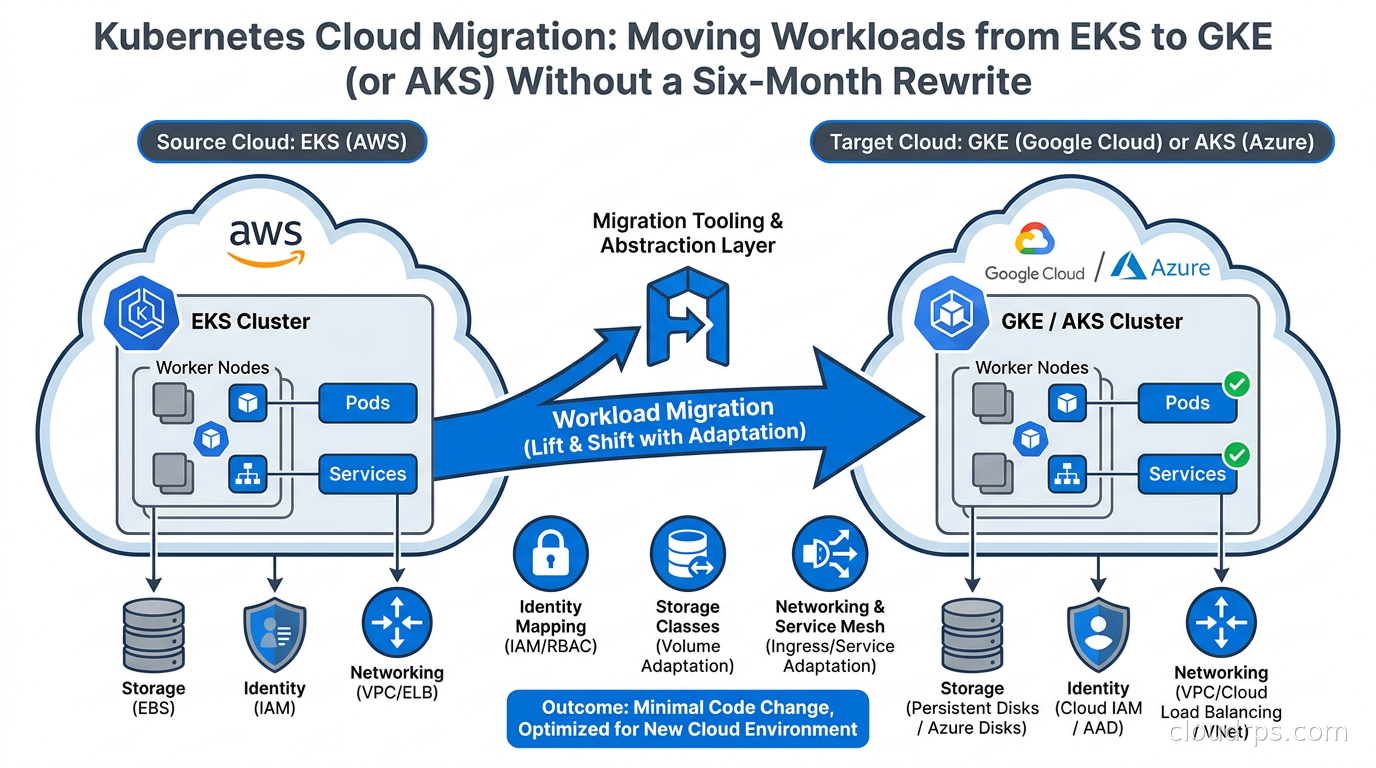
The pitch for Kubernetes was always cloud portability. Write your manifests once, run them anywhere. That is roughly true for stateless apps with no cloud-specific wiring. It falls apart the moment you touch workload identity, storage classes, load balancers, or anything that uses a cloud provider annotation.
I have done this migration three times in twenty years of cloud work: once moving a fintech platform from EKS to GKE when the team decided Google’s ML platform was too good to pass up, once moving a startup from AKS to EKS after an acquisition, and once helping an e-commerce company execute a phased multi-cloud move to reduce NVIDIA GPU lock-in. Each time I expected six weeks of work and got four months. The portability story is real, but the cloud-specific integration layer bites you every time.
This guide covers the full migration in the order you will actually face it: inventory and audit, the portable layer, identity, storage, networking, DNS cutover, and stateful services. I will be specific about what tools work, what does not carry over, and where the pain actually is.
Why Teams Are Doing This Now
For years Kubernetes cloud migrations were rare. The switching costs were high enough that teams stayed put. That changed in 2025 and 2026 for three reasons.
First, the NVIDIA GPU shortage pushed teams toward whichever cloud had capacity, then locked them in. Months later, the capacity situation improved, but the bill did not. Teams that overcommitted to one cloud’s GPU commitments are now rebalancing.
Second, the VMware exodus is still sending enterprises to public cloud, and many of them did not carefully pick a cloud first. They picked the one their integrator knew. Now they are second-guessing that choice after seeing the first annual invoice.
Third, cost optimization at scale. When your EKS workloads are spending meaningful money, GKE Autopilot or Azure’s spot VM pricing starts to look compelling. The FinOps discipline has matured enough that platform teams are being asked to model the total cost of a migration and weigh it against ongoing savings.
The common thread: Kubernetes was chosen partly for its portability, and teams are now collecting on that promise. The result is a wave of Kubernetes-to-Kubernetes cloud migrations that did not exist three years ago.
The Two Layers of a Kubernetes Cluster
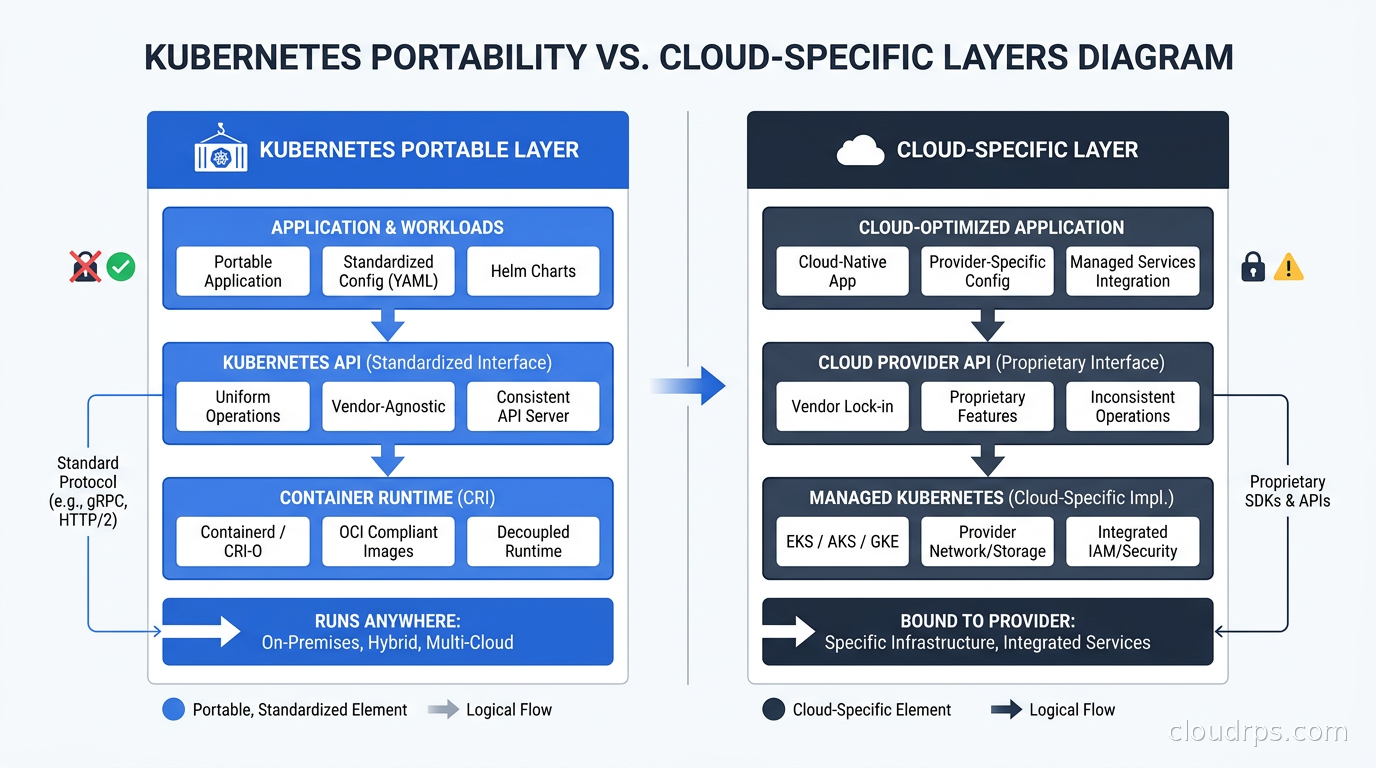
Before you plan anything, internalize this model: your cluster has two distinct layers.
The portable layer is the one Kubernetes actually standardizes. Pod specs, Deployments, StatefulSets, ConfigMaps, Secrets, Services, Ingresses, RBAC, NetworkPolicy, ResourceQuota. If your manifests are genuinely cloud-agnostic, this layer migrates close to verbatim.
The cloud-specific layer is everything that uses cloud annotations or cloud-specific behavior. This includes workload identity annotations (eks.amazonaws.com/role-arn, iam.gke.io/gcp-service-account), storage classes (kubernetes.io/aws-ebs, pd-ssd, managed-premium), load balancer service annotations, cluster autoscaler configuration, container registry pull credentials, and any AWS-, GCP-, or Azure-specific controller behavior.
Most teams underestimate the cloud-specific layer. I have seen codebases where over a third of Helm values files contained cloud-specific annotations. The comparison between EKS, GKE, and AKS gives you the feature differences; this article gives you the migration mechanics.
Step 1: Build the Inventory
Do not skip this. I have watched teams skip the inventory, start migrating individual services, hit a dependency they missed, and waste a month backtracking.
For each namespace, catalog:
- Workloads and their images (note: private registries must be replicated or migrated)
- PersistentVolumeClaims and their StorageClasses
- ServiceAccount annotations (this tells you the identity scope immediately)
- Service types (LoadBalancer, NodePort) and any cloud annotations
- Ingress resources and their ingress class
- Any cloud-specific operators or CRDs installed in the cluster (AWS Load Balancer Controller, GCP Config Connector, cert-manager cloud DNS solvers, Karpenter node pools)
# Quick inventory across namespaces
kubectl get deploy,sts,ds,pvc,svc,ingress,sa -A -o yaml \
  | grep -E "(eks.amazonaws.com|iam.gke.io|azure.com/|storageclass|kubernetes.io/aws)" \
  | sort | uniq -c | sort -rn
This grep surfaces everything cloud-specific in one pass. The count on each line tells you how many objects need changes in that category. Run it on the source cluster and use the output as your migration checklist.
Google publishes an official EKS-to-GKE migration architecture guide with a formal inventory template. It is worth reading even if you are migrating to AKS; the structure is sound regardless of target cloud.
Step 2: Abstract Your Manifests with Kustomize Overlays
The cleanest pattern for a portable codebase is Kustomize overlays: one base layer with provider-agnostic manifests and per-cloud overlays that patch in the cloud-specific pieces.
deploy/
  base/
    deployment.yaml     # no cloud annotations
    service.yaml        # type: ClusterIP
    serviceaccount.yaml # no cloud annotations
  overlays/
    eks/
      kustomization.yaml  # patch with IRSA annotations, AWS LB Controller, EBS storage
    gke/
      kustomization.yaml  # patch with GKE Workload Identity, GCP LB annotations, pd-ssd
    aks/
      kustomization.yaml  # patch with Entra Workload ID, Azure storage class
If you are using Helm, the equivalent is a values file per environment. The key is that the base templates never contain cloud-specific keys; those live only in the override layer.
This refactor is the most valuable thing you can do before migration. It also makes future cloud changes incremental rather than catastrophic. If your GitOps pipeline uses ArgoCD or Flux, each overlay becomes its own Application or Kustomization resource pointed at the right cluster.
Step 3: Identity Migration
This is the hardest part and where most timelines blow up. Cloud-specific workload identity is completely non-transferable. You cannot copy an IRSA annotation to a GKE cluster and expect anything to work.
EKS to GKE
On EKS you have two mechanisms. The older one is IRSA (IAM Roles for Service Accounts): an annotation on the Kubernetes ServiceAccount pointing to an IAM role ARN, with an OIDC trust policy on that role scoped to the cluster’s OIDC issuer. The newer one is EKS Pod Identity: instead of annotating ServiceAccounts, you create a Pod Identity Association via the EKS API (aws eks create-pod-identity-association) that maps a service account to an IAM role. The aws-eks-pod-identity-agent DaemonSet on each node intercepts and injects the credentials. No ServiceAccount annotation is needed.
GKE’s equivalent is Workload Identity Federation for GKE: you annotate the Kubernetes ServiceAccount with a GCP service account email, and you add a roles/iam.workloadIdentityUser IAM binding on the GCP service account that trusts the Kubernetes service account.
The migration steps are:
- Create GCP service accounts with the same permissions (translated to GCP equivalents: S3 becomes Cloud Storage, DynamoDB becomes Firestore or Spanner, etc.)
- Annotate Kubernetes ServiceAccounts in your GKE overlays with
iam.gke.io/gcp-service-account: <gsa>@<project>.iam.gserviceaccount.com - Add the Workload Identity binding on each GCP service account
- Update application code that calls AWS SDKs to call GCP SDKs (this is usually the longest part)
Point 4 is unavoidable if your application calls AWS-specific APIs directly. If you are using an abstraction layer (like COSI for object storage, or provider-agnostic database clients), the blast radius is smaller.
EKS to AKS
AKS uses Microsoft Entra Workload Identity (the successor to AAD Pod Identity). The pattern is similar to GKE: annotate the Kubernetes ServiceAccount with azure.workload.identity/client-id, create a Federated Identity Credential in Entra ID that trusts the AKS cluster’s OIDC issuer, and assign Azure RBAC roles to the managed identity.
For teams already using the RBAC patterns described in the workload identity federation guide, the concepts map cleanly across providers. The annotations are different; the trust model is the same.
Step 4: Storage Migration
Persistent storage is where migrations become genuinely painful for stateful services.
StorageClass mapping is straightforward: gp3 (EBS) maps to pd-ssd (GKE) or managed-premium (AKS). Update the StorageClass field in PVCs in your cloud overlays.
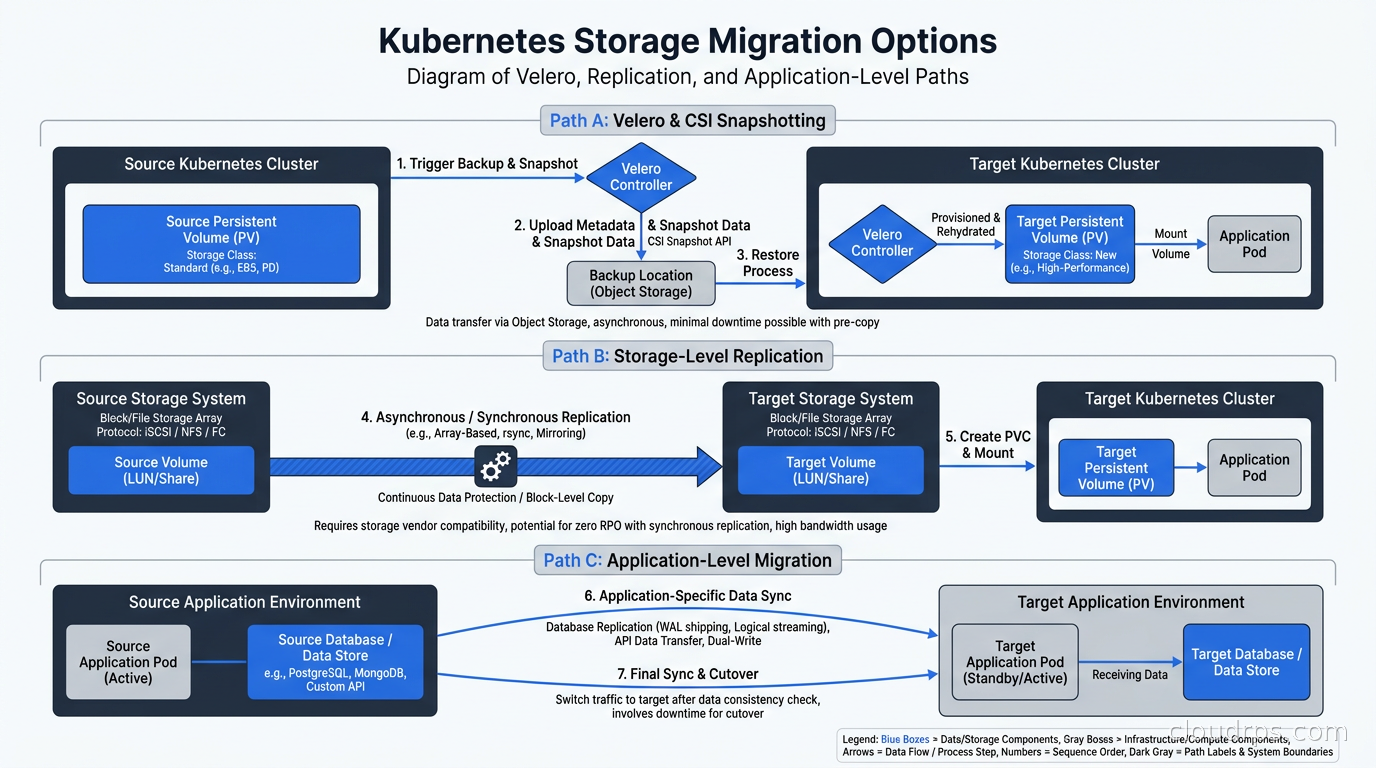
Moving data is the hard part. For stateless workloads backed by external databases you do not need to move PVCs at all. For workloads that use in-cluster persistent volumes (message queues, search indexes, caches), you have three options:
Velero file-system backup: Velero’s
--default-volumes-to-fs-backupflag copies PVC data to object storage and restores it in the target cluster. It works, but it is slow and requires the application to be quiesced during backup. For large volumes, expect hours. See the Velero backup guide for the operational setup.Storage replication tools: Tools like Rclone, CloudCasa, or vendor-specific migration services can replicate volumes continuously. This reduces cutover downtime from hours to minutes.
Application-level migration: For databases, never use Velero. Use pg_dump/pg_restore for PostgreSQL, mysqldump for MySQL, managed replication for managed databases. This is slower to set up but produces a known-good consistent snapshot.
My rule: if the data is in a managed database, use the database’s own migration tooling. If it is an application volume that can tolerate brief downtime, Velero file-system backup is fine. If it needs continuous sync, invest in a proper replication tool.
A critical detail: before you decommission the source cluster, change your PersistentVolume reclaim policy to Retain on any volume you have migrated. The default Delete policy will destroy the underlying disk when the PVC is deleted. I have seen teams lose data this way during rushed cutovers.
kubectl patch pv <pv-name> -p '{"spec":{"persistentVolumeReclaimPolicy":"Retain"}}'
Run this for every PV you care about before touching anything else.
Step 5: Load Balancers and Ingress
Cloud load balancers do not migrate; they are provisioned fresh in the target cloud. What you need to plan is the Service and Ingress annotation changes.
On EKS with the AWS Load Balancer Controller, your Service might look like:
metadata:
  annotations:
    service.beta.kubernetes.io/aws-load-balancer-type: external
    service.beta.kubernetes.io/aws-load-balancer-scheme: internet-facing
    service.beta.kubernetes.io/aws-load-balancer-nlb-target-type: ip
On GKE, the equivalent is:
metadata:
  annotations:
    cloud.google.com/load-balancer-type: External
    cloud.google.com/neg: '{"ingress": true}'
On AKS with the Azure Load Balancer:
metadata:
  annotations:
    service.beta.kubernetes.io/azure-load-balancer-internal: "false"
If you are using the Kubernetes Gateway API instead of cloud-specific Ingress, the migration is cleaner: the Gateway and HTTPRoute resources are provider-agnostic, and you change only the GatewayClass to reference the target cloud’s implementation.
Step 6: Networking Differences
The networking layer has several subtle differences that catch teams off guard.
Pod CIDR and Service CIDR: Make sure your target cluster’s CIDRs do not overlap with the source cluster’s or with any shared VPC address space. If you are running both clusters simultaneously during migration (you should be), overlapping CIDRs prevent direct connectivity.
Security Groups vs Firewall Rules: AWS uses Security Groups for pod-level networking (via the VPC CNI). GKE uses Google Cloud Firewall rules at the node level plus Kubernetes NetworkPolicy. AKS uses Azure Network Security Groups. Your Kubernetes network policies will carry over if you use standard NetworkPolicy resources, but any cloud-level firewall rules (security groups, GCP firewall rules) must be recreated manually.
Node-to-pod routing: EKS with the VPC CNI gives pods VPC-routable IPs. GKE can use VPC-native routing or the older routes-based approach. AKS with Azure CNI gives pods Azure-routable IPs. This matters if your application or monitoring tools assume pod IPs are routable from outside the cluster.
DNS: Each cloud has its own CoreDNS defaults and cluster domain. If any of your applications resolve other services by DNS name from outside the cluster, the DNS names will change. Plan this explicitly before cutover.
Step 7: DNS Cutover
DNS cutover is where multi-week migrations finish or fall apart. Do this wrong and you either have a long outage window or split traffic between old and new clusters in a way that corrupts state.
The technique I use:
Lower TTLs two weeks in advance: Find every DNS record pointing at load balancers fronting the source cluster and lower the TTL to 60 seconds. Do this two weeks before cutover, not the night before. Clients cache the old TTL value, so you need the full original TTL to expire before the low TTL takes effect.
Stand up the target cluster and validate: New cluster running, identity wired up, storage migrated or empty, applications healthy. Use synthetic traffic to verify.
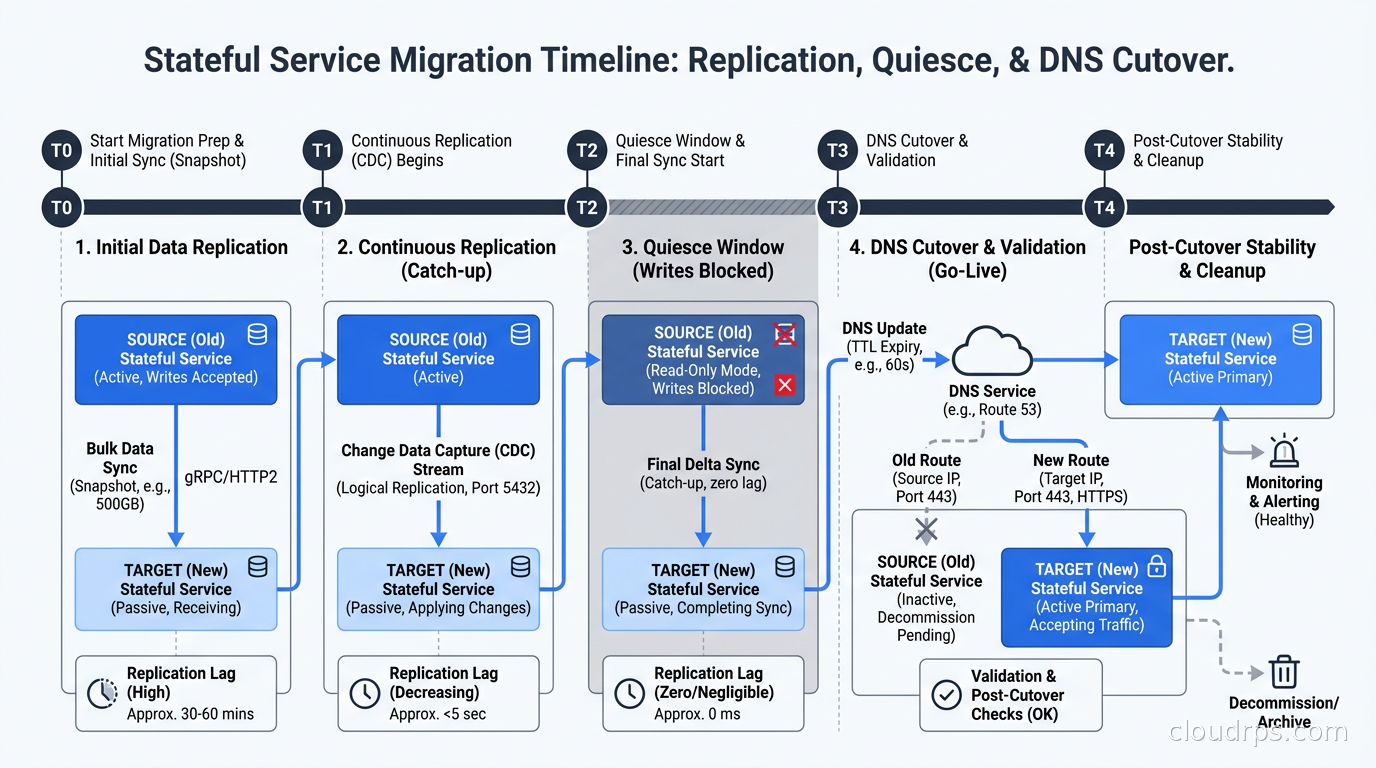
For stateful services: quiesce, migrate data, cutover atomically: Stop writes on the source, run a final data sync or backup-restore, update DNS. This is the only window with actual downtime for stateful apps. For most services this is a few minutes. For databases with significant in-flight writes, plan for longer.
For stateless services: DNS swap with rollback ready: Update the DNS record to point at the new load balancer IP. Because TTL is 60 seconds, traffic shifts within a minute. Keep the source cluster running and rollback-ready for 24 hours before decommissioning.
Monitor: Watch error rates in both clusters. Have a runbook ready that re-points DNS back to the source. The SLO and error budget framework applies here: define what error rate triggers rollback before you start, not during the panic.
Step 8: Stateful Services Deserve Their Own Plan
I want to be specific here because I have seen teams get it wrong in ways that caused data corruption.
Do not use Velero to migrate a production PostgreSQL instance. Velero takes a filesystem-level backup of the PVC. If the database is writing during the backup, you get a crash-consistent snapshot, which is not the same as a consistent database backup. For PostgreSQL, use pg_dump or logical replication. For MySQL, use mysqldump or the binary log based tools. For managed databases, use the cloud provider’s native export and import tools or database-level replication to replicate to a managed database on the target cloud.
The pattern for managed database migration during Kubernetes cutover:
- Set up cross-cloud replication to a database instance on the target cloud (most managed databases support this via logical replication or VPN-based access)
- Let replication run until lag is near zero
- During the cutover window: stop application writes (put the app in maintenance mode or fence it at the ingress level), verify replication is at zero lag, promote the replica
- Update the application’s database connection string (via ConfigMap or Secret in the new cluster)
- Start the new cluster’s application
The zero-downtime database migration patterns article has more depth on the expand-contract approach for schema changes alongside a cluster migration.
Step 9: Container Registry
This is easy to miss in the planning phase but blocks migration day. Your source cluster probably pulls images from ECR (EKS), GCR/Artifact Registry (GKE), or ACR (AKS). The target cluster needs to pull from somewhere it has access to.
Options:
Copy images to the target registry: Use
crane copyorskopeo copyto copy all images from the source registry to the target. This is the safest approach.Use a neutral registry: Docker Hub, GitHub Container Registry, or a hosted Harbor instance that both clusters can reach. This avoids registry migration entirely and is a good long-term choice for multi-cloud environments.
Cross-cloud registry pull: Most cloud registries support cross-account or cross-project pulls with appropriate service account permissions. EKS pods can pull from GCR if you configure the right imagePullSecrets. This works but adds latency and egress costs.
For large image libraries (hundreds of images), automate the copy with a script that lists all image tags in use across your manifests and copies only those. Copying every tag in a mature ECR repository is a multi-hour operation you do not want to discover on migration day.
Cluster Autoscaler and Node Configuration
Karpenter on EKS does not exist on GKE or AKS. GKE has Node Auto Provisioning (NAP) and standard cluster autoscaler. AKS has Cluster Autoscaler or Node Autoprovision. If your workloads rely on Karpenter’s NodePool and NodeClass resources for custom scheduling, those need to be translated to the target cloud’s equivalent node provisioning mechanism. The Karpenter guide covers EKS specifics; just know that this config does not transfer.
Node labels and taints you have set for pod scheduling may reference instance family names that do not exist on the target cloud. If you are using node affinity rules that reference node.kubernetes.io/instance-type: m5.4xlarge, those will not match GKE’s n2-standard-16 nodes. Update these in your cloud overlays.
Validation Before Cutover
Before you route any real traffic to the target cluster, run a full validation sweep:
# Check all pods are running
kubectl get pods -A | grep -v Running | grep -v Completed

# Check workload identity is working
kubectl exec -it <test-pod> -- \
  curl -H "Metadata-Flavor: Google" \
  "http://metadata.google.internal/computeMetadata/v1/instance/service-accounts/default/token"

# Check storage is accessible
kubectl exec -it <stateful-pod> -- df -h /data

# Check inter-service DNS resolution
kubectl exec -it <service-a-pod> -- nslookup service-b.namespace.svc.cluster.local

# Check external connectivity and egress
kubectl exec -it <pod> -- curl -I https://your-external-api.com
Each of these checks has caused a migration rollback when it was skipped. The workload identity check is especially important: a pod that starts successfully but cannot get credentials will fail silently until it tries to call a cloud API.
The Cost of Egress During Migration
One thing teams do not plan for: during the transition period when both clusters are running, you may be paying egress costs in both directions. Data flowing from the source cluster to the new cluster crosses cloud boundaries. The cloud egress cost guide covers the full picture, but the short version: a Kubernetes-to-Kubernetes migration across cloud providers typically generates meaningful egress charges for PVC data, container image copies, and database sync traffic.
Budget for this explicitly. I have seen migration projects go over budget not because of engineering time but because nobody modeled the data transfer costs.
Common Failure Modes
Identity misconfiguration discovered in production: The IRSA-to-GKE-WI translation looks right in the manifest but the IAM binding is missing or scoped to the wrong project. Applications start, pass health checks, then fail their first API call. The fix is fast once diagnosed, but the diagnosis can take an hour during a live cutover. Test identity explicitly with a pod that makes an authenticated API call before routing traffic.
PVC data was larger than expected: Teams test Velero restore with small volumes and assume it scales. It does not linearly. A 500 GB volume that looked fine in testing might take four hours to restore. Put actual volume sizes in your migration plan.
DNS TTL was not actually lowered: The DNS record was updated two weeks before the migration, but the DNS was managed by a third-party registrar that took 48 hours to propagate the TTL change. By migration night, some CDN nodes were still caching the old TTL. Always verify the TTL from multiple geographies before you rely on it.
Node labels broke scheduling: The first deployment to the target cluster had pods stuck in Pending because the node affinity rules referenced an instance type that did not exist. The fix was a 10-second manifest change, but it caused 20 minutes of confusion during a timed maintenance window.
Rollback Strategy
Define the rollback trigger and rollback procedure before you start cutover, in writing, shared with everyone on the call.
My rollback criteria: if error rate exceeds the target SLO threshold for more than five minutes after traffic shift, roll back. For services with actual downtime windows, any startup failure that cannot be diagnosed within 15 minutes triggers rollback.
The rollback procedure:
- Update DNS back to the source cluster load balancer
- For stateful services with writes paused: resume writes on the source application
- For databases with promoted replicas: re-establish replication from the new instance back to the old one (painful but possible)
- Notify the team, write up what failed, reschedule
Keep the source cluster running for at least 48 hours after a successful cutover. The disaster recovery patterns apply here: you want a tested rollback path, not a theoretical one.
What Kubernetes Portability Actually Gives You
After three cross-cloud migrations, here is my honest assessment of Kubernetes portability.
The portable layer is real and valuable. If you built your cluster right: GitOps-driven manifests, no hardcoded cloud annotations in base templates, cloud-agnostic application code that uses standard environment variables or ConfigMaps for configuration, then the mechanical parts of the migration are genuinely manageable. A team of three engineers can execute it in four to six weeks.
The cloud-specific layer is also real and non-trivial. Identity, storage, networking, and node provisioning are all cloud-specific. Migrating them is not hard, but it requires systematic effort and there are no shortcuts.
The honest advice: treat a cross-cloud Kubernetes migration as a medium-complexity project, not a lift-and-shift. Plan six to eight weeks for a moderately complex platform. Build your overlays first. Test identity and storage in the target environment before you commit to a cutover date. And never migrate a production database with Velero.
The portability promise is redeemable. I have done it. Just go in with eyes open about where the cloud-specific layer will push back.
Get Cloud Architecture Insights
Practical deep dives on infrastructure, security, and scaling. No spam, no fluff.
By subscribing, you agree to receive emails. Unsubscribe anytime.