
When I first started provisioning Kubernetes clusters in anger, around 2018, the tooling was a mess. You had kops for AWS, GKE was mostly click-and-pray, on-premises meant kubeadm scripts held together with bash duct tape, and nobody had a clean answer for what happened when you needed to upgrade forty clusters simultaneously. The platform team I was with at a large fintech had a spreadsheet tracking which clusters were on which version. Not a joke. An actual spreadsheet with a “last upgraded” column.
After twenty years in infrastructure and the last several building platform engineering capabilities for organizations running Kubernetes at serious scale, that spreadsheet still haunts me. Cluster API (CAPI) is the thing that finally made it obsolete.
CAPI brings the same declarative, controller-based model that makes Kubernetes great at managing workloads, and applies it to the clusters themselves. Instead of scripts, runbooks, and spreadsheets, you describe what you want your clusters to look like, commit that description to Git, and CAPI reconciles reality to match. The concept is elegant. The implementation, like all mature infrastructure projects, has sharp edges worth understanding before you commit to it.
The Core Idea: Use Kubernetes to Manage Kubernetes
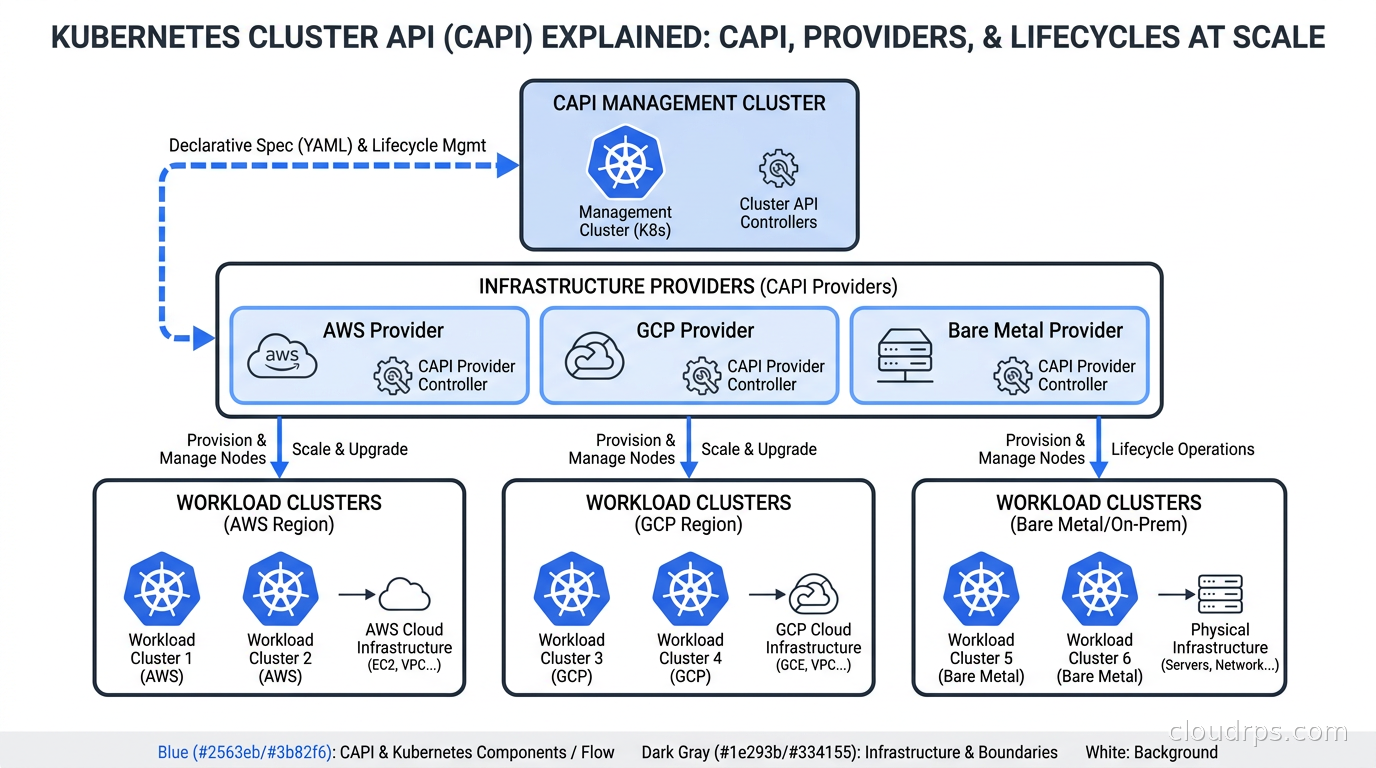
The central abstraction of CAPI is a “management cluster” that runs the Cluster API controllers. Those controllers provision “workload clusters” by watching Kubernetes custom resources. You apply a YAML manifest describing a cluster, CAPI goes off and creates it. You change the manifest to bump the Kubernetes version, CAPI performs a rolling upgrade. You delete the manifest, CAPI tears the cluster down.
This is the same pattern as every Kubernetes operator. CAPI is a set of operators that happen to manage other Kubernetes clusters instead of databases or message queues. If you understand how the operator pattern works, CAPI’s architecture will feel immediately familiar.
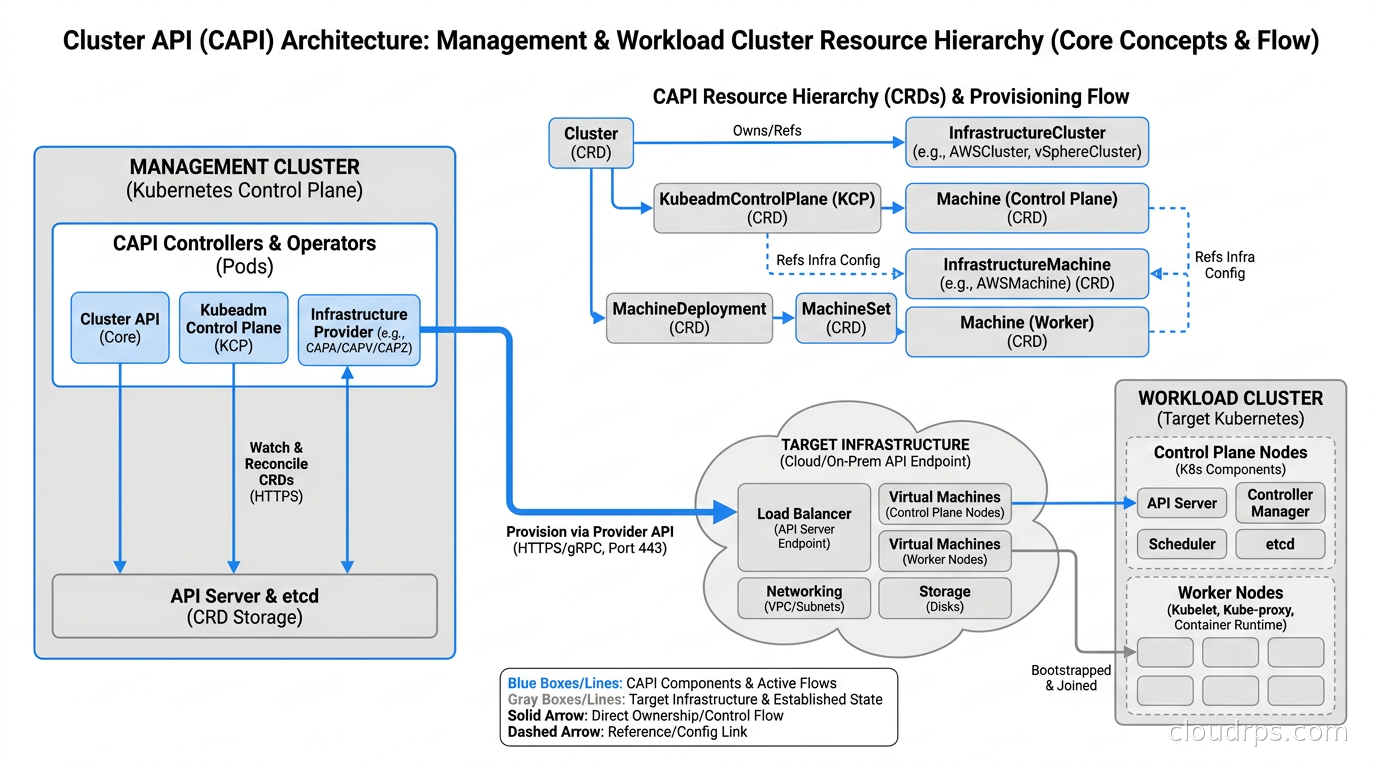
The key resource types you work with directly:
Cluster: The top-level resource. Defines network configuration, Kubernetes version, and references to infrastructure and control plane resources. Think of it as the spec for a cluster the same way a Deployment spec defines a set of pods.
KubeadmControlPlane (KCP): Manages the control plane. Handles etcd, API server, scheduler, and controller manager as a set. Upgrades control plane nodes one at a time to maintain quorum.
MachineDeployment: Manages worker node groups, analogous to Deployments managing pods. Describes desired count, machine spec, and upgrade strategy.
Machine: Represents a single node. Usually created by MachineDeployment rather than applied directly. When a machine goes unhealthy, the MachineDeployment replaces it automatically.
These core types are intentionally provider-agnostic. The infrastructure-specific bits live in separate provider resources, which is the key to CAPI’s extensibility.
The Provider Model: One Interface, Every Cloud
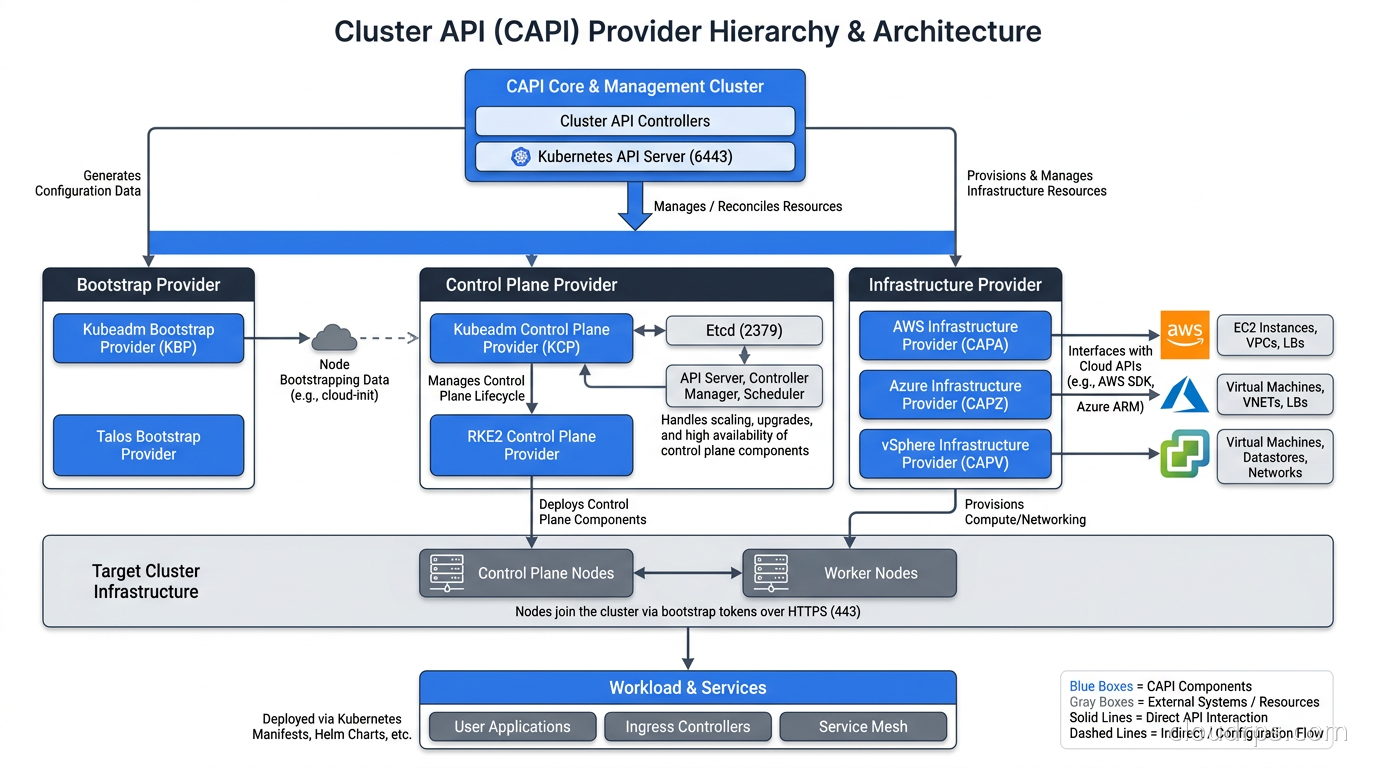
CAPI uses a plugin model to abstract away differences between AWS, GCP, Azure, vSphere, bare metal, and everything else. Three provider categories work together for every cluster:
Infrastructure providers handle the actual VMs, networks, and load balancers. The main ones you will encounter:
- CAPA (Cluster API Provider AWS): supports both self-managed clusters on EC2 and managed EKS
- CAPG (Google): self-managed on Compute Engine or GKE
- CAPZ (Azure): self-managed on Azure VMs or AKS-managed clusters
- CAPV (vSphere): on-premises VMware workloads
- CAPM3 (Metal3): bare metal provisioning via Ironic
Bootstrap providers generate the cloud-init or ignition configuration that turns a blank VM into a functioning Kubernetes node. The default is KubeadmBootstrap, which generates kubeadm configuration. Talos Linux has its own bootstrap provider (CABPT) that generates Talos machine configurations instead of kubeadm scripts. If you are running Talos, CAPI and CABPT are the natural fit for cluster provisioning.
Control plane providers manage Kubernetes control plane lifecycle. KubeadmControlPlane is the default for self-managed clusters. EKS, GKE, and AKS control plane providers delegate to the managed service rather than running the control plane directly.
This separation is one of CAPI’s most important design decisions. A generic cluster template can work across AWS, Azure, and on-premises bare metal by swapping only the infrastructure provider references. The MachineDeployment definition is identical; only the AWSMachineTemplate vs AzureMachineTemplate vs Metal3MachineTemplate changes. I have used this to build a single cluster template library that serves our entire multi-cloud portfolio without per-cloud forks.
Setting Up Your First CAPI Environment
The entry point is clusterctl, the CAPI CLI. You use it to initialize the management cluster with the providers you need and generate cluster manifests from templates.
# Initialize management cluster with AWS provider
clusterctl init --infrastructure aws

# Installs CAPI core controllers, CAPA infrastructure provider,
# CABPK bootstrap provider, and KubeadmControlPlane provider
Before creating workload clusters, the infrastructure provider needs credentials. For AWS, that means an IAM role with EC2, ELB, and IAM permissions. CAPA documents exactly what is needed, and there is a CloudFormation stack that provisions the correct IAM resources. I have watched teams spend an afternoon debugging mysterious failures because they missed the elasticloadbalancing:DescribeLoadBalancerAttributes permission. The permission list is long and specific. Read it before you start.
Once initialized, generate a cluster manifest:
clusterctl generate cluster prod-cluster-1 \
  --kubernetes-version v1.32.0 \
  --control-plane-machine-count=3 \
  --worker-machine-count=3 \
  > clusters/prod-cluster-1.yaml
That YAML file is the full cluster definition. Apply it to the management cluster, and CAPI starts provisioning. Control plane nodes come up first, then workers join. Watch progress with:
clusterctl describe cluster prod-cluster-1
When the cluster is ready, pull the kubeconfig:
clusterctl get kubeconfig prod-cluster-1 > prod-cluster-1.kubeconfig
A basic AWS cluster takes 10-15 minutes end to end. Not instant, but fully automated, reproducible, and inspectable.
ClusterClass: Templates for Fleet Consistency
CAPI v1.3 introduced ClusterClass, which is worth understanding if you are provisioning more than a handful of clusters. A ClusterClass is a reusable template that defines the shape of a cluster without the specific values. Individual clusters then reference the class and provide only the parameters that differ.
Without ClusterClass, if you have forty clusters and want to add a label to all worker nodes, you edit forty YAML files. With ClusterClass, you edit the class definition once, and CAPI propagates the change across all clusters that reference it. The rollout can be controlled: either an immediate reconcile or a phased rollout using a topology upgrade policy.
I started recommending ClusterClass to every team after the first time I helped a client apply a security patch to node configurations across twenty-three clusters by hand. It took four hours and left two clusters misconfigured because someone’s PR got merged out of order. ClusterClass would have made that a five-minute change.
GitOps Integration: Where CAPI Really Pays Off
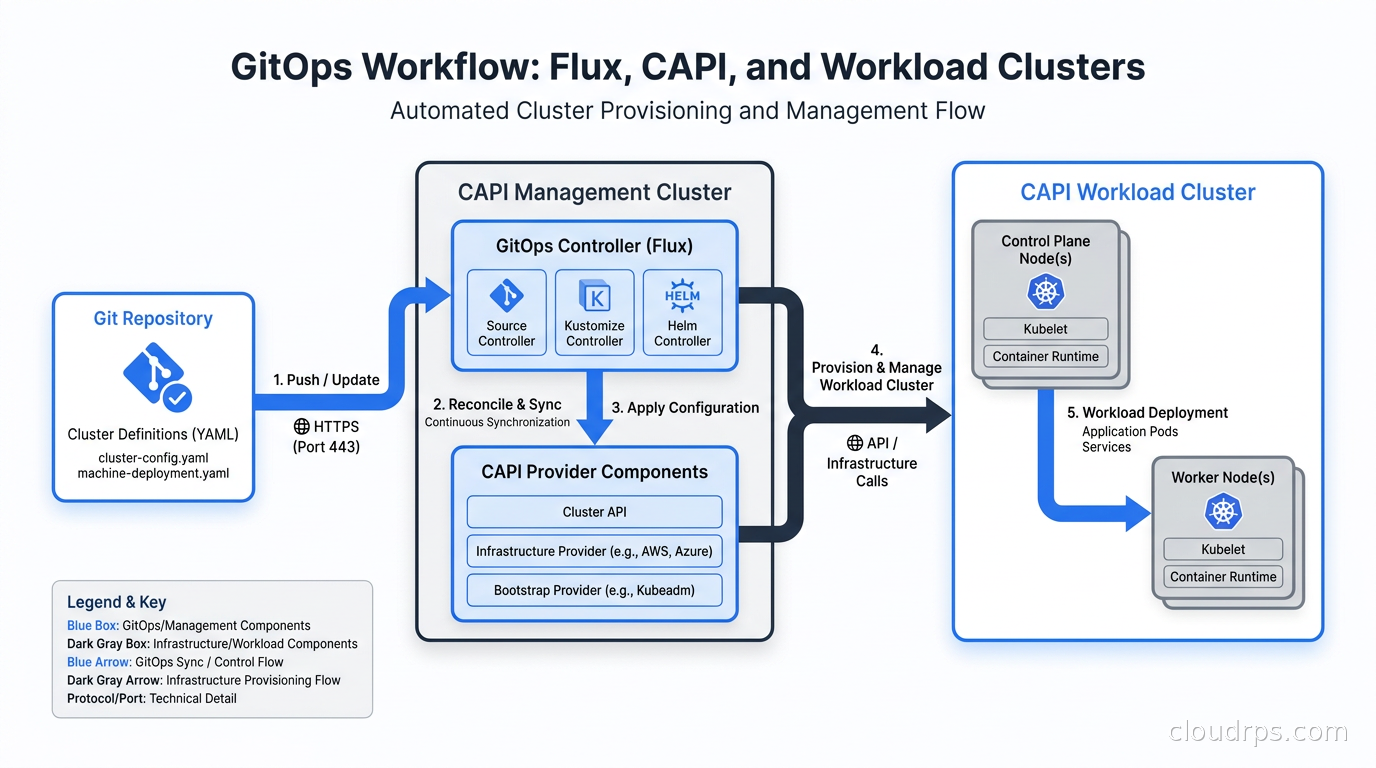
The full value of CAPI only materializes when you commit cluster manifests to Git and let ArgoCD or Flux manage them. The management cluster becomes just another GitOps target. A new cluster is a pull request. An upgrade is a version bump and a code review. Decommissioning is a file deletion with a logged approver.
The alternative, where engineers run clusterctl commands by hand, means no audit trail, no reproducible state, and no easy rollback path. When something goes wrong with a cluster at 2am, you want to ask “what changed in Git?” not “who ran what command from their laptop three days ago?”
The practical flow looks like this:
- Cluster definitions live in
clusters/in the infrastructure repo, one subdirectory per cluster - Flux watches the
clusters/path and applies changed manifests to the management cluster - CAPI reconciles the actual cluster state to match the desired spec
- Workload cluster kubeconfigs are stored as secrets in the management cluster, synced to Vault or AWS Secrets Manager for application teams to consume
For multi-cluster workload distribution with tools like Karmada or Rancher Fleet, CAPI handles the provisioning layer that those tools operate on top of. CAPI answers “does this cluster exist and is it healthy?” Karmada answers “what workloads run on which clusters?”
Cluster Upgrades: The Hard Part
Kubernetes upgrades have always been the most stressful operation in cluster management. CAPI makes them substantially safer, though not without nuance.
The default upgrade path uses a rolling replacement strategy for worker nodes. When you bump the Kubernetes version in the KubeadmControlPlane resource or the MachineDeployment, CAPI creates new machines at the new version, waits for them to become ready, drains the old ones, and deletes them. Control plane upgrades happen one node at a time to maintain etcd quorum. Worker upgrades happen in configurable batches, controlled by the maxSurge and maxUnavailable settings on the MachineDeployment.
The version skew constraint bites teams that fall behind. Kubernetes supports N-2 minor version skew between API server and kubelets. You cannot jump from v1.28 directly to v1.32 in one operation. You hop through each minor version. CAPI enforces this and will reject manifests that attempt skipping.
Before v1.12, fixing version debt required a sequence of manual manifest edits, one minor version at a time, waiting for each upgrade to complete before starting the next. CAPI v1.12’s chained upgrades feature automates this sequence. You specify the target version and CAPI queues the intermediate hops automatically. This feature alone is the reason to upgrade to v1.12 for any shop that has fallen behind. I have been in situations where a cluster was three minor versions behind and catching up was a weekend project. With chained upgrades, it becomes a watched afternoon.
The other v1.12 change worth understanding is in-place control plane upgrades. Previously, upgrading the control plane meant provisioning new VMs at the new version, shifting traffic, and tearing down the old ones. For providers like vSphere where VM provisioning takes several minutes per machine, a three-node control plane upgrade added 15-25 minutes of waiting on infrastructure. In-place upgrades update the running control plane nodes directly, similar to what kubeadm does manually. Faster, but riskier if the upgrade fails midway.
My recommendation: use in-place upgrades on development and staging clusters where speed matters, and keep the default replacement strategy for production. The extra time is cheap insurance.
The Management Cluster Bootstrapping Problem
Here is the honest assessment of the biggest operational challenge in CAPI: the management cluster itself is critical infrastructure that must be operated with the same discipline as any production system.
If the management cluster goes down, your workload clusters keep running. CAPI is not in the data path. But you lose the ability to create, upgrade, or scale them until the management cluster is restored. That means the management cluster needs high availability (at least three control plane nodes), etcd backups, monitoring, alerting, and a tested restore procedure. I have seen teams build an excellent CAPI setup for workload clusters while running the management cluster on a single node with no backups. Do not do this.
The bootstrapping paradox is real: how do you create the management cluster in the first place? The answer is “by hand the first time, then CAPI manages itself.” The clusterctl move command migrates all CAPI resources from a temporary bootstrap cluster (often a local kind cluster) into the production management cluster, which then manages its own lifecycle going forward.
I have performed this pivot twice in production and found it anxiety-inducing both times despite going smoothly. The documentation is thorough and the tooling works as advertised, but moving the control plane of your cluster management infrastructure while it is running requires nerves. Validate the backup procedure and do a dry run in a staging environment before production.
Many teams sidestep the complexity by running the management cluster on a managed Kubernetes service. If you are comparing managed Kubernetes options, that comparison applies directly to your management cluster choice. There is nothing wrong with running EKS as your management cluster and letting CAPI provision other EKS or self-managed clusters from it. You trade a bit of philosophical purity for operational simplicity.
CAPI vs Crossplane for Cluster Provisioning
Teams regularly ask whether to use CAPI or Crossplane for cluster provisioning. The answer depends on scope.
Crossplane is a general-purpose cloud resource provisioner. It can create Kubernetes clusters, databases, buckets, networks, and any other cloud resource through a unified CRD-based interface. If you want a single control plane for all cloud infrastructure, Crossplane is the right choice.
CAPI is purpose-built for Kubernetes cluster lifecycle. It understands Kubernetes version semantics, has first-class provider implementations for every major infrastructure platform, and handles the complex sequencing of control plane upgrades that a general-purpose provisioner would have to reinvent from scratch. If your primary need is managing Kubernetes clusters at scale, CAPI is the better-fit tool.
The integration point: you can use Crossplane to provision supporting infrastructure (VPCs, IAM roles, RDS instances) and CAPI to provision the clusters that run on that infrastructure. The two complement each other at different layers.
Karpenter and CAPI: Different Layers
The question comes up constantly: if I use Karpenter for node provisioning, do I still need CAPI?
Yes. They operate at different levels. CAPI handles cluster existence and health: creating the cluster, provisioning initial node groups, managing Kubernetes version upgrades. Karpenter handles compute scaling within a running cluster: adding nodes when pods are pending, removing them when workloads scale down.
The practical setup I run on AWS: CAPI provisions and manages the cluster lifecycle, creates a small initial MachineDeployment for system workloads, and Karpenter NodePools handle all application compute with aggressive spot utilization and right-sizing. CAPI upgrades the control plane and system nodes. Karpenter handles everything else dynamically. This combination covers both lifecycle management and cost-efficient scaling.
Observability for Your CAPI Setup
The CAPI controllers expose standard Prometheus metrics. The ones I alert on:
capi_machine_phase: machines stuck inProvisioningorDeletingfor more than ten minutes indicate a provider API problemcapi_cluster_phase: clusters not inProvisionedstate need investigationcontroller_runtime_reconcile_errors_total: sustained reconciliation failures indicate provider connectivity or configuration problems
I surface these in the same Prometheus and Grafana stack used for everything else. The CAPI community maintains a Grafana dashboard import. The most common production failure mode I have seen: a provider API hitting rate limits during a cluster upgrade causes reconciliation errors, the upgrade pauses, and without alerting nobody notices for hours. Alert on sustained errors, not just transient ones.
When CAPI Is Not the Right Choice
CAPI has genuine operational overhead. There are cases where managed Kubernetes or simpler tooling is the better call:
Teams running five or fewer clusters: The management cluster, provider configuration, and GitOps setup is real complexity. For a small number of stable clusters, the overhead is hard to justify.
Clusters that rarely change: The GitOps and automation value of CAPI is highest when you create, upgrade, and destroy clusters frequently. A two-cluster setup with annual upgrades is better managed with manual kubeadm or a managed service.
Teams new to Kubernetes: CAPI adds a layer of abstraction on top of Kubernetes that requires understanding both layers well. Get the fundamentals of Kubernetes operations solid before adding CAPI to the stack.
The scale point where CAPI becomes clearly worth it, in my experience: somewhere around ten to fifteen clusters. Below that, the complexity is hard to justify. At twenty or more clusters, operating without CAPI starts feeling reckless.
Getting Started
The fastest path to understanding CAPI is a local experiment using Docker as the infrastructure provider. The clusterctl quickstart guide walks through creating a management cluster with kind, installing the Docker infrastructure provider (CAPD), and provisioning a workload cluster entirely locally. No cloud credentials, no cost, and the whole flow runs in ten minutes.
From there, moving to AWS or GCP requires adding credentials and provider-specific machine templates, but the core resource model is identical. The local experiment gives you intuition for how CAPI resources relate before you are spending real money on cloud compute.
If you are building out a full platform engineering capability, CAPI pairs naturally with the internal developer portal layer. The portal provides the self-service UI; CAPI handles the actual cluster provisioning when a team requests a new environment. The integration is not trivial but the separation of concerns is clean.
CAPI is infrastructure plumbing. It is not exciting. It does not show up in keynotes. But after the spreadsheet era of 2018 and years of watching platform teams burn hours on manual cluster operations, I have a deep appreciation for boring infrastructure tooling that works. If you are managing more than a handful of clusters and have not looked at CAPI, the investment is worth making.
Get Cloud Architecture Insights
Practical deep dives on infrastructure, security, and scaling. No spam, no fluff.
By subscribing, you agree to receive emails. Unsubscribe anytime.