
The first time I inherited a Kubernetes cluster that someone else had set up, I had to debug a network policy that wasn’t working. Pods that should have been blocked were communicating freely. The policy looked syntactically correct. The reason it wasn’t enforcing: the cluster was running Flannel, which does not support NetworkPolicy at all. The policies were being accepted by the API server (because they’re just Kubernetes objects), but silently ignored because the CNI had no policy enforcement engine.
That experience is a good introduction to how Kubernetes networking actually works: the Container Network Interface (CNI) plugin is not just an implementation detail, it determines what capabilities you have access to. Get this choice wrong at cluster bootstrap time and you’ll pay for it later.
How Kubernetes Networking Works
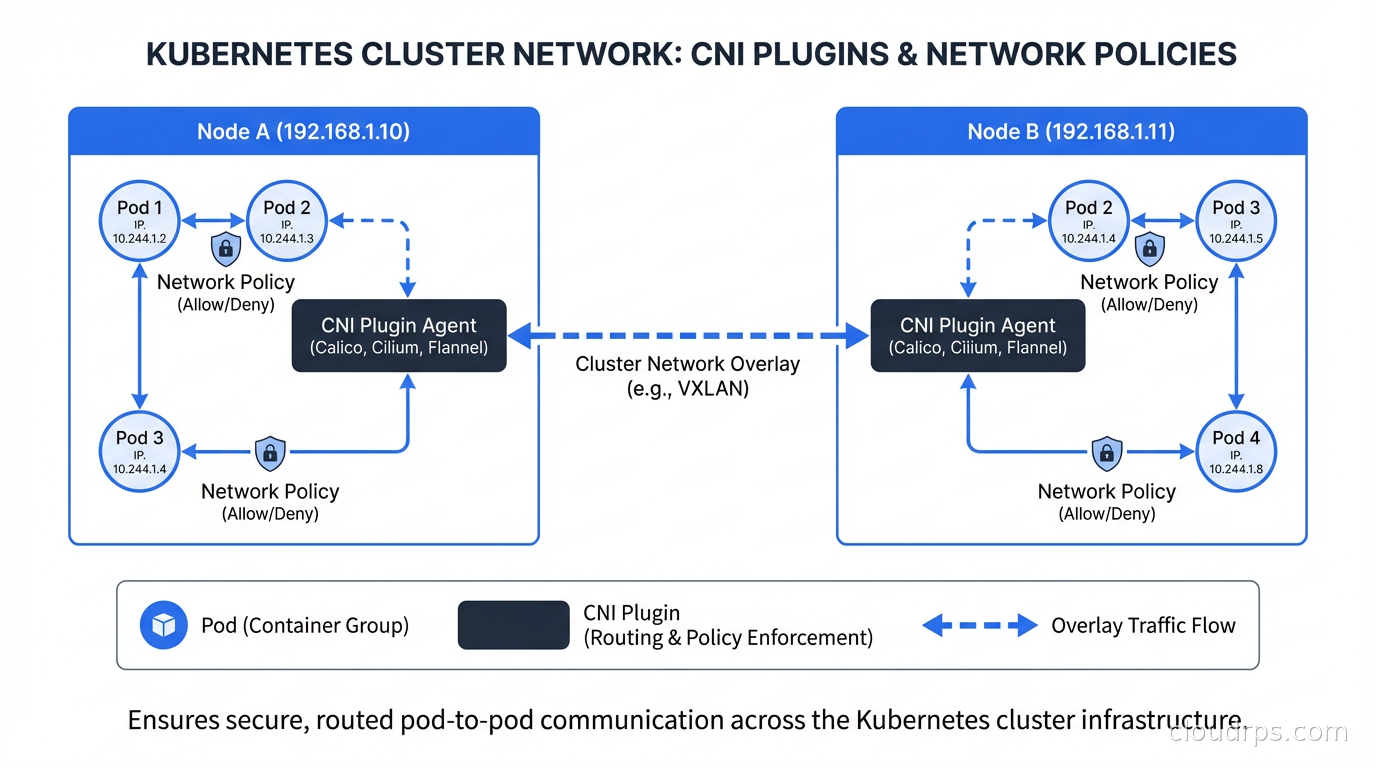
Kubernetes has a flat networking model: every pod gets its own IP address, and every pod can communicate with every other pod in the cluster without NAT. This sounds simple until you realize that Kubernetes doesn’t implement this itself. It specifies the model and delegates the implementation to a CNI plugin.
When kubelet creates a pod, it calls the CNI plugin to:
- Create a network interface for the pod (usually a veth pair)
- Assign an IP address from the cluster’s pod CIDR
- Set up routing so other nodes know how to reach this pod’s IPs
- Configure any network policies that apply to this pod
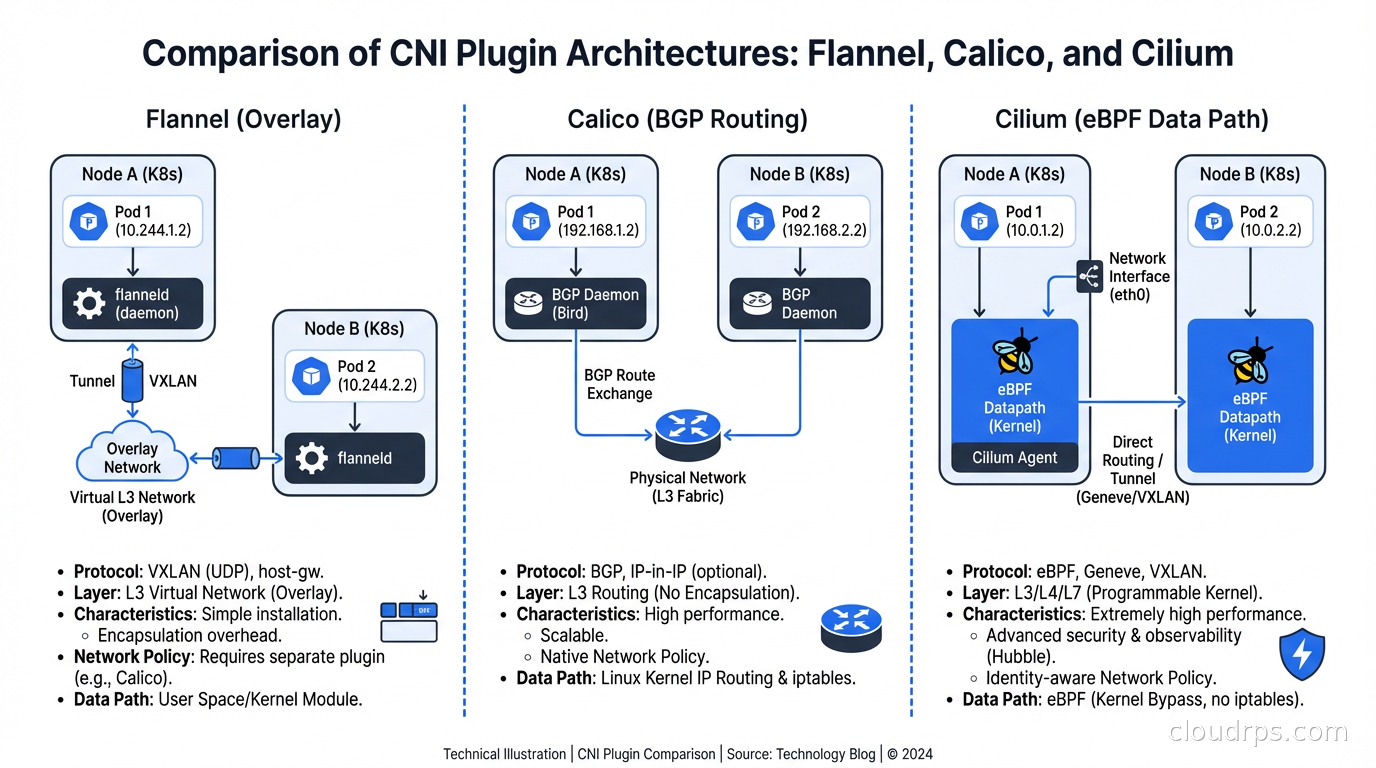
Different CNI plugins implement these steps differently. Flannel uses VXLAN or host-gw overlays. Calico defaults to BGP routing. Cilium uses eBPF to manage networking directly in the kernel. The outcome (pods can communicate) is the same; the mechanism, performance characteristics, and additional capabilities vary significantly.
The CNI specification also defines network policies. NetworkPolicy is a Kubernetes resource that specifies which pods can communicate with which other pods, on which ports. But here’s the critical detail: a CNI plugin is not required to implement network policy enforcement. If your CNI doesn’t support it, Kubernetes will accept your NetworkPolicy resources but do nothing with them.
The Main CNI Options
Let me cover the four most common CNI plugins you’ll encounter in production environments.
Flannel is the simplest. It creates an overlay network (VXLAN by default) that encapsulates pod traffic in UDP packets to route across nodes. Flannel is easy to set up, has few moving parts, and is well-understood. It’s the default in many managed Kubernetes distributions and single-node setups.
What Flannel doesn’t do: network policy enforcement. Period. If you’re running Flannel and deploying NetworkPolicy objects, those policies are decorative. You can pair Flannel with Calico’s policy engine (using Calico without Calico’s networking, just its policy agent) but at that point you might as well run Calico fully. I’ve seen Flannel in production at small scale where network isolation wasn’t a hard requirement; for anything security-sensitive, you need a different choice.
Calico has been the production workhorse for years. It uses BGP by default for route distribution, which means pod traffic isn’t encapsulated in an overlay - it routes natively like regular IP traffic. This makes Calico generally faster than overlay-based CNIs for pod-to-pod communication. On cloud providers where BGP isn’t available, Calico falls back to VXLAN, similar to Flannel.
Calico has full NetworkPolicy support, a global network policy concept (for cluster-wide rules that override namespace-scoped policies), host endpoint policies (for securing traffic to the node itself, not just pods), and good observability through its Felix component. The operational model is mature and well-documented.
The main critique of Calico: it’s complex. The BGP route distribution model requires understanding BGP concepts (AS numbers, peering, route reflectors) at scale. In large clusters (hundreds of nodes), Calico’s BGP routing can create a lot of route churn that needs careful tuning. The iptables-based data plane, while functional, doesn’t scale as well as eBPF-based alternatives.
Cilium is where the industry is moving, and for good reason. Cilium uses eBPF as its data plane, bypassing iptables entirely and implementing networking and security directly in the Linux kernel. This yields significantly better performance at high throughput, better observability (Hubble, Cilium’s observability component, gives you pod-level network visibility that iptables-based CNIs can’t match), and more powerful policy capabilities.
Cilium’s network policy implementation extends the standard Kubernetes NetworkPolicy with Cilium-specific CRDs that support Layer 7 policy (allow HTTP GET to /api/products but deny /admin), DNS-based policy (allow egress to api.external-service.com), and cluster-mesh policies that work across multiple Kubernetes clusters.
The performance difference between Cilium and iptables-based CNIs becomes meaningful at scale. iptables rule evaluation is O(n) in the number of rules. As you add more network policies, every new connection must traverse a growing iptables chain. eBPF uses hash maps for O(1) lookups. In a cluster with thousands of pods and complex policies, this makes a measurable difference in latency and CPU usage.
Weave Net was a popular choice a few years ago, particularly for its simplicity and mesh networking approach. Weave’s commercial entity was acquired and the project has seen reduced investment. I’d generally recommend against starting new clusters on Weave today; the ecosystem momentum is clearly behind Calico and Cilium.
Choosing Your CNI
My decision framework:
If you’re on a managed Kubernetes service (EKS, GKE, AKS), the managed addons for each cloud (VPC CNI on EKS, Dataplane V2 on GKE which is Cilium-based, Azure CNI) are good defaults. They integrate with cloud VPC networking, which gives you benefits like security group integration and direct VPC routing that generic CNIs don’t provide.
For self-managed clusters where security policies are important: Cilium is my default recommendation for new clusters in 2025 and beyond. The eBPF data plane is genuinely better, Hubble observability is excellent, and the extended policy capabilities solve real problems. The main caveat is that Cilium requires a reasonably modern kernel (5.10+ for full features).
For self-managed clusters with simpler requirements or older kernel constraints: Calico is solid and proven. The operational knowledge base is deep, and if you hit a problem, you’ll find documentation and Stack Overflow answers.
For development and testing environments where you just need something that works: Flannel or whatever your Kubernetes distribution ships as default.
Kubernetes NetworkPolicy: The Basics
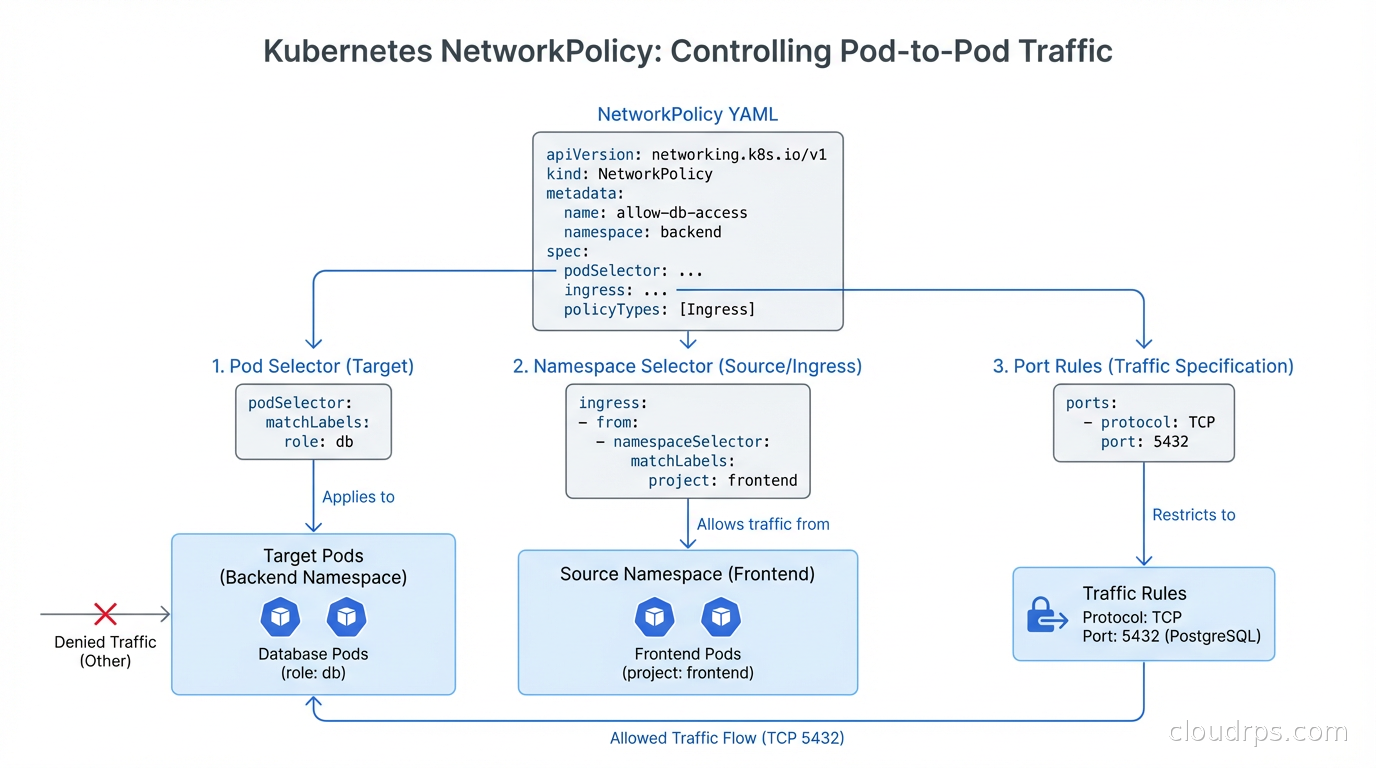
Kubernetes NetworkPolicy resources are namespace-scoped and use label selectors to define which pods they apply to. The default in Kubernetes is that all pods can communicate with all other pods (and with any external endpoint). A NetworkPolicy only restricts when it explicitly selects a set of pods; pods not selected by any NetworkPolicy remain fully open.
A basic example: deny all ingress to pods in the backend namespace by default:
apiVersion: networking.k8s.io/v1
kind: NetworkPolicy
metadata:
  name: default-deny-ingress
  namespace: backend
spec:
  podSelector: {}
  policyTypes:
  - Ingress
The empty podSelector: {} selects all pods in the namespace. No ingress: rules means no ingress is allowed. Now you can add specific allow rules:
apiVersion: networking.k8s.io/v1
kind: NetworkPolicy
metadata:
  name: allow-frontend-to-api
  namespace: backend
spec:
  podSelector:
    matchLabels:
      app: api
  policyTypes:
  - Ingress
  ingress:
  - from:
    - namespaceSelector:
        matchLabels:
          name: frontend
      podSelector:
        matchLabels:
          app: web
    ports:
    - protocol: TCP
      port: 8080
This allows pods labeled app: web in the frontend namespace to reach pods labeled app: api on port 8080. Everything else to the api pods is blocked.
Common NetworkPolicy Mistakes
The namespaceSelector and podSelector interaction trips up nearly everyone initially. When you put namespaceSelector and podSelector as siblings under a single from element (as in the example above), they’re AND-ed together: the source must match both the namespace selector AND the pod selector. When you put them as separate list elements, they’re OR-ed: any pod matching either condition is allowed.
# AND: source must be in frontend namespace AND have app: web label
from:
- namespaceSelector:
    matchLabels:
      name: frontend
  podSelector:
    matchLabels:
      app: web

# OR: source is EITHER in frontend namespace OR has app: web label
from:
- namespaceSelector:
    matchLabels:
      name: frontend
- podSelector:
    matchLabels:
      app: web
The second form is almost always wrong for security purposes, but the YAML structure is subtle enough that it’s a common mistake.
DNS (kube-dns/CoreDNS) needs explicit egress allowance when you’re using egress policies. Pods that can’t reach kube-dns on port 53 will fail DNS resolution and appear to be unable to reach external services at all. Always add:
egress:
- to:
  - namespaceSelector:
      matchLabels:
        kubernetes.io/metadata.name: kube-system
    podSelector:
      matchLabels:
        k8s-app: kube-dns
  ports:
  - protocol: UDP
    port: 53
  - protocol: TCP
    port: 53
NetworkPolicy doesn’t apply to host network pods. Pods running with hostNetwork: true bypass pod networking entirely and use the node’s network namespace. DaemonSets for system components (like the CNI plugin itself, or node monitoring agents) often run with host networking. NetworkPolicy cannot restrict their traffic.
Cilium Network Policy Extensions
Standard Kubernetes NetworkPolicy is L3/L4 only: you can allow or deny traffic based on IP addresses and ports, but not based on HTTP paths, gRPC methods, or DNS names. Cilium extends this with CiliumNetworkPolicy CRDs.
An example L7 policy that allows GET requests to /api/ but denies everything else to the backend:
apiVersion: "cilium.io/v2"
kind: CiliumNetworkPolicy
metadata:
  name: api-allow-get-only
spec:
  endpointSelector:
    matchLabels:
      app: api
  ingress:
  - fromEndpoints:
    - matchLabels:
        app: web
    toPorts:
    - ports:
      - port: "8080"
        protocol: TCP
      rules:
        http:
        - method: "GET"
          path: "/api/.*"
This is a qualitative improvement for zero trust security in microservices: instead of “allow any traffic from the frontend to the backend on port 8080”, you can enforce “allow only GET requests to the API path prefix”. A compromised frontend service that tries to issue DELETE requests or access /admin will be blocked at the network layer.
DNS-based egress policy is another Cilium capability that standard NetworkPolicy lacks. Controlling egress by IP address is fragile because cloud services (S3, external APIs) use many IP addresses that change. Cilium lets you write toFQDNs rules that are evaluated against actual DNS responses:
egress:
- toFQDNs:
  - matchName: "api.stripe.com"
  toPorts:
  - ports:
    - port: "443"
      protocol: TCP
Observing What Your Network Policies Are Doing
The hardest part of network policy management is knowing whether your policies are working correctly. With standard Kubernetes tools, debugging is painful: you have to exec into a pod and run curl/telnet to test connectivity, which is manual and doesn’t give you historical data.
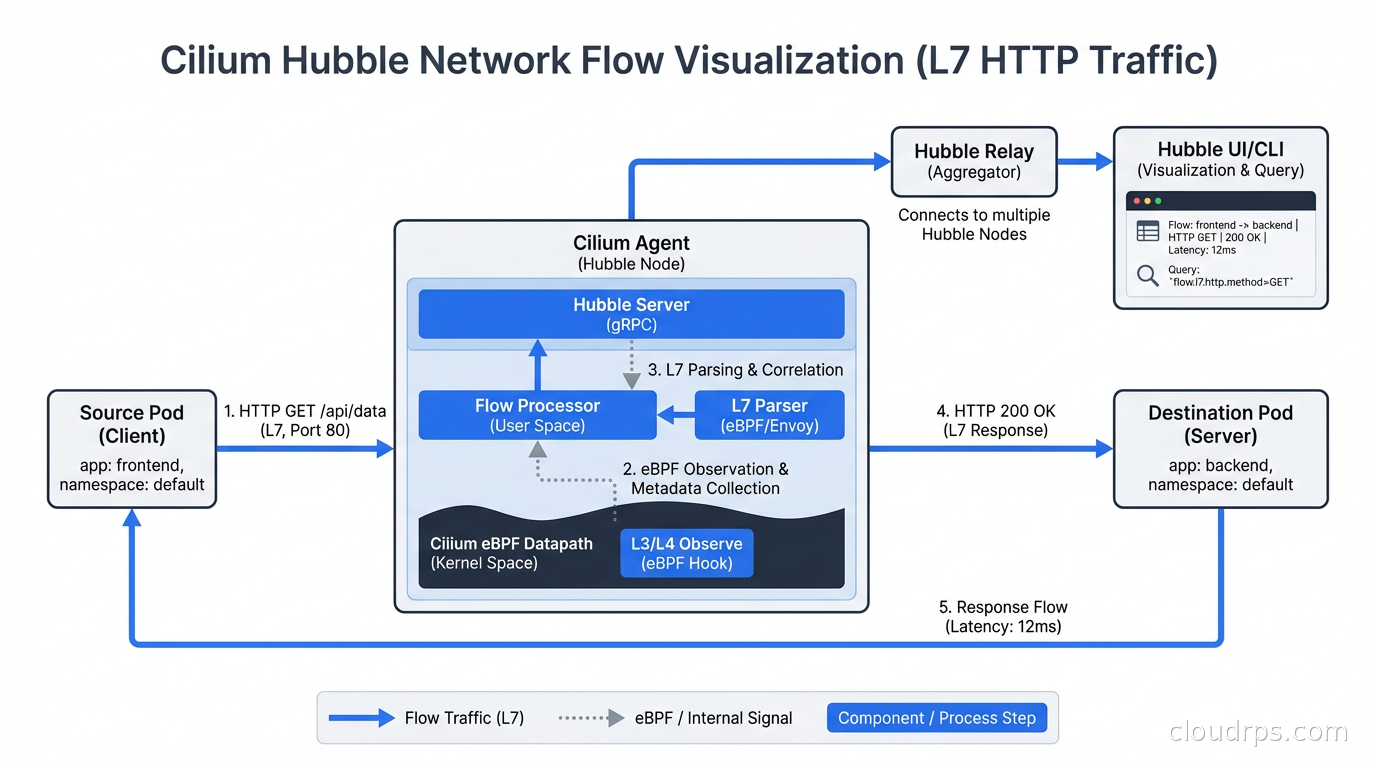
Cilium’s Hubble provides a real-time network flow visualization UI and CLI. You can see every connection attempt between pods, whether it was allowed or denied by policy, and at what layer the decision was made. The hubble observe command is genuinely useful for debugging policy issues:
hubble observe --pod backend/api --verdict DROPPED --last 100
This shows the last 100 dropped connections to the api pod, with source, destination, port, and the policy that dropped them. This is the kind of observability that used to require a service mesh.
For iptables-based CNIs like Calico, debugging requires reading iptables rules directly (iptables -nvL) or using Calico’s calicoctl tooling to inspect policy state. It’s workable but far less user-friendly.
The eBPF networking and observability capabilities that Cilium provides are a big part of why it’s becoming the default choice for security-conscious Kubernetes deployments.
Network Policies and Service Meshes
There’s a common question about whether you need both a CNI with network policies and a service mesh like Istio or Linkerd. The answer is usually yes, and they serve different purposes.
CNI network policies operate at L3/L4 and are enforced in the kernel’s network stack. They’re highly efficient and protect against lateral movement even before application traffic is processed.
Service mesh policies (Istio’s AuthorizationPolicy, Linkerd’s ServerAuthorization) operate at L7 and enforce mTLS-based identity, routing rules, and traffic shaping. They provide richer semantic control but operate in userspace.
A practical setup: use Cilium for L3/L4 pod-to-pod isolation (default deny, explicit allow per service), and use Istio for L7 mTLS enforcement, JWT validation, and per-route authorization. The two layers complement each other. Cilium’s Istio integration is worth investigating if you run both.
Migration Path If You’re Running Flannel
If you’re currently running a production cluster on Flannel and need network policies, you have two realistic options.
Option 1: Add Calico in policy-only mode. You keep Flannel for the data plane but deploy Calico’s Felix policy agent to enforce NetworkPolicy objects. This is the least disruptive path and works without touching the data plane. The downside is operational complexity of running two networking components.
Option 2: Rebuild the cluster with Calico or Cilium. This is disruptive but cleaner. For managed clusters, this means creating a new node group with the right CNI and migrating workloads. Most production teams I’ve seen take this approach when they have a maintenance window because running two CNIs long-term isn’t pleasant.
Either way, start with a thorough audit of which services need to talk to which other services. The exercise of writing network policies often reveals unexpected communication patterns and unauthorized dependencies that have accumulated over time. Use monitoring and logging practices to baseline your current traffic patterns before you start enforcing policy - you don’t want to discover undocumented dependencies by breaking production.
Kubernetes networking isn’t the most glamorous part of platform engineering, but getting it right is foundational. Your CNI choice constrains your security model, your observability capabilities, and your performance ceiling. Make it deliberately, not by default.
Get Cloud Architecture Insights
Practical deep dives on infrastructure, security, and scaling. No spam, no fluff.
By subscribing, you agree to receive emails. Unsubscribe anytime.