
I need to get something off my chest: Kubernetes is not for everyone. I know that’s borderline heresy in 2025, but I’ve spent the last eight years working with containers in production, and I’ve seen Kubernetes transform organizations for the better and I’ve seen it cripple them. The difference isn’t the technology; it’s whether the organization actually needed it.
A startup founder recently asked me to help design their architecture. They had three developers, one application, and about 200 users. They wanted to run on Kubernetes because “that’s what serious companies use.” I talked them into running on a single managed service (ECS Fargate, specifically), and they shipped their product two months ahead of schedule because they weren’t fighting with Kubernetes configuration.
On the other hand, I worked with a platform team managing 150 microservices across 4 teams, and Kubernetes was absolutely the right choice. It gave them consistent deployment patterns, resource management, and operational tooling across all those services.
Context matters. Let me give you the context you need to make the right decision.
Containers: The Foundation
Before we talk about orchestration, let’s make sure the foundation is solid.
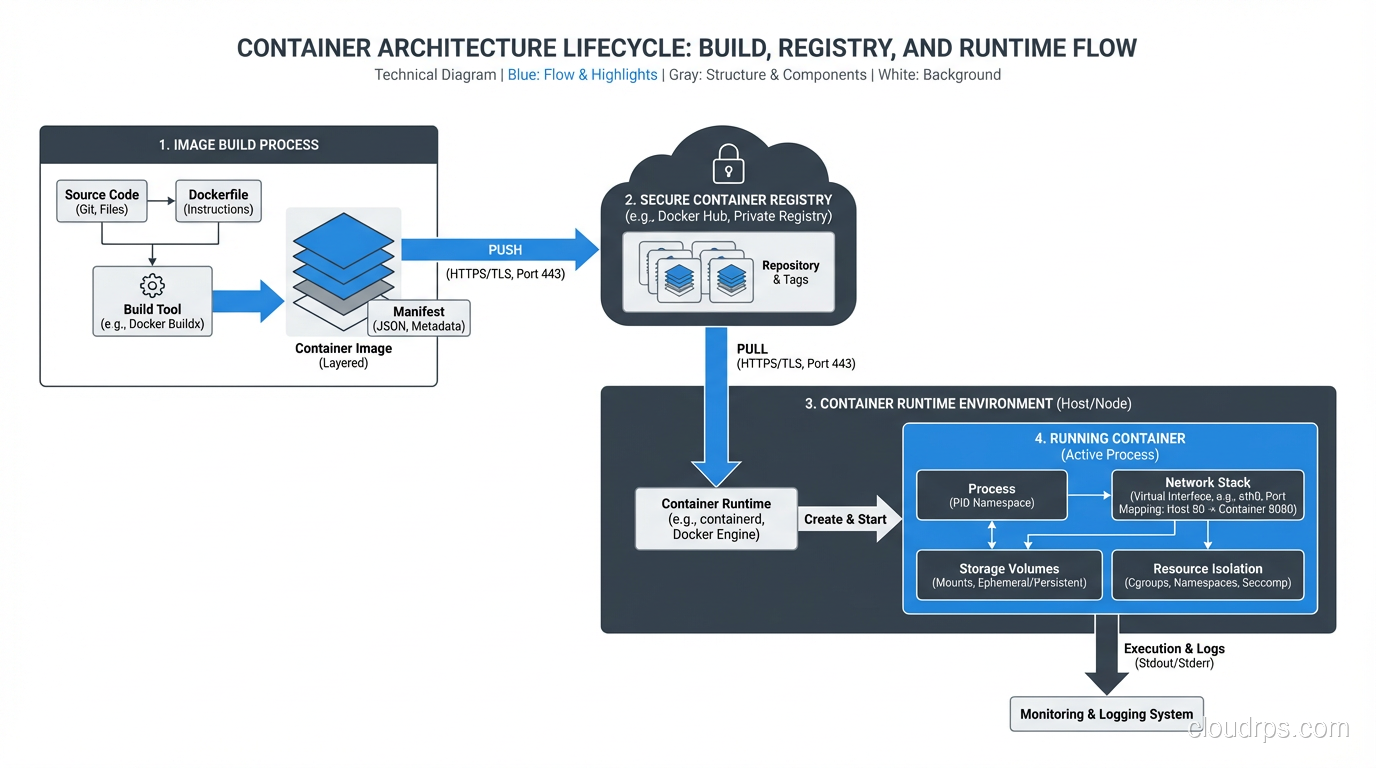
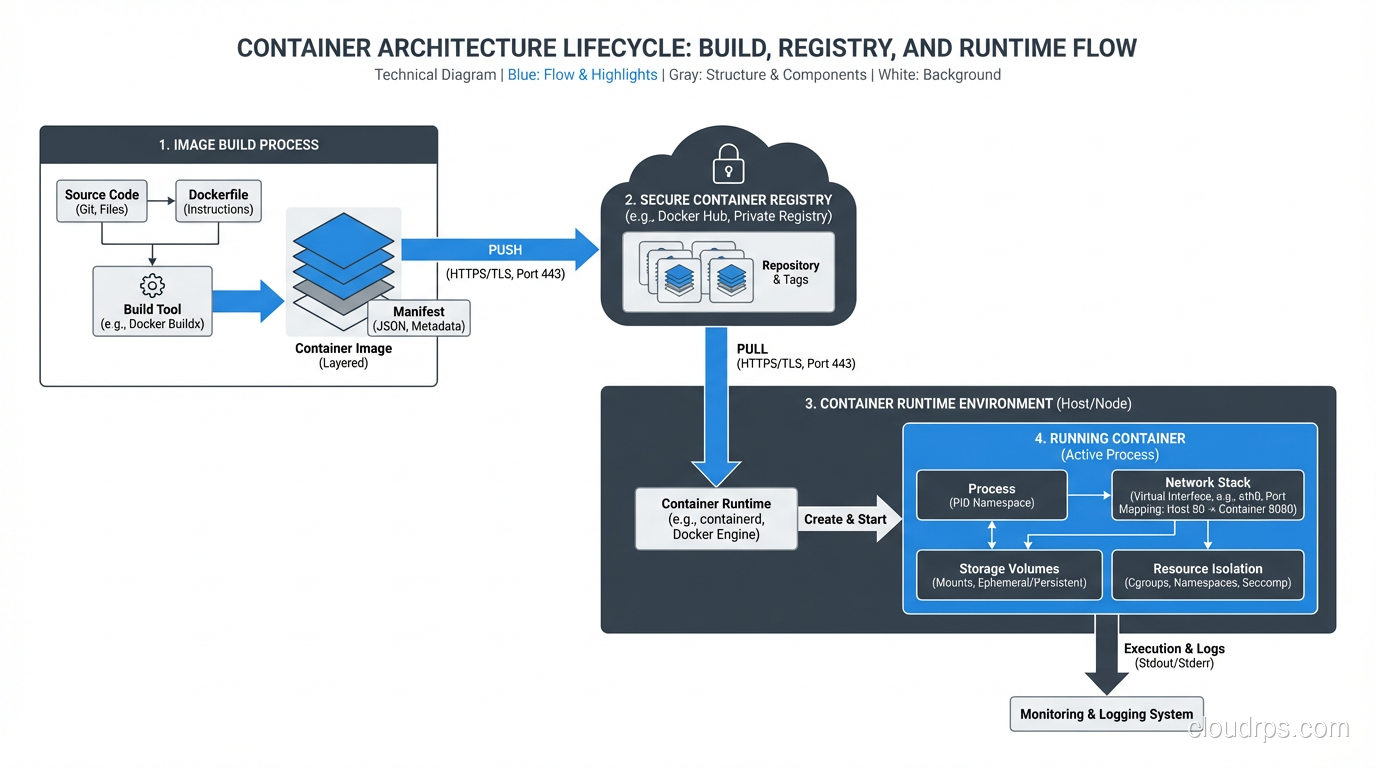
A container is a lightweight, standalone, executable package that includes everything an application needs to run: code, runtime, libraries, and system settings. It runs in an isolated process on the host operating system, sharing the kernel but having its own filesystem, network, and process namespace.
That’s the textbook definition. Here’s the practical one: a container is a way to package your application so it runs the same way everywhere. Your laptop, your CI server, your staging environment, your production servers: same container, same behavior. That “it works on my machine” problem? Containers actually solve it.
Docker Is Not Containers
This distinction matters. Docker is a tool for building and running containers. Containers are a Linux kernel feature (cgroups and namespaces) that Docker made accessible. You can run containers without Docker; containerd, CRI-O, and Podman all do the same thing. But Docker popularized the format (OCI images), the workflow (Dockerfile, build, push, pull, run), and the ecosystem (Docker Hub).
When someone says “we use Docker,” they usually mean “we package our applications as container images and run them using a container runtime.” The specific runtime matters less than the practice.
Why Containers Actually Matter
I was initially skeptical of containers when they showed up around 2013. I’d been running applications on VMs for years and they worked fine. But after running containers in production for nearly a decade, I’m fully converted. Here’s why:
Immutable artifacts. You build a container image once, and that exact image runs everywhere. No more “the staging build picked up a different dependency version.” The image is the artifact, and it’s immutable.
Fast startup. A container starts in seconds. A VM takes minutes. This means faster auto-scaling, faster deployments, and faster recovery from failures.
Resource efficiency. Containers share the host OS kernel, so you can run far more containers on a host than VMs. Where you might run 10 VMs on a server, you can run 50-100 containers.
Developer experience. A docker-compose.yml file that spins up your entire application stack locally (database, cache, message queue, and all) is a game-changer for developer onboarding and productivity.
Consistent CI/CD. Your CI/CD pipeline builds a container image, tests it, and promotes it through environments. The same image everywhere. No configuration drift.
Kubernetes: What It Is and What It Isn’t
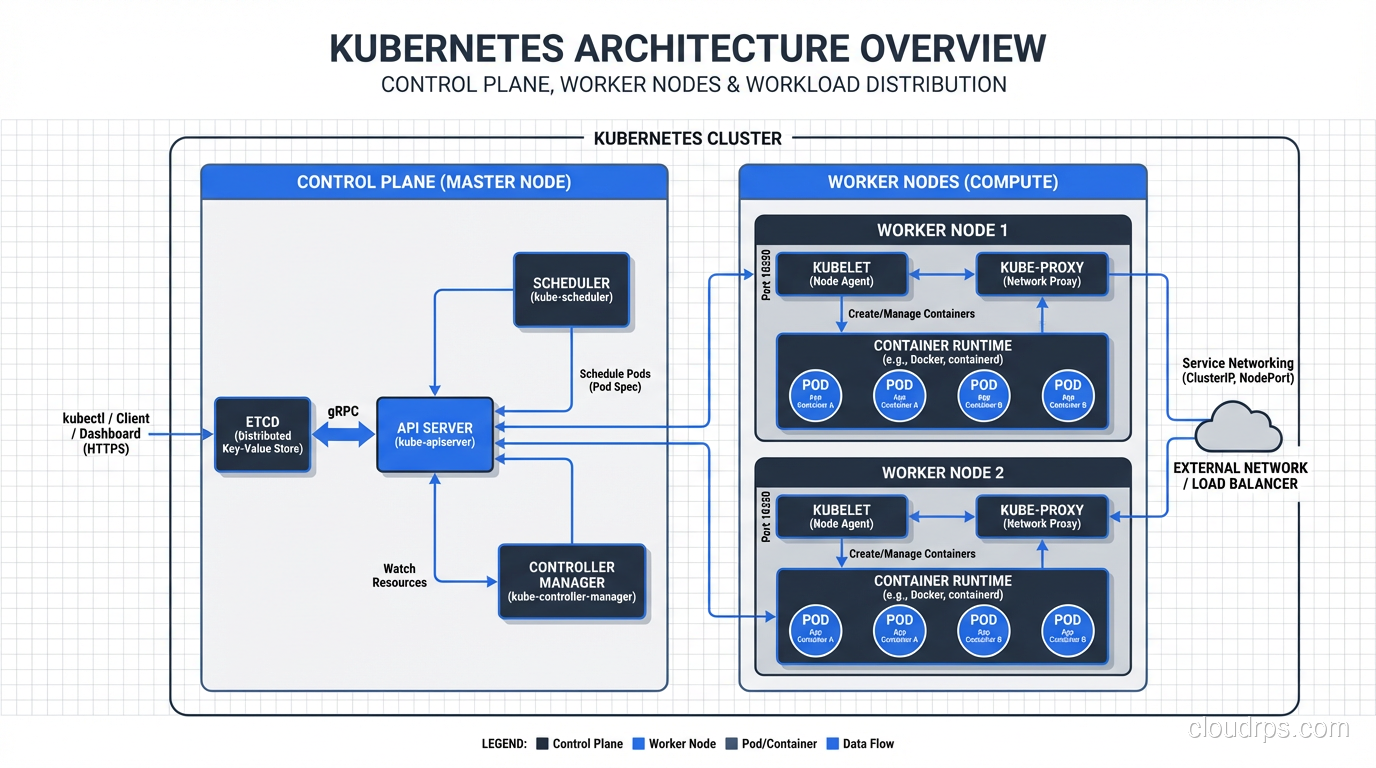
Kubernetes is a container orchestration platform. It manages the lifecycle of containers across a cluster of machines. That means it handles:
- Scheduling: Deciding which machine runs which container based on resource requirements and constraints
- Scaling: Running more or fewer copies of a container based on demand
- Networking: Providing service discovery, load balancing, and network policies between containers
- Storage: Managing persistent storage volumes for stateful workloads
- Self-healing: Restarting containers that fail, replacing containers on failed nodes, killing containers that don’t respond to health checks
- Rolling updates: Deploying new versions of containers without downtime
Kubernetes does a lot, and it does most of it well. But it comes with a steep learning curve and significant operational overhead.
The Kubernetes Learning Curve
I’m going to be honest about this because I think the community doesn’t talk about it enough.
Kubernetes has a vast surface area. Pods, Deployments, ReplicaSets, Services, Ingresses, ConfigMaps, Secrets, PersistentVolumes, PersistentVolumeClaims, StorageClasses, NetworkPolicies, ServiceAccounts, Roles, RoleBindings, Custom Resources, Operators, Helm charts, Kustomize… Custom Resources and Operators deserve special attention: they extend Kubernetes with application-specific automation. If you’re running stateful workloads like databases, a well-built Kubernetes Operator encodes the operational runbook into a controller that handles failover, upgrades, and backup automatically.
A competent Kubernetes operator needs to understand:
- How the control plane works (API server, etcd, scheduler, controller manager)
- How networking works (CNI plugins, service routing, ingress controllers)
- How storage works (CSI drivers, storage classes, dynamic provisioning)
- How RBAC works (service accounts, roles, bindings)
- How resource management works (requests, limits, quality of service)
- How to troubleshoot when things go wrong (and they will)
This is not a weekend learning project. For a team of experienced engineers, budget three to six months to become proficient with Kubernetes. For a team without prior container experience, double that.
Managed Kubernetes vs. Self-Managed
If you’ve decided Kubernetes is right for you, never run your own control plane. Use a managed service:
- Amazon EKS (Elastic Kubernetes Service)
- Google GKE (Google Kubernetes Engine)
- Azure AKS (Azure Kubernetes Service)
GKE is the most mature and best-operated of the three, which makes sense since Google created Kubernetes. EKS has the broadest AWS integration. AKS is the best choice if you’re an Azure shop.
Managed Kubernetes handles the control plane: etcd backups, API server availability, version upgrades. You’re still responsible for the worker nodes, but the most critical piece is taken care of.
Self-managed Kubernetes (kubeadm, kOps, Rancher) is for organizations that have specific requirements around control, compliance, or on-premises deployment. If you choose this path, budget at least one full-time engineer for Kubernetes operations.
When You Need Kubernetes
Based on my experience, Kubernetes makes sense when you have:
Multiple services (10+) with different scaling requirements. Kubernetes’ ability to independently scale services based on their resource usage is a genuine advantage at this scale.
A dedicated platform or DevOps team. Someone needs to operate the cluster, maintain it, and support the development teams using it. Without dedicated staff, Kubernetes becomes a burden rather than a tool.
Frequent deployments across multiple teams. Kubernetes provides a consistent deployment interface that enables teams to self-serve deployments without coordinating with operations.
Workloads with diverse resource requirements. Some services need GPU. Some need high memory. Some are CPU-intensive. Kubernetes’ scheduling can efficiently bin-pack these workloads across your cluster.
A need for self-healing and resilience. Kubernetes’ ability to automatically restart failed containers, reschedule workloads from failed nodes, and maintain desired replica counts is valuable for cloud-native applications.
When You Don’t Need Kubernetes
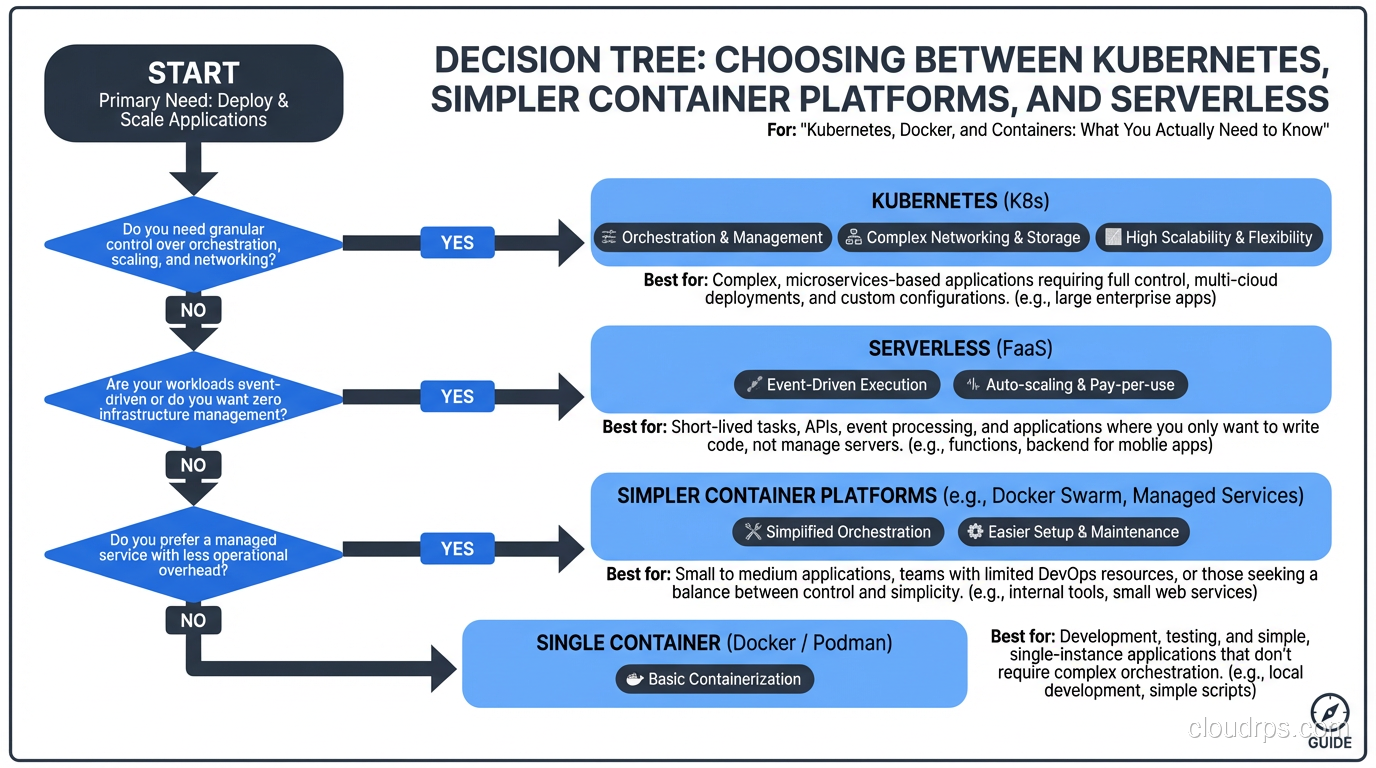
You have a single application. Running one application on Kubernetes is like using a semi truck to deliver a pizza. ECS, App Runner, Cloud Run, Heroku, Railway: any of these will serve you better with a fraction of the complexity.
Your team is small (under 5 engineers). The operational overhead of Kubernetes will consume a disproportionate amount of your team’s time. Use that time to build product instead.
You don’t have container experience yet. Learn containers first. Get comfortable with building images, running them, debugging them. Then consider orchestration.
Your workload is predominantly serverless. If your application is event-driven and bursty, serverless platforms (Lambda, Cloud Functions) might be a better fit than always-on containers.
Your application is mostly static. A static site doesn’t need Kubernetes. It needs a CDN.
Practical Kubernetes: Things I Wish Someone Told Me
Resource Requests and Limits Are Not Optional
Every container should have CPU and memory requests (what it needs to function) and limits (what it’s allowed to consume). Without these:
- The scheduler can’t make intelligent placement decisions
- A misbehaving container can consume all resources on a node and starve other containers
- Autoscaling doesn’t work properly
Set requests based on your actual resource usage (profile your application), and set limits at 2-3x the request as a safety margin. Don’t set CPU limits unless you have to, because CPU throttling causes latency spikes that are hard to diagnose. Getting these values right is also critical for Kubernetes autoscaling, since both HPA and VPA rely on accurate resource requests to make scaling decisions.
Health Checks Save Lives
Configure liveness probes (is the container alive?) and readiness probes (is the container ready to receive traffic?) for every container. A liveness probe that fails causes Kubernetes to restart the container. A readiness probe that fails removes the container from the service’s load balancer.
The most common mistake: making the liveness probe hit a health endpoint that depends on the database. If the database is slow, all containers fail their liveness probes, get restarted simultaneously, and the thundering herd makes the database even slower. Your liveness probe should check if the process is alive, nothing more. Your readiness probe can check dependencies.
Namespaces for Organization
Use namespaces to separate environments (dev, staging, production, though I prefer separate clusters for production) or teams. Apply resource quotas per namespace to prevent one team from consuming all cluster resources. Apply network policies to control which namespaces can communicate.
Helm Charts: The Package Manager
Helm is the de facto package manager for Kubernetes. Use it. Write Helm charts for your applications with values files for each environment. This gives you templated, versioned, parameterized deployments that are easy to promote across environments.
Don’t go overboard with Helm chart complexity. I’ve seen charts with so many conditional templates that they’re harder to understand than raw Kubernetes manifests. Keep charts simple and use values overrides for environment differences.
Observability Is More Important Than Ever
With dozens or hundreds of containers running across a cluster, observability is critical. At minimum:
- Prometheus + Grafana for cluster and application metrics
- A log aggregator (Loki, Elasticsearch, Datadog) that collects logs from all containers
- Distributed tracing (Jaeger, Zipkin) to follow requests across services
Kubernetes makes it easy to deploy these tools as part of the cluster, but they need to be configured and maintained.
Docker Best Practices for Production
Since containers are the building blocks, getting them right matters:
Use multi-stage builds. Your build container includes compilers, build tools, and test frameworks. Your production container includes only the runtime and your compiled application. This reduces image size from hundreds of megabytes to tens of megabytes.
Don’t run as root. Create a non-root user in your Dockerfile and use it. Running containers as root is a security risk because a container escape vulnerability is much more dangerous when the container process is running as root.
Pin your base image versions. FROM node:latest is a ticking time bomb. Use FROM node:20.10-alpine so your builds are reproducible.
Scan images for vulnerabilities. Use Trivy, Snyk, or your registry’s built-in scanning. Integrate this into your CI pipeline so vulnerable images never reach production.
Keep images small. Smaller images mean faster pulls, faster scaling, and less attack surface. Use Alpine-based images where possible. Remove build artifacts, caches, and unnecessary files.
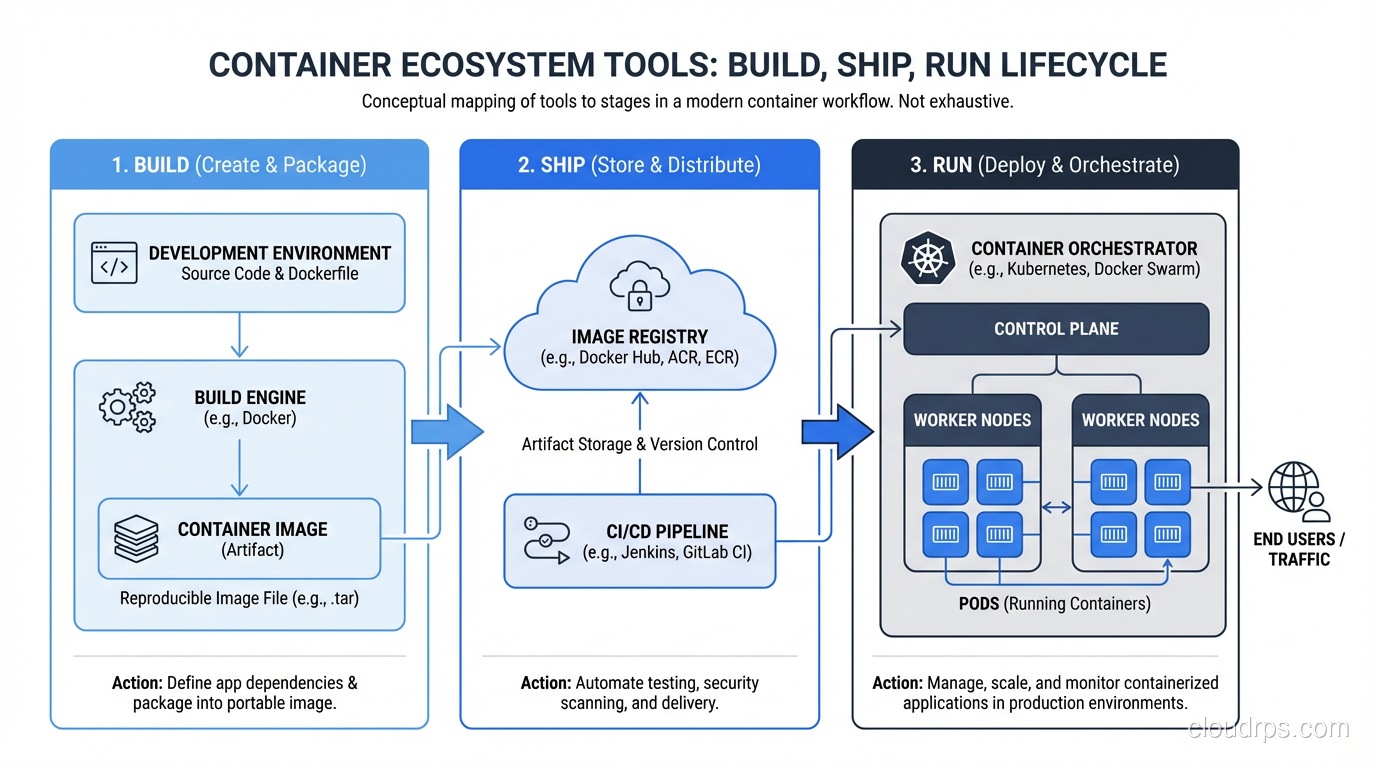
The Container Ecosystem in 2025
The container ecosystem has matured significantly. Here’s my current recommended stack:
- Container runtime: containerd (it’s what Kubernetes uses under the hood)
- Image building: Docker (for local development), Kaniko or BuildKit (for CI)
- Registry: ECR, GCR, or Docker Hub for public images
- Orchestration: Kubernetes (managed) for complex workloads; ECS/Cloud Run for simpler ones
- Service mesh: Istio or Linkerd, but only if you actually need traffic management, mTLS, and observability at the network level. Most teams don’t.
- GitOps: ArgoCD or Flux for declarative, Git-driven deployments to Kubernetes
My Honest Advice
Start with containers. They’re a net positive for almost every team. The reproducibility, the consistency, and the developer experience improvements are worth the learning investment.
For orchestration, start simple. If you’re running fewer than five services, a managed container service (ECS, Cloud Run, App Engine) is probably enough. As your system grows in services and teams, evaluate Kubernetes based on your actual operational needs, not on industry hype.
And if you do adopt Kubernetes, invest in training your team properly, use a managed control plane, and build robust observability from day one. Kubernetes operated well is a force multiplier. Kubernetes operated poorly is a constant source of incidents and frustration.
Choose wisely.
Get Cloud Architecture Insights
Practical deep dives on infrastructure, security, and scaling. No spam, no fluff.
By subscribing, you agree to receive emails. Unsubscribe anytime.