
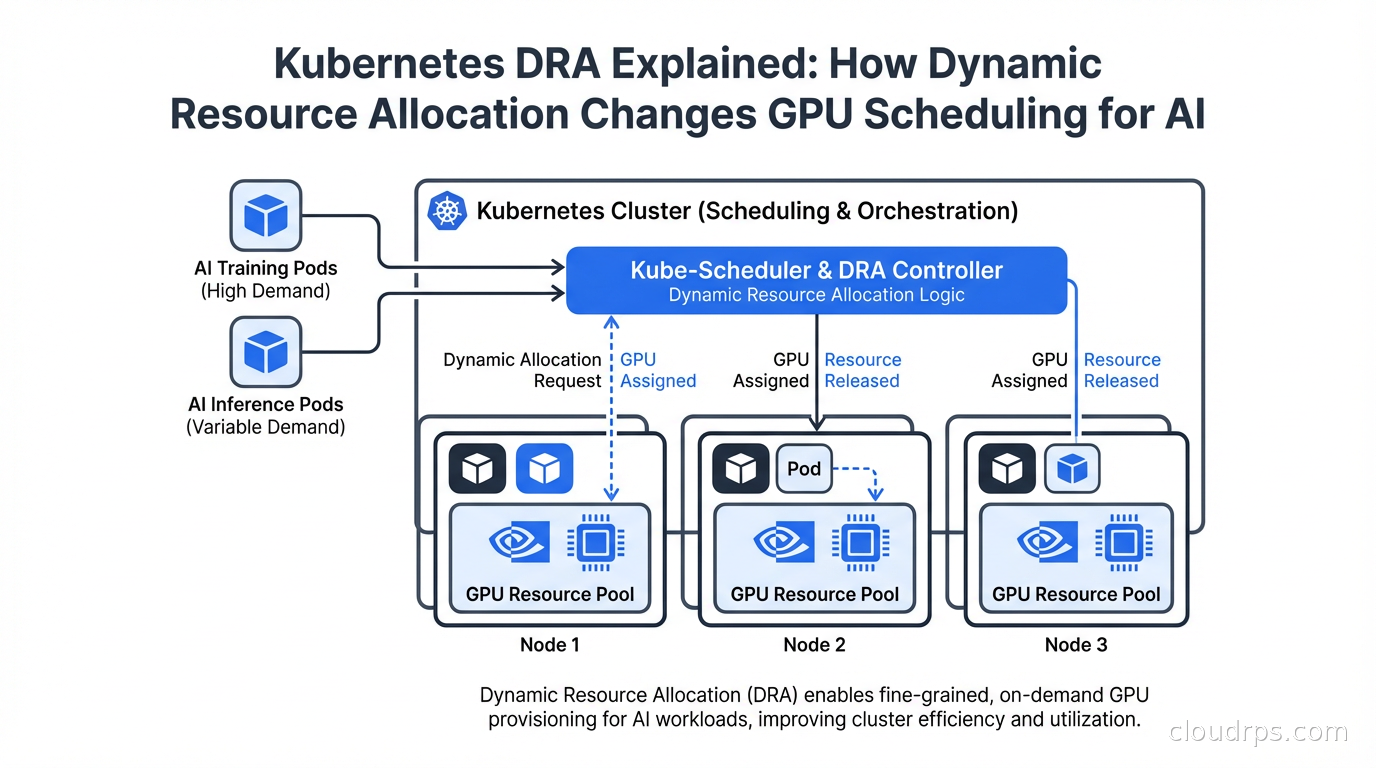
For years, the way Kubernetes handled GPU resources was embarrassingly primitive. You had Device Plugins, which let you advertise GPUs as a custom resource like nvidia.com/gpu: 1, and that was basically it. You either got a whole GPU or nothing. Sharing a GPU between pods required vendor-specific hacks. Requesting a GPU with specific memory requirements meant hoping your pod landed on the right node through labels and affinities, not through the scheduler understanding what you actually needed.
Dynamic Resource Allocation changes all of that. DRA graduated to stable (GA) in Kubernetes 1.34 (August 2025) and has since been adopted across GKE, EKS, AKS, and Red Hat OpenShift. NVIDIA donated their DRA driver to the CNCF. If you are running AI workloads on Kubernetes, you need to understand this.
The Device Plugin Problem
Before explaining DRA, it helps to understand why Device Plugins were not enough.
Device Plugins let vendors advertise hardware resources to the Kubernetes scheduler. A node running the NVIDIA device plugin would advertise nvidia.com/gpu: 8 if it had 8 GPUs. Pods requesting nvidia.com/gpu: 1 would be scheduled to nodes with available GPU resources, and the device plugin would handle mounting the device into the container.
The problems: first, it was binary. You got one GPU, or two, or eight. You could not request a fraction of a GPU, even for small inference workloads that needed 2GB of VRAM on a GPU with 80GB. Second, there was no way to express attributes. You could not say “I need a GPU with at least 40GB VRAM” or “I need GPUs connected via NVLink for distributed training.” You had to use node labels and hope.
Multi-instance GPU (MIG) technology from NVIDIA lets you partition an A100 or H100 into smaller isolated GPU instances, each with dedicated compute and memory. But using MIG with Device Plugins required static pre-configuration of MIG profiles on each node, and any change required draining the node and reconfiguring manually. It worked, but it was operationally painful. If you want a full breakdown of MIG profiles, time-slicing replica counts, and the tradeoffs between MIG, time-slicing, and MPS before diving into DRA, our fractional GPU guide covers the GPU Operator configuration and production edge cases in depth.
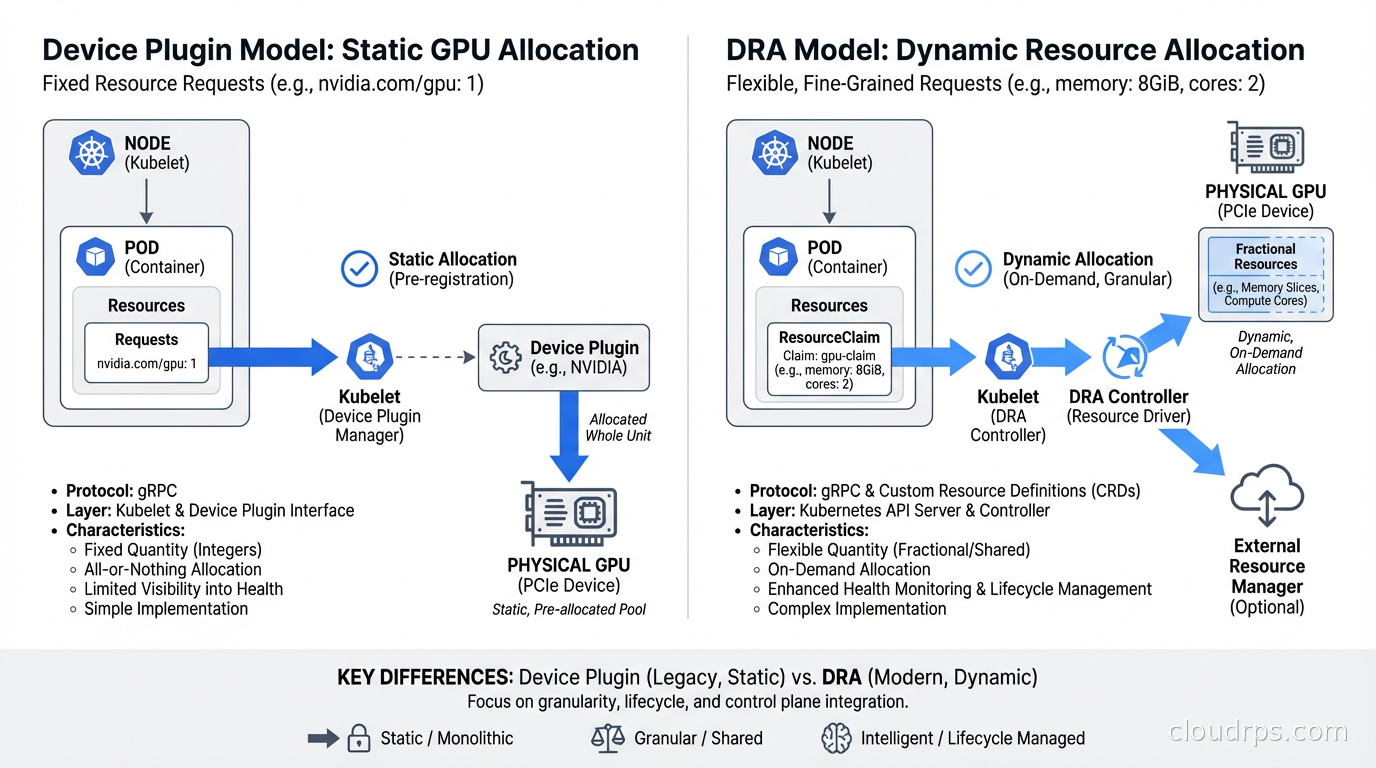
DRA addresses all of this with a new API framework built around ResourceClaims, ResourceClaimTemplates, DeviceClasses, and DeviceClaimConfigurations. The key insight is that resource allocation becomes a first-class scheduling concern rather than a post-hoc device mount operation.
The DRA Architecture
DRA introduces a set of new API objects under the resource.k8s.io API group.
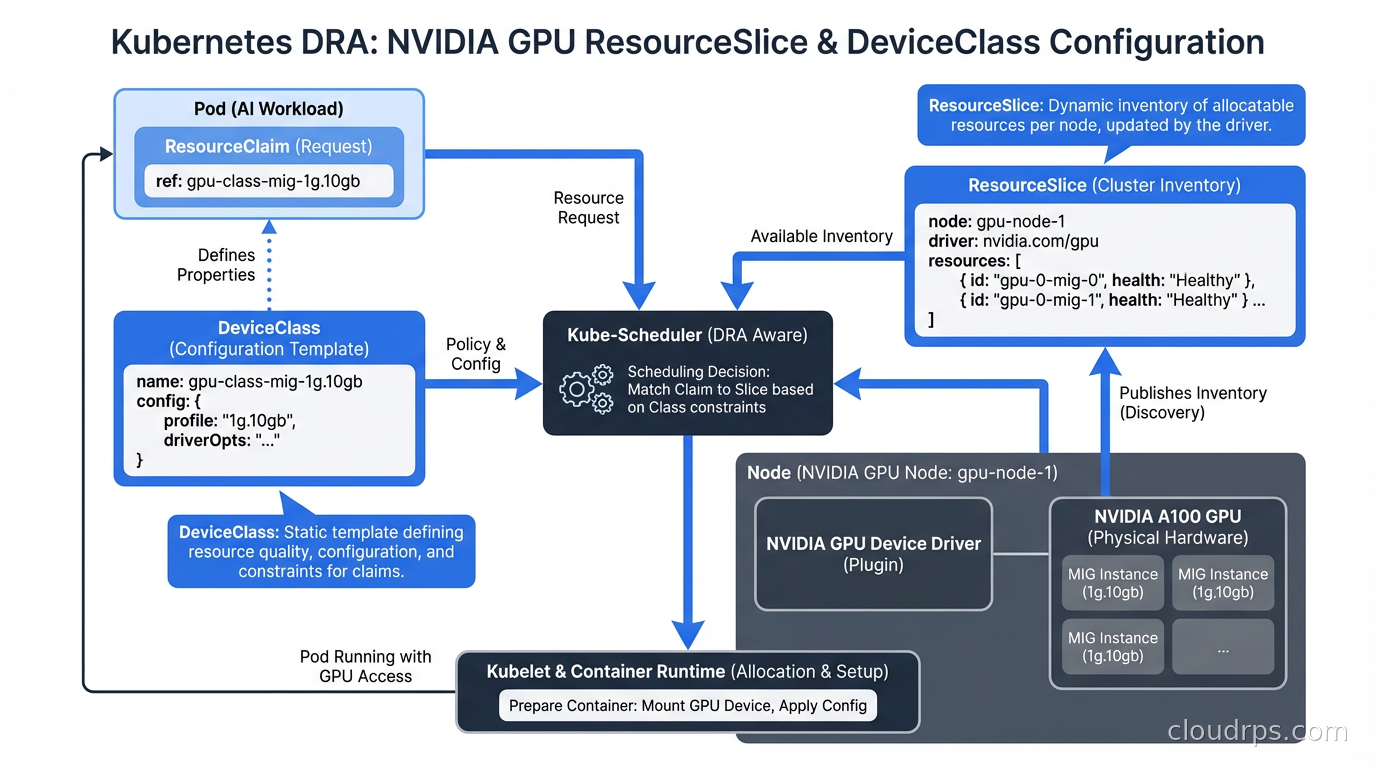
DeviceClass: Defines a category of devices with selection criteria and default configuration. An NVIDIA DeviceClass might specify that devices must be GPUs from the NVIDIA vendor.
ResourceClaim: A pod’s request for specific devices. This is where you express what you need: “I need a GPU with at least 40GB of memory” or “I need 3 MIG instances of type 3g.40gb.”
ResourceClaimTemplate: A template for creating ResourceClaims, used when each pod in a workload needs its own dedicated resources.
DeviceTaintRule: (New in 1.33) Allows nodes or specific devices to be tainted so that only pods with matching tolerations can use them.
The scheduler participates in the allocation process directly. When a pod with ResourceClaims is being scheduled, the scheduler calls the DRA driver to evaluate which devices on candidate nodes satisfy the claims, and only schedules the pod to a node where all its resource claims can be satisfied simultaneously. This eliminates the “pod scheduled but device not available” failures that happened with Device Plugins.
Here is what a ResourceClaim looks like for requesting an NVIDIA GPU with memory requirements:
apiVersion: resource.k8s.io/v1beta1
kind: ResourceClaim
metadata:
  name: gpu-claim
spec:
  devices:
    requests:
    - name: gpu
      deviceClassName: gpu.nvidia.com
      selectors:
      - cel:
          expression: device.attributes["memory"].isGreaterThan(quantity("40Gi"))
      allocationMode: ExactCount
      count: 1
And the pod that uses it:
apiVersion: v1
kind: Pod
metadata:
  name: training-job
spec:
  containers:
  - name: trainer
    image: my-training-image:latest
    resources:
      claims:
      - name: gpu
  resourceClaims:
  - name: gpu
    resourceClaimName: gpu-claim
The CEL expression in the selector is powerful. You can express complex requirements: minimum VRAM, specific GPU model, NVLink availability, NUMA topology alignment. The DRA driver evaluates these expressions against the actual device attributes reported by the driver on each node.
MIG and DRA: Dynamic GPU Partitioning
Multi-instance GPU is where DRA delivers its most dramatic operational improvement. With Device Plugins, MIG required static profiles. You picked a profile (say, 7x 1g.10gb or 2x 3g.40gb), configured it at node boot time, and lived with it. If your workload mix changed, you had to manually reconfigure nodes.
With DRA, MIG profiles become dynamic. The DRA driver can create and destroy MIG instances on demand as pods are scheduled and terminated. A node with an H100 can serve a 7g.80gb (full GPU) training job in the morning and reconfigure to 7x 1g.10gb instances for inference jobs in the afternoon, all automatically based on pod scheduling requests.
The configuration looks like this in a ResourceClaim targeting a specific MIG profile:
spec:
  devices:
    requests:
    - name: mig-instance
      deviceClassName: mig.nvidia.com
      selectors:
      - cel:
          expression: device.attributes["profile"] == "3g.40gb"
      count: 2
This requests two 3g.40gb MIG instances. The driver provisions them if the physical GPU has enough capacity and the scheduler confirms the node can satisfy the claim. When the pod finishes, the MIG instances are released back to the pool.
For teams running LLM inference infrastructure, this is transformative. Small models fit on a single MIG instance. Large models need full GPUs or multi-GPU configurations. Previously, you needed separate node pools for each configuration. Now a single pool of GPU nodes can dynamically serve both workloads.
Structured Parameters and Driver Models
DRA supports two driver models: classic DRA (where the driver handles all allocation decisions) and structured parameters (where the driver publishes device capabilities and the scheduler makes allocation decisions using CEL expressions).
Structured parameters are preferred because they move allocation logic into the scheduler, which enables more efficient bin-packing, topology-aware scheduling, and conflict detection without round-trips to the driver during the scheduling cycle. NVIDIA’s donated CNCF driver uses structured parameters.
The driver publishes a ResourceSlice for each node describing the available devices and their attributes:
apiVersion: resource.k8s.io/v1beta1
kind: ResourceSlice
metadata:
  name: node-gpu-resources
spec:
  nodeName: gpu-node-01
  driver: gpu.nvidia.com
  pool:
    name: gpu-pool
    generation: 1
    resourceSliceCount: 1
  devices:
  - name: gpu-0
    basic:
      attributes:
        memory:
          quantity: 80Gi
        model:
          string: "H100"
        nvlinkEnabled:
          bool: true
The scheduler reads ResourceSlices and evaluates ResourceClaim selectors without needing to talk to the driver, making scheduling decisions faster and more reliable than the classic model.
Integrating DRA with AI Workloads
For teams building on the agentic AI production scaling patterns, DRA enables much more precise resource allocation for the heterogeneous compute profiles that agentic systems require. An orchestration pod needs minimal resources. A tool-calling pod might need a GPU for a vision model. A reasoning step might need significant CPU and memory. DRA lets you specify exactly what each component needs without manual node selection.
For distributed training jobs managed by tools like Kubeflow, DRA with gang scheduling ensures all pods in a training job are allocated their resources atomically. Either the entire job gets the resources it needs or no pods start. This prevents the partial allocation problem where some training pods start but others cannot schedule, wasting the already-allocated GPU time. Pairing DRA with a queue-level admission controller like Kueue completes the picture: DRA handles fine-grained device allocation, while Kueue handles fair-share quota enforcement and multi-tenant job ordering above the scheduler.
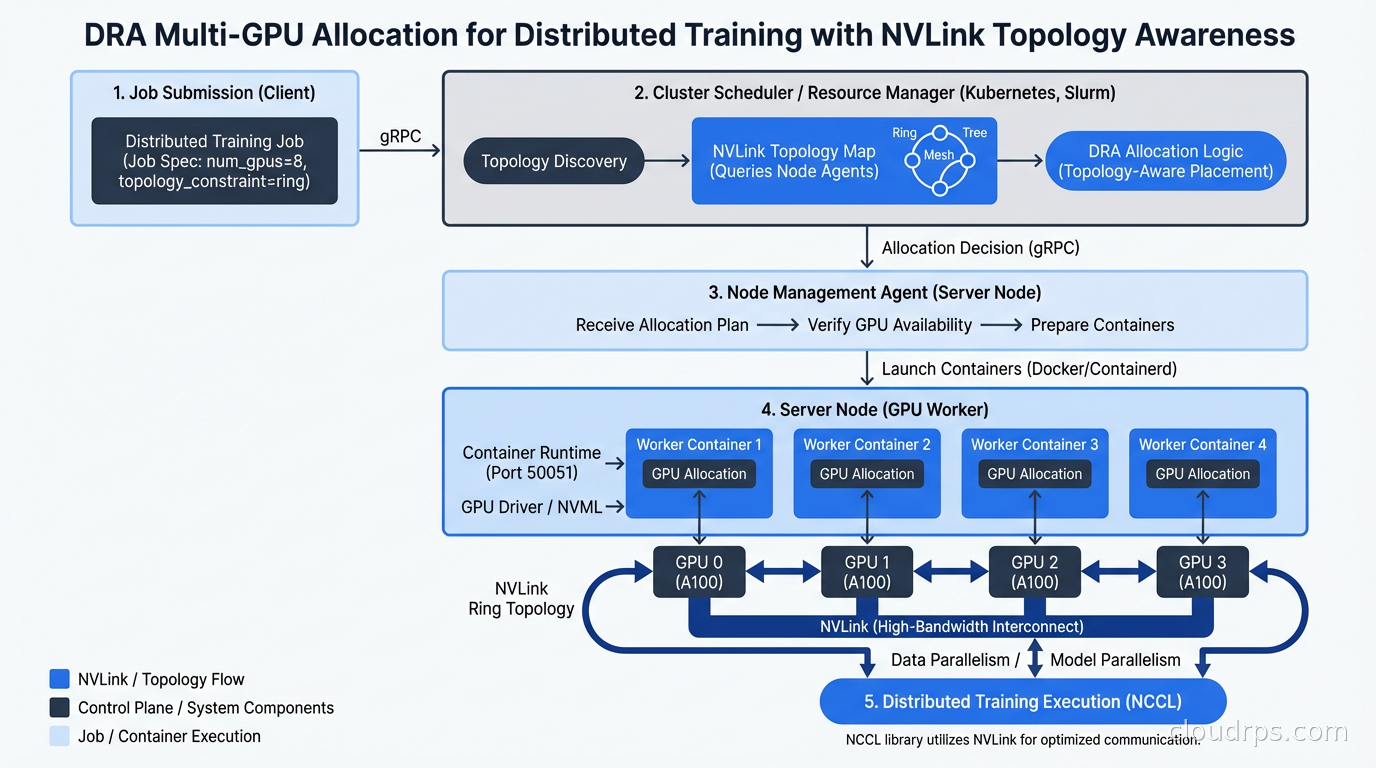
The topology-aware scheduling feature deserves special mention. For large model training, GPU interconnect topology matters enormously. Pods communicating via NVLink are ten to twenty times faster than pods communicating via PCIe or across NUMA nodes. DRA can express topology requirements through device attributes and ensure that the two GPUs allocated to a job actually share an NVLink connection, not just that two GPU resources happen to be available on the same node.
Device Taints and Administrative Control
Kubernetes 1.33 introduced DeviceTaintRules, which work analogously to node taints but at the device level. This solves a real operational problem: how do you take a specific GPU out of service for maintenance without draining the entire node?
apiVersion: resource.k8s.io/v1beta1
kind: DeviceTaintRule
metadata:
  name: gpu-2-maintenance
spec:
  deviceSelector:
    deviceClassName: gpu.nvidia.com
    selectors:
    - cel:
        expression: device.attributes["uuid"] == "GPU-abc123"
  taint:
    key: maintenance
    value: "true"
    effect: NoSchedule
This taints one specific GPU on one specific node. Existing pods using it continue running (like NoSchedule on nodes). New pods are only scheduled to it if they have a matching toleration. You can take the GPU through a diagnostic cycle, update the driver, or handle an ECC memory error without touching the rest of the node’s workload.
This kind of fine-grained control was simply impossible with Device Plugins, where the unit of management was the entire device plugin configuration on the node.
DRA and the Broader Kubernetes AI Ecosystem
The Kubernetes ecosystem is converging on DRA as the standard for accelerator management. The GPU cloud infrastructure selection decisions are still important, but DRA changes how you operate that hardware once you have it.
NVIDIA’s CNCF-donated DRA driver will eventually replace the old device plugin for GPU scheduling. AMD is developing a DRA driver for their MI300 series. Intel has DRA support for their Gaudi accelerators. The API is vendor-neutral enough that custom accelerators (Google TPUs, AWS Trainium, AWS Inferentia) can and will implement DRA drivers.
The Kubernetes autoscaling story is also evolving to understand DRA resources. KEDA can scale based on GPU utilization metrics. The Cluster Autoscaler and Karpenter both handle nodes with DRA-managed devices, though Karpenter’s flexibility with instance type selection pairs particularly well with DRA’s ability to express what you need rather than counting fixed resources.
Migrating from Device Plugins to DRA
The migration path exists and is not as painful as you might fear. Both Device Plugins and DRA can run simultaneously on the same cluster. Pods using nvidia.com/gpu: 1 continue to work exactly as before. New pods can use ResourceClaims.
The recommended migration path: first, deploy the DRA driver alongside the existing device plugin. Test DRA with non-production workloads. Validate that your scheduling requirements are correctly expressed as CEL selectors. Gradually migrate production workloads. Once all workloads use DRA, the device plugin can be removed.
The main gotcha is that pods using DRA cannot also use Device Plugin resources for the same device type. You have to pick one for a given pod. During migration, keep workloads cleanly on one model or the other until you are ready to complete the transition.
DRA represents a genuine step change for GPU scheduling in Kubernetes. If you are running AI workloads at any scale, understanding it now puts you ahead of most teams still operating with Device Plugins and static node configurations. DRA is also the GPU scheduling foundation that llm-d builds on: llm-d’s disaggregated inference framework uses ResourceClaims to express separate compute requirements for prefill and decode GPU pools, which only works cleanly with DRA rather than legacy Device Plugins.
Updated September 1, 2026: corrected the Kubernetes release in which DRA graduated to GA, which was 1.34, not 1.32.
Get Cloud Architecture Insights
Practical deep dives on infrastructure, security, and scaling. No spam, no fluff.
By subscribing, you agree to receive emails. Unsubscribe anytime.