
Running stateless applications on Kubernetes is solved. Deploy a Deployment, put a Service in front of it, scale with an HPA, done. The tooling is mature, the patterns are well-understood, and most things work out of the box.
Running stateful, operationally complex applications on Kubernetes is still hard. How do you handle a PostgreSQL primary failover? How do you manage rolling upgrades of a Kafka cluster where partition leadership needs to be balanced before any broker restarts? How do you properly decommission an Elasticsearch node so shards are relocated before the pod terminates? None of these are handled by Kubernetes’ built-in primitives.
This is the problem Operators were designed to solve.
What an Operator Actually Is
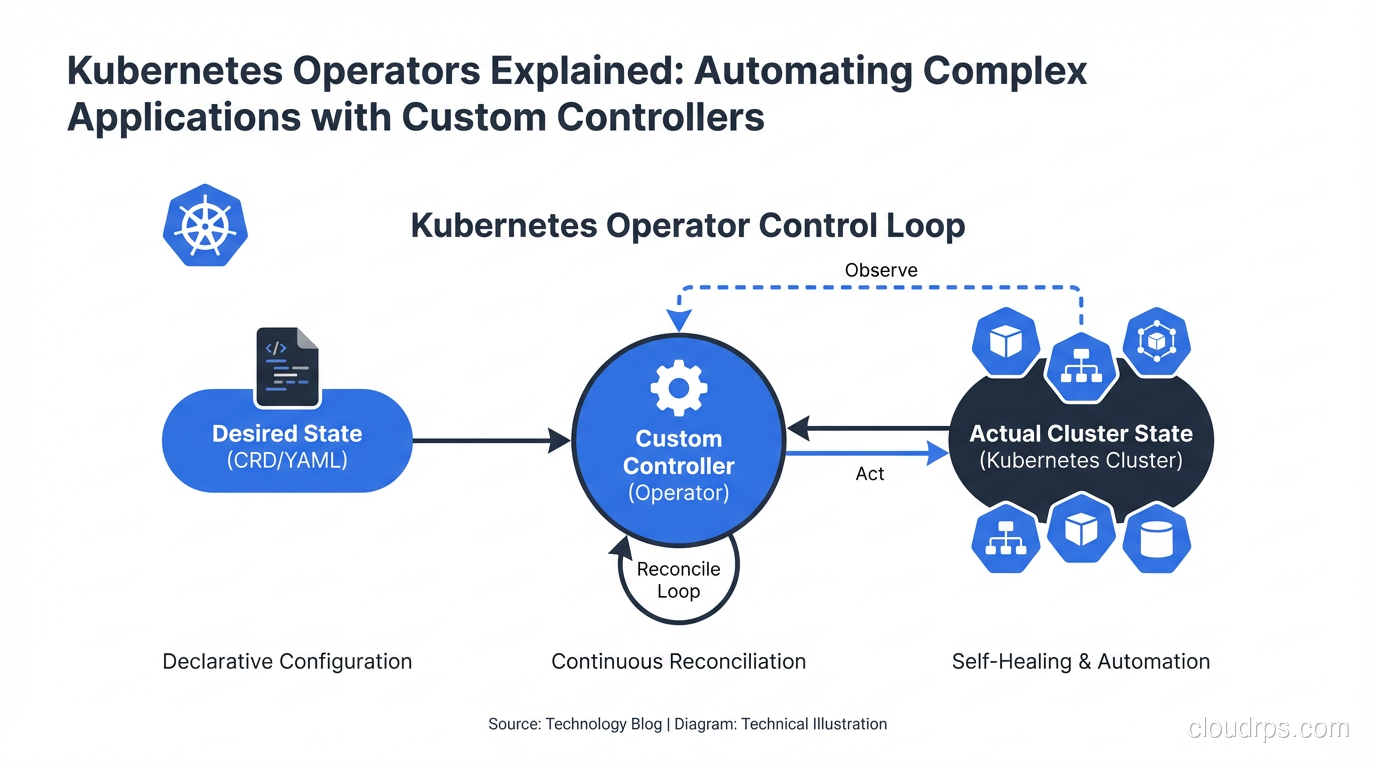
An Operator is a Kubernetes controller that uses Custom Resource Definitions (CRDs) to extend the Kubernetes API with application-specific knowledge. Instead of you manually running the operational playbook for a complex application, the Operator runs it automatically in response to state changes.
The concept is simple: humans who run a complex system develop operational knowledge over time. “When we upgrade the Kafka cluster, we always drain one broker at a time and wait for in-sync replicas to catch up before proceeding.” “When the PostgreSQL primary fails, we promote the replica with the lowest lag.” This knowledge lives in runbooks, in Slack messages, in the institutional memory of experienced engineers. An Operator codifies that knowledge into a controller that watches the cluster state and takes action.
The components:
Custom Resource Definition (CRD): Extends the Kubernetes API with a new resource type. Instead of just Pods, Deployments, and Services, you now have a PostgreSQLCluster or KafkaCluster resource.
Custom Resource (CR): An instance of the CRD. kind: PostgreSQLCluster with spec fields for replica count, storage class, version, backup schedule, etc.
Controller: A Go program (usually) running in the cluster that watches Custom Resources and reconciles the actual state of the world to match the desired state expressed in the CR.
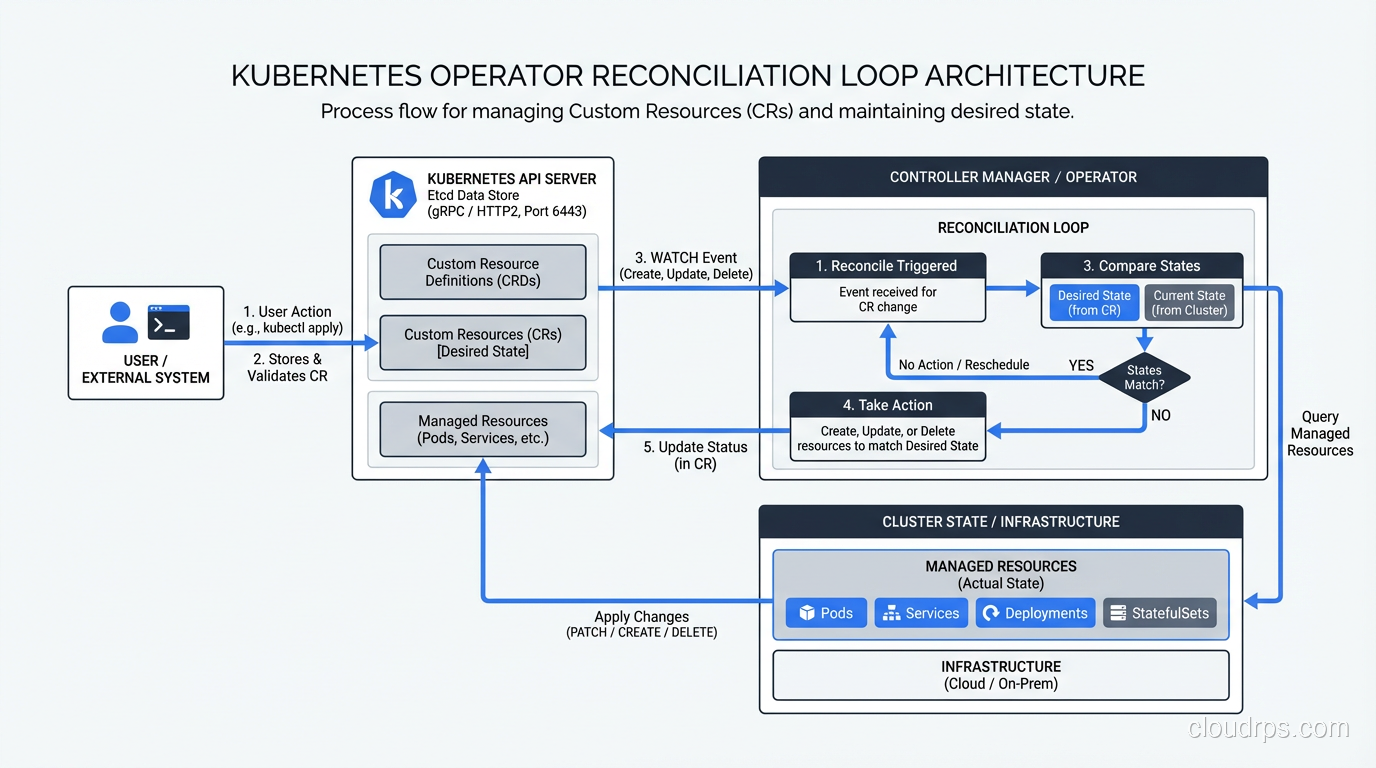
The reconciliation loop is the heart of every Kubernetes controller, built-in or custom:
observe current state -> compare to desired state -> take action -> repeat
Here’s a simplified example of what a controller reconciliation loop looks like:
func (r *PostgreSQLClusterReconciler) Reconcile(ctx context.Context, req ctrl.Request) (ctrl.Result, error) {
    // 1. Fetch the custom resource
    cluster := &v1alpha1.PostgreSQLCluster{}
    if err := r.Get(ctx, req.NamespacedName, cluster); err != nil {
        return ctrl.Result{}, client.IgnoreNotFound(err)
    }

    // 2. Check if primary exists and is healthy
    primary, err := r.getPrimaryPod(ctx, cluster)
    if err != nil || !isPodHealthy(primary) {
        // 3. Trigger failover if primary is unhealthy
        return r.handleFailover(ctx, cluster)
    }

    // 4. Ensure replicas exist and are connected
    if err := r.reconcileReplicas(ctx, cluster); err != nil {
        return ctrl.Result{RequeueAfter: 30 * time.Second}, err
    }

    // 5. Check if upgrade is needed
    if cluster.Spec.Version != getCurrentVersion(cluster) {
        return r.performRollingUpgrade(ctx, cluster)
    }

    return ctrl.Result{RequeueAfter: 60 * time.Second}, nil
}
Every time the CR changes, every time a watched resource changes, and periodically on a requeue timer, the reconcile function runs. It looks at the world, compares it to the desired state, and does what’s needed to close the gap.
The Operator Maturity Model
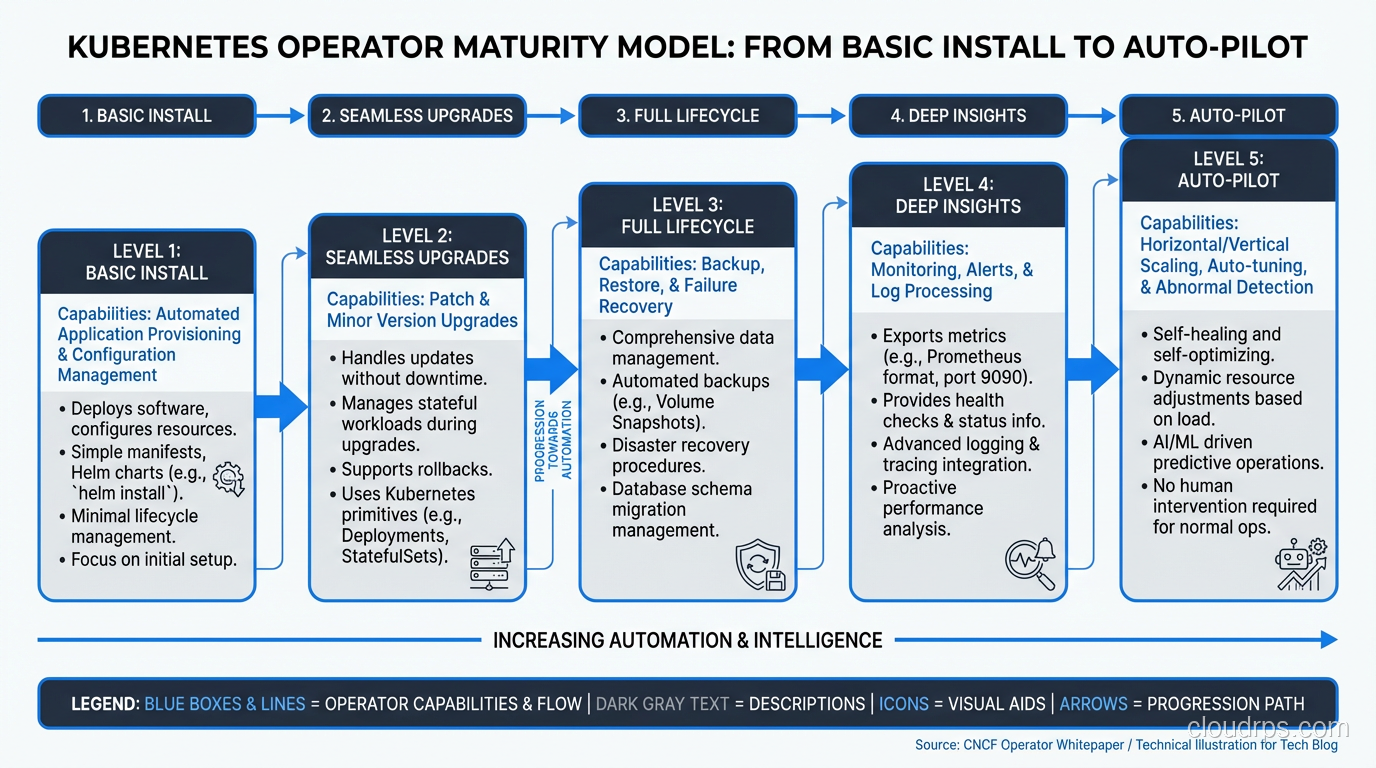
Not all operators are equal. The Operator Framework defines a maturity model that describes how sophisticated an operator’s automation is:
Level 1: Basic Install: The Operator can deploy the application. It handles the initial installation. This is the bare minimum.
Level 2: Seamless Upgrades: The Operator handles upgrades from one version to the next without manual intervention. It knows the upgrade path.
Level 3: Full Lifecycle: The Operator handles backups, failure recovery, and application-specific health checks.
Level 4: Deep Insights: The Operator exposes metrics, alerts, and logs. It provides workload analysis and recommendations.
Level 5: Auto Pilot: The Operator can tune performance parameters automatically, handle horizontal and vertical scaling based on application-specific metrics, and proactively fix common issues.
Most production-ready operators from vendors are at Level 3-4. The level of an operator matters enormously when choosing whether to use one. A Level 1 operator that can deploy but not upgrade is often more dangerous than not using an operator at all, because it creates a false sense of automation.
Running Databases on Kubernetes: The Operator Way
The most common use case for operators is running stateful applications, especially databases. Without operators, running PostgreSQL on Kubernetes is manageable for a single instance but becomes genuinely complex for anything resembling production: high availability, failover, backup management, connection pooling, major version upgrades.
The reality of databases on Kubernetes is that operators have dramatically changed the calculus. Two years ago I was advising against running most databases in Kubernetes without significant operational maturity. Today, with mature operators, my advice is more nuanced.
CloudNativePG (CNPG): The best PostgreSQL operator I’ve used. Built by EDB, now a CNCF project. Handles replication, failover, backups to S3/GCS, major version upgrades, point-in-time recovery. The CRD is expressive and well-designed.
apiVersion: postgresql.cnpg.io/v1
kind: Cluster
metadata:
  name: postgres-prod
spec:
  instances: 3
  imageName: ghcr.io/cloudnative-pg/postgresql:16.2

  storage:
    storageClass: fast-ssd
    size: 100Gi

  backup:
    retentionPolicy: "30d"
    barmanObjectStore:
      destinationPath: s3://my-bucket/postgres-backups
      serverName: postgres-prod
      s3Credentials:
        accessKeyId:
          name: s3-creds
          key: ACCESS_KEY_ID
        secretAccessKey:
          name: s3-creds
          key: SECRET_ACCESS_KEY

  monitoring:
    enablePodMonitor: true
That YAML deploys a 3-node PostgreSQL 16 cluster with automatic failover, continuous archiving to S3, and Prometheus metrics. The operator handles all the complexity of streaming replication, election of a new primary on failure, WAL archiving, and recovery.
Strimzi: The definitive Kafka operator. Handles the entire Kafka ecosystem: brokers, ZooKeeper (or KRaft for newer versions), Kafka Connect, MirrorMaker. Managing Kafka broker upgrades is genuinely complex (partition leadership needs to be balanced, controller node can’t be restarted until it’s no longer the active controller, etc.), and Strimzi handles all of it.
Redis Operator (from Spotahome or the Opstree variant): Multiple competing operators here. The landscape is messier than PostgreSQL, but mature options exist.
Writing Your Own Operator
Most teams shouldn’t write a custom operator. If there’s an existing operator for your workload, use it. Writing operators correctly is non-trivial, and the bugs tend to manifest as data loss or split-brain scenarios in production.
That said, there are legitimate reasons to write one: you have a proprietary system that no public operator handles, or you have application-specific operational knowledge that needs automation (custom deployment sequencing, application-specific health checks beyond HTTP probes, automated tenant provisioning).
The Operator SDK (from the Operator Framework project) is the standard starting point. It supports three approaches: Go (most powerful, most complex), Helm (wraps existing Helm charts, limited but simple), and Ansible (for teams who live in Ansible).
For a Go operator, you start by defining your CRD with kubebuilder markers:
// +kubebuilder:object:root=true
// +kubebuilder:subresource:status
// +kubebuilder:printcolumn:name="Ready",type="string",JSONPath=".status.ready"
// +kubebuilder:printcolumn:name="Replicas",type="integer",JSONPath=".spec.replicas"

type MyApplication struct {
    metav1.TypeMeta   `json:",inline"`
    metav1.ObjectMeta `json:"metadata,omitempty"`

    Spec   MyApplicationSpec   `json:"spec,omitempty"`
    Status MyApplicationStatus `json:"status,omitempty"`
}

type MyApplicationSpec struct {
    // +kubebuilder:validation:Minimum=1
    // +kubebuilder:validation:Maximum=10
    Replicas int32  `json:"replicas"`
    Version  string `json:"version"`
    // StorageSize is the size of the persistent volume
    StorageSize resource.Quantity `json:"storageSize"`
}
The kubebuilder markers generate CRD validation schema, RBAC rules, and controller scaffolding. Run make generate manifests and you get the CRD YAML, RBAC ClusterRole, and controller registration.
The non-obvious complexity in writing operators:
Finalizers: If your operator creates external resources (cloud load balancers, DNS records, database users), you need finalizers to ensure cleanup happens when the CR is deleted. Without a finalizer, deleting the CR deletes the object from Kubernetes but leaves the external resources dangling.
const finalizerName = "myapp.example.com/cleanup"

func (r *Reconciler) handleDeletion(ctx context.Context, app *MyApplication) error {
    if controllerutil.ContainsFinalizer(app, finalizerName) {
        // Perform cleanup
        if err := r.cleanupExternalResources(ctx, app); err != nil {
            return err
        }
        controllerutil.RemoveFinalizer(app, finalizerName)
        return r.Update(ctx, app)
    }
    return nil
}
Idempotency: The reconcile function must be idempotent. It will be called multiple times for the same state. “Create the ConfigMap if it doesn’t exist” is correct. “Create the ConfigMap” that fails if it already exists is wrong and will cause the operator to enter an error loop.
Status updates: Use the status subresource to report what the operator is doing. Good status reporting is what makes operators debuggable.
Owner references: Set owner references on resources you create so they’re garbage collected when the parent CR is deleted. Without this, deleting your CR leaves orphaned Deployments, Services, and ConfigMaps.
Security Considerations for Operators
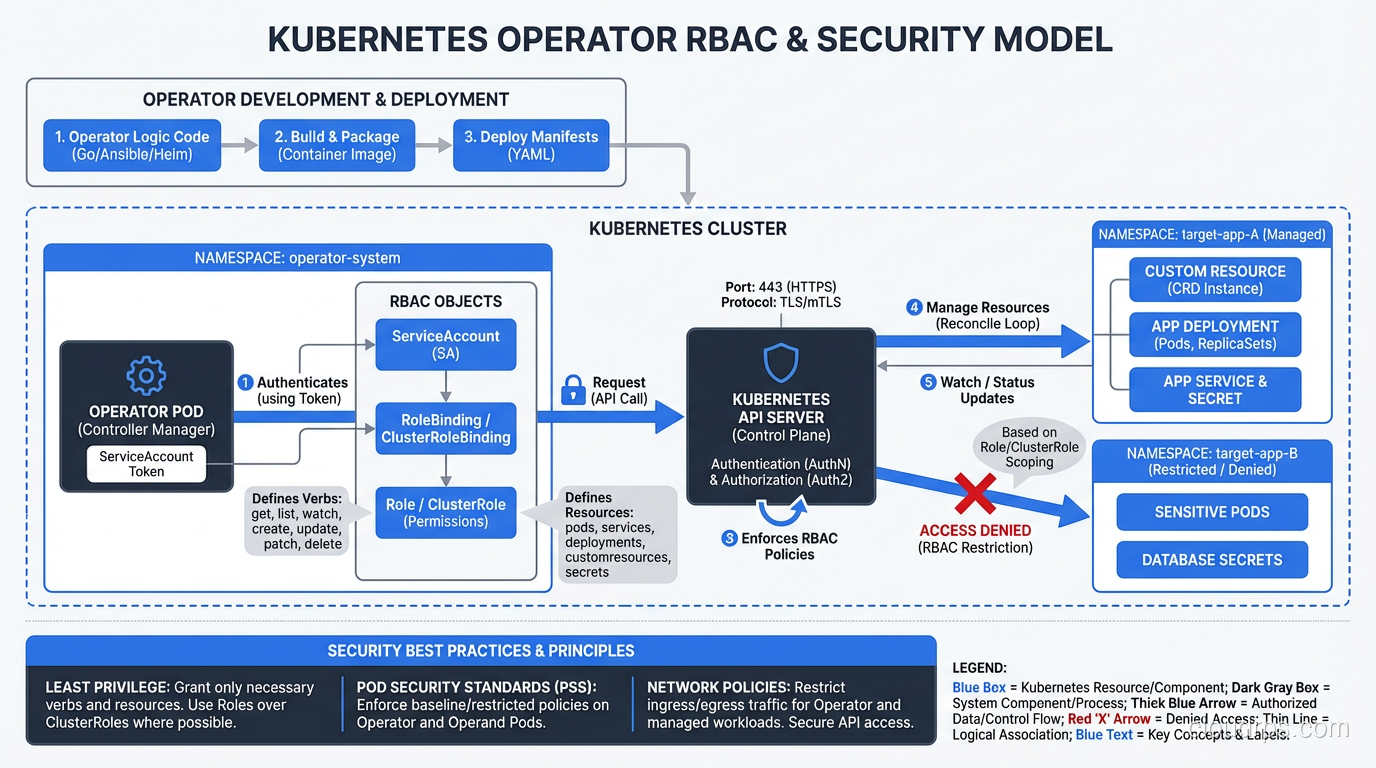
Operators run with elevated Kubernetes permissions. A typical database operator needs to create and modify StatefulSets, Services, Secrets, PersistentVolumeClaims, and sometimes ServiceAccounts. A poorly written operator that’s compromised can cause significant damage.
The supply chain security implications for operators are significant: operators are privileged software running in your cluster, and they’re often installed from OCI images maintained by third parties. Verify operator images are signed before installing. Pin operator versions with image digests, not floating tags.
RBAC for operators should follow least privilege:
apiVersion: rbac.authorization.k8s.io/v1
kind: ClusterRole
metadata:
  name: my-operator-role
rules:
# Only the resources this operator actually manages
- apiGroups: ["apps"]
  resources: ["statefulsets"]
  verbs: ["get", "list", "watch", "create", "update", "patch", "delete"]
- apiGroups: [""]
  resources: ["pods", "services", "configmaps"]
  verbs: ["get", "list", "watch", "create", "update", "patch", "delete"]
# Limit secret access to specific secret types if possible
- apiGroups: [""]
  resources: ["secrets"]
  verbs: ["get", "list", "watch", "create", "update"]
Avoid granting cluster-admin. I’ve seen operators bundled with default RBAC that grants full cluster access. That’s a hard no for production.
Operators vs Helm Charts vs GitOps
Where do operators fit relative to Helm charts and GitOps tooling like ArgoCD and Flux?
Helm charts handle deployment, not operations. Helm deploys your application in a known configuration. It doesn’t watch for failures, perform automatic upgrades, or handle application-specific lifecycle events. A Helm chart can deploy a PostgreSQL StatefulSet; it can’t handle a failover.
GitOps tools like ArgoCD manage the desired state of Kubernetes resources from Git. They reconcile git state to cluster state. They’re excellent at ensuring your configuration matches what’s in Git. They don’t understand application internals.
Operators handle runtime operations that require application-specific knowledge: failover, backup, upgrade sequencing. They run continuously and respond to events.
The three work together: ArgoCD deploys the operator itself and the Custom Resources from Git, the operator handles the runtime lifecycle. This is the pattern I recommend for production database management on Kubernetes: GitOps for the CRs (your PostgreSQLCluster YAML lives in Git), operator for the runtime operations.
The autoscaling capabilities in Kubernetes also intersect with operators. KEDA, which enables event-driven autoscaling based on external metrics, is itself implemented as an operator. It extends Kubernetes with ScaledObject and ScaledJob CRDs that the KEDA operator watches and acts on. Most of the interesting Kubernetes extensibility you use daily is powered by the operator pattern under the hood.
Operators are one of the more powerful abstractions in the Kubernetes ecosystem. When you find yourself writing runbooks for complex operational procedures on Kubernetes, that’s a signal to ask: “Could this be an operator?” Often, the answer is yes, and the operational complexity that requires three pages of documentation becomes a controller that runs reliably in the background without anyone’s involvement.
Get Cloud Architecture Insights
Practical deep dives on infrastructure, security, and scaling. No spam, no fluff.
By subscribing, you agree to receive emails. Unsubscribe anytime.