
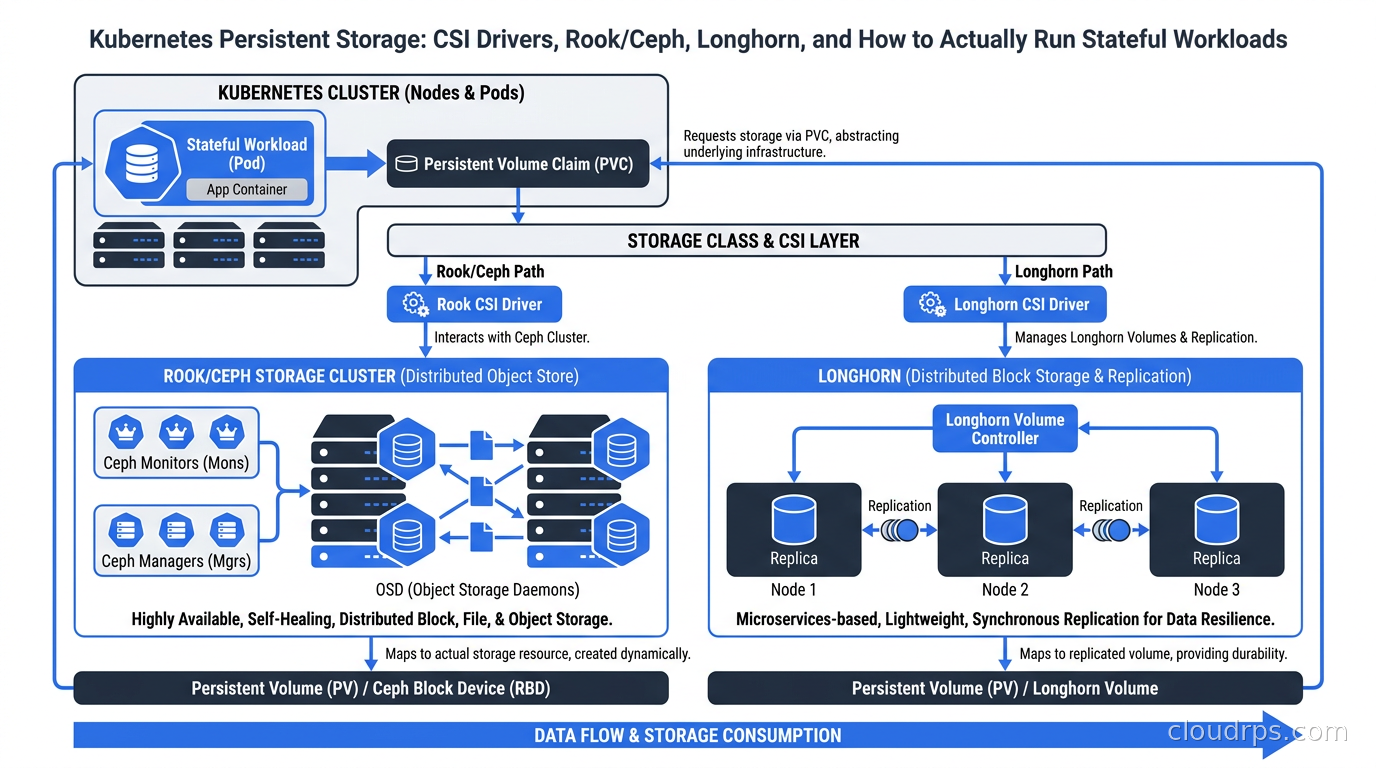
The pitch for running stateful workloads on Kubernetes sounds reasonable: consolidate your infrastructure, use the same orchestration layer for everything, stop maintaining a separate fleet of manually managed database servers. I have heard this pitch many times in twenty years of building cloud infrastructure, and I have watched a lot of teams walk into serious production pain because they skipped the part where persistent storage on Kubernetes is genuinely difficult.
This is not a criticism of Kubernetes. The project has made enormous progress on storage primitives. But the abstraction layers, the driver ecosystem, the access mode constraints, and the operational burden of running a distributed storage system inside your cluster are all real. You need to understand them before you commit.
This guide covers how Kubernetes storage actually works from CSI drivers down through the provisioner, the choices you face for on-premises or self-managed clusters, and the practical criteria for choosing between Rook/Ceph, Longhorn, cloud-native options, and everything else.
Why Kubernetes and Stateful Apps Are Fundamentally at Odds
Kubernetes was designed around ephemeral, stateless compute. The canonical workload is a Pod that can be killed and rescheduled anywhere in the cluster without losing anything important. StatefulSets arrived later, and they brought some important guarantees: stable network identity, ordered deployment, and persistent volume claims that follow Pods across rescheduling.
But Pods still move. The scheduler does not understand your storage topology unless you configure it explicitly through topology-aware scheduling and volumeBindingMode: WaitForFirstConsumer. When a Pod restarts on a different node and its volume cannot follow because the volume is zone-local, you get a stuck workload sitting in Pending indefinitely. I have seen this cause hour-long outages on clusters that had been running smoothly for months until the first unexpected node failure triggered a rescheduling cascade.
The performance model is also different. When your database runs on a dedicated host with locally attached NVMe, the I/O path is clean: kernel buffer cache, NVMe driver, device. When it runs on Kubernetes with networked storage, you have kernel, CSI node driver, network, storage backend, network return path, and CSI again. Every layer adds latency and potential failure modes.
None of this means you should avoid running stateful workloads on Kubernetes. It means you need to understand the storage system you are operating and choose the right one for your workload class. See our guide on whether databases belong on Kubernetes at all for the broader tradeoffs before you commit.
How CSI Actually Works: From PVC to Volume Mount
The Container Storage Interface (CSI) is the plugin specification that replaced the old in-tree volume drivers in Kubernetes. Before CSI, every storage vendor had to upstream code into the Kubernetes core repo. That was unsustainable. CSI externalizes storage drivers into their own deployments, with a well-defined gRPC interface between the Kubernetes control plane and the driver.
Here is what actually happens when you create a PersistentVolumeClaim and a Pod that consumes it.
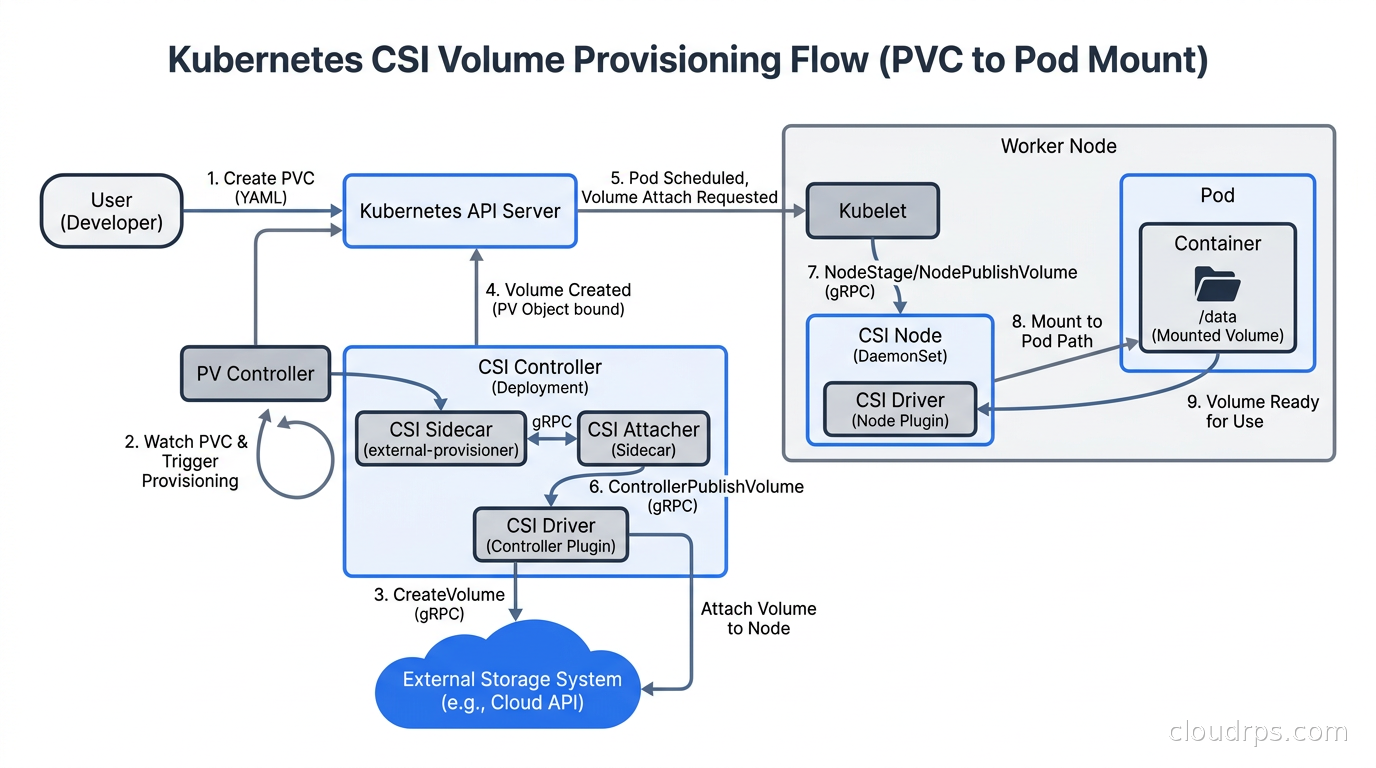
You create a PVC referencing a StorageClass. The external-provisioner sidecar (which runs alongside your CSI controller) watches for unbound PVCs and calls the CSI controller’s CreateVolume RPC. The driver contacts its backend (EBS, Ceph, whatever) and creates a volume. Kubernetes creates a PersistentVolume object representing it, and the volume gets bound to the PVC.
When the Pod is scheduled to a node, the external-attacher calls ControllerPublishVolume, which attaches the volume to the node at the hypervisor or network level. The kubelet then calls the CSI node plugin’s NodeStageVolume (formats and mounts to a global staging path on the node) and NodePublishVolume (bind-mounts from staging into the Pod’s container filesystem). On Pod termination, this runs in reverse: unpublish, unstage, controller unpublish.
This pipeline means there are at least three separate components involved in every volume operation: the CSI controller plugin (usually a Deployment), the CSI node plugin (a DaemonSet running on every node), and the Kubernetes external-provisioner, external-attacher, and external-resizer sidecar containers. When a volume is stuck, this is the chain you debug. Check PVC events first (kubectl describe pvc), then CSI controller logs, then node plugin logs on the specific node where the Pod is scheduled.
StorageClass parameters matter significantly. volumeBindingMode: Immediate creates volumes before a Pod is scheduled, which can lead to zone mismatches on multi-zone clusters where a volume lands in us-east-1a but the only schedulable node is in us-east-1b. WaitForFirstConsumer waits until the Pod is scheduled to a node, then provisions the volume in the same availability zone. Use WaitForFirstConsumer by default on multi-zone clusters unless you have a specific reason not to.
The Kubernetes operators that manage complex storage systems like Rook/Ceph are a good example of CSI at scale. They manage not just the driver but the entire lifecycle of the storage backend: bootstrapping the cluster, handling node failures, upgrading components, and creating custom StorageClasses that expose backend-specific parameters.
Cloud-Provided CSI Drivers: The Easy Path
If you are running on a managed Kubernetes service (EKS, GKE, AKS), your storage story is mostly handled for you, and you should lean into it hard.
The AWS EBS CSI driver gives you gp3 volumes with configurable IOPS and throughput as StorageClass parameters. The important constraint: EBS is ReadWriteOnce. One node mounts the volume as read-write. Multiple Pods on the same node can read from an RWO volume, but Pods on different nodes cannot. For shared filesystems on AWS, the EFS CSI driver gives you ReadWriteMany access, but EFS is not the right choice for databases. The latency characteristics of a distributed NFS-like filesystem over the wire are incompatible with the expectations of PostgreSQL or MySQL.
GKE uses the GCE Persistent Disk CSI driver with pd-ssd and pd-balanced tiers, and the newer Hyperdisk options for the highest-performance database workloads. Google recently added Parallelstore (Lustre-backed) for AI training workloads that need high-bandwidth shared filesystem access. Azure has Azure Disk (RWO, zone-local) and Azure Files (RWX) through their respective CSI drivers.
The operational advantage of cloud-native storage is significant: no infrastructure to manage, snapshots integrated with the cloud provider’s backup systems, encryption-at-rest handled by the platform, and storage automatically scales in terms of provisioned capacity when you resize a PVC. If you are on a managed cloud and your workloads fit the access mode constraints, use the cloud-native CSI driver. It is the right call.
The place you leave the cloud-native path is: you need RWX block storage with database-grade latency, you are on-premises or in colocation, you need features like thin provisioning or inline deduplication that the cloud driver does not expose, or you need storage portable across cloud providers. For multi-cloud architectures, having a consistent storage abstraction across providers has real value, though it comes with meaningful operational complexity.
Rook/Ceph: Enterprise Storage Inside Your Cluster
Rook is a CNCF-graduated storage orchestrator for Kubernetes. It does not implement storage itself. It takes Ceph, a battle-tested distributed storage system originally built for OpenStack deployments and large-scale object storage, and makes it Kubernetes-native through a set of operators and CRDs.
Ceph provides three storage types through a single cluster: RADOS Block Device (RBD) for block storage, CephFS for shared POSIX filesystems, and Ceph Object Gateway (RGW) for S3-compatible object storage. A single Rook/Ceph cluster can serve all three simultaneously, which is a significant operational advantage for teams that need multiple storage types. One cluster, one set of OSDs, one operations team.
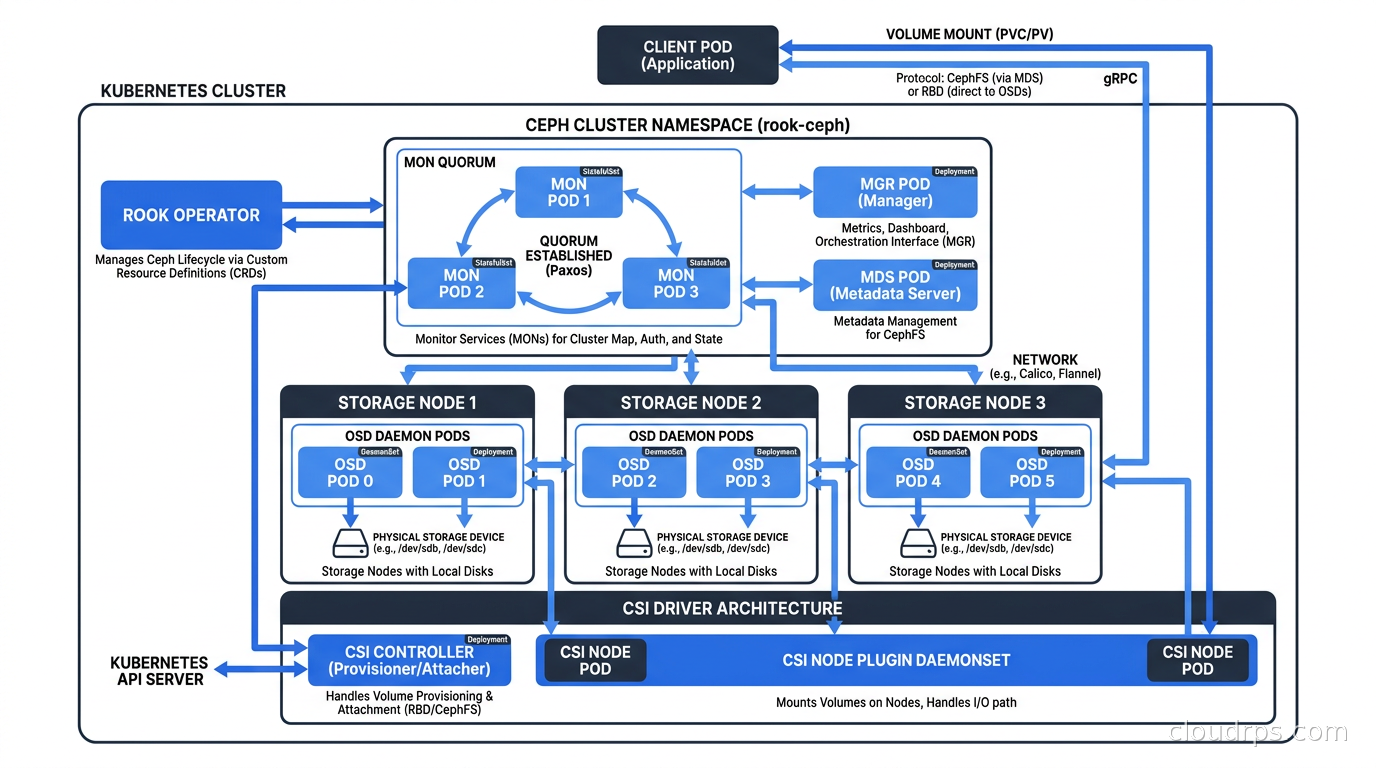
The Ceph architecture has several key components. Monitors (MONs): a quorum of at least three that tracks cluster state via a Paxos-based consensus map. Object Storage Daemons (OSDs): one per disk, responsible for storing data, handling replication, and performing recovery. Managers (MGRs): monitoring, metrics, and the Ceph dashboard. Metadata Servers (MDS): required for CephFS, manages the filesystem namespace. Rook deploys all of these as Kubernetes-native workloads. You define a CephCluster CRD pointing at specific nodes and devices, and the Rook operator handles bootstrapping the full Ceph cluster, provisioning OSDs on those devices, and creating the CSI driver that Kubernetes uses to provision volumes.
The performance story for Rook/Ceph is good when the hardware is right. All-NVMe OSDs with high-bandwidth (25Gbps or better) networking can sustain hundreds of thousands of IOPS per cluster. Ceph uses CRUSH maps for data placement, which means it stripes data across OSDs automatically without manual sharding. Replication factor (usually 3x) means you need at least three times your desired usable capacity in raw disks, which is a real cost to factor in.
The operational story is where Rook/Ceph gets honest. This is a complex distributed system. When things go wrong: a node goes offline and OSD recovery starts hammering your network with replication traffic; you misplace a drive and the cluster enters a degraded state that blocks writes; you upgrade Ceph versions and an incompatible journal format causes an outage window. I have seen all of these. They are recoverable, but only if you have engineers who understand what is happening at the Ceph level, not just the Kubernetes level.
The minimum viable Rook/Ceph cluster for production is three dedicated storage nodes with SSDs (preferably NVMe), 10Gbps or better networking between them, and at least one engineer who has read the Ceph documentation thoroughly. Do not run storage OSDs co-located with compute-intensive workloads on the same nodes. Storage I/O and CPU-bound workloads fight for bandwidth and context switches in ways that produce unpredictable latency spikes under load.
If you need CephFS for shared filesystem access (common for AI training data, CI artifact caches, or multi-reader media pipelines), Rook/Ceph is the right choice. Nothing else in the Kubernetes ecosystem gives you the same combination of RWX performance and operational maturity. The cost is complexity, and you need to respect that cost. Rook/Ceph with RBD is also the storage backend of choice for KubeVirt virtual machines that require live migration, since vMotion-style migration requires both source and destination nodes to access the VM disk simultaneously through an RWX volume.
Longhorn: The CNCF-Incubating Alternative
Longhorn takes a different architectural philosophy than Ceph. Instead of a separate distributed storage system, Longhorn treats every node’s local disk as a building block and implements replication at the volume level. Each Longhorn volume maintains a configurable number of replicas (default three), distributed across nodes. The Longhorn engine runs as a container in the data path for each volume.
Installation is genuinely simple: a single Helm chart or a Rancher app deployment. There are no quorum requirements, no CRUSH maps, no monitor daemons to maintain. You get a web UI out of the box that shows volume health, replica distribution, and backup status across all volumes in the cluster. For teams that do not have dedicated storage expertise, this operational simplicity is the primary argument for Longhorn.
The limitations are real and worth knowing upfront. Longhorn is block storage only with ReadWriteOnce access. There is no native RWX support for block volumes and no object storage tier. Performance is adequate for most database workloads but is not competitive with Ceph on NVMe hardware for IOPS-intensive applications. The Longhorn engine runs in the data path, meaning a controller crash can impact in-flight I/O to that specific volume (replicas continue, but there is a brief interruption).
Backup integration is one of Longhorn’s genuine strengths. It supports incremental snapshots to S3-compatible object storage directly from the UI or CRDs, without any external backup orchestration. For teams implementing disaster recovery for Kubernetes-native applications, Longhorn’s backup-to-S3 is significantly simpler to configure than Ceph’s snapshot pipeline. The recurring backup schedules defined as Kubernetes CRDs fit naturally into a GitOps workflow.
Longhorn is the right choice for: smaller clusters (under 20 storage nodes), teams without Ceph expertise, deployments where operational simplicity outweighs peak performance, and use cases where RWO block storage covers your needs. A three-replica Longhorn cluster with daily backups to S3 is genuinely production-ready for the majority of Kubernetes stateful workloads.
OpenEBS and the Local Storage Option
OpenEBS (a CNCF-incubating project under the Data on Kubernetes community) offers a different angle on the problem. Its multiple storage engines serve different use cases. Mayastor is the high-performance option, using NVMe-oF (NVMe over Fabrics) and io_uring for a kernel-bypass data path. In benchmarks, Mayastor approaches the throughput of direct NVMe access while maintaining replication, which no other Kubernetes-native storage solution currently matches. If you are running a latency-sensitive database on bare metal Kubernetes and cannot afford the overhead of traditional networked storage, Mayastor is worth serious evaluation.
LocalPV-hostpath and LocalPV-LVM are the right choices when you want local disk performance with no replication overhead. Your Pod is pinned to the node that owns the disk via node affinity on the PVC. You lose the ability to reschedule Pods freely across nodes, but you gain storage performance equivalent to running directly on the host. This is a valid architecture when you are handling replication at the application layer: a replicated PostgreSQL cluster where each instance has its own local volume, for example, or a Kafka broker fleet where each broker is pinned to a node with local NVMe.
Portworx is the commercial option with enterprise support, multi-cloud portability, and integrated backup. For most teams running open-source Kubernetes, one of the CNCF options is sufficient. Portworx makes sense in highly regulated environments where the enterprise support contract is required by compliance, or where the migration tooling between cloud providers justifies the licensing cost.
Storage Classes, Access Modes, and the Traps
This is the section that prevents production incidents.
Access modes on PersistentVolumes are frequently misunderstood, and getting them wrong ranges from annoying (stuck Pods) to catastrophic (data corruption).
ReadWriteOnce(RWO): one node can mount the volume read-write. Multiple Pods on the same node can access it.ReadWriteMany(RWX): multiple nodes can mount the volume read-write simultaneously.ReadOnlyMany(ROX): multiple nodes can mount read-only.ReadWriteOncePod(RWOP): introduced in Kubernetes 1.22, strictly one Pod (not just one node) can mount read-write. This is the access mode you want for most database scenarios.
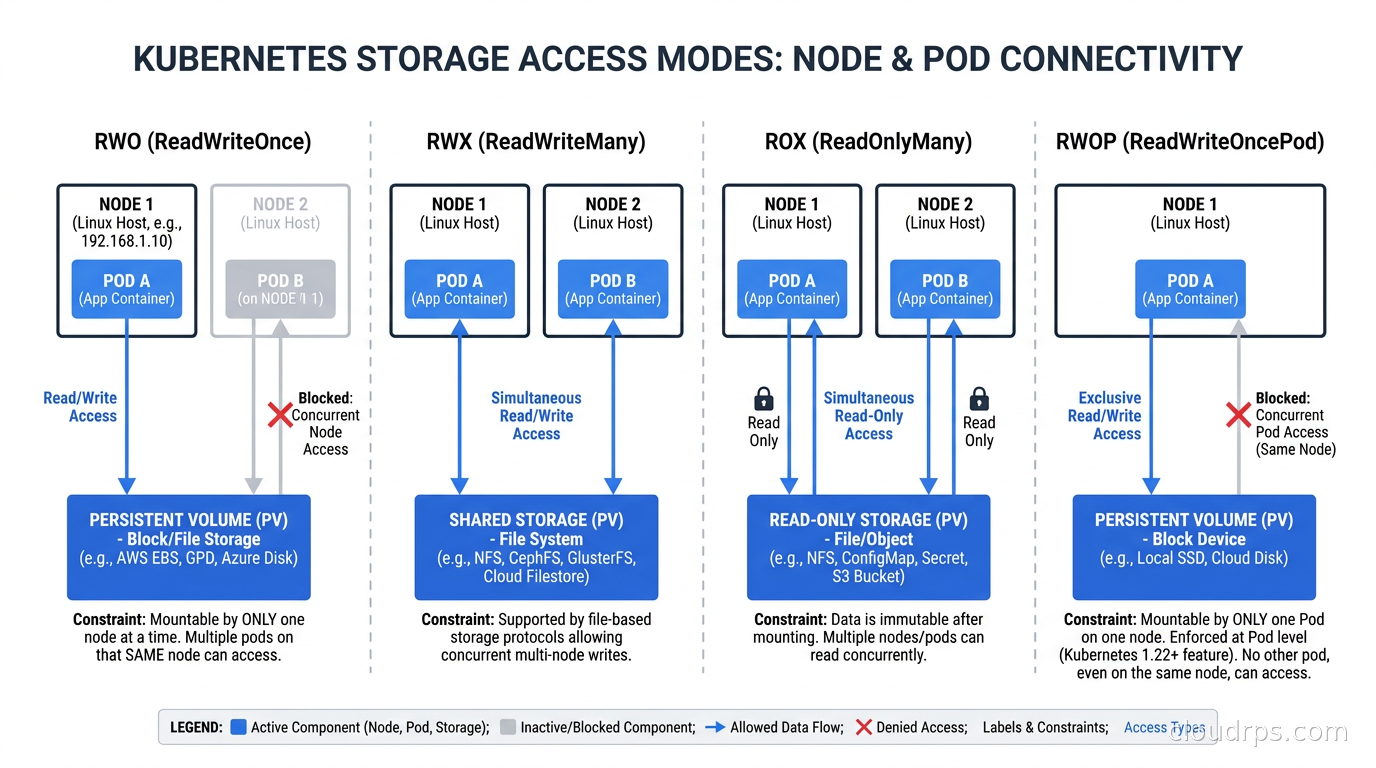
The trap: if you create a Deployment (not a StatefulSet) with an RWO volume and you have two or more replicas, Kubernetes will schedule both Pods and both will attempt to mount the volume. If they land on different nodes, one Pod will be stuck in ContainerCreating indefinitely. If they land on the same node, both mount successfully, and you now have two database processes writing to the same volume simultaneously. That is data corruption territory, and it is not theoretical. StatefulSets with a volumeClaimTemplate give each Pod its own dedicated PVC, which is the correct pattern for replicated databases.
StorageClass reclaimPolicy is the other setting you need to configure explicitly before you hit production. The default in most drivers is Delete, meaning when you delete a PVC, the underlying volume is also deleted immediately. If you are running production databases, set reclaimPolicy: Retain so that you have a manual recovery path if someone accidentally deletes a PVC. The recovery process: verify the PV is in Released state, manually clear the claimRef field, then create a new PVC that references the PV explicitly via volumeName.
Volume expansion requires allowVolumeExpansion: true in the StorageClass definition. Most modern CSI drivers support online expansion without downtime. The filesystem inside the volume needs to be expanded after the block device grows, which Kubernetes handles automatically for ext4 and xfs volumes via the NodeExpandVolume CSI call. This has been stable since Kubernetes 1.24.
Volume snapshots use a separate CRD hierarchy: VolumeSnapshotClass, VolumeSnapshot, and VolumeSnapshotContent. You need the snapshot controller deployed in your cluster separately, and a CSI driver that explicitly supports the snapshot capability. This is separate from the provisioning capability. Not all drivers that can create volumes can also snapshot them. Verify this against your driver’s feature matrix before your disaster recovery plan depends on it.
How to Choose: A Practical Decision Framework
Start with managed cloud? Use the cloud-native CSI driver as your default. The operational simplicity is not a compromise; it is the right tradeoff. Add EFS or Azure Files only where you have a genuine RWX requirement. Evaluate cloud-native first even for high-performance workloads: gp3 EBS with 16,000 provisioned IOPS handles the vast majority of database workloads.
On-premises or colocation, and you need RWX (shared filesystems for AI training, CI caches, media workflows), need block and object storage from one cluster, or are running more than five nodes of stateful workloads: Rook/Ceph is the right evaluation. Budget for operational complexity. Make sure you have at least one engineer who knows Ceph before you go live.
On-premises or colocation with simpler requirements, fewer storage engineers, or primarily RWO block storage needs: Longhorn is the right default. The operational simplicity is worth more than the theoretical performance ceiling for most workloads.
Bare metal Kubernetes with NVMe, latency-sensitive databases, and application-layer replication: LocalPV (OpenEBS or the built-in Kubernetes local StorageClass) or Mayastor if you need managed replication.
The FinOps side of this decision matters more than most teams calculate. Ceph with replication factor three means you need three times your usable capacity in raw disks. For 10TB of usable storage, you provision 30TB of physical disks. Cloud-native CSI charges you for provisioned capacity without that multiplier, because replication is abstracted into the platform’s pricing. Run the numbers before you build.
Kubernetes cost visibility tools also do not currently attribute storage costs well. PVC costs are often invisible in Kubecost and OpenCost dashboards unless you configure custom pricing. Add storage to your cost model manually, factoring in both raw capacity cost and the replication multiplier.
Operating This in Production
In twenty years of building infrastructure, the most expensive storage mistake I have seen on Kubernetes is not a technical one. It is an organizational one. Teams adopt Rook/Ceph because it sounds like the enterprise choice, without having the engineering depth to operate it. Then they hit their first CRUSH rebalance storm at 2am, nobody on the team knows what an OSD is, and the incident drags on for four hours while they read documentation under pressure.
Start with the simplest option that meets your requirements. Longhorn with daily backups to S3 and a three-replica configuration is production-ready for the majority of Kubernetes stateful workloads. Reach for Rook/Ceph when you have a specific technical requirement that demands it, not because it sounds more serious. Whichever storage system you choose, pair it with Velero for namespace-level backup so you can recover from accidental deletion or cluster migration scenarios without needing to manually recreate every Kubernetes object. The Kubernetes backup and disaster recovery guide explains how Velero integrates with CSI volume snapshots and why volume storage backup alone is not sufficient without also backing up the Kubernetes objects that reference those volumes.
Test your storage before you need it. Run fio against your StorageClass before you put a database on it. Measure actual IOPS and latency under the write patterns your workload produces. Test PVC expansion. Test node failure and verify volumes come back clean. Test Pod rescheduling across zones. Find out what your RTO and RPO actually are under realistic failure conditions, not what you assume they are.
Managing your StorageClasses, VolumeSnapshotClasses, and storage operator configuration in Git alongside your application manifests is worth adopting from day one. When you need to rebuild your cluster after a catastrophic failure, having all of your storage configuration as code is the difference between a two-hour recovery and a two-day one. This is a natural fit for GitOps workflows with ArgoCD or Flux.
The block, object, and file storage distinctions that matter at the cloud infrastructure level map directly onto Kubernetes storage primitives. RBD gives you block. CephFS gives you file. RGW gives you object. Understanding those underlying abstractions makes Kubernetes storage decisions much less mysterious.
Kubernetes persistent storage is a solved problem in 2026 in the sense that there are good tools with real production track records. It is not solved in the sense that you can ignore it. Pick the right tool, understand how it works, and operate it with the same rigor you bring to everything else that touches production data. The PVC that stores your users’ data deserves as much architectural thought as the database engine sitting on top of it.
Get Cloud Architecture Insights
Practical deep dives on infrastructure, security, and scaling. No spam, no fluff.
By subscribing, you agree to receive emails. Unsubscribe anytime.