
I have spent twenty years designing distributed infrastructure, and I will tell you the moment Kubernetes scheduling stopped feeling like magic and started feeling like a discipline: it was about 2018, watching a production incident unfold because a critical payment service had co-scheduled onto the same node as a batch job that consumed every available CPU and caused the payment service to start dropping requests. We had three nodes available. The scheduler picked wrong. Not because it was broken, but because nobody had told it the rules.
Most teams learn Kubernetes scheduling the hard way: FailedScheduling events at 2am, noisy-neighbor problems destroying your P99 latency, AI training jobs evicted mid-run because a lower-priority workload got preempted at the wrong moment. The tools to prevent all of this exist and have existed for years. They are just not obvious. This article is my attempt to make them obvious.
How the Kubernetes Scheduler Actually Works
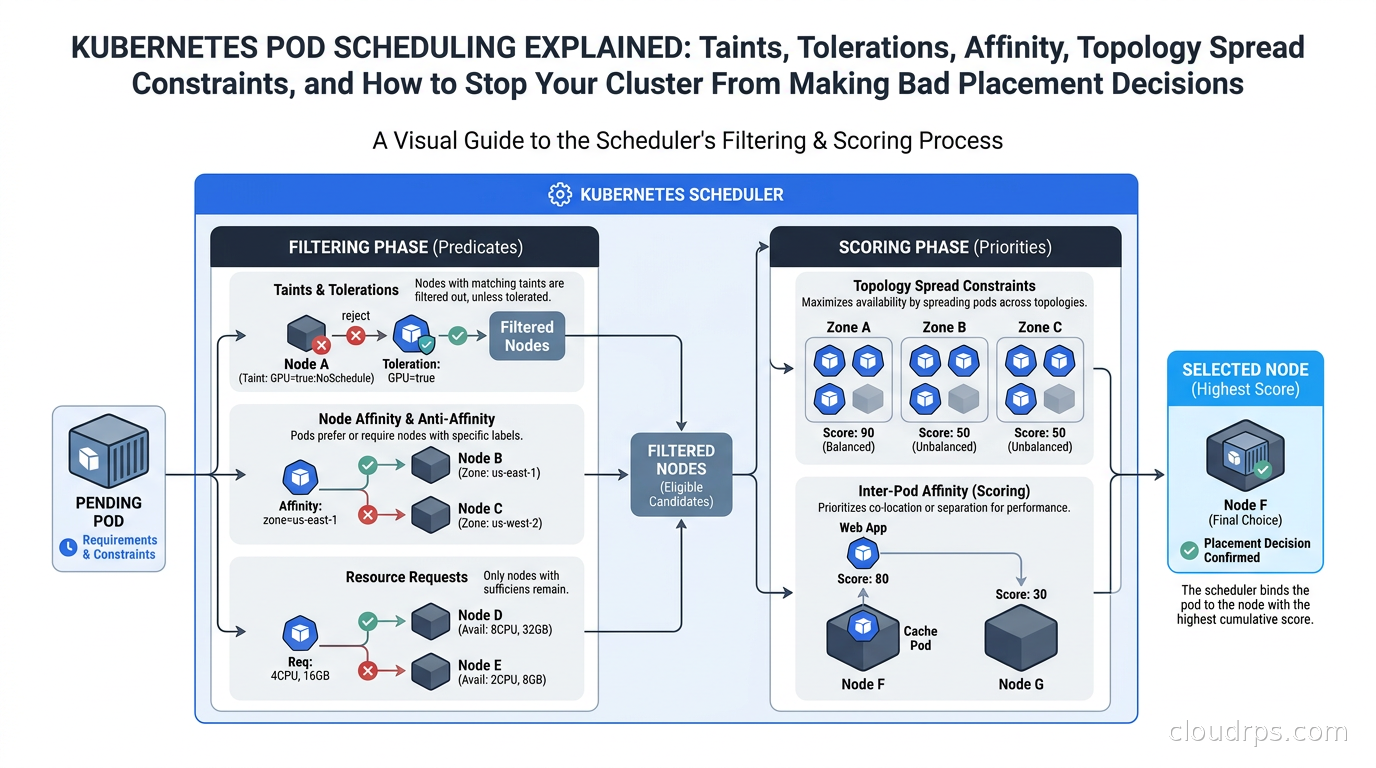
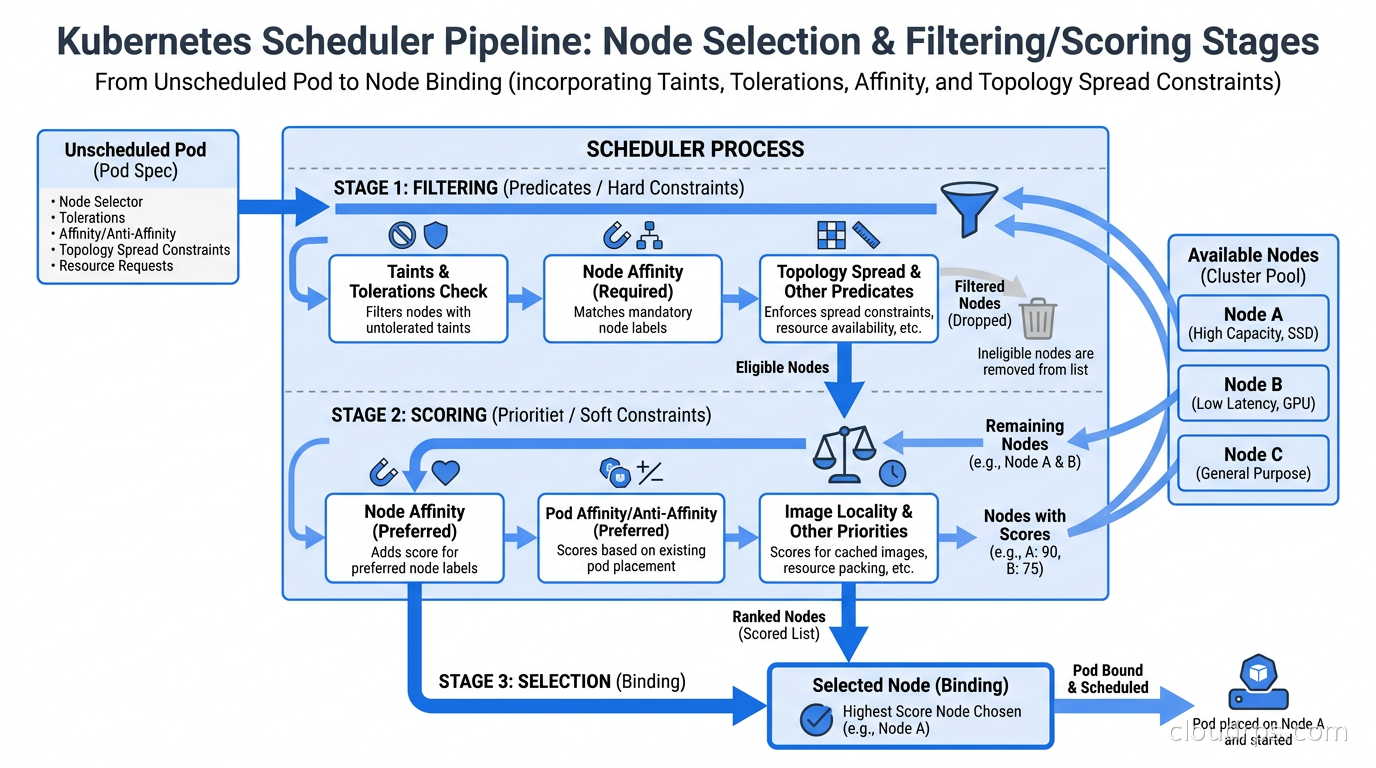
The scheduler is not magic, and it is not random. It runs as a control loop watching for pods with no assigned node. For each unscheduled pod, it runs two phases: filtering and scoring.
Filtering eliminates nodes that cannot run the pod. A node fails filtering if it does not have enough CPU or memory, if it has a taint the pod does not tolerate, if pod affinity rules require a topology that does not exist, or if the node does not match required node affinity expressions. The result is a candidate list of nodes that can run the pod.
Scoring ranks the remaining candidates. Each node gets a score across multiple dimensions: how balanced the resource usage would be, whether preferred affinity hints are satisfied, how well topology spread constraints are already satisfied, whether the node is in the same zone as other pods this pod would prefer to be near. The node with the highest composite score wins.
If the candidate list is empty after filtering, the pod lands in Pending with a FailedScheduling event. This is the situation you want to diagnose before it happens, not while a customer is calling.
Understanding these two phases changes how you debug. A FailedScheduling event tells you filtering eliminated every node. Check: do you have nodes that match the required affinity? Are all nodes tainted without a matching toleration? Is there enough resource headroom? Run kubectl describe pod <pod> and read the “Events” section carefully. It will tell you exactly why each node was eliminated.
Node Selectors: The Simple Case You Should Use When It Fits
Before reaching for affinity, consider nodeSelector. It is the blunt instrument. You add a label to a node, you add that label to your pod spec’s nodeSelector field, and the pod will only schedule on nodes carrying that label.
nodeSelector:
  disktype: ssd
That is it. If you need to pin a workload to nodes with local NVMe storage, or to dedicated GPU nodes, or to nodes in a specific availability zone, nodeSelector works. Its limitation is that it is binary: the pod either schedules on matching nodes or it does not. You cannot express preferences, fallbacks, or weight. For those you need affinity.
Taints and Tolerations: Workload Isolation Done Right
Taints and tolerations solve a different problem than affinity. Affinity says “I want to go here.” Taints say “you cannot come here unless you have permission.”
You add a taint to a node:
kubectl taint nodes gpu-node-01 workload=gpu:NoSchedule
This tells the scheduler: do not place any pod on this node unless the pod has a toleration for workload=gpu:NoSchedule. Now your GPU nodes are reserved exclusively for pods that opt in. Your general-purpose Deployments will never accidentally land on a $12/hour GPU node.
The matching toleration in the pod spec:
tolerations:
- key: "workload"
  operator: "Equal"
  value: "gpu"
  effect: "NoSchedule"
There are three taint effects worth knowing:
NoSchedule: new pods without the toleration will not be scheduled here. Existing pods are unaffected.PreferNoSchedule: the scheduler will try to avoid this node but will use it if no alternatives exist. Soft version of NoSchedule.NoExecute: existing pods without the toleration will be evicted. New pods will not schedule here. This is what Kubernetes uses internally when a node becomes unreachable.
The NoExecute effect is where most teams get surprised. When a node goes down, Kubernetes adds a node.kubernetes.io/not-ready:NoExecute taint automatically. Pods without the right toleration get evicted after a tolerationSeconds window (default 300 seconds). If you want faster eviction for stateless services or slower eviction for databases, set tolerationSeconds explicitly in your pod spec.
A production pattern I use everywhere: taint spot/preemptible nodes with cloud.google.com/gke-spot=true:NoSchedule (or the AWS equivalent). Only workloads that explicitly opt in with a toleration will land on spot capacity. This means you never accidentally run a stateful database on a node that could disappear in 30 seconds. For more on managing spot instances effectively, see our guide to spot instances and preemptible VMs.
Node Affinity: Expressing Preferences and Requirements
Node affinity is the sophisticated version of nodeSelector. It gives you required rules (hard constraints, filtering phase) and preferred rules (soft hints, scoring phase). The YAML is verbose but the semantics are precise.
affinity:
  nodeAffinity:
    requiredDuringSchedulingIgnoredDuringExecution:
      nodeSelectorTerms:
      - matchExpressions:
        - key: kubernetes.io/arch
          operator: In
          values:
          - arm64
    preferredDuringSchedulingIgnoredDuringExecution:
    - weight: 80
      preference:
        matchExpressions:
        - key: node.kubernetes.io/instance-type
          operator: In
          values:
          - c7g.4xlarge
          - c7g.8xlarge
The required block filters. The preferred block scores. If the required block is not met, the pod is Pending. If the preferred block is not met, the pod still schedules, just on a lower-scoring node.
The IgnoredDuringExecution suffix means: once a pod is running, changes to node labels do not cause eviction. There is a RequiredDuringExecution variant coming (it was in alpha as of 1.27) but for almost all production use cases, IgnoredDuringExecution is what you want. You do not want a label change to suddenly evict running pods.
The weight field in preferred rules (1-100) lets you express relative importance. If you have multiple preferred conditions, the scorer sums the weights for each node and picks the highest total. This is how you express “I’d really prefer ARM64 nodes from this instance family, but I’ll take anything ARM64 if those aren’t available.”
Pod Affinity and Pod Anti-Affinity: Placement Relative to Other Pods
Node affinity is about the node’s properties. Pod affinity and anti-affinity are about co-location relative to other pods.
Pod affinity pulls pods together. Pod anti-affinity pushes them apart. The canonical use case: you want your cache pods on the same node as your application pods (pod affinity, reduce network latency), but you want your application pods on different nodes from each other (pod anti-affinity, avoid SPOF).
affinity:
  podAntiAffinity:
    requiredDuringSchedulingIgnoredDuringExecution:
    - labelSelector:
        matchLabels:
          app: payment-service
      topologyKey: kubernetes.io/hostname
The topologyKey defines the “unit” of separation. kubernetes.io/hostname means no two pods with the label app: payment-service will land on the same node. topology.kubernetes.io/zone means no two pods will land in the same availability zone. topology.kubernetes.io/region means no two pods will land in the same region.
I use required pod anti-affinity with hostname topology for anything that would cause an outage if two instances died simultaneously. I use preferred pod anti-affinity for less critical services where spreading is a nice-to-have but I would rather have the pod running than waiting for a node in a different zone to become available.
One thing that trips up every team at least once: pod affinity matching is based on pod labels, and those labels are evaluated at scheduling time. If you change a pod’s labels after it is running, the affinity rules for future pods will not find it with the old label. This is why label discipline matters.
Topology Spread Constraints: The Modern Way to Spread Workloads
Pod anti-affinity is powerful but rigid. Topology Spread Constraints (TSC) are the flexible, production-grade mechanism for spreading workloads evenly across failure domains. They were introduced in Kubernetes 1.19 and have largely replaced pod anti-affinity for spread use cases in clusters I’ve built since then.
The core idea: define how many pods can be “unbalanced” across a topology domain. If you have a Deployment with 6 replicas and 3 availability zones, you probably want 2 pods per zone. TSC lets you express this.
topologySpreadConstraints:
- maxSkew: 1
  topologyKey: topology.kubernetes.io/zone
  whenUnsatisfiable: DoNotSchedule
  labelSelector:
    matchLabels:
      app: api-server
- maxSkew: 2
  topologyKey: kubernetes.io/hostname
  whenUnsatisfiable: ScheduleAnyway
  labelSelector:
    matchLabels:
      app: api-server
maxSkew is the maximum allowed difference in pod count between the most-loaded and least-loaded topology domain. A maxSkew of 1 with 3 zones means the scheduler will try to keep the distribution like 2-2-2 or 3-2-2 but will reject scheduling that would produce 4-1-1.
whenUnsatisfiable: DoNotSchedule is a hard constraint (filtering). ScheduleAnyway is a soft constraint (scoring). I use hard constraints for zone spread on my stateless services and soft constraints for node-level spread so I do not block scale-up when one node is under heavy load.
You can stack multiple TSC entries as I showed above. The scheduler satisfies all of them simultaneously. This is how you express “spread across zones for HA, and also try not to pile everything on one node within a zone.”
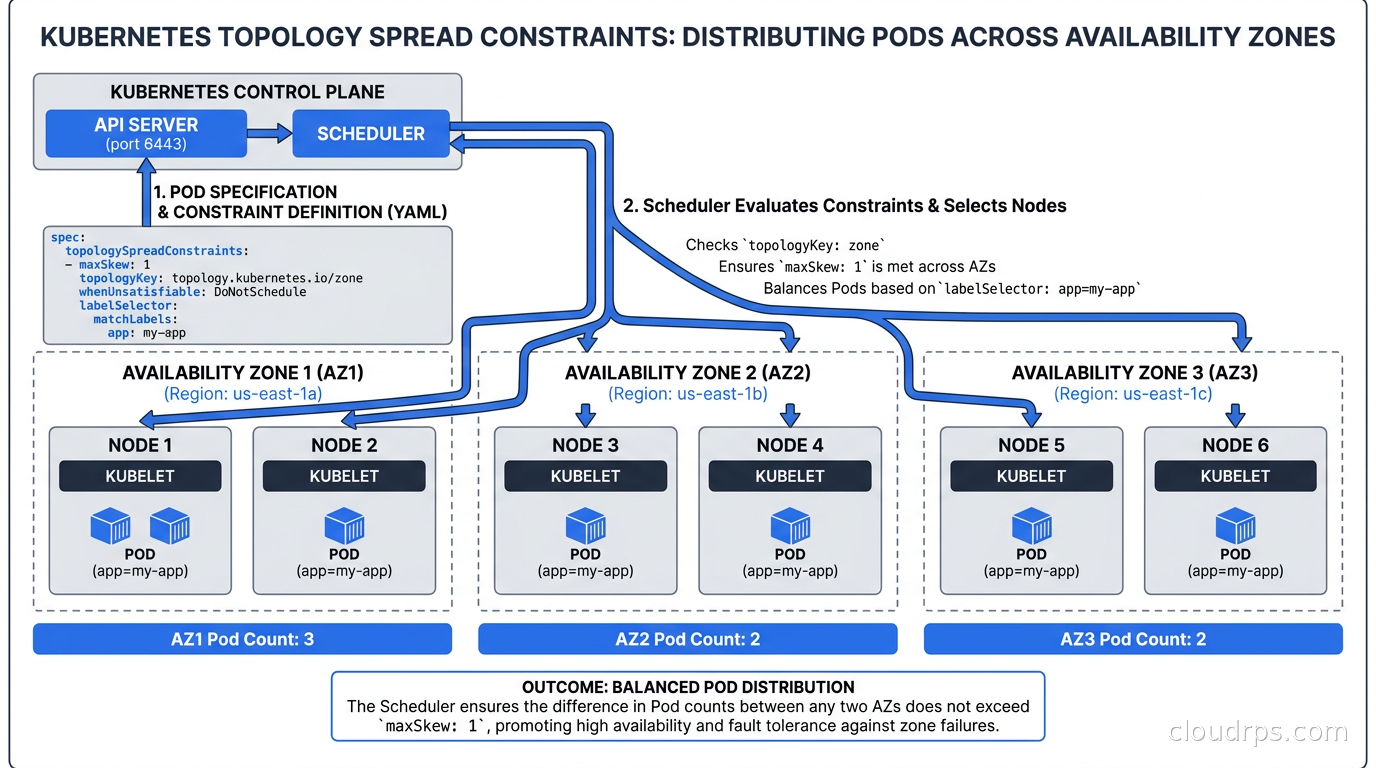
Topology Spread Constraints also have a minDomains field (stable as of 1.30): if you specify minDomains: 3 and fewer than 3 zones have at least one matching pod, the constraint is satisfied regardless of skew. This prevents the scheduler from blocking scale-up of a brand-new Deployment before it has pods in all zones.
When you combine TSC with Karpenter for node provisioning, you get a genuinely powerful autoscaling story: Karpenter creates new nodes to satisfy pending pods, and TSC ensures those pods land in the right zones once the nodes exist.
PriorityClass and Preemption: Who Gets Evicted When Things Get Tight
Every pod in a Kubernetes cluster has a scheduling priority. If you do not specify one, it gets the default (0). When the cluster runs out of capacity, the scheduler uses priority to decide which pending high-priority pods are worth evicting existing lower-priority pods for.
apiVersion: scheduling.k8s.io/v1
kind: PriorityClass
metadata:
  name: critical-services
value: 1000
globalDefault: false
description: "For payment processing, auth, and core API services"
apiVersion: scheduling.k8s.io/v1
kind: PriorityClass
metadata:
  name: batch-jobs
value: 100
globalDefault: false
description: "For analytics batch processing and ETL jobs"
When a critical-services pod is pending and the cluster is full, the scheduler will look for batch-jobs pods it can evict to make room. This is preemption. The evicted pod goes back to Pending and will be rescheduled when capacity is available.
Use this deliberately. I have seen teams set all their microservices to priority 1000 and all their batch jobs to priority 100, and then wonder why batch jobs get constantly evicted. The priority hierarchy only works if you actually stratify your workloads.
The built-in system-cluster-critical and system-node-critical PriorityClasses (values 2000000000 and 2000001000 respectively) are reserved for core cluster components like CoreDNS and kube-proxy. Do not set your application workloads above these unless you want your application to potentially preempt the cluster’s own DNS service. I once saw someone do exactly that. It did not end well.
Preemption has a subtlety: the scheduler will not preempt a pod if doing so would violate PodDisruptionBudgets. If your batch job has a PDB requiring at least 1 pod running, preemption will not evict the last batch pod even if a higher-priority workload is pending. This is the right behavior, but it means your critical workload can still be blocked if lower-priority workloads are protected by PDBs that are too permissive. Review your PDB settings alongside your PriorityClasses.
Production Patterns That Actually Matter
These are the patterns I reach for on every cluster I build:
GPU node isolation: Always taint GPU nodes with NoSchedule. The per-hour cost of GPU instances (anywhere from $3 to $30+ depending on the GPU) means you cannot afford to have general-purpose pods consuming GPU node capacity. Set up a dedicated node pool, taint it, add a matching toleration to only your AI/ML workloads. Pair this with Kubernetes DRA for GPU scheduling for fine-grained GPU resource allocation.
Spot/on-demand segregation: Taint spot nodes. Add tolerations to stateless, interruptible workloads. Never let stateful workloads (databases, caches, anything that needs persistent local state) land on spot nodes accidentally. For more on this pattern see spot instances and preemptible VMs.
Zone-aware spreading for stateless services: Use Topology Spread Constraints with topologyKey: topology.kubernetes.io/zone and maxSkew: 1 for any service where losing a zone would take out your entire tier. This is the single highest-leverage scheduling change you can make to improve HA without adding infrastructure.
Noisy-neighbor prevention for databases: Add a dedicated node pool for your database workloads (if you are running databases on Kubernetes - an approach with real trade-offs). Taint it, add pod anti-affinity at the hostname level for replicas, and use resource requests and limits that reflect actual usage. The combination of node isolation plus anti-affinity ensures each replica lands on a dedicated node with no application workload competing for CPU.
Topology spread for autoscaling correctness: Without TSC, Horizontal Pod Autoscaler scale-ups can stack new pods on nodes that happen to have headroom, even if those nodes are all in one zone. The HPA does not know about topology. Set TSC on every Deployment that uses HPA if multi-zone availability matters to you.
Common FailedScheduling Failures and How to Debug Them
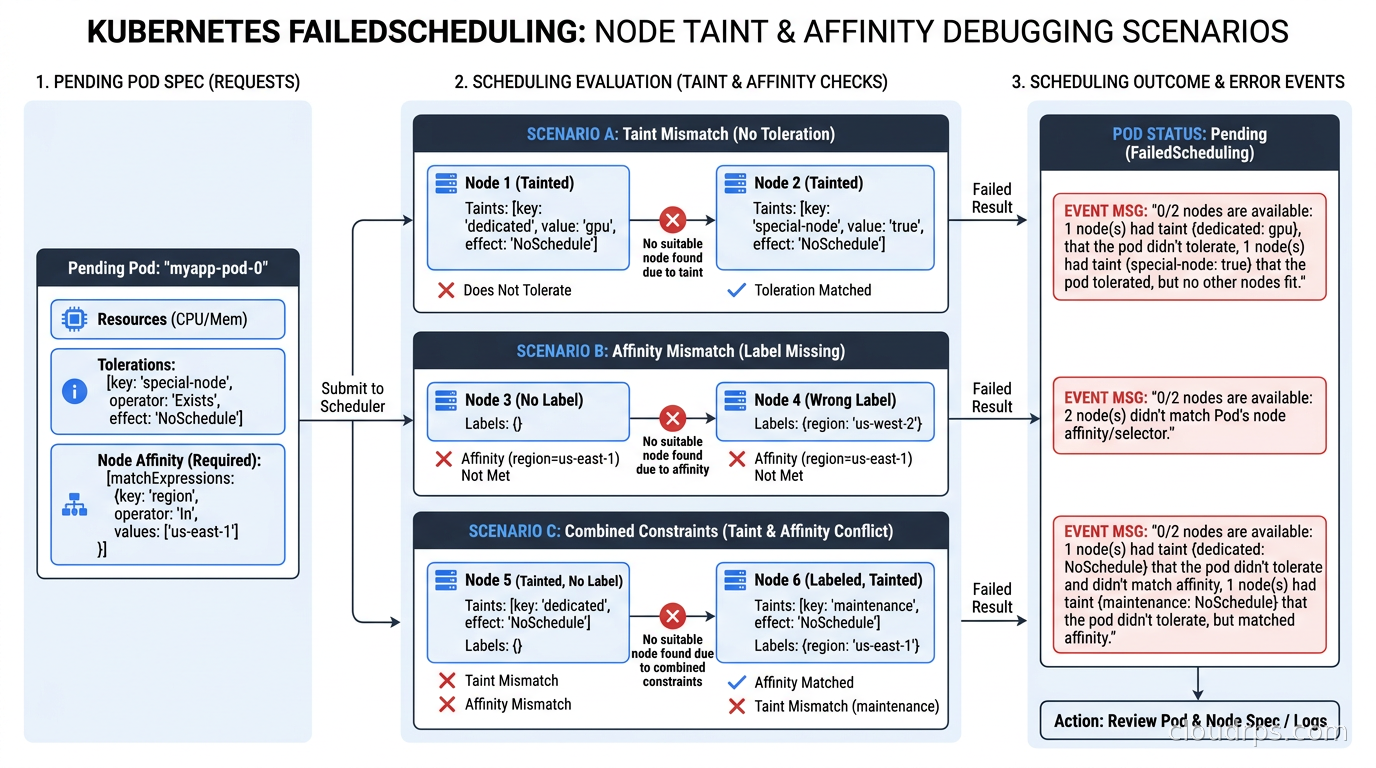
The most common causes of pods stuck in Pending with FailedScheduling:
Insufficient resources: 0/5 nodes are available: 5 Insufficient memory. Your pods request more memory than any node can provide. Either reduce the request, increase node sizes, or let your node autoscaler provision a larger node. Check kubectl describe nodes for Allocatable vs Allocated resources.
Taint not tolerated: 0/5 nodes are available: 5 node(s) had untolerated taint {workload: gpu}. Your pod is trying to schedule on GPU nodes but has no toleration. Add the toleration or remove the node selector that is driving it toward those nodes.
No nodes match affinity: 0/5 nodes are available: 5 node(s) didn't match Pod's node affinity/selector. Check your required affinity labels match actual node labels. Run kubectl get nodes --show-labels and compare.
Topology spread unsatisfiable: This one is subtle. If you have minDomains: 3 but only 2 zones exist in your cluster, TSC will block scheduling entirely. Always set minDomains equal to or less than the number of zones you actually have.
PVC node affinity conflict: If your pod has a PersistentVolumeClaim that is zone-bound (most cloud EBS/persistent disks are), the pod must schedule in the same zone as the volume. If your pod affinity or TSC rules conflict with the volume’s zone, the pod will be stuck. This is one of the nastier scheduling conflicts to debug. Check kubectl describe pv <pv-name> for node affinity on the volume.
Scheduler Plugins and Custom Scheduling Profiles
The default Kubernetes scheduler supports multiple scheduling profiles, and you can configure which plugins are enabled per profile. If you are running mixed workloads (interactive services alongside batch jobs), you can configure a profile that prioritizes low bin-packing for latency-sensitive services and high bin-packing for batch.
The scheduler framework exposes plugin extension points at every phase: PreFilter, Filter, PostFilter (preemption), PreScore, Score, Reserve, Permit, and Bind. Custom scheduler plugins written in Go can implement these interfaces. Projects like Volcano (designed for batch/AI workloads) and the Kubernetes Scheduler Simulator are built on this framework.
For most teams, custom scheduler plugins are not necessary. But if you are running GPU clusters with gang scheduling requirements (all pods of a training job must schedule simultaneously or not at all), default Kubernetes scheduling does not handle this correctly by default. Volcano solves this with queue-based gang scheduling, which is specifically important for distributed AI training workloads.
You can also configure multiple scheduler profiles in a single scheduler binary, allowing different pods to specify which profile they use via schedulerName in the pod spec. This gives you a clean way to run different scheduling strategies for different workload classes without deploying a separate scheduler binary.
Kubernetes 1.35 and Where Scheduling Is Heading
Kubernetes 1.35 introduced Extended Toleration Operators in alpha, which allows toleration matching on numeric ranges rather than just exact values. The use case: taint nodes with a numeric quality-of-service score and tolerate ranges rather than discrete values. This is specifically useful for heterogeneous GPU clusters where you want to say “schedule on any node with a GPU memory score above 80” rather than enumerating every discrete GPU model.
Topology Spread Constraints continue to mature. The NodeInclusionPolicy field (stable in 1.30) lets you control whether nodes affected by taints or affinity are included in the TSC calculation domain. Without this, a TSC looking at 3 zones might count a tainted GPU-only node in zone-A as part of the zone-A domain even though your pod cannot schedule there, causing the constraint to appear satisfied while it is actually not.
The Discipline, Not the Magic
Here is what I tell every platform team I work with: Kubernetes scheduling is not something to figure out when things break. Build your scheduling rules into your cluster from day one. Create a PriorityClass hierarchy. Taint your specialized node pools. Add Topology Spread Constraints to your standard Deployment templates. Add pod anti-affinity for anything stateful.
The default scheduler is intelligent within the constraints it has been given. If you give it no constraints, it will make reasonable-but-generic decisions. If you give it explicit constraints that reflect your actual reliability and cost requirements, it will make exactly the decisions you need.
Twenty years in, the tools that feel like bureaucratic YAML overhead in development become the tools that save your 3am. Build the rules when you are calm. The scheduler will apply them when you are not.
For teams building out their full Kubernetes platform, this scheduling foundation pairs well with Karpenter for node provisioning, network policies via Cilium or Calico, and GitOps deployment patterns via ArgoCD or Flux for a complete production-grade cluster design.
Get Cloud Architecture Insights
Practical deep dives on infrastructure, security, and scaling. No spam, no fluff.
By subscribing, you agree to receive emails. Unsubscribe anytime.