
I’ve watched a fintech company run with a single service account that had cluster-admin privileges for two years before anyone noticed. The account was created in a weekend hackathon, the developer who made it left six months later, and by the time a penetration tester found it, that token was baked into fifteen microservices. Rotating it took three weeks and two production incidents.
Kubernetes RBAC is one of those topics that looks simple in the docs and turns into a nightmare in practice. Every team understands the theory. Almost no team gets the implementation right on the first try. This guide covers how RBAC actually works, why common approaches backfire, and how to design access control that holds up when your cluster grows from five engineers to fifty.
What RBAC Is Actually Doing
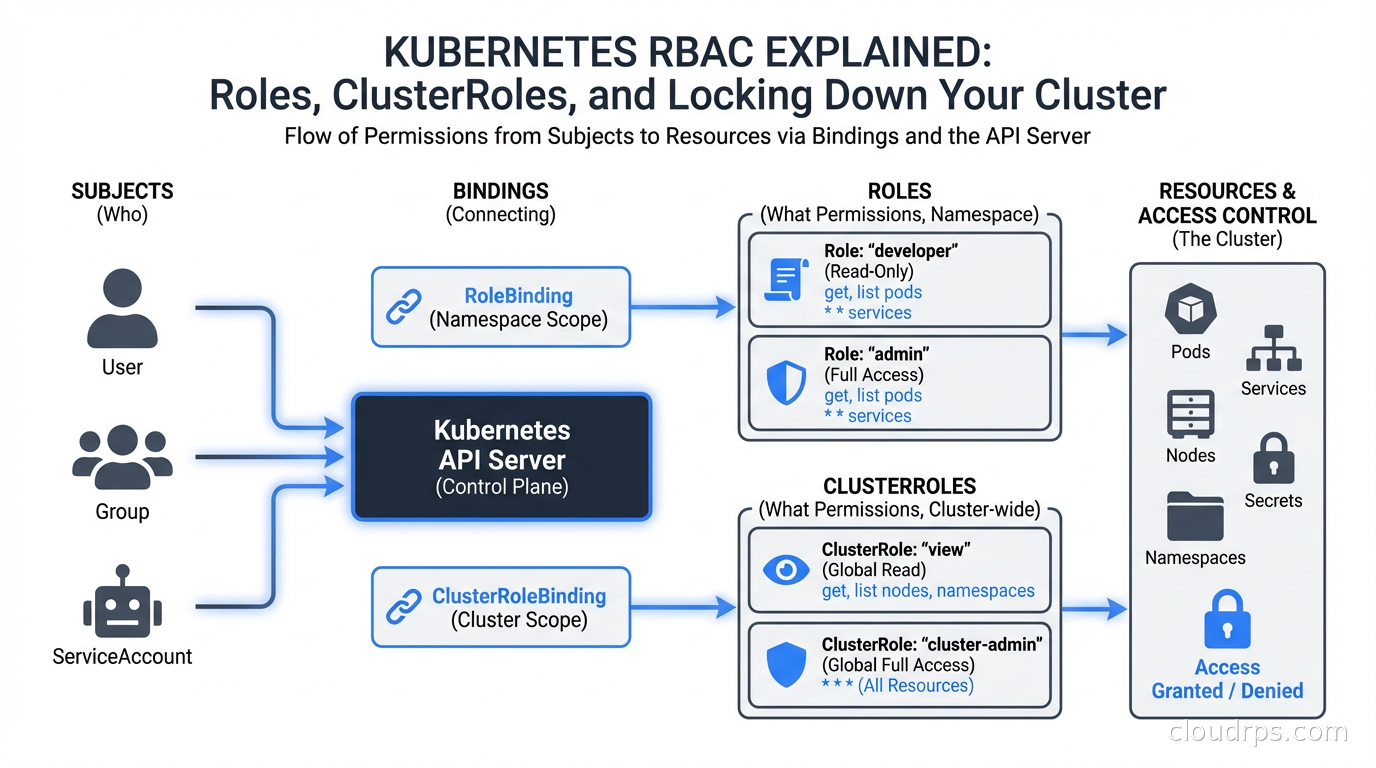
RBAC in Kubernetes is an authorization mechanism built into the API server. When any request reaches kube-apiserver, the server runs it through a chain of authorizers. If RBAC is enabled (and it should be, on every cluster), the RBAC authorizer checks whether the requesting identity has permission to perform the requested verb on the requested resource in the requested namespace.
The model has four core objects:
Role defines permissions within a single namespace. A Role that can get and list Pods in namespace payments cannot touch anything in namespace fraud-detection.
ClusterRole defines permissions cluster-wide, or reusable permissions that can be applied per-namespace. A ClusterRole is the right choice when you want consistent permission sets across many namespaces without copy-pasting Role YAML.
RoleBinding grants the permissions in a Role (or ClusterRole) to a set of subjects within a specific namespace. Binding a ClusterRole via RoleBinding scopes those permissions to that namespace only.
ClusterRoleBinding grants the permissions in a ClusterRole to subjects cluster-wide. This is where things get dangerous fast.
The subjects in bindings can be Users, Groups, or ServiceAccounts. Users and Groups are external identities managed by your identity provider. ServiceAccounts are Kubernetes-native identities intended for workloads running inside the cluster.
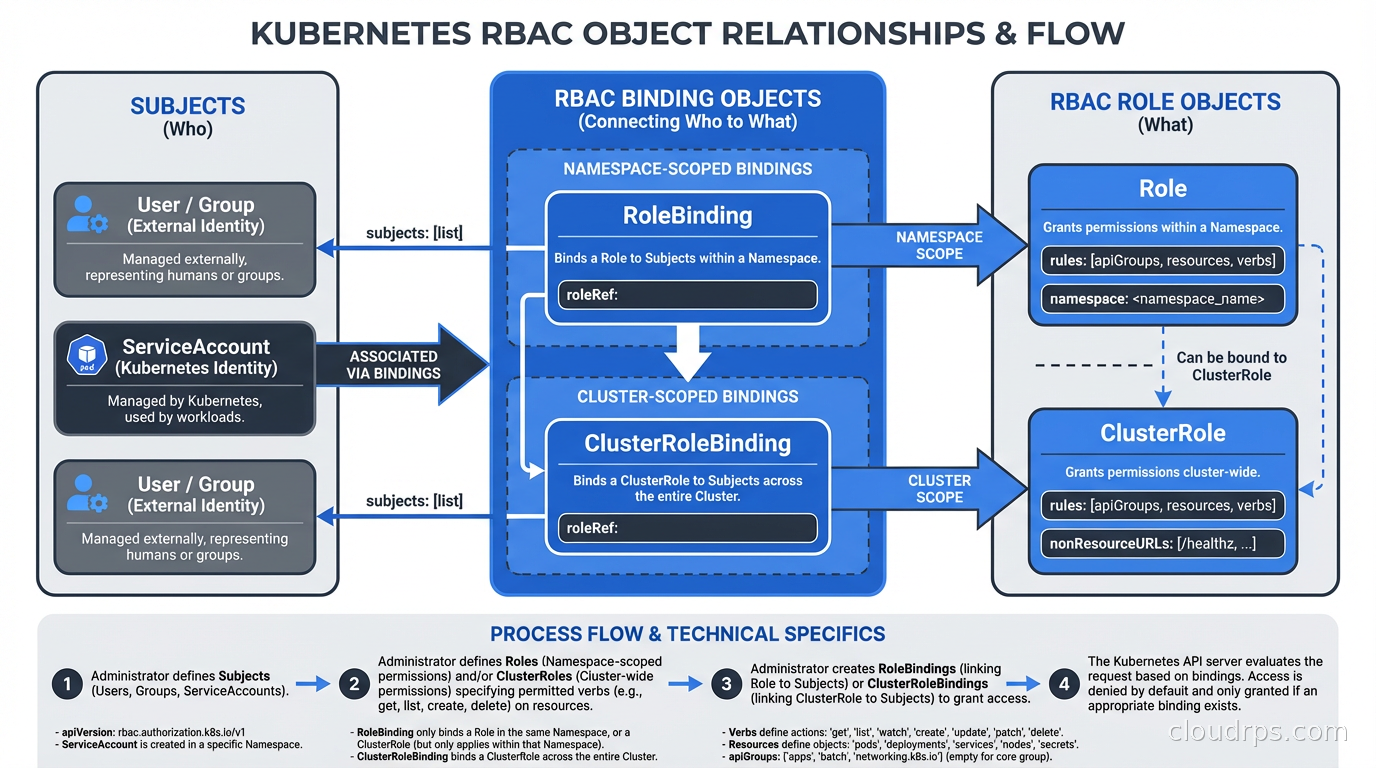
Understanding this model matters because the most common mistake I see is teams treating ClusterRoleBindings as the default, then trying to walk them back later. Walking back ClusterRoleBindings in a production cluster is genuinely painful because something always breaks and you only find out at 2 AM.
The Built-In Roles You Need to Know
Kubernetes ships with several default ClusterRoles. Three matter more than the rest:
cluster-admin grants full control over every resource in every namespace. Think of this as root on your cluster. It bypasses all other RBAC checks.
admin is a namespaced admin role. When bound via RoleBinding in a namespace, the subject can do nearly anything in that namespace including modifying RBAC within it.
edit allows reading and modifying most resources in a namespace but not RBAC objects or Secrets (in newer Kubernetes versions).
view is read-only access to most namespaced resources.
My rule: cluster-admin is for your break-glass emergency procedure only. It should not be bound to any regular user, group, or service account in your day-to-day cluster configuration. If a developer tells you they need cluster-admin to do their job, the actual problem is that your platform team has not built the self-service scaffolding they need. That is a platform engineering failure, not a reason to hand out cluster-admin.
Designing Roles That Won’t Haunt You
The right approach to Kubernetes RBAC is to start from nothing and add permissions as you understand what a workload actually needs. The wrong approach is to start from cluster-admin and chip away. Chipping never works because there is always something that breaks and teams always cave under pressure.
For application workloads, most services need zero RBAC permissions. A stateless API behind a load balancer has no reason to talk to the Kubernetes API at all. The default ServiceAccount in every namespace gets mounted into every Pod by default. That ServiceAccount, in a freshly bootstrapped cluster, cannot do much, but it can still authenticate to the API server and enumerate some resources.
My default posture: disable automounting of ServiceAccount tokens for workloads that do not need Kubernetes API access. Add this to your Pod spec:
spec:
  automountServiceAccountToken: false
For workloads that do need API access (operators, controllers, custom admission webhooks, monitoring agents), create a dedicated ServiceAccount per workload and bind the minimum set of permissions using a Role in the namespace where the workload runs.
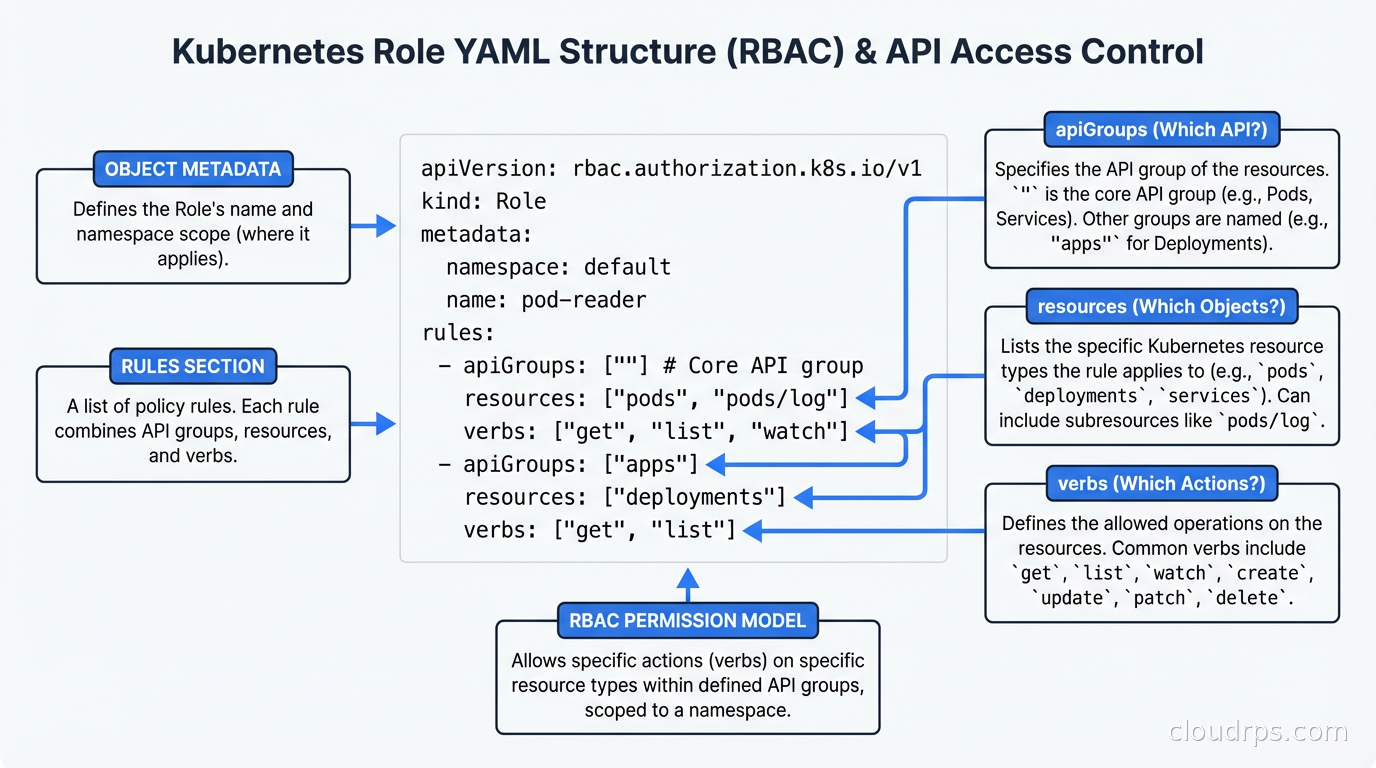
Here is what a minimal Role looks like for a workload that needs to read ConfigMaps and update its own Lease (for leader election):
apiVersion: rbac.authorization.k8s.io/v1
kind: Role
metadata:
  name: myapp-controller
  namespace: myapp-system
rules:
- apiGroups: [""]
  resources: ["configmaps"]
  verbs: ["get", "list", "watch"]
- apiGroups: ["coordination.k8s.io"]
  resources: ["leases"]
  verbs: ["get", "create", "update"]
Notice the apiGroups field. The core API group is represented as "". Most people learn this the hard way after getting a 403 and spending forty minutes wondering why their Role is not working.
ServiceAccounts: The One That Actually Bites You
Developer users are usually managed by your identity provider with short-lived tokens. If you want full control over that identity layer, self-hosted Keycloak integrates directly with the Kubernetes API server’s OIDC authentication, giving you MFA-enforced kubectl access tied to your organization’s user lifecycle – see the Keycloak production guide for the configuration details. ServiceAccounts are where the real risk lives, because ServiceAccount tokens used to be eternal secrets that lived in your cluster forever. Before Kubernetes 1.22, a ServiceAccount secret was a Bearer token with no expiration. If an attacker got that token, they had access until you explicitly rotated it. I have been on incident calls where the answer to “how long has the attacker had this?” was “since the cluster was bootstrapped, three years ago.”
Since 1.22, Kubernetes uses bound service account tokens projected into Pod volumes. These tokens have a configurable expiration (default one hour) and are tied to the lifetime of the Pod. This is a massive improvement, but only if you are actually using projected volumes rather than the old secret-based tokens.
If you see ServiceAccount Secrets of type kubernetes.io/service-account-token in your cluster, you are probably carrying legacy credentials. Audit them with:
kubectl get secrets -A -o json | jq '.items[] | select(.type=="kubernetes.io/service-account-token") | .metadata.namespace + "/" + .metadata.name'
Many teams built integrations against the old model because it was convenient. CI/CD pipelines that need cluster access are a common culprit. Those are worth migrating to proper OIDC-based federation with your CI provider (GitHub Actions OIDC, for instance), which eliminates long-lived secrets entirely. For the broader problem of giving pods access to AWS, GCP, or Azure APIs without storing static credentials, see the deep dive on Workload Identity Federation, which covers IRSA, GKE Workload Identity, and Azure Workload Identity end-to-end. If you are running GitOps with ArgoCD or Flux, see the GitOps guide for patterns that avoid baking cluster credentials into your CI secrets.
Common Misconfigurations I See in Production
Wildcard resources and verbs. I have seen Roles like this in production clusters at companies that should know better:
rules:
- apiGroups: ["*"]
  resources: ["*"]
  verbs: ["*"]
This is cluster-admin without the label. It is usually created by someone who was frustrated with 403 errors and just wanted something to work. It works. It also means any workload running with this ServiceAccount can delete namespaces, modify RBAC, read all Secrets across the cluster, and do basically anything else. Do not do this.
Secrets access via broad read permissions. A Role that grants get and list on pods, deployments, and secrets in a namespace is a credential exposure waiting to happen. Secrets in Kubernetes are base64-encoded, not encrypted at rest by default (unless you have envelope encryption configured). A workload that can list Secrets in the payments namespace can read every API key, database credential, and TLS certificate stored there. Grant Secrets access only when a workload has a specific, documented need for it. This is also why integrating secret management tools like Vault or AWS Secrets Manager to inject secrets at runtime, rather than storing them as Kubernetes Secrets, is worth the extra complexity. The External Secrets Operator pattern, where secrets are written into the cluster from an authoritative external store and never manually applied, significantly reduces the blast radius of over-permissioned Roles. The complete patterns are in the Kubernetes secrets management guide.
Namespace-admin escalation via RBAC objects. The admin ClusterRole allows the subject to create RoleBindings in the namespace. A developer with namespace-admin can grant themselves or others additional permissions, including binding other ClusterRoles. This is fine in development namespaces. It is a problem when the same pattern leaks into staging or production. Use edit instead of admin for developer access to shared namespaces.
Missing resourceNames constraints. RBAC rules can be scoped to specific named resources. A workload that only needs to read its own ConfigMap does not need to read all ConfigMaps. Use resourceNames: ["my-app-config"] to lock that down. Most teams skip this because it requires more specific YAML, but it is meaningfully tighter.
Enforcing RBAC Policy at Scale
Once you have more than a handful of teams sharing a cluster, manual RBAC review does not scale. You need tooling that enforces standards automatically.
OPA/Gatekeeper and Kyverno are the two dominant tools for Kubernetes policy enforcement. For RBAC specifically, you can use them to:
- Block creation of ClusterRoleBindings without explicit exemptions
- Deny Roles that include wildcard verbs or resources
- Require that all workloads in production namespaces set
automountServiceAccountToken: falseunless they have a label documenting why they need it - Prevent Secrets access in Roles unless the namespace has an annotation approving it
The combination of good RBAC defaults and policy enforcement at the admission layer is much more durable than relying on code review. Code review catches some violations, the ones a reviewer happens to notice; admission webhooks catch everything, because nothing gets created unless it passes the check. On Kubernetes 1.30 and later, ValidatingAdmissionPolicy is worth evaluating for these checks since it runs CEL expressions in-process with no external webhook dependency, which removes one more component from your cluster’s critical path.
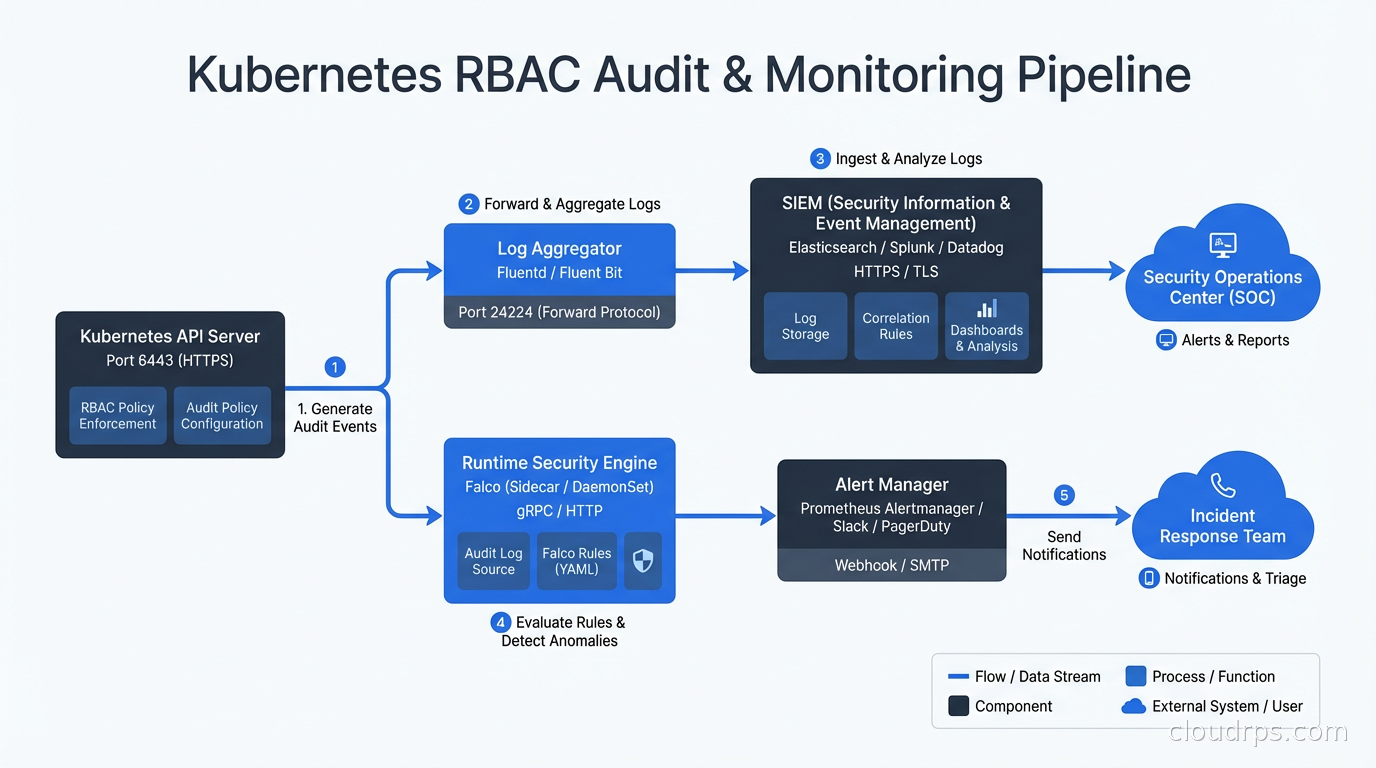
For runtime detection of suspicious RBAC-adjacent behavior (a workload suddenly making API calls it has never made before, ServiceAccount tokens being used from unusual IP addresses), Falco is the tool of choice. Falco’s Kubernetes audit log rules can flag things like cluster-admin binding creation, new ServiceAccount token secrets, and privileged Pods being scheduled.
Multi-Team Cluster Patterns
If you are running a shared cluster with multiple teams, you need a clear model for who owns what. The three patterns I see:
Namespace-per-team with a platform RBAC layer. Each team owns one or more namespaces. The platform team grants each team edit access (not admin) to their namespaces via ClusterRole bound with RoleBinding. RBAC objects in those namespaces are managed by the platform team only. This is my recommended starting point.
Team RBAC with managed admission control. Teams can create their own Roles and RoleBindings within their namespaces, but an admission webhook enforces that those Roles cannot escalate beyond the team’s granted permissions. More flexible, more complex to implement.
Hierarchical namespace controller. The Kubernetes Hierarchical Namespace Controller (HNC) propagates RBAC objects from parent to child namespaces. Useful for large organizations where teams have sub-teams with their own resource isolation needs.
If you are also using Kubernetes autoscaling with HPA and KEDA across multiple teams, the autoscaler’s ServiceAccount needs read access to Deployments, ReplicaSets, and custom metrics. Make sure that access is scoped to the relevant namespaces, not granted cluster-wide.
Auditing What You Actually Have
The gap between your RBAC intent and your RBAC reality is usually significant. A few tools help:
kubectl auth can-i --list --as=system:serviceaccount:default:myapp shows all permissions the specified ServiceAccount has. Run this for your production service accounts and prepare to be uncomfortable.
rbac-police (open source) scans your cluster for risky RBAC configurations and flags issues like ServiceAccounts with excessive permissions, Pods with hostPID or hostNetwork (which bypass container namespacing entirely), and privilege escalation paths.
rbac-lookup shows all roles bound to a given subject, even indirect ones. Useful for understanding the full permission set a user actually has across namespaces.
The audit log in your API server is also invaluable. Enabling verbose audit logging for RBAC-related API calls (creates/updates to Roles, RoleBindings, ClusterRoles, ClusterRoleBindings) and piping those to your SIEM means you have a record of every permission change. This was how the team at the fintech company I mentioned finally found that cluster-admin service account. They turned on audit logging, ran a 30-day lookback, and found a bind event from a Saturday night two years earlier.
Where RBAC Ends and Other Controls Begin
RBAC controls who can talk to the Kubernetes API. It does not control network traffic between Pods. For that, you need Kubernetes NetworkPolicies and CNI plugins like Calico or Cilium. RBAC also does not control what code running inside a container can do at the Linux kernel level. That is the domain of seccomp profiles, AppArmor policies, and Pod Security Standards. And Kubernetes RBAC only controls cluster-level permissions; for application-level authorization with resource ownership and sharing semantics, you need a different model entirely, such as relationship-based access control with OpenFGA.
Real Kubernetes security is defense in depth. RBAC is the authorization layer. NetworkPolicies are the network layer. Falco is the runtime detection layer. Policy enforcement via OPA or Kyverno is the admission control layer. Zero trust principles tie them together: assume breach, verify explicitly, use least-privilege access at every layer. If you want a sequenced checklist that covers all of these layers together with CIS benchmark controls, API server hardening, and etcd encryption, the Kubernetes security hardening guide walks through the full remediation sequence.
A cluster where RBAC is well-configured but NetworkPolicies are absent is still a lateral movement nightmare. Start with RBAC because it is the foundational control, then work outward.
Making RBAC Changes Safely
One more practical note: RBAC changes in production clusters can break things in subtle ways. A service that was accidentally running with elevated permissions may have undocumented dependencies on API access that no one knew about. Before removing permissions from a ServiceAccount, enable RBAC audit logging, watch what API calls the ServiceAccount makes in a 72-hour window, and compare that to what the application documentation says it needs.
I once removed configmaps/update from a batch processing ServiceAccount after confirming with the team that their code did not update ConfigMaps. The code did not, but the logging library they used did, as part of a distributed lock mechanism. Twenty minutes into the next batch run, everything deadlocked. Audit before you cut.
RBAC is not glamorous work. It does not show up on roadmaps or impress stakeholders. But the teams that get it right are the ones who, when an attacker does compromise a single workload, lose one service instead of the entire cluster. That asymmetry is worth the investment.
Updated September 1, 2026: removed unsourced statistics as part of an accuracy review.
Get Cloud Architecture Insights
Practical deep dives on infrastructure, security, and scaling. No spam, no fluff.
By subscribing, you agree to receive emails. Unsubscribe anytime.