
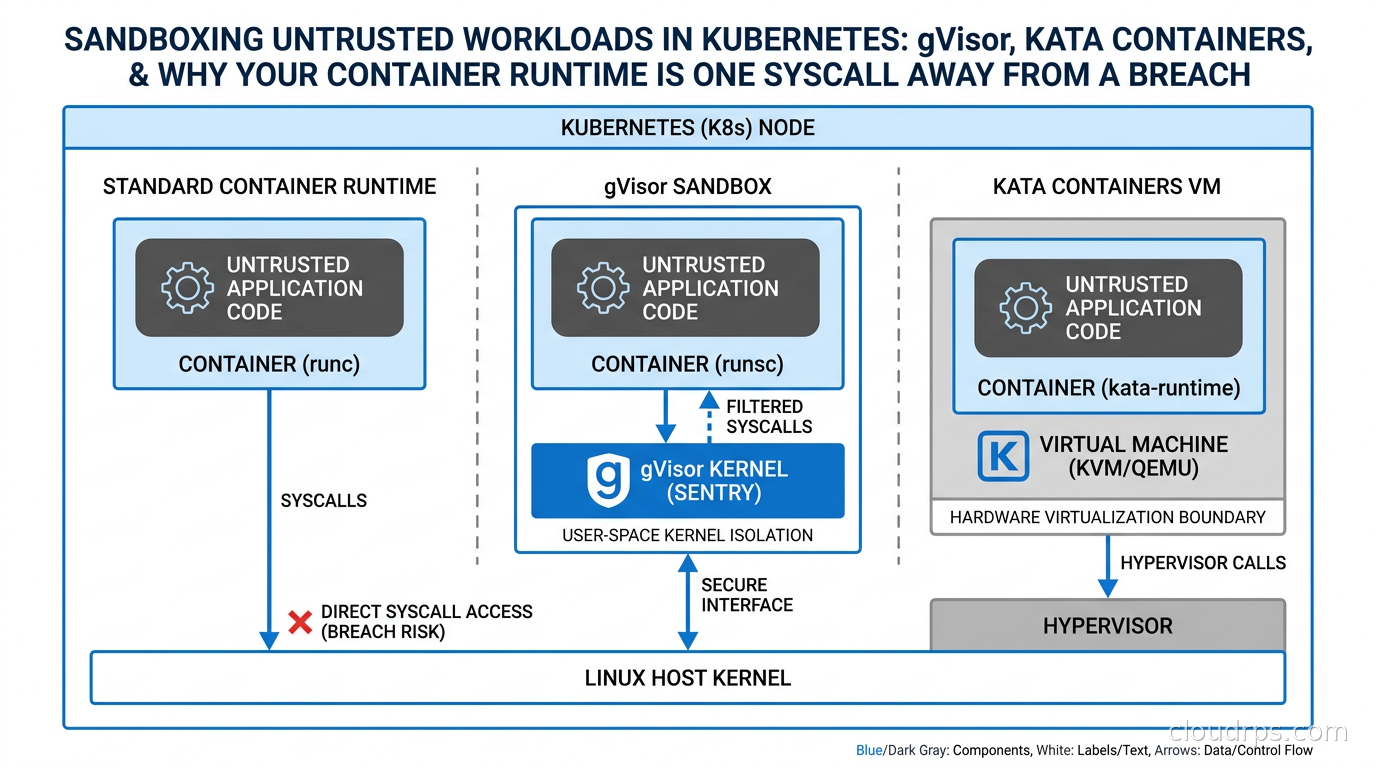
Containers share a kernel. That single fact is the source of more production security incidents than most teams realize until after the fact. I have spent twenty years watching infrastructure teams deploy containerized workloads under the assumption that namespaces and cgroups are an isolation boundary. They are not. They are a visibility boundary. The kernel itself is shared, and every syscall your container makes goes straight through to the same kernel that powers every other container on that node.
For internal workloads, this tradeoff is usually acceptable. You trust your own code. You control the build pipeline. The blast radius of a compromise is bounded by your RBAC policies and network policies. But there is a category of workloads where this tradeoff breaks down completely: any situation where you are running code you did not write and cannot fully trust. That category is expanding fast.
Multi-tenant SaaS platforms that let customers run custom logic. AI agent frameworks that execute tool calls from LLM outputs. Code execution sandboxes for developer platforms. Batch processing pipelines that ingest customer-provided transformation scripts. CI/CD systems that build arbitrary code. Any of these running as standard runc containers is accepting a threat model most security teams would reject if they wrote it down explicitly.
Two runtimes fix this: gVisor and Kata Containers. They solve the isolation problem in fundamentally different ways, with different tradeoffs, and they deploy into Kubernetes via a clean abstraction called RuntimeClass. I have run both in production. Here is what you actually need to know.
The Attack Surface Containers Were Not Designed to Protect
A standard container uses Linux namespaces to give the illusion of isolation: PID namespace, network namespace, mount namespace, user namespace. It uses cgroups to limit resource consumption. But the syscall interface, the roughly 350 system calls that go directly into the kernel, is completely shared across all containers on a node.
This matters because the Linux kernel’s attack surface is enormous. The CVE history proves it. Dirty Cow. Dirty Pipe. runc container escape vulnerabilities from 2019 and 2024. io_uring privilege escalation paths. In the past two years alone, multiple container escape vulnerabilities have surfaced where a process with sufficient capability inside a container could exploit a kernel bug and land on the host with root access. When you run untrusted code, the question is not whether someone will try this. The question is whether you have made it meaningfully difficult.
Seccomp profiles help by filtering which syscalls a container can make. AppArmor and SELinux policies add a layer of mandatory access control. I cover these defense-in-depth tools in our container runtime security guide. But they are not isolation. They reduce the attack surface of the shared kernel. They do not eliminate the sharing.
gVisor and Kata Containers take a fundamentally different approach: they give each pod its own kernel, or the functional equivalent of one.
gVisor: A Syscall Interceptor Written in Go
gVisor was built at Google and open-sourced in 2018. It powers Google Cloud Run and was the basis for Google’s internal multi-tenant container infrastructure for years before that. The core insight is elegant: intercept every syscall before it reaches the host kernel, and implement the kernel behavior in a user-space process.
When a process inside a gVisor container calls read() or mmap() or clone(), that call does not go to the host kernel. It goes to a user-space process called the Sentry. The Sentry implements a large subset of the Linux kernel ABI in Go. It services most calls itself. For operations that genuinely need host kernel access, like actual file I/O or network packets, it delegates to a companion process called the Gofer, which makes the real syscall on behalf of the Sentry with a much tighter scope.
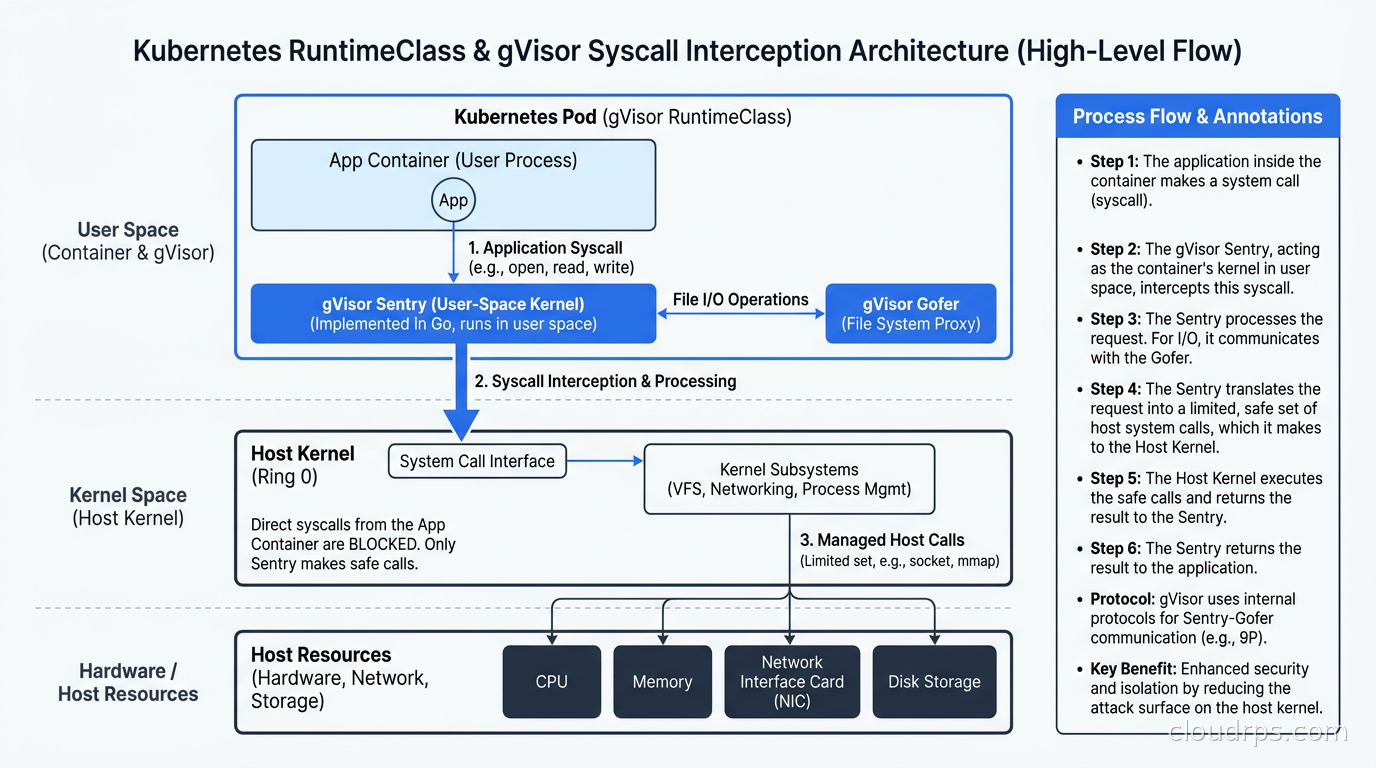
The threat model reduction is significant. The Sentry is written in a memory-safe language and presents a dramatically smaller attack surface than the full Linux kernel. Even if a process inside a gVisor container exploits a bug in the Sentry, it is still in user space, still subject to the host’s security controls, without kernel privileges. Getting from “I broke the Sentry” to “I own the host node” is multiple layers harder than the direct kernel exploit path you have with runc.
The tradeoff is performance and compatibility. The Sentry supports the majority of Linux syscalls but not all of them. Things that use unusual kernel features, certain memory-mapped I/O patterns, some network socket options, and AF_PACKET raw sockets will fail. Databases with high I/O rates pay real overhead from the Sentry proxy model. In my testing, gVisor adds roughly 10-15% overhead for typical web application workloads and can be substantially worse (50%+) for I/O-intensive workloads or anything that hammers the syscall rate. CPU-bound compute, Python interpreters, Node.js services, Go binaries doing normal things: these all work well with acceptable overhead.
gVisor runs as an OCI-compatible runtime through its runsc binary. The Sentry uses either ptrace or KVM to intercept syscalls, with KVM being significantly faster when available. On any modern cloud instance where nested virtualization is enabled, or on bare metal, use KVM mode. On instances without nested virt, ptrace mode still works but at higher overhead cost.
Kata Containers: Real VMs, Container Interface
Kata Containers takes the opposite architectural approach. Instead of a syscall-intercepting user-space kernel, each pod gets a genuine virtual machine with a real Linux kernel, running inside a lightweight hypervisor. The container experience from Kubernetes’s perspective is unchanged: you still schedule pods, use the same YAML, get the same networking abstractions. But under the hood, each pod is a microVM.
The hypervisor layer defaults to QEMU, but Kata also supports cloud-hypervisor (from Intel), Firecracker from AWS, and ACRN. For production Kubernetes deployments I typically use either QEMU with its broad device model support or Firecracker for pure-compute pods where you want the minimal overhead model. You can read more about Firecracker’s architecture and how AWS uses it at scale in our Firecracker microVM deep dive.
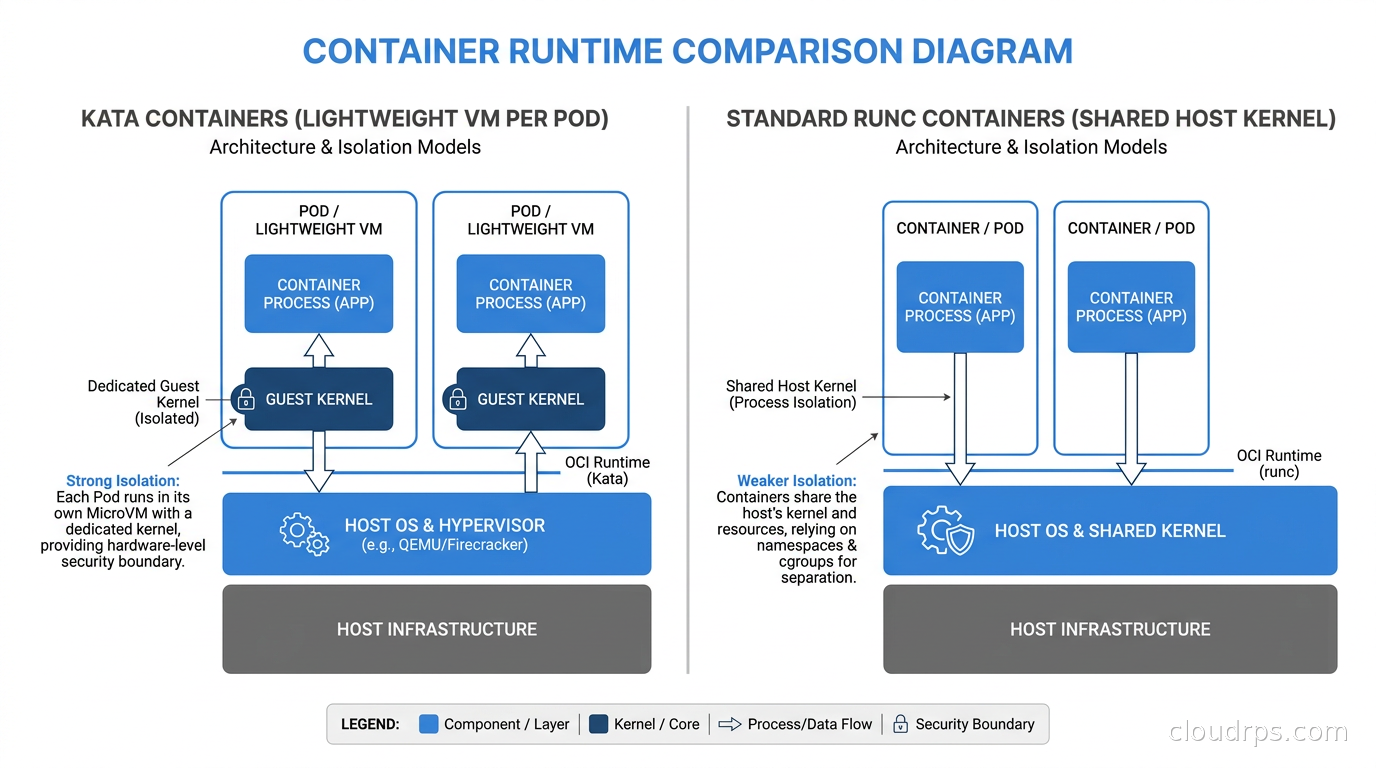
The security model here is substantially stronger than gVisor for severe threat scenarios. A compromised process inside a Kata pod has to escape both the container inside the VM and then the hardware virtualization boundary before reaching the host. VM escapes happen, but they require either a hypervisor vulnerability or a kernel vulnerability at the guest level, followed by a separate hypervisor exploit. The cumulative probability of that full chain is orders of magnitude lower than a single shared-kernel exploit in the runc model.
The tradeoffs: startup time is higher, typically 50-300ms per pod startup versus milliseconds for runc. Memory overhead is real because each VM needs its own kernel, init process, and Kata agent, adding roughly 50-150MB per pod. On the compatibility side, Kata is excellent. It runs a real Linux kernel, so almost any workload that runs on runc runs on Kata, including things that need raw sockets, unusual syscalls, or even kernel modules. The compatibility advantage over gVisor is significant for complex or legacy workloads.
For AI agent workloads where you are executing arbitrary tool calls from LLM outputs, Kata Containers is what I recommend. The security challenges of running AI agents in production are real, and the blast radius of a prompt injection or tool misuse attack that achieves code execution needs to be bounded at the infrastructure level, not just the application layer.
RuntimeClass: The Kubernetes Abstraction That Ties It Together
Kubernetes manages the choice of container runtime through the RuntimeClass resource, stable since 1.20. Without RuntimeClass, all pods on a node use the same runtime, typically runc via containerd or CRI-O. With RuntimeClass, you can have multiple runtimes registered simultaneously, and pods specify which one they want via a single field.
The setup is straightforward. First, install the runtime binaries on your nodes. For gVisor, that means installing runsc. For Kata, kata-deploy handles the installation automatically. Then register them with containerd by adding to /etc/containerd/config.toml:
[plugins."io.containerd.grpc.v1.cri".containerd.runtimes.gvisor]
  runtime_type = "io.containerd.runsc.v1"

[plugins."io.containerd.grpc.v1.cri".containerd.runtimes.kata]
  runtime_type = "io.containerd.kata.v2"
Create the RuntimeClass objects in Kubernetes:
apiVersion: node.k8s.io/v1
kind: RuntimeClass
metadata:
  name: gvisor
handler: gvisor
---
apiVersion: node.k8s.io/v1
kind: RuntimeClass
metadata:
  name: kata-containers
handler: kata
Use them in a pod spec:
apiVersion: v1
kind: Pod
metadata:
  name: sandboxed-workload
spec:
  runtimeClassName: kata-containers
  containers:
  - name: app
    image: my-untrusted-workload:latest
That is the entire change from the pod perspective. Your Kubernetes manifests stay identical except for the runtimeClassName field. Sandboxing is opt-in per workload, requires zero application changes, and is auditable directly from the pod spec.
Combined with Kubernetes RBAC, you can restrict which service accounts can schedule pods without a RuntimeClass. Better still, use OPA or Kyverno policy-as-code to write admission policies like “any pod in the untrusted-execution namespace must specify runtimeClassName: kata-containers.” This makes the sandbox mandatory for sensitive namespaces without relying on developers remembering to add the field.
Choosing Between gVisor and Kata
The decision turns on three dimensions: compatibility requirements, performance sensitivity, and threat model severity.
Use gVisor when your workloads are standard web services, application code, or compute jobs. When you need lower per-pod memory and startup overhead. When syscall usage is typical (no raw sockets, no unusual kernel features). When the threat model is “reduce blast radius” rather than “maximum hardware isolation.” Python, Node.js, Go, and Java applications without unusual native dependencies all work well.
Use Kata Containers when maximum isolation matters because you are running genuinely hostile code, user-submitted workloads, or CI builds from external contributors. When your workload uses syscalls or kernel features gVisor does not support. When you are running AI agents with tool execution capabilities and need hardware virtualization boundaries between the agent and your infrastructure. When compatibility is non-negotiable and any workload that runs on Linux must run correctly.

There is also a layered approach I have used in production: default to gVisor for the “untrusted but predictable” workload class, customer Lambda-style functions with known patterns and controlled inputs; use Kata for the “run arbitrary code” class, CI builders and AI agent tool execution; and keep runc for trusted internal workloads. Kubernetes RuntimeClass makes this clean because the decision is per-pod and enforced at admission time.
Production Architecture Patterns
Multi-Tenant Data Processing
I built a multi-tenant data processing platform that let enterprise customers upload Python transformation scripts. The naive first design ran these scripts in standard containers. We caught the problem before it shipped, but the risk was clear: a crafty customer could write a script that escaped to the host, read credentials from co-tenant pod environment variables, or brought down the entire node.
The production design used Kata Containers for the execution tier. Customer scripts ran in Kata pods scheduled on dedicated node pools with no trusted workloads present. We combined this with workload identity federation so execution pods had minimal IAM permissions scoped to exactly the resources they needed, and strict network policy to prevent pod-to-pod communication on the execution tier. The defense stack: Kata hardware isolation, RBAC least privilege, network segmentation, and stripped credentials. A compromise of one execution pod had nowhere interesting to pivot.
AI Agent Tool Execution
The most urgent use case I am seeing through 2025 and 2026 is sandboxing AI agent tool calls. The scaling challenges of agentic AI in production are complex, but the infrastructure question is concrete: when your AI agent is going to execute code, run shell commands, or invoke arbitrary tools from LLM output, that execution needs to be sandboxed at the hypervisor level.
The pattern I recommend: tool execution happens in ephemeral Kata pods spun up per request with a timeout, typically 30-60 seconds. The pod gets no ambient credentials beyond what the specific tool legitimately needs. It has no persistent storage except an in-memory tmpfs. Network access is restricted to exactly the external APIs the tool is supposed to call. When the tool call completes, the pod terminates and the VM is destroyed. Nothing persists. This is the same model Google uses for Cloud Run and that AWS uses for Lambda via Firecracker: assume each execution could be hostile and destroy the boundary after every use.
CI/CD Build Systems
If you run a CI/CD platform and build jobs come from external pull requests or open-source contributors, you are running untrusted code. The standard assumption of “we trust the Dockerfile” breaks down when the Dockerfile or the build scripts can be modified by anyone who opens a PR. gVisor is commonly used for CI platforms (it is what many managed CI vendors run under the hood) and provides adequate isolation for most build workloads. For platforms that need to build kernel modules or have compatibility requirements that gVisor cannot satisfy, Kata is the right call.
Operational Considerations
Node pool separation: Run sandboxed workloads on dedicated node pools separate from trusted internal services. The runtime isolation prevents most escape paths, but defense in depth suggests not collocating your API servers and execution pods on the same physical nodes even when the sandbox is strong.
Monitoring: Standard Prometheus metrics, container logs, and OpenTelemetry instrumentation all work identically inside sandboxed containers. The application is unaware it is sandboxed. What changes is what you can observe from outside: the Sentry in gVisor generates its own trace logs for syscall activity, which are invaluable for debugging compatibility failures during initial rollout. Enable these during testing and disable in production to avoid log volume overhead.
Resource planning for Kata: Kata’s per-VM overhead is real and needs explicit accounting in your bin-packing calculations. A node that runs 50 runc containers comfortably might only fit 30 Kata pods before VM overhead becomes limiting. Budget roughly 100MB of unaccountable memory overhead per Kata pod and adjust resource requests accordingly.
Image compatibility testing: Standard OCI images work with both runtimes without modification. For gVisor specifically: test your target workloads under gVisor before promoting to production. The Sentry’s logs will surface any unsupported syscalls during testing. Most modern application stacks pass cleanly. The failure modes I have hit consistently are: applications using AF_PACKET raw sockets, custom kernel modules, and some eBPF programs. None of these are typical application workloads.
The Zero-Trust Connection
Sandboxed runtimes are one layer in a zero-trust architecture. They address the isolation boundary at the compute layer. Combined with the other layers the picture becomes coherent: workload identity via SPIFFE and SPIRE so every pod has a cryptographic identity, network policy controlling east-west traffic, secrets management so credentials are not baked into images, and RBAC limiting Kubernetes API access.
The zero-trust model, detailed in our zero-trust security principles guide, is built on the assumption of breach. Sandboxed runtimes implement that assumption at the container layer: assume the workload will try to escape, and ensure the escape attempt fails structurally rather than depending on the absence of kernel vulnerabilities in any given month.
What These Runtimes Do Not Solve
Runtime isolation is scoped to the kernel escape threat. It does not address:
Application-layer attacks: SQL injection, authentication bypasses, and business logic vulnerabilities happen entirely inside the application and are invisible to the runtime. Your application still needs proper input validation.
Supply chain attacks: A compromised base image with an embedded backdoor will still execute, just in an isolated environment. You need software supply chain security practices alongside runtime isolation.
Network-level data exfiltration: A sandboxed pod can still make outbound connections unless your network policy prevents it. Runtime isolation does not replace network segmentation. The two controls are complementary, not substitutes.
API-level data access: If untrusted code calls a legitimate internal API and gets back sensitive data, the runtime knows nothing about it. Your authorization model and API design handle that problem.
Defense in depth means each control addresses a specific threat class. Runtime isolation is the right control for kernel escape and host takeover. Use the right tool for the right threat.
Getting Started Today
The practical path to deploying this in an existing Kubernetes cluster:
- Install containerd 1.7 or newer on target nodes (it ships gVisor and Kata integration cleanly in most distributions).
- Install the runtime binaries:
runscfor gVisor via the official apt/yum repo, orkata-deployDaemonSet for Kata which automates the node-level installation. - Update containerd config to register the new runtimes and restart containerd.
- Create RuntimeClass objects in the cluster.
- Write OPA or Kyverno policies to enforce RuntimeClass requirements for high-risk namespaces.
- Test target workloads under gVisor first; fall back to Kata only where compatibility requires it.
- Monitor Sentry logs during initial rollout to surface any syscall compatibility issues before they hit production.
The setup takes half a day for someone who has not done it before. Ongoing operational overhead is minimal. gVisor runs at Google Cloud scale. Kata Containers is a CNCF incubating project with broad industry backing. Both are production-grade and actively maintained.
Twenty years in, the security advice I keep coming back to is this: the best controls are the ones that work even when your application code is completely compromised. Runtime isolation at the hypervisor or user-space kernel level is that kind of control. It does not depend on your developers writing perfect code or your security team catching every vulnerability in review. It bounds the blast radius structurally. In a world where AI agents are executing LLM-driven tool calls and multi-tenant platforms run customer code at scale, structural isolation is not optional anymore. It is the minimum bar.
Get Cloud Architecture Insights
Practical deep dives on infrastructure, security, and scaling. No spam, no fluff.
By subscribing, you agree to receive emails. Unsubscribe anytime.