
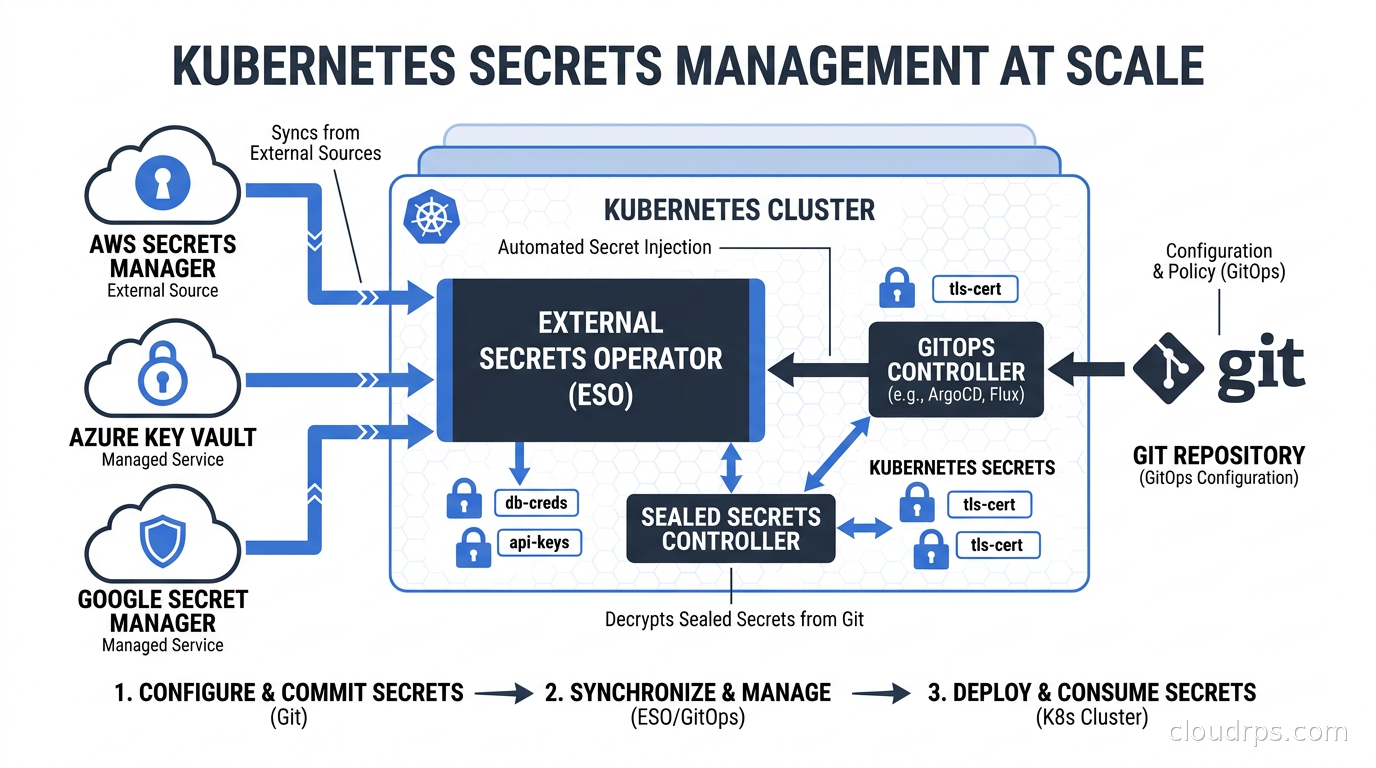
I have spent twenty years watching teams make the same fundamental mistake with Kubernetes secrets. They discover that kubectl create secret stores values as base64, assume that means encryption, and build their entire secrets management strategy on that misunderstanding. Base64 is encoding, not encryption. Anyone with kubectl get secret -o yaml access to your cluster can read every value in plain text. I have seen this exact misconfiguration in clusters processing hundreds of millions of dollars of transactions per day.
The real problem is not just the encoding confusion. It is the entire lifecycle: how secrets get created, how they get rotated, how they get audited, and most critically, how they get managed without ending up in a Git repository as plain text. Native Kubernetes secrets fail at almost every production requirement: no rotation, no audit trail, no central policy enforcement, and a GitOps story that ranges from awkward to catastrophic.
This article is about the patterns that actually work. I have built secrets management systems for multi-cloud environments, regulated industries, and teams running thousands of microservices, and the answer is almost never “just use native Kubernetes secrets.” Here is the complete picture.
Why Native Kubernetes Secrets Fail at Production Scale
Before talking about solutions, it is worth understanding exactly where native Kubernetes secrets break down. This is not a theoretical exercise. These are the failure modes I have watched bite teams in production.
The first is the GitOps problem. If you are running ArgoCD or Flux as described in the GitOps guide on this site, your deployment manifests live in Git. That is the whole point. But where do the secret manifests live? If they are in Git, they are plain base64 in version control forever, visible to everyone with repo access, and essentially permanent even after rotation because git history does not lie. If they are not in Git, you have a hole in your declarative infrastructure where someone has to manually apply secrets out of band, which breaks your audit trail and your disaster recovery story.
The second failure mode is rotation. In any regulated environment, you need to rotate secrets on a schedule. Rotating a native Kubernetes secret means deleting and recreating it, then restarting every pod that consumed it. Automated rotation without downtime requires orchestration that Kubernetes simply does not provide natively.
The third is the multi-cluster problem. If you are running more than one cluster, you need the same secret in multiple places. Copy-pasting secrets across clusters is a recipe for drift and stale credentials. The correct model is one source of truth, with clusters pulling from it, not N copies of a secret with N separate rotation processes.
The fourth is audit and governance. Who created this secret? When was it last rotated? Who has read it? Native Kubernetes secrets have none of this. Your RBAC configuration can limit who can read secrets, but it cannot tell you who actually did, when, and from where.
With that context established, here are the patterns that solve these problems.
External Secrets Operator: The Most Flexible Pattern
The External Secrets Operator (ESO) is the solution I recommend most often for teams that already have a central secret store, and that should be most production teams. The architecture is conceptually simple: you define a SecretStore or ClusterSecretStore resource that tells ESO where to fetch secrets from (AWS Secrets Manager, HashiCorp Vault, GCP Secret Manager, Azure Key Vault, and a dozen others), then create ExternalSecret resources that define which secrets to pull and what Kubernetes secrets to create.
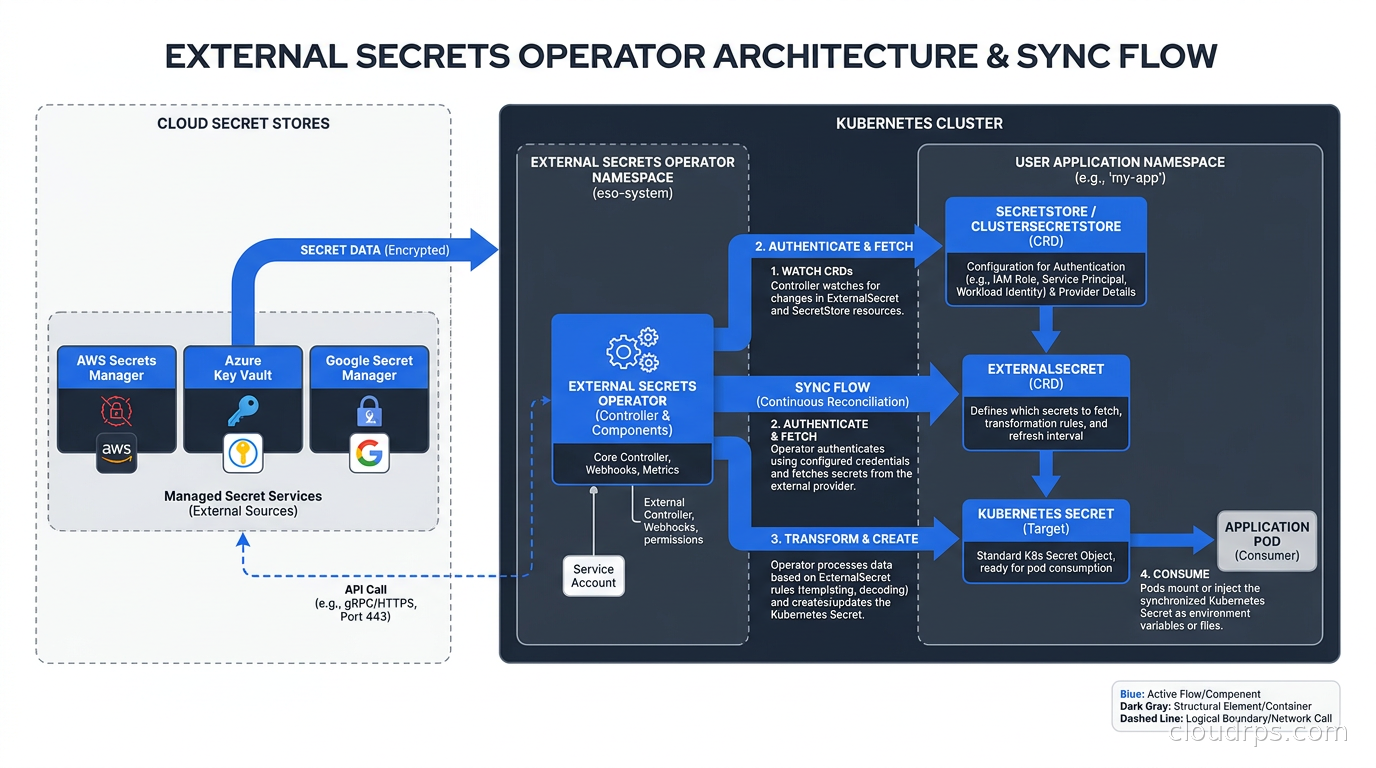
Here is what a production ESO setup looks like for a team using AWS Secrets Manager. First, the store definition, using workload identity federation to authenticate rather than storing AWS credentials in the cluster:
apiVersion: external-secrets.io/v1beta1
kind: ClusterSecretStore
metadata:
  name: aws-secrets-manager
spec:
  provider:
    aws:
      service: SecretsManager
      region: us-east-1
      auth:
        jwt:
          serviceAccountRef:
            name: external-secrets-sa
            namespace: external-secrets
Then an ExternalSecret in the application namespace:
apiVersion: external-secrets.io/v1beta1
kind: ExternalSecret
metadata:
  name: payment-service-db
  namespace: payments
spec:
  refreshInterval: 1h
  secretStoreRef:
    name: aws-secrets-manager
    kind: ClusterSecretStore
  target:
    name: payment-service-db
    creationPolicy: Owner
    template:
      type: Opaque
      data:
        DATABASE_URL: "postgresql://{{ .username }}:{{ .password }}@{{ .host }}/payments"
  data:
    - secretKey: username
      remoteRef:
        key: prod/payments/database
        property: username
    - secretKey: password
      remoteRef:
        key: prod/payments/database
        property: password
    - secretKey: host
      remoteRef:
        key: prod/payments/database
        property: host
What I like about this pattern is that the ExternalSecret manifest is safe to commit to Git. It contains no actual secret values, only references. Your GitOps workflow works exactly as designed: ArgoCD or Flux applies the ExternalSecret manifest, ESO fetches the actual values from your secret store, and creates the native Kubernetes secret. The source of truth lives in your dedicated secret store where you have full audit logging, access controls, and rotation tooling.
The refreshInterval field is where rotation becomes automatic. Set it to 1h and ESO will poll your secret store every hour. When you rotate a database password in AWS Secrets Manager, every cluster running ESO will pick up the new value within the refresh window. No manual intervention, no pod restarts required (if your application handles credential refresh at the connection level, which it should).
One operational detail that matters: ESO creates the Kubernetes secret and sets itself as the owner via creationPolicy: Owner. This means if you delete the ExternalSecret, Kubernetes garbage collection removes the underlying secret too. That is usually what you want, but can surprise teams during incident response if they delete the wrong object.
The ESO project supports a genuinely impressive set of backends. I have used it with Vault, AWS Secrets Manager, and GCP Secret Manager in the same cluster for customers that inherited multi-cloud environments. You just define multiple ClusterSecretStore resources and reference the appropriate one from each ExternalSecret. The abstraction layer over heterogeneous secret backends is one of ESO’s strongest selling points.
Where ESO falls short is in clusters that genuinely cannot reach an external secret store, or where you need secrets available before network connectivity is fully established at boot time. Edge clusters, air-gapped environments, and single-node setups sometimes need a different approach.
Sealed Secrets: GitOps-Native Encryption in the Repository
Bitnami’s Sealed Secrets takes a fundamentally different approach. Rather than keeping secrets out of Git, it lets you commit encrypted secrets that only your cluster can decrypt. A controller running in the cluster holds the private key. You use the kubeseal CLI to encrypt a regular Kubernetes secret manifest against that public key, producing a SealedSecret resource. Commit the SealedSecret to Git, apply it to the cluster, and the controller decrypts it and creates the underlying Kubernetes secret.
The architecture looks like this in practice:
# Create a regular secret manifest (never commit this)
kubectl create secret generic api-keys \
  --from-literal=stripe-key=sk_live_... \
  --from-literal=sendgrid-key=SG.... \
  --dry-run=client -o yaml > secret.yaml

# Seal it against your cluster's public key
kubeseal --controller-namespace=kube-system \
  --controller-name=sealed-secrets-controller \
  --format yaml < secret.yaml > sealed-secret.yaml

# Commit the sealed version to Git
git add sealed-secret.yaml
git commit -m "Add sealed API keys for payments service"
What gets committed is the SealedSecret manifest, which looks like a regular Kubernetes resource with encrypted byte strings. Anyone who gets access to your Git repository sees gibberish. The actual values never exist in version control.
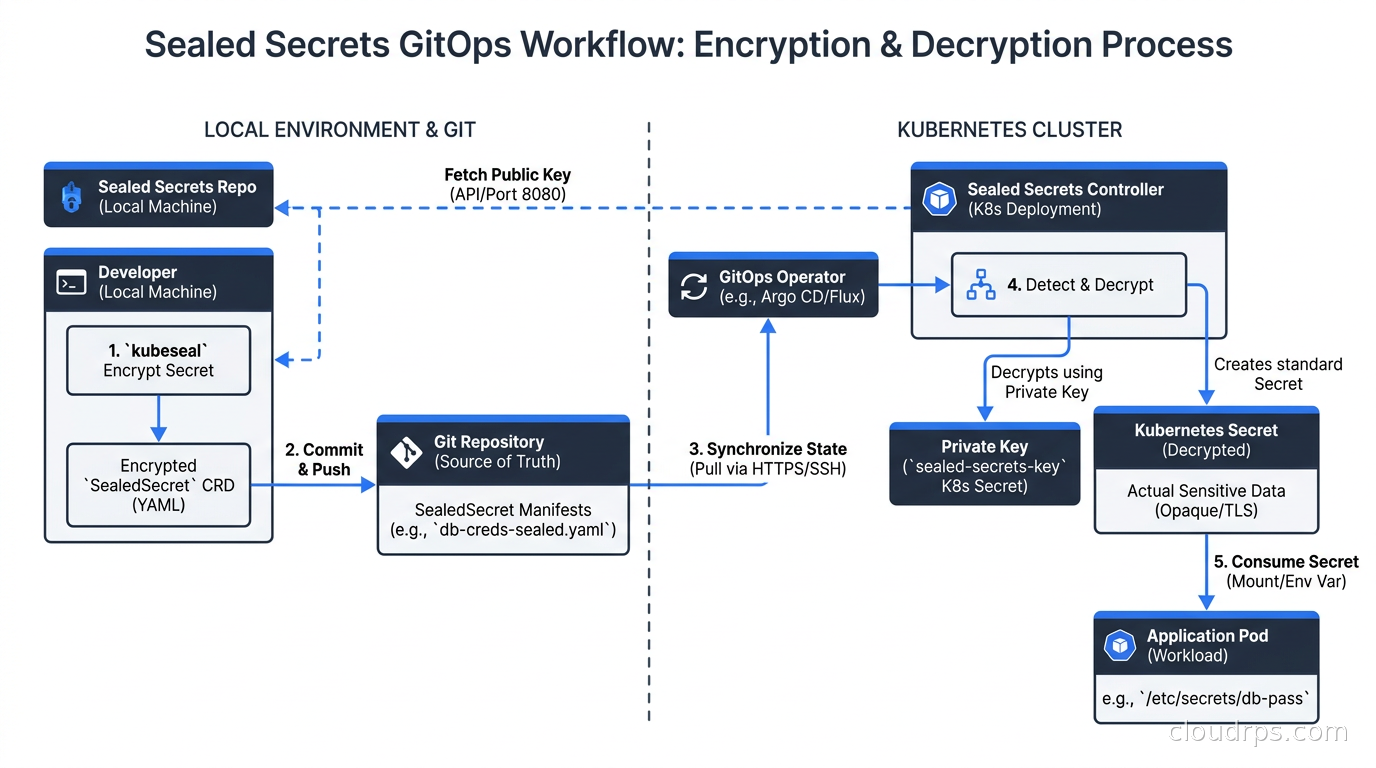
The elegance of Sealed Secrets is in its simplicity. There is no external dependency. No Vault cluster to operate, no AWS Secrets Manager to configure, no network calls during pod startup. Everything is self-contained in the cluster. For small teams, single-cluster setups, or projects where operational simplicity outweighs enterprise feature requirements, Sealed Secrets is often the right answer.
But Sealed Secrets has real limitations you need to understand before committing to it:
Key rotation is painful. The controller generates an asymmetric key pair. By default, it rotates the encryption key every 30 days, but existing SealedSecret resources are not automatically re-encrypted. The old decryption key is retained so existing secrets continue to work, but this means your cluster accumulates old private keys over time. Actual secret rotation (changing the underlying credential value) still requires you to re-seal and recommit.
Multi-cluster secrets are duplicated. A SealedSecret encrypted for cluster A cannot be decrypted by cluster B. They have different controller keys. If you need the same secret in five clusters, you need five different SealedSecret manifests encrypted against five different public keys. This is manageable with scripting but it is friction that ESO avoids entirely.
No centralized audit trail. Because the secrets live in Git, your audit trail is Git history and Kubernetes audit logs. That is often sufficient, but it lacks the rich access logging you get from a dedicated secret store.
I typically recommend Sealed Secrets for teams that are just starting out with GitOps and want the simplest possible story, or for air-gapped environments where ESO’s external calls are not an option. For anything running more than two or three clusters, or needing enterprise-grade audit capabilities, ESO against a central secret store is the better long-term investment.
Secrets Store CSI Driver: When Volumes Are the Right Abstraction
The Secrets Store CSI Driver (SSCSID) takes a third approach: rather than creating Kubernetes secret objects at all, it mounts secret values directly from your external store as files in a pod’s filesystem or, optionally, syncs them to Kubernetes secrets as a secondary step.
The primary use case is applications that read configuration from files rather than environment variables. Legacy apps, applications with large configuration files, or anything using a framework that expects file-based config fits this model well.
A SecretProviderClass resource defines the secret mapping:
apiVersion: secrets-store.csi.x-k8s.io/v1
kind: SecretProviderClass
metadata:
  name: vault-db-secrets
  namespace: payments
spec:
  provider: vault
  parameters:
    vaultAddress: "https://vault.internal:8200"
    roleName: "payments-service"
    objects: |
      - objectName: "db-password"
        secretPath: "secret/data/payments/database"
        secretKey: "password"
  secretObjects:
    - secretName: payments-db-secret
      type: Opaque
      data:
        - objectName: db-password
          key: password
And the pod spec mounts it like any CSI volume:
volumes:
  - name: secrets-store
    csi:
      driver: secrets-store.csi.k8s.io
      readOnly: true
      volumeAttributes:
        secretProviderClass: vault-db-secrets
One important operational detail: the CSI driver fetches secrets at pod startup time. If your secret store is unavailable, the pod fails to start. This creates a hard dependency between your application availability and your secret store availability. ESO creates Kubernetes secrets that are cached and persistent; if AWS Secrets Manager has a hiccup at 3 AM, your pods still start because the Kubernetes secret already exists. With the CSI driver, a secret store outage at pod startup time means your application does not start.
For applications that need secrets rotated and consumed without restart, the CSI driver supports rotation with volume re-mount, but the application needs to watch for file changes and handle the refresh. That is more application code than most teams want to write. I use the CSI driver selectively: mainly for applications that genuinely need file-based configuration and are running in environments where I have high confidence in secret store availability (usually a Vault cluster running inside the same cloud region with its own HA setup, described in our secret management guide).
Vault Secrets Operator vs Vault Agent Injector
If your organization already runs HashiCorp Vault, which in my experience covers about 40% of mature enterprises, you have two additional Kubernetes-specific options: the Vault Agent Injector and the newer Vault Secrets Operator.
The Vault Agent Injector works via a mutating admission webhook. You annotate a pod, and the injector automatically injects a Vault agent sidecar that authenticates with Vault, fetches secrets, writes them to a shared volume, and keeps them refreshed. It is a well-established pattern that requires no CRDs and works with any namespace.
The Vault Secrets Operator (VSO) is the modern replacement. It uses a controller-based model similar to ESO: you define VaultAuth, VaultConnection, and VaultStaticSecret or VaultDynamicSecret resources, and the operator syncs values to Kubernetes secrets. The VSO approach gives you the same GitOps-friendly, CRD-based workflow as ESO but is specific to Vault.
I generally recommend VSO over the injector for new deployments because:
- No sidecar overhead per pod (the controller handles sync centrally)
- Better observability through Kubernetes-native metrics
- More predictable rotation behavior
- Cleaner separation between secret sync and application pods
The injector is still appropriate if you need per-pod authentication context (where different pods of the same deployment need different Vault policies) or if you are running Vault Enterprise and need its specific features around response wrapping.
SOPS: The GitOps Native Alternative
Mozilla SOPS (Secrets OPerationS) deserves a mention, particularly for teams using Helm or kustomize. SOPS is an editor for encrypted files: it encrypts specific values in YAML, JSON, or .env files using AWS KMS, GCP KMS, Azure Key Vault, or age (a modern encryption tool). The result is a file where the structure is visible but the values are encrypted in place.
Integrated with Helm Secrets or kustomize-SOPS plugins, you can decrypt secrets on the fly during deployment. The workflow is:
# Create encrypted secrets file
sops --encrypt \
  --kms arn:aws:kms:us-east-1:123456789:key/abc123 \
  secrets.yaml > secrets.enc.yaml

# Commit the encrypted file
git add secrets.enc.yaml
During deployment, Helm Secrets decrypts on the fly using the KMS key, which is accessed via the deploying agent’s IAM role. No secrets ever exist unencrypted in your pipeline unless you make a mistake.
SOPS fits best in teams that want minimal operational overhead (no controller to run) and primarily use Helm charts. It requires your CI/CD system to have KMS access, which is a dependency to manage, and it lacks automatic rotation. But for teams with a simple Helm-based GitOps setup, it is often the fastest path to “secrets not in Git as plaintext.”
Choosing the Right Pattern
After twenty years of building infrastructure, my decision matrix for Kubernetes secrets management looks like this:
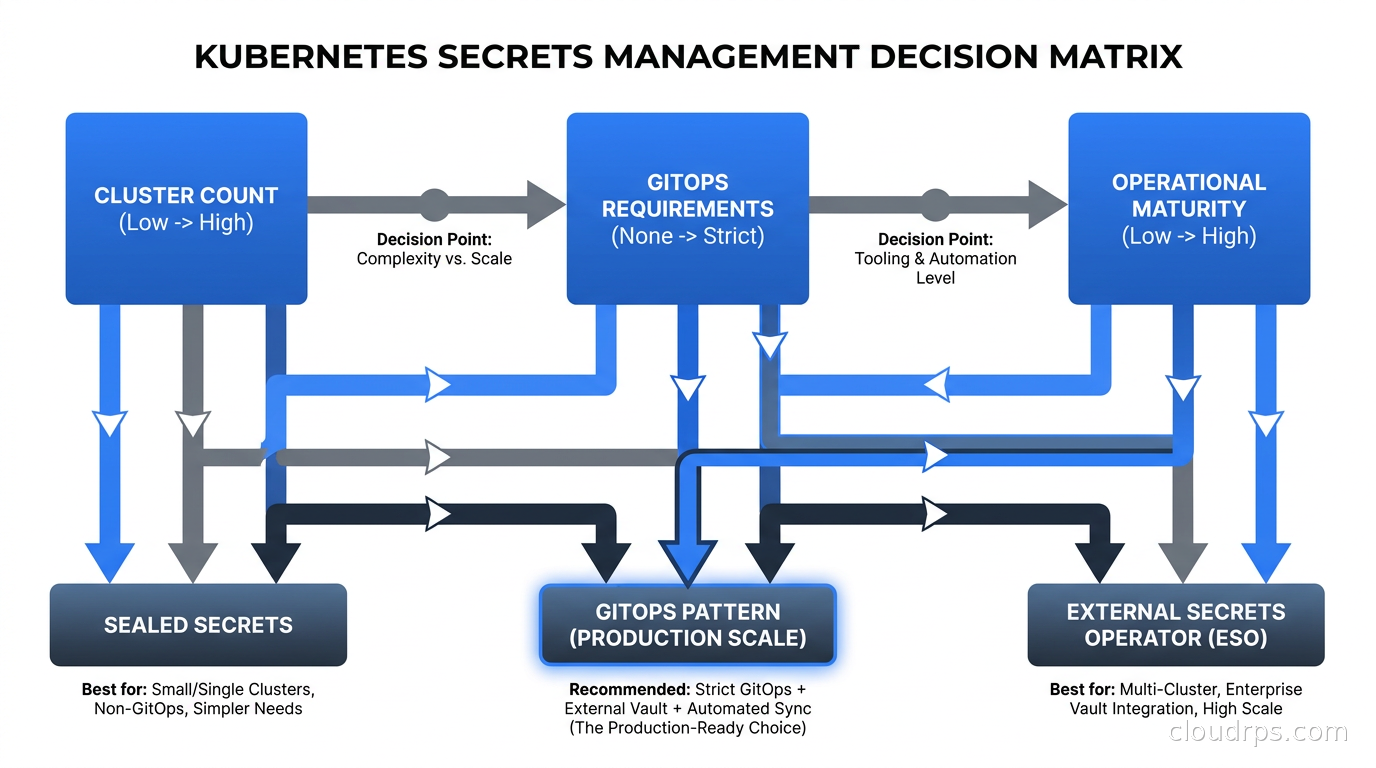
Use External Secrets Operator when:
- You have an existing central secret store (Vault, AWS Secrets Manager, GCP Secret Manager)
- You run multiple clusters that need shared secrets
- You need enterprise-grade audit logging and policy enforcement
- Automatic rotation with defined refresh windows is a requirement
- You have the operational maturity to run and maintain ESO itself
Use Sealed Secrets when:
- You are running a single cluster or a small number of clusters
- You want the simplest possible GitOps story with no external dependencies
- You are in an air-gapped or restricted network environment
- Your team is newer to Kubernetes and you want to minimize operational surface area
Use the Secrets Store CSI Driver when:
- Applications require file-based configuration rather than environment variables
- You need direct integration with an external store without Kubernetes secret objects as an intermediary
- You are comfortable with the added dependency on secret store availability at pod startup
Use SOPS when:
- Your primary deployment tooling is Helm and you want encryption in the Git repo
- You want minimal controller overhead and are comfortable with KMS-based encryption
- Rotation can be handled through key re-encryption rather than automated pulling
In practice, most large organizations use ESO as the primary pattern and layer in the CSI driver for specific legacy workloads. Sealed Secrets often appears in developer environments and edge deployments. Very few production systems should rely on native Kubernetes secrets alone for anything sensitive.
Operational Concerns That Apply to Every Pattern
Regardless of which approach you choose, certain operational practices apply universally.
Never let secrets drift. Whether you are using ESO’s refreshInterval or manually updating Sealed Secrets, you need a process that detects when a Kubernetes secret no longer matches the intended value in your source of truth. I have seen clusters where the “authoritative” secret in AWS Secrets Manager was rotated months ago but the ESO refresh was silently failing, leaving the old value in production. Monitor ESO sync failures like you monitor anything else that matters.
Namespace isolation matters. A ClusterSecretStore in ESO is accessible from any namespace. Be deliberate about whether you use ClusterSecretStore or namespace-scoped SecretStore resources. Pair this with RBAC policies that restrict which service accounts can read which secrets, and policy enforcement via Kyverno or OPA to prevent accidental secret mounting from the wrong namespace.
Treat secret rotation as a regular deployment event. In well-run systems, rotating a database password should be as routine as a code deployment. Build the automation: update the secret in your store, verify the new value is valid, monitor for connection errors, roll back if needed. Rotation that requires heroic manual effort is rotation that will not happen on schedule, and that is a compliance and security problem.
Keep your secret store highly available. If ESO cannot reach AWS Secrets Manager or Vault, it cannot refresh secrets. Existing secrets remain cached in Kubernetes and pods continue running, but any new pod requiring a secret that has not yet been cached will fail. In practice this is a narrow failure window, but it is real. Your secret store HA story matters. If you are self-hosting Vault, the general secret management guide covers the HA architecture patterns in detail.
Integrate with your zero trust posture. Secrets management is not a standalone problem. It intersects with your zero trust security model through workload identity (which identity does this pod use to authenticate to the secret store?), through network policy (which pods can even reach the secret store endpoint?), and through audit (can you prove that only the payment service accessed the database credentials?). ESO with IRSA or GKE Workload Identity is a complete solution to the “how does the cluster authenticate to the secret store” problem without putting cloud credentials inside the cluster. That workload identity federation pattern is essential reading alongside this one.
The Pattern I Wish I Had Twenty Years Ago
If I were starting a new production Kubernetes deployment today, here is exactly what I would build: ESO running as a cluster-level controller, authenticated to AWS Secrets Manager (or the equivalent on your cloud) via IRSA or GKE Workload Identity. ExternalSecret manifests live in Git alongside all other application manifests and get applied by ArgoCD. A ClusterSecretStore handles organization-wide secrets (shared TLS certs, common API keys) while namespace-scoped SecretStore resources handle team-specific backends. Refresh interval is 1h for most secrets, 15m for anything that is actively rotating, 24h for static configuration that rarely changes.
Sealed Secrets gets added for developer namespaces and edge cluster deployments where operational simplicity beats feature richness. SOPS handles anything that needs to travel through Helm-based deployment pipelines.
TLS certificate secrets are handled separately by cert-manager, which integrates cleanly with the Secrets Store CSI Driver or ESO if you need cross-cluster certificate synchronization.
The result is a secrets story that is auditable, rotatable, GitOps-compatible, and operationally sustainable. It takes a day or two to set up properly, and then it runs itself. That is the standard worth holding to.
Native Kubernetes secrets were always a building block, not a solution. Treat them as the storage format that ESO writes to, not the system you build on top of. The teams that get secrets right are the ones that made that distinction early.
Get Cloud Architecture Insights
Practical deep dives on infrastructure, security, and scaling. No spam, no fluff.
By subscribing, you agree to receive emails. Unsubscribe anytime.