
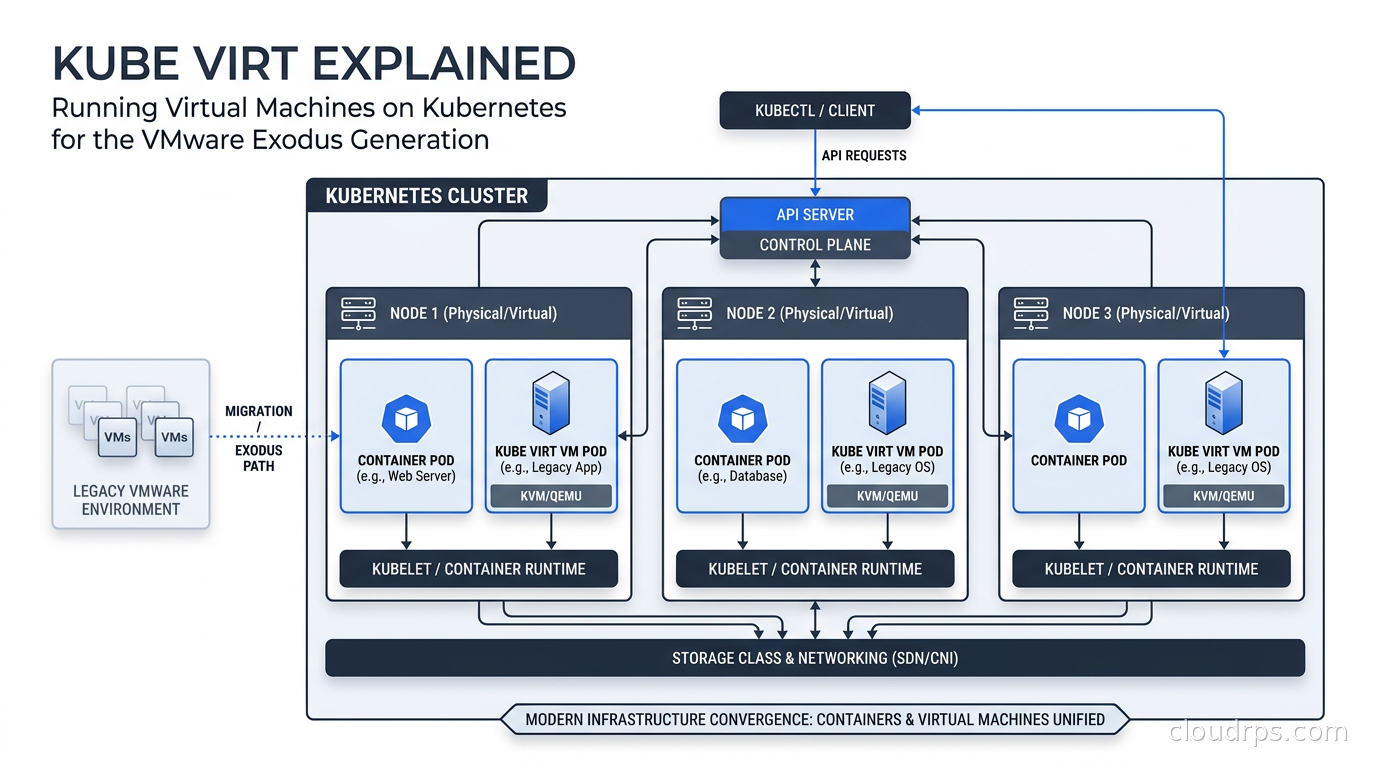
I have been running production Kubernetes clusters since the 1.4 days, back when StatefulSets were brand new and everyone was still arguing about whether databases belonged in containers at all. In those twenty years I have watched the boundary between “container workloads” and “VM workloads” dissolve in ways that would have seemed absurd at a 2008 architecture review. KubeVirt is the clearest sign yet that those two worlds are fully converging, and with Broadcom’s VMware pricing changes still sending shockwaves through enterprise IT, it is arriving at exactly the right moment.
This is not a toy project anymore. Cloudflare is running hundreds of KubeVirt virtual machines across production clusters. Nutanix announced KubeVirt support in April 2026. KubeVirt v1.8 shipped at KubeCon Europe 2026 with a Hypervisor Abstraction Layer that opens the door to backends beyond KVM. If you are evaluating your post-VMware strategy, or if you are inheriting a Kubernetes platform and wondering what to do with the ten Windows Server VMs nobody wants to containerize, you need to understand what KubeVirt actually is and what it can realistically do for you today.
The Problem KubeVirt Solves
The standard answer to “why not just containerize everything” is the polite version. The real answer is messier. I have sat in rooms where the “containerize everything” mandate ran headlong into a 12-year-old Oracle database running on Red Hat 6, a Windows-only CAD rendering service that the vendor absolutely will not support on anything else, and a telecom billing system that requires a specific kernel version because of some ancient network driver. Containerizing those things is not a six-week project. It is a multi-year program with significant risk.
At the same time, running two separate orchestration planes is genuinely expensive. You have your Kubernetes clusters handling the modern stuff, and somewhere else you have vSphere, or maybe Proxmox, or bare Hyper-V, handling the legacy VMs. That means two monitoring stacks, two networking models, two storage integration points, two sets of operators who need to understand both worlds. The operational overhead compounds fast.
KubeVirt’s answer is to make virtual machines first-class citizens in Kubernetes. Not by running a VM inside a container in a hacky way, but by extending the Kubernetes API itself so that a VirtualMachine object is as native as a Deployment or a StatefulSet. Your VM workloads participate in the same scheduling, networking, storage, and RBAC systems as your container workloads. You use kubectl to manage them. GitOps pipelines that drive your container fleet can drive your VM fleet with the same tooling.
How KubeVirt Actually Works
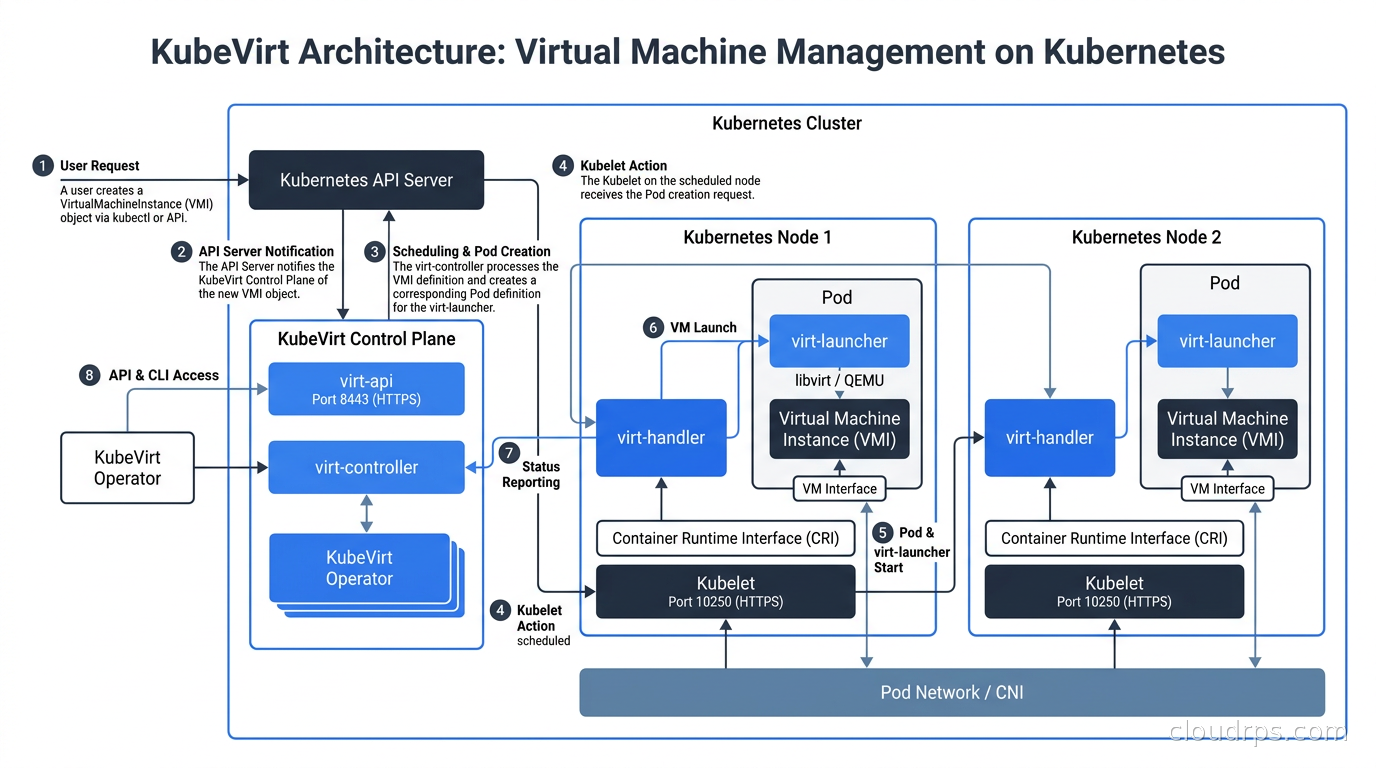
KubeVirt is a CNCF project that extends Kubernetes through custom resource definitions and a set of controllers. The key components are:
virt-api: A Kubernetes API server extension that handles admission webhooks and subresource requests for VirtualMachine objects. When you kubectl apply a VirtualMachine manifest, it passes through here.
virt-controller: A standard Kubernetes controller that watches VirtualMachine and VirtualMachineInstance CRDs and reconciles them toward desired state. It handles things like creating the Pod that will host the VM process.
virt-handler: A DaemonSet that runs on every node. It communicates with the local KVM hypervisor to manage the actual VM lifecycle on that node. It is essentially the per-node agent that translates Kubernetes reconciliation intent into hypervisor operations.
virt-launcher: The Pod that actually runs for each VM. Inside this Pod is libvirt managing a QEMU process for the VM. The launcher is responsible for the VM’s lifecycle from start to termination. This is the key insight: from Kubernetes’ perspective, your VM is a Pod. It participates in the scheduler, it has resource requests and limits, it gets an IP from whatever CNI plugin your cluster uses.
CDI (Containerized Data Importer): A companion component that handles VM disk image imports. You can point it at a URL, an object storage bucket, or an existing PersistentVolume, and it will prepare the VM disk. This is how you boot a VM from an ISO or migrate a VMDK from an existing VMware environment.
Resource Representation
A basic KubeVirt VirtualMachine looks like this in YAML:
apiVersion: kubevirt.io/v1
kind: VirtualMachine
metadata:
  name: fedora-vm
spec:
  running: true
  template:
    spec:
      domain:
        cpu:
          cores: 2
        memory:
          guest: 4Gi
        devices:
          disks:
          - name: rootdisk
            disk:
              bus: virtio
          interfaces:
          - name: default
            masquerade: {}
      networks:
      - name: default
        pod: {}
      volumes:
      - name: rootdisk
        dataVolume:
          name: fedora-dv
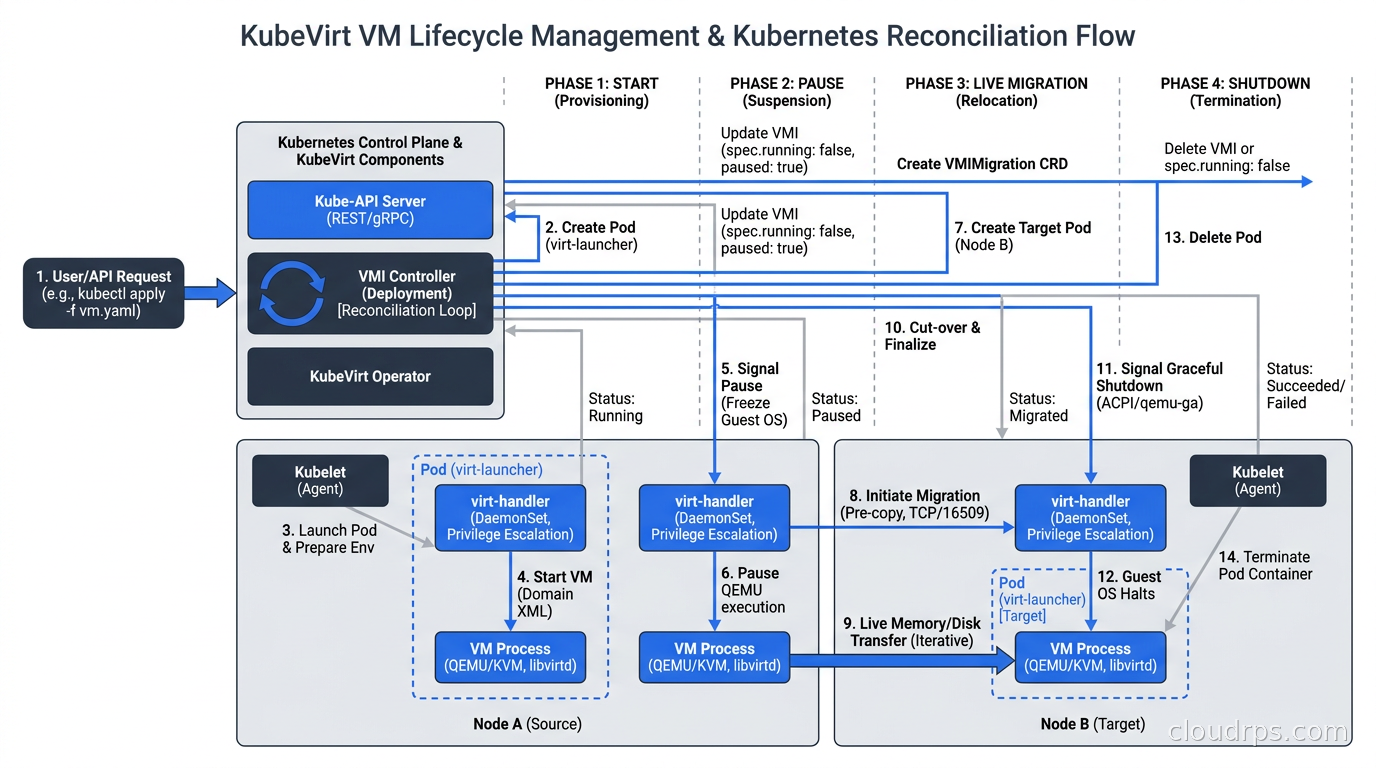
The VirtualMachine object is the persistent representation, analogous to a Deployment. The VirtualMachineInstance is the running instance, analogous to a Pod. You can stop and start a VM without deleting its persistent definition, which maps cleanly to how operators think about VM lifecycle.
Networking in KubeVirt
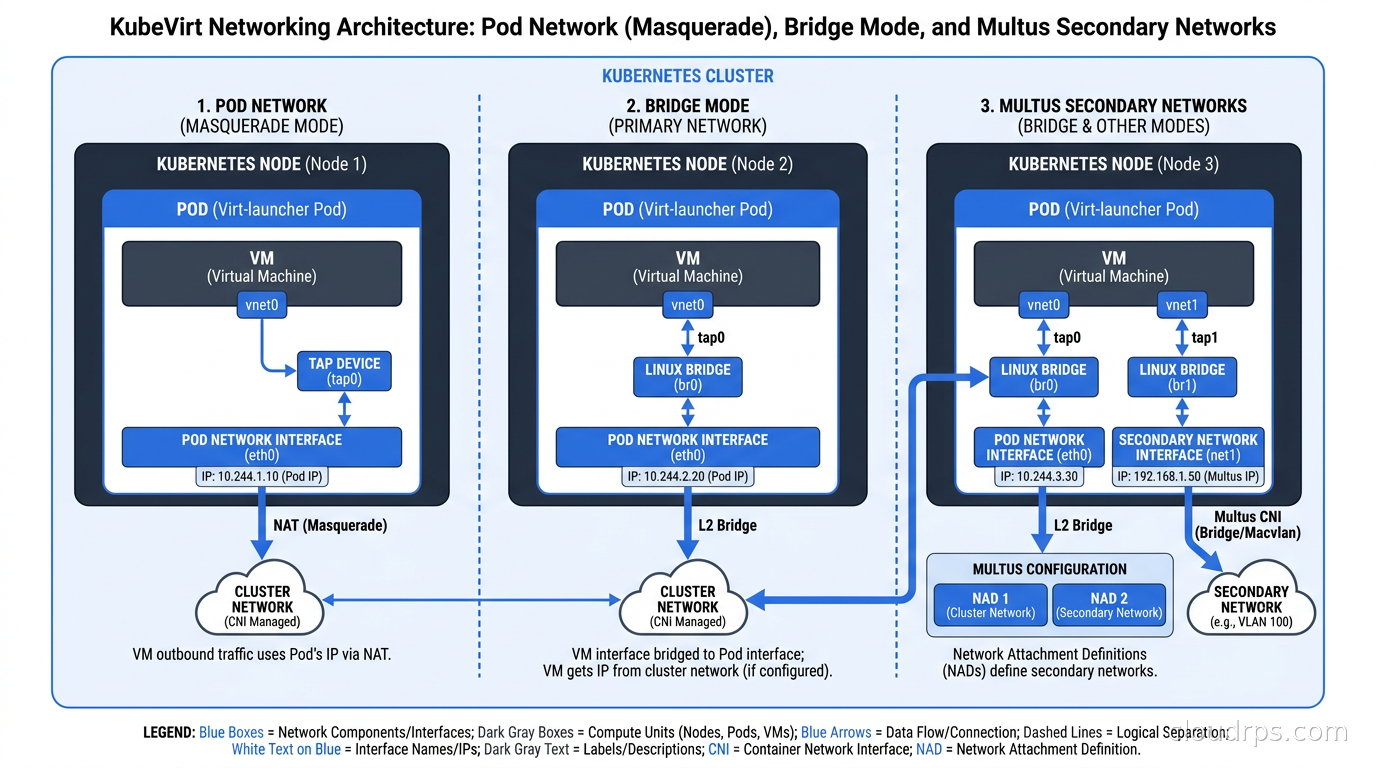
This is where things get genuinely interesting and where I have seen the most production confusion. KubeVirt VMs get network connectivity through the same CNI layer as your containers. By default, a VM gets a Pod IP and can communicate with other Pods and Services on the cluster network. The VM sees a virtio network interface internally, but from the cluster’s perspective it is just a Pod with a network interface.
For VMs that need to expose services externally, you have the same options as any other Pod: Kubernetes Services with NodePort or LoadBalancer, Ingress, or Gateway API. This is genuinely elegant once you accept it. I had a team that needed to expose an RDP port from a Windows VM, and they did it with a simple Service of type LoadBalancer backed by a cloud provider LB. Took about ten minutes.
The more complex scenarios involve VMs that need to participate in existing non-cluster networks. For those cases, KubeVirt supports secondary network interfaces through Multus CNI. You can give a VM a secondary interface on a VLAN or a bridge that connects to your data center network. This is essential for legacy VM workloads that have hardcoded IP addresses or that need to communicate with physical servers on traditional networks.
Storage for VMs
VM storage in KubeVirt is handled through standard Kubernetes PersistentVolumes. The CDI component extends this with DataVolume objects that can populate PVs from external sources. This integrates cleanly with whatever CSI driver your cluster is already using.
For high-performance VM storage, you want RWX (ReadWriteMany) PVs with block mode rather than filesystem mode. Block mode gives the VM direct block access without the filesystem layer overhead, which matters significantly for database VMs. I covered the CSI and Rook/Ceph storage options in depth in the Kubernetes persistent storage guide; those same choices apply to KubeVirt VM disks.
Hot-plug volume support lets you attach and detach storage from running VMs without reboot, which is essential for database VMs that need to add capacity. Snapshot integration lets you take PVC snapshots of VM disks, giving you the same crash-consistent snapshot capabilities you had with VMware.
Live migration support is one of KubeVirt’s headline features. You can migrate a running VM to another node without downtime, just like vMotion in vSphere. This requires RWX storage so both nodes can access the disk simultaneously during migration. In practice, live migration in KubeVirt works well on clusters with appropriate storage backends, but it requires careful network planning to ensure the migration traffic does not saturate your cluster network.
What Changed in KubeVirt v1.8
The March 2026 release is significant enough that it deserves specific attention. The headline feature is the Hypervisor Abstraction Layer (HAL), which decouples KubeVirt from its hard dependency on KVM/QEMU. This matters for two reasons.
First, it opens the door to running KubeVirt on nodes where KVM is not available or appropriate. ARM-based nodes are an increasingly common scenario as AWS Graviton, Ampere Altra, and Qualcomm Cloud AI 100 chips proliferate. KVM works on ARM, but the specific hardware virtualization extensions vary, and HAL makes it easier for KubeVirt to adapt.
Second, it enables enterprise-grade hypervisors as backends. Nutanix’s April 2026 announcement is the first major commercial example: Nutanix AHV (their hypervisor) can now be used as the KubeVirt backend instead of KVM. This is a big deal for enterprises already running Nutanix who want to consolidate onto a Kubernetes control plane.
v1.8 also added confidential computing support via Intel TDX (Trust Domain Extensions). This gives hardware-level memory encryption and isolation for VM workloads, which matters for financial services and healthcare use cases where tenant isolation must be provable at the hardware level. If you are interested in how these TEE technologies work under the hood, the confidential computing deep dive covers the underlying mechanisms.
PCIe NUMA topology awareness is the third major addition. For GPU-attached VMs, this ensures the GPU and the VM’s memory are in the same NUMA domain, which can mean the difference between 10% performance degradation and 40% degradation on memory-bandwidth-intensive AI workloads. Combined with KubeVirt’s existing device plugin support for GPU passthrough, this makes KubeVirt a serious option for running VMs that need direct GPU access.
KubeVirt vs Other VMware Exodus Options
I covered Proxmox VE and XCP-ng in detail in the VMware exodus alternatives guide. Here is how KubeVirt fits into that picture.
KubeVirt over Proxmox: Choose KubeVirt when you are already running Kubernetes at scale and want to consolidate your VM and container management. Proxmox is a better choice when your team is primarily VM-focused and container orchestration is not part of your current stack. Proxmox has a far more mature management UI and a gentler learning curve for teams coming from vSphere.
KubeVirt over XCP-ng: XCP-ng gives you enterprise-grade virtualization with familiar XenCenter-style management. If your organization lives in a traditional hypervisor mental model and has no Kubernetes investment, XCP-ng is much easier to operate. KubeVirt requires real Kubernetes expertise.
KubeVirt for mixed workloads: This is where KubeVirt wins clearly. If you have a platform team running Kubernetes and you want to offer both container and VM scheduling through a single control plane, KubeVirt is the right architecture. GitOps workflows, RBAC policies, monitoring pipelines, and service mesh integrations all apply uniformly to both workload types.
The honest trade-off is operational complexity. Kubernetes is already complex. Adding KubeVirt adds another layer of CRDs, controllers, and debugging surface area. I have seen teams adopt KubeVirt and then struggle because the platform team did not fully understand libvirt troubleshooting, or because their storage backend was not tuned for the random IO patterns of VM workloads. Go in with eyes open.
Production Patterns I Have Used
One pattern that works well is the “lift-and-shift to KubeVirt, modernize later” approach. You take the VMware VM, use CDI to import the VMDK, boot it as a KubeVirt VM, validate it works, and then you have bought yourself time to modernize the application at a pace the business can absorb. The VM is now on a platform your team already knows how to operate.
For Windows workloads specifically, KubeVirt with VirtIO drivers for Windows works reliably. The VirtIO disk and network drivers for Windows are well-maintained, and Microsoft has not objected to Windows running on KVM. I have run Windows Server 2022 VMs under KubeVirt in production. The main gotcha is that Windows wants to see a TPM for some licensing and BitLocker scenarios; KubeVirt supports virtual TPM (vTPM) via swtpm, but you need to explicitly configure it.
For databases, the should you run databases on Kubernetes considerations apply with additional VM-specific nuances. A VM running PostgreSQL on KubeVirt is actually more isolation than a containerized PostgreSQL, because the VM has its own kernel. This can be meaningful for noisy-neighbor scenarios. The trade-off is that you lose the tight Kubernetes-native storage management you get with something like a CloudNativePG operator.
RBAC and Multi-Tenancy
Because KubeVirt VMs are Kubernetes resources, they inherit Kubernetes RBAC. You define who can create, start, stop, and migrate VMs using standard Roles and ClusterRoles. The Kubernetes RBAC guide covers the pattern in detail; KubeVirt adds specific verbs like start, stop, restart, migrate, and guestosinfo that you control through those standard mechanisms.
Namespace isolation works as you would expect. VMs in namespace team-a are invisible to users who only have access to namespace team-b. This is a significant improvement over many on-premises VMware deployments I have seen where VM permissions were managed through vCenter roles that had nothing to do with the team’s application ownership model.
For teams operating KubeVirt as a shared platform service, I recommend treating the KubeVirt operator and system components as platform-level infrastructure in a dedicated namespace, separate from tenant namespaces. Use ResourceQuotas and LimitRanges on tenant namespaces to prevent a single team from scheduling 96 CPU cores of VMs and monopolizing cluster capacity.
Networking Deep Dive: Multus and SRIOV
For production VM workloads with demanding networking requirements, the masquerade CNI mode that gives VMs Pod IPs has limitations. SR-IOV passthrough gives a VM direct access to a physical NIC’s virtual function, bypassing the software networking stack entirely. Latency and throughput on SR-IOV are close to bare metal. I have used this for network function virtualization (NFV) use cases where we were running virtual routers and firewalls that needed to handle 40 Gbps of traffic.
DPDK-based workloads work with KubeVirt using huge pages support combined with CPU pinning. You can reserve specific CPU cores exclusively for a VM, preventing the host OS and other workloads from using those cores. This gives deterministic, low-jitter behavior that soft-real-time applications need.
The eBPF and Kubernetes networking article is relevant here because Cilium, which implements eBPF-based Kubernetes networking, works alongside KubeVirt. Cilium handles pod network policy enforcement; KubeVirt VMs appear as Pods, so Cilium policies apply to VM network traffic as transparently as they apply to container traffic.
Monitoring and Observability
KubeVirt exposes Prometheus metrics through standard Kubernetes service monitor annotations. You get metrics for VM CPU time, memory balloon (the hypervisor’s memory reclaim mechanism), disk IOPS and throughput, and network bytes per VM. These integrate directly into Grafana dashboards alongside your container metrics.
One thing that surprised me early on: the VM balloon metrics require that the guest OS has the virtio-balloon kernel module loaded. On modern Linux distributions, this is the default. On older enterprise Linux installs or custom-built guests, you may need to manually load the module. When a VM is showing unexpectedly high memory usage on the host but the guest reports normal usage, the balloon driver is often the culprit.
For guest-level observability, you have two options. The KubeVirt guest agent (qemu-guest-agent) runs inside the VM and exposes guest metrics and lifecycle hooks through the KubeVirt API. Alternatively, you can install your standard observability agents (node exporter, Datadog agent, etc.) inside the VM as you would on any other Linux or Windows host.
When KubeVirt Is the Wrong Answer
I want to be direct about the scenarios where I would steer you away from KubeVirt.
If your team has no Kubernetes expertise and you are adopting KubeVirt specifically to avoid learning Kubernetes, you are making your life harder. KubeVirt is built on top of Kubernetes, not alongside it. You need to understand Kubernetes scheduling, storage, networking, and operators to operate KubeVirt well. If your team does not have that background, start with Proxmox or XCP-ng and build toward KubeVirt as your Kubernetes adoption matures.
If you need a simple, GUI-managed VM platform for a small team, KubeVirt’s tooling is not there yet. The KubeVirt Manager web UI is improving, but it is not in the same category as the Proxmox web UI or XenCenter. You will be living in kubectl and YAML for most operations.
If your VM workloads require features that are specific to VMware’s networking stack (NSX-T distributed firewall policies, VMware HCX for migration), you will need to invest heavily in translating those requirements to Kubernetes-native equivalents. That translation is absolutely possible, but it is not automatic.
The Path Forward
KubeVirt is in a genuinely strong position right now. It has CNCF backing, it is at v1.8 with a clear roadmap, and it has meaningful production adoption from organizations whose infrastructure choices carry weight (Cloudflare, Nutanix, Red Hat OpenShift Virtualization which is the enterprise distribution). The HAL addition in v1.8 signals that the project is serious about enterprise hypervisor support, not just being a KVM wrapper.
The VMware exodus has years of legs left. Enterprises that locked in three-year ELAs when Broadcom took over are going to start coming off those contracts, and they will need alternatives. Some will go to Proxmox. Some will go to public cloud. Some will go to KubeVirt, especially those organizations that are mid-Kubernetes-adoption and want to consolidate their platform investment.
If I were standing up a new platform team today for an organization doing serious Kubernetes work, KubeVirt would be in my default stack. Not as the only hypervisor option, but as the answer to “what do we do with the VMs that aren’t ready to be containers.” Managed alongside a GitOps workflow with ArgoCD or Flux, with Kubernetes operators handling the operational lifecycle patterns, KubeVirt fits naturally into the control plane you are already building.
Twenty years of watching hypervisors evolve has taught me that the best virtualization platform is the one your team already knows how to operate. If your team is a Kubernetes team, KubeVirt is the virtualization platform they already know how to operate. That is not a small thing.
Get Cloud Architecture Insights
Practical deep dives on infrastructure, security, and scaling. No spam, no fluff.
By subscribing, you agree to receive emails. Unsubscribe anytime.