
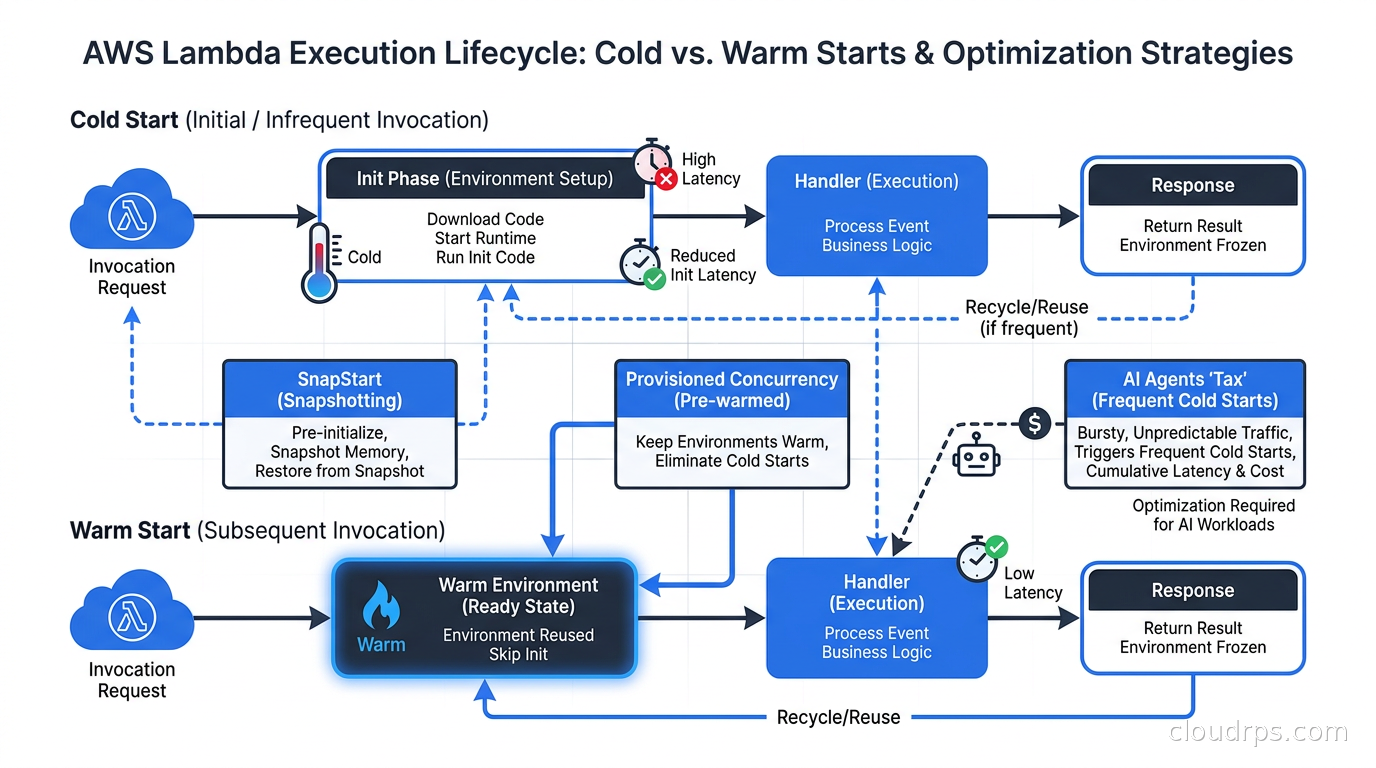
I have been running serverless workloads in production for twenty years, watching cold starts go from a curiosity to a genuine architectural constraint. For most of that time, cold starts were a Lambda footnote: annoying for Java, acceptable for Python and Node.js, mostly irrelevant if your traffic pattern kept environments warm. Then two things happened almost simultaneously. The first was the explosion of AI agents using Lambda functions as tools. The second was SnapStart finally arriving for Python and .NET, then expanding to container images in September 2026. The cold start conversation is no longer about user-visible page loads. It is about whether your AI agent can complete a tool chain in time for the user to stay engaged.
This article is the guide I wish existed when I started optimizing Lambda for AI workloads: how cold starts actually work under the hood, when SnapStart is the right lever, when Provisioned Concurrency is worth the cost, and the code-level patterns that save you from paying either tax at all.
What a Cold Start Actually Is
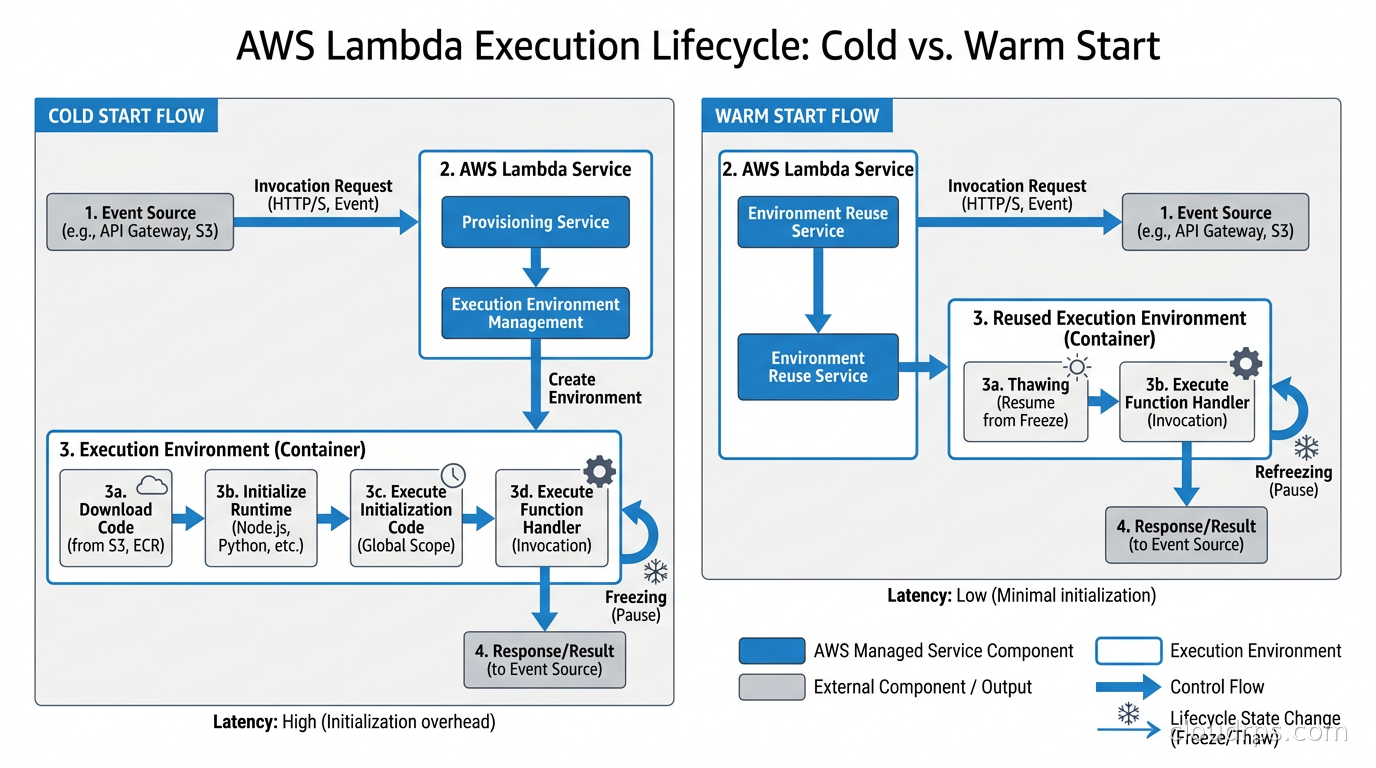
Lambda’s execution model is built on isolation. Every function invocation runs inside a dedicated Firecracker microVM, a lightweight virtual machine that boots in well under a second. When no warm environment exists to handle a request, Lambda has to create one. That creation process is what engineers call a cold start, and it has several distinct phases:
Download and extract the code package. Lambda pulls your deployment ZIP or container image from S3 and sets it up in the execution environment. For container images, the layers are cached and streamed lazily, so this is faster than it sounds, but it is still real work.
Initialize the microVM. The Firecracker VM comes up, networking gets configured, and the Lambda runtime agent starts.
Initialize the runtime. The language runtime starts. For Python this is fast. For Java this is where frameworks like Spring Boot have historically turned cold starts into a multi-second ordeal, because the JVM starts, then the classloader runs, then Spring’s dependency injection container scans your entire classpath.
Run your initialization code. Everything outside your handler function runs at this point: creating database connection pools, loading configuration from Secrets Manager, initializing SDK clients. This is within your control, and it is where most cold start optimization outside SnapStart happens.
Finally, invoke the handler. This is the only phase that runs on every invocation. Everything before it happens only on cold starts.
The Init Duration field in CloudWatch Logs tells you how long phases two through four took. When you see a log line with Init Duration: 1243.82 ms, that is the tax the user paid before your code ran.
Why This Got Worse With AI Agents
A web request hits one Lambda function, maybe two. A user-facing AI agent can hit five, ten, or more. Each tool call is a separate Lambda invocation. If your agent uses a code execution tool, a database lookup tool, a web search tool, and a formatting tool in sequence, and each has even a modest cold start, those latencies stack. The user sitting at a chat interface waiting for a response does not experience them as four separate 300 ms delays. They experience a 1.2-second gap before anything happens.
I worked with a team building an AI customer service platform where the agent orchestration layer was built on AWS Step Functions with Lambda for each tool invocation. In testing, the latency was fine because developers run tests repeatedly and environments stay warm. In production, after a slow overnight period cleared warm environments, the first customers of the morning were experiencing strikingly poor response times. Nobody had added cold start instrumentation because individual function cold starts looked acceptable in isolation. The compounding only became visible when someone traced an end-to-end agent workflow.
Agentic AI in production introduces latency budgets that are fundamentally different from traditional web applications. A web page can absorb 500 ms for a cold start and still feel acceptable. A conversational AI response cannot. This is the new context in which Lambda cold start optimization matters.
SnapStart: How the Snapshot Model Works
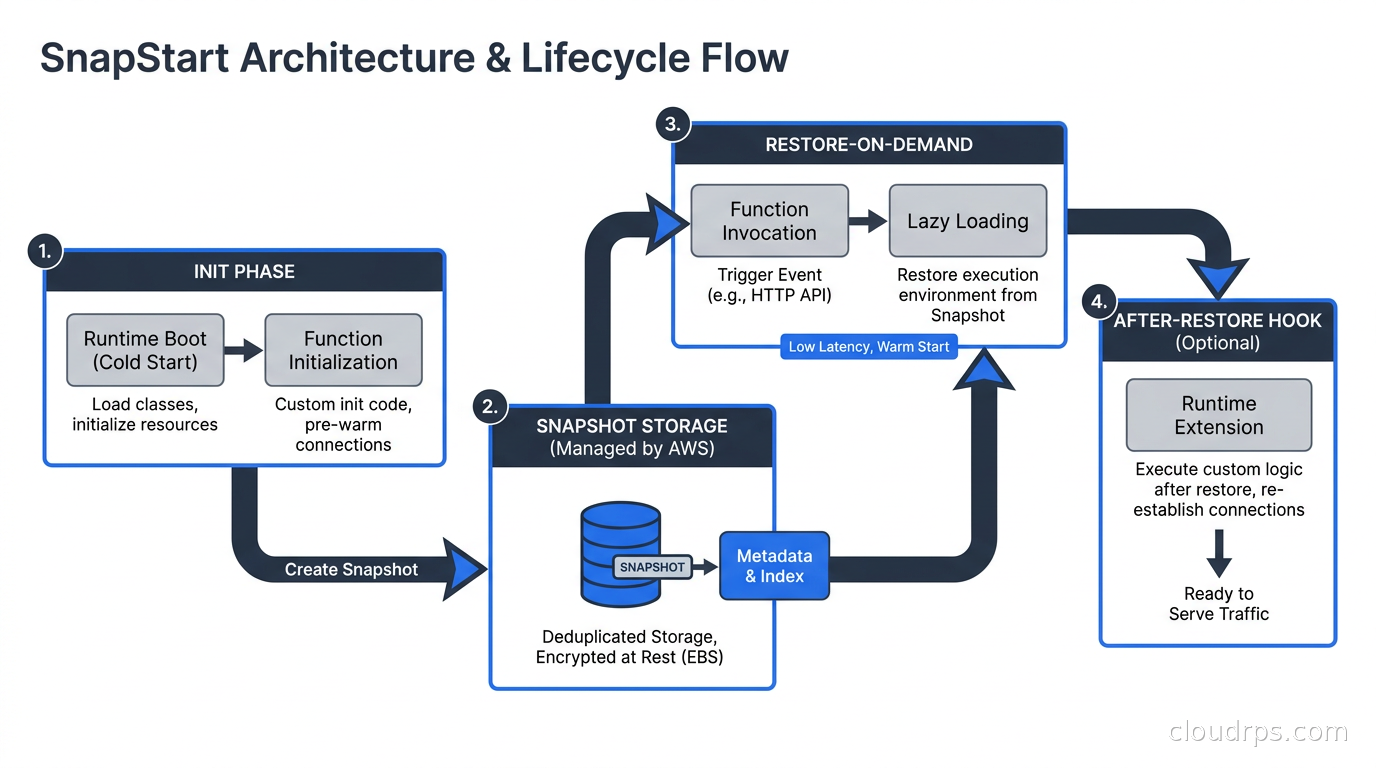
SnapStart is AWS’s approach to pre-initializing Lambda execution environments. The idea is elegant: instead of letting every cold start re-run your initialization code, AWS takes a snapshot of the fully initialized execution environment, stores it, and restores from that snapshot on demand.
When you enable SnapStart and publish a function version, Lambda initializes the execution environment once, runs all your initialization code, then takes a snapshot of the execution environment’s memory and disk state. That snapshot lives in S3 with a tiered caching layer. When a new execution environment needs to be created, Lambda restores from the snapshot instead of running initialization from scratch. AWS claims this delivers sub-second startup performance even for workloads that previously took several seconds to initialize.
There are two important caveats. First, SnapStart only activates on published function versions, not on $LATEST. If you invoke $LATEST directly, you get standard cold start behavior. Most production teams should be versioning their Lambda functions anyway, but this is a common gotcha when teams first enable SnapStart and notice no improvement.
Second, because the snapshot can be restored multiple times across many environments simultaneously, you cannot rely on anything that should be unique per execution environment. Random number generators seeded at initialization time would produce identical values across all restored instances. Time values captured at initialization would be stale. AWS addresses this with lifecycle hooks: beforeSnapshot runs before the snapshot is taken, and afterRestore runs after each restore. You use afterRestore to re-seed your random number generator, reinitialize time-sensitive state, and re-establish any connections that do not survive the snapshot-restore cycle.
Supported Runtimes and the Container Image Expansion
SnapStart launched with Java 11 and became the standard recommendation for anyone running Spring Boot, Quarkus, or Micronaut on Lambda. Java cold starts have always been painful because of JVM startup and framework initialization. SnapStart effectively eliminates that pain at no additional cost.
Python 3.12 and .NET 8 support reached general availability in November 2024, bringing SnapStart to the most common serverless runtimes. Python cold starts were never as severe as Java, but frameworks like Mangum-wrapped FastAPI, or heavyweight ML inference libraries with large model loading steps, produce initialization times where SnapStart delivers real value.
The significant expansion came in September 2026, when AWS launched SnapStart support for container image functions. This matters for two reasons. First, many production Lambda deployments use container images because they allow larger deployment packages and standard Docker tooling. Second, AI inference workloads that package large model files as part of a Lambda container image have initialization overhead that SnapStart can substantially reduce.
For container images, the supported base images for SnapStart are those built on Java 11+, Python 3.12+, and .NET 8+ AWS base images. Node.js and Ruby container images can use SnapStart through lifecycle hooks in the Dockerfile. Custom base images require registering the SnapStart extension explicitly. The feature is available in all commercial AWS regions except Asia Pacific (New Zealand) and Asia Pacific (Taipei) as of the launch.
What SnapStart does not support: Amazon EFS file system mounts, ephemeral storage above 512 MB, and Provisioned Concurrency. You cannot combine SnapStart with Provisioned Concurrency on the same function version. They are distinct tools solving different parts of the problem.
Provisioned Concurrency: Buying Out of Cold Starts
If SnapStart’s restore latency is still too high for your use case, or your runtime is not supported, Provisioned Concurrency pre-warms execution environments and keeps them perpetually initialized, ready to handle invocations instantly with no cold start at all.
The trade-off is cost. With standard Lambda, you pay only when your code runs. With Provisioned Concurrency, you pay for every second those pre-warmed environments exist, whether or not they are handling requests. For bursty or infrequent workloads, this cost is hard to justify. For consistently high-traffic functions where cold starts would happen regularly and user experience demands it, the math can work out.
Application Auto Scaling integration makes Provisioned Concurrency more practical for variable traffic patterns. You can configure scaling policies that increase provisioned concurrency before predictable traffic spikes (say, before market open for a financial application) and scale it back down during quiet periods. This requires knowing your traffic pattern well enough to predict it, which rules out genuinely unpredictable workloads.
The functions most worth provisioning are those at the synchronous entry points of user-facing flows: API Gateway integrations, AppSync resolvers, and any Lambda function that a human is directly waiting on. The internal worker functions in a workflow, or the async processors reading from SQS, are rarely worth the provisioning cost because their latency is not user-visible.
For Node.js and Ruby functions, where SnapStart is not available, Provisioned Concurrency is your primary cold start mitigation. Node.js cold starts are typically fast unless you are loading large dependencies, but as npm packages compound and AI SDKs get bundled in, the initialization cost grows.
Code-Level Optimizations That Actually Matter
SnapStart and Provisioned Concurrency are infrastructure levers. Before reaching for them, it is worth eliminating unnecessary initialization cost in code, because that reduces both cold start duration and the snapshot size SnapStart has to manage.
Move heavy imports out of the handler. In Python, importing large libraries inside the handler function forces a re-import on every invocation. Importing at module level means they run once per cold start and get cached. If you import libraries you only use conditionally, consider lazy imports inside conditional blocks to avoid paying for unused dependencies on cold paths.
Initialize clients at module level, not handler level. Creating a DynamoDB client, an S3 client, or an SDK connection inside your handler function creates a new client object on every invocation. Creating it at module level means Lambda reuses the same client object across warm invocations. This is one of the highest-leverage code changes you can make.
Use connection pooling carefully. Lambda execution environments are ephemeral and can run in thousands of simultaneous instances. If each environment opens a dedicated database connection on initialization, you can inadvertently create thousands of connections to a database that supports hundreds. RDS Proxy exists partly to solve this problem, and I would not run Lambda against an RDS instance at any meaningful scale without it. DynamoDB and serverless-native databases do not have this constraint.
Right-size your memory. Lambda allocates CPU in proportion to memory. A function configured with 128 MB gets less CPU than one configured with 512 MB. I have seen functions where doubling the memory allocation cut total invocation time (cold start plus execution) in half, because the CPU-bound initialization phase completed much faster. The memory cost is small relative to the time savings. Profile your initialization phase before assuming it is I/O bound.
Trim your deployment package. Every megabyte you add to your deployment package is a megabyte Lambda has to deal with during initialization. Use bundlers like esbuild to tree-shake unused dependencies. Lambda Layers let you separate stable, large dependencies from your frequently-updated application code, which can improve the caching behavior even if it does not reduce total package size.
Architecture Patterns to Sidestep Cold Starts
Sometimes the right answer is not optimizing the cold start but designing the system so cold starts do not appear on the critical path.
Async offloading. If you can accept that an operation happens asynchronously, you can move it to an SQS queue or EventBridge and return a job ID to the caller immediately. The Lambda function processing the queue will cold start if needed, but the user is not blocked waiting for it. This works well for document processing, notification delivery, and report generation.
Async tool calls in agent frameworks. For AI agents, frameworks like LangGraph support pre-warming invocations. Sending a small “ping” invocation to tool Lambda functions before the agent needs them, at the start of a user session, can warm the environments and eliminate cold starts on the actual tool calls. This requires knowing what tools the agent might use, which is possible if your tool catalog is bounded.
Pre-warming schedules. A CloudWatch Events rule set to fire every few minutes can invoke your Lambda function with a lightweight ping payload. This prevents environments from going cold during predictable quiet periods. It is a blunt instrument but costs almost nothing, and for functions that serve user-facing requests but have irregular traffic (say, a function handling user-initiated workflows), it can dramatically improve the experience.
Stepwise initialization. If your function has expensive initialization (loading an ML model, fetching a large configuration file), consider caching those artifacts in the Lambda execution environment’s /tmp directory and checking the cache before re-fetching. The /tmp directory persists across warm invocations within the same execution environment. A function can check whether the model is already in /tmp from a previous invocation before downloading it again.
Measuring and Monitoring Cold Starts
You cannot optimize what you cannot measure. Lambda’s built-in metrics and distributed tracing give you the raw data you need.
In CloudWatch Logs Insights, the Init Duration field in REPORT log lines identifies cold starts. A query like filter @type = "REPORT" | stats count() as coldStarts by bin(5m) | filter @initDuration > 0 will show you cold start frequency over time. The @initDuration field is only present on cold start invocations.
AWS X-Ray and OpenTelemetry both capture the initialization phase as a distinct span when you instrument your functions. This lets you correlate cold starts with user-visible latency in your traces. For AI workloads specifically, the LLM observability patterns that capture full request traces across tool calls will surface the compounding effect of cold starts much more clearly than looking at individual function metrics in isolation.
Lambda also publishes a ConcurrentExecutions CloudWatch metric. If you see frequent spikes that correlate with Init Duration events, you are hitting scaling events where Lambda is provisioning new environments to handle load increases. This is the pattern that benefits most from Provisioned Concurrency with Application Auto Scaling.
Choosing Your Strategy
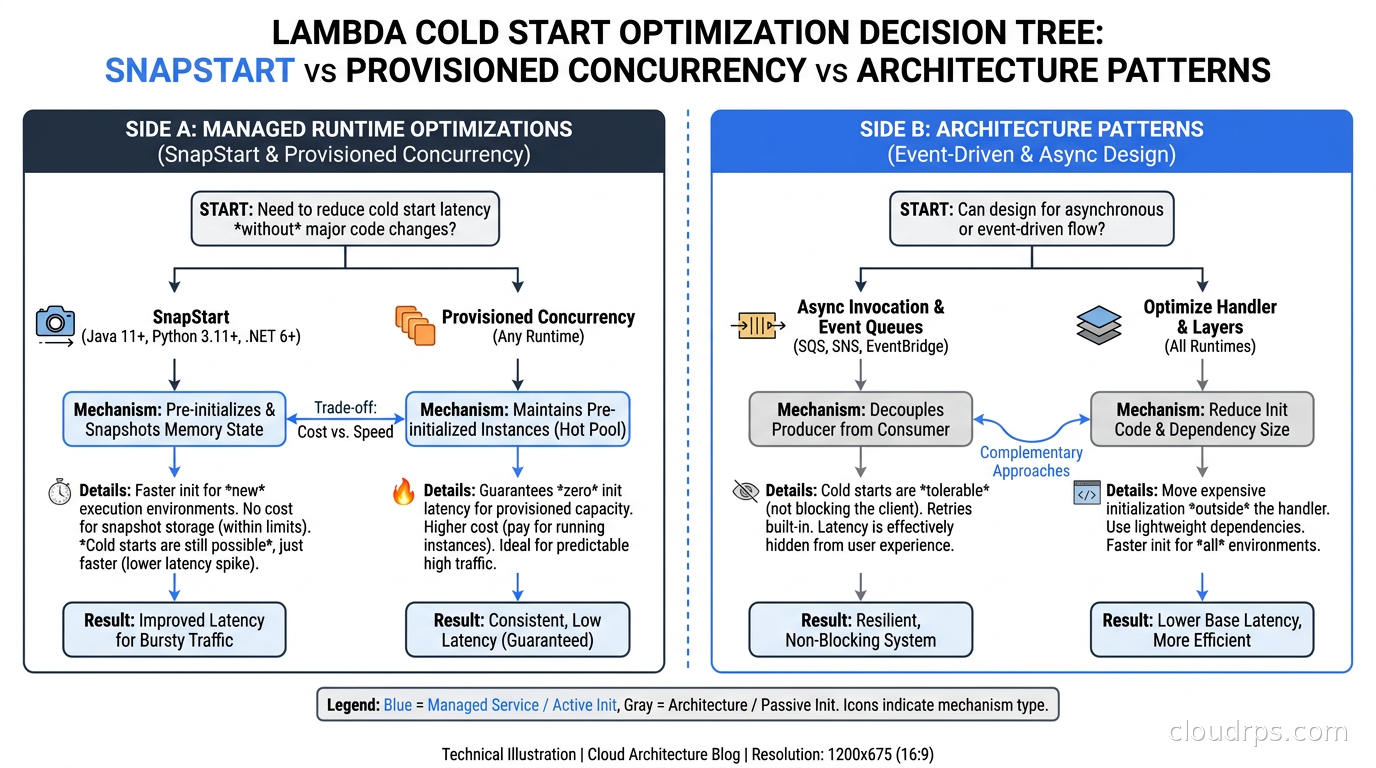
The decision tree is not complicated once you understand the trade-offs.
If you are running Java, Python 3.12+, or .NET 8+: Enable SnapStart. It costs nothing extra, requires no architectural changes, and meaningfully reduces cold start latency. The only reason not to enable it is if your initialization code relies on uniqueness or timing that the afterRestore hook cannot fix. Test your function after enabling SnapStart to verify correctness, particularly around random number generation, UUID creation, and any state that should be fresh per environment.
If you are using container images on supported runtimes: SnapStart support arrived in September 2026. Enable it the same way as ZIP deployments. For other base images, review the lifecycle hook approach in the Lambda developer documentation.
If you are running Node.js or Ruby, or SnapStart’s restore latency is still not low enough: Evaluate Provisioned Concurrency. Calculate the break-even point: at what request rate does the cost of provisioned concurrency equal the cost of the lost users caused by cold starts? For internal tools and background workers, the answer is probably never. For user-facing synchronous functions with steady traffic, Provisioned Concurrency combined with Application Auto Scaling is often the right call.
If your workloads are asynchronous or can tolerate latency: Design around cold starts rather than eliminating them. Pre-warming, async offloading, and caching in /tmp cost very little and often solve the problem without infrastructure changes.
If you are running AI agent tool functions: Treat every tool Lambda as a candidate for SnapStart. The compounding effect makes even modest individual cold start reductions significant at the agent level. Consider whether your agent orchestration layer can pre-warm tool environments during session initialization.
The SnapStart Container Image Case Study
To make this concrete: I have been working with a team building a RAG-based document analysis service. The Lambda functions package a custom embedding library and several NLP utilities as a container image. Before SnapStart container support, cold starts on these functions ran long enough to be clearly noticeable at the application layer. The team had been using Provisioned Concurrency for the most latency-sensitive functions, which solved the problem but added meaningful cost to every environment.
After enabling SnapStart on the container image functions in October 2026, the provisioned concurrency became unnecessary for most of them. AWS’s claim of sub-second startup held up in practice for functions that had been taking several seconds to initialize from scratch. The functions that still warranted provisioned concurrency were the ones called directly from user-facing API Gateway routes, where even a sub-second restore latency was visible enough to matter.
The afterRestore hook required some care: the embedding library used a random seed for batching operations that needed to be re-initialized per environment, and a connection to an internal service needed to be re-established after restore. Both were straightforward to handle in the hook, but required knowing that they existed as stateful initialization artifacts.
What Comes Next
Cold start latency is a solved problem for the workloads SnapStart supports. The remaining frontier is runtimes it does not: Node.js, Ruby, Go, and custom runtimes on provided.al2023. Node.js is the most important by volume. Container image SnapStart partially addresses it through lifecycle hooks, but the ergonomics are more complex than for natively-supported runtimes.
The serverless versus containers decision is increasingly about cold start characteristics, not just operational complexity. Google Cloud Run has its own initialization caching mechanisms. AWS Fargate’s cold start characteristics differ again. As AI workloads with heavy initialization requirements push more teams toward container-based serverless, the pressure to close these runtime gaps will only increase.
The underlying truth that twenty years in cloud infrastructure has reinforced: the best cold start is one you do not have. Design your systems to minimize cold start frequency through warm environments and async patterns, then use SnapStart and Provisioned Concurrency for the cases where you cannot avoid them. Reaching for provisioned concurrency as the first tool, before examining whether you actually need synchronous always-warm execution, is how serverless costs end up looking like Kubernetes costs without the control.
Sources: AWS Lambda SnapStart documentation, SnapStart for Python and .NET GA announcement, SnapStart for container images announcement.
Get Cloud Architecture Insights
Practical deep dives on infrastructure, security, and scaling. No spam, no fluff.
By subscribing, you agree to receive emails. Unsubscribe anytime.