
There’s a line I’ve been using in architecture reviews for twenty years: “Bandwidth is how wide the pipe is. Latency is how long the pipe is.” It’s an oversimplification, but it gets the core idea across faster than any textbook definition I’ve found. And yet, after three decades of building distributed systems, I still encounter teams that confuse the two, optimize for the wrong one, or don’t understand why their “fast” network feels slow.
The distinction between latency and bandwidth is one of the most important concepts in networking and distributed systems. Get it wrong and you’ll waste money on bandwidth you don’t need while ignoring latency that’s killing your user experience.
The Water Pipe Analogy (And Why It’s Not Quite Right)
The classic analogy: imagine a water pipe. The diameter of the pipe is bandwidth, representing how much water can flow through per unit of time. The length of the pipe is latency, representing how long it takes for a drop of water to travel from one end to the other.
A fat, short pipe gives you high bandwidth and low latency. That’s a local gigabit Ethernet connection. A thin, very long pipe gives you low bandwidth and high latency. That’s a satellite link to a remote research station.
The analogy works for intuition but breaks down in important ways. Network bandwidth isn’t really about pipe diameter; it’s about how many bits per second a link can carry. And latency isn’t just about distance; it includes processing time, queuing delays, serialization, and protocol overhead. Real networks are more complex than plumbing.
Let’s get precise.
What Bandwidth Actually Means
Bandwidth is the maximum rate of data transfer across a network link, measured in bits per second (bps). A 1 Gbps Ethernet link can theoretically transmit 1 billion bits per second. A 100 Mbps link can transmit 100 million bits per second.
A few important distinctions:
Bandwidth vs. throughput. Bandwidth is the theoretical maximum. Throughput is what you actually achieve. A 1 Gbps link will never give you 1 Gbps of application data transfer because of protocol overhead (Ethernet framing, IP headers, TCP headers), congestion, packet loss, and flow control. Real throughput is always lower than raw bandwidth. Typical TCP throughput on a healthy 1 Gbps link is around 900-940 Mbps.
Bandwidth is per-link, not end-to-end. Your 1 Gbps home internet connection is only 1 Gbps to your ISP. If the server you’re connecting to has a 100 Mbps link, your effective bandwidth for that connection is 100 Mbps. The bottleneck determines the effective bandwidth for any given flow.
Bandwidth is shared. Unless you have a dedicated circuit, your bandwidth is shared with other traffic on the same link. Your 1 Gbps office connection shared among 50 people gives each person an average of 20 Mbps, though in practice it’s bursty, not evenly divided.
What Latency Actually Means
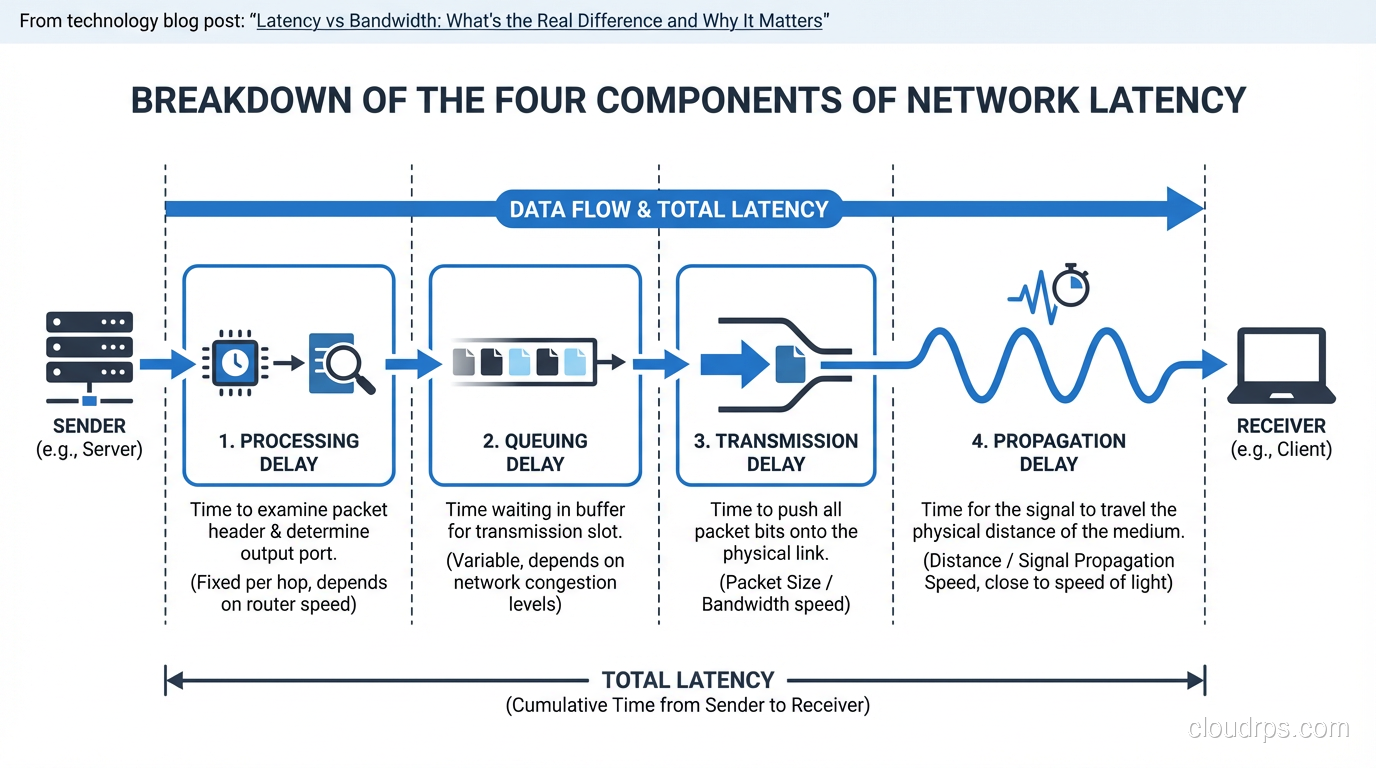
Latency is the time it takes for a packet to travel from source to destination. It’s usually measured in milliseconds (ms) and has several components:
Propagation delay. The time it takes for a signal to travel through the physical medium. Light travels through fiber at roughly two-thirds the speed of light in a vacuum, about 200,000 km/s. For a fiber path between New York and London (roughly 5,500 km of cable), propagation delay alone is about 27ms one way, 54ms round trip. You cannot reduce this. Physics doesn’t negotiate.
Serialization delay. The time to push all the bits of a packet onto the wire. A 1,500-byte packet on a 1 Gbps link takes 12 microseconds to serialize. On a 1 Mbps link, the same packet takes 12 milliseconds. Higher bandwidth reduces serialization delay, which is one of the few ways bandwidth and latency interact.
Processing delay. The time routers, switches, and firewalls take to examine the packet header, look up the routing table, apply ACLs, and forward the packet. Modern hardware handles this in microseconds, but deep packet inspection firewalls or overloaded routers can add significant processing delay.
Queuing delay. When a packet arrives at a router or switch and the outgoing interface is busy, the packet waits in a buffer. Under heavy load, queuing delays can dominate total latency. This is the most variable component and the primary cause of “jitter” (variation in latency).
Why Latency Matters More Than You Think
Here’s the counterintuitive truth that trips people up: for most interactive applications, latency matters far more than bandwidth.
Consider loading a web page. A modern web page might be 3 MB total. On a 100 Mbps connection, downloading 3 MB takes about 0.24 seconds. On a 10 Mbps connection, it takes 2.4 seconds. So bandwidth matters, right?
Not so fast. A web page isn’t a single 3 MB download. It’s dozens or hundreds of individual resources: HTML, CSS, JavaScript, images, fonts, API calls. Many of these resources depend on each other (the browser can’t request images until it’s parsed the HTML that references them). And each resource request requires a round trip to the server.
If your latency is 100ms, every round trip takes 100ms. A TCP connection requires a three-way handshake (1.5 round trips). A TLS handshake adds another 1-2 round trips. Then the HTTP request-response is another round trip. That’s 4-5 round trips before the first byte of content arrives, adding 400-500ms of latency overhead before any data even starts flowing.
Now multiply that by the number of resource requests that can’t be parallelized, and you see why latency dominates page load time. Google found that a 100ms increase in latency reduced revenue by 1%. Amazon found that every 100ms of added latency cost them 1% in sales. These aren’t rounding errors.
This is exactly why CDN infrastructure exists. CDNs don’t give you more bandwidth. They reduce latency by moving content closer to users. A CDN edge server in the same city as the user might have 5ms of latency instead of 100ms. The bandwidth is the same, but the page loads dramatically faster because each round trip is 20x shorter.
The Bandwidth-Delay Product
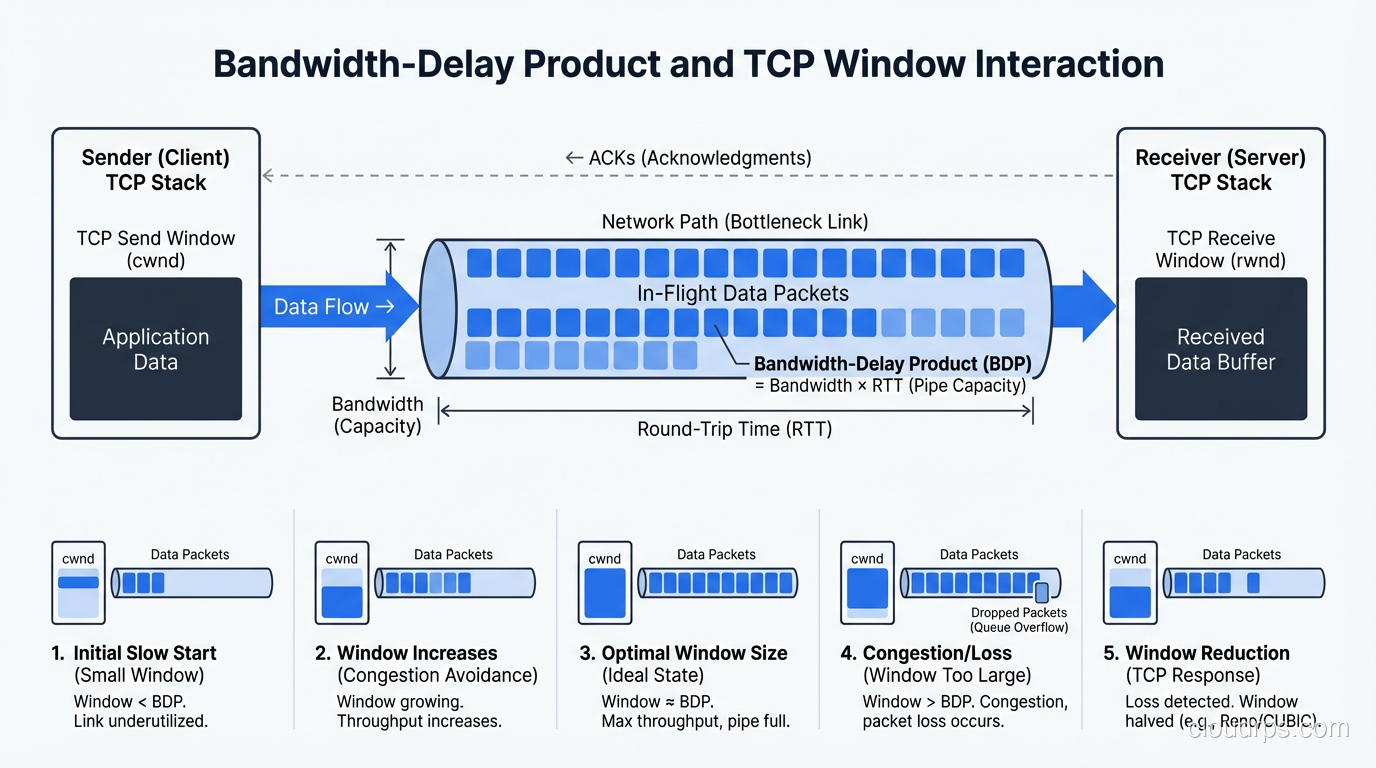
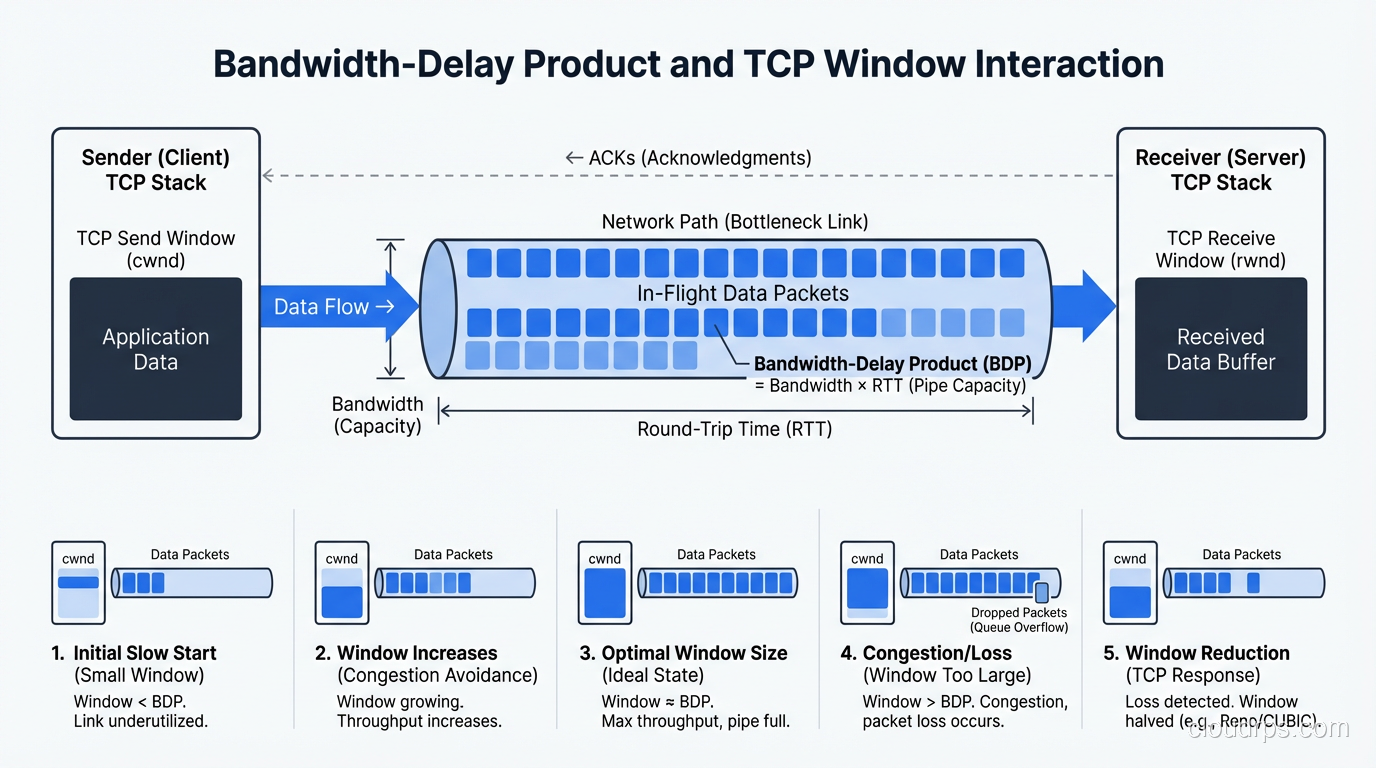
There’s a concept in networking called the bandwidth-delay product (BDP) that captures the interaction between bandwidth and latency. It’s the amount of data “in flight” in the network at any given time, meaning the data that has been sent but hasn’t been acknowledged yet.
BDP = bandwidth × round-trip time
A 1 Gbps link with 100ms RTT has a BDP of 1,000,000,000 × 0.1 = 100,000,000 bits = 12.5 MB.
This matters because TCP uses a receive window to control how much data can be in flight. If the TCP window is smaller than the BDP, the sender has to stop and wait for acknowledgments, and you’ll never fill the pipe. You’ll have plenty of bandwidth but low throughput because the protocol can’t keep enough data in flight.
This is the root cause of a problem I’ve seen dozens of times: teams upgrade from a 100 Mbps circuit to a 1 Gbps circuit and see almost no improvement in file transfer speeds to a remote data center. The link is faster, but the high latency means the BDP is large, and the TCP window isn’t large enough to fill it. The solution isn’t more bandwidth; it’s tuning the TCP window size or using a protocol designed for high-BDP links.
When Bandwidth Matters
Bandwidth matters most for bulk data transfer, moving large amounts of data where the number of round trips is small relative to the data volume.
Backup and replication. If you’re replicating a 10 TB database to a DR site, the total transfer time is dominated by the data volume divided by bandwidth, not by round trips. Doubling bandwidth roughly halves transfer time.
Video streaming. Once a video stream is buffered and playing, bandwidth determines whether you can sustain the bitrate. A 4K stream at 25 Mbps needs 25 Mbps of sustained bandwidth. Latency is less important once the buffer is filled (though high latency affects initial startup time and seek operations).
Large file downloads. Downloading a 50 GB game or OS image is a bandwidth-bound operation. With modern HTTP/2 and large TCP windows, a single connection can fill even a high-BDP link, and the transfer time is essentially size / bandwidth.
When Latency Matters
Latency matters most for interactive, request-response workloads.
Web applications. As discussed, page load time is dominated by the number of round trips multiplied by latency. HTTP/2 and HTTP/3 help by reducing the number of round trips (multiplexing, server push), but latency still matters for every mandatory round trip.
Real-time communication. Voice and video calls are extremely latency-sensitive. Human perception notices delays above about 150ms. At 300ms, conversation becomes difficult. This is why the choice between TCP and UDP matters so much for real-time traffic, since TCP’s retransmission adds latency that real-time applications can’t tolerate.
Online gaming. Competitive gamers obsess over “ping” for good reason. A 10ms advantage in latency is the difference between hitting the target and missing. Game servers are placed in multiple regions specifically to minimize latency to players.
Database queries. An application that makes 50 sequential database queries to render a page accumulates latency on each query. If the database is in a different region with 50ms of latency, that’s 2.5 seconds of latency overhead alone, even if each query returns instantly on the server side. This is why database replicas in the same availability zone as the application servers are so important.
API microservices. Distributed architectures with many service-to-service calls are especially latency-sensitive. If service A calls service B, which calls service C, which calls service D, the end-to-end latency is the sum of all inter-service latencies plus processing time. This “latency tax” on every hop is why microservice architectures need careful design, and why co-locating dependent services and reducing call chains matters.
Measuring and Diagnosing
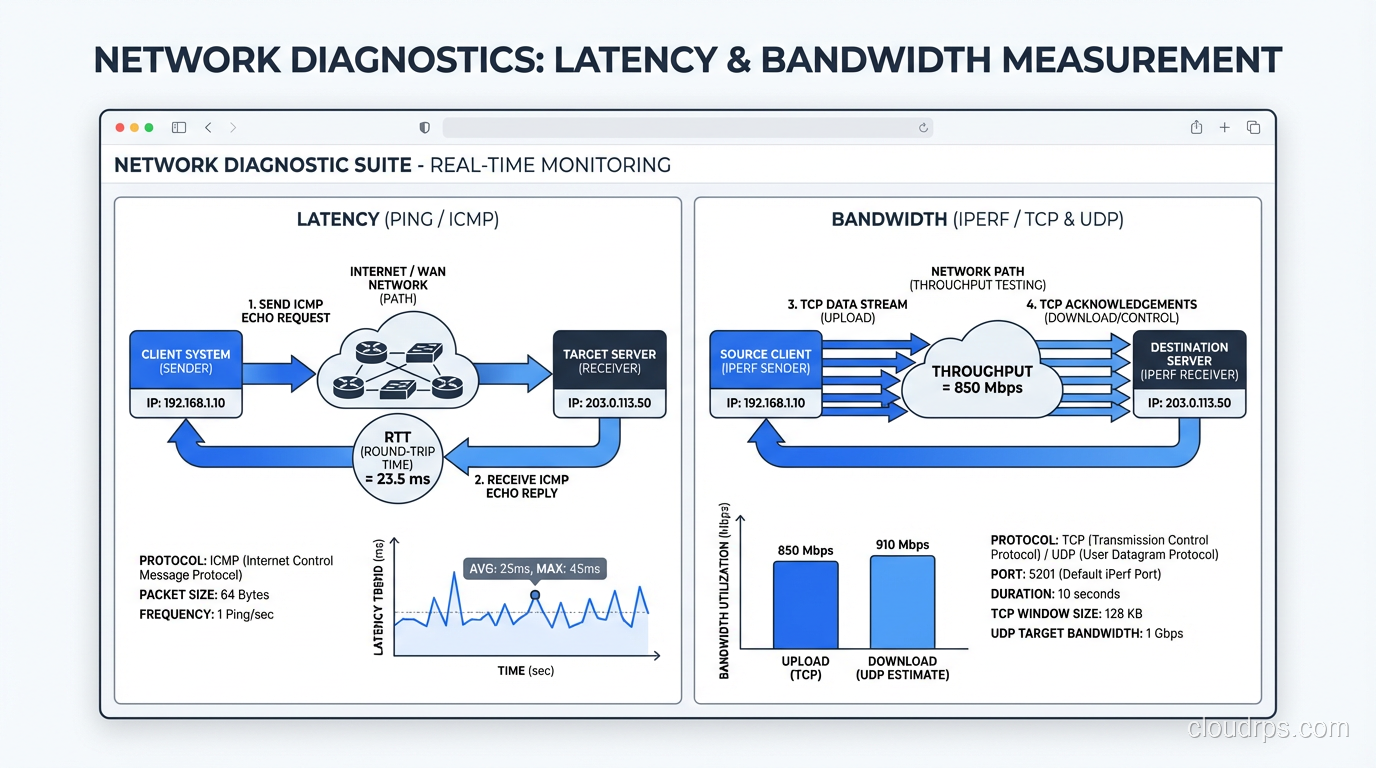
Latency measurement:
pinggives you round-trip time (RTT). Simple, effective, available everywhere.traceroute(ormtr, which combines ping and traceroute) shows per-hop latency, helping you identify where latency is being added.- Application-level latency monitoring (APM tools like Datadog, New Relic) shows end-to-end latency including server processing time.
Bandwidth measurement:
iperf3is the gold standard for measuring raw network bandwidth between two points.- Speed test sites (Ookla, fast.com) measure bandwidth to specific servers. Useful for consumer links, less useful for infrastructure.
- Sustained throughput measurement under real workloads is more meaningful than synthetic benchmarks.
For troubleshooting latency issues, a systematic approach is essential: measure at each layer, identify the component contributing the most latency, and address that first.
Optimizing Latency
Since you can’t change the speed of light, latency optimization is about:
- Reducing distance. Deploy servers closer to users. Use CDNs. Place database replicas in the same AZ as application servers.
- Reducing round trips. Use HTTP/2 or HTTP/3. Use connection pooling. Batch API calls. Pre-fetch data you’ll need.
- Reducing processing time. Optimize server-side code. Use caching. Reduce query complexity.
- Reducing queuing. Avoid network congestion. Use QoS to prioritize latency-sensitive traffic. Right-size your links to avoid saturation.
Optimizing Bandwidth
Bandwidth optimization is more straightforward:
- Compress data. Gzip, Brotli, zstd. Smaller payloads use less bandwidth and transfer faster.
- Reduce redundant transfers. Use HTTP caching headers. Only send data that has changed (delta sync, ETags).
- Upgrade links. Sometimes the answer really is buying more bandwidth. But only after you’ve confirmed bandwidth is actually the bottleneck.
- Traffic shaping. Prioritize critical traffic. Rate-limit bulk transfers during business hours.
The Cloud Dimension
In cloud environments, both latency and bandwidth have specific characteristics:
- Same AZ: Sub-millisecond latency, 10+ Gbps bandwidth. This is why you co-locate tightly coupled services.
- Cross-AZ (same region): 1-2ms latency, high bandwidth. Safe for synchronous replication and service calls.
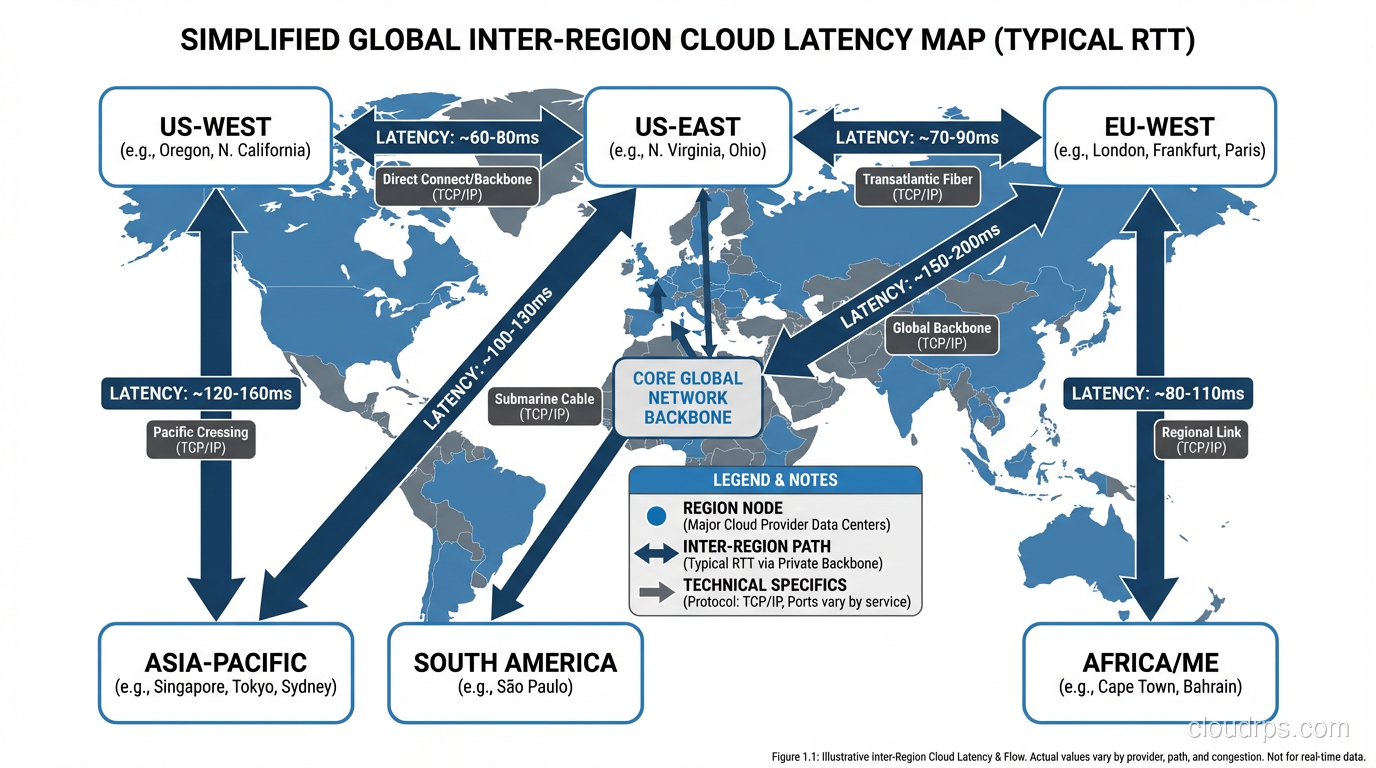
- Cross-region: 50-200ms latency depending on regions. Often used for async replication and DR.
- Internet edge to cloud: Highly variable. Depends on user location, ISP, and time of day.
AWS, Azure, and GCP all have backbone networks that provide lower latency between regions than the public internet. Cross-region latency on the provider’s backbone might be 60ms where the public internet path is 100ms.
A War Story
Years ago, I was called in to diagnose why a financial trading application was slower than the competition. The company had spared no expense: 10 Gbps network links, the fastest servers money could buy, terabytes of RAM. They assumed bandwidth was the answer and kept throwing capacity at the problem.
The issue was latency. Their application made 12 sequential API calls to assemble the data for each trade decision. Each call crossed a network boundary with 8ms of latency. That’s 96ms of accumulated latency before a single calculation began. Their competitor had restructured their application to make 2 calls instead of 12. Same data, different architecture. 16ms vs 96ms. In high-frequency trading, 80ms is an eternity.
We restructured the call chain, co-located services that called each other, and added a caching layer for data that didn’t change between calls. Total latency dropped from 96ms to 11ms. They didn’t need a single bandwidth upgrade.
Wrapping Up
Latency and bandwidth are both critical to network performance, but they affect different workloads in different ways. Bandwidth is about volume, how much data can flow per second. Latency is about time, how long it takes for data to make the trip. For interactive, request-response workloads (which is most of what we build today), latency is usually the bigger factor.
The most expensive mistake is optimizing the wrong one. Don’t buy more bandwidth when your problem is latency. Don’t deploy a CDN when your problem is a saturated link. Measure first, understand the nature of your workload, and then optimize accordingly.
And remember: you can always buy more bandwidth, but you can’t buy faster light.
Get Cloud Architecture Insights
Practical deep dives on infrastructure, security, and scaling. No spam, no fluff.
By subscribing, you agree to receive emails. Unsubscribe anytime.