
“Should we use a Layer 4 or Layer 7 load balancer?” is a question I’ve been asked in architecture reviews at least a hundred times. And my answer is almost always the same: “It depends on what you need to see.”
That’s the fundamental difference between Layer 4 and Layer 7: visibility. A Layer 4 device sees IP addresses, ports, and TCP/UDP connection state. A Layer 7 device sees all of that plus the actual application data: HTTP headers, URLs, cookies, request bodies, gRPC methods, and more. That visibility comes at a cost: more processing, more complexity, and different failure modes.
Understanding when you need each layer, and when you don’t, is one of the most consequential infrastructure decisions you’ll make. I’ve seen teams waste tens of thousands of dollars per month running application-layer load balancers where a simple TCP proxy would have worked. I’ve also seen teams deploy Layer 4 load balancers and then wonder why they can’t do URL-based routing or sticky sessions based on cookies.
Let’s break this down properly, using the OSI model as our framework.
What Layer 4 Sees (and Doesn’t See)
Layer 4 (the Transport layer) operates on TCP and UDP. A Layer 4 device can inspect and make decisions based on:
- Source IP address
- Destination IP address
- Source port
- Destination port
- TCP flags (SYN, ACK, FIN, RST)
- Protocol (TCP vs UDP)
That’s it. A Layer 4 load balancer or firewall has absolutely no idea whether the traffic is HTTP, gRPC, WebSocket, database connections, or anything else. It’s all just TCP (or UDP) segments with port numbers.
How Layer 4 Load Balancing Works
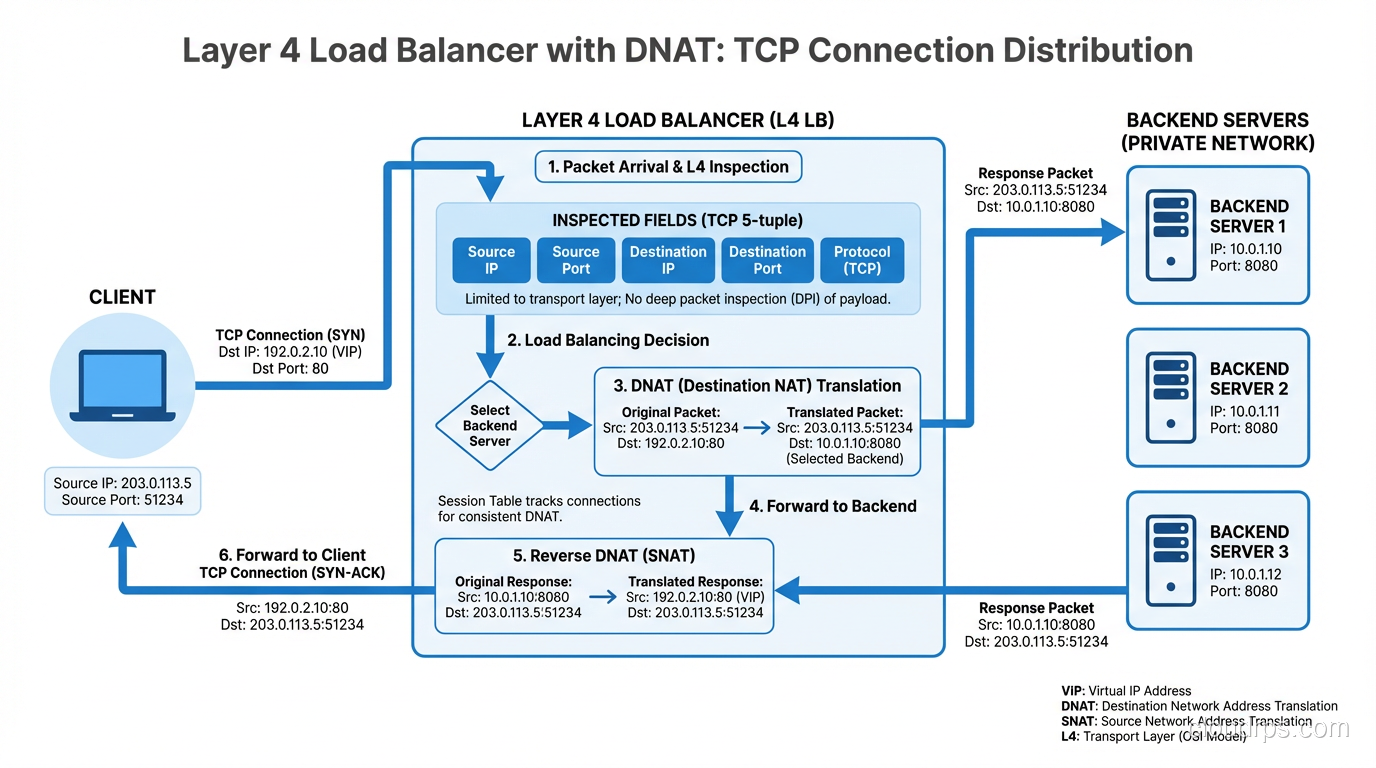
A Layer 4 load balancer distributes TCP connections across backend servers. When a new TCP SYN arrives, the load balancer selects a backend using its algorithm (round-robin, least connections, hash-based) and either:
- NATs the connection: Rewrites the destination IP to the backend server’s IP (DNAT). The client talks to the LB’s IP, the LB forwards to the backend.
- Uses DSR (Direct Server Return): The LB forwards the initial SYN to the backend, but the backend responds directly to the client, bypassing the LB for return traffic. This is extremely efficient for asymmetric workloads (small requests, large responses).
Client → [SYN to LB:443] → LB → [SYN to Backend-A:443] → Backend-A
Client ← [SYN-ACK from LB:443] ← LB ← [SYN-ACK from Backend-A:443] ← Backend-A
Client → [Data] → LB → Backend-A → (data flows through LB, or DSR bypasses it)
Once the connection is established, the LB maintains a connection table mapping (client_ip:client_port) → (backend_ip:backend_port). All subsequent packets for that connection go to the same backend. This is connection-level persistence, and it’s inherent to L4 load balancing.
Layer 4 Load Balancers in Practice
| Product | Type | Notes |
|---|---|---|
| AWS NLB | Cloud L4 | Millions of connections/sec, static IPs, very cheap |
| HAProxy (TCP mode) | Software | Incredibly efficient, widely deployed |
| IPVS (Linux) | Kernel | Used by Kubernetes kube-proxy in IPVS mode |
| F5 BIG-IP (L4 mode) | Hardware/VM | Enterprise staple |
| Maglev (Google) | Custom | Powers Google’s frontend, consistent hashing |
| Cloudflare Spectrum | Cloud L4 | L4 proxy for any TCP/UDP protocol |
What Layer 7 Sees (And Can Do With It)
Layer 7 (the Application layer) understands the actual protocol being spoken. For HTTP (the most common case), a Layer 7 device can see:
- Everything Layer 4 sees, plus:
- HTTP method (GET, POST, PUT, DELETE)
- URL path (
/api/v2/users) - Host header (virtual hosting)
- Query parameters (
?page=2&sort=name) - HTTP headers (Authorization, Content-Type, X-Custom-Header)
- Cookies (session IDs, tracking)
- Request/response body (JSON, HTML, form data)
- TLS SNI (if terminating TLS)
- HTTP version (1.1, 2, 3)
This visibility enables capabilities that Layer 4 simply cannot provide.
What Layer 7 Load Balancers Can Do
Content-based routing: Route requests to different backends based on URL path, headers, or any other HTTP attribute.
# Nginx Layer 7 routing
upstream api_servers {
    server 10.0.1.10:8080;
    server 10.0.1.11:8080;
}

upstream static_servers {
    server 10.0.2.10:80;
    server 10.0.2.11:80;
}

server {
    listen 443 ssl;

    location /api/ {
        proxy_pass http://api_servers;
    }

    location /static/ {
        proxy_pass http://static_servers;
    }

    location / {
        proxy_pass http://api_servers;
    }
}
Cookie-based session affinity: Stick users to specific backends based on a session cookie, rather than relying on source IP (which breaks with NAT).
SSL/TLS termination: Decrypt HTTPS at the load balancer, inspect the HTTP content, then forward to backends over plain HTTP (or re-encrypt). This centralizes certificate management and offloads crypto from your application servers.
Request modification: Add, remove, or modify headers before forwarding. Common uses: adding X-Forwarded-For with the client’s real IP, injecting trace IDs, stripping sensitive headers.
Rate limiting per URL/user: Limit requests to /api/search to 10/sec per user, while allowing unlimited requests to /api/healthcheck.
A/B testing and canary deployments: Send 5% of traffic to a new version based on a cookie or header.
Compression: gzip or Brotli compress responses at the LB layer.
Caching: Cache responses for specific URLs and serve them directly without hitting backends.
Layer 7 Load Balancers in Practice
| Product | Type | Notes |
|---|---|---|
| AWS ALB | Cloud L7 | HTTP/HTTPS, path/host routing, integrates with ECS/EKS |
| Nginx | Software | The Swiss Army knife of L7 proxying |
| Envoy | Software | Cloud-native, used in Istio/service meshes |
| HAProxy (HTTP mode) | Software | Feature-rich, battle-tested |
| Cloudflare | Cloud L7 | Integrated with CDN, WAF, DDoS protection |
| Traefik | Software | Popular in container environments |
| AWS API Gateway | Cloud L7 | Serverless-focused, rate limiting, auth |
The Performance Tradeoff
Here’s the elephant in the room: Layer 7 processing is orders of magnitude more expensive than Layer 4.
A Layer 4 load balancer handles a TCP connection by maintaining a small state table entry and forwarding packets. It doesn’t need to buffer data, parse protocols, or make complex decisions. An IPVS-based L4 LB can handle millions of concurrent connections with minimal CPU.
A Layer 7 load balancer must:
- Terminate the TCP connection from the client
- Parse the HTTP request (buffering potentially large headers/bodies)
- Make a routing decision based on parsed content
- Open a new TCP connection to the backend (or reuse one from a connection pool)
- Forward the request
- Buffer and parse the response
- Forward the response back to the client
That’s a lot more work. An Nginx instance handling L7 proxying typically handles tens of thousands of concurrent connections, not millions. The gap is real.
Performance Comparison
| Metric | Layer 4 (NLB/IPVS) | Layer 7 (ALB/Nginx) |
|---|---|---|
| Connections/sec | 1M+ | 10K-100K |
| Added latency | < 1ms | 1-10ms |
| Memory per connection | ~128 bytes | ~16KB+ |
| TLS termination | Pass-through only | Full termination |
| CPU usage | Minimal | Significant |
| Cost (cloud) | Lower | Higher |
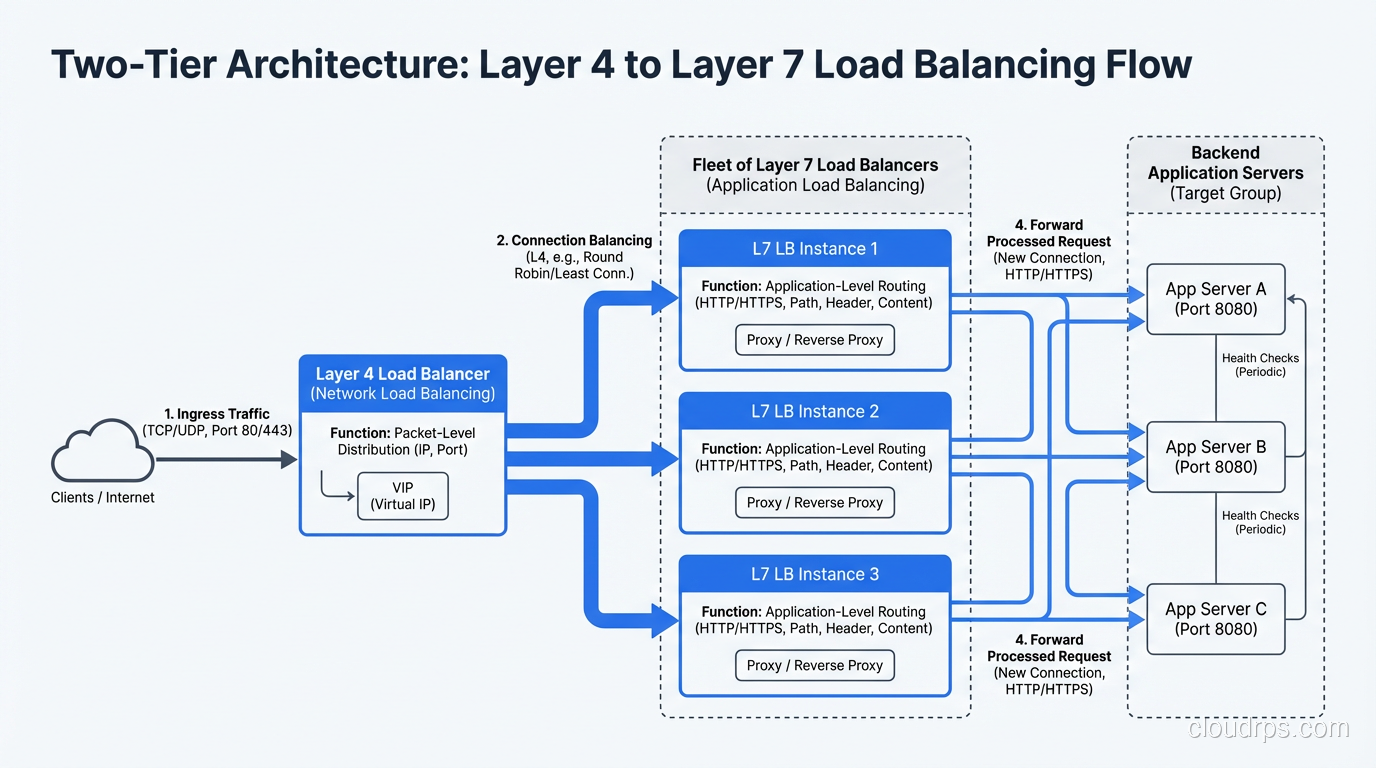
This is why many architectures use both: a Layer 4 load balancer in front of a fleet of Layer 7 load balancers. The L4 LB distributes raw TCP connections across multiple Nginx/Envoy instances, and those L7 instances handle the application-layer routing.
Internet → [L4 NLB] → [Nginx L7 fleet] → [Backend services]
AWS literally architectures this way: NLB in front of ALB is a documented pattern for when you need NLB’s static IP addresses but ALB’s L7 features.
Firewalls: L4 vs L7
The Layer 4 vs Layer 7 distinction is equally important for firewalls, and the terminology here is stateless vs stateful (Layer 3/4) vs next-generation (Layer 7).
Layer 3/4 Firewalls (Packet Filters)
Traditional firewalls and security groups (like AWS Security Groups) operate at Layer 3/4. They make allow/deny decisions based on:
- Source/destination IP
- Source/destination port
- Protocol (TCP/UDP/ICMP)
- TCP connection state (stateful firewalls track established connections)
# iptables Layer 4 rules
iptables -A INPUT -p tcp --dport 443 -j ACCEPT    # Allow HTTPS
iptables -A INPUT -p tcp --dport 22 -s 10.0.0.0/8 -j ACCEPT  # SSH from internal only
iptables -A INPUT -j DROP                           # Deny everything else
This is fast and effective for basic access control. AWS Security Groups are stateful L4 firewalls, and they can handle massive throughput because they operate at the hypervisor level.
Layer 7 Firewalls (NGFW / WAF)
Layer 7 firewalls, often called Next-Generation Firewalls (NGFW) or Web Application Firewalls (WAF), inspect the actual application payload. They can:
- Block SQL injection: Detect
SELECT * FROM users WHERE id='1' OR '1'='1'in HTTP request parameters - Block XSS: Detect
<script>tags in form submissions - Application identification: Distinguish between legitimate HTTPS traffic and tunneled P2P traffic on port 443
- TLS inspection: Decrypt, inspect, and re-encrypt HTTPS traffic (controversial, breaks end-to-end encryption)
- File type filtering: Block
.exedownloads or detect malware in uploaded files - Protocol compliance: Ensure HTTP requests conform to RFC standards, reject malformed requests
# AWS WAF rule example (simplified)
Rules:
  - Name: BlockSQLInjection
    Priority: 1
    Statement:
      SqliMatchStatement:
        FieldToMatch:
          QueryString: {}
        TextTransformations:
          - Priority: 0
            Type: URL_DECODE
    Action:
      Block: {}
The Firewall Decision Matrix
| Requirement | L3/4 Firewall | L7 Firewall/WAF |
|---|---|---|
| Block by IP/port | ✓ Best choice | ✓ Overkill |
| Block by country (GeoIP) | ✓ Efficient | ✓ Also works |
| Block SQL injection | ✗ Can’t see payload | ✓ Required |
| Rate limit by URL | ✗ Can’t see URL | ✓ Required |
| Block specific user agents | ✗ Can’t see headers | ✓ Required |
| Inspect encrypted traffic | ✗ Can’t decrypt | ✓ With TLS termination |
| Performance at scale | ✓ Very fast | △ Slower, needs more resources |
In practice, you use both. L3/4 security groups as the first line of defense (cheap, fast, blocks obvious noise), and L7 WAF for application-specific threats.
Proxies: Forward and Reverse
Proxies are another area where the L4/L7 distinction matters.
Layer 4 Proxy (TCP Proxy)
A Layer 4 proxy forwards TCP connections without understanding the application protocol. It’s used for:
- TLS passthrough: Forward encrypted connections to backends without terminating TLS
- Non-HTTP protocols: Database connections (MySQL on 3306, Redis on 6379), MQTT, custom protocols
- Maximum performance: When you don’t need L7 features
In Kubernetes, a Service of type LoadBalancer with TCP backend is essentially an L4 proxy.
Layer 7 Proxy (Application Proxy)
A Layer 7 proxy understands and can modify application-layer traffic. Reverse proxies like Nginx, Envoy, and HAProxy (in HTTP mode) are L7 proxies. They:
- Terminate TLS and re-establish connections to backends
- Parse HTTP requests and responses
- Can rewrite URLs, add headers, modify cookies
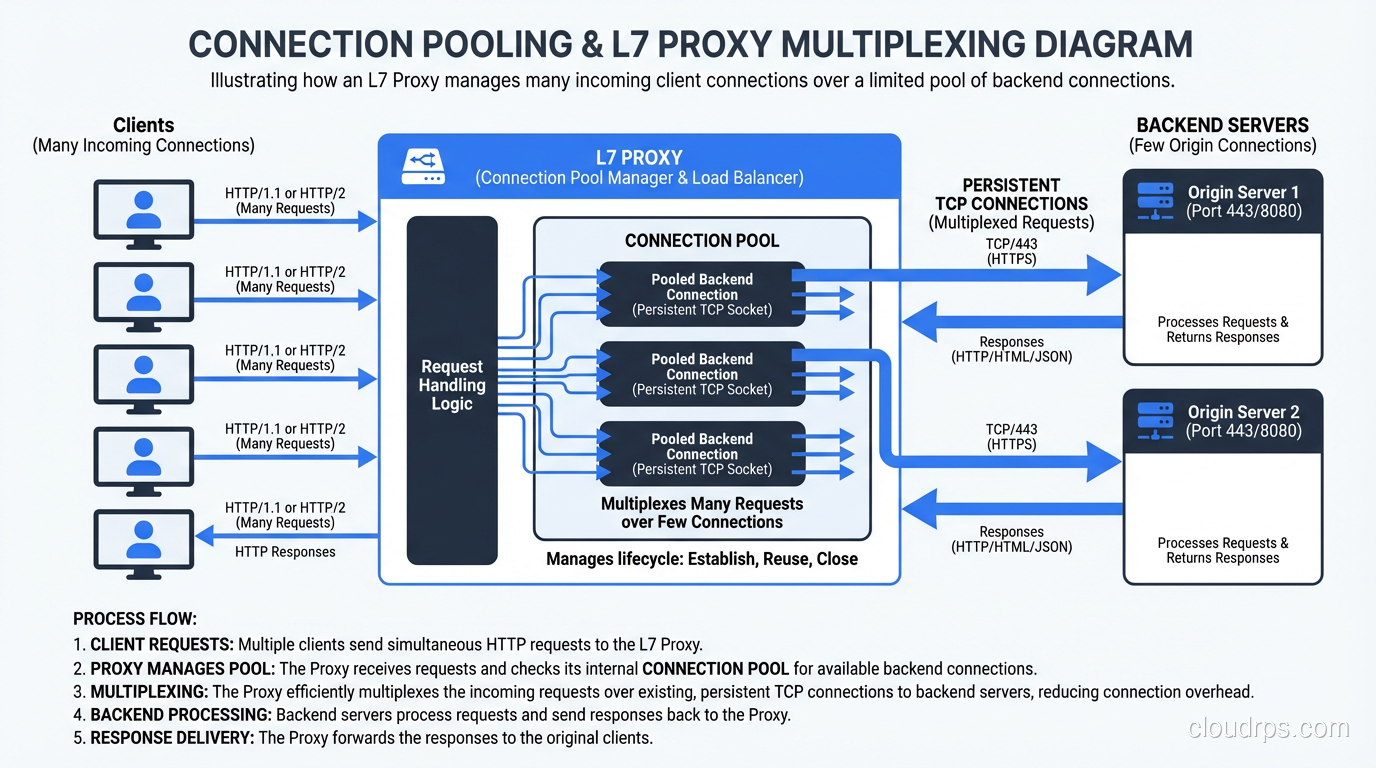
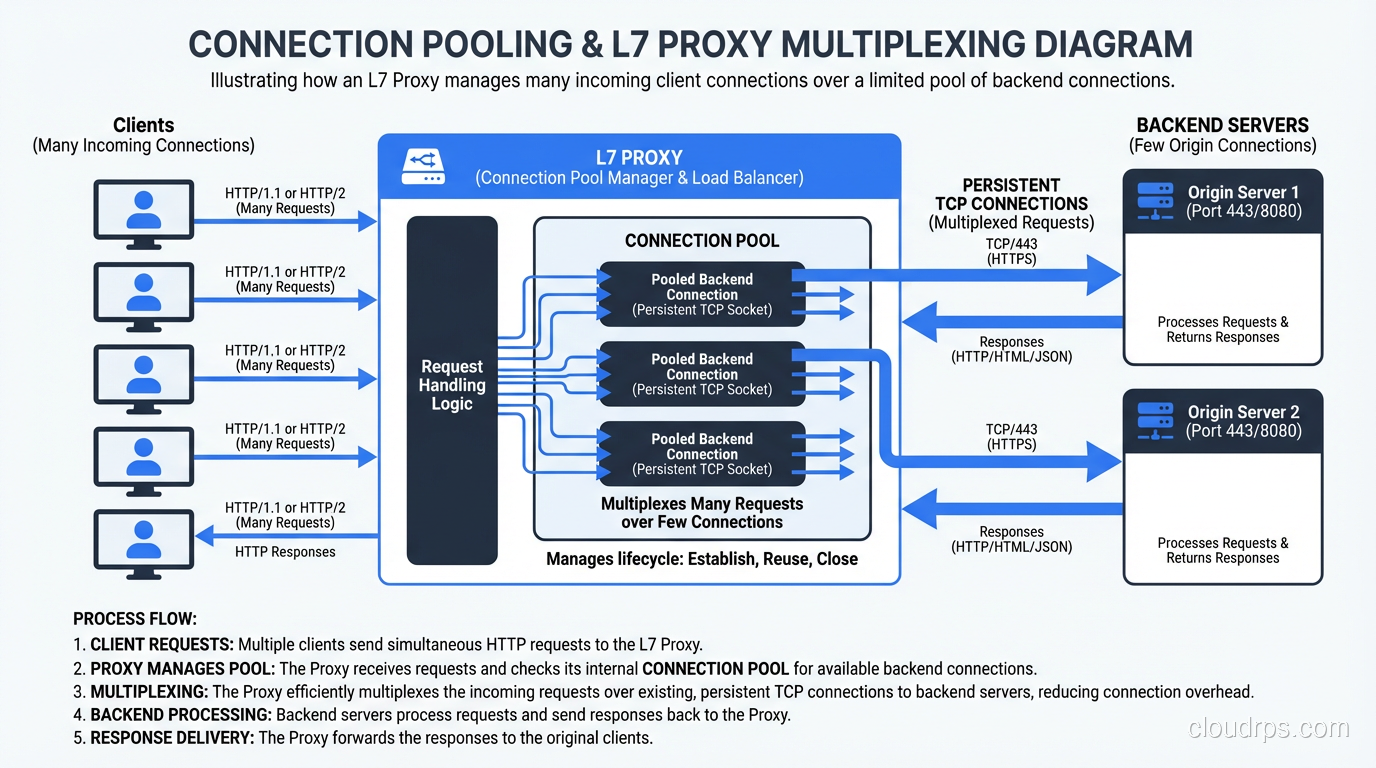
- Support connection pooling (reusing backend connections across multiple client requests)
- Can multiplex HTTP/2 connections from clients over HTTP/1.1 connections to backends
The Connection Pooling Win
One of the biggest advantages of L7 proxies that people overlook is connection pooling. Without an L7 proxy, every client TCP connection maps to a backend TCP connection. If you have 10,000 clients, your backend handles 10,000 connections.
With an L7 proxy, the proxy maintains a small pool of persistent connections to each backend. It receives a client request, selects a backend connection from the pool, sends the request, gets the response, and sends it back to the client. The proxy might serve 10,000 clients with only 100 backend connections.
This is huge for databases and backend services that have connection limits. I’ve seen PostgreSQL backends saved from connection exhaustion by putting a PgBouncer (L7 proxy for PostgreSQL) in front of them.
gRPC, WebSockets, and Other Protocols
Not everything is simple HTTP request/response. Modern applications use:
gRPC: HTTP/2-based RPC framework. L7 load balancing for gRPC requires understanding HTTP/2 frames, because a single HTTP/2 connection multiplexes many streams (RPCs). An L4 load balancer sees one connection and sends all streams to one backend, defeating the purpose of load balancing.
WebSockets: Start as HTTP, then upgrade to a persistent bidirectional connection. An L7 load balancer handles the HTTP upgrade, then the connection becomes essentially L4 (raw TCP frames going back and forth).
HTTP/2 and HTTP/3: Multiplexed protocols where a single connection carries multiple streams. L4 load balancers can only balance at the connection level, not the stream level. This is why gRPC services almost always need L7 load balancing.
# gRPC load balancing problem with L4
Client → [L4 LB] → single HTTP/2 connection → Backend-A
                    (all gRPC streams go to one backend!)

# gRPC load balancing with L7
Client → [L7 LB (Envoy)] → distributes individual gRPC streams
                           → Backend-A (stream 1, stream 3)
                           → Backend-B (stream 2, stream 4)
This is one of the reasons Envoy became so popular in the Kubernetes/service-mesh world. It natively understands HTTP/2 and gRPC and can load-balance at the stream level.
Decision Framework: When to Use Which
After years of deploying both, here’s my rule of thumb:
Use Layer 4 when:
- You’re proxying non-HTTP protocols (databases, MQTT, custom TCP)
- You need TLS passthrough (end-to-end encryption, can’t terminate at LB)
- You need maximum performance and minimal latency
- You need static IP addresses (AWS NLB provides this, ALB doesn’t)
- You’re building the first tier of a two-tier LB architecture
- Your routing decisions are purely based on port number
Use Layer 7 when:
- You need URL-based routing (
/api/*to one service,/web/*to another) - You need header/cookie-based routing or session affinity
- You need TLS termination at the load balancer
- You want to do request/response modification
- You need rate limiting based on URL, user, or API key
- You’re running gRPC or need HTTP/2 stream-level load balancing
- You need WAF capabilities
- You want connection pooling to protect backends
Use both when:
- You need static IPs AND L7 routing (NLB → ALB pattern)
- You need to scale L7 capacity horizontally
- You have mixed protocol requirements
Cloud-Specific Guidance
AWS
| Service | Layer | Use When |
|---|---|---|
| NLB | L4 | TCP/UDP, static IPs, extreme throughput, TLS passthrough |
| ALB | L7 | HTTP/HTTPS, path routing, gRPC, WebSocket |
| CLB (Classic) | Both | Don’t. Migrate to NLB or ALB. |
| API Gateway | L7 | REST/HTTP APIs, serverless integration |
| CloudFront | L7 | CDN + L7 routing at edge |
GCP
- Network LB: Layer 4, regional
- HTTP(S) LB: Layer 7, global (this is what most people want)
- TCP/SSL Proxy: Layer 4 with global anycast
Kubernetes
- Service (ClusterIP/NodePort): Layer 4 (iptables/IPVS)
- Ingress: Layer 7 (Nginx, Traefik, or cloud ALB)
- Gateway API: Layer 4 and Layer 7 (newer, more flexible than Ingress)
Wrapping Up
The Layer 4 vs Layer 7 decision comes down to what you need to see. If you’re making decisions based on IP addresses and port numbers, stay at Layer 4; it’s cheaper, faster, and simpler. If you need to look inside the application protocol to make routing, security, or modification decisions, you need Layer 7.
In most modern web architectures, you’ll use both. L4 for raw TCP distribution and non-HTTP protocols, L7 for HTTP routing and application-layer intelligence. Understanding where the boundary lies, and what each layer costs you in performance and complexity, will help you build load balancer architectures that are both effective and efficient.
Don’t over-engineer. If your architecture is “everything goes to the same backend pool on port 443,” you probably don’t need an ALB. And if you’re spending hours configuring URL-based routing, you definitely don’t want an NLB. Match the tool to the problem.
Get Cloud Architecture Insights
Practical deep dives on infrastructure, security, and scaling. No spam, no fluff.
By subscribing, you agree to receive emails. Unsubscribe anytime.