
I have been deep in AI infrastructure for the past several years, and if I had to name the single thing that causes the most confusion among engineering teams right now, it is the question of when and how to fine-tune a model. Teams either jump straight to fine-tuning because it sounds powerful, or they avoid it entirely because the GPU requirements seem daunting. Both instincts are wrong in different ways.
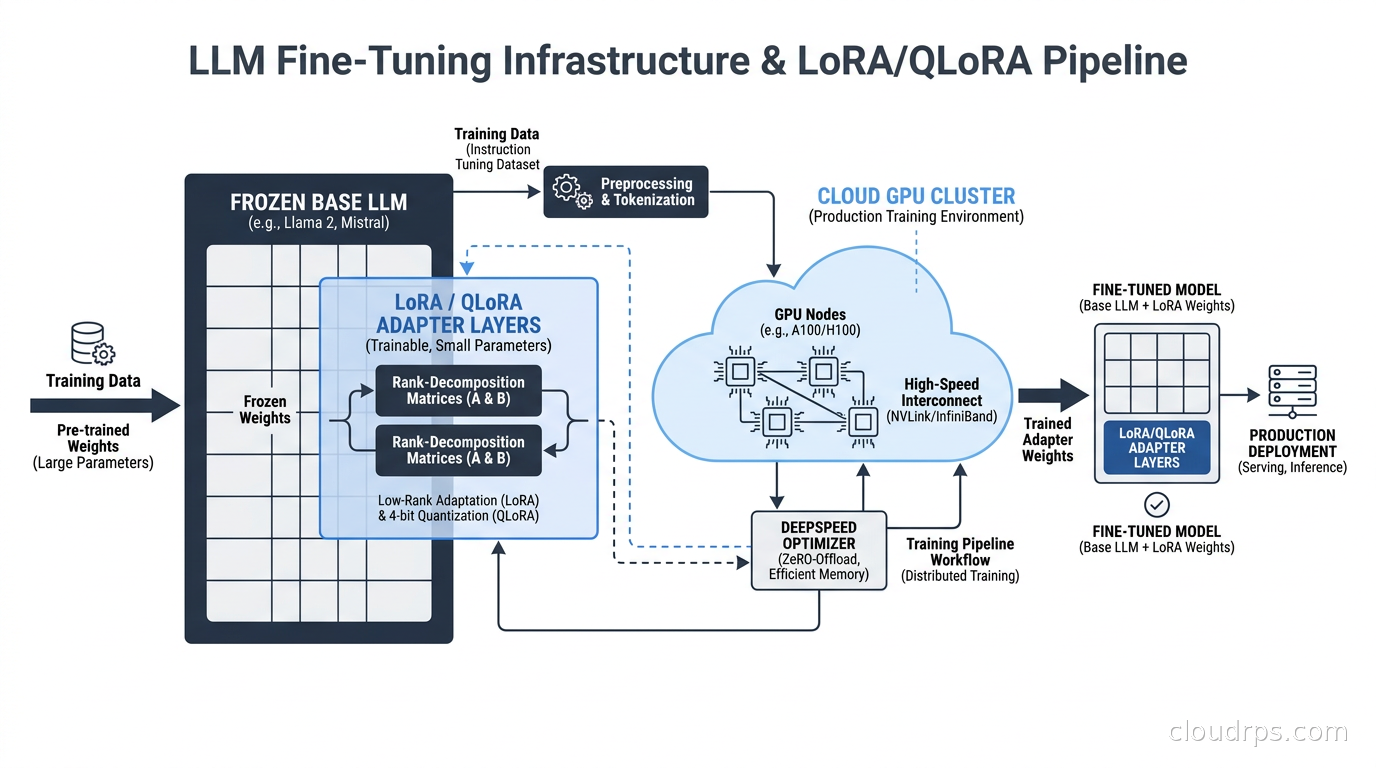
Fine-tuning is not magic, and it is not unapproachable. With parameter-efficient methods like LoRA and QLoRA, you can adapt a 7B or 13B model on a single GPU in an afternoon. With the right cloud setup, you can fine-tune a 70B model for a few hundred dollars. The infrastructure is finally accessible. The harder problem is knowing when fine-tuning is actually the right tool versus a RAG architecture or few-shot prompting, and how to build the pipeline so your experiments are repeatable and your deployments do not become a mystery.
This article is the one I wish I had the first time I tried to stand up a fine-tuning pipeline in production.
When to Fine-Tune vs Everything Else
Before touching the infrastructure, let me be direct about when fine-tuning is the right call, because I have seen teams waste weeks building fine-tuning pipelines for problems that better prompting or RAG would have solved in an afternoon.
Fine-tuning makes sense when:
- You have a consistent style, format, or behavioral change you need across all outputs, not just specific queries
- You have thousands to tens of thousands of labeled examples of the exact behavior you want
- Latency matters and you cannot afford to stuff a 10,000 token context window with examples on every call
- You need the model to internalize domain knowledge that cannot be retrieved: specialized jargon, reasoning patterns, output schemas
Fine-tuning does NOT make sense when:
- Your knowledge changes frequently (use RAG instead)
- You have fewer than a few hundred examples (few-shot prompting will likely match the results)
- Your “fine-tuning” goal is just following instructions better (fix your system prompt first)
- You do not have the ability to evaluate outputs rigorously
One variant worth knowing about: LLM distillation is a form of fine-tuning where the labels come from a larger “teacher” model rather than human annotators. If you have high call volume on a frontier model and want to capture its behavior in a cheaper, task-specific student model, distillation is often a better framing than general-purpose fine-tuning. The pipeline is similar but the dataset generation step is different.
I watched a fintech company spend three weeks fine-tuning a model to answer questions about their loan products, when a hybrid RAG architecture would have handled the constantly-changing rate and product information far better. Fine-tuning baked in stale data and made updates a retraining event instead of a document update. They eventually switched to RAG and shipped in two days.
How LoRA Works: The Math That Makes Fine-Tuning Affordable
Classic full fine-tuning updates every weight in the model. For a 70B parameter model, that means 70 billion float32 values to store gradients for, maintain optimizer state for, and update on every backward pass. The memory requirements are brutal. You need a cluster of A100s or H100s, and you are looking at thousands of dollars per training run for serious model sizes.
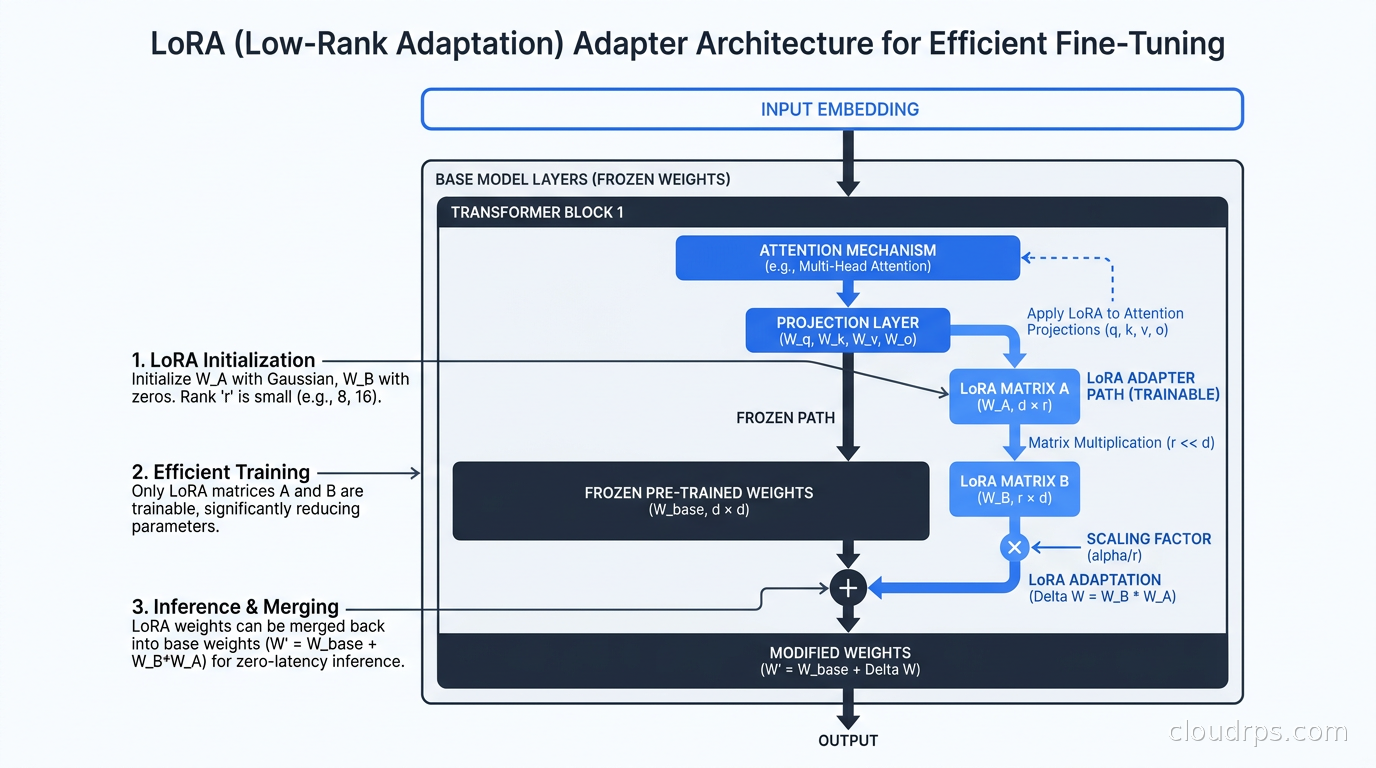
LoRA (Low-Rank Adaptation) works on the insight that the changes needed during fine-tuning have low intrinsic dimensionality. Instead of updating the full weight matrix W (which might be 4096x4096 for an attention projection layer), LoRA adds two small matrices A and B, where A is 4096xr and B is rx4096, with r being the rank (typically 4, 8, 16, or 32). The effective weight update is A multiplied by B. During training, only A and B are updated; the original model weights are frozen entirely.
You end up training roughly 0.1 to 1 percent of the total parameter count. Memory requirements drop dramatically.
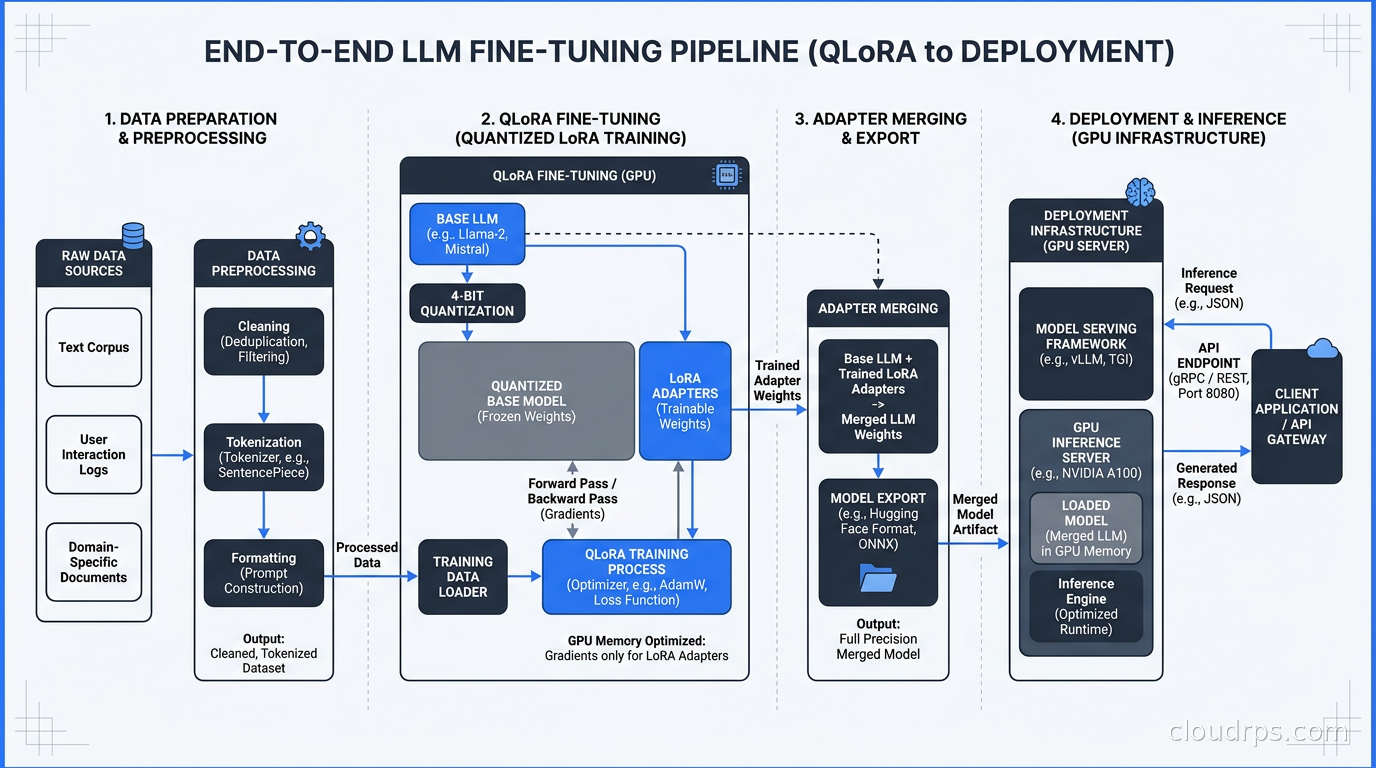
QLoRA (Quantized LoRA) takes this further. It quantizes the base model weights to 4-bit precision using NF4 (NormalFloat4) quantization, cutting the memory footprint of the frozen base model by roughly 4x. You still train the LoRA adapters in 16-bit precision, but the base model weights stay frozen in 4-bit. A 7B model that needs around 14GB at 16-bit precision fits in 5-6GB with QLoRA. A 70B model drops from roughly 140GB to around 45GB, meaning you can fine-tune it on a single A100 80GB. Note that the NF4 format used during QLoRA training is distinct from the production serving formats (AWQ, GPTQ) you will use after fine-tuning. The recommended path is to merge your trained LoRA adapter into the base model and then apply AWQ quantization to the merged result for production deployment. Our LLM quantization guide covers the full production format landscape and why this merge-and-requantize approach yields better inference quality than serving a quantized model with an unmerged adapter.
The LoRA hyperparameters you need to understand:
r (rank): Higher rank captures more complex adaptations but uses more memory and is more prone to overfitting. 8 to 16 is a good starting point for most instruction-tuning tasks.
alpha: Scales the LoRA output. Convention is to set alpha equal to 2 times r, though alpha equal to r also works fine. This controls the effective learning rate of the adapters.
target_modules: Which weight matrices to apply LoRA to. For most transformer models, q_proj and v_proj is the minimum. Adding k_proj, o_proj, and the MLP layers (gate_proj, up_proj, down_proj) gives better results at the cost of more memory and slightly slower training.
dropout: Small LoRA dropout (0.05 to 0.1) helps regularization. I have seen it make a meaningful difference when training data is limited.
In practice, QLoRA recovers roughly 90 to 95 percent of the performance of full fine-tuning while requiring a fraction of the memory. For most production use cases, that tradeoff is excellent. I use QLoRA as my default unless I have evidence that full fine-tuning would meaningfully change outcomes.
The Single-GPU Setup
For models up to 13B parameters, a single A100 80GB or H100 80GB handles QLoRA fine-tuning comfortably. For 7B models, an A10G 24GB or 40GB A100 often works. This is remarkable: the infrastructure barrier that once required a dedicated ML engineering team now fits on a single instance.
The standard stack today is:
Transformers + PEFT + TRL: Hugging Face’s ecosystem. PEFT handles LoRA and QLoRA configuration. TRL provides SFTTrainer for supervised fine-tuning and DPOTrainer for direct preference optimization.
BitsAndBytes: Handles the 4-bit quantization for QLoRA. One import, one config object, and the quantization is handled transparently.
Unsloth: Custom CUDA kernels that produce 2 to 4x training speedups over vanilla Hugging Face, with lower memory usage. This translates directly to lower cloud costs. For single-GPU fine-tuning, it is my default now.
Weights and Biases or MLflow: Experiment tracking. You will run many experiments and you will need to compare them.
A minimal QLoRA setup with Hugging Face PEFT:
from transformers import AutoModelForCausalLM, BitsAndBytesConfig
from peft import LoraConfig, get_peft_model
import torch

bnb_config = BitsAndBytesConfig(
    load_in_4bit=True,
    bnb_4bit_quant_type="nf4",
    bnb_4bit_compute_dtype=torch.bfloat16,
    bnb_4bit_use_double_quant=True,
)

model = AutoModelForCausalLM.from_pretrained(
    "meta-llama/Llama-3.1-8B",
    quantization_config=bnb_config,
    device_map="auto",
)

lora_config = LoraConfig(
    r=16,
    lora_alpha=32,
    target_modules=["q_proj", "v_proj", "k_proj", "o_proj"],
    lora_dropout=0.05,
    bias="none",
    task_type="CAUSAL_LM",
)

model = get_peft_model(model, lora_config)
The cloud infrastructure for single-GPU fine-tuning is simple: one instance, your dataset in S3 or GCS, and persistent storage for checkpoints. On spot instances, an A100 80GB runs roughly $2 to $4 per hour at spot pricing. A typical fine-tuning run for a 7B model on 10,000 examples takes 2 to 4 hours. Total compute cost: under $20. That kind of accessibility did not exist three years ago.
Multi-GPU Training: FSDP vs DeepSpeed
Once you need to fine-tune models larger than what fits comfortably on a single GPU, or you want full fine-tuning instead of LoRA, you need distributed training. The two dominant frameworks are PyTorch FSDP (Fully Sharded Data Parallelism) and Microsoft’s DeepSpeed.
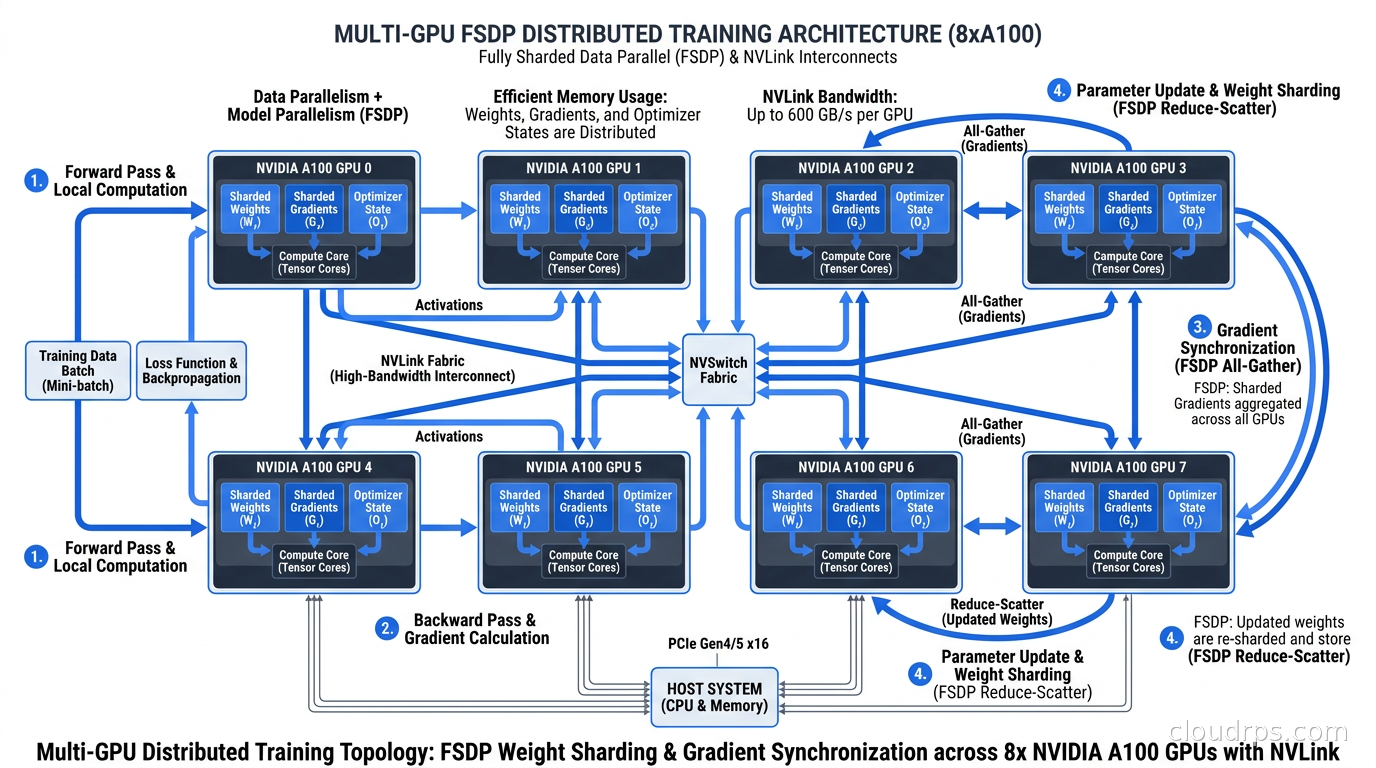
PyTorch FSDP shards model parameters, gradients, and optimizer state across all GPUs. During the forward pass, each GPU holds only a shard of each layer’s weights. FSDP uses all-gather operations to materialize the full layer when needed, then discards the remote shards immediately after. This scales linearly with GPU count and is now the standard for large-scale training. It is tightly integrated with PyTorch and requires minimal extra configuration beyond specifying a sharding strategy.
DeepSpeed is Microsoft’s optimization library supporting ZeRO (Zero Redundancy Optimizer) stages 1, 2, and 3, which progressively shard more training state:
- ZeRO-1: Shard optimizer state only
- ZeRO-2: Shard optimizer state and gradients
- ZeRO-3: Shard optimizer state, gradients, and model parameters (equivalent to FSDP)
DeepSpeed also includes CPU offloading, which uses system RAM as a spill buffer for optimizer state and parameters. With ZeRO-Infinity and CPU offloading, you can fine-tune models that would not otherwise fit in GPU memory at all, at the cost of slower training due to CPU-GPU data transfers.
My rule of thumb after running both in production:
- Single node, up to 8 GPUs: FSDP is simpler, native to PyTorch, and fast. Start here.
- Multi-node training: DeepSpeed has better-tuned multi-node performance, especially with its elastic training support.
- Memory-constrained environments: DeepSpeed’s CPU offloading is genuinely invaluable. I used it to fine-tune a 34B model on 4xA100 40GB instances before H100s became accessible.
- Hugging Face Trainer: Both integrate cleanly.
For GPU infrastructure selection, multi-GPU fine-tuning requires fast interconnects. Within a single node, you need NVLink. For multi-node training, InfiniBand matters significantly. AWS P4d and P5 instances, GCP A3 instances, and Azure NDv5 instances all provide the interconnect bandwidth needed for efficient distributed training. Without fast interconnects, communication overhead dominates and you lose most of the scaling benefit. If you are designing your own GPU cluster rather than using cloud instances, the GPU cluster networking guide covers RDMA, RoCEv2 configuration, and lossless fabric design in depth. For teams running large-scale fine-tuning jobs with stable input shapes and no custom CUDA kernels, AWS Trainium 3 and Google Ironwood TPU are now worth evaluating as cost alternatives, with 30-50% savings potential for qualifying workloads.
The Cloud Infrastructure Setup
Here is the setup I use for production fine-tuning jobs.
Storage: Training data lives in S3 or GCS. I stage a local copy on the NVMe SSD attached to the training instance before starting the job. For 10 to 50GB datasets, this is straightforward. For larger datasets, streaming with a data loader buffer works but adds throughput complexity. Once you move to multi-node pre-training where every node needs shared access to the same dataset, local NVMe is no longer an option and you need a proper parallel file system like Lustre or WEKA. Checkpoint storage also goes to object storage: every 500 to 1000 steps, write the adapter weights and optimizer state so you can resume if the spot instance is interrupted.
Compute: Spot instances for experiments, on-demand or reserved for production training runs where interruption is unacceptable. With aggressive spot checkpointing, most LoRA fine-tuning jobs complete in under 4 hours, making spot interruption risk manageable. I use AWS Spot with automatic restart via EC2 launch templates, or GCP Spot VMs with preemption scripts that push the latest checkpoint to GCS before shutdown.
Experiment tracking: Weights and Biases is my preference. Every run gets tagged with the model base, dataset version, LoRA rank, learning rate, and number of steps. The comparison UI makes it practical to run 10 experiments and understand which variables actually mattered.
Containerization: Training jobs run in Docker containers built from versioned images, with environment variables injecting the run configuration. This makes any experiment exactly reproducible. For Kubernetes-based training, Ray on Kubernetes handles multi-GPU job orchestration cleanly, and the Hugging Face Accelerate integration with Ray Train is solid for FSDP jobs.
Data Preparation Is 80% of the Work
No amount of infrastructure sophistication compensates for bad training data. I have watched teams spend weeks tuning learning rate schedules when the actual problem was inconsistent or noisy training examples.
For instruction fine-tuning, your data format matters. Most modern models (Llama 3, Mistral, Gemma) use a conversation format with role labels. Always use the model’s documented chat template, not a generic Alpaca-style format, unless you are specifically testing format generalization.
Data quality practices I follow consistently:
Deduplication: Exact and near-deduplication. MinHash LSH is fast for near-dedup at scale. Even 5 percent duplicates can noticeably distort training dynamics.
Length filtering: Remove examples that are too short to be meaningful or so long they dominate training steps disproportionately. I typically filter below 50 tokens and above 4096 tokens.
Quality scoring: For curated datasets, use a reward model or a judge LLM to score examples and filter the bottom 10 to 20 percent. A single bad example in a small dataset can measurably hurt results.
Held-out evaluation set: Never use evaluation examples in training. This sounds obvious, but I have seen it happen in both startups and large enterprises.
For domain-specific fine-tuning, 500 to 2000 high-quality, carefully curated examples often outperform 50,000 noisy examples. Quality wins over quantity at fine-tuning scale, especially with smaller models. When real domain data is off-limits due to privacy or regulatory constraints, synthetic data generation is an increasingly practical alternative: a teacher model generates instruction-response pairs that preserve domain coverage without exposing sensitive records from the original dataset.
Training Configuration That Actually Works
A few settings that consistently improve results across fine-tuning jobs:
Learning rate: Much lower than pre-training. Typical range for LoRA adapters is 1e-5 to 3e-4. Too high and you see training loss drop fast then spike: catastrophic forgetting. Use a cosine learning rate schedule with a short warm-up of 5 to 10 percent of total steps.
Gradient checkpointing: Trades compute for memory by not storing all intermediate activations. Enable it unconditionally. The extra compute overhead is small relative to the memory savings.
Effective batch size: 32 to 128 works well for most fine-tuning tasks. If hardware limits you to a physical batch of 4, use gradient accumulation over 8 to 32 steps to reach your target effective batch size.
Flash Attention 2: Enable it. Significant speedup and memory reduction for attention computation, supported in all modern Hugging Face Transformer models. On long-context examples, it is not optional.
Evaluation during training: Run on a held-out set every 100 to 200 steps. When validation loss starts rising while training loss keeps dropping, you are overfitting. Stop early.
Merging Adapters and Deploying
LoRA adapters are stored separately from the base model. For production inference, you have two options.
Load adapters on top of the base model at inference time: More flexible, allows swapping adapters for different tasks, but adds slight latency and operational complexity. Useful when you maintain multiple task-specific adapters on a shared base.
Merge adapters into the base model: Creates a standalone fine-tuned model with zero adapter overhead. Simpler to deploy. This is my default for production.
Merging is done with model.merge_and_unload() after training. The merged model is a standard full-precision model you can then quantize for inference using serving engines like vLLM or SGLang. The inference infrastructure for fine-tuned models is identical to serving base models: GPU instances with appropriate VRAM, a serving framework, and autoscaling based on request queue depth.
Evaluation Is Where Fine-Tuning Lives or Dies
Evaluating fine-tuned models is hard, and I have strong opinions here from watching this go wrong repeatedly.
Do not rely only on training loss and perplexity. They measure how well the model fits your training distribution, not whether it does what you want in production. I have seen models with excellent training metrics that produced confidently wrong answers on real queries.
Build task-specific benchmarks. If you are fine-tuning for code generation, build a test suite of coding tasks with automated correctness checks. If you are fine-tuning for document classification, measure F1 on a labeled test set. If you are fine-tuning for customer service tone and format, define clear rubrics and score with human evaluators or an LLM judge.
LLM-as-judge evaluation scales well for iterative experimentation. Use a powerful model to evaluate outputs against a gold standard on specific criteria: correctness, format adherence, conciseness, tone. Define the evaluation criteria carefully before you start training, not after. Changing your evaluation criteria mid-experiment means your results are not comparable.
Compare against alternatives before declaring victory. A fine-tuned model needs to meaningfully beat few-shot prompting of the base model, and if your use case involves retrieving changing information, it needs to beat a properly implemented RAG pipeline too. Fine-tuning has real infrastructure and maintenance costs. It needs to earn its place in your stack.
Lessons From Running This in Production
Twenty years of infrastructure work has made me deeply suspicious of any workflow where “it works on my machine” is the last test before production. Fine-tuning has several ways to go wrong silently.
Version control your datasets. I have had teams discover months later that their improved fine-tuned model trained on a corrupted version of their dataset. A single field mapping error in a preprocessing script sent an entire batch of training examples with swapped inputs and outputs. The model trained just fine. It was backwards. Use data versioning from the start: DVC, or simply hash your datasets and tag them in S3.
Reproducibility is harder than it looks. Floating-point non-determinism, different random seeds, different library versions, different hardware all produce different results. Document your exact environment. Pin your dependencies. Log your random seeds. This is standard MLOps hygiene but requires consistent discipline.
Fine-tuned models need monitoring too. The LLM observability infrastructure you have for base models applies equally to fine-tuned ones. Distribution shift happens: when your input distribution drifts from your training distribution, output quality degrades quietly. Log inputs and outputs, monitor quality metrics in production, and have a defined threshold for when retraining is triggered.
The base model matters enormously. Fine-tuning amplifies what is already in the base model. A stronger base model with the same LoRA training will almost always outperform a weaker base model with more training. When we switched from Llama 2 to Llama 3.1 on an existing fine-tuning project, retraining with the same dataset on the new base improved our evaluation scores significantly with zero changes to the training setup.
Budget for iteration. The first fine-tuning run is never the last. Plan for five to ten experiments to converge on the right configuration. Structure your infrastructure to make re-running experiments fast and cheap. Unsloth’s training speed improvements pay off directly here: 2x faster training means 2x faster iteration cycles, which compounds over a project.
The infrastructure for LLM fine-tuning has matured to the point where the tooling is solid, the cloud costs are accessible, and the results for the right use cases are genuinely strong. The hard part is no longer standing up the infrastructure. It is building high-quality training data, defining evaluation criteria that actually correlate with production quality, and resisting the urge to fine-tune when a better system prompt or a well-architected RAG pipeline would serve you better and cost less to maintain.
Build the infrastructure correctly, evaluate rigorously, and fine-tuning becomes a powerful lever in your AI platform rather than a source of unexplained regressions.
Get Cloud Architecture Insights
Practical deep dives on infrastructure, security, and scaling. No spam, no fluff.
By subscribing, you agree to receive emails. Unsubscribe anytime.