
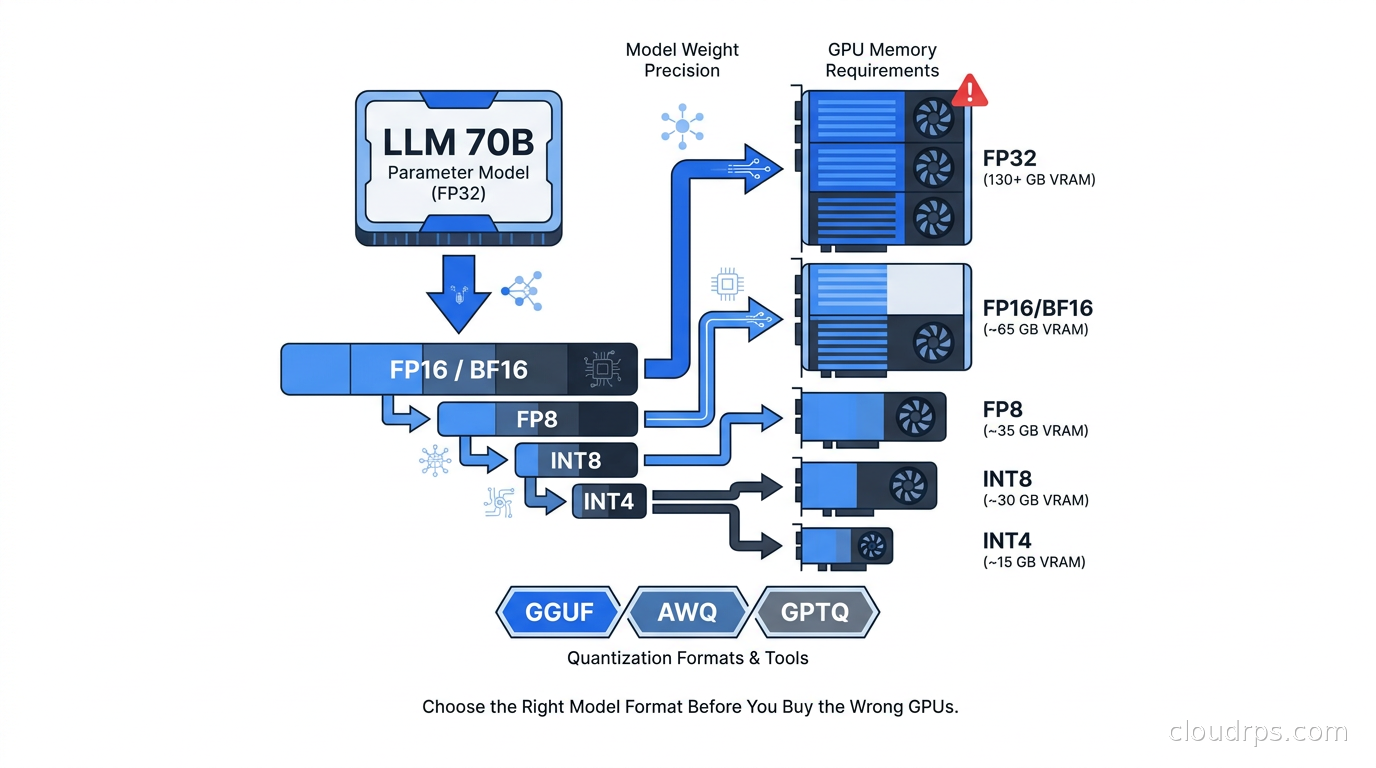
Three years ago I spent four hours on a call explaining to an engineering team why their freshly provisioned cluster of eight A100s could not fit the model they had chosen. They downloaded Llama 2 70B in full FP16 precision, did the math wrong, and wondered why OOM errors kept cascading the moment they tried to batch two concurrent requests. The model needed 140 GB of VRAM. Eight A100 80GB cards give you 640 GB total in theory, but their serving setup was not parallelizing across cards correctly. Two A100s per replica, 160 GB, and the serving engine overhead pushed them over the edge.
The fix took twenty minutes. Swap the checkpoint for an AWQ INT4 version, which drops the same 70B model to roughly 38 GB, and suddenly a single A100 runs it comfortably with headroom for batching. But the damage was done: they had spent two weeks on provisioning and setup before anyone tested whether the model actually fit.
Twenty years in cloud architecture has taught me that GPU memory is the new “will it fit in RAM” problem, and most teams underestimate it until they are debugging OOM errors in production. This guide is what that team should have read first.
The VRAM Problem Is a Math Problem
Every parameter in a neural network is a number stored at some precision. A 70B parameter model has seventy billion numbers. In full FP32 (32-bit float), each number takes 4 bytes, which means 280 GB for the weights alone, before you add activations, KV cache, and overhead. Nobody uses FP32 for inference.
FP16 (16-bit float) cuts that to 140 GB. That is the naive format you get when you download most models from Hugging Face without specifying a quantization scheme. Still massive, and it requires multi-GPU setups for anything larger than 7B to 13B models on standard hardware.
INT8 (8-bit integer) takes it to 70 GB. INT4 (4-bit integer) brings a 70B model to roughly 35 to 40 GB depending on the format, because quantization schemes have overhead beyond the raw weight bits. This is where the economics get interesting. A single A100 80GB can now run a 70B model with room for a meaningful KV cache. An H100 80GB handles it with even more headroom, and A100 40GB instances, which are substantially cheaper, can run 34B or even some 70B models in 4-bit.
The math matters because GPU cost dominates inference budgets. Getting the wrong format means paying for hardware you do not need, or buying hardware that is not enough.
The Format Landscape: GGUF, GPTQ, AWQ, FP8
These formats are not interchangeable. Each was designed for different hardware targets and serving patterns, and mixing them up is one of the most common mistakes I see in production AI infrastructure work.
GGUF: The Developer Workstation Format
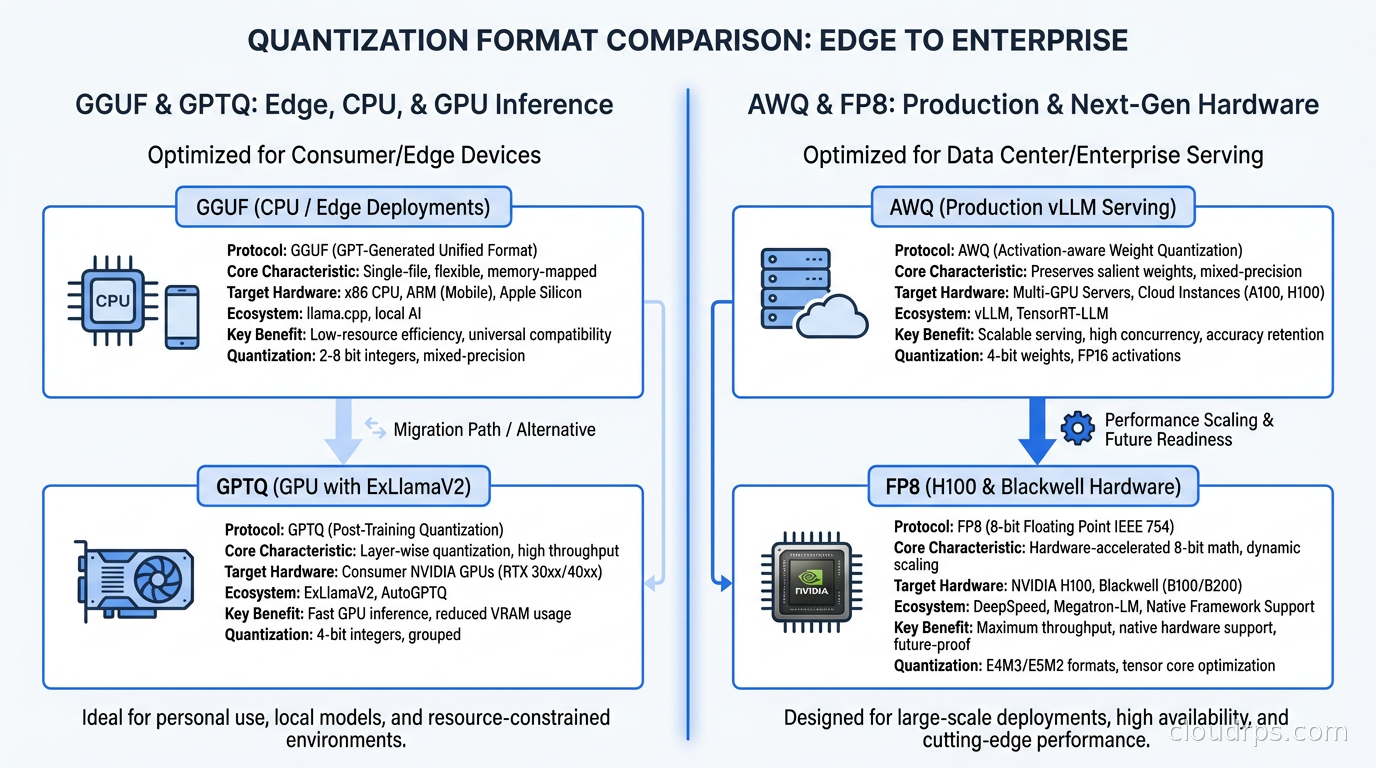
GGUF (GPT-Generated Unified Format) is the native format for llama.cpp, the C++ inference library that made running LLMs on consumer hardware practical. It replaced the older GGML format in 2023 and has become the standard for CPU inference and edge deployments.
GGUF supports a range of quantization levels: Q2_K, Q3_K_M, Q4_K_M, Q5_K_M, Q6_K, Q8_0. The naming is opaque but the pattern matters. The number is the target bit depth, K means it uses k-quants (a mixed-precision scheme where different parts of the model get different precision), and the suffix (S, M, L) indicates how aggressively higher-precision quantization is applied to the most sensitive layers.
Q4_K_M is the workhorse. It quantizes most weights to 4 bits but uses 6-bit quantization for attention and feed-forward layers that matter more for quality. The result is a good quality-to-size ratio that runs on a MacBook Pro M3 Max with 128 GB unified memory, which is where I do most of my local model testing.
The key architectural point: GGUF with llama.cpp is designed to run on CPU, with GPU acceleration as a bonus via CUDA or Metal offload. The runtime loads model layers into RAM, optionally offloading some to GPU. This makes it flexible but fundamentally limits throughput compared to formats that assume all computation happens on GPU.
Do not use GGUF for production multi-user serving on GPU. It lacks the continuous batching and PagedAttention memory management that purpose-built GPU serving engines provide. GGUF is for developer workstations and local testing, edge deployments where CPU is the only compute available, self-hosted single-user applications on consumer hardware, and experimentation before you commit to a production format.
GPTQ: The First-Generation GPU Quantization Standard
GPTQ (Generative Pre-trained Transformer Quantization) was the first widely adopted GPU-native 4-bit quantization format. It applies second-order information from a calibration dataset to minimize quantization error, using a technique called optimal brain quantization.
GPTQ models dominated Hugging Face downloads in 2023 and early 2024. The format is well-supported in vLLM, text-generation-inference, and ExLlamaV2. ExLlamaV2 in particular has highly optimized GPTQ kernels that deliver excellent throughput on consumer GPUs like the RTX 4090.
The limitation of GPTQ is calibration sensitivity. Quality depends on the calibration dataset used during quantization. If the calibration set does not represent your actual inference distribution well, you get quality degradation that is invisible in standard benchmarks. I have seen production models score fine on MMLU but produce noticeably worse outputs on domain-specific tasks because the GPTQ calibration used c4 or wikitext2, which does not cover the production domain. GPTQ is still useful but is increasingly superseded by AWQ for new deployments.
AWQ: The Current Production Standard for INT4 GPU Serving
AWQ (Activation-Aware Weight Quantization) solved GPTQ’s main problems. The key insight is that not all weights are equally important. A small percentage of weights, identified by their activation magnitudes, have outsized impact on output quality. AWQ protects these salient weights by scaling them before quantization while quantizing the remaining weights more aggressively.
The result is INT4 quantization with better quality preservation than GPTQ at the same bit-depth. AWQ also has simpler calibration requirements: it uses a small representative sample set and is less sensitive to calibration dataset mismatch than GPTQ.
As of 2026, AWQ is the default choice for production INT4 inference on GPU. Major model families on Hugging Face ship pre-quantized AWQ checkpoints. vLLM has native AWQ support with optimized kernels. SGLang supports AWQ. If you are deploying a quantized 70B or 405B model on actual GPU servers, AWQ is where you start.
vLLM’s AWQ implementation handles PagedAttention and continuous batching identically to FP16 models. You swap the model path, specify the quantization parameter, and the serving characteristics improve because the model fits in less VRAM. No application-level changes required.
FP8: Native Hardware Quantization for Modern Accelerators
FP8 (8-bit floating point) is native to Hopper-generation (H100) and Blackwell-generation (B100, B200) NVIDIA GPUs. Unlike INT4 or INT8, which use integer arithmetic, FP8 maintains floating-point semantics, which reduces quantization-induced accuracy loss at the same bit-width.
H100s have hardware FP8 tensor cores that make FP8 inference nearly as fast as INT8 with better quality. vLLM, SGLang, and TensorRT-LLM all support FP8. For many models, FP8 is close enough to FP16 quality that you need careful evals to detect the difference on real workloads.
The tradeoff: FP8 only makes sense on hardware with native FP8 support. Running FP8 on older Ampere A100s means software emulation, and you lose the performance benefit entirely. The practical rule I use: if you are buying H100s or B200s, target FP8 for your largest models. If you are buying A100s or A10Gs, use AWQ INT4.
The VRAM Arithmetic You Need
Here is the math I run before every infrastructure decision involving LLMs. Model size in GPU memory is not just the weights. It is weights plus the KV cache for concurrent requests plus the serving engine overhead.
Weights memory per precision level:
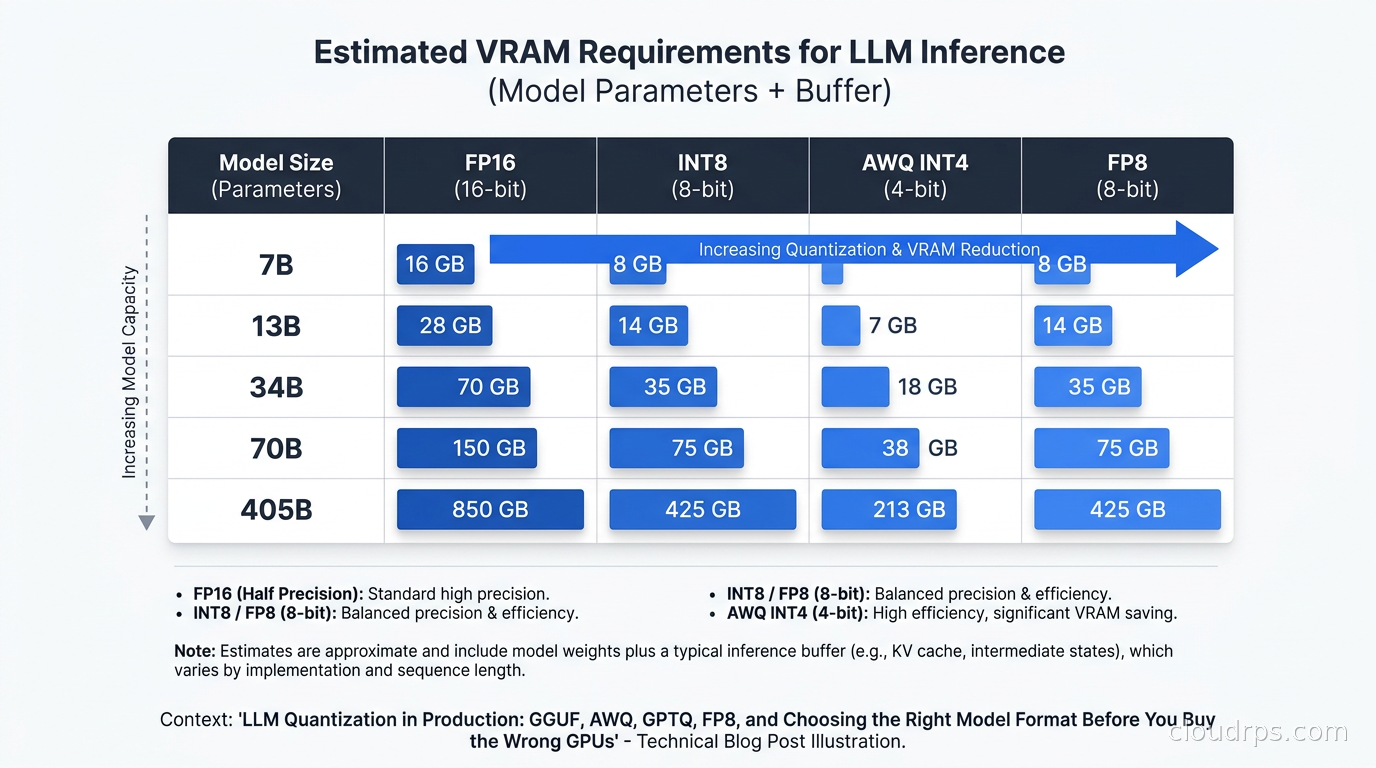
- FP16: billions of parameters times 2 bytes. A 70B model needs 140 GB.
- INT8: parameters times 1 byte. 70B model needs 70 GB.
- INT4 (AWQ): parameters times 0.5 bytes plus format overhead, roughly 35 to 40 GB for a 70B model.
- FP8: parameters times 1 byte, similar to INT8 in size but with native hardware efficiency on Hopper.
KV cache size depends on context window, number of layers, number of attention heads, and concurrent requests. For a 70B model with 4096-token context running 10 concurrent requests, the KV cache alone adds 10 to 20 GB depending on the architecture.
Serving engine overhead: vLLM reserves memory for its PagedAttention blocks. Plan for 10 to 15% overhead on top of weights and KV cache.
Practical sizing for Llama 3.1 70B Instruct:
- FP16: requires 2x H100 80GB minimum, with limited KV cache headroom for batching
- AWQ INT4: fits on 1x A100 80GB with reasonable KV cache for moderate concurrency
- FP8 on H100: 1x H100 80GB with better quality than AWQ and full throughput
For Llama 3.1 405B:
- FP16: roughly 810 GB, minimum 8x H100 80GB or 10x A100 80GB
- AWQ INT4: roughly 200 GB, fits on 3 to 4x A100 80GB
- FP8: roughly 400 GB, fits on 5 to 6x H100 80GB
These numbers change the infrastructure conversation completely. Going from FP16 to AWQ on a 405B model drops you from needing a dedicated 8xH100 node to fitting on 4 A100 80GB cards, which you might share with other workloads or run on spot instances. At current GPU pricing, that is a major cost delta on a per-inference basis.
Quality Degradation: What You Actually Lose
For standard benchmarks (MMLU, HellaSwag, GSM8K), the gap between FP16 and AWQ INT4 on modern models is small, typically 1 to 3 percentage points on MMLU for a well-quantized 70B model. For Llama 3.1 70B, most users cannot reliably distinguish FP16 from AWQ INT4 on typical conversational tasks.
Where quantization degradation matters more:
Mathematical reasoning: Complex multi-step arithmetic degrades earlier at lower bit depths. INT8 is usually fine; INT4 shows issues with harder competition-level math. For RAG pipelines that involve numerical data, evaluate carefully.
Code generation: This is sensitive to precision. Production code generation should go through quality evals specifically on code samples from your codebase before committing to INT4.
Long context with retrieval: Applications that retrieve and synthesize long contexts can see subtle degradation in coherence at INT4. Test your actual retrieval use case, not just benchmarks.
Instruction following: Very specific system prompt requirements, especially in agentic workflows, can be more sensitive to quantization than aggregate benchmarks suggest.
My evaluation process: run your top-100 production query types through both FP16 and the candidate quantized format. Use an LLM judge to score responses on a 1-to-5 scale. If the win-rate for FP16 is less than 55%, the quality difference is below the threshold that justifies the hardware cost. For most conversational and document processing applications, AWQ INT4 on a well-trained modern model passes this test. For highest-stakes applications, FP8 on H100 is the right answer.
Connecting Quantization to Serving Engine Choice
Format choice and serving engine choice are coupled decisions. You cannot pick a format and then independently pick an engine.
For production GPU serving, your options map cleanly to format support. Our LLM inference engines comparison covers the engines in depth, but the quantization-relevant summary:
vLLM: Native support for FP16, BF16, AWQ INT4, GPTQ INT4, and FP8 (Hopper). PagedAttention memory management works across all formats. My default for production serving when I need good throughput and operational simplicity. The AWQ kernels are production-grade and have been in use at scale since 2024.
SGLang: Excellent FP8 performance on H100, solid AWQ and GPTQ support. RadixAttention gives it an edge for applications with shared prompt prefixes. My preference for H100 clusters where you want to squeeze throughput on repeated system prompts.
TensorRT-LLM: NVIDIA’s own stack delivers the best raw throughput numbers if you accept compile-time overhead and NVIDIA lock-in. Supports FP8, INT8, INT4. Deploy this if maximum throughput on dedicated NVIDIA hardware is the primary goal.
llama.cpp: GGUF only. CPU-first with optional GPU offload. Do not use this for multi-user production serving on GPU. Use it for developer environments, edge deployments, and single-user applications where operational simplicity matters more than throughput.
ExLlamaV2: Particularly good for GPTQ and EXL2 (its own quantization format) on consumer GPUs. If you are running 4090s or similar hardware and want maximum throughput without paying for data-center GPUs, ExLlamaV2 with EXL2 format delivers strong throughput per dollar.
The Fine-Tuning and Quantization Connection
If you are doing your own LLM fine-tuning with LoRA or QLoRA, quantization interacts with the training process in ways worth understanding. A related technique that combines well with quantization is LLM distillation, where a frontier teacher model generates the training labels for a compact student model. Distilling first and then quantizing the student is a popular production pattern: you get task-specialization from distillation and inference efficiency from quantization, and the quality hits from each step are smaller because the student is already small.
QLoRA fine-tunes a quantized base model while adding small trainable LoRA adapters. You load the base model in INT4 via bitsandbytes NF4 quantization, add LoRA layers on top, and train only the LoRA weights in FP16 or BF16. This lets you fine-tune a 70B model on a single A100 that could not hold the FP16 base model.
The resulting artifact is an FP16 LoRA delta. For production deployment, I strongly prefer the merge-and-requantize path: merge your LoRA adapter into the FP16 base model, then apply AWQ quantization to the merged result. This gives you a clean AWQ checkpoint that serves identically to any other AWQ model, without runtime overhead of loading the adapter separately. The quality of this merged-and-requantized model is typically better than serving the quantized base with an unmerged adapter, because the AWQ calibration can account for the adapter’s contribution to the weight distribution.
Making the Infrastructure Decision
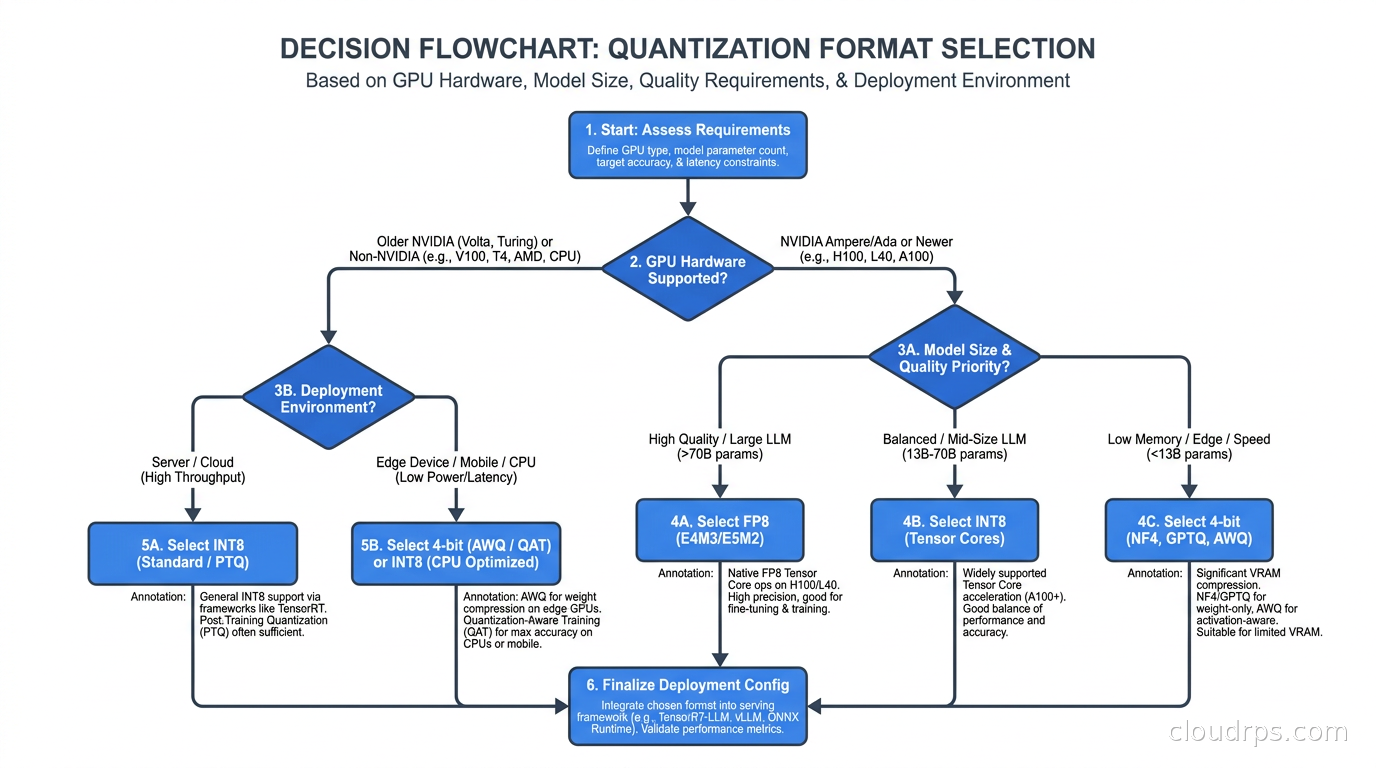
The format you choose drives GPU selection, which drives cost, which drives the entire economics of your AI FinOps strategy. Here is the decision framework I use:
H100 or Blackwell B200 hardware: Use FP8. It is native to the tensor cores, quality preservation is close to FP16, and throughput per GPU is the best available. If you are using fully managed platforms like AWS Bedrock or Google Vertex AI (see the enterprise AI platform comparison), they handle quantization internally and this decision is abstracted away.
A100 80GB for fitting the largest models: Use AWQ INT4. A 70B model fits comfortably on one card, leaving room for KV cache and concurrent requests.
A10G, L4, or A100 40GB for cost-optimized deployments: AWQ INT4 is required if you are running models larger than 13B. A 34B AWQ model fits on an A100 40GB and gives you good quality at a price point that makes single-GPU deployment viable.
Developer workstations or laptop-class inference: GGUF Q4_K_M or Q5_K_M with llama.cpp. Five minutes on Hugging Face finding a pre-quantized GGUF for your model gets you running immediately. Pick a quantization level based on available RAM and run it. The Ollama wrapper makes this even simpler for teams that want model management without touching llama.cpp directly.
CPU-only infrastructure or edge hardware: GGUF, no question. llama.cpp supports arm64, x86, RISC-V, and a range of embedded targets. Pre-quantized GGUF files are widely available for every major model family. If you are targeting consumer laptops and phones rather than dedicated edge servers, the decisions go beyond format selection: which frameworks exploit NPU acceleration (MLX on Apple Silicon, ONNX Runtime with DirectML on Windows), how to distribute 2-3 GB model files to end-user devices, and how to route requests between local and cloud inference. The on-device AI inference guide covers those deployment concerns in full.
Production Operations Details
Quantization takes time: AWQ quantization of a 70B model on a single A100 takes 2 to 4 hours depending on calibration dataset size. Build this into your model pipeline. If you are using pre-quantized Hugging Face checkpoints, this is already done. If you are doing custom fine-tuning and then quantizing, add quantization time to your model release schedule.
Calibration dataset matters: AWQ uses roughly 512 samples from a calibration dataset to identify which weights to protect. The default (typically from the Pile or C4) works for general models. If you are serving a domain-specific application in legal, medical, or financial contexts, using calibration samples from your domain improves quality. This is a 20-minute change with measurable impact.
Test before deployment: I treat quantization changes the same way I treat any production model change: run an evaluation harness against your key prompt types, compare win-rates against the previous checkpoint, and gate deployment on a quality threshold. New base model releases sometimes include updated AWQ checkpoints that are worse for specific use cases. Test everything.
Monitor quality in production: Add LLM-based quality scoring to your observability stack, referenced in our LLM observability guide. Log input and output pairs, sample them for quality scoring, and track trends over time. This catches quantization regressions that only appear on the long tail of production traffic.
Version your model formats: Track quantization format, quantization version, serving engine version, and calibration dataset in model metadata. When something breaks, you need to know which of these changed. Quantization versioning is often neglected until you have a quality regression you cannot explain.
The Cost Math at Scale
If you are running a production API serving Llama 3.1 70B at 100 million tokens per day, GPU costs are your dominant expense. Understanding the quantization math directly translates to infrastructure spend.
FP16 on H100 80GB requires 2 cards per model replica. AWQ INT4 on A100 80GB requires 1 card per replica. Even if the A100 is cheaper per hour than the H100, the fact that you need half the card count for the same model capacity creates a substantial cost advantage. When you layer on spot instance discounts and the ability to run on older, cheaper GPU generations, the practical cost difference between FP16 and AWQ INT4 serving can be 3x to 5x for the same throughput.
For teams serious about GPU cost optimization, quantization is not a quality compromise you reluctantly accept. It is the primary cost control lever. A 70B AWQ model on a well-configured A100 with smart batching often delivers better cost-per-token than a 7B FP16 model on a fractional GPU, because the 70B model’s higher quality means fewer retry requests and shorter outputs needed for the same task completion. See our GPU infrastructure selection guide for the hardware side of this calculation.
Twenty years of infrastructure work has taught me that the most expensive hardware mistake is buying what the benchmark said you needed rather than what your actual workload uses. Quantization gives you the tools to right-size your GPU fleet without sacrificing the model quality your application actually requires. Learn the formats, do the VRAM math before you provision anything, run real evals on your production query distribution, and your model serving costs will reflect that discipline.
Get Cloud Architecture Insights
Practical deep dives on infrastructure, security, and scaling. No spam, no fluff.
By subscribing, you agree to receive emails. Unsubscribe anytime.