
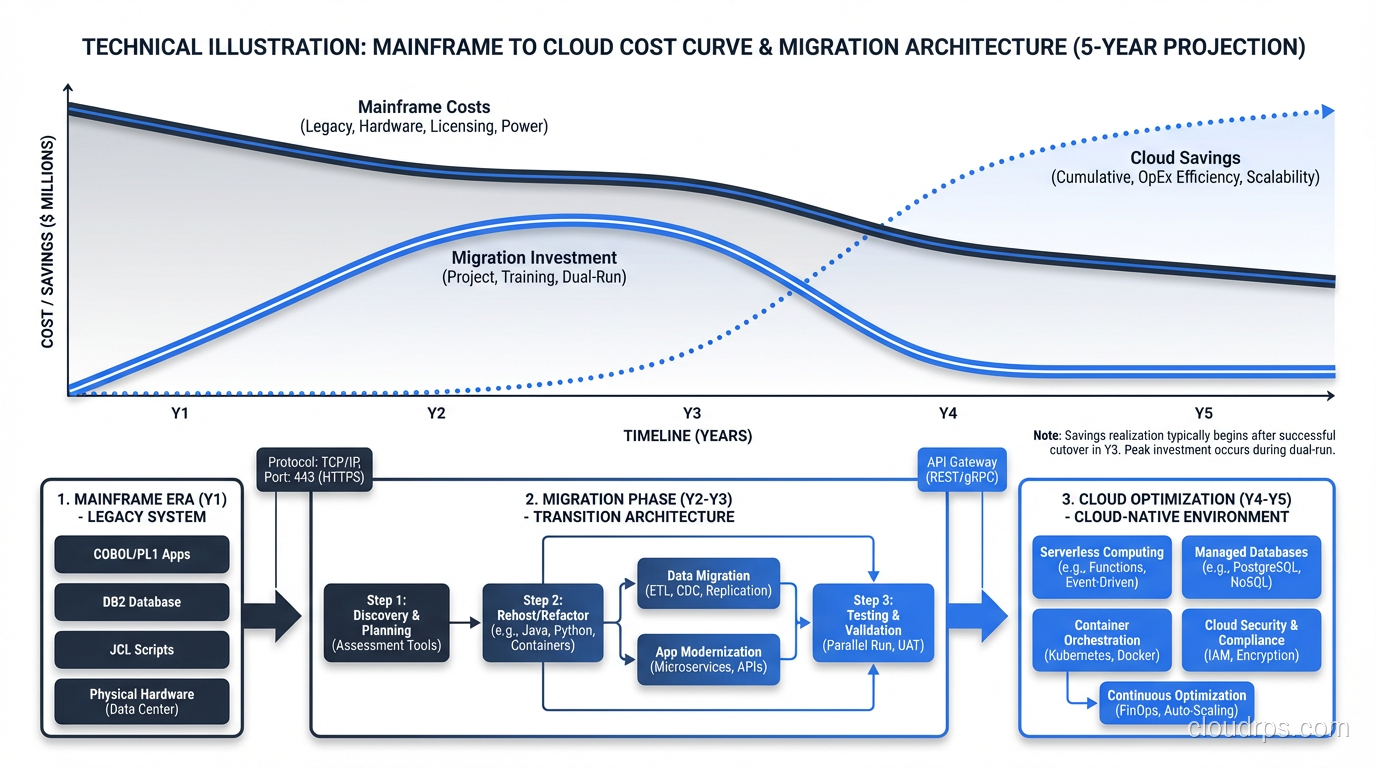
Nothing in enterprise IT inspires more dread than the phrase “mainframe migration.” I’ve been involved in five of them over my career, and each one taught me something new about pain, patience, and the astonishing durability of COBOL.
Here’s the uncomfortable truth about mainframes: they work. They process billions of transactions per day across banking, insurance, government, and healthcare with reliability that modern distributed systems still aspire to. The problem isn’t that mainframes are bad at what they do. The problem is everything around them: the shrinking talent pool, the astronomical licensing costs, the inability to integrate with modern architectures, and the opportunity cost of being locked into a platform that can’t participate in the cloud-native world.
If you’re facing a mainframe migration, this article is for you. I’m not going to sugarcoat it. This is the hardest migration you’ll ever do.
Why Organizations Migrate Off Mainframes
The conversation always starts with cost. IBM mainframe licensing is based on MIPS (Million Instructions Per Second), and those costs are eye-watering. I’ve worked with organizations paying $20-30 million per year in mainframe software licensing alone. When the CFO realizes that number could fund an entire cloud infrastructure and then some, the migration conversation begins.
But cost is usually the trigger, not the root cause. The deeper problems:
Talent cliff: The average COBOL developer is in their late fifties. Universities stopped teaching COBOL decades ago. Every year, more mainframe expertise retires than enters the workforce. I’ve watched organizations scramble to find COBOL developers willing to work on short-term migration projects, and the rates are staggering.
Integration friction: Modern applications expect REST APIs, JSON, event streams. Mainframe applications communicate through CICS transactions, batch JCL jobs, and VSAM files. Every integration between mainframe and modern systems requires a translation layer, and each layer adds complexity and latency.
Agility constraints: You can’t containerize a CICS transaction. You can’t deploy a COBOL program through a CI/CD pipeline (well, you can, but nobody does). The mainframe development and deployment model is fundamentally incompatible with agile, DevOps, and continuous delivery.
Business risk: When the two people who understand your core banking COBOL codebase both retire, your $50 billion bank has an existential risk. I’m not exaggerating. I’ve sat in board meetings where this was the stated concern.
The Migration Strategies
The 7 Rs framework applies to mainframe migration, but the practical options narrow to a few approaches.
Emulation (Rehost on Emulator)
Run your mainframe code (COBOL, PL/I, JCL, CICS) on a software emulator that runs on commodity x86 hardware or in the cloud. Products like Micro Focus Enterprise Server, LzLabs Software Defined Mainframe, and TmaxSoft OpenFrame provide z/OS-compatible runtime environments on Linux.
Pros: Fastest path off the mainframe. No code changes required (in theory). Preserves existing business logic exactly.
Cons: You’re still running COBOL. You still need COBOL skills to maintain and modify the applications. You’ve solved the cost problem but not the talent or agility problems. And the “no code changes” claim is rarely 100% true. There are always edge cases around character encoding, file system semantics, and timing-dependent behavior.
I’ve used this strategy as a bridge. Get off the mainframe hardware quickly (stop the licensing bleed), then modernize the applications at a pace the organization can absorb.
Automated Refactoring (Code Conversion)
Tools that automatically convert COBOL to Java, C#, or other modern languages. The converted code isn’t pretty (it’s machine-generated, often mimicking COBOL patterns in Java syntax), but it runs on modern infrastructure.
Pros: Eliminates the COBOL dependency. Faster than manual rewriting. Preserves business logic (the tool converts it, line by line).
Cons: The generated code is difficult to maintain. It looks like COBOL wearing a Java costume. Developers who didn’t write the original COBOL struggle to understand the converted code. In many cases, you end up with code that nobody wants to maintain. It’s not COBOL enough for mainframe developers and not Java enough for Java developers.
I’ve had mixed results with this approach. It works when the goal is to get off COBOL and you’re willing to accept a transitional code quality, with plans to incrementally refactor the generated code into idiomatic modern code over time.
Manual Rewrite
Rewrite the mainframe applications from scratch in a modern language and architecture. This is the nuclear option: maximum effort, maximum risk, maximum potential benefit.
Pros: Clean modern codebase. Cloud-native architecture. Modern development practices. Eliminates all legacy technical debt.
Cons: Enormous cost and timeline. Extremely high risk of functional regressions (the original COBOL code encodes decades of business rules, edge cases, and regulatory requirements). I’ve seen rewrite projects take 3-5 years and still miss critical business logic.
The risk of functional regression is the killer. That COBOL program that’s been running for 30 years has handled every edge case the business has ever encountered. The rewrites I’ve seen miss edge cases that only show up once a quarter or once a year, and when they do, the results are catastrophic.
The Strangler Fig Pattern
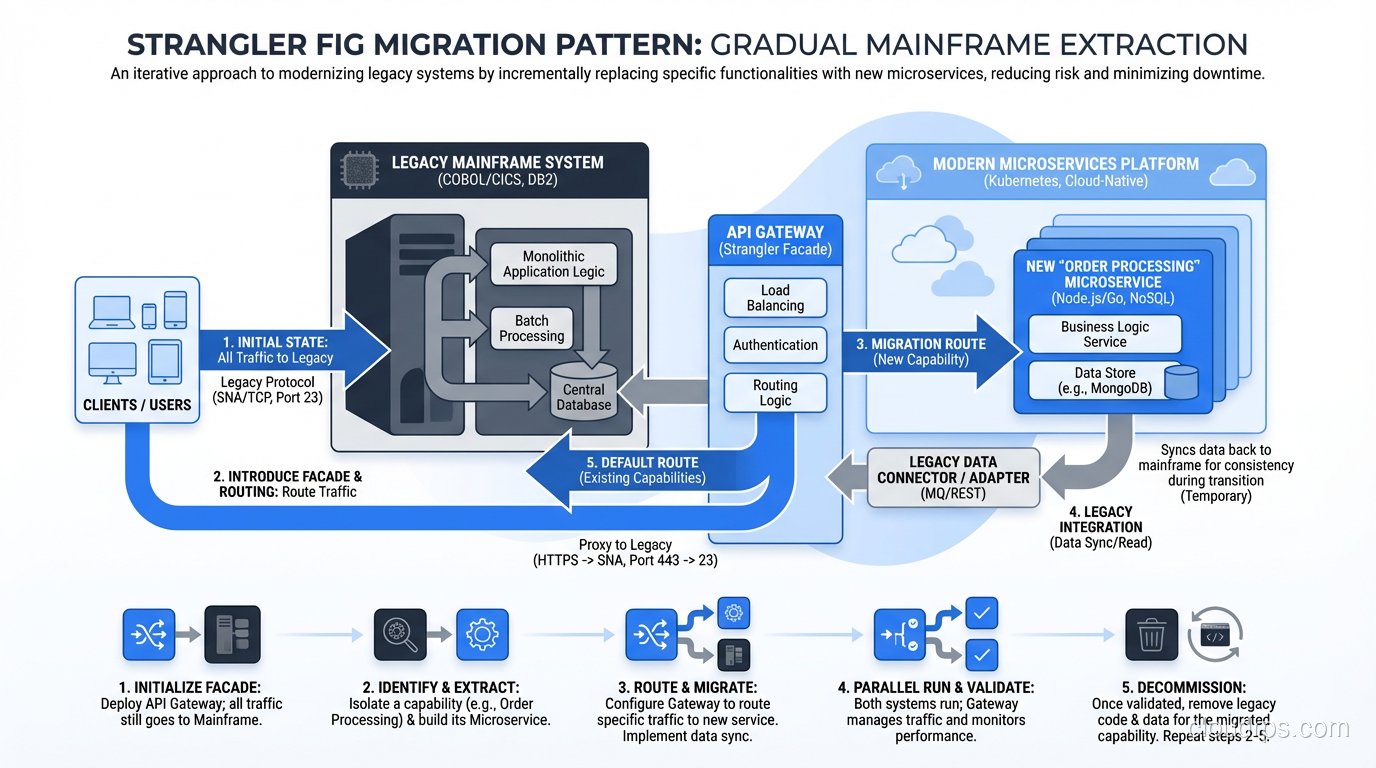
My preferred approach for most mainframe migrations. Named after the strangler fig tree that gradually envelops and replaces its host tree.
Instead of migrating the entire mainframe at once, you incrementally extract functionality from the mainframe and implement it in modern services. New features are built in the modern stack. Existing features are gradually extracted, one at a time, with the mainframe and modern systems running in parallel.
Each extraction follows a pattern:
- Build the new service
- Route traffic to both the mainframe and the new service (dual-write or dual-read)
- Validate that the new service produces identical results
- Cut over to the new service
- Decommission the mainframe component
This approach reduces risk because you’re migrating one capability at a time. If an extraction fails, you roll back that one service, not the entire migration.
The catch: It takes years. The mainframe continues running (and costing money) until the last capability is extracted. You need robust integration between the mainframe and the modern stack throughout the transition. This is not a quick win.
The Hard Lessons
Lesson 1: Data Migration Is the Hardest Part
Moving compute is straightforward compared to moving data. Mainframe data lives in VSAM files, IMS databases, DB2 with mainframe-specific features, and flat files with packed decimal and EBCDIC encoding.
Converting EBCDIC to ASCII sounds simple until you encounter multi-byte character sets, packed decimal fields, redefined record structures (COBOL’s REDEFINES clause), and variable-length records with embedded length fields. I’ve spent weeks debugging data conversion issues that traced back to a single REDEFINES in a copybook.
Plan for data migration to consume 30-40% of total migration effort. Test data conversion exhaustively. Compare record by record, field by field, between source and target.
Lesson 2: Batch Windows Are Sacred
Mainframe batch processing is the backbone of most large financial institutions. The nightly batch window (typically 4-8 hours) runs thousands of JCL jobs in sequence, processing the day’s transactions, generating reports, and feeding downstream systems.
Every mainframe migration must account for the batch window. If you’re using the strangler fig pattern, some batch jobs will run on the mainframe and some on the modern stack, with dependencies between them. Managing this hybrid batch environment is operationally complex and requires careful orchestration.
I’ve seen migrations stall because the hybrid batch window exceeded the available overnight processing time. If batch takes 6 hours on the mainframe and 8 hours in the hybrid environment, you’ve run out of night.
Lesson 3: Nobody Knows All the Business Rules
The biggest risk in mainframe migration isn’t technical; it’s knowledge. After 30 years of modifications, nobody fully understands what the COBOL code does. The original developers are retired. The documentation is incomplete or outdated. The business rules are encoded in the code itself, not in any specification document.
My mitigation: before migrating any component, conduct a thorough analysis of the COBOL code. Use code analysis tools (CAST, SonarQube with COBOL plugins, Micro Focus Enterprise Analyzer) to map program flows, data dependencies, and dead code. Interview everyone (current developers, business users, compliance teams) to capture undocumented rules.
Even with this, you’ll miss things. Build extensive regression testing and plan for a stabilization period after each migration phase.
Lesson 4: The Mainframe Team Is Your Best Asset
Don’t alienate the mainframe team. They know the system better than anyone, and their knowledge is irreplaceable during the migration. I’ve seen organizations make the mistake of announcing the mainframe migration as “replacing the old system” and immediately losing the cooperation of the people who understand it.
Frame it as modernization, not replacement. Invest in retraining mainframe developers in modern technologies. Many experienced COBOL developers are excellent programmers who can learn Java or Python given the opportunity and motivation. The ones who don’t want to retrain can serve as subject matter experts during the migration, and their knowledge of the business rules is worth more than any analysis tool.
Lesson 5: It Takes Longer Than You Think
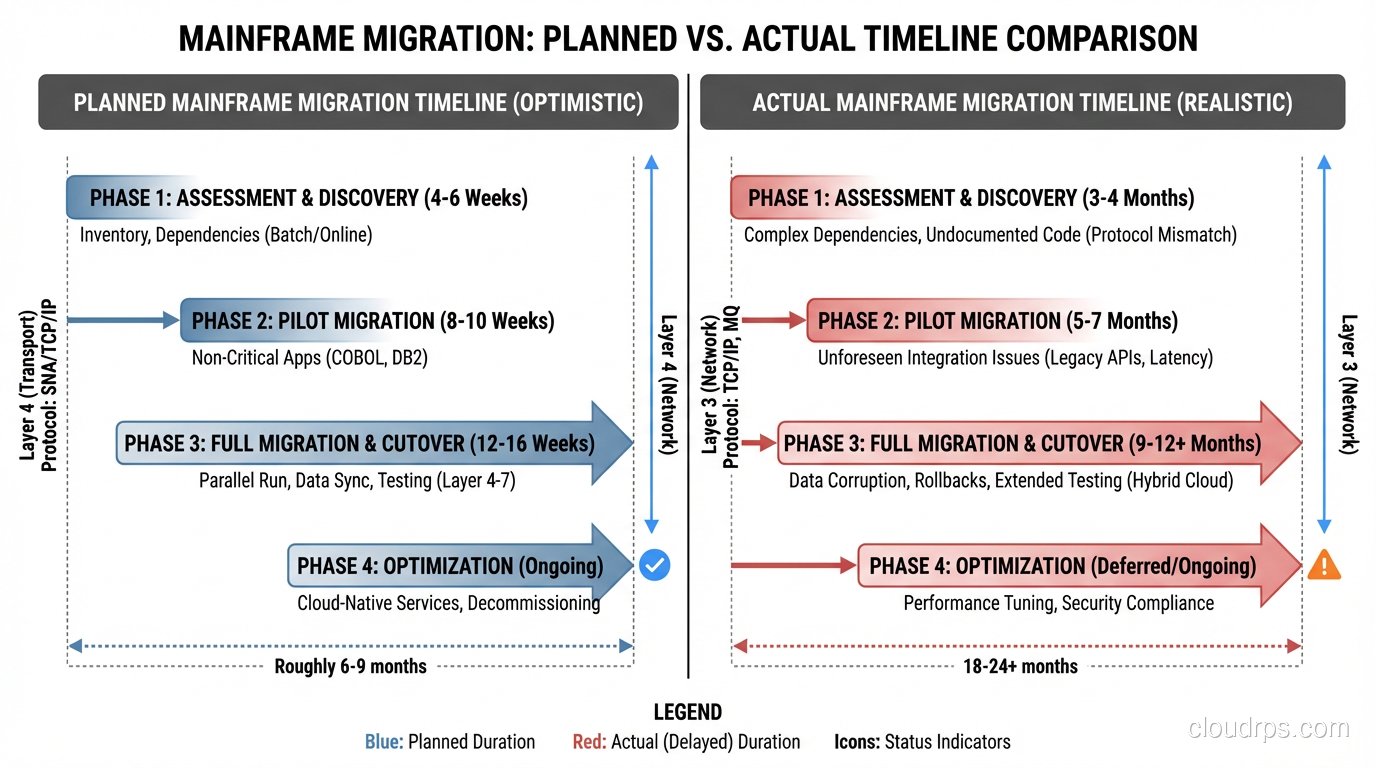
Every mainframe migration I’ve been involved with has taken longer than the original estimate. Not by a little, but by a lot. A projected 18-month migration typically takes 30-36 months.
Build contingency into your timeline. Plan for the mainframe to continue running (with its licensing costs) longer than you’d like. And start the migration before you’re forced to. The worst mainframe migrations are the ones driven by a hard deadline (vendor support end-of-life, data center closure) that doesn’t have enough slack.
The Cloud Target Architecture
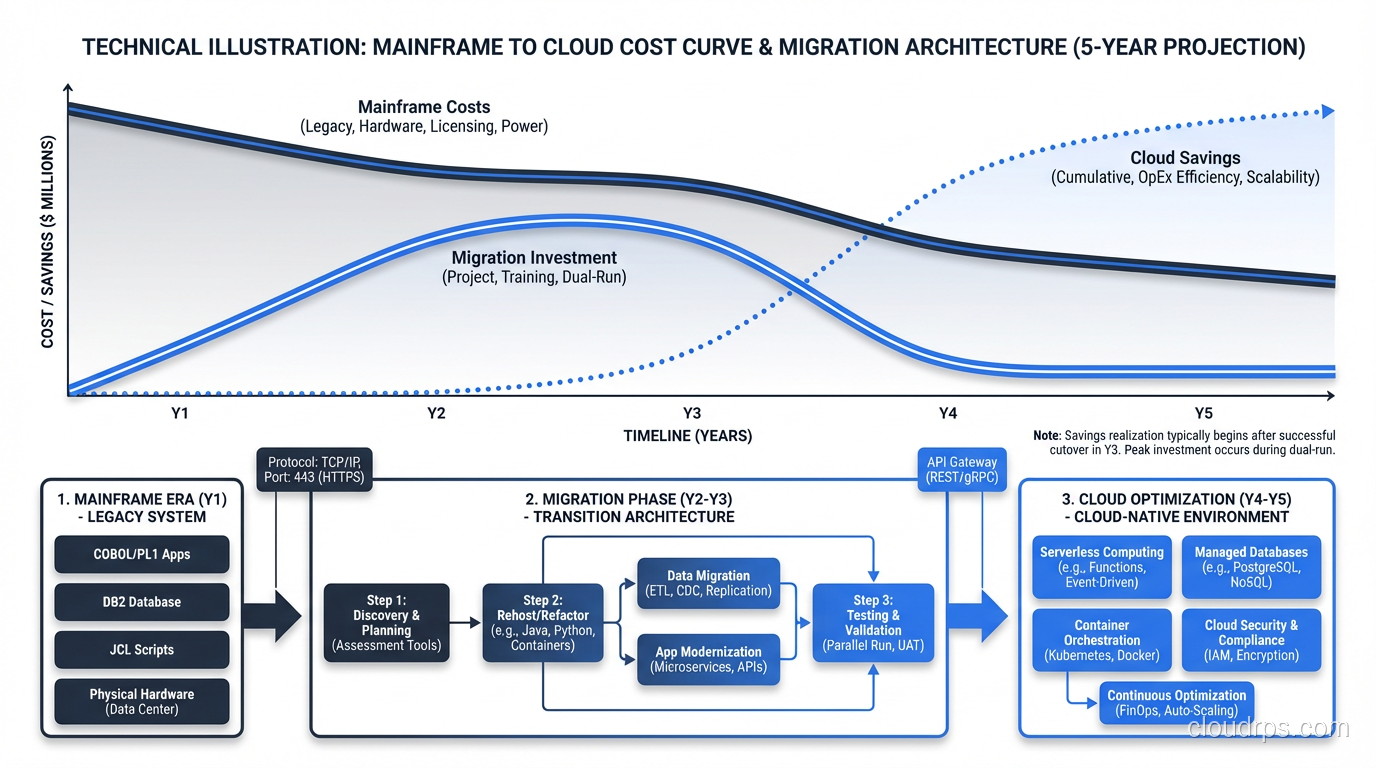
When you migrate off a mainframe, what do you migrate to? The general cloud migration process applies, but mainframe workloads have specific architectural considerations.
Transaction processing: CICS transactions typically map to API-based microservices or serverless functions. The key is matching the throughput and latency characteristics. CICS can process thousands of transactions per second with sub-millisecond latency. Your cloud architecture needs to do the same.
Batch processing: JCL batch jobs map to orchestrated workflows (Step Functions, Airflow) running on containers or serverless compute. The challenge is replicating the dependency management and restart/recovery capabilities that JES2/JES3 provides natively.
Data tier: DB2 on z/OS migrates to PostgreSQL, AWS Aurora, or cloud-native databases. VSAM files typically convert to relational tables or NoSQL databases depending on access patterns.
Security: RACF (the mainframe security system) is comprehensive and mature. Your cloud security architecture needs to match its capabilities: role-based access, data classification, audit logging. Don’t assume cloud-native security tools match RACF feature-for-feature without validation.
To understand the broader landscape of cloud computing that enables these migrations, see what is cloud computing.
Is It Worth It?
After five mainframe migrations (three completed, two still in progress), I can say unequivocally: yes, it’s worth it, but only if you go in with realistic expectations.
The cost savings are real, though they take 2-3 years to materialize. The agility gains are transformative. Once you’re off the mainframe, you can innovate at cloud speed. The talent risk drops dramatically, since Java developers are plentiful, COBOL developers are not.
But the journey is brutal. Budget for twice the time and 1.5 times the cost of your initial estimate. Staff it with your best people. And treat the mainframe team with the respect they deserve. They built the systems that ran your business for decades.
Get Cloud Architecture Insights
Practical deep dives on infrastructure, security, and scaling. No spam, no fluff.
By subscribing, you agree to receive emails. Unsubscribe anytime.