
I have spent twenty years watching organizations make the same database decision badly. A team picks a managed PostgreSQL service based on a blog post from 2019, a vendor demo with cherry-picked benchmarks, or simply defaulting to whatever cloud provider their other workloads run on. Three years later they are paying twice what they budgeted, their failover takes four minutes when the vendor promised thirty seconds, and their DBA is explaining why the read replicas are falling behind during peak load.
The managed PostgreSQL landscape changed dramatically between 2022 and 2026. AWS launched Aurora Limitless, which enables horizontal write scaling across shards without application-level sharding logic. Google AlloyDB added a columnar engine that Google claims accelerates analytical queries by up to 100x (Google’s own published figure for transactional workloads that benefit from columnar acceleration is closer to 4x) while maintaining full PostgreSQL wire compatibility. Azure Database for PostgreSQL Flexible Server matured into a genuinely competitive option for enterprise workloads after years of playing catch-up. Meanwhile, the price-performance gap between these premium managed offerings and plain RDS PostgreSQL (or Cloud SQL Standard Edition) has narrowed enough that the choice no longer comes down to cost alone.
This is the comparison I wish I had when I was evaluating these platforms for a $40M/year SaaS business last year. It covers what the marketing materials do not say, and where each platform falls apart.
Why Managed PostgreSQL Is More Complex Than It Looks
The term “managed PostgreSQL” spans a huge range of architectures. When your team says “let’s just use managed Postgres,” they could be talking about:
- A vanilla PostgreSQL instance with automated backups and a monitoring dashboard (Amazon RDS, Cloud SQL Standard)
- A custom storage engine with the PostgreSQL query layer running on top (Aurora, AlloyDB)
- A distributed database system that speaks the PostgreSQL protocol (Aurora Limitless, Google AlloyDB with distributed writes)
These are meaningfully different products. They have different failure modes, different performance characteristics under different access patterns, and very different cost structures at scale.
The other thing that bites teams: PostgreSQL compatibility is not binary. All three platforms have caught up to the current major version: Aurora supports PostgreSQL through 18 (18.4 as of this writing), AlloyDB reached PostgreSQL 18 general availability in May 2026, and Azure Flexible Server actually got there first, rolling PostgreSQL 18 out to new servers in January 2026. But all three have extensions that work on one platform and fail on another, connection pooling behaviors that differ, and replication semantics that diverge from upstream PostgreSQL in ways that matter when you are doing point-in-time recovery or logical replication to an analytics warehouse.
Understanding PostgreSQL write-ahead logging is important here, because Aurora, AlloyDB, and Azure Flexible Server all handle WAL differently at the storage layer, and those differences cascade into every behavior you care about: replication lag, failover time, backup costs, and cross-region data movement.
AWS Aurora PostgreSQL: The Write-Heavy OLTP Standard
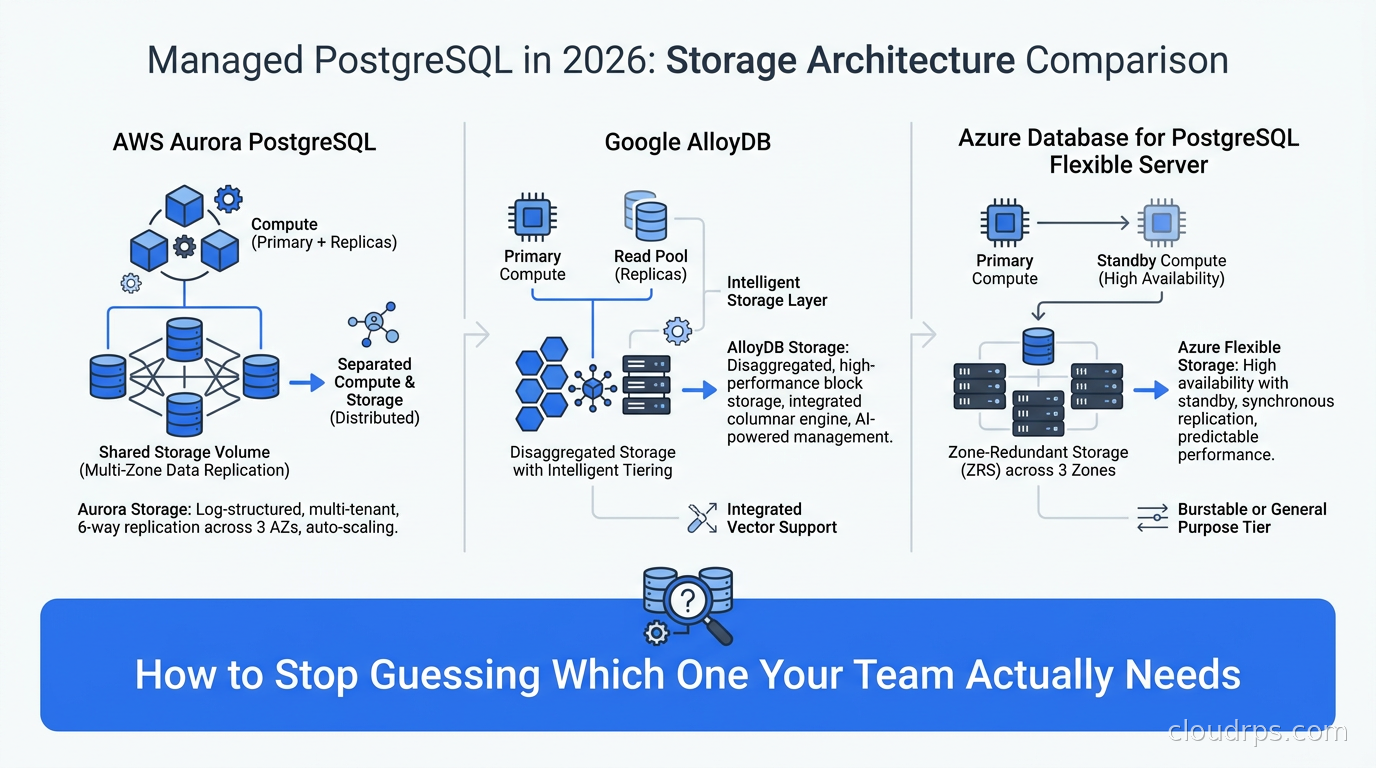
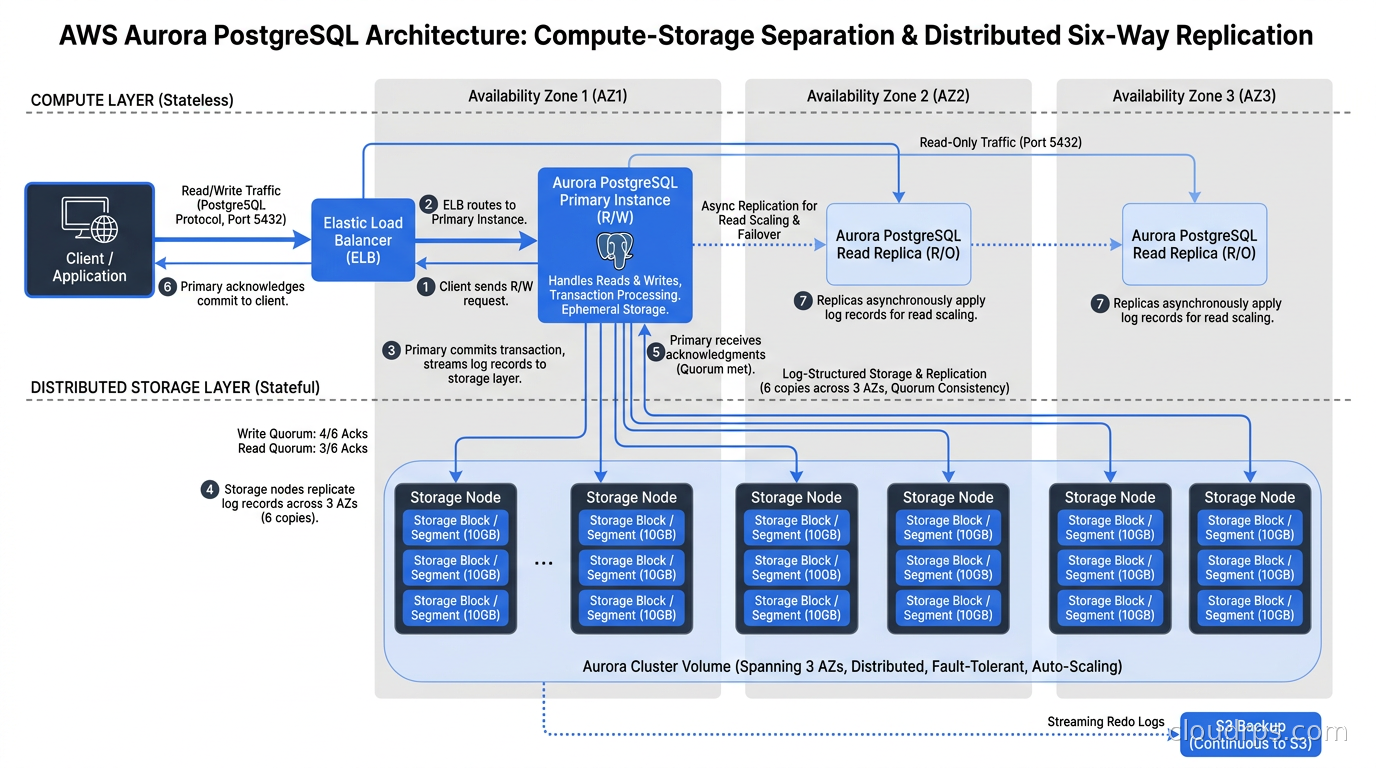
Aurora PostgreSQL replaced its storage engine with a distributed, log-structured design built specifically for cloud. Instead of writing data pages to a local disk and shipping WAL to replicas, Aurora writes WAL records to a shared distributed storage layer replicated across six copies in three availability zones. The compute nodes (your database instances) do not have local storage; they are stateless query processors that read and write to this shared storage layer.
This architecture has real consequences that make Aurora the right choice for specific workloads.
Where Aurora shines: Write-heavy OLTP with predictable access patterns. The shared storage layer means read replicas have near-zero lag: a replica that is reading the same storage layer as the primary will see committed data within milliseconds, not seconds. In a high-write environment, Aurora replicas stay current in ways that streaming replication replicas cannot. I have run Aurora clusters where replicas stayed consistently within a few milliseconds of the primary during sustained write loads that would have put streaming replicas 30-60 seconds behind.
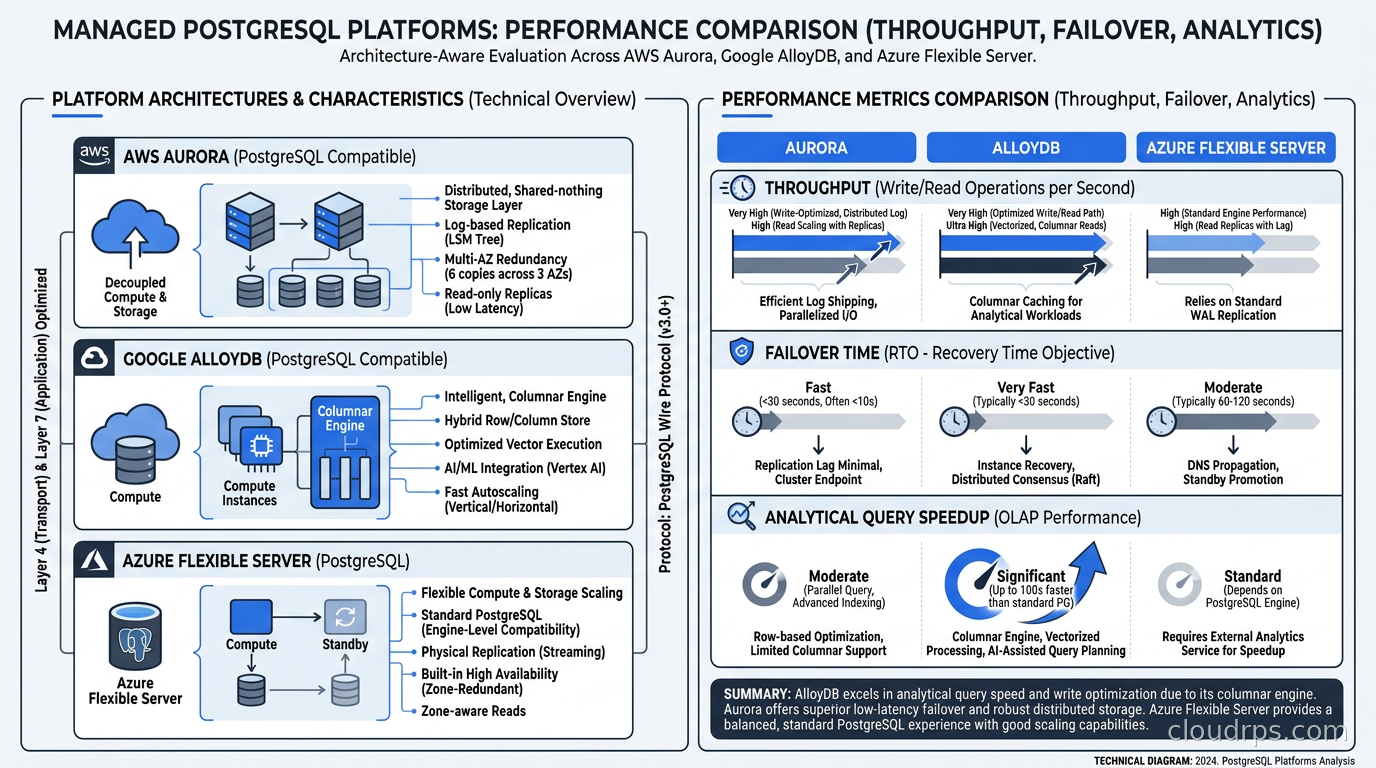
Failover is Aurora’s other major advantage. When a primary fails, Aurora promotes a replica by reassigning the shared storage endpoint to the replica’s compute, without copying any data. This typically completes in 15-30 seconds, compared to 60-180 seconds for RDS PostgreSQL or self-managed PostgreSQL with Patroni. If you have SLAs requiring database availability of 99.95% or higher, Aurora’s failover behavior is worth the cost premium.
Aurora Limitless: the horizontal scaling story. Aurora Limitless, released in 2024 and now generally available, adds a distributed query router and shard layer on top of the standard Aurora storage architecture. You define sharding keys, and Aurora transparently routes writes across multiple shards. Single-row operations are fast. Cross-shard joins are expensive and can be very expensive if your query patterns do not align with your sharding key.
I have mixed feelings about Aurora Limitless in practice. For teams with genuinely write-bound workloads (tens of thousands of writes per second that a single Aurora writer cannot handle) it solves a real problem. For teams who think they will hit that wall eventually, it adds operational complexity today for a problem they may not encounter for two years. The SQL compatibility limitations also bite teams who rely on CTEs with mutations, certain window functions, or stored procedures with complex transaction semantics.
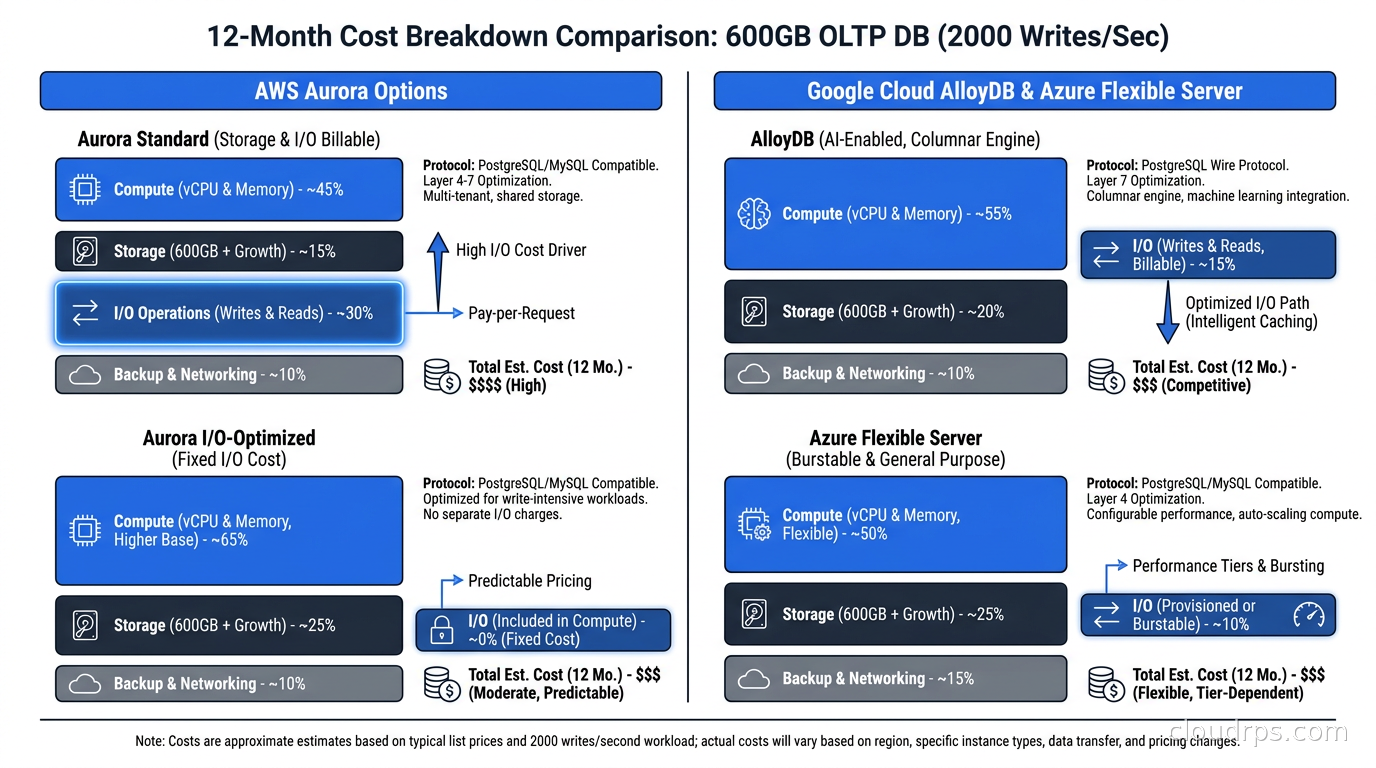
Cost structure: Aurora charges separately for compute (instance-hours), storage (per GB-month), I/O (per million requests), and data transfer. This I/O pricing is the variable that surprises most teams. In my experience, write-heavy OLTP applications on Aurora often pay a substantial share of their total Aurora bill in I/O costs alone. Aurora I/O-Optimized pricing, launched in 2023, eliminates the I/O charge in exchange for a 25% compute and storage premium. If your I/O costs exceed 25% of your total bill, I/O-Optimized saves money. Calculate this before you commit to a pricing tier.
For connection pooling with Aurora, RDS Proxy is the native option. PgBouncer also works and is often cheaper at scale. Do not use connection strings that hardcode the writer endpoint without also implementing health checks. An Aurora writer failover will temporarily make the writer endpoint unresolvable, and naively configured apps will throw exceptions for 15-30 seconds.
Google AlloyDB: The Analytics-Capable OLTP Database
AlloyDB has an unusual design: it runs two storage engines simultaneously. A row-based engine handles transactional writes with full PostgreSQL ACID semantics. A columnar engine, updated asynchronously, stores hot data in a columnar format optimized for analytical queries. When you run a query, AlloyDB’s optimizer decides whether to use the row engine, the columnar engine, or a combination of both.
In practice, this makes AlloyDB genuinely competitive for mixed OLTP/analytics workloads. If your application runs reporting queries against production data (something I generally argue against, but teams do it constantly), AlloyDB can accelerate those queries substantially without a separate analytics database. Google’s own benchmarks claim up to 100x for analytical query patterns, though the roughly 4x figure Google publishes for transactional workloads is a more realistic baseline for typical mixed workloads. I have seen teams eliminate entire Redshift or BigQuery pipelines by moving to AlloyDB and rewriting their reporting queries to take advantage of the columnar engine.
Where AlloyDB excels: Read-heavy workloads with significant analytical query volume. AlloyDB’s read pools (autoscaling groups of read replicas) handle both OLTP reads and analytical reads efficiently. The connection handling is better than Aurora at high concurrency: AlloyDB’s built-in connection management handles several thousand connections without the connection pooler proxy overhead you need with Aurora.
AlloyDB also has better vector search integration than its competitors. If your application does similarity search, AlloyDB integrates with pgvector more tightly and has better performance on vector index operations at scale. For AI applications doing retrieval-augmented generation against a PostgreSQL backend, AlloyDB is worth evaluating seriously.
The compatibility caveat: AlloyDB is more opinionated about extensions than Aurora. The AlloyDB extension allowlist is stricter, and some things that work on plain PostgreSQL (or even Aurora) do not work on AlloyDB. Before committing, test your full extension set. If you rely heavily on the PostgreSQL extensions ecosystem including TimescaleDB, Citus, or more exotic extensions, AlloyDB may create friction.
AlloyDB Omni is Google’s containerized AlloyDB distribution you can run anywhere, including on Kubernetes. It brings the same storage engine behavior to on-premises and non-Google cloud deployments. For teams with hybrid requirements or regulatory constraints that prevent moving all data to the public cloud, Omni is worth examining, though it adds operational overhead that managed AlloyDB does not have.
Failover behavior: AlloyDB’s newer hot standby HA configuration, now rolling out by default alongside PostgreSQL 18, fails over in roughly 15 seconds and returns to pre-failover throughput almost immediately because the standby keeps a warm cache. AlloyDB’s older, standard HA model (what you get without hot standby) completes failover in about 60 seconds, which is slower than Aurora and matters for SLAs. If you need sub-30-second failover, Aurora is still the safer bet, but AlloyDB’s hot standby has closed most of the gap.
Cost structure: AlloyDB pricing is simpler than Aurora: compute, storage, and networking. There is no separate I/O charge. For write-heavy workloads, this predictability is valuable. AlloyDB is typically 20-30% more expensive than equivalent RDS PostgreSQL but comparable to Aurora at similar instance sizes. The analytical capability sometimes eliminates the need for a separate data warehouse, which changes the total cost picture significantly.
Azure Database for PostgreSQL Flexible Server: The Enterprise Integration Play
Azure Flexible Server is the most mature managed PostgreSQL option for shops running primarily on Azure, primarily because of its integration with the rest of the Azure ecosystem. Azure Active Directory authentication, Azure Private Link, Azure Monitor integration, and native backup to Azure Blob Storage all work seamlessly in ways that the equivalent integrations on GCP or AWS require more setup to achieve.
Azure Flexible Server now supports PostgreSQL 17, which matters for teams that want access to the latest optimizer improvements, logical replication enhancements, and JSON capabilities. The extension support is broader than AlloyDB, and the PgBouncer integration is built-in and configured via portal or ARM templates rather than deployed separately.
Where Azure Flexible Server wins: Microsoft-heavy shops where Azure AD is the identity provider and where integration with Azure services is a primary requirement. If you are already using Azure Synapse Analytics for your data warehouse, Azure Cognitive Services, or Azure Machine Learning, the data movement between Azure Flexible Server and those services is straightforward. Cross-service latency is lower within a single cloud provider, and the IAM integration avoids database password management entirely.
Flexible Server’s compute options are also broader than AlloyDB at the high end. The current Esv6/Edsv6 memory-optimized tiers go up to 1,832 GiB of RAM on Azure, which matters for workloads that benefit from very large shared buffers. For pure in-memory OLTP on a single node, Azure Flexible Server at the top tier is competitive with anything in the market.
The honest weakness: Flexible Server’s distributed capabilities are behind Aurora Limitless and AlloyDB’s read pools. If you need horizontal write scaling or autoscaling read replicas with built-in traffic balancing, Azure requires more manual intervention. You can build this with Azure Front Door and multiple read replicas, but it is not a native platform feature the way AlloyDB’s read pools are.
Flexible Server also does not have an equivalent to AlloyDB’s columnar engine. Analytical queries run against row storage, which means you will hit performance walls on reporting queries much earlier than on AlloyDB. Teams with meaningful analytics requirements should consider Azure Synapse Link or a proper ETL pipeline to Synapse Analytics rather than running reports directly against Flexible Server.
Failover and reliability: Flexible Server HA uses zone-redundant standby with a target failover time of 60-120 seconds. This is comparable to AlloyDB but slower than Aurora. The database reliability engineering practice matters here: for Azure Flexible Server, I always recommend custom health checks and application-level connection retry logic with backoff, because the 60-120 second window means a naive application will accumulate errors that matter at scale.
Comparing the Three: What Actually Matters
Rather than a feature matrix (which every vendor’s website has), here is how I think about the decision:
Write throughput above 50K transactions per second: Aurora Limitless or AlloyDB in distributed mode. Standard Aurora maxes out around 30-50K TPS on the largest instance types. Beyond that, you need horizontal scaling.
Failover under 30 seconds: Aurora, still the fastest by default. AlloyDB’s newer hot standby configuration gets close, failing over in roughly 15 seconds, though its standard HA model and Azure both remain in the 60-second-plus range.
Mixed OLTP and analytics without a separate data warehouse: AlloyDB. The columnar engine changes the economics here. I have seen AlloyDB eliminate costly Redshift clusters entirely for teams running moderate analytical workloads.
Azure-native environments: Azure Flexible Server. The integration work you avoid is worth more than the architectural gaps.
Cost optimization for steady workloads: Plain RDS PostgreSQL or Cloud SQL PostgreSQL Standard Edition. The premium managed options (Aurora, AlloyDB) charge 30-80% more than baseline managed PostgreSQL for capabilities many workloads do not use. Self-hosted PostgreSQL with Patroni is even cheaper if you have the operational expertise, but most teams should not go this route in 2026 unless regulatory requirements force it.
Serverless or pay-per-use: Consider serverless database options like Neon (PostgreSQL-compatible, branches per pull request) before committing to always-on managed PostgreSQL. For development environments and applications with intermittent traffic, the serverless options have better economics than any of the three platforms discussed here.
The Cost Reality Check
Here is the number that does not appear in comparison blog posts: at serious scale, managed PostgreSQL costs are dominated by data transfer and I/O, not compute. This is especially true for Aurora.
Here is an illustrative estimate for a representative workload profile: 600 GB database, 2,000 writes/second sustained, 10,000 reads/second. On Aurora (standard pricing):
- Compute: $2,200/month (2x db.r6g.4xlarge writer + reader)
- Storage: $400/month
- I/O: $3,100/month (at standard I/O pricing)
- Total: ~$5,700/month
On Aurora I/O-Optimized:
- Compute: $2,750/month (25% premium)
- Storage: $500/month
- Total: ~$3,250/month
On AlloyDB:
- Compute: $2,800/month (similar instance types)
- Storage: $450/month
- Total: ~$3,250/month (comparable to Aurora I/O-Optimized, plus analytical query capability)
On Azure Flexible Server:
- Compute: $2,600/month
- Storage: $380/month
- Total: ~$2,980/month
These are rough estimates and your specific workload will vary, but the point is that the “expensive premium managed database” frame dissolves when you do the full accounting. AlloyDB and Aurora I/O-Optimized land at similar total costs. Azure Flexible Server is often the cheapest of the premium options.
Cloud cost anomaly detection matters here because all three platforms have cost drivers that spike unexpectedly. Aurora I/O costs can triple during a batch job. AlloyDB network egress costs appear when you move data to BigQuery. Azure Flexible Server backup costs grow faster than expected with large databases. Set budget alerts before problems appear.
Migration Realities
I want to spend a moment on migrations because this is where the decision becomes concrete and painful.
Migrating to Aurora from RDS PostgreSQL is the lowest-risk managed PostgreSQL migration. AWS provides a snapshot restore path. The storage format differs, but you can promote a read replica. In practice, teams complete this migration with minimal downtime using logical replication to the Aurora target.
Migrating to AlloyDB from PostgreSQL requires using Database Migration Service or pg_dump/restore. Logical replication from an external PostgreSQL source to AlloyDB works, but the extension compatibility check is critical first. AlloyDB does not support every extension that Aurora supports.
Migrating from Aurora to AlloyDB or vice versa is a cross-cloud migration. This is significantly more complex, requires careful multi-region architecture planning if you want zero downtime, and the egress costs from AWS or GCP for a large database will be real (a 2 TB database export can cost $180-200 in data transfer fees from AWS).
One practical recommendation: before committing to any platform, run your actual production workload against it for a week. AWS, Google, and Azure all offer free trials or credits that cover this. The benchmark that matters is your write pattern, your read pattern, your index cardinality, and your query mix. Generic TPC-C benchmarks tell you almost nothing useful. If you are migrating from Oracle rather than from an existing PostgreSQL deployment, the path is more involved: PL/SQL conversion, data type mapping, and CDC pipeline setup require their own planning. The Oracle to PostgreSQL migration guide covers the assessment, conversion tooling, and near-zero-downtime cutover process for teams making that move.
The Self-Managed Alternative
I have argued throughout this post that managed PostgreSQL is the right default for most teams in 2026. But let me be honest about when it is not. If you have:
- A database reliability engineering team with deep PostgreSQL expertise
- Regulatory requirements that prohibit storing data with a cloud provider’s managed service
- Hardware-specific requirements (NVMe local storage for extremely low latency, RDMA for high-throughput replication)
- Cost requirements below what managed services can deliver
…then running PostgreSQL on Kubernetes with CloudNativePG or on VMs with Patroni is a legitimate option. The PostgreSQL indexing strategies and query tuning capabilities are identical regardless of whether you are on Aurora, AlloyDB, or bare metal. Where managed services pay off is operational overhead: automated backups, automatic minor version patching, hardware failure handling, and failover automation.
For most teams, this operational overhead represents 0.5-2 FTE of engineering time per year. At senior engineer rates, that is $150K-$600K annually. Against that benchmark, the cost premium of managed PostgreSQL looks different.
What I Would Recommend Right Now
My current default recommendation by workload:
Standard OLTP, AWS-first shop: Aurora PostgreSQL I/O-Optimized. The failover behavior and ecosystem integration justify the cost. Enable RDS Proxy or deploy PgBouncer for connection management. Evaluate Aurora Limitless only when you have documented evidence of write throughput limitations.
Mixed OLTP and analytics, GCP shop or cloud-agnostic: AlloyDB. The columnar engine eliminates architectural complexity. If you are considering a separate analytics database, price out AlloyDB first.
Enterprise Microsoft shop: Azure Database for PostgreSQL Flexible Server with zone-redundant HA. Invest in proper connection retry logic and automated failover testing. Budget for a separate analytics tier unless your analytical workload is minimal.
Cost-sensitive or early-stage: RDS PostgreSQL (Multi-AZ) or Cloud SQL PostgreSQL Standard Edition. The managed features you care about are there. The premium features you are paying for with Aurora and AlloyDB can wait until you have evidence you need them.
The worst outcome is the one I see most often: an org defaults to Aurora because it is AWS’s default recommendation, pays the I/O premium for years, never actually needs the failover speed advantage, and then spends a painful quarter migrating to a cheaper solution they could have started with.
Know your workload. Test against your actual data. And do not let a vendor benchmark make the decision for you.
For teams managing multiple PostgreSQL environments across an organization, database reliability engineering principles apply equally to managed and self-hosted platforms. The SLOs, runbooks, and failure mode analysis matter regardless of who manages the storage layer underneath.
Updated September 1, 2026: refreshed PostgreSQL version support across all three platforms to 18, corrected AlloyDB columnar engine and failover figures to Google’s actual published claims, updated Azure’s memory-optimized RAM ceiling, and softened unverified cost figures to illustrative estimates.
Get Cloud Architecture Insights
Practical deep dives on infrastructure, security, and scaling. No spam, no fluff.
By subscribing, you agree to receive emails. Unsubscribe anytime.