
I was sitting in a war room in 2012 when the scope of the breach became clear. An attacker had compromised a senior executive’s email account using credentials harvested from a phishing email. From there, they pivoted to the executive’s cloud storage, found board documents, financial projections, and M&A plans. The whole thing was over in four hours. The damage took eighteen months to contain.
The executive’s password was sixteen characters, mixed case, with symbols. It was strong. It was also the only thing standing between an attacker and the keys to the kingdom.
That incident converted me from an MFA advocate to an MFA zealot. I’ve since mandated multi-factor authentication on every system I’ve architected, and I’ve watched the technology evolve from clunky hardware tokens that users lost constantly to biometric verification that happens in milliseconds. Let me share what I’ve learned about doing MFA right.
What Multi-Factor Authentication Actually Is
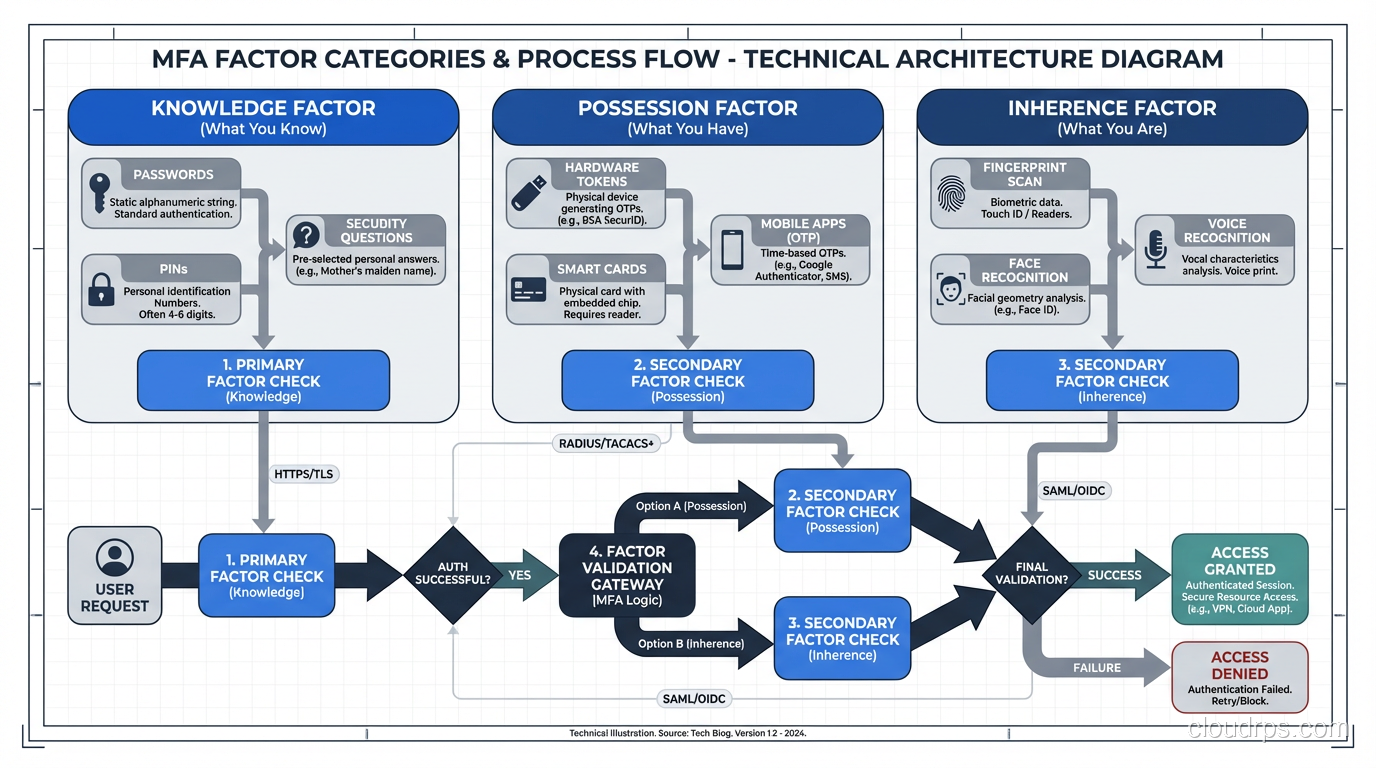
MFA requires a user to prove their identity through two or more independent verification methods, drawn from different categories:
- Something you know: Passwords, PINs, security questions
- Something you have: Phone, hardware token, smart card
- Something you are: Fingerprint, face scan, voice pattern
The key word is “independent.” Using a password plus a security question is NOT true MFA – both are knowledge factors. If an attacker can phish one, they can likely phish the other. Genuine MFA combines factors from different categories so that compromising one factor doesn’t compromise the others.
This might seem like basic stuff, but I still encounter organizations that think SMS-based password resets count as “multi-factor” or that requiring users to answer security questions after entering a password qualifies. It doesn’t. Understanding why requires understanding the threat model.
The distinction between authentication and authorization matters here too. MFA strengthens authentication – the proof of identity. It says nothing about what the user can do once they’re verified. That’s a separate concern, and conflating the two leads to architectural mistakes.
MFA Methods Ranked by Security and Usability
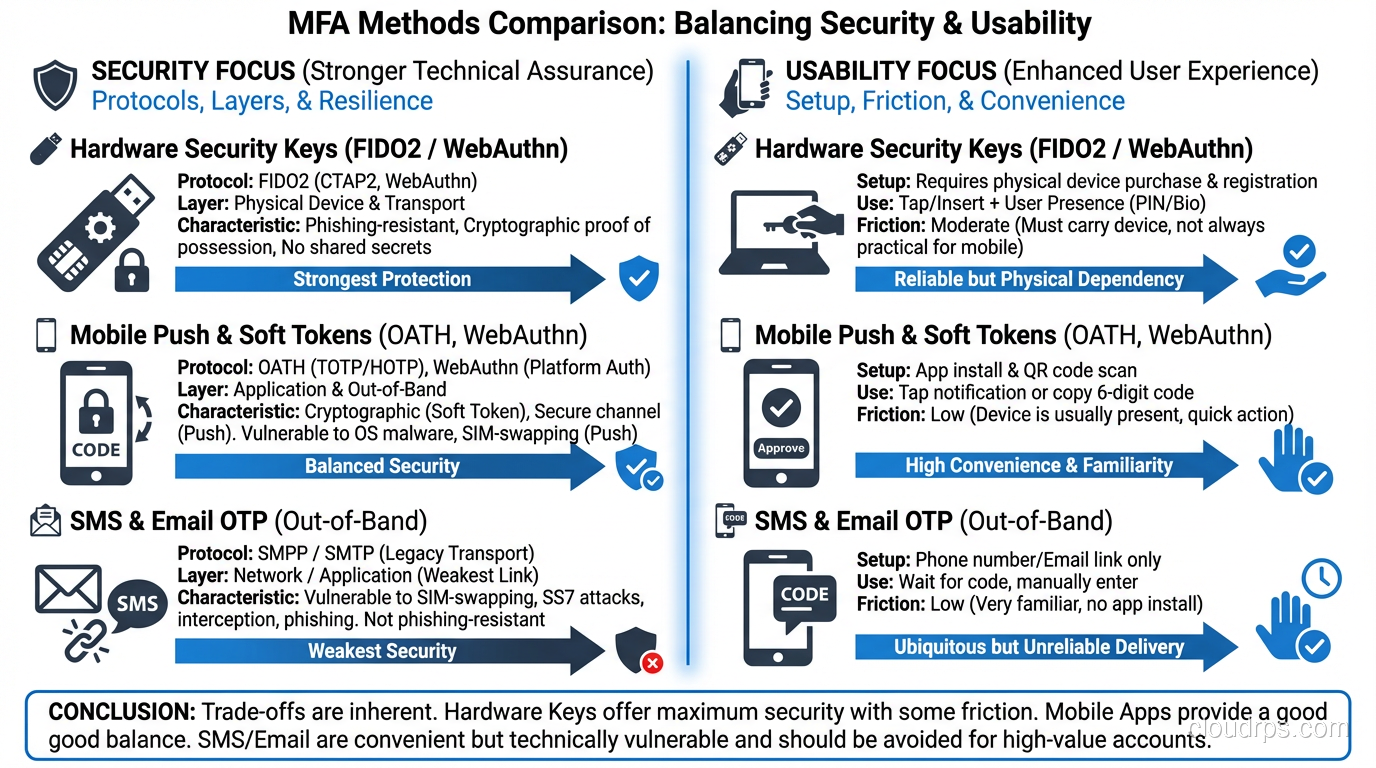
Not all second factors are created equal. After deploying MFA across hundreds of systems, here’s how I rank the common methods from weakest to strongest.
SMS One-Time Passwords: Better Than Nothing
SMS OTP sends a numeric code to your phone via text message. It’s the most widely deployed second factor, and it’s the weakest one worth using.
The problems are well-documented. SIM swapping attacks allow attackers to port your phone number to their device. SS7 vulnerabilities in the telecom infrastructure allow message interception. Social engineering of mobile carrier support staff can redirect messages.
I stopped recommending SMS as a primary MFA method around 2018. NIST deprecated it as a preferred authentication method even earlier. But here’s the pragmatic reality: SMS MFA blocks over 99% of automated credential stuffing attacks. If your choice is between SMS MFA and no MFA, choose SMS every single time.
Email-Based One-Time Passwords
Email OTP sends a code to the user’s registered email address. It’s slightly worse than SMS because email accounts are frequently the target of compromise and email delivery can be slow and unreliable.
I only recommend email OTP as a fallback method when the user’s primary MFA device is unavailable.
TOTP Authenticator Apps
Time-based One-Time Passwords (TOTP) are generated by authenticator apps like Google Authenticator, Microsoft Authenticator, or Authy. The system works by sharing a secret key between the server and the app during enrollment. Both sides use that key plus the current time to generate the same six-digit code every 30 seconds.
TOTP is significantly more secure than SMS because there’s no network transport to intercept. The secret lives on the user’s device and never traverses the network after initial enrollment. An attacker would need physical access to the device (or the backup codes) to compromise this factor.
The weakness of TOTP is phishing. A sophisticated attacker can set up a proxy that intercepts the TOTP code in real time and uses it before it expires. The user enters their password and code on the fake site, the attacker relays both to the real site, and they’re in. This is called an adversary-in-the-middle attack, and it works against any OTP-based method.
Push Notifications
Push-based MFA (like Duo Push, Microsoft Authenticator push, or Okta Verify) sends a notification to the user’s registered device. The user taps “Approve” to complete authentication.
Push is more convenient than TOTP and slightly more resistant to phishing because the notification includes context (what application, from where). But push is vulnerable to “MFA fatigue” attacks where the attacker repeatedly triggers push notifications until the frustrated user taps approve just to make them stop. The Uber breach in 2022 used exactly this technique.
Good push implementations now include number matching (the user must enter a number displayed on the login screen) which defeats fatigue attacks.
Hardware Security Keys (FIDO2/WebAuthn)
This is the gold standard. Hardware keys like YubiKeys implement the FIDO2/WebAuthn protocol, which uses public-key cryptography bound to the specific origin (website domain).
Here’s why hardware keys are special: they’re phishing-resistant by design. The key only responds to authentication challenges from the exact domain it was registered with. A phishing site on login.evil.com cannot trigger a response from a key registered with login.real.com. The domain verification happens in hardware, outside the user’s control, removing the human from the security equation entirely.
I’ve deployed YubiKeys to thousands of users across multiple organizations. The initial logistics are painful – you need to buy, distribute, and register the keys, handle replacements for lost keys, and support users who forget them at home. But once deployed, the security improvement is dramatic. Phishing-resistant MFA effectively eliminates credential-based attacks.
Biometrics
Fingerprint readers, facial recognition (like Windows Hello or Face ID), and other biometric methods serve as a convenient local verification that unlocks a stronger credential. Your fingerprint doesn’t travel to the server – it unlocks a cryptographic key stored in the device’s secure enclave, and that key performs the actual authentication.
This is an important distinction. Biometrics are great for local device unlock but problematic as a network authentication factor because biometric data can’t be revoked or changed. If your fingerprint template is compromised, you can’t get new fingers.
The Protocol Layer: How MFA Works Under the Hood
Understanding the user-facing experience is one thing. Understanding what happens at the protocol level is what separates architects from checkbox-fillers.
TOTP: RFC 6238 in Practice
TOTP is defined in RFC 6238 and built on HOTP (RFC 4226). The algorithm is straightforward:
- During enrollment, the server generates a random secret (typically 160 bits) and shares it with the client, usually via a QR code encoding an
otpauth://URI. - To generate a code, both sides compute:
HMAC-SHA1(secret, floor(current_unix_time / 30)) - The result is truncated to a 6-digit decimal number.
- The server accepts codes from the current time step plus one step forward and one step backward (to handle clock drift).
The beauty of TOTP is its simplicity. No network connection needed after enrollment. No central infrastructure beyond storing the shared secret. The downside is that the shared secret is symmetric – the server stores the same secret as the client, meaning a server-side database breach exposes all the TOTP secrets.
FIDO2/WebAuthn: Public Key Authentication
FIDO2 is fundamentally different from OTP-based methods. Instead of a shared secret, it uses asymmetric cryptography:
- During registration, the authenticator (hardware key or platform authenticator) generates a unique key pair for that specific origin (domain).
- The public key is sent to the server. The private key never leaves the authenticator.
- During authentication, the server sends a challenge (random nonce). The authenticator signs the challenge with the private key and returns the signature.
- The server verifies the signature using the stored public key.
The server never possesses the private key, so a server-side breach doesn’t compromise the authenticator. The origin binding means the authenticator won’t respond to challenges from domains it wasn’t registered with. And the key pair is unique per site, so compromising one service reveals nothing about others.
This is why FIDO2 is the direction the entire industry is moving. It solves the fundamental weaknesses of shared-secret systems.
Integration With SSO
MFA and SSO interact in important ways. In most enterprise deployments, MFA is enforced at the identity provider level. The user authenticates to the IdP with password + second factor, and the IdP issues assertions or tokens to downstream applications.
This means the individual applications don’t need to implement MFA themselves. The IdP handles it once, and the SSO framework carries that authentication context forward. The assertion or token can include claims about the authentication method used, allowing downstream applications to make authorization decisions based on the strength of the MFA method.
For example, you might allow TOTP-authenticated users to view reports but require hardware key authentication for administrative actions. This is called “step-up authentication” and it’s a pattern I implement frequently in high-security environments.
Implementation Patterns That Actually Work
Theory is nice. Let me share the implementation patterns I’ve used in production.
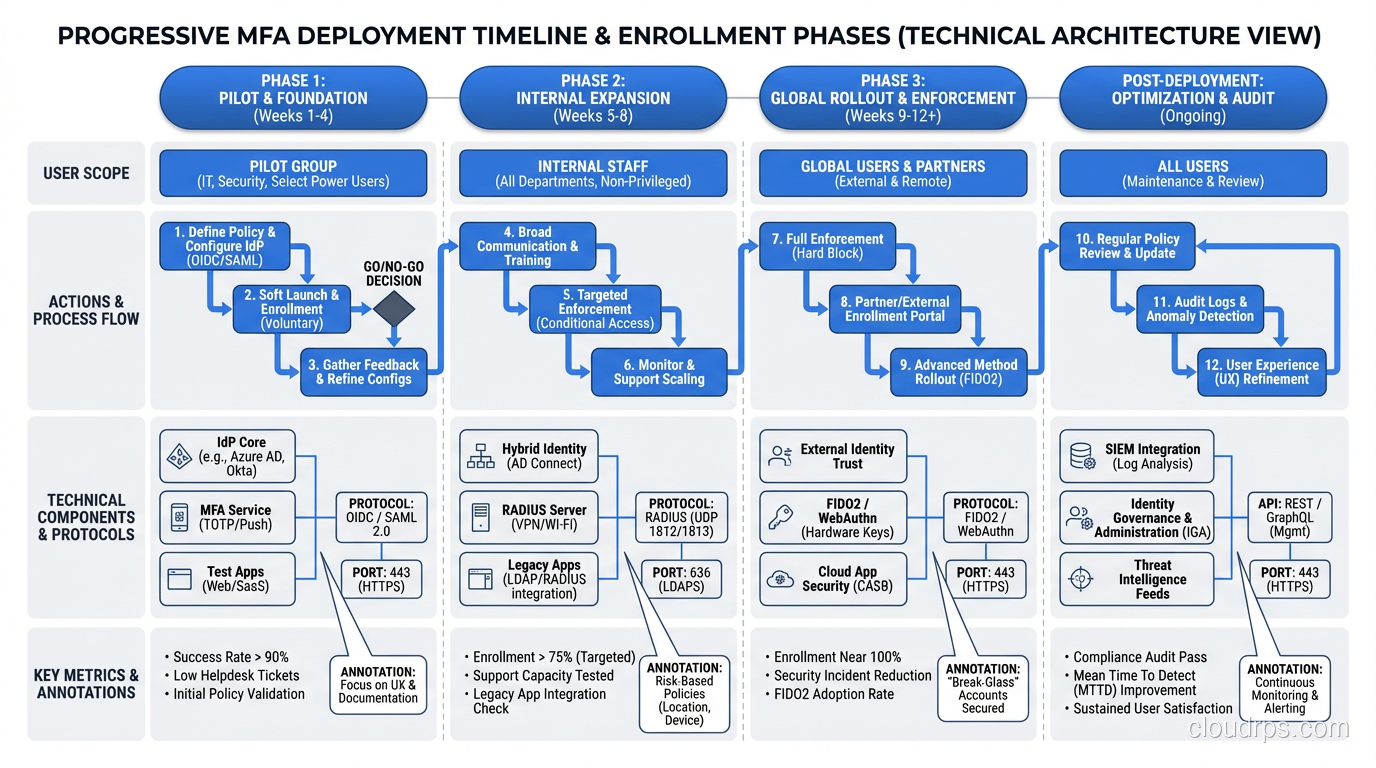
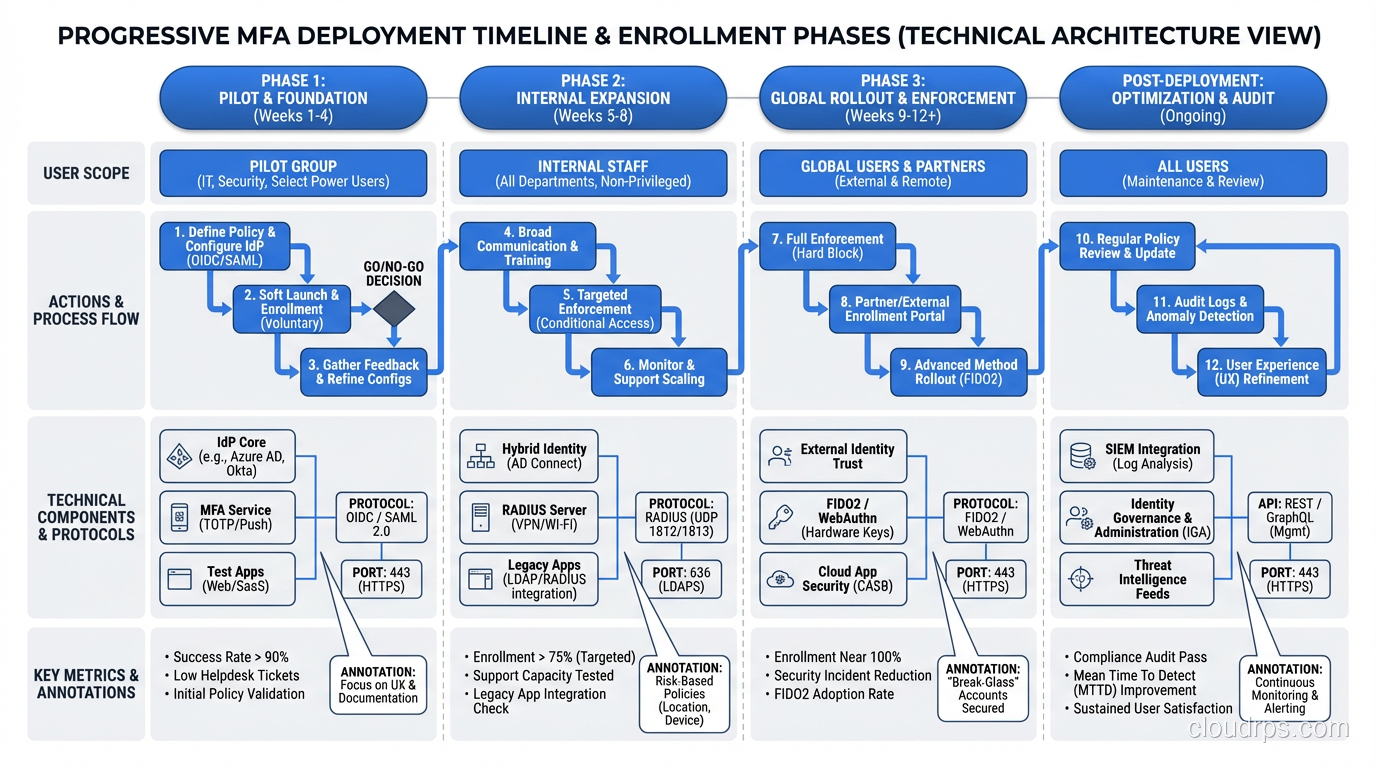
Progressive MFA Enrollment
The biggest mistake I see is requiring MFA enrollment for all users on day one. It creates a support tsunami. Instead, I use progressive enrollment:
- Week 1-2: Enable MFA, make it optional. Send educational communications explaining why it matters and how to set it up.
- Week 3-4: Make MFA recommended. Show a persistent but dismissible banner on login.
- Week 5-6: Require MFA for privileged accounts (admins, executives, IT staff).
- Week 7-8: Require MFA for all users. Provide a grace period with countdown.
This approach typically achieves 70-80% voluntary enrollment before the mandate kicks in, dramatically reducing support load.
Recovery and Fallback
MFA inevitably locks users out. They lose their phone, their hardware key breaks, or they get a new device. Your recovery process IS your security – a weak recovery path undermines even the strongest MFA.
Recovery options I implement:
- Backup codes: Generated during enrollment, stored securely by the user. Ten single-use codes that bypass MFA. These are effectively a backup “something you have.”
- Administrator reset: A help desk process with strong identity verification (not just “what’s your employee ID”). I require video call verification for high-privilege accounts.
- Recovery key: A long random string generated during enrollment, stored in a safe or password manager. Stronger than backup codes but harder to use.
What I never do: allow recovery via the same channel as the primary factor. If your MFA is app-based on your phone, recovery should not be SMS to that same phone.
Risk-Based MFA
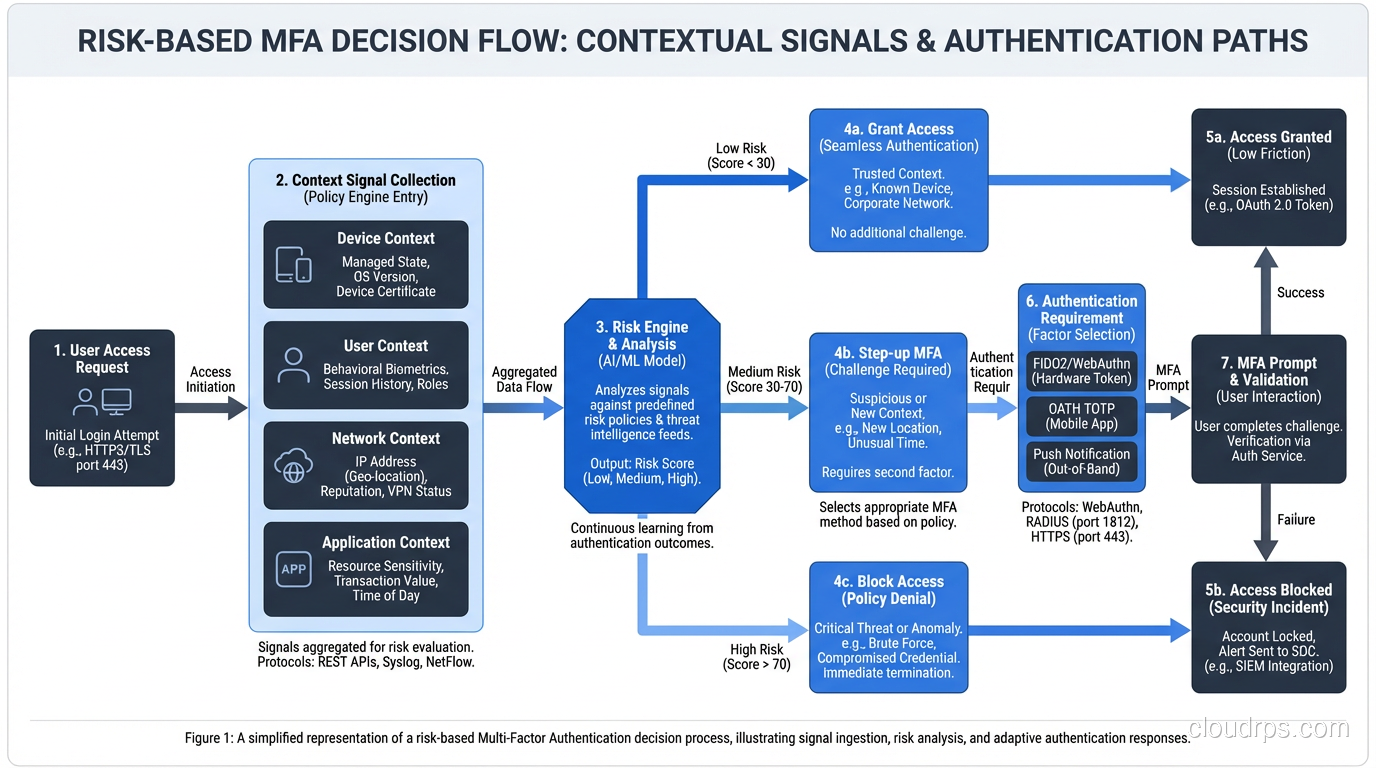
Not every authentication attempt needs the same level of friction. Risk-based MFA (also called adaptive MFA) adjusts the MFA requirement based on context signals:
- Known device + known location + low-privilege access: Skip MFA
- Known device + new location: Require MFA
- Unknown device + any location: Require MFA + device registration
- High-privilege access: Always require MFA regardless of context
This dramatically improves user experience without significantly reducing security. The users who are logging in from their usual laptop at the office every morning don’t need to dig out their YubiKey for the hundredth time. The user logging in from a new device in a foreign country absolutely does.
MFA Attacks and How to Defend Against Them
Deploying MFA isn’t the end of the security conversation. Attackers have adapted.
Adversary-in-the-Middle (AitM)
The attacker sets up a reverse proxy between the user and the legitimate site. The user thinks they’re logging into the real site, enters their password and OTP, and the proxy relays everything to the real site in real time. The attacker gets a valid session cookie.
Defense: FIDO2/WebAuthn. The origin binding prevents the authenticator from responding to the proxy’s domain. This is the single strongest argument for hardware keys.
MFA Fatigue / Prompt Bombing
The attacker already has the user’s password (from a breach, phishing, or credential stuffing) and repeatedly triggers push notifications until the user approves one.
Defense: Number matching on push notifications. Rate limiting on MFA attempts. Alerting when multiple failed MFA attempts occur.
SIM Swapping
The attacker social-engineers the mobile carrier to transfer the victim’s phone number to the attacker’s SIM card.
Defense: Don’t use SMS as an MFA factor. If you must support it, make it the fallback option and encourage users to upgrade to app-based or hardware key MFA.
Recovery Process Exploitation
The attacker bypasses MFA entirely by exploiting the account recovery process.
Defense: Make recovery at least as strong as the primary MFA method. Require out-of-band verification for recovery. Log and alert on all recovery actions.
Organizational Deployment Lessons
I’ll close with the organizational lessons that are harder to find in technical documentation.
Executive sponsorship is non-negotiable. MFA changes how every person in the organization logs in every day. That’s a cultural change, not just a technical one. I’ve had MFA rollouts fail because a VP refused to use it and the security team didn’t have the backing to enforce it.
Support costs spike temporarily. Plan for a 3-4x increase in authentication-related support tickets during the first month of mandatory MFA. It drops back to baseline within 60-90 days as users adapt.
Test MFA with your incident response plan. What happens when MFA is down? Can you still access critical systems? Can your IR team still log into SIEM and forensics tools? I’ve seen organizations lock their security team out of security tools during an MFA outage. Have a break-glass process and test it quarterly.
Consider Zero Trust as the bigger picture. MFA is one control in a broader philosophy that says trust must be continuously verified. Don’t treat MFA as a checkbox – treat it as a foundation for richer, context-aware access decisions.
MFA is the single highest-impact security control most organizations can deploy. It’s not perfect – nothing is – but it raises the cost of attack dramatically. In my three decades of doing this work, no other single control has prevented more breaches per dollar spent. Deploy it, enforce it, and continually improve the methods you support. Your future self will thank you during the next breach you don’t have.
Get Cloud Architecture Insights
Practical deep dives on infrastructure, security, and scaling. No spam, no fluff.
By subscribing, you agree to receive emails. Unsubscribe anytime.