
Here is the problem I kept running into as AI agents became more capable: every new integration required custom glue code. Want your agent to query a database? Write a function, handle auth, manage the connection. Want it to call an internal API? More custom code. Want it to read from S3? Different code again. The agent itself was often the least complex part; the integration layer was the mess.
Model Context Protocol (MCP) is the answer the industry arrived at, and it has the potential to change how we build the integration layer between AI systems and the rest of our infrastructure. Released by Anthropic in late 2024 and donated to the Linux Foundation in December 2025, it has since been adopted by every major AI platform. The architecture is worth understanding in detail, both because you will increasingly encounter MCP servers in production deployments and because the design decisions reveal a lot about how the industry is thinking about AI infrastructure.
The Problem MCP Solves: N Times M Integrations
Before MCP, integrating AI models with tools followed what engineers called the N-by-M integration problem. You had N different AI systems (different models, different agents, different applications) and M different data sources and tools (databases, APIs, file systems, SaaS products). Each combination required a custom integration. N AI systems times M tools equals N times M custom integration pieces to build and maintain.
This is the same problem that drove the creation of APIs, of message queues, of every middleware abstraction in the history of computing. The solution is always the same: define a common interface that both sides implement, reduce N-by-M to N-plus-M.
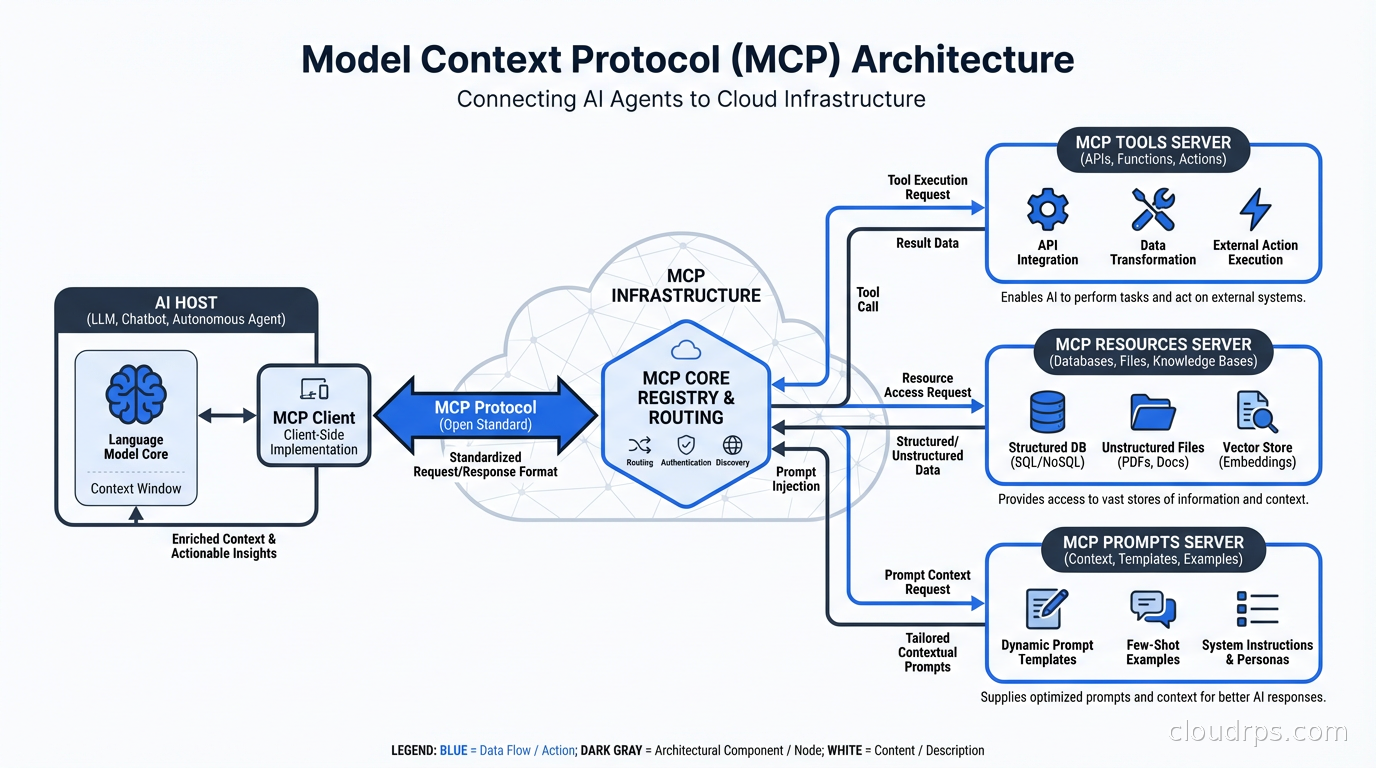
MCP defines that common interface for AI-to-tool communication. An AI host implements the MCP client protocol once. A tool exposes itself as an MCP server once. They can now interoperate. Build an MCP server for your internal API and every MCP-compatible AI system can use it. The N-by-M problem collapses to N-plus-M.
The analogy I find useful is the Language Server Protocol (LSP) in developer tooling. Before LSP, every editor needed custom integrations with every language. After LSP, language tools and editors each implement one protocol. MCP is doing the same thing for AI tools. It is not a coincidence that Anthropic, which created MCP, has significant roots in developer tooling thinking.
The Architecture: Hosts, Clients, and Servers
MCP defines three roles in every interaction.
The host is the AI application: Claude Desktop, a coding assistant, an automated agent, a custom application you built. The host contains the LLM and makes decisions about which tools to invoke. It manages the user interaction and controls what the agent is allowed to do.
The client is a component within the host that manages connections to one or more MCP servers. Each client maintains a one-to-one connection with one server. The host can have multiple clients, one per server it needs to talk to.
The server is a process that exposes capabilities: tools the agent can call, resources it can read, and prompt templates it can use. Servers can run locally on the same machine as the host, on remote infrastructure over a network, or anywhere in between.
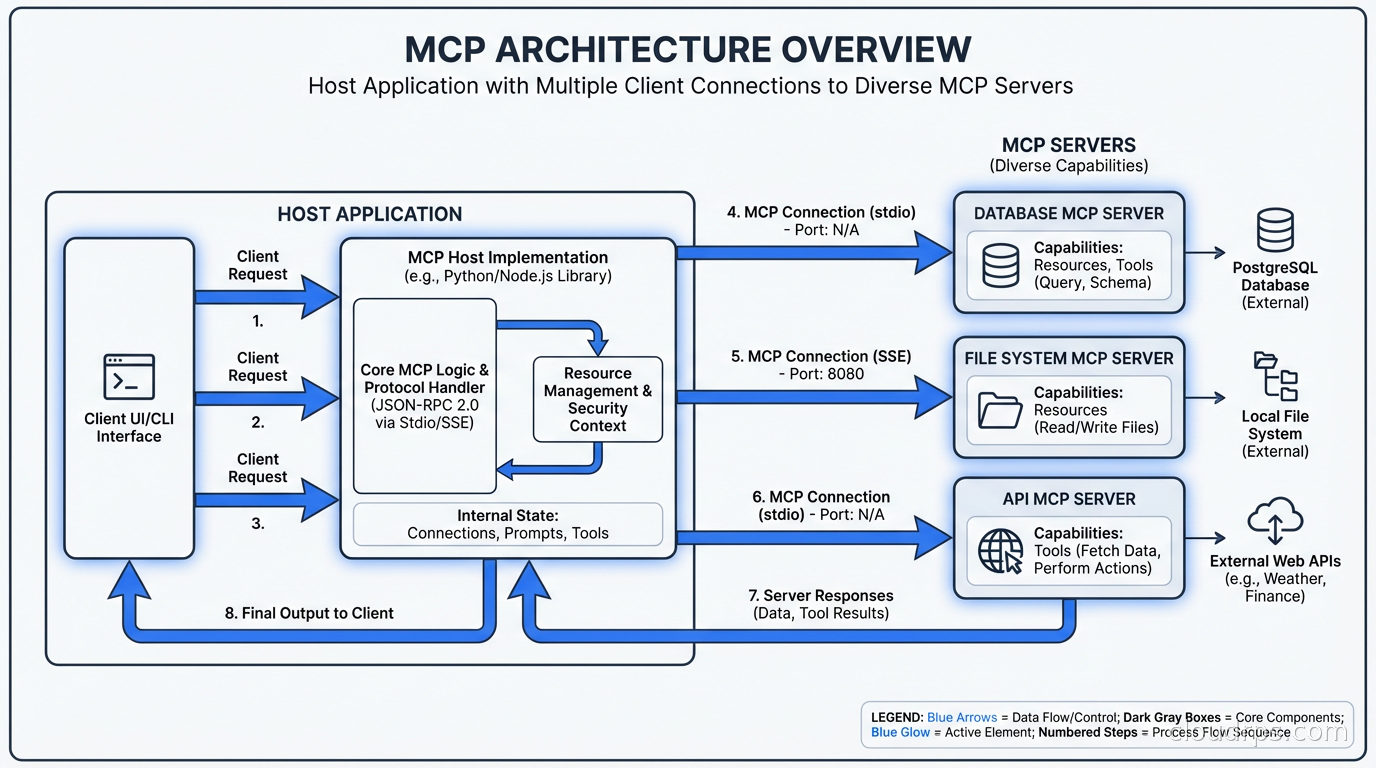
This separation of concerns is deliberate. The host controls security policy and decides what the user has authorized. The server exposes capabilities without needing to understand AI context or conversation state. The client handles the protocol mechanics. Each piece has a clear responsibility.
The three capability types that servers expose are:
Tools are functions the AI can call. A tool has a name, a description the AI uses to understand when to invoke it, and a JSON Schema describing its parameters. When the AI decides to use a tool, the host routes the call to the appropriate server, which executes the function and returns the result. Tools are the primary mechanism for AI-to-infrastructure interaction.
Resources are data sources the AI can read. Resources have URIs (like database://orders/recent or file:///var/log/app.log) and can return text or binary content. They let servers expose structured access to data without requiring the AI to know how the data is stored. Think of resources as read-only views into systems.
Prompts are reusable prompt templates that servers can expose. A server might expose a generate-sql-query prompt that knows how to format the request correctly for its database schema. This sounds minor but is genuinely useful for specialized workflows.
Transport Layers: Where and How Servers Run
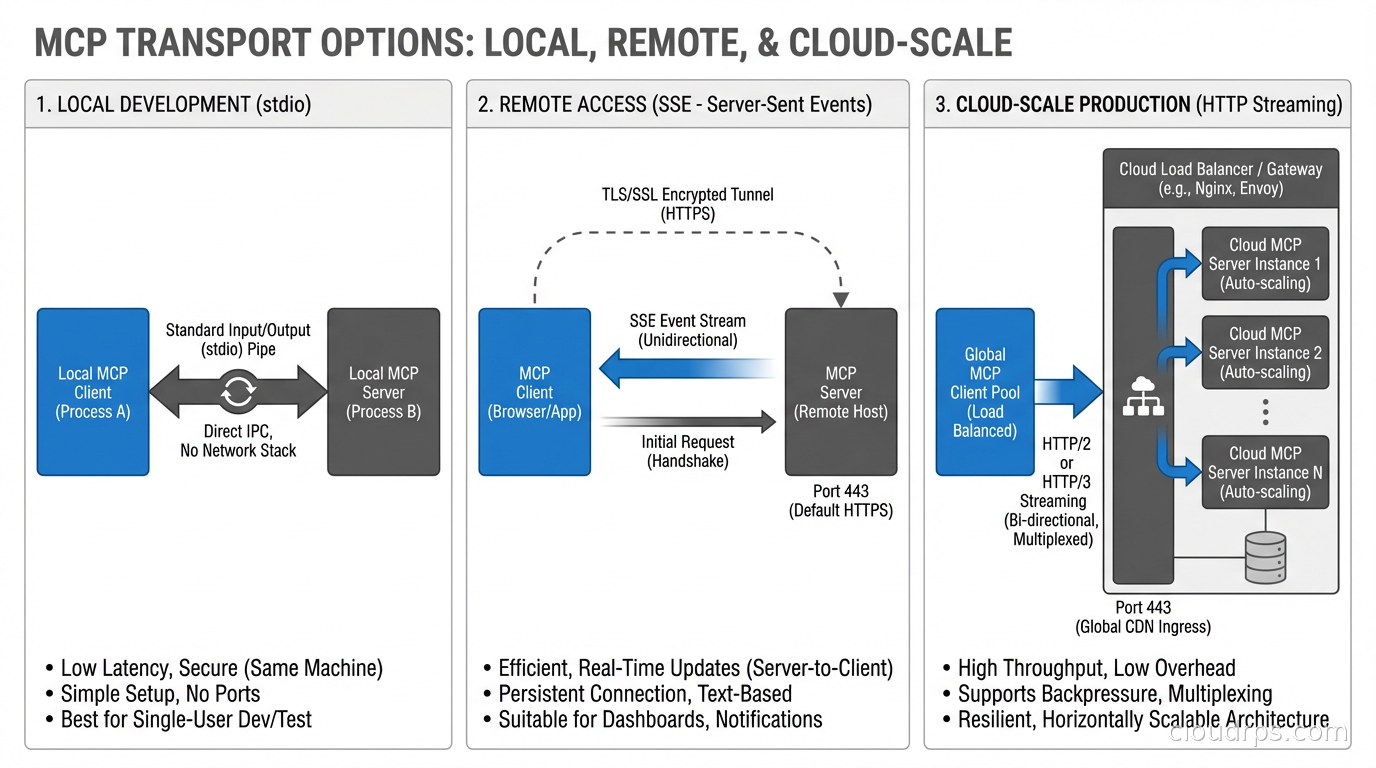
MCP supports multiple transport mechanisms, which is why the architecture is flexible enough to work both locally and in distributed cloud environments.
stdio (standard input/output) is the simplest transport and the one used for local servers. The host process spawns the server as a subprocess and communicates over stdin/stdout. This is how Claude Desktop runs most local MCP servers. The advantage is simplicity and tight process isolation. The disadvantage is that it does not work across network boundaries.
SSE (Server-Sent Events) is the transport for remote servers. The client makes an HTTP connection to the server, which streams events back using the SSE protocol. This is how you expose an MCP server running in your infrastructure to AI systems running elsewhere. SSE works well for low-to-moderate throughput scenarios.
HTTP with streaming is the newer transport being standardized for production deployments. It supports bidirectional streaming, better connection management, and cleaner load balancer compatibility. This is where production cloud deployments are heading.
For cloud deployments, you are typically running MCP servers as containerized services behind a load balancer, with TLS termination, authentication middleware, and whatever observability you use for any other service. The MCP server is just another microservice in your stack from the infrastructure perspective. The same service mesh patterns that handle mTLS between your microservices can handle authentication between your AI hosts and MCP servers.
Building Your First MCP Server
Let me get concrete. Here is what building an MCP server for an internal API actually looks like.
Anthropic provides SDKs in Python, TypeScript, and several other languages. The pattern is consistent: you define your tools with their schemas, register handlers, and start the server.
from mcp.server import Server
from mcp.server.stdio import stdio_server
import mcp.types as types

app = Server("internal-api-server")

@app.list_tools()
async def list_tools() -> list[types.Tool]:
    return [
        types.Tool(
            name="get-deployment-status",
            description="Get the current status of a service deployment",
            inputSchema={
                "type": "object",
                "properties": {
                    "service_name": {
                        "type": "string",
                        "description": "The name of the service to check"
                    },
                    "environment": {
                        "type": "string",
                        "enum": ["production", "staging", "development"]
                    }
                },
                "required": ["service_name"]
            }
        )
    ]

@app.call_tool()
async def call_tool(name: str, arguments: dict) -> list[types.TextContent]:
    if name == "get-deployment-status":
        service = arguments["service_name"]
        env = arguments.get("environment", "production")
        # Call your internal API here
        status = await fetch_deployment_status(service, env)
        return [types.TextContent(type="text", text=str(status))]

async with stdio_server() as (read_stream, write_stream):
    await app.run(read_stream, write_stream, app.create_initialization_options())
The tool description is critical. This is how the AI decides when to invoke your tool. Write it like documentation for a smart junior engineer who is trying to figure out whether this is the right tool for their situation. Be specific about what the tool does, what it expects, and what it returns. Vague descriptions lead to incorrect tool selection and poor agent behavior.
The Security Model
MCP’s security model is the part of the architecture that cloud engineers need to understand before deploying anything in production.
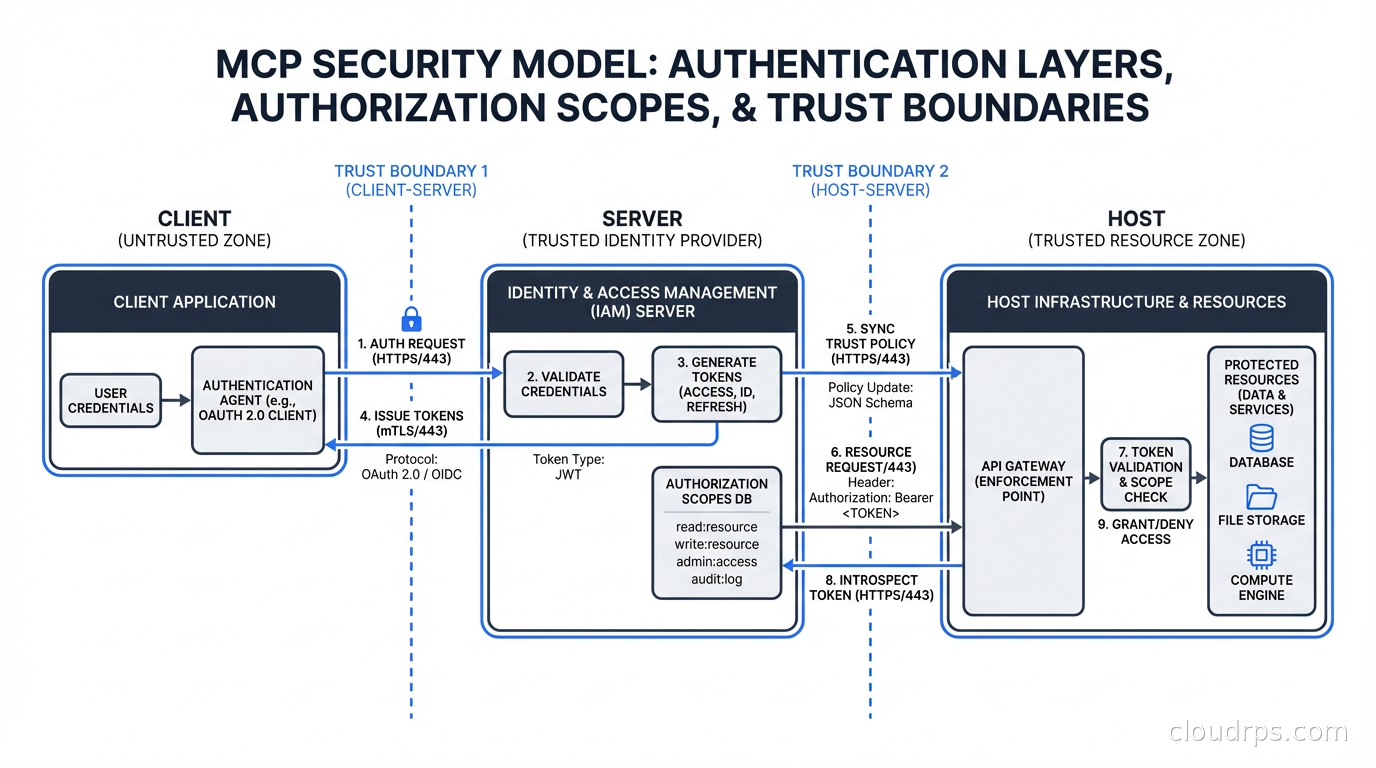
The host controls authorization. The host decides which servers the agent can communicate with and which tools the agent is allowed to call. Users typically authorize the connection to a server when they install or configure it. The server trusts that the host is sending it legitimate requests from authorized users.
This creates an important security boundary: the MCP server is trusting the host. If you are building an MCP server that exposes sensitive infrastructure (databases, internal APIs, secrets), the server needs to authenticate that requests actually come from authorized hosts, not from anyone who can reach the server’s endpoint.
For local stdio servers, this is not an issue. The server runs as a subprocess of the host process, and OS-level process isolation provides the security boundary.
For remote servers, you need proper authentication. Options include:
- API keys: the host includes an API key in the request headers, the server validates it. Simple and widely understood. Use this with secrets management (not hardcoded keys). Your secrets management infrastructure should handle MCP server credentials the same way it handles any other service credentials.
- OAuth 2.0: the user authorizes the connection through a standard OAuth flow. The MCP spec includes an OAuth profile for this. Better for user-facing integrations where each user has their own authorization scope.
- mTLS: mutual TLS where both client and server present certificates. Best for server-to-server communication in your own infrastructure.
The “confused deputy” problem is a specific threat to be aware of. An MCP server that executes actions on behalf of users needs to ensure it is acting within that user’s authorization scope, not the server’s own ambient permissions. An MCP server with database write access should only write data that the requesting user is authorized to write, not whatever the service account allows.
Treat MCP servers with the same security rigor you apply to any API that executes actions in your infrastructure. A tool that can delete resources, send emails, or modify configurations is as dangerous as any API endpoint with those capabilities. Scope permissions narrowly. Log all tool invocations. Rate limit tool calls. Audit what actions agents are taking.
Production Deployment Patterns
Running MCP servers in production looks like running any other microservice, but with some AI-specific considerations.
Stateless servers are preferable where possible. An MCP server that does not maintain conversation state between tool calls can be horizontally scaled behind a load balancer without session affinity. Most tool implementations are inherently stateless: take input, call an API, return a result. Design toward this pattern.
Observability is essential. When an agent produces an unexpected result, you need to be able to trace exactly which tools were called, what parameters were passed, what was returned, and how the AI used those results. Standard distributed tracing with OpenTelemetry works well here. Each tool invocation should be a traced span with the input parameters and output result recorded. This is non-negotiable for production deployments. The observability infrastructure you have for your microservices applies directly to MCP servers.
Rate limiting at the MCP server level protects your backend systems from agents that get into loops or make unexpected numbers of calls. An agent encountering an error sometimes retries aggressively. A tool that calls an external API needs rate limiting the same as any other API consumer.
Caching matters for tools that fetch data that does not change frequently. If an agent needs to know the current list of services in your infrastructure during a conversation, caching that list for a few minutes prevents repeated expensive API calls. Design tool implementations with caching in mind, especially for resource-type endpoints.
Versioning is important for MCP servers that multiple teams depend on. The tool schema becomes a contract. Breaking changes to parameter names or semantics will break agents that depend on your server. Version your MCP server APIs and maintain backwards compatibility or provide migration paths.
The Ecosystem and What It Means for Infrastructure Teams
Since MCP’s donation to the Linux Foundation, the ecosystem has grown to over 10,000 public MCP servers. Major cloud providers have their own: AWS MCP servers for querying services and managing resources, GCP MCP servers for BigQuery and Cloud Run, Azure servers for their ecosystem.
The growth pattern resembles the early API economy. Initially, vendors built custom integrations with AI systems one by one. Now, vendors are shipping MCP servers as part of their product offering. A database product that ships an MCP server is instantly compatible with every MCP-enabled AI system. This is the network effect that makes MCP self-reinforcing.
For infrastructure teams, this means several things. Your AI gateway and LLM proxy infrastructure needs to understand MCP’s tool-calling patterns to properly route, log, and rate-limit AI traffic. The distinction between a user asking a question and an agent making tool calls needs to be visible in your observability stack. Costs associated with agentic workflows (multiple model calls per user interaction, tool execution costs) need to be attributed correctly, which requires understanding the cost control patterns for LLM infrastructure.
Internal developer platforms are adding MCP servers as a standard surface area. Rather than giving engineers a CLI to query internal systems, give them an MCP server and they can query those systems from any AI assistant they use. The productivity multiplier is real when you can ask your AI coding assistant “what is the current error rate for the payments service in production?” and get an accurate answer from your actual monitoring system rather than a hallucinated guess.
What Comes Next
MCP is still in early standardization. The 2026 roadmap includes better multi-agent communication patterns (agents calling other agents through MCP), richer streaming support for long-running operations, and improved sampling APIs that let servers influence how the AI generates responses.
The multi-agent pattern is particularly interesting for cloud infrastructure. Imagine an orchestrating agent that delegates to specialized sub-agents: a network diagnostics agent, a cost analysis agent, a security review agent. Each sub-agent is an MCP server. The orchestrator coordinates them. The human stays at the top of the loop, approving actions that have blast radius. This is the agentic AI in production architecture that teams are building toward.
MCP is not magic and it is not without operational overhead. But it solves a real problem with a clean abstraction, and the ecosystem has reached critical mass. If you are building AI-powered tooling that needs to interact with infrastructure, building an MCP server should be on your list. The integration work you do once will work across every AI system that supports the protocol.
Get Cloud Architecture Insights
Practical deep dives on infrastructure, security, and scaling. No spam, no fluff.
By subscribing, you agree to receive emails. Unsubscribe anytime.