
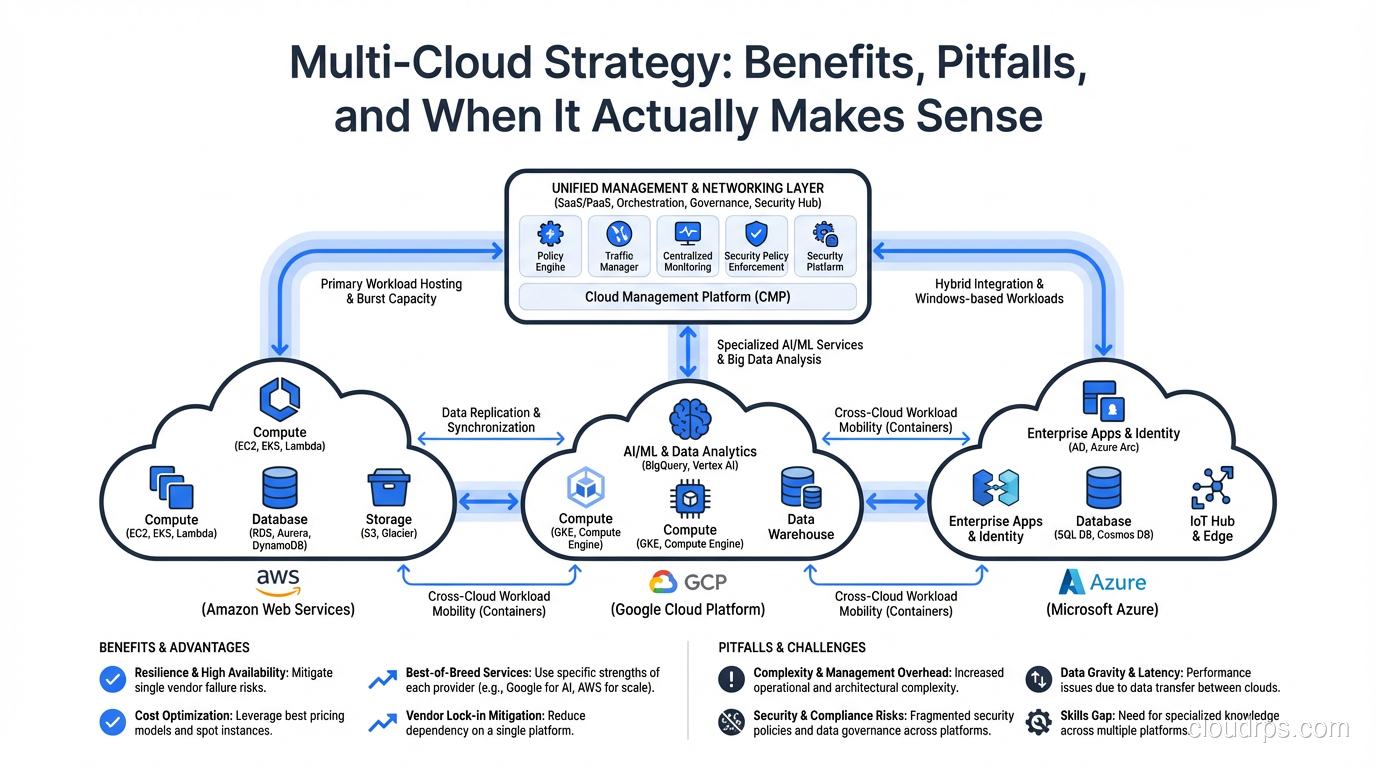
I want to tell you the story of how my team accidentally became a multi-cloud shop. It’s 2019, we’re a mid-size fintech company, and we’re happily running everything on AWS. Then our CEO comes back from a golf outing with the CTO of a major bank and announces we need to support Azure for a compliance integration. Three months later, a data science team spins up a BigQuery project on GCP because “nothing else comes close for this workload.” Nobody planned any of this. Nobody architected it. We just woke up one morning running production services across three clouds, with three different IAM models, three networking paradigms, and zero unified observability.
That, my friends, is how most companies end up multi-cloud. Not through careful strategic planning, but through a series of reasonable-sounding decisions that each made sense individually and together created a management nightmare.
I’ve spent six years since then helping organizations either tame their accidental multi-cloud sprawl or deliberately build multi-cloud architectures that actually work. The difference between those two outcomes is massive, and it starts with being honest about what multi-cloud actually costs you.
Multi-Cloud vs Hybrid Cloud: Let’s Get the Definitions Straight
Before we go further, I need to clear up a terminology mess that confuses even experienced architects.
Multi-cloud means running workloads across two or more public cloud providers (AWS, GCP, Azure, Oracle Cloud, etc.). The key word is “public.” You’re using multiple vendors’ infrastructure and managed services.
Hybrid cloud means combining public cloud with on-premises infrastructure or private cloud. A company running VMware in their own data center alongside AWS workloads is hybrid cloud, not multi-cloud.
You can absolutely be both. If you’re running a private data center plus AWS plus GCP, you’re doing hybrid multi-cloud. Congratulations, you’ve chosen the hardest mode available.
The reason this distinction matters is that the benefits, challenges, and architecture patterns are different. Hybrid cloud is usually about migration journeys, data sovereignty, or legacy system integration. Multi-cloud is about provider diversification, best-of-breed services, or vendor negotiation leverage. Different motivations, different architectures, different pain points. And increasingly in 2026, a third motivation is pushing organizations toward hybrid: cloud repatriation, where predictable workloads move back to colocations for purely economic reasons.
If you’re still wrapping your head around the basic cloud service models that underpin all of this, my breakdown of IaaS vs PaaS vs SaaS will give you the foundation you need.
The Real Benefits of Multi-Cloud (When They’re Actually Real)
Let me be upfront: the multi-cloud benefits that vendors and consultants love to talk about are real, but they come with asterisks that nobody mentions in the slide deck. Here’s my honest assessment.
Vendor Negotiation Leverage
This is the benefit I’ve seen deliver the most tangible value. When your AWS rep knows you’re also running production on GCP, the enterprise discount conversation changes dramatically. I’ve watched organizations negotiate meaningfully better terms on committed use agreements simply because they had credible alternatives.
The asterisk: you only get this leverage if the workloads are actually portable. If you’re deeply embedded in AWS-native services (Lambda, DynamoDB, SQS), telling your AWS rep “we could move to GCP” is an empty threat and they know it. The leverage comes from genuinely portable workloads, usually containerized applications running on Kubernetes.
Best-of-Breed Services
Different clouds genuinely excel at different things. GCP’s BigQuery is the best serverless analytics warehouse I’ve used, period. Azure’s Active Directory integration is unmatched if you’re a Microsoft shop. AWS has the broadest service catalog and the deepest ecosystem. There are legitimate technical reasons to pick specific services from specific providers.
The asterisk: every best-of-breed service you adopt deepens your dependency on that provider for that workload. You’re not reducing lock-in; you’re distributing it. That might be a perfectly valid choice, but don’t pretend it’s “avoiding lock-in.” You’ve traded one lock to one vendor for three locks to three vendors.
Compliance and Data Sovereignty
Some industries and geographies have regulations that effectively require multi-cloud. Government contracts might mandate a specific provider. EU data residency requirements might mean you need a provider with a Frankfurt region that your primary provider doesn’t serve well. Financial regulations might require you to demonstrate that a single provider failure won’t take down your entire operation.
The asterisk: this is the one benefit with no asterisk. If regulations or contracts require it, you do it. Full stop. I’ve architected multi-cloud solutions purely for compliance reasons, and in those cases there’s no debate about whether the complexity is worth it. Increasingly, regulated industries are going multi-cloud specifically to satisfy data sovereignty and residency requirements rather than for portability or pricing.
Resilience and Availability
The argument goes like this: if AWS has a region-level outage, your GCP workloads keep running. True in theory, and it does happen. AWS us-east-1 has had notable outages that affected thousands of companies simultaneously.
The asterisk: a cross-provider failover that you’ve never tested is a fantasy, not a DR plan. Building genuine active-active across two clouds is one of the hardest architectural challenges in our field. Most organizations can’t even do active-active within a single provider reliably. For a grounded look at what resilience architectures actually require, read my guide on high availability and my piece on fault tolerance.
The Real Costs of Multi-Cloud (The Part Nobody Wants to Talk About)
Here’s where I get opinionated. The costs of multi-cloud are consistently underestimated. Every single time. I’ve reviewed dozens of multi-cloud strategies over the years, and the projected costs are wrong, often by a wide margin, in almost every case. Here’s why.
Skills Multiplication
Your team now needs to be proficient in multiple cloud platforms. Not just “I took the certification exam” proficient, but “I can debug a production outage at 3am” proficient. The networking model in AWS (VPCs, security groups, NACLs) is fundamentally different from GCP (VPC networks, firewall rules, shared VPC). IAM works differently. Logging works differently. Even the CLI tools and APIs are different.
You either hire specialists for each cloud (expensive and creates silos) or you train generalists across clouds (expensive and creates shallow knowledge). Neither option is cheap.
I’ve seen teams that were excellent AWS engineers become mediocre multi-cloud engineers, not because they got worse, but because their attention and learning capacity got split three ways.
Networking Complexity
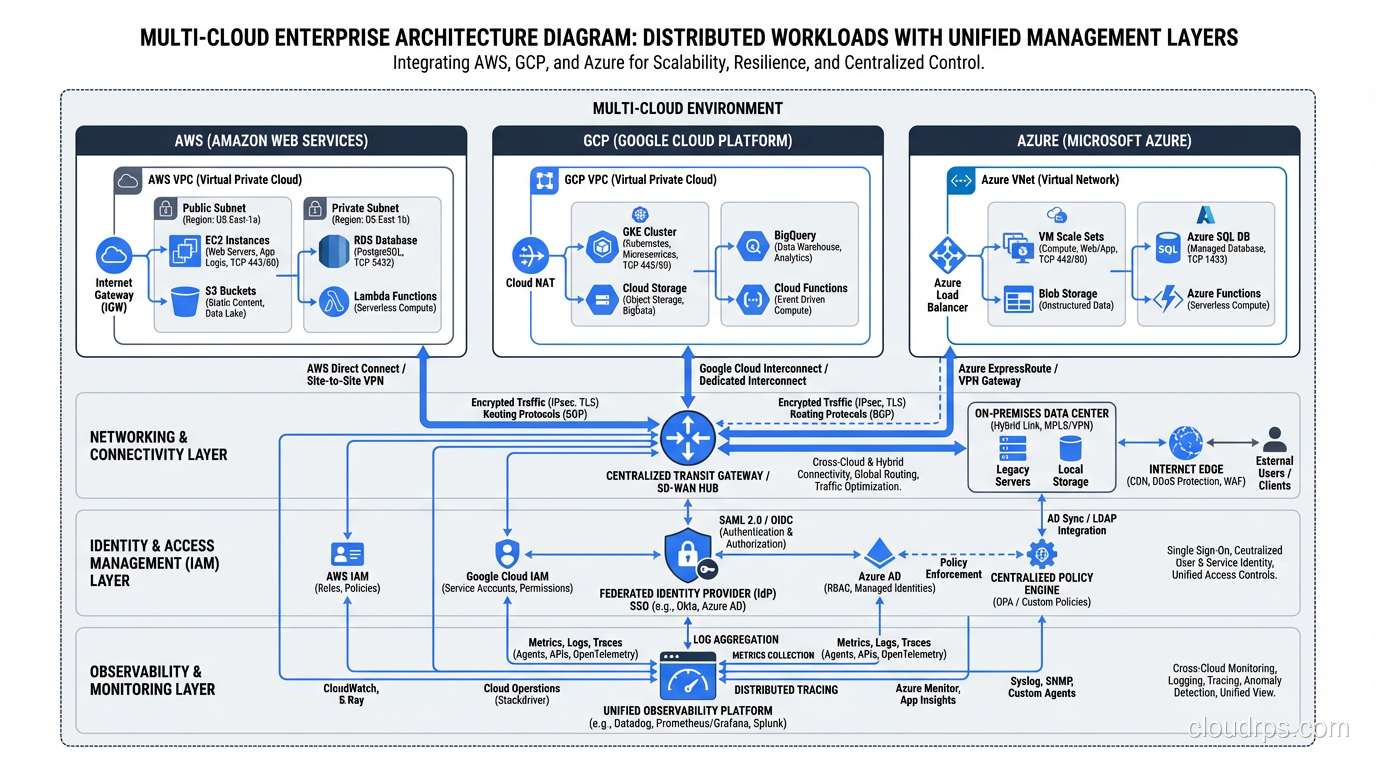
Connecting workloads across clouds is harder than connecting them within a single cloud. You need to set up dedicated interconnects or VPN tunnels between providers. Latency between clouds is higher and less predictable than within a single provider’s backbone. You need to manage overlapping IP address spaces, DNS resolution across environments, and firewall rules that span providers. A deliberate cloud IPAM and VPC network design strategy is essential before you connect your second cloud: none of the native IPAM tools (AWS VPC IPAM, Azure Virtual Network Manager) see each other’s allocations, so you need a shared source of truth like NetBox to prevent address-space collisions across providers.
This is not trivial work. I’ve watched networking setups that take a week within a single cloud stretch into a couple of months in a multi-cloud context. And that’s just the initial setup. Ongoing operations are proportionally more complex.
Data Egress Costs
Cloud providers charge you to move data out of their network. This is the silent killer of multi-cloud architectures. If workload A on AWS needs to communicate frequently with workload B on GCP, you’re paying egress charges in both directions. At scale, these costs are staggering.
I worked with a company that budgeted a modest monthly figure for their multi-cloud networking. After six months of production traffic, the actual bill was several times what they’d modeled. The workloads were chattier than anyone predicted, and the data volumes grew faster than modeled. This connects directly to cloud cost management (FinOps), which is already hard enough within a single provider. The mechanics of how egress pricing works across AZs, regions, and inter-cloud transfers deserve their own treatment: our cloud egress costs guide walks through the pricing tiers and the architectural patterns that turn a manageable data transfer bill into a catastrophic one. For teams serious about multi-cloud cost visibility, the FOCUS specification is now the standard approach: AWS, Azure, and GCP all export FOCUS-formatted billing data, giving you a unified schema you can UNION directly without building separate ETL pipelines for each provider.
Observability and Security Gaps
Unified monitoring across clouds is a real problem. CloudWatch doesn’t talk to Cloud Monitoring doesn’t talk to Azure Monitor. You need a third-party observability platform (Datadog, Grafana Cloud, New Relic) that can ingest from all three, and you need to build consistent tagging, naming conventions, and alerting logic across environments.
Security is even harder. IAM policies, secret management, encryption key management, audit logging: each of these works differently on each provider. Building a unified security posture across three clouds is a full-time job for a dedicated security engineering team.
When Multi-Cloud Actually Makes Sense
After all those warnings, let me be constructive. Here are the scenarios where I believe multi-cloud is genuinely the right choice.
You have a regulatory or contractual requirement. If a government contract mandates Azure, your primary cloud is AWS, and you need both, then you need both. Don’t fight it.
You have a genuinely best-of-breed use case. Your main platform is AWS, but your data team needs BigQuery for analytics. This is workload-level cloud selection, and it’s the most common (and most manageable) form of multi-cloud.
You’re large enough that vendor leverage matters. If your cloud spend is north of $5 million per year, having credible multi-cloud capability gives you real negotiating power. Below that threshold, the operational overhead of multi-cloud probably costs more than you save in discounts.
You’ve already built the platform team. If you have a dedicated cloud platform team with genuine expertise across providers and you’ve invested in the tooling (Terraform, Kubernetes, unified observability), then adding a second or third cloud is incremental. The hardest part is building that foundation.
When Multi-Cloud Does NOT Make Sense
You’re trying to “avoid vendor lock-in” in the abstract. This is the most common bad reason. If you’re building on AWS and it’s working, the theoretical risk of AWS somehow becoming unsuitable is far less expensive than the concrete cost of running everything on two clouds. Lock-in is a risk; multi-cloud operational overhead is a certainty.
You’re a startup or mid-size company without a platform team. You do not have the engineering bandwidth to operate multiple clouds well. Pick one, go deep, and revisit multi-cloud when you’re at a scale where the benefits outweigh the costs.
You think it’s “easy” because Kubernetes runs everywhere. I hear this constantly and it drives me up a wall. Kubernetes provides compute abstraction, but your application doesn’t just use compute. It uses databases, message queues, identity services, DNS, load balancers, storage, and a dozen other managed services. Kubernetes doesn’t abstract any of those. I’ve written extensively about what cloud-native architecture actually requires, and it goes way beyond containers.
Architecture Patterns for Multi-Cloud
If you’ve decided multi-cloud is right for you (for real reasons, not theoretical ones), here are the three architecture patterns I’ve used successfully.
Pattern 1: Workload Segmentation
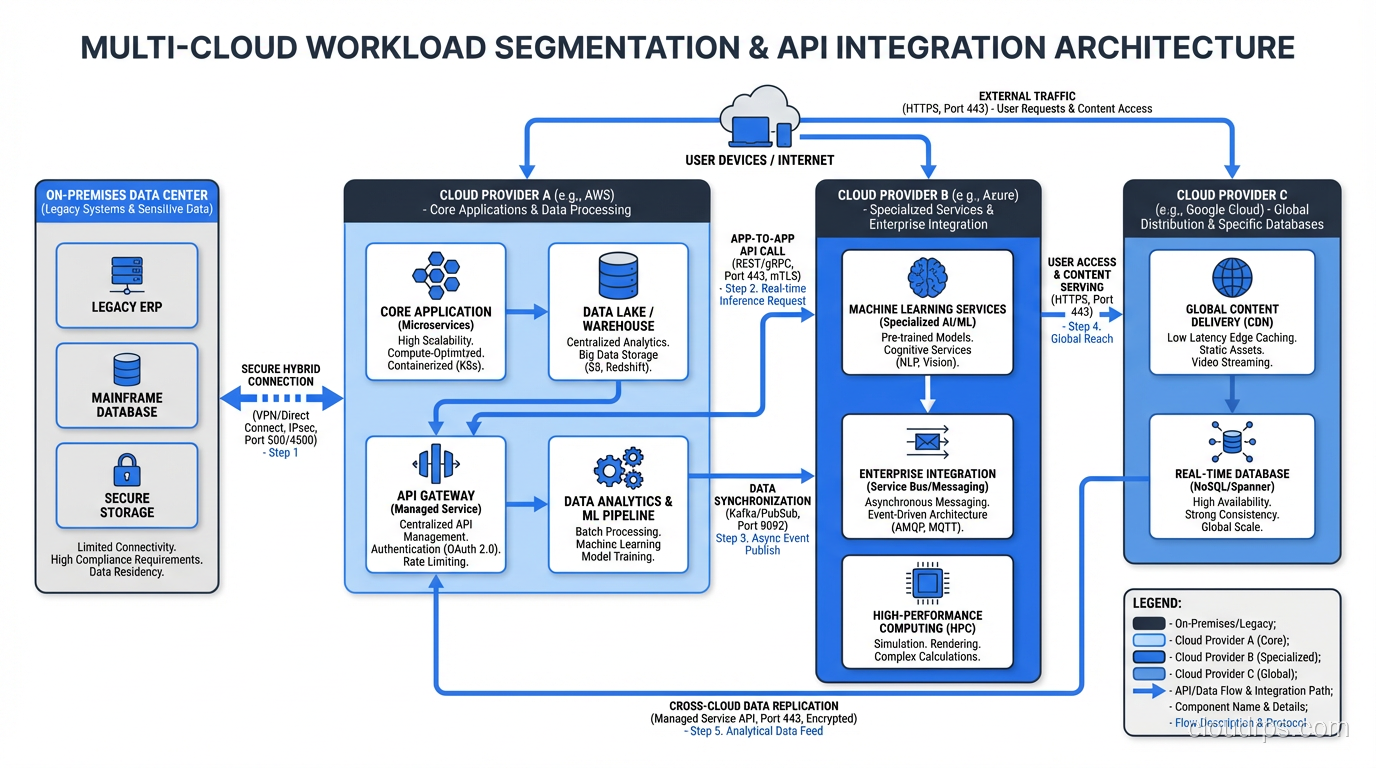
This is the simplest and most common pattern. Different workloads run on different clouds based on which provider is the best fit. Your web application runs on AWS. Your analytics pipeline runs on GCP. Your internal enterprise tools run on Azure because you’re a Microsoft shop.
Each workload is “single-cloud.” The multi-cloud aspect is at the organizational level, not the application level. Data exchange between clouds happens through well-defined APIs, event streams, or batch transfers, not through tightly coupled service calls.
This is how I recommend most organizations approach multi-cloud. It’s the lowest complexity option because each team only needs to be expert in one cloud. The platform team handles the cross-cloud concerns (networking, identity federation, cost management).
Pattern 2: Active-Active Multi-Cloud
The same application runs simultaneously on two or more clouds, with traffic distributed across them. If one cloud goes down, the others absorb the load.
This is the gold standard for resilience, and it’s brutally hard to implement. You need global load balancing that works across providers, data replication that keeps all instances consistent, and deployment pipelines that push to multiple clouds simultaneously. Conflict resolution for writes that happen on different clouds at the same time is a distributed systems problem that has no easy answers.
I’ve built this pattern exactly twice, both for financial services companies where the regulatory requirement for zero-downtime was non-negotiable. Both projects took well over a year and required a sizable dedicated engineering team. This is not something you bolt on; it’s something you design from the ground up.
If you’re considering this pattern, make sure you’ve read my article on disaster recovery planning first. The DR concepts (RTO, RPO, failover testing) are foundational.
Pattern 3: DR-Only Multi-Cloud
Your primary workloads run on one cloud. Your DR environment runs on a different cloud. In normal operations, the second cloud is either idle or running a subset of services.
This gives you genuine protection against a catastrophic provider-level failure without the full complexity of active-active. The tradeoff is that your RTO will be measured in hours, not minutes, because you’re activating a cold or warm standby on a different platform.
This pattern works well when combined with cloud-native design principles. If your applications are containerized and your infrastructure is defined in Terraform, standing up the DR environment on a different cloud is significantly easier than trying to replicate a complex set of provider-specific managed services.
Networking and Data Gravity: The Forces That Shape Your Architecture
I want to spend a moment on data gravity because it’s the single most underappreciated force in multi-cloud architecture.
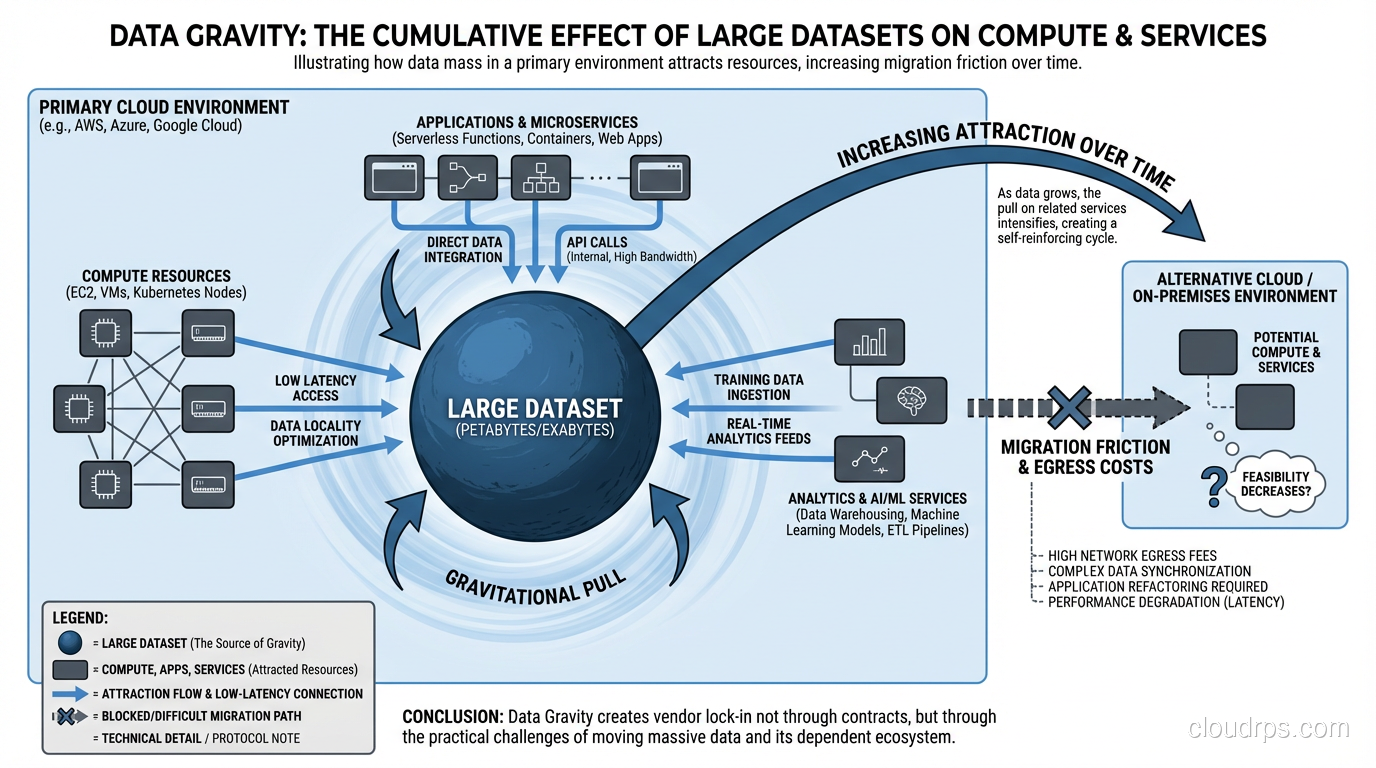
Data gravity is a simple concept: data attracts applications, services, and other data. The more data you have in one location, the stronger the gravitational pull to keep everything else close to it. Moving a 500TB data warehouse from AWS to GCP isn’t just a migration project; it’s a multi-month, high-risk effort that costs real money in egress charges alone.
This is why I tell every client: decide where your data lives first, then design your multi-cloud architecture around that decision. Applications can move between clouds relatively easily if they’re containerized. Data cannot. Your primary data store determines your primary cloud, whether you like it or not.
The networking implications flow from this. If your database is on AWS, your application servers should be on AWS too, not on GCP calling across the internet to a database on another provider. Latency, egress costs, and reliability all suffer when you separate compute from data across cloud boundaries. This is also where SD-WAN and SASE platforms earn their keep in multi-cloud shops: they give you one place to enforce routing, segmentation, and security policy across however many cloud regions and on-prem sites you end up with.
The practical rule I follow: keep data and the compute that accesses it in the same cloud. Use asynchronous replication, event streaming, or batch ETL to move data between clouds when needed. Synchronous cross-cloud database calls are a recipe for latency spikes, timeout errors, and surprisingly large bills.
Tools That Make Multi-Cloud Manageable
If you’re committed to multi-cloud, the right tooling is the difference between manageable complexity and chaos. Here are the tools and approaches I’ve seen work.
Terraform (or OpenTofu) for Infrastructure as Code
Terraform is the closest thing we have to a universal infrastructure language. It supports all major cloud providers through its provider model, and it lets you define infrastructure in a consistent format regardless of where it runs. For a deeper look at how Terraform compares to Pulumi, CloudFormation, and OpenTofu, see our Infrastructure as Code comparison guide. Terraform won’t abstract away the differences between providers (an AWS VPC and a GCP VPC network are still different resources with different properties), but it gives you a single workflow for managing all of it.
The key discipline: use modules. Build reusable modules for common patterns (networking, compute, databases) that encapsulate provider-specific logic. Your application teams shouldn’t need to know whether they’re deploying to AWS or GCP; the module handles those details.
Kubernetes as the Compute Abstraction Layer
Kubernetes genuinely does provide a consistent compute abstraction across clouds. EKS, GKE, and AKS all run standard Kubernetes, and a workload that runs on one will generally run on the others. This is real value.
But I want to be clear about what Kubernetes does and doesn’t abstract. It handles container orchestration, service discovery, rolling deployments, and autoscaling. It does not abstract databases, message queues, object storage, identity, or any of the other managed services your application depends on. If your application uses RDS, SQS, and S3, you can’t just move it to GCP by running it on GKE. You also need to swap out every AWS-specific dependency.
The organizations I’ve seen do multi-cloud Kubernetes well use a consistent service mesh (Istio or Linkerd) across clusters, a unified deployment tool (Argo CD or Flux), and a platform abstraction layer that hides provider-specific services behind internal APIs.
Observability Platforms
Pick one observability platform and use it everywhere. Datadog, Grafana Cloud, and New Relic all support multi-cloud ingestion. The non-negotiable requirement is that your engineers can see the health of all environments in one place. If they need to switch between CloudWatch, Cloud Monitoring, and Azure Monitor to diagnose a cross-cloud issue, you’ve already lost.
Identity Federation
This is unsexy but critical. Federate identity across clouds so that your engineers authenticate once and have appropriate access everywhere. SAML or OIDC federation between your identity provider (Okta, Azure AD, Google Workspace) and each cloud provider. Without this, your engineers are juggling three sets of credentials, and your security team is trying to audit three separate IAM systems.
The Honest Wrap-Up
Here’s my bottom line after years of living in multi-cloud environments.
Multi-cloud is a capability, not a goal. Nobody should set out to be multi-cloud for its own sake. You should set out to solve business problems, and sometimes the right solution involves multiple cloud providers.
If you’re going to do it, do it deliberately. The organizations that succeed at multi-cloud are the ones that made a conscious architectural decision, invested in the platform team and tooling, and chose specific patterns (usually workload segmentation) that limit complexity.
If you stumbled into multi-cloud accidentally (like I did back in 2019), the first step isn’t to add more tooling. It’s to step back and ask: do we actually need to be on all of these clouds? Sometimes the right answer is to consolidate back to one or two providers rather than investing in making three work. Understanding the fundamentals of cloud computing and the actual business requirements you’re serving will guide that decision.
The worst multi-cloud implementations I’ve seen are the ones driven by a PowerPoint deck that promised “no vendor lock-in” and “best-of-breed everything” without acknowledging the engineering cost. The best ones are the ones driven by a specific, measurable business need where someone looked at the full cost picture (including operational overhead, skills requirements, and data egress) and decided the juice was worth the squeeze.
Be honest about the costs. Be specific about the benefits. And if you decide to commit, invest in the platform team and tooling that makes it sustainable. Multi-cloud done right is a genuine competitive advantage. Multi-cloud done wrong is just expensive complexity with a fancy name.
Updated September 1, 2026: removed unsourced statistics as part of an accuracy review.
Get Cloud Architecture Insights
Practical deep dives on infrastructure, security, and scaling. No spam, no fluff.
By subscribing, you agree to receive emails. Unsubscribe anytime.